Best Selling Products

Freepik Premium Account
59 USD

Genuine Cheap Canva Pro
39 USD

Autodesk All App Account Copyright
120 USD

Upgrade genuine Capture One account
120 USD

MidJourney Account
29 USD

Plugin Retouch4me
69 USD

ChatGPT Plus Account (GPT-4)
16 USD

Windows 10 & 11 Pro Key
36 USD

Capcut Pro 1 Year
39 USD

Adobe Premiere Pro Account
99 USD

Copyright Adobe Lightroom Account
59 USD

Genuine Adobe Illustrator account
99 USD

Upgrade Genuine Office 365
49 USD

Upgrade Duolingo Super
29 USD

Adobe Photoshop Copyright - Full App
120 USD
How to Join the Viral AI Snow Photo Trend That’s Taking Over Social Media
Nội dung
- 1. Social Media Explodes with the AI “Standing in the Snow” Trend
- 2. The Origin of the “Snow Mood AI” Trend as Winter Arrives Through Artificial Intelligence
- 3. Why Is the AI Snow Photo Trend So Popular?
- 4. 3 Quick Steps to Create Snow Photos with Gemini AI in Just 1 Minute
- 4.1 Step 1: Access the Gemini AI Tool
- 4.2 Step 2: Enter an Image Description AI Can Understand and Transform
- 4.3 Step 3: Download and Share the Winter Trend Photo
- 5. Create Snow Photos Easily with Meitu for Phone Lovers
- 5.1 Step 1: Open Meitu and Select Winter Effects
- 5.2 Step 2: Upload Your Portrait Photo
- 5.3 Step 3: Choose Snowfall, Night Street, or Snow Forest Effects
- 5.4 Step 4: Adjust Lighting and Add Artistic Details
- 6. Join the Snow Video Trend with CapCut Easily—Anyone Can Do It!
- 7. Important Tips for the Most Beautiful and Natural AI Snow Photos
- 8. The Hottest Snow Photo Concepts of 2025
- 9. Appvip Leads the Way in Upgrading CapCut to Increase AI Snow Photo Creation
- 10. Conclusion
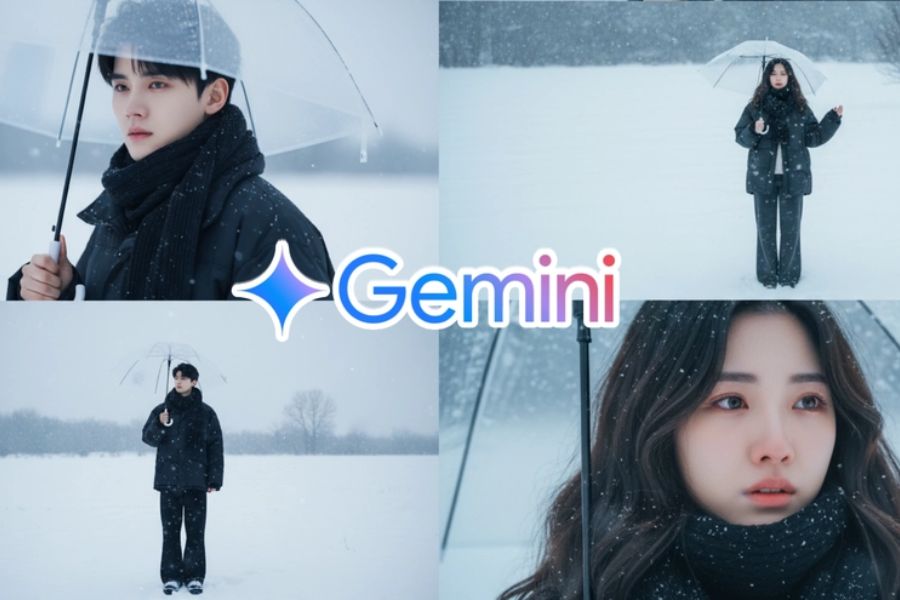
Social media is “heating up” with the trend of creating AI-generated standing-in-the-snow photos, a new craze that young people are obsessed with.
1. Social Media Explodes with the AI “Standing in the Snow” Trend
Recently, scrolling through TikTok or Facebook, you’ll see young people wrapped in thick coats, holding transparent umbrellas, standing in pure white snowfall. Although they look like photos taken in Korea or Japan, the truth is... most of them are completely AI-generated.
The trend of “creating AI standing-in-the-snow photos,” also known as the “snow mood trend,” is sweeping across social media. From TikTok and Instagram to Facebook, thousands of users are sharing dreamy winter check-in photos that leave viewers amazed. With just a few simple steps, anyone can become the main character under romantic snowfall like in a cinematic masterpiece. Let Appvip guide you through this viral trend—from its origin and creation process to important tips for making your photos more artistic and elegant than ever.
.jpg)
2. The Origin of the “Snow Mood AI” Trend as Winter Arrives Through Artificial Intelligence
The snow photo trend originated from “Snow Mood AI” tutorial videos that appeared on TikTok in late October. It first gained popularity in Korea and China before quickly spreading to Vietnam, creating an incredibly vivid “artificial winter.”
Hashtags such as #SnowMood, #AIwinter, #GeminiAIphoto, and #CapCutAItrend have flooded social media. Many KOLs, fashion bloggers, and content creators quickly joined in, sharing sparkling snow-white images.
“It looks like a real vacation photo!” and “I can’t believe this is AI-generated, it’s so beautiful!” are comments frequently seen under posts, making the trend even more viral. The best part is that you don’t need to travel or own professional equipment—just a few minutes and a clear facial photo, and AI will “paint” the perfect winter scene with you at the center.
3. Why Is the AI Snow Photo Trend So Popular?
Every winter, young people eagerly wait for a new trend to refresh their social media presence. But this year, no trend has caused as much excitement as standing-in-the-snow AI photos. From TikTok to Facebook, dazzling snowy scenes like Korean dramas make everyone want to try it.
Easy to Create—Anyone Can Do It: Unlike older complex photo-editing trends, AI snow photos are user-friendly for everyone, even those unfamiliar with technology. Simply upload a photo and type prompts like “a girl standing under falling snow, winter light, cinematic atmosphere,” and AI instantly transforms it into a magical winter wonderland. No Photoshop skills or background setup required.
Impressive and Incredibly Realistic Results: What makes this trend explode is its unbelievably realistic output. Delicate snowfall, soft reflections on the face, and gray skies mixed with warm golden tones combine to create a cinematic winter atmosphere.
A New Emotional Experience—“Virtual Travel” in Europe: In Vietnam’s year-round warm climate, seeing yourself in a snowy landscape feels special. Each AI snow photo brings a refreshing, peaceful, and dreamy sensation—like a virtual trip to Europe without leaving home.
Expressing Personal Style and Aesthetic Taste: This trend is also a way to express individuality. Some choose soft romantic vibes like Korean dramas, while others prefer chill street style in white snow with bold outfits. Some pursue classical artistic aesthetics with warm dim lighting and distant gazes.
Viral Thanks to Social Media: The trend’s popularity is amplified by social platforms. Quick tutorials on TikTok, Reels, and YouTube Shorts show how to create stunning snow photos in just 30 seconds. Chill background music, eye-catching visuals, and captions like “It’s snowing, shall we take a walk together?” instantly draw viewers into an emotional winter atmosphere.
.jpg)
4. 3 Quick Steps to Create Snow Photos with Gemini AI in Just 1 Minute
If you’re looking to join the viral standing-in-the-snow photo trend, Gemini AI is the perfect tool right now. With its user-friendly interface, ultra-fast processing, and realistic image generation, you can create a sparkling “K-drama-style” winter photo in just a few steps.
4.1 Step 1: Access the Gemini AI Tool
First, open your browser and visit: https://gemini.google.com
Log in with your personal Google account.
Prepare a clear portrait photo with natural lighting. Avoid tilted, blurry, or face-covered images.
The simpler the photo composition, the easier it is for AI to naturally generate snowy backgrounds.
.jpg)
4.2 Step 2: Enter an Image Description AI Can Understand and Transform
In Gemini’s prompt box, type a detailed description of your desired style.
You can customize with elements such as:
Korean Style: soft lighting, white-gray-beige tones.
European Style: old streets, stone buildings, warm golden lights.
Artistic Style: bokeh effects, side lighting, vintage film tones.
After entering the prompt, simply click Generate and wait a few seconds.
.jpg)
4.3 Step 3: Download and Share the Winter Trend Photo
Once the image is generated, Gemini will display it immediately.
Click Download to save it.
For light editing, you can use Lightroom, Snapseed, or CapCut AI Edit to balance lighting and enhance snow clarity.
Finally, share your sparkling photo with trending hashtags: #SnowMood #GeminiAI #WinterVibes #AppvipTrend
5. Create Snow Photos Easily with Meitu for Phone Lovers
If you love editing photos on your phone and want to quickly join the snow trend, Meitu is the perfect tool for you.
5.1 Step 1: Open Meitu and Select Winter Effects
Download or open Meitu (available on App Store and Google Play). On the main screen, select “Winter Filter”—currently the most loved feature thanks to its realistic snowfall effects and cool lighting tones.
5.2 Step 2: Upload Your Portrait Photo
Choose a clear, well-lit portrait with a simple background for easier subject recognition. Selfies and full-body shots both work, as long as they’re not too dark or blurry.
.jpg)
5.3 Step 3: Choose Snowfall, Night Street, or Snow Forest Effects
Available winter filter styles include:
Snowfall: gentle snowfall with a fresh atmosphere.
Winter Street: romantic snowy streets with warm yellow lights.
Snow Forest: artistic snowy forest backgrounds with cool tones.
Try different effects to match your personal vibe—from soft and chill to luxurious and vintage.
5.4 Step 4: Adjust Lighting and Add Artistic Details
After selecting your preferred effect, refine the image:
Brightness & Contrast: make your face stand out.
Skin Tone: adjust naturally to avoid color distortion.
Snowflakes & Film Grain: add lightly for depth and realism.
.jpg) 6. Join the Snow Video Trend with CapCut Easily—Anyone Can Do It!
6. Join the Snow Video Trend with CapCut Easily—Anyone Can Do It!
If you want to join the hot snow video trend, CapCut is essential. Thanks to AI Background Generator and AI Style Filter, you can create sparkling snow videos in minutes without advanced editing skills.
Step 1: Open CapCut, go to Templates, and search “Snow” or “Winter Mood.”
Step 2: Choose your favorite template and tap Use This Template.
Step 3: Upload your portrait photo or short video. CapCut automatically removes backgrounds and adds snow and glowing effects.
Step 4: Customize further—add chill winter music, cool tones, artistic text, or the Appvip logo for a personal touch.
Within minutes, you’ll have a Korean-style snow video ready for TikTok, Facebook, or Instagram Reels.
7. Important Tips for the Most Beautiful and Natural AI Snow Photos
Want your snow photos to look more chill, realistic, and artistic? Keep these tips in mind:
The brighter your original photo, the more sparkling the result.
Avoid dark or blurry photos.
Keep the background simple.
If generating AI people, use short and clear prompts.
Protect personal information—never use other people’s photos.
Add an “Appvip” watermark or signature to establish originality.
With just these small details, you’ll create AI snow photos that look real, artistic, and irresistible on social media.
8. The Hottest Snow Photo Concepts of 2025
This winter, AI snow trends are dominating social media with creative concepts:
Winter Girl: White sweater, long flowing hair, transparent umbrella under romantic snowfall.
Chill Guy in the Snow Forest: Thick coat, standing in white snow with cool blue lighting.
Winter Couple: Holding hands under snowfall with soft smiles and warm golden light.
Group of Friends in Falling Snow: Matching pastel coats, playful poses, unforgettable memories.
Artistic Portrait: Close-up face shots with soft reflections and abstract snowy backgrounds.
Beautiful Snow Photo Tones for 2025:
Cold Blue: luxurious and mysterious.
Soft Snow White-Gray: delicate and pure.
Vintage Winter Cream-Brown: warm and artistic.
No matter your concept, adjust lighting and color balance for the perfect winter vibe. Create unforgettable AI snow photos with Appvip today!
9. Appvip Leads the Way in Upgrading CapCut to Increase AI Snow Photo Creation
While AI snow photo trends continue to explode, Appvip reinforces its leading role in content creation by actively upgrading CapCut features and effects.
Optimized AI snow templates: New Korean, European, and vintage styles.
Exclusive custom filters: Realistic snowfall, cool lighting, cinematic color grading.
Higher creation speed: Thousands of snow videos generated within minutes.
Creative community support: Regular tutorials on editing and color coordination.
Thanks to these innovations, Appvip is not only leading AI snow trends but also helping CapCut become the most powerful trend-creation tool of winter 2025.
10. Conclusion
The AI snow photo trend of 2025 is not just a temporary craze—it’s a new way for everyone to express personal style and winter emotions. With tools like Gemini AI, Meitu, CapCut, and creative concepts suggested by Appvip, creating sparkling snow photos and videos has never been easier. Whether you love Korean romance, classic European aesthetics, or modern artistic vibes, just a few minutes of creativity can transform you into the star of a dreamy winter wonderland. Join this trend now with Appvip and refresh your social media with the breath of winter!





















VIP Products








Best Selling Products
Freepik Premium Account
59 USD
Genuine Cheap Canva Pro
39 USD
Autodesk All App Account Copyright
120 USD
Upgrade genuine Capture One account
120 USD
MidJourney Account
29 USD
Plugin Retouch4me
69 USD
ChatGPT Plus Account (GPT-4)
16 USD
Windows 10 & 11 Pro Key
36 USD
Capcut Pro 1 Year
39 USD
Adobe Premiere Pro Account
99 USD
Copyright Adobe Lightroom Account
59 USD
Genuine Adobe Illustrator account
99 USD
Upgrade Genuine Office 365
49 USD
Upgrade Duolingo Super
29 USD
Adobe Photoshop Copyright - Full App
120 USD