Best Selling Products

Windows 10 & 11 Pro Key
36 USD

Adobe Photoshop Copyright - Full App
120 USD

Upgrade Duolingo Super
29 USD

Upgrade Genuine Office 365
49 USD

Genuine Cheap Canva Pro
39 USD

Capcut Pro 1 Year
39 USD

Plugin Retouch4me
69 USD

Autodesk All App Account Copyright
120 USD

Upgrade genuine Capture One account
120 USD

Adobe Premiere Pro Account
99 USD

Freepik Premium Account
59 USD

Genuine Adobe Illustrator account
99 USD

ChatGPT Plus Account (GPT-4)
16 USD

MidJourney Account
29 USD

Copyright Adobe Lightroom Account
59 USD
Nano Banana Pro: An AI Tool for Creating Visual and Easy-to-Understand Infographics for Every Idea
Nội dung
- 1. What is Nano Banana Pro and How Does It Work?
- 2. Why You Should Use Nano Banana Pro to Create Infographics
- 2.1 Simply Enter Content and AI Automatically Suggests Suitable Layouts and Color Schemes
- 2.2 Supports Multiple Display Ratios, Optimized for Presentations and Long Infographics
- 2.3 Provides AI-Generated Illustrations to Make Content More Outstanding and Consistent
- 2.4 Intuitive Interface, Numerous Ready-Made Templates, Easy for Everyone to Use
- 3. Outstanding Advantages of Nano Banana Pro Compared to Other AI Tools
- 4.1 Step 1: Enter the Topic and Select the Format
- 4.2 Step 2: Clearly Define the Main Topic to Convey
- 4.3 Step 3: Wait for the System to Generate the Infographic and Refine the Content
- 4.4 Step 4: Publish and Share the Infographic
- 5. Important Notes When Using Nano Banana Pro
- 6. Should You Use Nano Banana Pro or the Free Version?
- 7. Conclusion
Creating infographics with Nano Banana Pro is gradually becoming the optimal choice for those who need to present information visually and clearly without spending too much time on the design process.
1. What is Nano Banana Pro and How Does It Work?
Nano Banana Pro is an AI-powered infographic creation tool developed to help users transform text content, data, or complex ideas into visual images within a short time. Instead of manually designing everything from scratch, users only need to input the core content, and the system will automatically analyze and suggest suitable infographic layouts. This significantly saves time while still ensuring that the final output remains clear, coherent, and easy for viewers to understand.
The operating mechanism of Nano Banana Pro is based on a combination of automation and artificial intelligence. The AI reads and understands the content provided by the user, identifies key ideas, information relationships, and priority order, then arranges the data into a logical structure. At the same time, the tool automatically selects colors, fonts, and presentation styles that match the topic, helping the infographic look visually appealing while effectively conveying the intended message.
The difference with Nano Banana Pro lies in its optimization for non-professional users. You do not need design knowledge or advanced graphic skills to create professional infographics for presentations, reports, teaching, or digital sharing. This simple yet effective approach has made Nano Banana Pro a popular choice in today’s AI infographic design trend.
2. Why You Should Use Nano Banana Pro to Create Infographics
When it comes to presenting information visually and clearly, Nano Banana Pro becomes an effective support tool that helps users create infographics quickly with just a few simple steps. Instead of spending a lot of time arranging layouts, choosing colors, or adjusting details, this tool applies automation combined with artificial intelligence to optimize the entire design process. As a result, even users without a graphic design background can still create professional, clear, and viewer-friendly infographics.
2.1 Simply Enter Content and AI Automatically Suggests Suitable Layouts and Color Schemes
One of the reasons Nano Banana Pro is highly appreciated is its intelligent automatic content processing capability. Users only need to enter the information they want to present, and the AI system will quickly analyze it and suggest an appropriate layout, arranging content blocks in a logical order to make the infographic coherent and easy to read at first glance.
Not only does it handle layouts, but Nano Banana Pro also automatically coordinates harmonious colors based on the topic and intended purpose. This helps maintain visual consistency, avoiding cluttered or unprofessional-looking designs while significantly reducing the amount of manual editing required.
2.2 Supports Multiple Display Ratios, Optimized for Presentations and Long Infographics
Nano Banana Pro supports various display ratios, with the most notable being the 16:9 ratio, which is highly suitable for presentations and long-form infographics. This ratio helps content display proportionally on projectors, laptops, or online presentation platforms, ensuring clear text and uncropped visuals.
Thanks to its flexible customization capabilities, users can easily reuse the same infographic for different purposes such as reports, teaching materials, or online sharing. This not only improves presentation effectiveness but also optimizes effort and time during the content creation process.
2.3 Provides AI-Generated Illustrations to Make Content More Outstanding and Consistent
Another major advantage of Nano Banana Pro is its ability to generate AI illustrations directly during the infographic design process. Users do not need to spend time searching for external images or worry about copyright issues because the system is ready to provide illustrations that match the presented content.
The AI-generated visuals maintain a style consistent with the overall design, making the infographic more unified and professional. When illustrations are closely connected to the content, the conveyed message also becomes clearer, more vivid, and easier for viewers to remember.
2.4 Intuitive Interface, Numerous Ready-Made Templates, Easy for Everyone to Use
Nano Banana Pro features an intuitive and user-friendly interface that allows users to quickly become familiar with the tool from the very first use. The diverse template library covering many different topics enables users to quickly select a suitable layout without starting from a blank page.
Thanks to its simple operations and optimized workflow, even beginners can create visually appealing infographics within a short time. The combination of an easy-to-use interface and the power of AI makes Nano Banana Pro an ideal choice for students, office workers, and anyone who needs to present information visually and effectively.
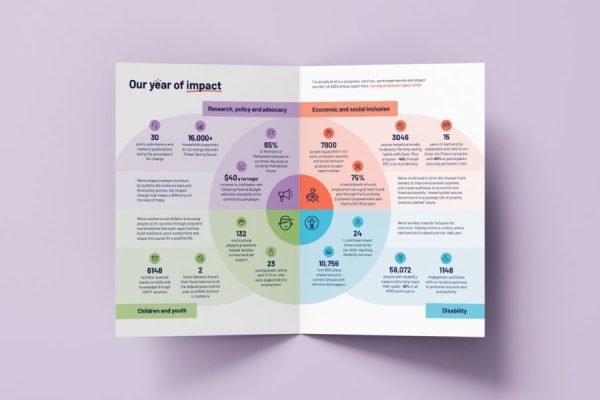
3. Outstanding Advantages of Nano Banana Pro Compared to Other AI Tools
Below is a detailed guide on how you can create a 16:9 infographic using Nano Banana Pro, suitable for presentations, reports, or sharing on digital platforms. The workflow is optimized so users only need to focus on the content, while all layout and presentation elements are intelligently and quickly handled by the tool.
4.1 Step 1: Enter the Topic and Select the Format
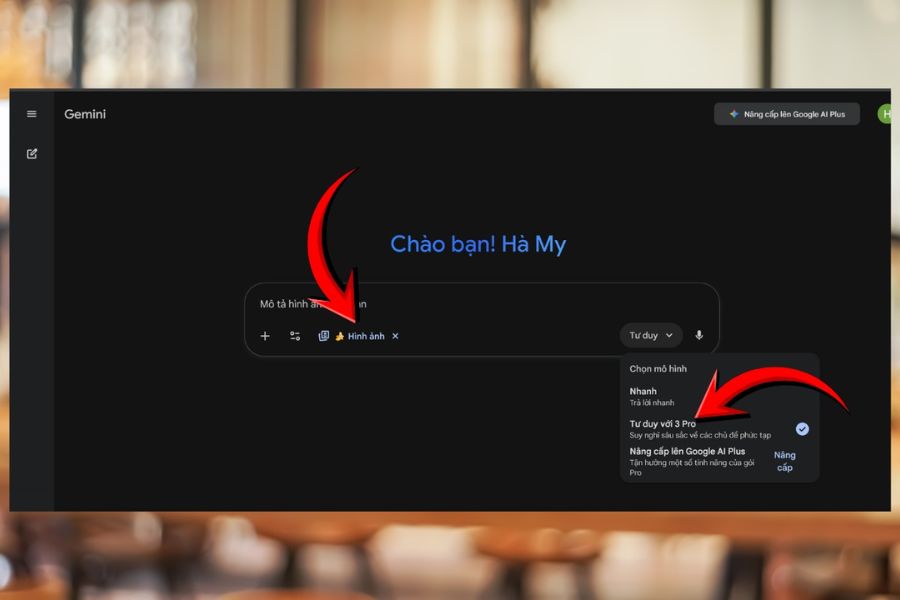
First, visit the Gemini website and move to the main content input area. Here, in the tools section, select Image Creation with the banana icon located at the top of the interface. On the right side of the screen, choose Thinking 3 Pro mode to fully activate Nano Banana Pro’s advanced processing capabilities. Selecting the correct tool and mode from the beginning helps the system clearly understand your goals and optimize infographic results according to the intended format.
After completing this step, you are ready to begin building your infographic with a suitable layout foundation. This is an important step to ensure that the created infographic has the correct display ratio, especially the 16:9 ratio commonly used in professional presentations and slideshow content.
4.2 Step 2: Clearly Define the Main Topic to Convey
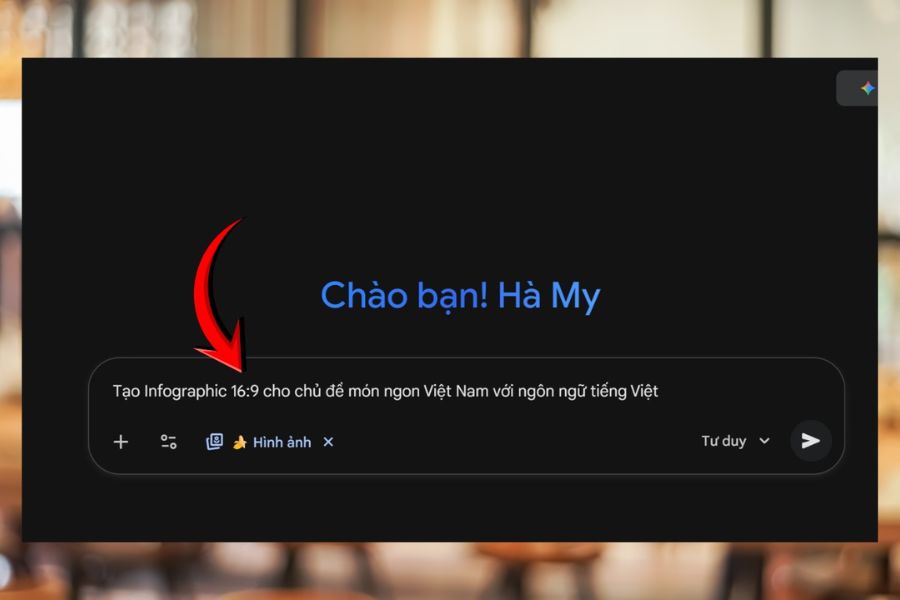
Next, you need to define a specific, concise, and visually understandable topic. The clearer the topic, the more coherent and understandable the infographic will be. In the content input box, you can use a simple command such as “Create a 16:9 infographic about” followed by the content or idea you want to present. This input method helps the system quickly identify the objective and determine the infographic’s overall structure.
Defining the topic from the beginning also helps Nano Banana Pro organize information according to the correct focus, avoiding unnecessary or excessive details. As a result, the infographic not only looks visually appealing but also effectively conveys the main message to viewers within just a few seconds of observation.
4.3 Step 3: Wait for the System to Generate the Infographic and Refine the Content
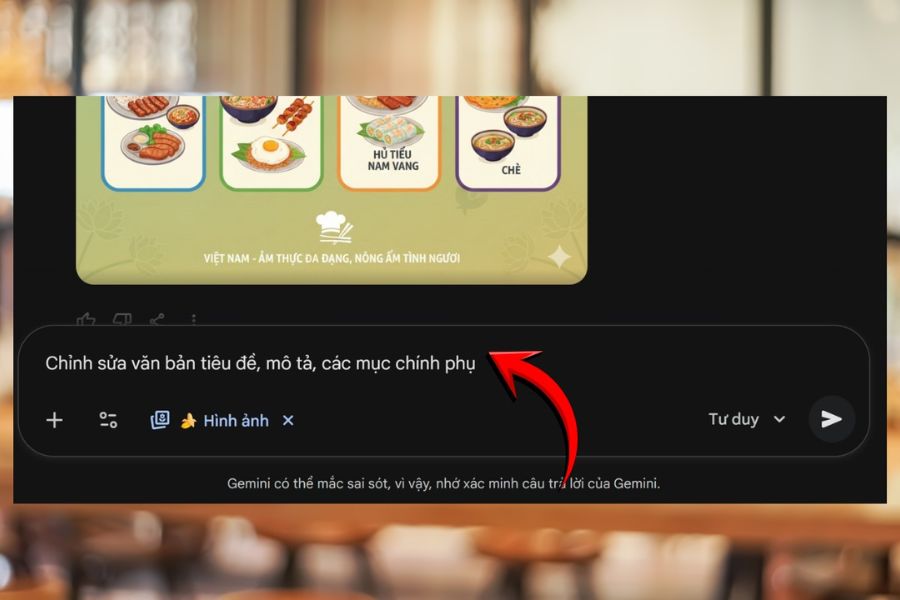
After entering the prompt and necessary data, you only need to wait for the system to process and generate a complete infographic. The waiting time is usually quite short and may vary depending on the complexity of the content. Once the infographic is generated, you can edit it further to better suit your actual usage needs.
At this stage, Nano Banana Pro allows you to easily adjust titles, descriptions, as well as primary and secondary content sections. You can also add suitable illustrations, change colors, fonts, or spacing between elements to make the infographic more harmonious and clearer. The strength of the tool lies in the fact that even with extensive editing, the overall layout remains stable, ensuring the final product always looks professional and easy to follow.
4.4 Step 4: Publish and Share the Infographic
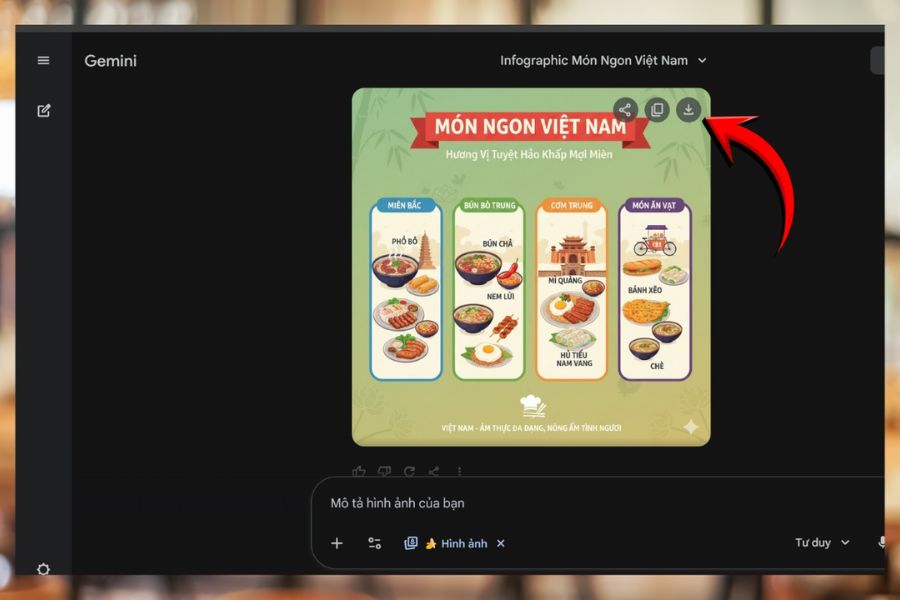
Once you are satisfied with the infographic, you can export it in high resolution. Nano Banana Pro supports JPG export, suitable for presentations, reports, or inserting into learning and working documents. The image quality is well preserved, ensuring the content remains clear even when displayed on large screens.
In addition, you can download the infographic to your personal device or share it directly on platforms used for work and learning. With a simple yet effective workflow, Nano Banana Pro makes creating 16:9 infographics fast, easy, and suitable for many different usage purposes.
5. Important Notes When Using Nano Banana Pro
Although Nano Banana Pro is an AI tool that supports quick and effective infographic creation, users still need clear content thinking to achieve the best results. AI can help suggest layouts, visuals, and presentation styles, but the quality of the final infographic still largely depends on how you define the message and control the content. Clearly understanding communication goals, target audiences, and usage contexts will help Nano Banana Pro maximize its capabilities and create infographics that are both visually appealing and focused.
Clearly define communication goals before starting: Before entering content, determine what you want viewers to understand after seeing the infographic. When the objective is clear, the AI can more easily suggest suitable layouts, information structures, and presentation styles, helping the infographic stay focused and avoid unnecessary details.
Avoid stuffing too much text into the infographic: Effective infographics are a harmonious combination of content and visuals. Instead of adding excessive text, select the main points and utilize illustrations or icons to support information delivery. This approach makes the content easier for viewers to absorb and remember.
Always double-check data and information before publishing: Although Nano Banana Pro helps create infographics very quickly, you should still review important numbers, terminology, and content. Careful checking ensures accuracy and reliability, especially when the infographic is used for reports, teaching, or professional presentations.
Maintain consistency in colors and fonts: Consistency in colors and typography makes infographics look more professional and easier to follow. When visual elements are unified, viewers can focus on the main content instead of being distracted by too many different presentation styles.
6. Should You Use Nano Banana Pro or the Free Version?
Choosing the right infographic creation tool not only affects image quality but also impacts productivity and user experience. Both Nano Banana Pro and the free version have their own strengths, but if you want to save time, enhance presentation quality, and create polished products from the start, investing in Nano Banana Pro will provide more noticeable value. The comparison table below will help you clearly understand the differences between these two options.
7. Conclusion
Nano Banana Pro is not just an infographic design support tool but also a solution that optimizes how ideas are communicated in an image-driven era. When data and information are scientifically organized and visually presented, viewers can more easily absorb and remember the message. Applying AI to the design process helps save time, reduce creative pressure, and improve the professionalism of every final product. With Nano Banana Pro, every idea from simple to complex can be transformed into convincing infographics, contributing to more effective communication and leaving a strong impression on viewers.





















VIP Products








Best Selling Products
Windows 10 & 11 Pro Key
36 USD
Adobe Photoshop Copyright - Full App
120 USD
Upgrade Duolingo Super
29 USD
Upgrade Genuine Office 365
49 USD
Genuine Cheap Canva Pro
39 USD
Capcut Pro 1 Year
39 USD
Plugin Retouch4me
69 USD
Autodesk All App Account Copyright
120 USD
Upgrade genuine Capture One account
120 USD
Adobe Premiere Pro Account
99 USD
Freepik Premium Account
59 USD
Genuine Adobe Illustrator account
99 USD
ChatGPT Plus Account (GPT-4)
16 USD
MidJourney Account
29 USD
Copyright Adobe Lightroom Account
59 USD