Best Selling Products

Genuine Cheap Canva Pro
39 USD

Genuine Adobe Illustrator account
99 USD

Plugin Retouch4me
69 USD

Copyright Adobe Lightroom Account
59 USD

Autodesk All App Account Copyright
120 USD

Capcut Pro 1 Year
39 USD

Adobe Photoshop Copyright - Full App
120 USD

Upgrade genuine Capture One account
120 USD

Windows 10 & 11 Pro Key
36 USD

MidJourney Account
29 USD

Upgrade Genuine Office 365
49 USD

Adobe Premiere Pro Account
99 USD

Freepik Premium Account
59 USD

ChatGPT Plus Account (GPT-4)
16 USD

Upgrade Duolingo Super
29 USD
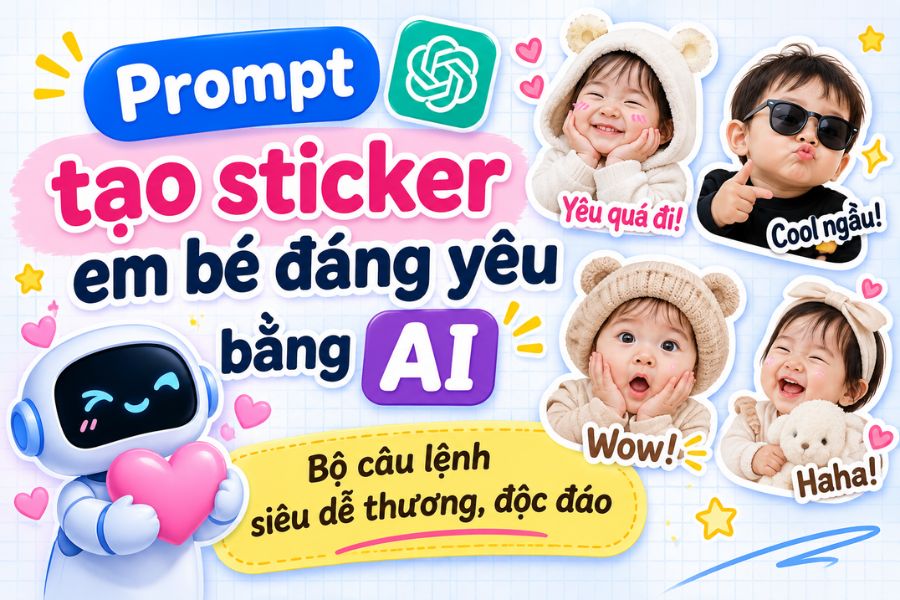
Prompt to create adorable baby stickers using AI: A set of super cute and unique commands.
Nội dung
- 1. Formula for writing a prompt to create beautiful baby stickers
- 2. Compilation of prompts for creating adorable baby stickers
- 2.1. Prompt to create mischievous and funny baby stickers
- 2.2. Prompt to create cute and cuddly baby stickers
- 2.3. Prompt to create fun, energetic baby stickers
- 2.4. Prompt to create 3D chibi-style baby stickers
- 2.5. Prompt to create hand-drawn baby stickers
- 2.6. Prompt to create stickers of babies eating, sleeping, and playing.
- 3. Tips for creating beautiful and consistent baby stickers using AI.
- 4. Conclusion
Transforming everyday photos of your baby into adorable stickers is a popular way for many parents to preserve precious moments. With just a few simple commands, you can use ChatGPT, Gemini, or other AI tools to create a series of stickers with fun, cute, or mischievous expressions. In this article, Sadesign will compile a list of beautiful and easy-to-use baby sticker creation prompts so you can freely create a sticker set with your own unique touch.
1. Formula for writing a prompt to create beautiful baby stickers
To have the AI create the sticker exactly as you want, you should specifically describe the character, style, and expression you desire. A clear command will help create a well-composed image, minimize facial inaccuracies, and avoid duplicate stickers.
A complete prompt typically includes the following elements:
-
Character: Describe the baby or instruct the AI to use a face from an uploaded photo, preserving identifying features.
-
Style: Choose a design style such as 3D chibi, 2D cartoon, realistic photo, or claymation.
-
Layout: Create 9 stickers in a 3x3 grid or 16 stickers in a 4x4 grid.
-
Expressions: List states such as laughing, crying, surprised, angry, sleepy.
-
Decorative details: Add Vietnamese text, speech bubbles, white borders, or cute effects.
-
Background: Choose a white or transparent background to easily separate each sticker.
2. Compilation of prompts for creating adorable baby stickers
Depending on your preferences, you can choose from many different styles to create a vibrant sticker set. Below are some template prompts that you can copy and use right away.
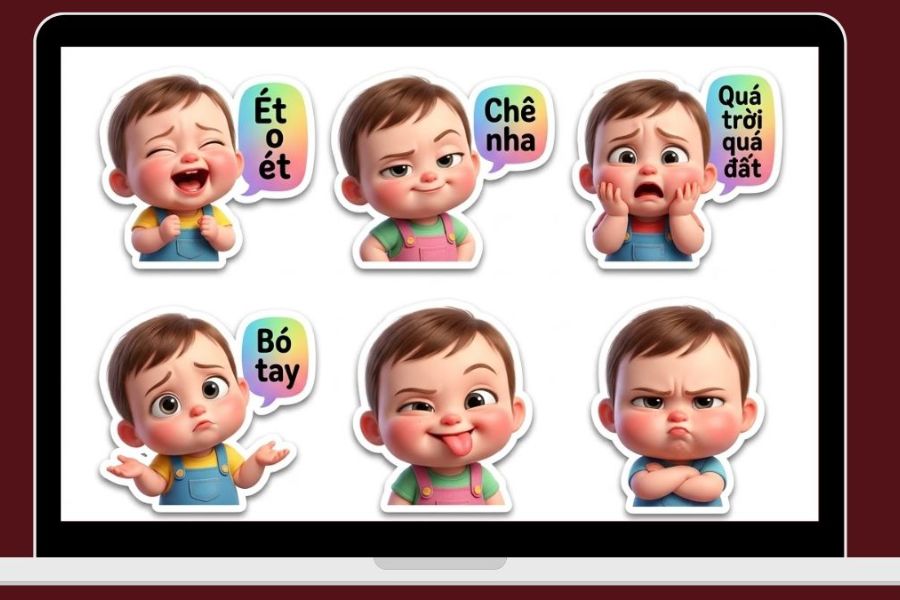
2.1. Prompt to create mischievous and funny baby stickers
These playful, somewhat humorous expressions will make texting more fun with these stickers. You can combine actions like sticking out your tongue, making a face, pouting, or rolling your eyes with short, friendly phrases.
Prompt 1:
"Create a set of 16 stickers from the baby photos I uploaded, using a 4x4 grid layout. Keep the baby's face, hairstyle, and identifying features intact. Adorable 3D cartoon style with bright colors. Each sticker has a different expression such as squinting, sticking out tongue, frowning, pouting, bewildered, slightly sulky, winking, and laughing. Add fun Vietnamese text: 'Huh?', 'I don't like it', 'Hehe', 'I don't like it', 'Speechless'. Clear white borders, transparent background."
Prompt template 2:
"Create a set of 9 cute chibi-style baby stickers from the attached image. Maintain the original facial features and create humorous expressions including: wide eyes and open mouth, puffed cheeks, hands on hips, arms crossed in a pout, a delighted laugh, and tongue sticking out playfully. Add short text like 'I know!', 'Isn't that scary?', 'No way to save you', 'I'm going to faint'. The images are sharp, the layout is a 3x3 grid, and the background is white."
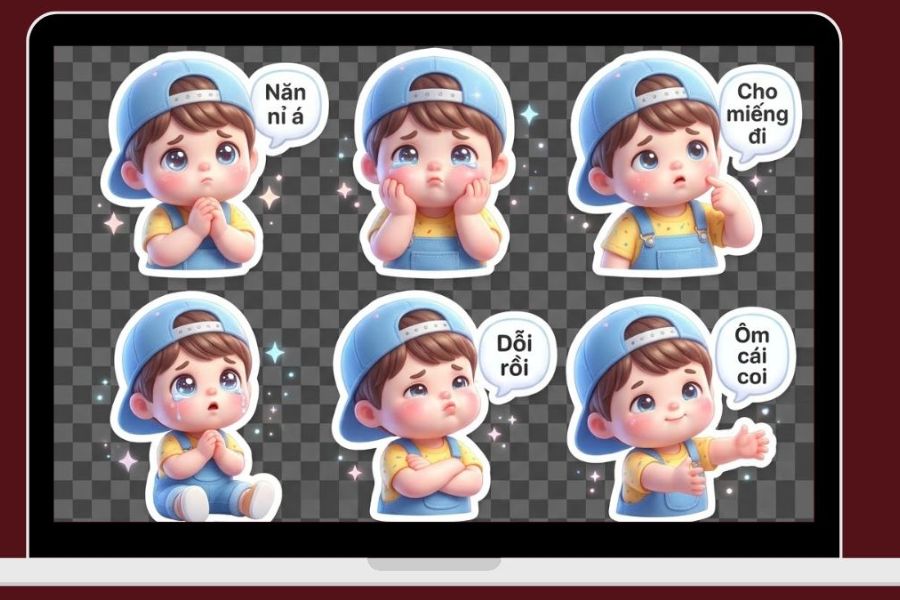
2.2. Prompt to create cute and cuddly baby stickers
If you prefer gentle stickers, you can choose a pastel style with sparkling eyes, rosy cheeks, and adorable expressions. Phrases like "I miss you so much," "Give me a hug," or "I love you" will make the stickers more relatable.
Prompt 1:
"Use the uploaded baby photo to create a set of 16 adorable stickers in a 4x4 grid layout. Keep the baby's face and unique features intact. 3D chibi style, pastel pink and creamy white tones. Create cute expressions like pouting lips, clasped hands begging, sparkling eyes, hugging a teddy bear, reaching out to be held, and a sweet smile. Add Vietnamese text: 'So cute', 'Hug me', 'Please', 'Remember me', 'Moa moa'. Transparent background with white border."
Prompt template 2:
"Create a set of 9 baby stickers from the attached portrait photo. The style is soft 2D cartoon, with gentle pastel colors, rosy cheeks, and big, round eyes. Each sticker expresses a different emotion: sad, spoiled, smiling, blowing a kiss, smiling with eyes closed, making a heart, or raising both hands for a hug. Add speech bubbles with the messages 'Yes', 'So cute', 'Give me a kiss', 'I'm sulking'. Maintain the baby's facial features, clear image, and simple white background."
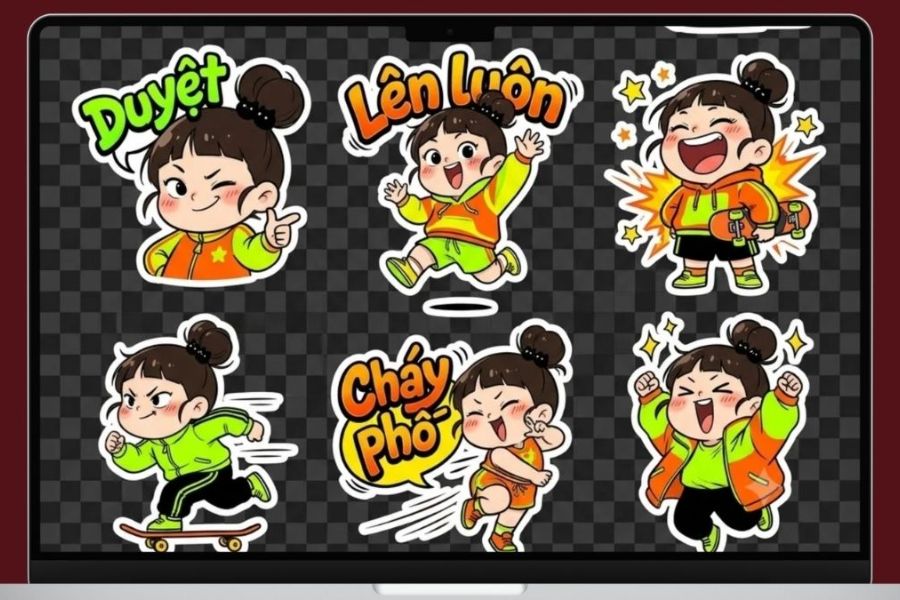
2.3. Prompt to create fun, energetic baby stickers
These stickers, imbued with positive energy, are perfect for use in everyday conversations. You can ask the AI to create additional waving, dancing, thumbs-up, or celebratory poses to enrich the sticker collection.
Prompt 1:
"Create a set of 16 baby stickers from original photos, preserving the face and identifying features. The 3D cartoon style is lively and the colors are bright. Each image depicts an activity such as raising both hands in celebration, waving, jumping happily, clapping, giving a thumbs-up, laughing loudly, and striking a victory pose. Add Vietnamese text: 'Amazing', 'Keep going', 'Yeahhh', 'So awesome', 'So good'. The layout is a 4x4 grid, with a transparent background and white sticker borders."
Prompt template 2:
"Design a set of 9 3D chibi-style baby stickers from the attached image. The characters are chubby and adorable, retaining their original faces. Actions include running, jumping, cheering, clapping, winking, making heart shapes, and smiling brightly. Uses pastel yellow, orange, and blue colors. Adds the words 'Let's go', 'Awesome', 'Hooray', 'Well done'. 3x3 grid layout, sharp images, ensuring the stickers don't touch each other."
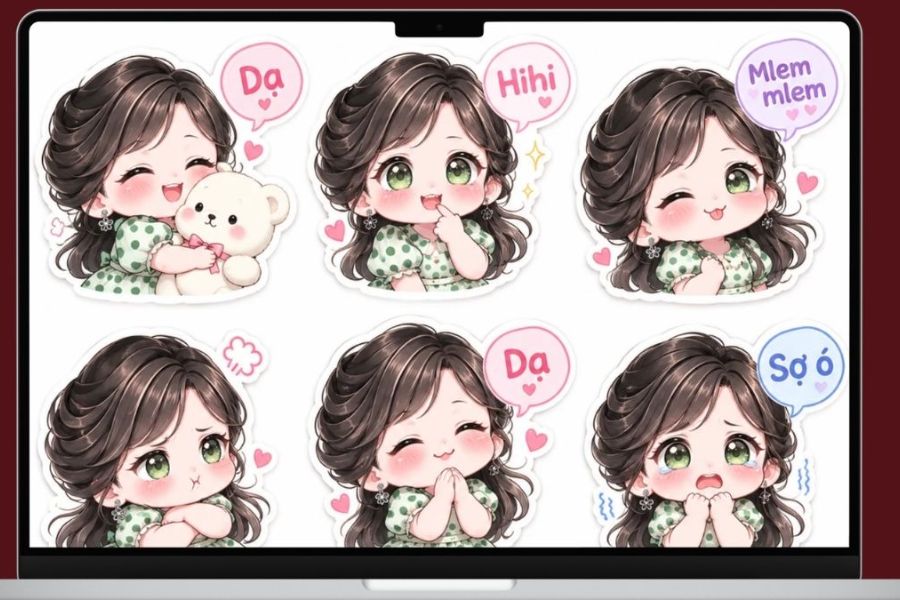
2.4. Prompt to create 3D chibi-style baby stickers
3D chibi is a popular style thanks to its large head, small body, sparkling eyes, and rounded features. When applied to baby photos, AI can create cartoon characters that are both adorable and retain the baby's unique characteristics.
Prompt 1:
"Convert your uploaded baby photos into a set of 16 adorable 3D chibi stickers. The natural facial features, hairstyle, and skin tone are preserved. The characters have slightly larger heads, smaller bodies, sparkling eyes, rosy cheeks, and a soft, gentle appearance. Poses include hugging a bottle, dozing off, holding a teddy bear, waving, smiling, surprised, and pouting. Sweet pastel colors, soft lighting, white borders around each sticker, and a transparent background."
Prompt template 2:
"Create a set of 9 baby stickers in a 3D doll style. Use the attached image as a character template, preserving the identifying features. Design the baby with big eyes, a round face, rosy cheeks, and cute outfits. Each image has a unique expression such as happy, shy, surprised, sleepy, joyful, curious, adorable, and playful. Use a 3x3 grid layout, harmonious colors, and a white background."
2.5. Prompt to create hand-drawn baby stickers
If you don't like overly polished images, you can try the doodle style. Simple lines, soft colors, and random decorations will create a warm, natural feel.
Prompt 1:
"Create a set of 16 baby stickers from the portrait photos I uploaded, using a 2D hand-drawn doodle style. Retain the baby's prominent facial features. Use soft brushstrokes, bright colors, rosy cheeks, and thick white outlines. Expressions include smiling, crying, sulking, sleeping soundly, surprised, pouting, and waving. Add cute Vietnamese words like 'Hello', 'Sleep Here', 'Huhu', 'Love You'. 4x4 grid layout, white background."
Prompt template 2:
"Transform your baby's photos into adorable, hand-drawn diary-style stickers. The characters feature simple drawings, pastel colors, rosy cheeks, and natural expressions. Add small decorative elements like hearts, stars, flowers, and clouds. Create 9 different expressions including smiling, crying, yawning, winking, surprised, hugging, blowing a kiss, sulking, and sleeping soundly. The original facial features are preserved, and the background is transparent."
2.6. Prompt to create stickers of babies eating, sleeping, and playing.
Besides typical expressions, you can also create stickers based on familiar activities of young children. This is a way to add more adorable moments to the sticker set, making it closer to everyday life.
Prompt 1:
"Create a set of 16 baby stickers from original photos, preserving the face and identifying features. Cute 3D chibi style. Each sticker depicts a different activity: drinking milk, eating cake, holding a spoon, hugging a teddy bear, sleeping on a pillow, yawning, playing with toys, and crawling on the floor. Natural, adorable expressions, pastel colors. Add the words 'Delicious', 'Yummy', 'Sleepy', 'Let's go play'. 4x4 grid layout, white background."
Prompt template 2:
"This set of 9 baby stickers is designed around daily activities. Using the included photos as templates, the baby's face is preserved. The 3D cartoon style is soft and rounded. Activities include eating, drinking milk, bathing, sleeping, playing with toys, reading, hugging mom, smiling, and waving. Each sticker has a unique expression, with no repetition. The background is transparent, the white border is clear, and the images are sharp."
3. Tips for creating beautiful and consistent baby stickers using AI.
To ensure a high-quality sticker set, you should pay attention to the input image and how you describe your requirements. A few minor adjustments in the prompt can also help to improve the final image.
-
Choose a clear, original photo: Prioritize a frontal shot that is well-lit and does not obscure the face.
-
Requirement to preserve the child's features: Add a command to keep the child's face, hairstyle, and other distinctive characteristics unchanged.
-
Avoid excessive detail: Each sticker should focus on one main expression or action.
-
Check Vietnamese characters: AI sometimes creates characters with incorrect diacritics or missing characters. You should check and correct them before use.
-
Choose a suitable background: A transparent background makes it easier to separate the image, while a white background is convenient for editing.
-
Separate the stickers: If the AI creates the image in a grid format, you can use photo editing tools to crop it into individual stickers.
4. Conclusion
With these baby sticker creation prompts, you can easily transform ordinary photos into vibrant, personalized sticker sets. From 3D chibi styles and hand-drawn designs to playful expressions, each command can be customized to your liking. Try combining different ideas to create a unique sticker set, preserving your baby's adorable moments and using them in your daily conversations.





















VIP Products








Best Selling Products
Genuine Cheap Canva Pro
39 USD
Genuine Adobe Illustrator account
99 USD
Plugin Retouch4me
69 USD
Copyright Adobe Lightroom Account
59 USD
Autodesk All App Account Copyright
120 USD
Capcut Pro 1 Year
39 USD
Adobe Photoshop Copyright - Full App
120 USD
Upgrade genuine Capture One account
120 USD
Windows 10 & 11 Pro Key
36 USD
MidJourney Account
29 USD
Upgrade Genuine Office 365
49 USD
Adobe Premiere Pro Account
99 USD
Freepik Premium Account
59 USD
ChatGPT Plus Account (GPT-4)
16 USD
Upgrade Duolingo Super
29 USD