Best Selling Products

Capcut Pro 1 Year
39 USD

Autodesk All App Account Copyright
120 USD

Genuine Adobe Illustrator account
99 USD

Freepik Premium Account
59 USD

Copyright Adobe Lightroom Account
59 USD

Adobe Premiere Pro Account
99 USD

Plugin Retouch4me
69 USD

Upgrade genuine Capture One account
120 USD

Upgrade Duolingo Super
29 USD

Adobe Photoshop Copyright - Full App
120 USD

ChatGPT Plus Account (GPT-4)
16 USD

Upgrade Genuine Office 365
49 USD

Windows 10 & 11 Pro Key
36 USD

MidJourney Account
29 USD

Genuine Cheap Canva Pro
39 USD
Searching for the Best Virtual Assistant in 2025: ChatGPT or Copilot?
Nội dung
- 1. Introduction to ChatGPT vs Copilot
- 2. Service pricing between ChatGPT and Copilot
- 3. Advantages and disadvantages of ChatGPT vs. Copilot
- 4. Comparing ChatGPT vs Copilot
- 5. Comparing the usability of ChatGPT and Copilot
- 5.1. Survey
- 5.2. Writing the content
- 5.3. Data Analysis
- 5.4. Writing code
- 5.5. Graphic Design
- 6. ChatGPT vs. Copilot: Which is the best assistant?
- 7. Conclusion
Finding an effective virtual assistant is not just a trend, but a necessity in today''s technological age. ChatGPT and Copilot are two strong contenders in this race, each offering unique advantages and features. A thorough analysis of these two platforms will help you decide which virtual assistant best suits your work and creative needs in 2025. This article from Sadesign will provide a comprehensive overview of the strengths, weaknesses, and practical applications of both tools, helping you make the smartest choice.
1. Introduction to ChatGPT vs Copilot
ChatGPT is a prominent AI chatbot developed by OpenAI. Utilizing large language models like GPT-4 and multimedia models, ChatGPT is capable of generating natural, human-like responses in various formats, including text, voice, and images. This cloud-based platform allows users to access it from multiple devices, providing flexibility and convenience in their work.
Conversely, Microsoft Copilot is also an AI chatbot, but it's developed by Microsoft and deeply integrated into the Microsoft 365 ecosystem. Based on the same GPT-4 model as ChatGPT, Copilot aims to be an intelligent digital office assistant, helping users process documents, emails, and spreadsheets more efficiently in applications like Excel, Word, and Outlook.
2. Service pricing between ChatGPT and Copilot
When deciding which AI tool to choose to support your work and creativity, the cost of use is an indispensable factor. Each tool has different service packages with corresponding prices, and understanding the pricing will help you make a more informed decision. The price list below will give you an overview of the costs of ChatGPT and Copilot in 2025.
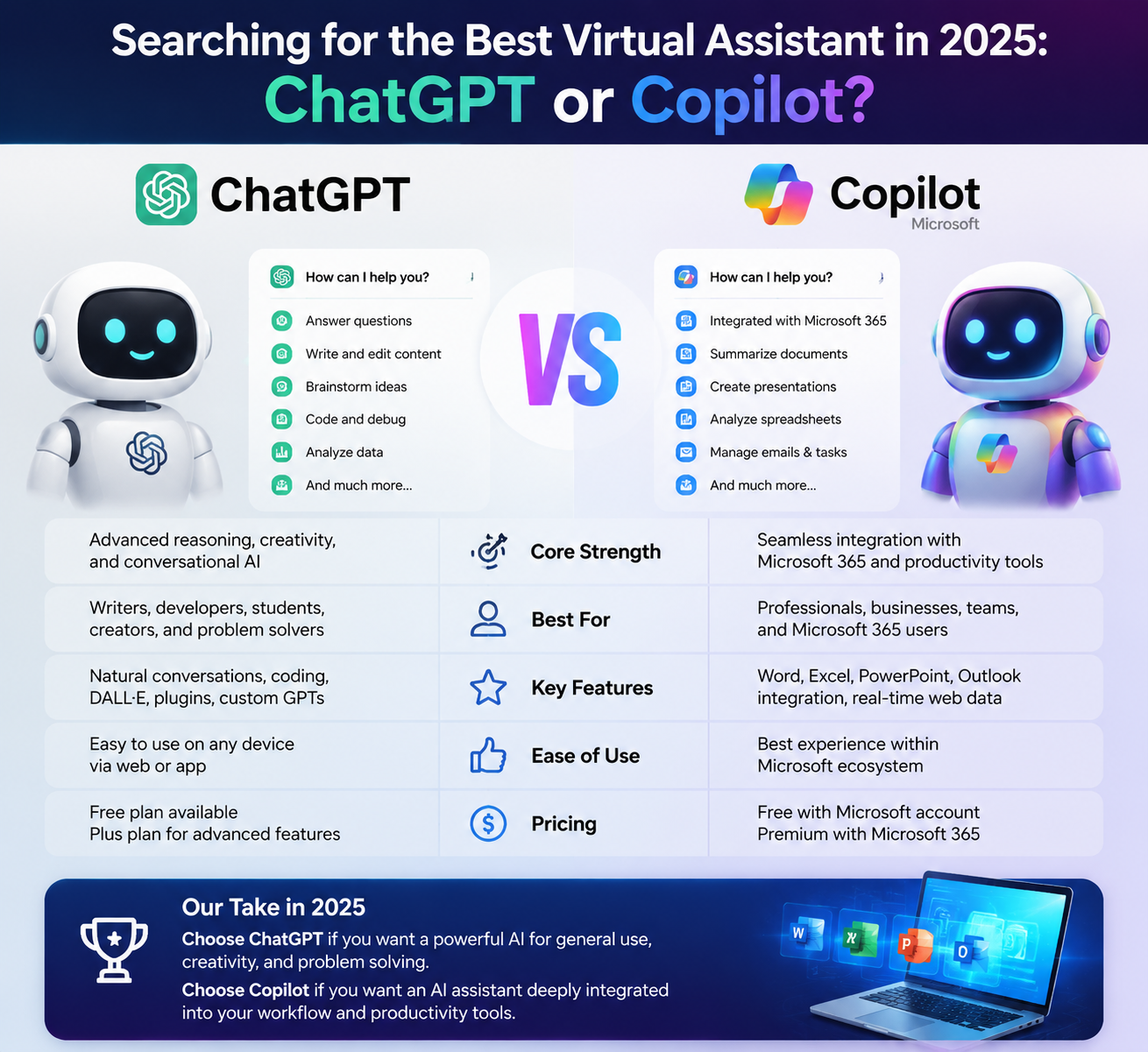
ChatGPT offers various service packages to suit individual user needs. The Plus package, at $20/month, gives you access to GPT-40, enhanced voice mode, and image creation and data analysis capabilities. If you need more features, the Pro package, at $200/month, provides a more comprehensive experience with full GPT-40, GPT-4.5, Sora, and Codex features. For businesses, ChatGPT also offers a service package at $25/month/user, helping to optimize costs for workgroups.
Meanwhile, Microsoft Copilot starts at $20/month for the Pro plan, offering priority access to GPT-4/GPT-4 Turbo and 100 image boosts per day. For businesses, the fee is $30/month/user if paid annually. Its deep integration into the Microsoft 365 ecosystem makes Copilot an attractive option for those working in an office environment.
3. Advantages and disadvantages of ChatGPT vs. Copilot
Once you have an overview of service prices, considering the pros and cons of each tool will help you make a more informed decision. ChatGPT stands out with its natural and smooth communication capabilities and excellent contextual understanding, which is crucial for creating content such as blogs, poems, or scripts. Furthermore, ChatGPT supports multiple languages, including Vietnamese, expanding its accessibility for users.
However, not all features are free. Some advanced tools require users to pay to access them. Furthermore, ChatGPT is not built into office platforms, which can be a disadvantage for those who need to use this tool in a work environment.
Regarding Microsoft Copilot, its biggest advantage is its integration with Microsoft 365, which automates workflows. Copilot can quickly create slides, reports, and emails, and supports efficient programming with high integration with Visual Studio Code. However, to use Copilot, users need a Microsoft account, and communication may not be as natural as ChatGPT.

4. Comparing ChatGPT vs Copilot
Before delving into the details of each advantage and disadvantage, the comparison table below will give you an overview of the differentiating factors between ChatGPT and Copilot in 2025. Both tools offer unique value, and understanding each aspect will help you decide which one is better suited to your needs.
5. Comparing the usability of ChatGPT and Copilot
When it comes to their ability to support various fields, both ChatGPT and Copilot have their own strengths. Below is a detailed analysis of each tool's usability in five key areas: surveys, content writing, data analysis, coding, and graphic design.
5.1. Survey
In the field of surveys, ChatGPT stands out for its ability to generate rich and diverse questions, making it easy for users to build questionnaires or design detailed surveys. Thanks to its contextual understanding and analytical capabilities, ChatGPT can suggest questions relevant to research objectives, while also providing question templates that save users time. This is very useful for researchers or marketers seeking information from their target audience.
Conversely, Copilot doesn't excel in the survey field. While it can assist in drafting survey content, its lack of flexibility in creating diverse questions and limited creative space make it less than ideal for this area. Furthermore, Copilot is primarily focused on office applications, meaning users may not fully utilize its potential for survey design.
5.2. Writing the content
When it comes to content writing, ChatGPT is truly an excellent virtual assistant. With its ability to generate natural and rich text, ChatGPT can support blogging, articles, poetry, and many other types of content. Users can specify the style, tone, and theme, and ChatGPT will quickly and efficiently deliver the appropriate content. This not only saves time but also provides content creators with added inspiration.
Meanwhile, Copilot is not as powerful as ChatGPT in the field of content writing. Although it can assist in text editing, Copilot's main features focus on office tasks. It can help users edit and refine content, but lacks the independent creative capabilities that ChatGPT offers. Therefore, if you are a writer or blogger, ChatGPT will definitely be a better choice.
5.3. Data Analysis
In data analysis, Copilot clearly demonstrates its advantage with its ability to integrate into applications like Excel. It can automate the analysis process, helping users process data quickly and efficiently. Copilot can create complex formulas, generate charts, and even suggest ways to analyze data based on the information provided. This is extremely useful for data analysts or office workers who need to process data daily.
Although ChatGPT can assist in interpreting data, it cannot replace dedicated data analysis tools. While it can generate text, ChatGPT can help explain analysis results, but it cannot perform computational tasks or data processing like Copilot. Therefore, in this area, Copilot is clearly the superior choice.
5.4. Writing code
When it comes to programming, Copilot is an indispensable assistant for programmers. With its ability to automatically suggest code in real time, Copilot saves time and increases productivity. It can understand the context of the code being written and provide specific suggestions, helping programmers complete their work quickly and efficiently. Its integration with Visual Studio Code further enhances Copilot's power, making it an essential tool in any programmer's toolkit.
Meanwhile, ChatGPT also has code writing support capabilities, but it's not as in-depth as Copilot. It can suggest basic code snippets and explain algorithms, but lacks the ability to suggest contextually specific code in real time. Therefore, if you are a professional programmer, Copilot would be a more ideal choice to optimize your workflow.
5.5. Graphic Design
ChatGPT cannot directly design images, but it can assist you by suggesting ideas, descriptions, and instructions on how to create images. If you need to create a concept for a design, ChatGPT can help you shape the idea and content to convey your message. However, it cannot generate images directly, which limits its application in the field of image design.
Conversely, Copilot allows free image creation through DALL·E 3, although with a daily limit on uses. This enables users to create unique and creative images quickly. Furthermore, with its integration into the Microsoft ecosystem, Copilot can help you edit and refine images within office applications. In short, if you're looking for a tool to design images, Copilot is a better choice.
6. ChatGPT vs. Copilot: Which is the best assistant?
When comparing ChatGPT and Copilot, determining which tool is better depends on the specific needs of each user. For those seeking creativity and natural communication, ChatGPT is a standout choice. This tool not only supports writing and academics but also allows users to create visual and multimedia content. The GPT-40 version offers excellent contextual understanding, making it easy for creators to express their ideas vividly and engagingly.
Conversely, Microsoft Copilot shines in enterprise environments where efficiency and integration are crucial. Copilot is designed to work seamlessly with applications in the Microsoft 365 ecosystem, such as Word, Excel, and Teams. This allows users to automate workflows, from creating reports to composing emails and coding in Visual Studio Code. If you are an office worker or programmer, Copilot can significantly save you time and improve your productivity.
Ultimately, the choice between ChatGPT and Copilot will depend on your work style and what you need from a virtual assistant. If you prioritize creativity and flexible communication, ChatGPT will be the ideal companion. Conversely, if you need an efficient office tool, Microsoft Copilot will be the optimal choice. Consider carefully to find the assistant that best suits your needs!
7. Conclusion
Ultimately, the choice between ChatGPT and Copilot depends on your specific needs. If you're looking for a virtual assistant with flexible and innovative interactive capabilities, ChatGPT might be the perfect choice. Conversely, if you need an efficient programming support tool, Copilot will help you overcome coding challenges. Consider carefully and choose the tool that best suits your needs to optimize your productivity in 2025!





















VIP Products








Best Selling Products
Capcut Pro 1 Year
39 USD
Autodesk All App Account Copyright
120 USD
Genuine Adobe Illustrator account
99 USD
Freepik Premium Account
59 USD
Copyright Adobe Lightroom Account
59 USD
Adobe Premiere Pro Account
99 USD
Plugin Retouch4me
69 USD
Upgrade genuine Capture One account
120 USD
Upgrade Duolingo Super
29 USD
Adobe Photoshop Copyright - Full App
120 USD
ChatGPT Plus Account (GPT-4)
16 USD
Upgrade Genuine Office 365
49 USD
Windows 10 & 11 Pro Key
36 USD
MidJourney Account
29 USD
Genuine Cheap Canva Pro
39 USD