Best Selling Products

Adobe Photoshop Copyright - Full App
120 USD

Plugin Retouch4me
69 USD

Capcut Pro 1 Year
39 USD

Copyright Adobe Lightroom Account
59 USD

MidJourney Account
29 USD

Autodesk All App Account Copyright
120 USD

Adobe Premiere Pro Account
99 USD

ChatGPT Plus Account (GPT-4)
16 USD

Freepik Premium Account
59 USD

Windows 10 & 11 Pro Key
36 USD

Upgrade Duolingo Super
29 USD

Genuine Adobe Illustrator account
99 USD

Upgrade Genuine Office 365
49 USD

Genuine Cheap Canva Pro
39 USD

Upgrade genuine Capture One account
120 USD
The Most Detailed Guide to Creating Photos with Zootopia Characters Using CapCut
Nội dung
- 1. What is Zootopia 2?
- 2. Why Should You Use CapCut for the Zootopia Trend?
- 3. Outstanding Features of CapCut Pro
- 4. The Fastest Way to Create Photos with Nick & Judy Using CapCut
- 4.1 Step 1: Open the CapCut App and Access the Template Library
- 4.2 Step 2: Search for Zootopia-Related Templates
- 4.3 Step 3: Choose Your Favorite Template
- 4.4 Step 4: Upload a Clear Portrait Photo of Yourself
- 4.5 Step 5: AI Automatically Inserts Your Photo into the Zootopia Scene
- 4.6 Step 6: Download the Photo to Your Phone and Share It
- 5. Tips to Make Your Zootopia AI Photo Look Better and More Natural
- 5.1 Use a Clear Selfie with Even Lighting
- 5.2 Choose a Natural Face Angle and Expression
- 5.3 Adjust Brightness and Contrast in CapCut
- 5.4 Further Editing with Photoshop or Lightroom (If Needed)
- 6. Suggested Alternative Tools for Creating Photos with Nick & Judy
- 7. Should You Upgrade to CapCut Pro?
- 8. Conclusion
The AI trend of creating photos with Zootopia 2 characters is truly “taking social media by storm” as anyone can transform into the main character and appear next to Nick Wilde or Judy Hopps in an emotional movie theater setting.
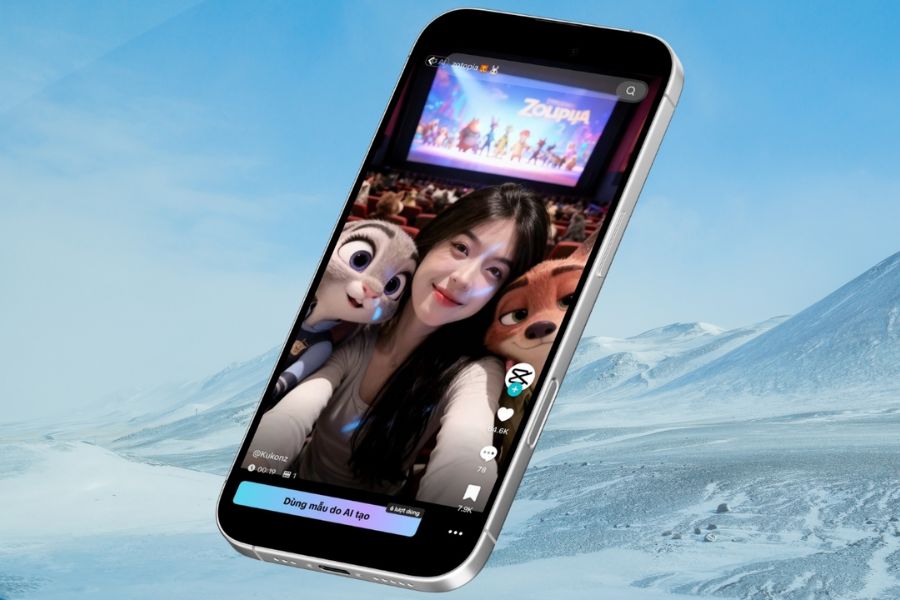
1. What is Zootopia 2?
Zootopia 2 is the highly anticipated sequel to Disney’s blockbuster animated film, continuing the huge success of the first installment that once “swept across” audiences worldwide. The movie still takes place in the city of Zootopia—a place where animals live, work, and face very “real-life” issues in a humorous and relatable way. From its release, Zootopia 2 quickly captured attention thanks to its fresh storyline, vivid visuals, and meaningful message.
In the second part, the story continues following the familiar detective duo Judy Hopps and Nick Wilde through thrilling and surprising new cases. The chemistry between the smart and passionate rabbit officer and the clever, humorous fox continues to bring both suspenseful and witty moments. This deeper character development and engaging storyline help Zootopia 2 maintain strong appeal for both children and adults.
Not stopping at box-office success, Zootopia 2 has also sparked a vibrant wave of creative content across social media. The most notable is the AI photo trend that allows users to “step into the movie world” with just a few simple actions. This trend is spreading rapidly on TikTok, Instagram, and Facebook, becoming a favorite choice for those who want to catch trends quickly, create unique content, and attract high engagement.
2. Why Should You Use CapCut for the Zootopia Trend?
CapCut is the tool many people choose for the Zootopia trend because of its intuitive interface, ease of use, and suitability for both beginners and experienced photo or video editors. You do not need complicated design skills or heavy software—just a few simple drag-and-drop actions to merge photos, adjust layouts, and create vivid effects. This is why CapCut is especially suitable for AI trends spreading quickly across social media.
Another major advantage of CapCut is its strong integration with AI effects, templates, and editing tools. When creating photos with Zootopia characters, you can easily adjust brightness, color, and sharpness to make your face blend naturally with the animated scene. This makes the final photo look realistic and emotionally connected to the movie setting instead of awkwardly edited.
In addition, CapCut is highly optimized for sharing on TikTok, Instagram, and Facebook—platforms where the Zootopia trend is booming. Exported photos and videos are high quality and perfectly sized for social media, helping content reach viewers more effectively and increasing viral potential. This convenience and efficiency make CapCut the top choice for trend-based creative content.
.jpg)
3. Outstanding Features of CapCut Pro
CapCut Pro is a complete upgraded version for those who want to create professional content, catch trends quickly, and produce deeper, higher-quality images and videos. It not only makes editing easier but also delivers superior results suitable for creators, designers, and beginners who want polished products from the start.
-
Exclusive Pro effects, filters, and templates updated continuously with the latest trends
-
Smart AI technology for precise background removal, natural character merging, and cinematic effects
-
High-resolution photo and video exports without watermarks
-
Advanced color, lighting, contrast, and detail adjustment tools for more professional visuals
-
Support for multiple frame ratios optimized for TikTok, Instagram, Facebook, and YouTube
-
Fast and smooth processing, even for large files and complex effects
-
Full freedom to customize layers, keyframes, and transitions for unique content depth
-
Suitable for both beginners and professional creators who want efficiency with high quality
4. The Fastest Way to Create Photos with Nick & Judy Using CapCut
To create an AI-generated photo with Nick Wilde and Judy Hopps from Zootopia 2, you do not need technical expertise or complex editing skills. With CapCut and a clear selfie, you can quickly join the trend and create impressive results. Here are the detailed steps suitable for beginners.
4.1 Step 1: Open the CapCut App and Access the Template Library
First, install the CapCut app on your phone. After opening it, switch to the “Templates” section on the main interface, where trending templates are collected. This is the “trend library” that helps you create photos and videos in just a few steps.
Using ready-made templates saves significant editing time. You do not need to manually adjust layouts, add effects, or process colors because everything is already designed in Zootopia style and optimized for AI photo merging.
.jpg)
4.2 Step 2: Search for Zootopia-Related Templates
In the search bar, type keywords such as “Zootopia,” “Zootopia AI,” “Nick and Judy CapCut,” or “Zootopia AI photo.” CapCut will instantly display the most popular templates aligned with current trends.
Each template has a different style: some focus on movie theater vibes, while others are playful and cute. Preview them to choose one that matches your personality and facial expression for more natural results.
.jpg)
4.3 Step 3: Choose Your Favorite Template
After finding the right template, tap it to preview details. CapCut will show a full preview so you can clearly imagine how your final photo will look.
Then press “Use AI template to create.” This activates CapCut’s AI technology, allowing the system to automatically analyze your face and insert you into the Zootopia setting quickly and accurately.
.jpg)
4.4 Step 4: Upload a Clear Portrait Photo of Yourself
At this stage, choose a clear selfie with even lighting and no blur. Front-facing or slightly angled shots with natural expressions such as a soft smile work best for realistic AI merging.
After selecting the image, CapCut will take a few seconds to analyze your face, remove the background, and process details. You only need to wait for completion.
.jpg)
4.5 Step 5: AI Automatically Inserts Your Photo into the Zootopia Scene
Once processing is complete, you will see yourself standing next to Nick Wilde or Judy Hopps in a vivid Zootopia scene. It feels as if you are truly part of a movie moment, making it perfect for social media trend posts.
If you are not satisfied, you can return and choose another photo or template. Once satisfied, press “Export” to save the final image.
.jpg)
4.6 Step 6: Download the Photo to Your Phone and Share It
Finally, choose “Saved and Share to TikTok” to export a file without the CapCut watermark. This small trick makes your image or video look more professional on social media.
After downloading, you can instantly post it on TikTok, Instagram, or Facebook to join the Zootopia 2 trend currently “taking over” social media. In just a few minutes, you will have a unique and engaging photo with Nick & Judy.
.jpg)
5. Tips to Make Your Zootopia AI Photo Look Better and More Natural
To make your photo look realistic and harmonious, preparing the original image is extremely important. Just paying attention to a few small details will help AI process more accurately and improve final quality.
5.1 Use a Clear Selfie with Even Lighting
Choose selfies with sharp facial details and balanced lighting. Avoid backlit photos or strong shadows that can confuse AI recognition. Natural daylight or soft white lighting works best.
5.2 Choose a Natural Face Angle and Expression
Face angle and expression strongly affect realism. Slightly tilted or front-facing shots with natural expressions like a soft smile, curiosity, or surprise blend well with Zootopia’s playful atmosphere.
5.3 Adjust Brightness and Contrast in CapCut
If the original photo is too dark or lacks highlights, use CapCut’s built-in editing tools to slightly increase brightness, contrast, or sharpness. Avoid over-editing to preserve natural appearance.
5.4 Further Editing with Photoshop or Lightroom (If Needed)
If using a computer and aiming for professional results, additional editing in Photoshop or Lightroom is worth considering. Adjust skin tones, color balance, or depth for better harmony with the Zootopia background.
6. Suggested Alternative Tools for Creating Photos with Nick & Judy
Below are some alternative tools besides CapCut that help create beautiful AI-generated photos with Nick & Judy quickly and easily:
Canva (AI Image Generator): Allows text-to-image creation and easy drag-and-drop editing for beginners.
Adobe Firefly: Excellent for detailed AI-generated visuals with customizable artistic styles.
Midjourney: Famous for high-quality artistic image generation through Discord commands.
DALL-E (OpenAI): Powerful text-to-image tool for detailed custom Zootopia scenes.
PicsArt AI: Offers background replacement, AI scenes, and creative stickers after merging.
7. Should You Upgrade to CapCut Pro?
Upgrading to CapCut Pro is worth considering if you want professional-quality content rather than basic editing. The Pro version unlocks advanced features for smoother workflow and better AI trend participation, especially for Zootopia 2 where sharper visuals and polished effects attract more viewers.
CapCut Pro is not just a photo or video editing tool—it offers an advanced creative experience with exclusive templates, strong AI features, and watermark-free exports. This helps your content look more premium and creates stronger impressions on followers.
If you frequently create content, follow trends, or want to elevate your personal or brand image, CapCut Pro is a worthwhile investment. For casual users, the free version is still enough for basic needs. The final choice depends on how often you use it and your quality expectations.
.jpg)
8. Conclusion
As you can see, creating photos with Zootopia characters using CapCut is not difficult at all. By using AI power combined with CapCut’s built-in features, you can transform an ordinary photo into a charming and creative “movie date with Nick and Judy.” This is not only a fast way to catch trends but also an opportunity to express your personality, aesthetic taste, and creative content skills. Do not hesitate to experiment with different poses, angles, and effects to find your favorite version. And if you want to improve your editing skills and stay updated with new AI and design trends, Appvip is always ready to accompany you on your journey toward more professional and captivating visual creativity every day.





















VIP Products








Best Selling Products
Adobe Photoshop Copyright - Full App
120 USD
Plugin Retouch4me
69 USD
Capcut Pro 1 Year
39 USD
Copyright Adobe Lightroom Account
59 USD
MidJourney Account
29 USD
Autodesk All App Account Copyright
120 USD
Adobe Premiere Pro Account
99 USD
ChatGPT Plus Account (GPT-4)
16 USD
Freepik Premium Account
59 USD
Windows 10 & 11 Pro Key
36 USD
Upgrade Duolingo Super
29 USD
Genuine Adobe Illustrator account
99 USD
Upgrade Genuine Office 365
49 USD
Genuine Cheap Canva Pro
39 USD
Upgrade genuine Capture One account
120 USD