Best Selling Products

Upgrade Genuine Office 365
49 USD

ChatGPT Plus Account (GPT-4)
16 USD

Adobe Premiere Pro Account
99 USD

Upgrade genuine Capture One account
120 USD

Genuine Cheap Canva Pro
39 USD

Autodesk All App Account Copyright
120 USD

Genuine Adobe Illustrator account
99 USD

Freepik Premium Account
59 USD

Copyright Adobe Lightroom Account
59 USD

MidJourney Account
29 USD

Upgrade Duolingo Super
29 USD

Windows 10 & 11 Pro Key
36 USD

Plugin Retouch4me
69 USD

Capcut Pro 1 Year
39 USD

Adobe Photoshop Copyright - Full App
120 USD
The Secret to Changing Image Aspect Ratio to 3x4 Size Right on Your Mobile Device
Nội dung
- 1. The Importance of Mastering How to Adjust Photos to 3x4 on Your Phone
- 1.1 Meeting the Standard Requirements for Online Documents
- 1.2 Maximizing Time and Cost Savings in Post-Processing
- 2. Instructions on How to Adjust Photos to 3x4 Format on iOS Phones
- 2.1 Using the Default Editor in the iPhone's Photos App
- 2.2 Exploiting Automatic Keyboard Shortcuts for Batch Processing
- 3. How to Adjust Photos to 3x4 on Android Phones
- 3.1 Image Cropping Feature in Samsung's Gallery
- 3.2 Implementing Size Changes on Xiaomi and Oppo Devices
- 4. Web appvip.ai - A Technology Platform Supporting Advanced AI-Powered Image Optimization
- 5. Using Third-Party Apps to Professionally Edit 3x4 Size Photos
- 5.1 PicsArt - A Versatile Image Editing Tool on Mobile
- 5.2 Canva - Designing and Formatting Standard-Size Frames
- 6. The Process of Shooting and Selecting Original Photos to Ensure Quality After Cropping
- 6.1 Choosing a Direct and Well-Lighted Shooting Angle
- 6.2 Maintain adequate spacing to avoid losing detail when cropping.
- 7. Important Notes to Avoid Errors When Editing 3x4 Photos on Your Phone
- 7.1 Check Resolution and Eliminate Image Distortion After Cutting
- 7.2 Note on Regulations Regarding Background Color for ID Photo
- 8. Conclusion
This guide shows you how to quickly adjust photos to 3x4 on your iPhone and Android phone. Discover the process of cropping ID photos and profile pictures to the correct aspect ratio without losing detail.
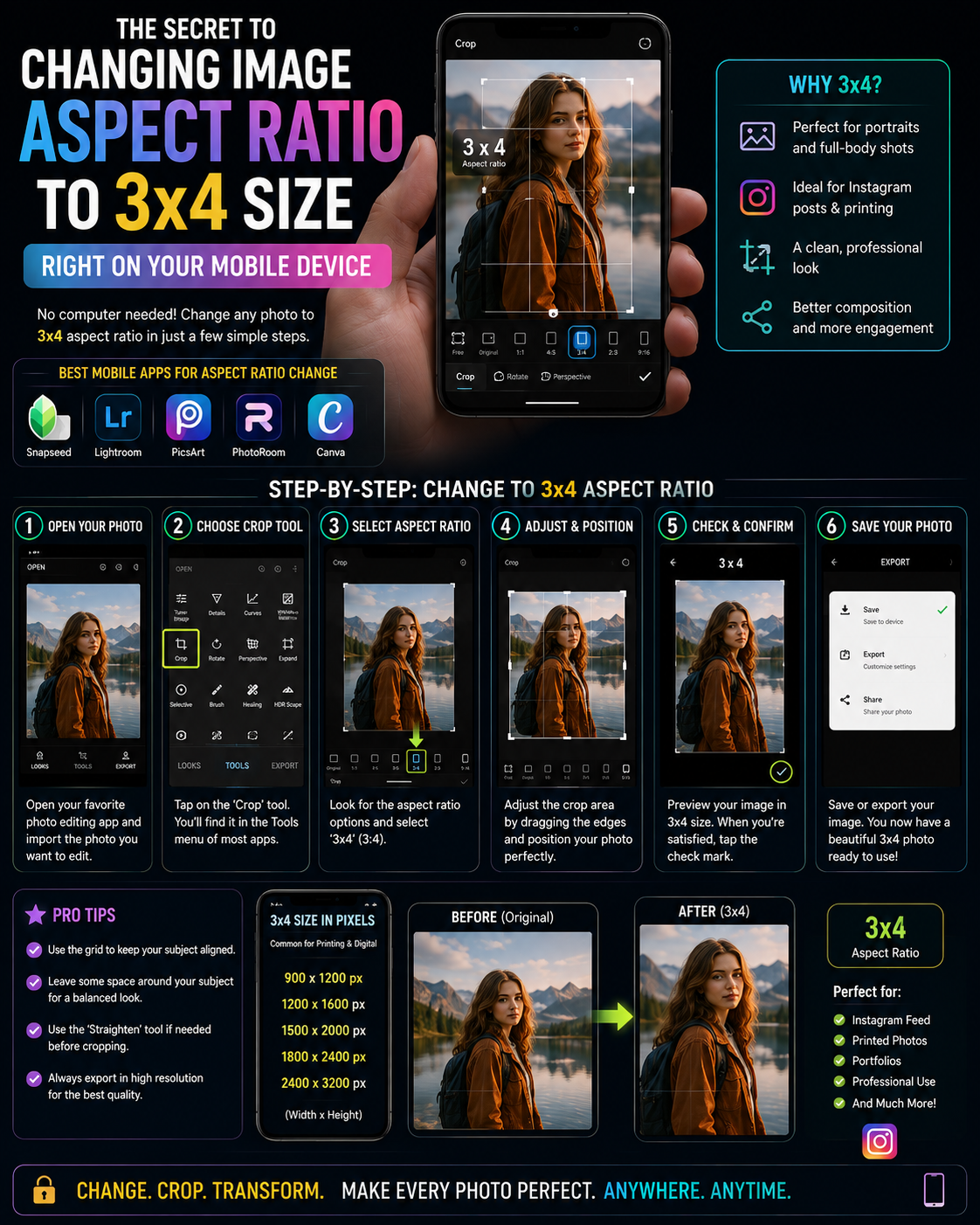
1. The Importance of Mastering How to Adjust Photos to 3x4 on Your Phone
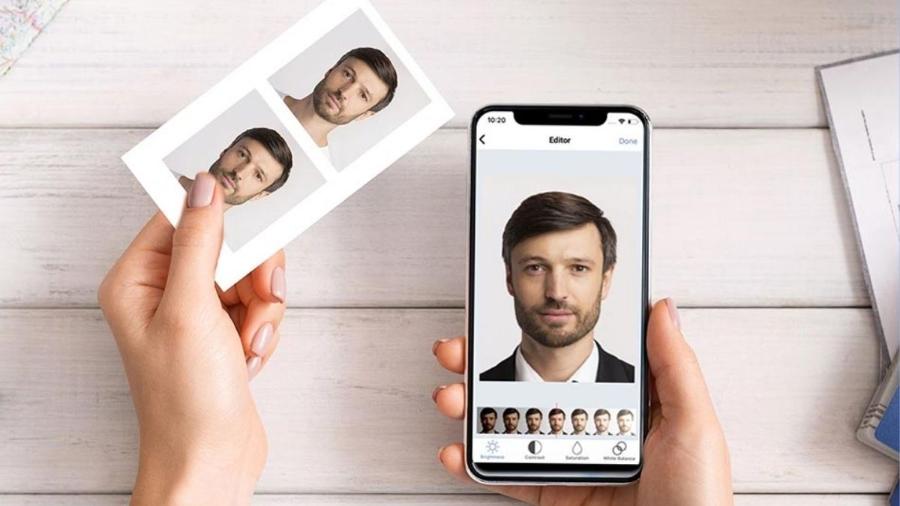
1.1 Meeting the Standard Requirements for Online Documents
Online admissions, exam registration, and job application systems always have extremely strict regulations regarding the format of submitted images. Uploading an incorrectly sized image can lead to automatic rejection or distorting your face due to improper scaling. Understanding image cropping techniques will help you proactively complete your documents legally anytime, anywhere.
1.2 Maximizing Time and Cost Savings in Post-Processing
Instead of traveling to traditional photo studios and waiting for hours to receive your files, you can easily process them yourself at home. The tools available on your smartphone are perfectly accurate in terms of aspect ratio, allowing you to get high-quality digital files in just a few minutes, ready for any urgent tasks.
2. Instructions on How to Adjust Photos to 3x4 Format on iOS Phones
2.1 Using the Default Editor in the iPhone's Photos App
The iOS operating system is renowned for optimizing the user experience through its built-in tools that offer absolute precision. You don't need to download any third-party software to easily adjust your photos to your desired aspect ratio.
-
Step one: Open the Photos app on your device and select the portrait you want to resize. Tap the Edit button in the upper right corner of the screen to activate the advanced editing interface.
-
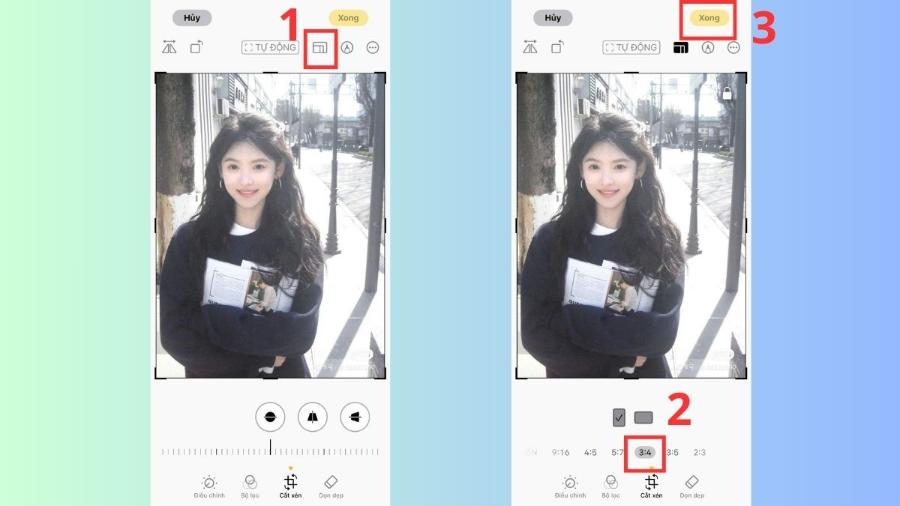
Step two: Look at the toolbar at the bottom and click the Crop/Rotate icon (a square with two arrows around it). Next, click the Aspect Ratio icon (stacked squares) in the upper corner of the screen.
-
Step three: A list of standard aspect ratios will appear at the bottom for you to choose from. Users find and select the 3:4 ratio, then choose portrait mode to create an accurate portrait frame.
-
Step four: Use two fingers to move or zoom in/out of the photo so that the face is centered within the frame. Finally, press the Done button in the bottom right corner to save the result.
2.2 Exploiting Automatic Keyboard Shortcuts for Batch Processing
Using the Shortcuts app on your iPhone offers exceptional convenience for those who need to process multiple photos simultaneously. You can set up an automatic cropping process to a fixed size, freeing up labor and eliminating repetitive manual steps.
3. How to Adjust Photos to 3x4 on Android Phones
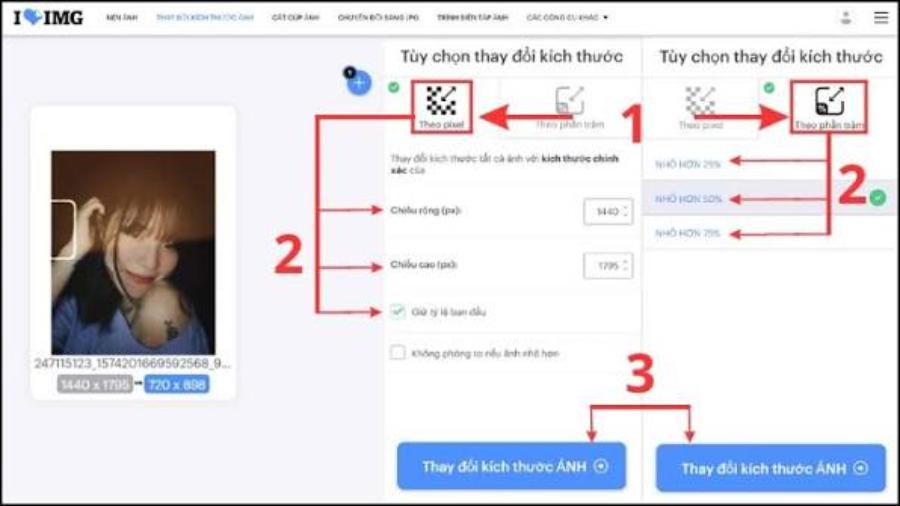
3.1 Image Cropping Feature in Samsung's Gallery
Samsung devices boast a powerful photo editing toolkit integrated into the default Gallery app. The company's algorithms intelligently recognize the scene to help users perfectly crop photos.
-
First step: Access your Gallery, find and open the portrait photo you want to process in full screen. Tap the pen icon (Edit) in the toolbar at the bottom to open the editor.
-
Next, tap the aspect ratio icon (it usually displays "Free" or the original aspect ratio of the image by default). A small menu will appear containing different size standards.
-
Completion step: The user selects the 3:4 symbol in the displayed list. The system will immediately apply a standard grid to the image; you drag the corners to adjust the composition and press Save to finish.
3.2 Implementing Size Changes on Xiaomi and Oppo Devices
Other Android phone brands also equip similar features within their multimedia file management applications. A common feature of these devices is their intuitive interface design; the aspect ratio selection is usually clearly indicated by numbers, allowing even non-expert users to operate it proficiently from the first time.
4. Web appvip.ai - A Technology Platform Supporting Advanced AI-Powered Image Optimization
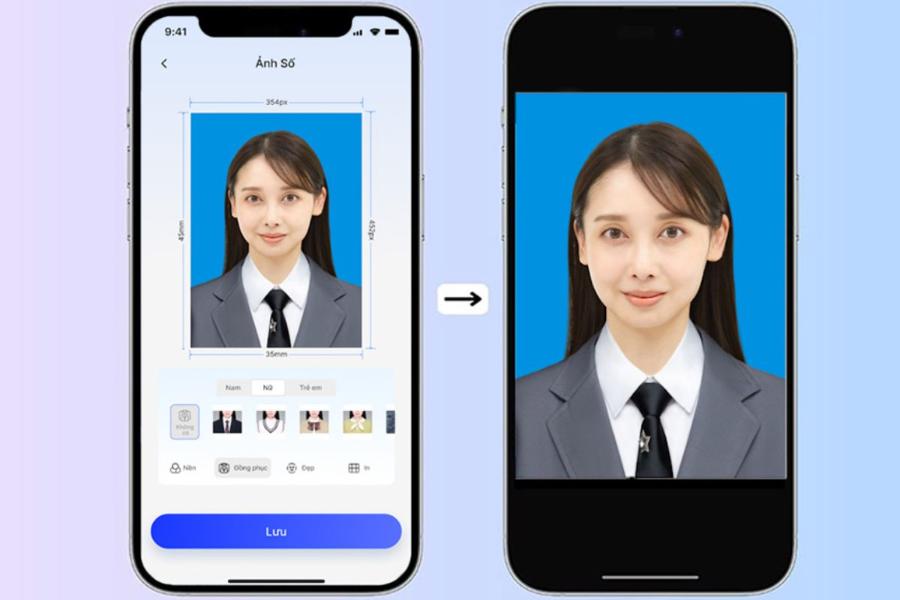
The development of artificial intelligence technology has brought groundbreaking solutions, simplifying previously complex graphic processing procedures. The online web application appvip.ai proudly stands as a leading provider of high-quality, secure, and fully automated online image editing tools. This platform integrates next-generation machine learning algorithms capable of automatically recognizing facial structures, intelligently removing backgrounds, and supporting image conversion to standard ratios like 3x4 or 4x6 with just one file upload. Users don't need to worry about blurry or pixelated images after cropping, as the system automatically optimizes resolution to the highest level. This is undoubtedly a comprehensive technological solution to help you improve work efficiency and create professional-quality profile photos.
5. Using Third-Party Apps to Professionally Edit 3x4 Size Photos
5.1 PicsArt - A Versatile Image Editing Tool on Mobile
PicsArt has always been a top choice for young people who want to deeply customize the technical parameters of their images. This software offers an extremely flexible cropping feature, allowing you to precisely enter the number of pixels or choose from pre-designed templates, including a three-quarters aspect ratio. Besides cropping, users can also utilize features like skin smoothing and background changes to make their ID photos look more glamorous and professional.
5.2 Canva - Designing and Formatting Standard-Size Frames
Canva offers a highly modern approach to image processing using graphic design layouts. You can create a new, proportionally sized design frame, then drag and drop your image into it. This method gives you complete control over the display space, allowing you to easily add borders or insert necessary text without affecting the original image structure.
6. The Process of Shooting and Selecting Original Photos to Ensure Quality After Cropping
6.1 Choosing a Direct and Well-Lighted Shooting Angle
The quality of the final cropped image depends heavily on the preparation of the input file. You should prioritize using photos taken in natural light, with the face directly facing the camera lens. Standing at an angle or shooting in low light will make the resulting 3x4 photo look unprofessional and less likely to be accepted by the relevant authorities.
6.2 Maintain adequate spacing to avoid losing detail when cropping.
A common mistake is taking close-up shots of faces before cropping. When you apply a 3x4 aspect ratio to a photo that's too close, the top of the head or shoulders are easily pushed out of the frame. The best approach is to take a wide-angle shot from the chest up, leaving enough space above the head for easier composition adjustment.
7. Important Notes to Avoid Errors When Editing 3x4 Photos on Your Phone
7.1 Check Resolution and Eliminate Image Distortion After Cutting
Each time you crop an image, a portion of the original image's pixels is completely removed, resulting in a reduction in file size. Users should carefully check the file details after saving to ensure that sharpness is not significantly affected. If you notice blurring, you should use AI-powered image enhancement tools to compensate for the lost pixels.
7.2 Note on Regulations Regarding Background Color for ID Photo
Each type of administrative procedure or job application will have specific requirements regarding the background color (usually blue or white). Before cropping the image to the correct aspect ratio, you should complete the background color correction process to ensure uniformity. Cropping the image first and then changing the background can sometimes reveal jagged edges around the hair and shoulders, making the picture lose its natural aesthetic appeal.
8. Conclusion
Mastering image resizing methods directly on mobile devices offers immense convenience in today's digital age. Built-in tools or intelligent software can help you create a perfectly sized, sharp, and technically sound 3x4 image. Apply the detailed instructions above to quickly and efficiently resize your image files yourself.





















VIP Products








Best Selling Products
Upgrade Genuine Office 365
49 USD
ChatGPT Plus Account (GPT-4)
16 USD
Adobe Premiere Pro Account
99 USD
Upgrade genuine Capture One account
120 USD
Genuine Cheap Canva Pro
39 USD
Autodesk All App Account Copyright
120 USD
Genuine Adobe Illustrator account
99 USD
Freepik Premium Account
59 USD
Copyright Adobe Lightroom Account
59 USD
MidJourney Account
29 USD
Upgrade Duolingo Super
29 USD
Windows 10 & 11 Pro Key
36 USD
Plugin Retouch4me
69 USD
Capcut Pro 1 Year
39 USD
Adobe Photoshop Copyright - Full App
120 USD