Best Selling Products

Plugin Retouch4me
69 USD

Autodesk All App Account Copyright
120 USD

Upgrade Genuine Office 365
49 USD

Upgrade genuine Capture One account
120 USD

MidJourney Account
29 USD

Adobe Photoshop Copyright - Full App
120 USD

Capcut Pro 1 Year
39 USD

Genuine Cheap Canva Pro
39 USD

Copyright Adobe Lightroom Account
59 USD

Adobe Premiere Pro Account
99 USD

Upgrade Duolingo Super
29 USD

Genuine Adobe Illustrator account
99 USD

Windows 10 & 11 Pro Key
36 USD

ChatGPT Plus Account (GPT-4)
16 USD

Freepik Premium Account
59 USD
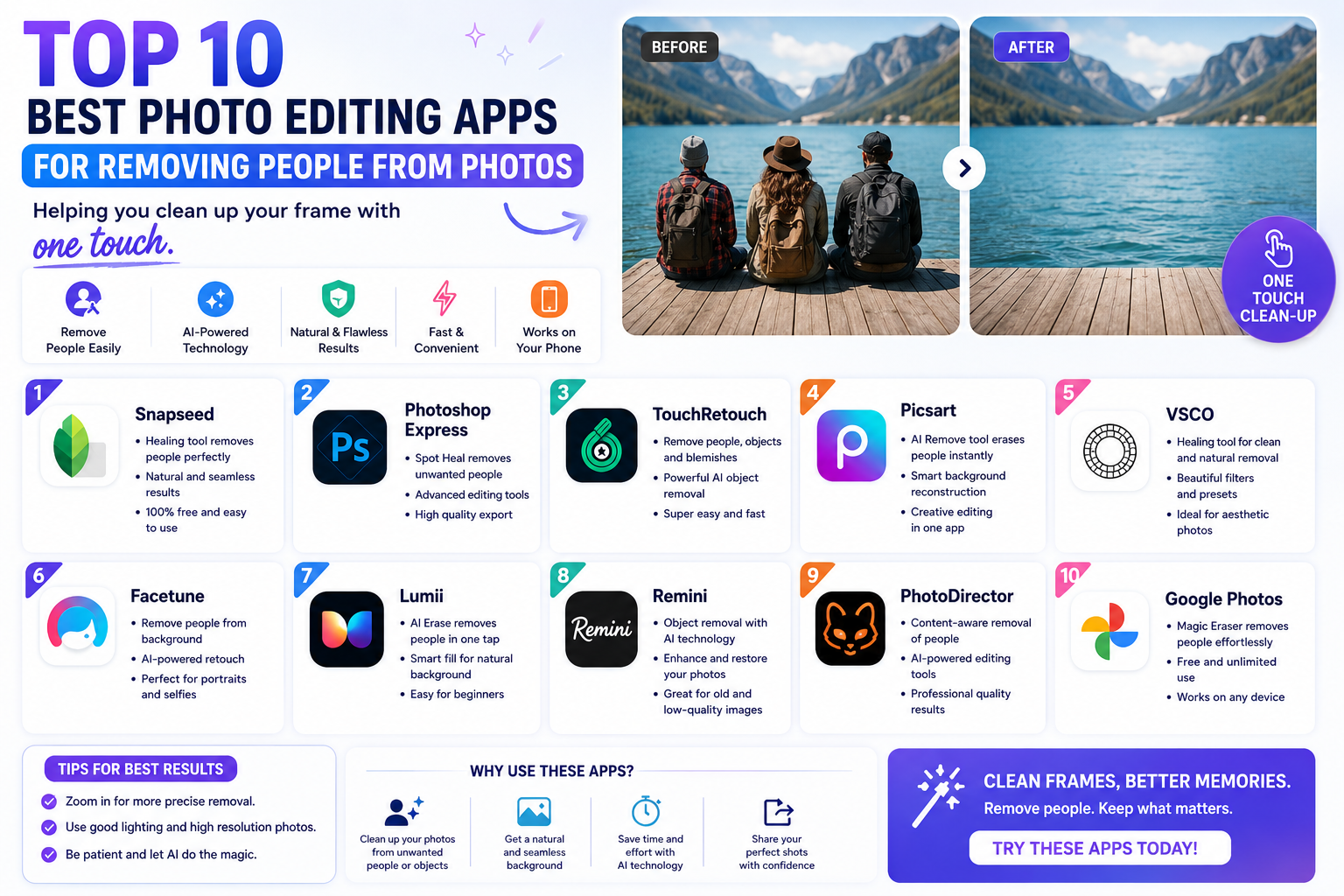
Top 10 best photo editing apps for removing people from photos, helping you clean up your frame with one touch.
Nội dung
Instead of sadly deleting your cherished photos or spending hours tinkering with complex graphic design software on your computer, the solution right now is smart mobile applications.
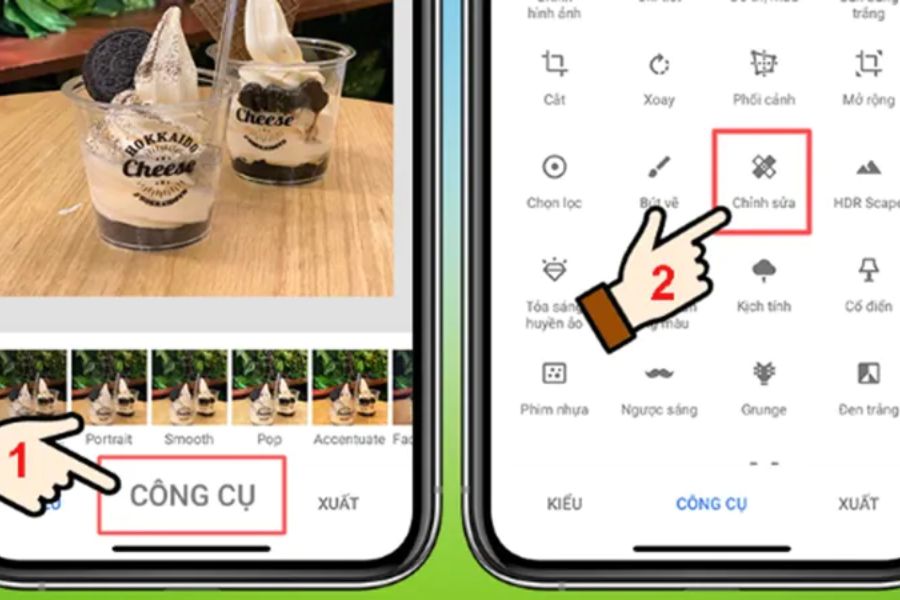
1. Snapseed
If you're looking for a completely free app, free of annoying ads, and from a reputable publisher, Snapseed is the perfect answer. Developed by the giant Google, Snapseed boasts a powerful "Healing" tool, allowing users to select and remove any unwanted details in an instant. Snapseed's strength lies in its versatility; besides cleaning up unwanted elements, you can also deeply manipulate the color, lighting, and contrast of even the smallest areas of your photos. It's dubbed a mini darkroom on mobile, a must-have tool for street or travel photography enthusiasts.
-
Completely 100% free : No hidden features, no need to buy VIP accounts, and no ads ever appear while editing photos.
-
Precision Healing Tool : Allows you to zoom in on the image multiple times to meticulously erase tiny details such as debris and stains.
-
Professional filter system : Integrates a range of artistic color filters such as Vintage, Drama, and Grunge, helping to give photos with people removed more depth.
-
Smart zone editing : The Selective feature helps you rebalance the lighting of the area you just removed so that it blends seamlessly into the overall picture.
-
Save your editing history : You can easily revert to previous steps or undo the delete command if you accidentally make a mistake without having to start over.
2. Snapedit
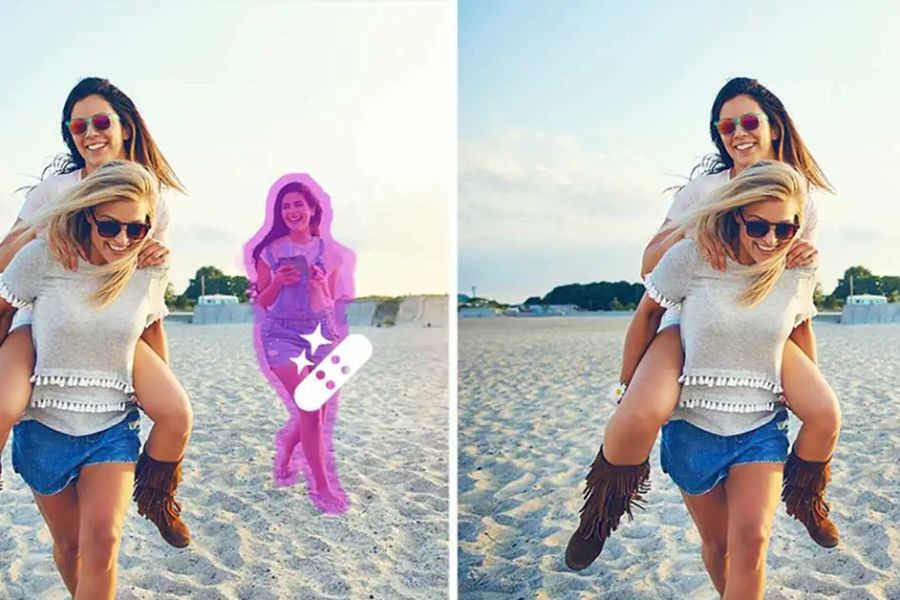
Hailed as one of the smartest apps currently available thanks to its extensive use of AI technology, Snapedit offers an incredibly hands-free photo editing experience. Instead of requiring users to manually draw on the subject they want to remove, Snapedit's AI automatically scans the entire photo, detects all passersby in the frame, and displays them as selection bubbles. All you have to do is look at the list of offending objects found by the AI, lightly tap on the person you want to remove, and press the button; they will instantly disappear as if they never existed. This app is extremely suitable for photos taken at crowded tourist locations such as beaches, pedestrian streets, or scenic spots.
-
Automatic scanning and person detection : No manual swiping required, AI automatically and accurately identifies all objects that wander into your frame.
-
Bulk deletion in a second : You can select multiple passersby at once and delete them all with a single click.
-
Advanced brush technology : Provides additional manual brushes for situations where you want to erase foreign objects that are not human.
-
Modern, ultra-minimalist interface : Designed for busy users, eliminating unnecessary steps to focus entirely on image processing speed.
-
Continuous algorithm updates : The app regularly upgrades its AI to improve its ability to restore the background in complex settings such as ancient architecture or ocean waves.
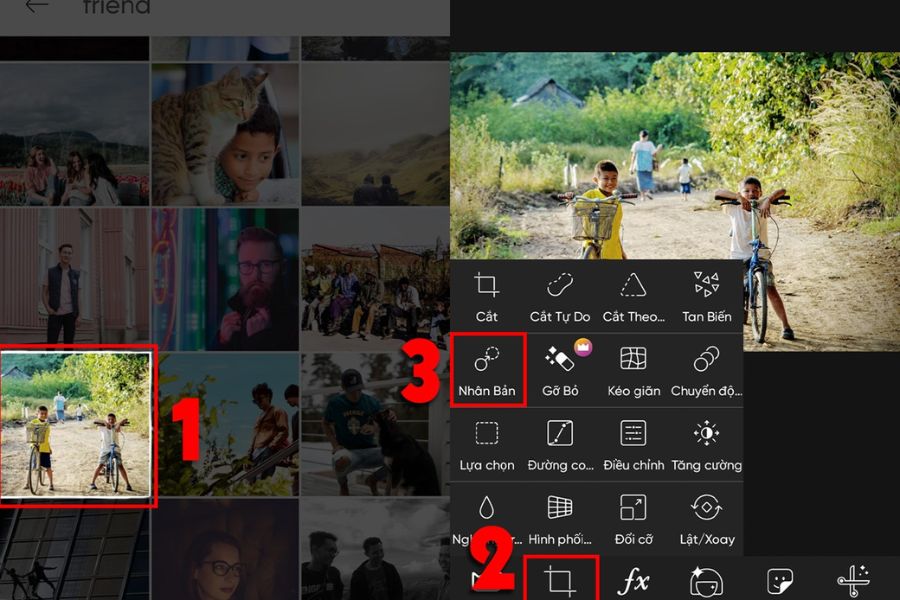
3. Picsart
No one in the world of social media enthusiasts is unfamiliar with Picsart, a versatile photo editing app that combines top-notch creative tools for mobile phones, including the ability to remove unwanted objects or people. With its AI-powered "Remove Object" feature, Picsart allows you to smoothly and precisely remove unwanted objects or people. What sets Picsart apart is that after removing people, you don't just end up with a clean photo; you can further enhance it with lighting effects, add artistic text, clouds, or stickers to transform the flawed photo into a work of art with a strong personal touch.
-
Powerful AI Remove Tool : Capable of removing objects roughly but with extreme finesse, without distorting or altering the background.
-
Huge library of effects and stickers : Easily add layers and unique stickers to cover up overly complex backgrounds that are difficult to remove cleanly.
-
Separate the background and replace the image in an instant : If the scene is too crowded to remove all the people, you can use the feature to completely separate the people and merge them into a new background.
-
A large creative community : You can find photo editing tutorials and artistic ways to remove people from photos with millions of other users worldwide.
-
Supports high-resolution photo editing : Allows you to export sharp, original-quality images, ready to upload to social media without worrying about file size reduction.
4. Meitu
Known as a powerful assistant for girls who love perfect beauty, Meitu is not only a face beautifying app but also boasts an incredibly powerful background removal feature. Meitu's AI-powered "Object Removal" feature is highly optimized for portraits, outdoor photos, or cafe check-in photos. You can easily remove cluttered motorbikes, trash on the floor, or crowds of people in the background to highlight your beautiful figure and face. The perfect combination of skin smoothing, body slimming, and removal of unwanted details makes Meitu an indispensable app on your device.
-
Object removal combined with beauty enhancement : It simultaneously cleans up background clutter while lengthening legs, slimming the waist, and enhancing the main subject's appearance.
-
Smooth, smart eraser brush : The soft brush strokes make erasing passersby in border areas and boundary zones look natural and leave no trace.
-
Asian-style color filters : Offers hundreds of clear, sweet color filters that perfectly complement photos after the background has been cleaned up.
-
Background blur feature : If you don't want to completely blur the background, you can choose to blur it to create an effect similar to that of a DSLR camera.
-
User-friendly Vietnamese interface : All features are clearly and easily localized into Vietnamese, helping users get acquainted with and master the application in just a few minutes.
5. Photoroom
If your needs extend beyond simply editing photos for leisure; you also need it for online sales and banner design, then Photoroom is the ideal choice. This application boasts an incredible ability to separate the subject from the background with pixel-perfect accuracy. When you import a photo into Photoroom, the application scans it and allows you to remove all surrounding people, or completely remove the old background and replace it with a plain background or a luxurious studio background. This is the perfect solution for creating professional avatar photos and clean product images for posting on e-commerce platforms.
-
Precise background separation : Automatically recognizes and separates people from even the most complex backgrounds, including stray strands of hair.
-
Remove people and objects with the magic brush : Quickly eliminate unwanted details around a product or model with just one light swipe.
-
Diverse commercial background library : Provides thousands of ready-made background templates, from minimalist to luxurious, allowing you to integrate your subject after removing the old background.
-
Create natural shadows : After removing the old person or changing the background, the app automatically creates a shadow effect that falls onto the floor, making the photo look incredibly realistic.
-
Batch editing support : Save maximum effort by applying a single formula to remove people and change the background of multiple photos at once.
6. Photodirector
Developed by CyberLink, a giant in the image processing software industry, Photodirector offers a photo editing experience on par with professional computer tools. Its AI-powered object removal feature analyzes the depth of the image, recognizing the distance between objects to provide the most logical way to fill the gaps after removal. Whether the background features complex geometric patterns, continuously shifting colors, or rough stone textures, the application can handle it smoothly without disrupting the image's spatial structure.
-
State-of-the-art AI algorithm : Perfectly recreates complex background textures such as wood grain, building architecture, and tree foliage after removing people.
-
Manual Clone & Stamp Tool : Allows you to select any desirable area of an image to stamp, overlaying it onto areas with unwanted people to control the level of detail as desired.
-
Unique AI animation effect : Transform your photo (after removing people) into a trendy and engaging 3D anime or cartoon drawing.
-
Magical sky editing : Replace gloomy, gray skies with vibrant sunset skies or sunny blue skies after clearing the frame.
-
Export photos in Ultra HD quality : Ensure your photos retain their highest sharpness and quality without degradation when shared on social media.
7. Touchretouch
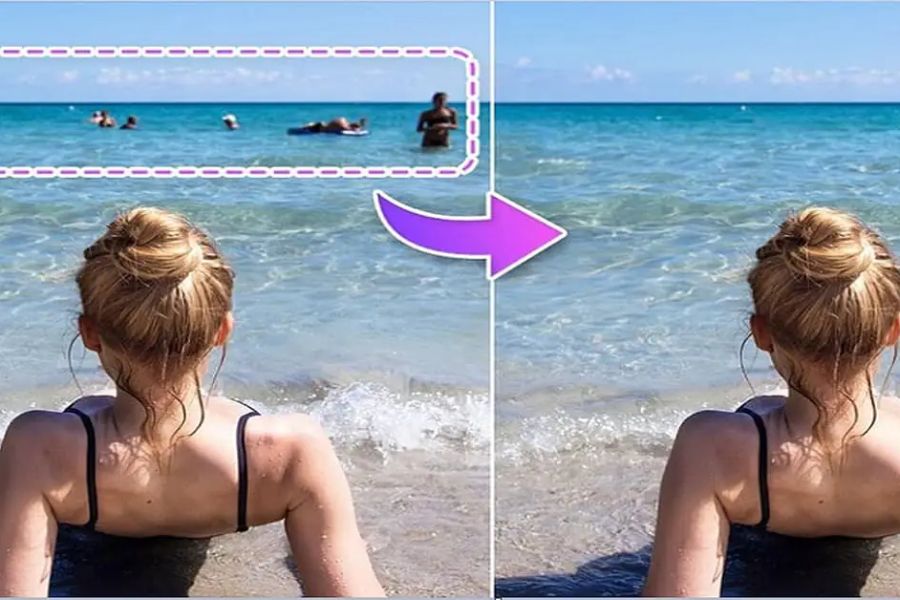
Completely different from those multi-purpose apps that cram in too many features, Touchretouch is a specialized photo editing app for removing unwanted people , born with a single mission: to eliminate all the clutter from your photos. Because of this specialized focus, Touchretouch possesses incredibly precise and effective tools for removing unwanted details. You can remove a passerby with just a light touch, or erase a tangled power line across the sky with a single stroke along the line without having to color in the entire thing. This is a worthwhile app for anyone who demands absolute perfection in every frame.
-
Smart line removal : Simply swipe across the image, and the app automatically recognizes and removes unsightly power lines, fences, and other lines that detract from the photo's appearance.
-
Quick fix tool : Gently touch pimples on your face, stains on your clothes, or litter on the street to make them disappear instantly.
-
Intelligent fill algorithm : The deleted image area is processed smoothly, leaving no blurry streaks or unpleasant jagged edges.
-
Built-in video tutorials : Each feature includes a short, visually illustrative clip to help you grasp the correct operation from the very first use.
-
No image size reduction : The image retains its original specifications, EXIF data, and resolution after saving to your device.
8. Youcam Perfect
Youcam Perfect is a fantastic app that elevates your travel photos to a new level thanks to its incredibly smooth AI-powered person removal tool. This app is extremely sensitive in separating overlapping objects, making it easy to remove someone standing right next to you without affecting your posture or clothing. In addition, Youcam Perfect offers a treasure trove of animated effects, artistic frames, and a very natural body slimming tool to help you retouch your entire photo before uploading it.
-
Precise AI object removal : Cleanly remove pedestrians, traffic signs, or vehicles in the background without leaving any blur.
-
Instafit's smart features : Automatically adjusts aspect ratio and blurs edges so you can easily upload photos to platforms without cropping.
-
Double exposure effect : Allows for the artistic blending of two photos after the background of the main photo has been cleared.
-
Body editing tools : These help subtly adjust waist, hip, and height proportions, resulting in a perfectly balanced physique.
-
Convenient one-touch operation : The optimized interface allows you to complete the process of removing people and applying color filters in less than a minute.
9. Picwish
If you're a busy person or work in image management for fashion shops, Picwish is the optimal solution to save you hours of work thanks to its batch person removal technology. This application focuses heavily on speed and convenience, allowing you to upload dozens of photos at once and let the AI automatically clean up unwanted details using a common formula. Not only does it remove people effectively, Picwish is also a powerful tool for enhancing the sharpness of blurry, old, or grainy photos, ensuring your edited work achieves the highest commercial quality.
-
Batch removal of unwanted details : The ability to process multiple images simultaneously and automatically apply object removal commands saves maximum time.
-
AI-powered image sharpening : Integrates features to improve image quality, transforming blurry, hastily taken photos into sharp, clear images.
-
Download images without compression : We guarantee to maintain the original quality of the image files, without reducing resolution or altering color during export.
-
Intuitive flat interface : Eliminates all unnecessary tools, focusing entirely on core features so even beginners can use it right away.
-
High system stability : The application runs smoothly even on mid-range phones without overheating or crashing.

10. Makaron
Makaron brings a completely new approach to photo editing apps that remove people, thanks to its incredibly intelligent layer-based image processing. When you upload a photo, Makaron not only removes the subject but also automatically separates the image into distinct parts: the main subject, passersby, and the background. This structure allows you to not only remove unwanted people but also choose to keep them while zooming in, zooming out, moving them to a different location, or changing the entire background to a luxurious cityscape without the need for manual cropping.
-
Intelligent automatic layer splitting : AI automatically separates objects in the image into independent layers, making management and editing extremely flexible.
-
Unlimited background removal and replacement : Easily remove unwanted people or transform outdated backgrounds into stylish travel backgrounds readily available in our library.
-
Subject repositioning tool : Allows you to move passersby to a different, less visible corner of the photo instead of completely removing them if you want to preserve the memory.
-
Diverse artistic color filters : Featuring many unique color filters with painting or cinematic styles to make your photos more attractive.
-
Youthful and creative interface : Eye-catching and fun design, maximizing user creativity during image editing.
11. Conclusion
Having a smart photo editing app that removes people from photos on your phone is the golden key to taking control of every frame and preserving beautiful moments while traveling or taking everyday photos. Depending on your needs, whether you prefer a completely free app like Snapseed, a highly automated one like Snapedit, or a more advanced one like TouchRetouch, you can easily transform a flawed, crowded photo into a clean and captivating work of art. Download one of these powerful tools to your device today and be ready to transform all your photos into perfection and confidently share them on social media.





















VIP Products








Best Selling Products
Plugin Retouch4me
69 USD
Autodesk All App Account Copyright
120 USD
Upgrade Genuine Office 365
49 USD
Upgrade genuine Capture One account
120 USD
MidJourney Account
29 USD
Adobe Photoshop Copyright - Full App
120 USD
Capcut Pro 1 Year
39 USD
Genuine Cheap Canva Pro
39 USD
Copyright Adobe Lightroom Account
59 USD
Adobe Premiere Pro Account
99 USD
Upgrade Duolingo Super
29 USD
Genuine Adobe Illustrator account
99 USD
Windows 10 & 11 Pro Key
36 USD
ChatGPT Plus Account (GPT-4)
16 USD
Freepik Premium Account
59 USD