Best Selling Products

Plugin Retouch4me
69 USD

MidJourney Account
29 USD

Upgrade Duolingo Super
29 USD

Upgrade Genuine Office 365
49 USD

Copyright Adobe Lightroom Account
59 USD

Autodesk All App Account Copyright
120 USD

Genuine Adobe Illustrator account
99 USD

Adobe Photoshop Copyright - Full App
120 USD

Adobe Premiere Pro Account
99 USD

Freepik Premium Account
59 USD

Upgrade genuine Capture One account
120 USD

ChatGPT Plus Account (GPT-4)
16 USD

Capcut Pro 1 Year
39 USD

Genuine Cheap Canva Pro
39 USD

Windows 10 & 11 Pro Key
36 USD
Types of Laptops Suitable for Photoshop Graphic Design: A Guide to Choosing Color-Accurate and High-Performance Machines
Nội dung
- 1. Key hardware criteria when choosing a laptop for Photoshop
- Display and color coverage – A critical factor
- Processor (CPU) and AI computing power
- RAM and high-speed SSD storage
- 2. Top laptop lines leading Photoshop trends in 2026
- Apple MacBook Pro Series – The gold standard for Designers
- Dell XPS and Precision – Elegance combined with Windows power
- ASUS ProArt and Vivobook Pro OLED – Cost-effective optimal choices
- 3. Gaming laptops for graphic design – An effective “2-in-1” solution
- Acer Nitro V and Predator Helios – Durable performance
- 4. Notes on graphics cards when using Photoshop
- Dedicated graphics cards and AI processing advantages
- Choosing powerful integrated graphics on Ultrabooks
- 5. Choosing laptops by specific Photoshop needs
- Laptops for photographers and portrait retouching
- Laptops for UI/UX design and flat 2D graphics
- Laptops for digital painting and illustration
- 6. Common mistakes when choosing a graphic design laptop
- Underestimating the cooling system
- Only focusing on 4K resolution
- 7. Essential accessories to enhance Photoshop experience on laptops
- External professional graphic monitor
- Graphics tablet
- 8. Maintenance and software optimization for graphic laptops
- 9. Optimizing Photoshop settings to maximize laptop performance
- Accurate performance preferences setup
- Managing cache and Scratch Disks
- 10. Conclusion
A compiled list of the best laptops for Photoshop graphic design in 2026. A guide to choosing computer configurations with accurate color and strong performance dedicated to professional Designers and Photographers.
1. Key hardware criteria when choosing a laptop for Photoshop
%20(1).jpg)
Before diving into specific models, understanding technical specifications will help you confidently make decisions based on your actual needs.
Display and color coverage – A critical factor
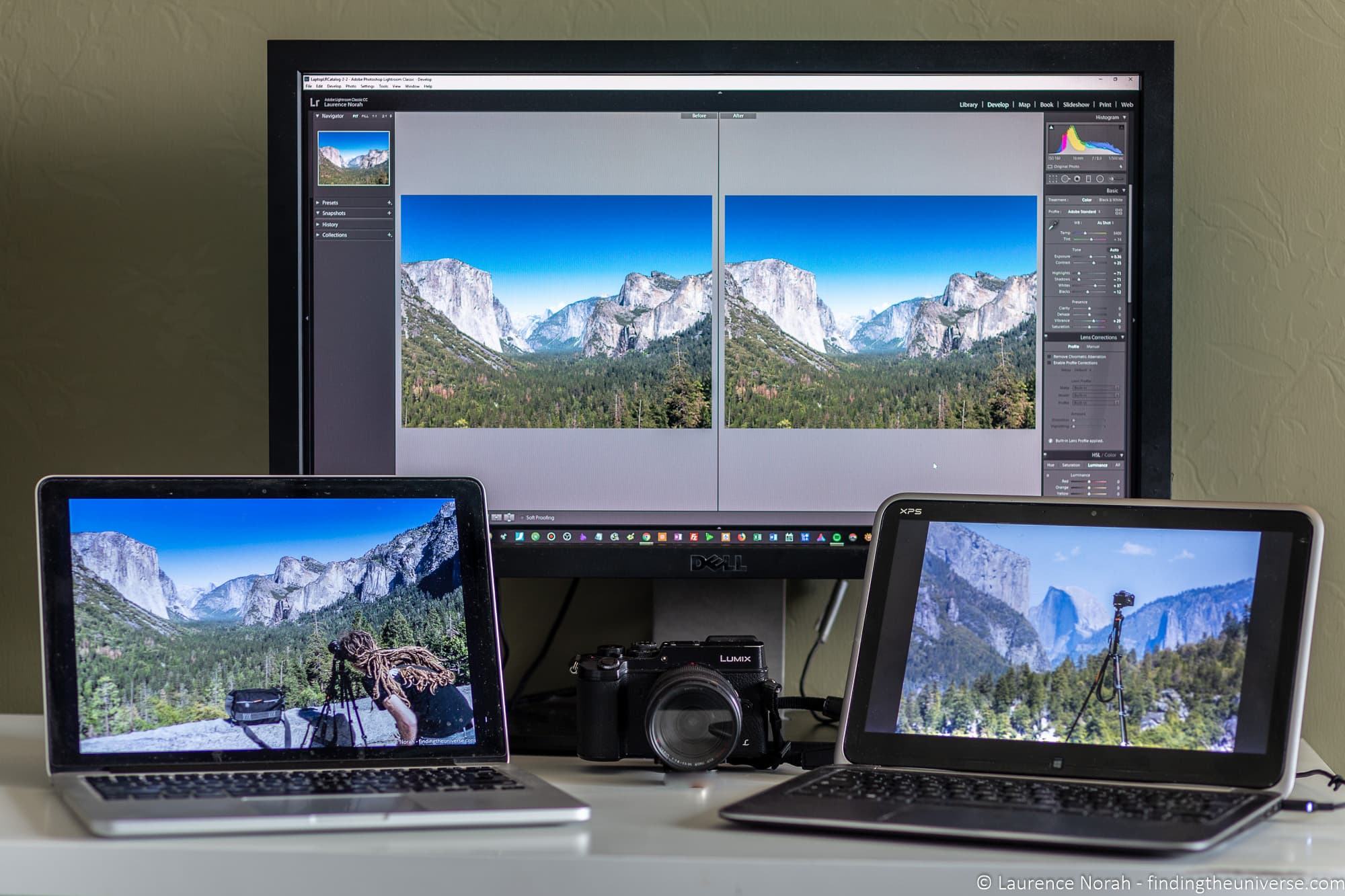
For a graphic designer, the screen is the “window to the soul” of every artwork. You cannot edit colors accurately if the display shows incorrect tones. A good laptop for Photoshop must achieve at least 100% sRGB color coverage. For professional printing projects, machines supporting 100% Adobe RGB or DCI-P3 are preferred. Additionally, IPS or OLED panels with brightness above 400 nits will allow you to work effectively under various lighting conditions without glare or color shifting due to viewing angles.
Processor (CPU) and AI computing power
Photoshop prioritizes single-core processing speed. In 2026, chips integrating NPUs (Neural Processing Units) such as Intel Core Ultra or AMD Ryzen AI are becoming the new standard. These processors not only run heavy filters smoothly but also significantly accelerate Adobe’s AI features. The recommended minimum configuration is Intel Core i5 or Ryzen 5 H-series (high performance) of the latest generation, but for long-term work with heavy RAW files, Core i7 or Ryzen 7 will provide a more stable experience.
RAM and high-speed SSD storage
RAM is the breathing space for Photoshop. With newer software versions, 8GB RAM is no longer sufficient for stable performance. 16GB RAM is the minimum to run Photoshop alongside dozens of browser tabs. If possible, upgrade to 32GB to avoid system freezes. In addition, NVMe SSD storage is essential to launch software within seconds and access data quickly.
2. Top laptop lines leading Photoshop trends in 2026
The laptop market has clearly segmented into specialized lines for content creators with unique design and operating system characteristics.
Apple MacBook Pro Series – The gold standard for Designers
MacBook Pro with M3 and M4 Pro chips remains the most reliable companion for photographers and designers. Its biggest strength is the Liquid Retina XDR display with near-perfect color accuracy out of the box. macOS is highly optimized for Adobe software, allowing smooth operation, low heat, and excellent battery life. This is ideal for those who prioritize stability, portability, and long-term brand value.
Dell XPS and Precision – Elegance combined with Windows power
If you prefer Windows, the Dell XPS 14 or 16 directly competes with MacBook. With ultra-thin InfinityEdge bezels and up to 4K OLED resolution, Dell XPS delivers an impressive visual experience. For more intensive tasks like complex 3D image processing in Photoshop, Dell Precision workstations with dedicated GPUs are irreplaceable thanks to their ability to operate continuously 24/7 without performance degradation.
ASUS ProArt and Vivobook Pro OLED – Cost-effective optimal choices
ASUS has revolutionized the market by bringing color-accurate OLED displays to more affordable devices. The ProArt Studiobook includes unique tools like the ASUS Dial, allowing intuitive brush size adjustments or parameter changes in Photoshop. Meanwhile, the Vivobook Pro OLED is a “best value” option for students or entry-level freelancers, offering excellent displays and strong performance in a youthful design.
3. Gaming laptops for graphic design – An effective “2-in-1” solution
Many people hesitate to use gaming laptops for graphic work due to their aggressive design, but in reality, they offer the best performance-to-price ratio.
%20(1).jpg)
Lenovo Legion and LOQ – Perfect balance
Lenovo Legion Pro 5 or Legion 7 is favored by Designers thanks to excellent cooling systems and high color-accurate displays (usually 100% sRGB or more). Unlike other gaming lines, Legion has a more refined design suitable for client meetings. NVIDIA RTX 4000 series GPUs help significantly in rendering tasks or AI-powered sharpening features in Photoshop.
Acer Nitro V and Predator Helios – Durable performance
The Acer Nitro V 15 or 16 (2026 version) has significantly improved display quality to serve both gaming and design needs. With competitive pricing, you get performance comparable to high-end models, making multi-layer Photoshop projects easier. Predator Helios is for those needing extreme speed with proprietary cooling systems, ensuring stable performance even when handling large design files for extended periods.
4. Notes on graphics cards when using Photoshop
Although Photoshop prioritizes CPU, the role of GPU is increasingly important as Adobe integrates more GPU-based tools.
Dedicated graphics cards and AI processing advantages
Features like Select Subject, Sky Replacement, or noise reduction leverage CUDA cores from NVIDIA or AMD processing units. A laptop with at least RTX 3050 will make zooming, rotating, and applying filters significantly smoother than using only integrated graphics.
Choosing powerful integrated graphics on Ultrabooks
If you prefer portability, new chips like Intel Core Ultra with Intel Arc integrated graphics can handle basic 2D Photoshop tasks. However, ensure sufficient RAM since integrated graphics use shared system memory.
5. Choosing laptops by specific Photoshop needs
Not all Photoshop users have the same needs. Clearly defining your work nature helps avoid overspending or underperformance.
Laptops for photographers and portrait retouching
For photographers, the priority is not a powerful GPU but color accuracy and fast card reading. Displays with Delta E < 2 and deep P3 color support are essential for accurate skin tone editing. Built-in high-speed SD card slots (UHS-II) also speed up workflow significantly after shoots.
Laptops for UI/UX design and flat 2D graphics
UI/UX design requires running multiple tools simultaneously like Photoshop, Illustrator, and browsers. In this case, RAM is the deciding factor. A lightweight laptop with 32GB RAM is more effective than a bulky machine with a powerful GPU but only 16GB RAM. Displays with 16:10 or 3:2 ratios are also preferred for better vertical workspace.
Laptops for digital painting and illustration
Digital artists need laptops with pressure-sensitive touchscreens or compatibility with drawing tablets. Low input lag is essential for smooth strokes. 2-in-1 laptops with 360-degree hinges and stylus support provide flexibility, allowing direct sketching on screen like professional drawing paper.
6. Common mistakes when choosing a graphic design laptop
Many users are attracted by flashy marketing specs and overlook practical factors affecting long-term performance.
(2).jpg)
Underestimating the cooling system
A powerful laptop with poor cooling will quickly suffer from thermal throttling. CPU and GPU speeds will drop to reduce heat, making it slower than weaker machines with better cooling. Photoshop, especially with large files, generates significant heat, so prioritize models with dual fans and visible heat pipes.
Only focusing on 4K resolution
4K resolution on 14–15 inch screens is often unnecessary and drains battery quickly. The difference between 2K and 4K is barely noticeable at that size. Instead, focus on contrast and panel quality. A 2K Mini-LED or OLED display provides deeper blacks and better dynamic range than a cheap 4K LCD.
7. Essential accessories to enhance Photoshop experience on laptops
Even powerful laptops have limitations in workspace and touchpad precision. Accessories help you work more professionally.
External professional graphic monitor
A 27-inch or 32-inch 4K monitor significantly expands creative space. You can place tool panels on the laptop screen and dedicate the main display to artwork. Choose monitors with USB-C (Thunderbolt) for both display and charging through a single cable.
Graphics tablet
Using a mouse in Photoshop is like writing with a stone. A graphics tablet with pressure-sensitive stylus allows more natural and precise editing. This is an essential tool for professional Retouchers and Designers.
8. Maintenance and software optimization for graphic laptops
To keep your laptop performing at its best over time, regular maintenance is necessary.
Hardware cleaning: Dust in cooling fans causes overheating and performance drops. Clean every 6 months.
Setting Scratch Disk in Photoshop: When RAM is full, Photoshop uses storage as temporary memory. Ensure at least 50–100GB free SSD space to avoid “Out of memory” errors.
Updating graphics drivers regularly: NVIDIA and AMD release Studio Drivers optimized for Adobe software, improving stability and performance.
9. Optimizing Photoshop settings to maximize laptop performance
A powerful laptop alone is not enough. Proper configuration turns it into a true graphics powerhouse.
(1).jpg)
Accurate performance preferences setup
In Photoshop settings (Ctrl + K), Performance is the most important section. Allocate about 70%–80% of total RAM. If using a dedicated GPU, ensure “Use Graphics Processor” is enabled. This allows GPU handling of heavy tasks like zooming, rotating, and filters, freeing CPU resources.
Managing cache and Scratch Disks
When working with large multi-layer files, RAM fills quickly. Photoshop then uses storage as Scratch Disk. Choose the fastest SSD and keep at least 100GB free. If your laptop has two drives, use the non-system drive as the primary Scratch Disk for better performance.
10. Conclusion
Choosing a laptop for Photoshop graphic design in 2026 is not just about flashy specifications. It is about finding a device with the most color-accurate display in your budget, an intelligent processor supporting AI features, and a design that fits your workflow. Whether you choose the stability of MacBook, the flexibility of high-end Windows machines, or the raw power of gaming laptops, always prioritize display quality. A good tool cannot replace creativity, but it will be the foundation that helps your artistic ideas become reality in the most professional way possible.





















VIP Products








Best Selling Products
Plugin Retouch4me
69 USD
MidJourney Account
29 USD
Upgrade Duolingo Super
29 USD
Upgrade Genuine Office 365
49 USD
Copyright Adobe Lightroom Account
59 USD
Autodesk All App Account Copyright
120 USD
Genuine Adobe Illustrator account
99 USD
Adobe Photoshop Copyright - Full App
120 USD
Adobe Premiere Pro Account
99 USD
Freepik Premium Account
59 USD
Upgrade genuine Capture One account
120 USD
ChatGPT Plus Account (GPT-4)
16 USD
Capcut Pro 1 Year
39 USD
Genuine Cheap Canva Pro
39 USD
Windows 10 & 11 Pro Key
36 USD