Best Selling Products

Genuine Cheap Canva Pro
39 USD

Windows 10 & 11 Pro Key
36 USD

Adobe Premiere Pro Account
99 USD

Capcut Pro 1 Year
39 USD

Upgrade Duolingo Super
29 USD

Adobe Photoshop Copyright - Full App
120 USD

Plugin Retouch4me
69 USD

Upgrade Genuine Office 365
49 USD

ChatGPT Plus Account (GPT-4)
16 USD

MidJourney Account
29 USD

Upgrade genuine Capture One account
120 USD

Genuine Adobe Illustrator account
99 USD

Autodesk All App Account Copyright
120 USD

Copyright Adobe Lightroom Account
59 USD

Freepik Premium Account
59 USD
What Do You Need to Start a YouTube Channel? Video Production Skills and Equipment for Beginners
Nội dung
- 1. What You Need to Do When Filming Videos for YouTube
- 1.1. Basic Video Shooting Skills
- 1.2. Professional Video Editing Skills
- 1.3. Visual Storytelling Skills
- 1.4. What Makes a Video Get More Views?
- 2. Essential Equipment for Starting a YouTube Channel
- 2.1. Camera or Smartphone
- 2.2. External Microphone
- 2.3. Tripod and Lighting Equipment
- 2.4. Video Editing Software
- 3. Common Mistakes Beginners Make When Shooting and Editing Videos
- 3.1. Shaky Footage, Poor Lighting, and Messy Composition
- 3.2. Overusing Effects During Video Editing
- 3.3. Not Creating a Script Before Filming
A complete overview of the essential skills and tools needed to produce high-quality YouTube videos. This guide helps you understand where to start and how to invest wisely.
1. What You Need to Do When Filming Videos for YouTube
1.1. Basic Video Shooting Skills
Video shooting skills are the most important foundation because the quality of the original footage largely determines the final result. If you shoot well, you will save a significant amount of time and effort during post-production.
Composition is the first element you should understand. The rule of thirds helps place your subject naturally within the frame, creating a balanced and visually pleasing image. In addition, you should pay attention to depth in the frame and avoid backgrounds that are either too flat or too cluttered.
Lighting is an element that can either elevate or ruin a video. When shooting outdoors, natural light is usually the best option, especially during early mornings or late afternoons. When filming indoors, position your light source in front of the subject or at a 45-degree angle to create depth on the face.
Another important factor is camera angles. Instead of filming from a single fixed angle, try varying your shots to make the video more dynamic. For example, combining close-ups, medium shots, and wide shots can make your content more engaging.
.jpg)
Finally, stability is crucial. Use a tripod or hold your camera steadily to avoid shaking. Slow, smooth camera movements create a much more professional appearance.
1.2. Professional Video Editing Skills
Video editing is not simply about cutting and combining clips—it is the art of organizing content. This is where you control the pacing and emotional flow of the viewer’s experience.
A well-edited video removes unnecessary segments, keeps the important parts, and ensures a clear content structure. The editing pace should match the content—not so slow that it becomes boring, and not so fast that viewers struggle to keep up.
Audio plays an extremely important role. You need to ensure that the voice is clear, free from noise, and that background music does not overpower the main content. Balancing volume levels across different sections also makes the video feel more professional.
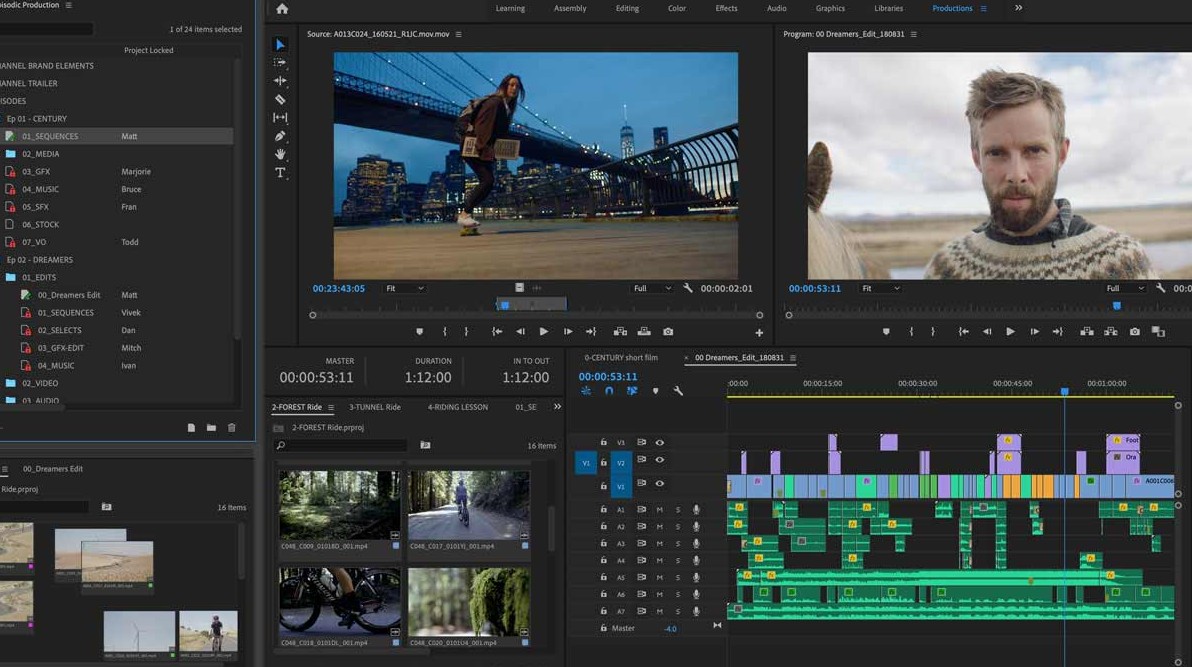
Additionally, you can use text, subtitles, or simple effects to emphasize key points. However, these should be used selectively to avoid making the video look cluttered.
A more advanced skill is color grading. When applied properly, color grading helps create visual consistency and gives your videos a unique style, strengthening channel identity.
1.3. Visual Storytelling Skills
Storytelling is what makes your videos stand out. A video with a clear story is far more likely to retain viewers than one that simply delivers information.
The introduction is extremely important. You need a strong hook to keep viewers watching, whether it is a question, a surprising situation, or a specific benefit.
The main section should be divided into clear points with logical connections. You can use visual examples, real-life situations, or personal experiences to make your content more convincing.
The conclusion should leave an impression. It could be a summary, advice, or a call to action such as subscribing, commenting, or sharing.
When storytelling is done well, viewers feel like they are following a journey rather than simply consuming information.
1.4. What Makes a Video Get More Views?
Content strategy determines whether viewers click on your video or not. You need to understand your target audience and create content that matches their interests and needs.
A high-view video often starts with its title and thumbnail. These two elements determine whether someone clicks on the video. The title should be clear and address a specific problem, while the thumbnail should be visually appealing and spark curiosity.
.jpg)
The content itself must deliver clear value, whether through knowledge, entertainment, or inspiration. Focus on solving a specific problem rather than speaking broadly without direction.
In addition, keyword research and trend analysis are extremely important. Understanding what viewers are searching for makes it easier to create relevant content.
Most importantly, develop your own style. Viewers do not only follow content—they follow your personality and perspective as well.
2. Essential Equipment for Starting a YouTube Channel
2.1. Camera or Smartphone
You do not need expensive equipment to start a YouTube channel. In fact, many successful creators began with nothing more than a smartphone. Modern smartphones support high-resolution video recording (Full HD and 4K), electronic stabilization, and advanced image processing capabilities.
However, what matters most is not the device itself but how you use it. Set an appropriate resolution (typically 1080p or 4K), keep your shots stable, and pay close attention to lighting. Also, clean the camera lens before recording—a small detail that can greatly affect image sharpness.
.jpg)
If your budget allows, you can later upgrade to a mirrorless camera or DSLR for better image quality, especially in low-light environments or when you need professional background blur. However, for beginners, smartphones remain the most cost-effective and convenient option.
2.2. External Microphone
Audio is often underestimated, yet it directly affects the viewing experience. A video with excellent visuals but poor, distorted, or noisy sound will quickly drive viewers away.
An external microphone can significantly improve audio quality. Lavalier microphones are a great choice for talking-head videos, vlogs, or interviews. They are compact, easy to use, and deliver clear sound.
If you film in a studio or fixed environment, you may consider a condenser microphone or shotgun microphone for more professional audio recording. You should also pay attention to your recording environment and avoid places with excessive noise or echo.
.jpg)
A useful tip is to always test your audio before recording. This helps prevent unnecessary mistakes and saves time during editing.
2.3. Tripod and Lighting Equipment
A tripod is one of the most basic yet essential pieces of equipment. It keeps your camera stable, prevents shaking, and maintains consistent framing throughout the recording process. For talking-head videos, livestreams, or solo filming, a tripod is almost indispensable.
.jpg)
Choose a tripod that offers adjustable height, solid construction, and easy angle adjustments. If you use a smartphone, adding a phone mount can increase convenience.
Lighting is another key factor that determines the perceived quality of a video. A well-lit video with even lighting and minimal harsh shadows appears much more professional. For indoor recording, ring lights or LED panels are popular options for illuminating the face.
You should also learn basic lighting setups, such as placing the light source directly in front of you or at a 45-degree angle to create depth. Avoid placing strong light behind the subject, as this can make the subject appear too dark.
2.4. Video Editing Software
If you are a beginner, you can start with easy-to-use mobile apps such as CapCut, InShot, or VN Video Editor. These applications feature intuitive interfaces and simple workflows, making them ideal for quick editing, adding music, inserting text, and applying basic effects.
For computer users, software like Filmora or Movavi Video Editor provides a good starting point. These programs are beginner-friendly yet powerful enough to create high-quality YouTube videos.
As your skills improve and your projects become more professional, you may move on to Adobe Premiere Pro, Final Cut Pro, or DaVinci Resolve. These advanced tools offer professional color grading, audio processing, and sophisticated visual effects.
.jpg)
Start by mastering the basics such as trimming clips, adjusting audio, adding text, and inserting background music. Once comfortable, you can explore advanced techniques such as color grading, transition effects, and creating custom intros for your channel.
3. Common Mistakes Beginners Make When Shooting and Editing Videos
3.1. Shaky Footage, Poor Lighting, and Messy Composition
These are basic mistakes that frequently appear in beginner videos. Shaky footage can make viewers uncomfortable, while poor lighting reduces image quality and makes videos appear less professional.
Messy composition, cluttered backgrounds, or unclear subjects also reduce the overall visual appeal. These problems usually result from inadequate preparation before filming.
To avoid these issues, carefully check your framing, lighting, and equipment before pressing the record button. Spending just a few extra minutes preparing can dramatically improve video quality.
3.2. Overusing Effects During Video Editing
Another common mistake is using too many visual effects. Many beginners believe that more effects make a video look better, but in reality, the opposite is often true.
Excessive transitions, animated text, sound effects, or color filters can make videos feel chaotic and unprofessional. Viewers become distracted and find it harder to focus on the content itself.
An important principle is “less but better.” Effects should only be used when they genuinely support the content, such as emphasizing a key point or creating a logical transition.
3.3. Not Creating a Script Before Filming
Many beginners shoot videos spontaneously without a clear plan. This often leads to content that feels unfocused, lacks structure, and struggles to keep viewers engaged.
Without a script, filming and editing also take longer because you end up dealing with unnecessary footage and logical inconsistencies.
To solve this, you do not need a highly detailed script, but you should create a clear outline: what you will say in the introduction, the key points of the main content, and how the video will conclude. This helps you film faster, edit more efficiently, and maintain a clear structure.
Creating YouTube videos requires a combination of skills, mindset, and tools. You do not need to be perfect from the beginning, but you do need to understand the core elements to develop in the right direction. Start with the basics, practice consistently, and continuously improve. With persistence, your video quality will steadily increase, and your opportunities for success on YouTube will continue to grow.





















VIP Products








Best Selling Products
Genuine Cheap Canva Pro
39 USD
Windows 10 & 11 Pro Key
36 USD
Adobe Premiere Pro Account
99 USD
Capcut Pro 1 Year
39 USD
Upgrade Duolingo Super
29 USD
Adobe Photoshop Copyright - Full App
120 USD
Plugin Retouch4me
69 USD
Upgrade Genuine Office 365
49 USD
ChatGPT Plus Account (GPT-4)
16 USD
MidJourney Account
29 USD
Upgrade genuine Capture One account
120 USD
Genuine Adobe Illustrator account
99 USD
Autodesk All App Account Copyright
120 USD
Copyright Adobe Lightroom Account
59 USD
Freepik Premium Account
59 USD