Best Selling Products

Upgrade Genuine Office 365
49 USD

Autodesk All App Account Copyright
120 USD

ChatGPT Plus Account (GPT-4)
16 USD

Freepik Premium Account
59 USD

Genuine Cheap Canva Pro
39 USD

Windows 10 & 11 Pro Key
36 USD

Upgrade genuine Capture One account
120 USD

Adobe Photoshop Copyright - Full App
120 USD

Genuine Adobe Illustrator account
99 USD

Adobe Premiere Pro Account
99 USD

MidJourney Account
29 USD

Copyright Adobe Lightroom Account
59 USD

Upgrade Duolingo Super
29 USD

Plugin Retouch4me
69 USD

Capcut Pro 1 Year
39 USD
What Is Camtasia for Video Creation? Pros and Cons You Should Know
Nội dung
- 1. What is Camtasia software?
- 2. What are the advantages of Camtasia?
- 3. What are the disadvantages of Camtasia?
- 4. Main features of Camtasia
- 4.1 High-quality screen recording
- 4.2 Simple and easy video editing
- 4.3 Dynamic video effects and transitions
- 4.4 Convenient audio editing and background removal
- 4.5 Diverse resource library and flexible video exporting
- 5. Should you upgrade Camtasia for video creation?
- 6. Conclusion
Amid the wide variety of tools available on the market, Camtasia is considered a suitable choice for both beginners and office workers thanks to its ability to record screens, edit videos, and add effects all within a single platform.
1. What is Camtasia software?
Camtasia is screen recording and video editing software developed by TechSmith, helping users create videos quickly right on their computers. With Camtasia for video creation, you can easily record every action on your screen, create lectures, software tutorials, online meeting recordings, or knowledge-sharing videos with just a few simple steps. The software supports both Windows and MacOS, making it suitable for a wide range of users from students and office workers to content creators.
What makes Camtasia for video creation highly popular is its user-friendly interface, ease of use, and built-in convenient editing tools. After recording your screen, users can cut and merge videos, add text, effects, audio, or zoom into important content all within the same software without needing extra applications. Thanks to its fast workflow, easy learning curve, and time-saving capabilities, Camtasia is suitable for both beginners and those who need to create professional videos in a simple way.
%20(1).jpg)
2. What are the advantages of Camtasia?
It is no coincidence that Camtasia is chosen by many users for screen recording and both basic and advanced video editing. The biggest strength of Camtasia for video creation lies in its simplicity while still integrating all essential features for modern users. Whether you are a teacher creating online lessons, an office worker producing tutorial videos, or a beginner learning video editing, Camtasia delivers an easy-to-use experience that saves considerable time. Its intuitive interface, drag-and-drop tools, and fast processing allow users with little technical knowledge to still create professional-looking videos.
User-friendly interface, easy to use: Camtasia is optimized for beginners, making it quick to learn and far less complicated than many professional editing programs.
Supports high-quality screen recording: This is the standout feature of Camtasia for video creation, allowing users to record every action on their computer for tutorials, software reviews, or online lessons.
Integrated video editing tools: After recording, you can trim videos, add text, effects, audio, or zoom into important sections without using additional software.
Smooth smartphone syncing through Fuse: The Fuse app allows quick transfer of files from smartphones to Camtasia, making the workflow much more convenient.
Automatic audio balancing: Camtasia can adjust volume levels across recordings to prevent sudden loud or soft audio that may annoy viewers.
Supports both Windows and MacOS: Users can flexibly work across different platforms without worrying about compatibility issues.
3. What are the disadvantages of Camtasia?
Although it offers many strong advantages, Camtasia for video creation still has a few limitations users should consider before choosing it. Since it integrates many screen recording and editing functions, the software requires relatively stable computer specifications to run smoothly. In addition, Camtasia is not a browser-based tool, so users must download and install it. For those frequently editing large video files or working on low-spec laptops, lagging may sometimes occur during use.
No direct web-based support: Users must install the software instead of using it online like some modern video editing tools.
Requires relatively high system specifications: Camtasia performs best on devices with at least 16GB RAM, especially when processing high-resolution or long videos.
Low-spec machines may lag: On weaker office laptops, the editing experience may not always feel smooth.
Free version has limited features: Some important Camtasia video creation features such as advanced recording or high-quality export are restricted unless upgraded to the paid version.
Not ideal for professional filmmaking: While it works well for basic editing and tutorial videos, Camtasia lacks some advanced tools required by professional editors.
%20(1).png)
4. Main features of Camtasia
4.1 High-quality screen recording
One of Camtasia’s standout features is its sharp and highly flexible screen recording capability. With Camtasia for video creation, users can record the full screen, selected areas, or even a single application window depending on their needs. It also supports webcam recording, microphone audio capture, and system sound recording simultaneously, making tutorials, online teaching, and product reviews much more professional and intuitive.
4.2 Simple and easy video editing
One reason beginners choose Camtasia for video creation is its highly user-friendly editing interface. Users can easily trim videos, drag and drop content, add images, text, or audio with just a few basic actions. Even with little editing experience, you can quickly create polished videos thanks to its intuitive timeline system. This makes Camtasia suitable for study, work, and personal content creation.
4.3 Dynamic video effects and transitions
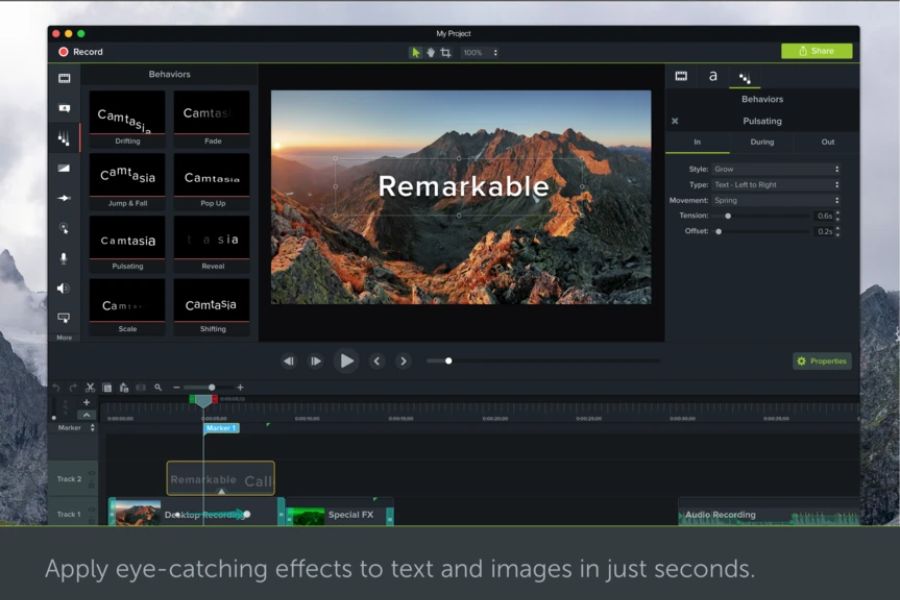
To make videos more engaging, Camtasia for video creation includes many professional effects that make content less monotonous and improve viewing experience. Users can add smooth transitions, animate text, insert annotations, or use zoom features to highlight key on-screen content. Cursor effects are especially useful for tutorials, making each step easier to follow.
4.4 Convenient audio editing and background removal
Camtasia does not focus only on visuals but also provides strong audio editing features to improve professionalism. The software can automatically balance volume, reduce noise, and add fade in/fade out effects for smoother sound playback. Additionally, its Green Screen background removal feature is a major plus, allowing users to quickly remove video backgrounds without needing overly complex editing software.
4.5 Diverse resource library and flexible video exporting
Another feature that makes Camtasia for video creation highly rated is its extremely convenient built-in resource library. The software provides many video templates, background music tracks, icons, and effects that save significant design time. It also supports importing PowerPoint slides directly and turning presentations into professional videos in just a few steps. Once completed, users can export videos in high quality up to 4K and easily share them to YouTube, Google Drive, or other platforms while maintaining sharp visual quality.
%20(1).jpg)
5. Should you upgrade Camtasia for video creation?
If you regularly use Camtasia for lessons, tutorial videos, or building YouTube content, upgrading to the paid version is definitely worth considering. The premium version unlocks stronger features such as stable screen recording, high-quality exports, a richer effects library, and more professional editing support. Especially as Camtasia for video creation becomes increasingly popular, investing in a fully featured tool can save significant time in content production.
In addition to basic features, Camtasia now also integrates many AI-powered tools to speed up video creation, generate captions, process audio, and optimize content more professionally. Therefore, if you frequently create training videos, sales videos, or educational content, the upgraded version will provide a noticeably smoother and more optimized experience.
Currently, AppVip.ai is a trusted destination for many users upgrading Camtasia thanks to reasonable pricing, fast registration, and support for various AI tools on a single platform. Besides AI solutions for image generation, video editing, and AI chat, AppVip.ai is also ideal for content creators who want to optimize costs while still having complete tools for work. For anyone looking to seriously invest in long-term Camtasia video creation, this is a highly worthwhile option for upgrading and experiencing the full version.
%20(1).jpg)
6. Conclusion
It is clear that Camtasia for video creation is a suitable solution for those who need screen recording and simple video editing software that is easy to use while still meeting basic needs such as tutorials, online lessons, product reviews, or YouTube content. Although it does not offer as many advanced features as premium filmmaking software, Camtasia still stands out thanks to its friendly interface, quick workflow, and time-saving convenience for new users. If you are looking for an easy-to-learn, easy-to-use tool that supports effective video creation, Camtasia is certainly worth trying.





















VIP Products








Best Selling Products
Upgrade Genuine Office 365
49 USD
Autodesk All App Account Copyright
120 USD
ChatGPT Plus Account (GPT-4)
16 USD
Freepik Premium Account
59 USD
Genuine Cheap Canva Pro
39 USD
Windows 10 & 11 Pro Key
36 USD
Upgrade genuine Capture One account
120 USD
Adobe Photoshop Copyright - Full App
120 USD
Genuine Adobe Illustrator account
99 USD
Adobe Premiere Pro Account
99 USD
MidJourney Account
29 USD
Copyright Adobe Lightroom Account
59 USD
Upgrade Duolingo Super
29 USD
Plugin Retouch4me
69 USD
Capcut Pro 1 Year
39 USD