Best Selling Products

Plugin Retouch4me
69 USD

Adobe Photoshop Copyright - Full App
120 USD

Autodesk All App Account Copyright
120 USD

Capcut Pro 1 Year
39 USD

ChatGPT Plus Account (GPT-4)
16 USD

MidJourney Account
29 USD

Genuine Adobe Illustrator account
99 USD

Upgrade Duolingo Super
29 USD

Genuine Cheap Canva Pro
39 USD

Adobe Premiere Pro Account
99 USD

Freepik Premium Account
59 USD

Copyright Adobe Lightroom Account
59 USD

Windows 10 & 11 Pro Key
36 USD

Upgrade genuine Capture One account
120 USD

Upgrade Genuine Office 365
49 USD
What Is Microsoft Azure? An Overview of the World''s Leading Cloud Computing Platform
Nội dung
- 1. What is Cloud Computing?
- 2. Why is Cloud Computing Important?
- 3. What is Microsoft Azure?
- 4. How does Azure work?
- 4.1 Architecture and Core Components
- 4.2 How Users Operate Azure
- 5. Services Provided by Azure
- 5.1 Infrastructure As A Service (IaaS)
- 5.2 Platform As A Service (PaaS)
- 5.3 Software As A Service (SaaS)
- 5.4 Network Services
- 5.5 Storage Services
- 5.6 Azure Key Vault
- 5.7 Azure Active Directory
- 5.8 Azure Firewall
- 5.9 Azure CLI
- 5.10 Azure Monitor
- 6. Benefits of Microsoft Azure
- 6.1 Scalability
- 6.2 Cost Savings
- 6.3 Global Scope
- 7. Basic Guide to Using Microsoft Azure
- 7.1 Step 1: Registration
- 7.2 Step 2: Using the License
- 7.3 Step 3: Cost Estimation
- 8. Summary
In the era of digital transformation, cloud computing has become the core foundation that helps businesses operate flexibly, save costs, and scale quickly.

1. What is Cloud Computing?
Cloud computing is a model that provides IT resources such as servers, storage, databases, networks, software, and analytical services over the Internet, instead of requiring investment in and operation of on-premise physical infrastructure. Instead of purchasing servers, setting up their own data centers, and maintaining a technical team to service the systems, businesses can lease resources from cloud providers and only pay for what they actually use.

Essentially, cloud computing operates on the principle of virtualization, allowing a physical system to be shared into multiple independent virtual resources, serving many different users simultaneously. This enables cloud providers to optimize hardware utilization while offering customers flexible access to resources that can be scaled up or down in minutes.
There are three most common cloud service models today: infrastructure as a service, platform as a service, and software as a service. Each model suits a different need, from purely renting virtual servers to directly using pre-packaged applications. Furthermore, cloud computing is deployed in various forms such as public cloud, private cloud, and hybrid cloud, depending on the security, data control, and budget requirements of each organization.
2. Why is Cloud Computing Important?
Cloud computing is not simply a passing technological trend, but has become a vital element for the competitiveness of businesses in the digital age. First and foremost, the cloud eliminates the burden of initial investment in hardware, which often requires significant costs and lengthy deployment times. Businesses can launch a technology project in just a few hours instead of weeks or months as would be the case when building physical infrastructure.
Secondly, the cloud offers virtually unlimited scalability. When demand spikes, such as during major promotions or peak business seasons, the system can automatically scale resources to meet the load, then scale back when demand drops. This helps businesses avoid wasting resources or, conversely, experiencing processing capacity shortages at critical times.
Third, cloud computing fosters innovation. Major cloud providers are constantly developing cutting-edge tools in artificial intelligence, machine learning, big data analytics, and the Internet of Things, allowing businesses to access cutting-edge technology without having to build it from scratch. Finally, the cloud also enhances disaster recovery and data security, thanks to distributed backup systems across multiple geographic regions and sophisticated security layers that few businesses can independently implement.
3. What is Microsoft Azure?
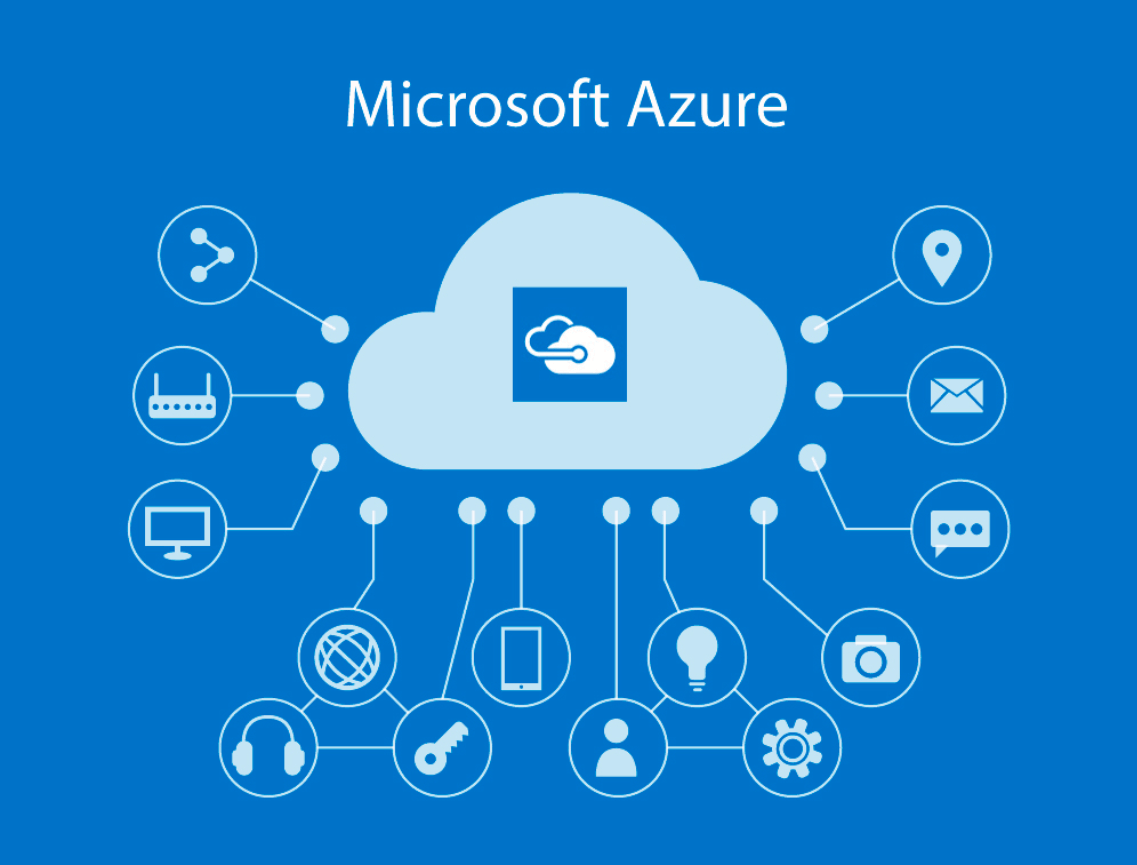
Microsoft Azure is a cloud computing platform developed and operated by Microsoft, providing a diverse ecosystem of services for building, deploying, and managing applications through a network of data centers located in multiple regions worldwide. Simply put, Azure is a comprehensive system of cloud computing services, allowing individuals and organizations to lease IT resources according to their actual needs instead of owning and operating their own infrastructure.
Historically, this platform was first announced by Microsoft in 2008 and officially launched in 2010 under the name Windows Azure. In 2014, the product was rebranded as Microsoft Azure, as it is known today, to accurately reflect the expanded scope of services beyond the Windows operating system, including open-source platforms and technologies.
Azure offers all three fundamental cloud service models: infrastructure as a service, platform as a service, and software as a service. This allows it to serve a wide range of customers, from developers needing a flexible application deployment environment to businesses requiring pre-packaged office and management applications. Azure currently supports hundreds of different services across various fields such as computing, networking, storage, databases, artificial intelligence, big data analytics, security, and the Internet of Things, and is compatible with a diverse range of programming languages, frameworks, and development tools, including both proprietary Microsoft solutions and popular open-source technologies.
4. How does Azure work?
4.1 Architecture and Core Components
Microsoft Azure's architecture is built on a vast network of data centers located in various geographic regions around the world. Each large geographic region is typically divided into multiple availability zones, which are clusters of data centers independent of power, cooling systems, and networking. This organization helps Azure ensure high availability, because if one availability zone experiences a problem, the remaining zones can continue to operate normally without service interruption.
At its core, Azure uses virtualization technology to share physical hardware resources—including processors, memory, storage drives, and network bandwidth—into multiple independent virtual resources. This allows the system to allocate virtual machines, containers, or services on demand in seconds, while ensuring secure isolation between different customers sharing the same physical infrastructure.
Above the virtualization infrastructure layer are pre-built service layers, including computing services, storage services, networking services, database services, and specialized platform services such as artificial intelligence or big data analytics. The entire system is connected and coordinated through a central management layer, allowing users to monitor, configure, and supervise their resources uniformly, regardless of their geographical location.
4.2 How Users Operate Azure
Users interact with Azure primarily through three main channels. The most popular channel is the Azure Portal, an intuitive web interface that allows users to create, configure, and manage resources with a few clicks, making it suitable for beginners. In addition, Azure CLI and Azure PowerShell provide command-line capabilities, enabling system administrators and DevOps teams to automate repetitive tasks through scripting.
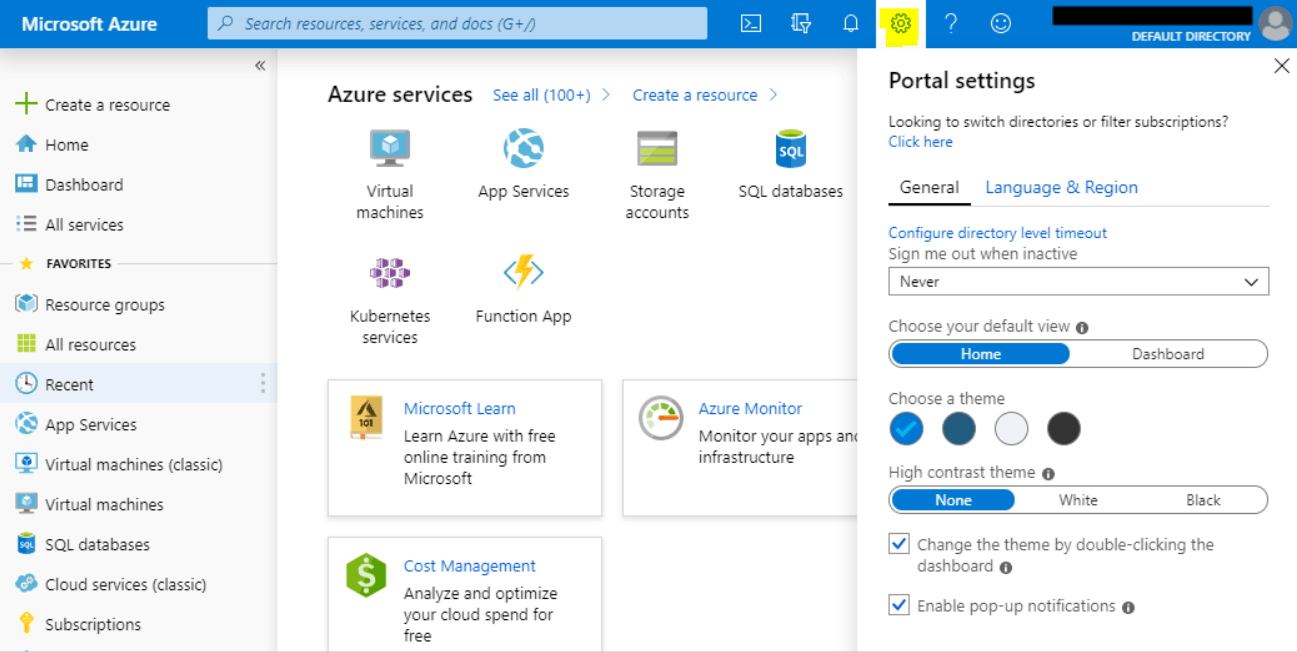
Additionally, Azure supports the REST API, allowing developers to directly integrate Azure resource management into their own applications or automated workflows. For organizations deploying infrastructure using a code model, Azure Resource Manager allows defining the entire resource structure using template files, making deployment consistent, version-controlled, and easily reusable across different environments.
Regardless of the channel used, users operate within the concept of subscriptions, which are packages that define the scope of payment and access to resources. Within each subscription, resources are organized into resource groups, helping to group related components together for easier lifecycle management, permission allocation, and systematic cost tracking.
5. Services Provided by Azure
Microsoft Azure currently offers hundreds of different services, categorized into groups to serve the diverse technology needs of businesses. Below are some of the most typical service groups that users frequently encounter when starting to use this platform.
5.1 Infrastructure As A Service (IaaS)
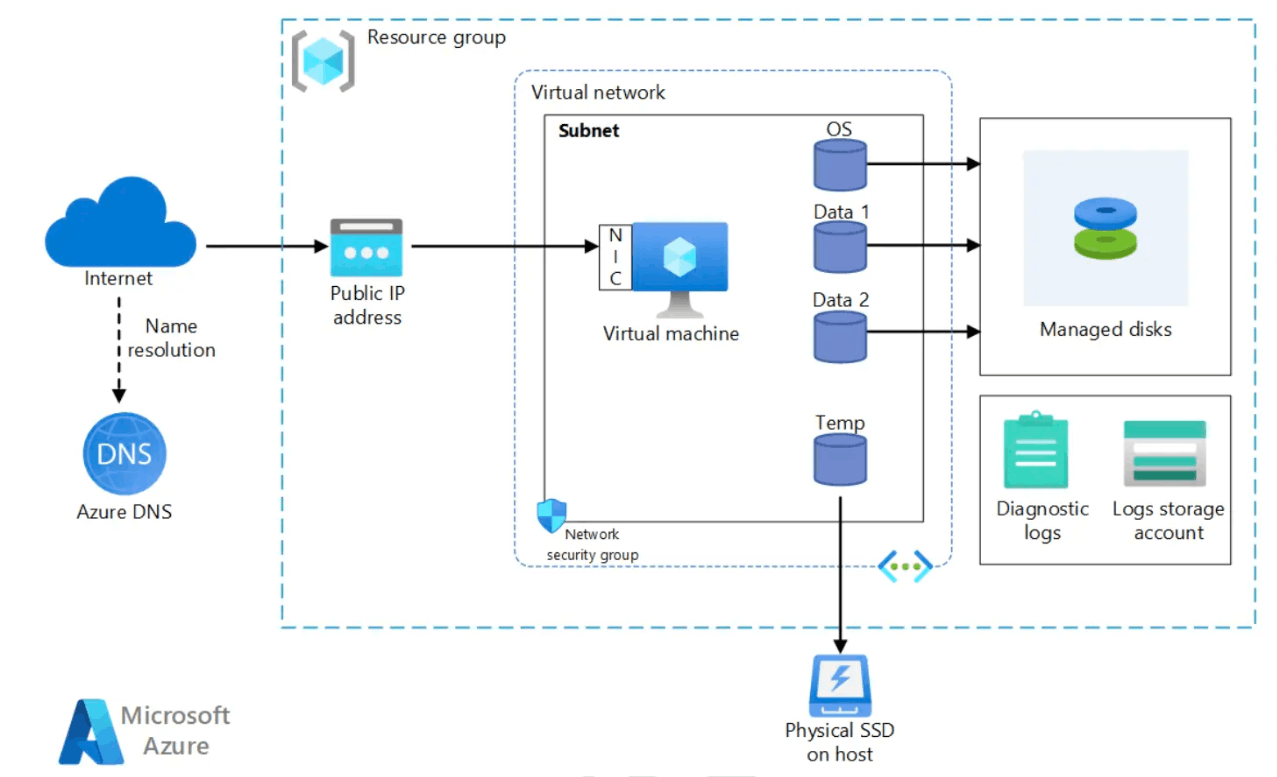
With its infrastructure-as-a-service model, Azure provides direct access to fundamental computing resources such as virtual machines, storage drives, networking, and operating systems. The most prominent service in this group is Azure Virtual Machines, which allows users to create virtual servers running Windows, Linux, or any other operating system configuration in minutes. Users have full control over the operating system, software installation, and application configuration on top of the virtual machine, similar to running a traditional physical server, but without the worry of maintaining the underlying hardware.
5.2 Platform As A Service (PaaS)
The Platform as a Service (PPS) model provides a pre-managed environment for application development and operation, allowing developers to focus entirely on writing source code without worrying about configuring the underlying server or operating system. Azure App Service is a prime example, enabling the rapid building and deployment of web applications, mobile backend applications, or APIs with flexible scalability.
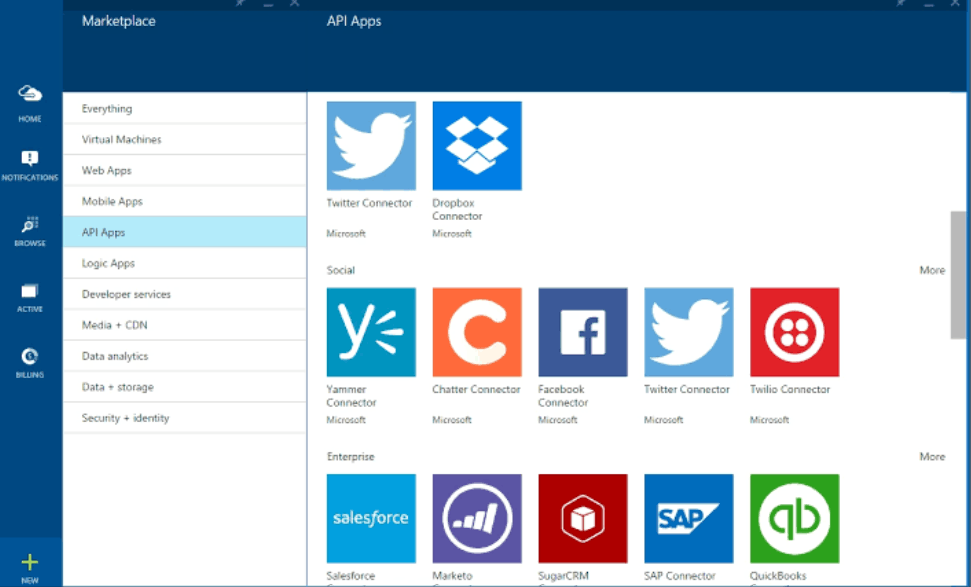
Furthermore, Azure Functions offers a serverless computing model, meaning users only need to provide the code to handle the logic, and Azure will automatically allocate resources to execute the code based on trigger events. Regarding databases, Azure provides several managed options such as Azure SQL Database for relational databases, Cosmos DB for applications requiring globally distributed databases, and Azure Database for MySQL for systems familiar with open-source code.
5.3 Software As A Service (SaaS)
At the highest level, the software-as-a-service model provides complete, ready-to-use applications via a browser or client application, without requiring users to install or maintain any technical components. Office 365, which includes familiar tools like Teams, SharePoint, OneDrive, Outlook Exchange, Word, and PowerPoint, is a prime example of the cloud-based office productivity suite within the Microsoft ecosystem.
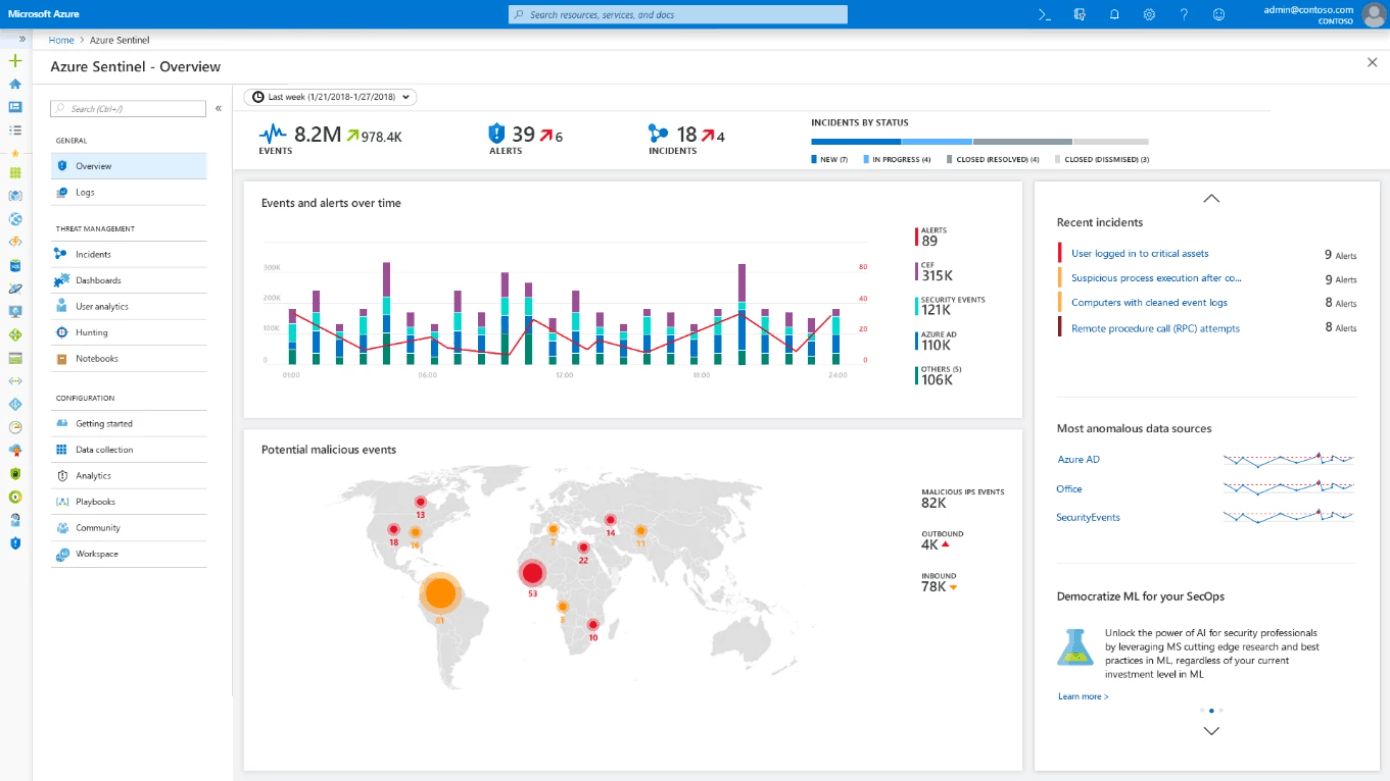
Additionally, Dynamics 365 provides business applications for customer relationship management and enterprise resource planning, while Azure Sentinel serves as a cloud-based security information and event management solution that helps organizations detect and respond to cybersecurity threats intelligently and promptly.
5.4 Network Services
Azure's network services team is responsible for connecting resources and routing traffic between the Azure data center and the enterprise's on-premises environment. Azure Virtual Networks allows the establishment of virtual private networks within the Azure infrastructure, enabling resources such as virtual machines to communicate securely with each other, with the public internet, or with the enterprise's internal network, by dividing them into subnets and routing traffic similarly to a traditional network.
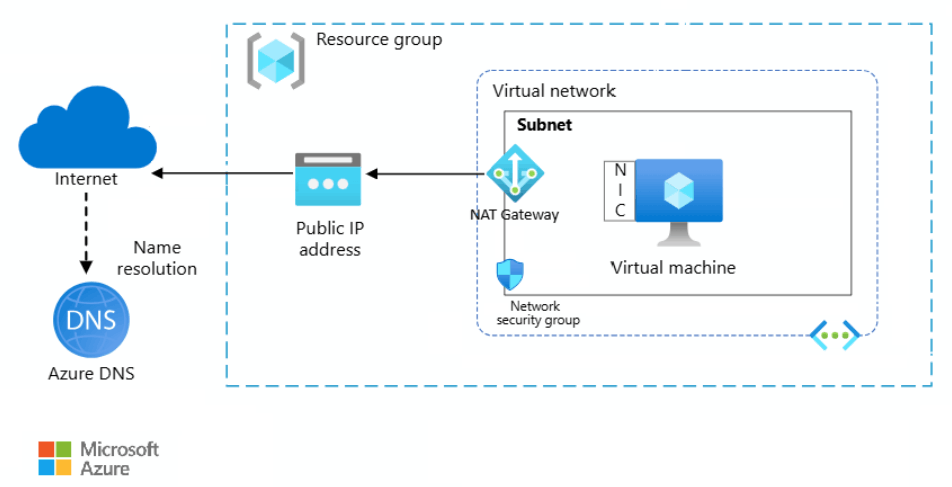
In addition, Azure offers Azure CDN, which helps deliver content to end users with low latency thanks to a network of servers located in many strategic locations globally, along with Azure Express Route, which allows for the establishment of private, stable connections between on-premises infrastructure and the Microsoft cloud without going through the public internet.
5.5 Storage Services
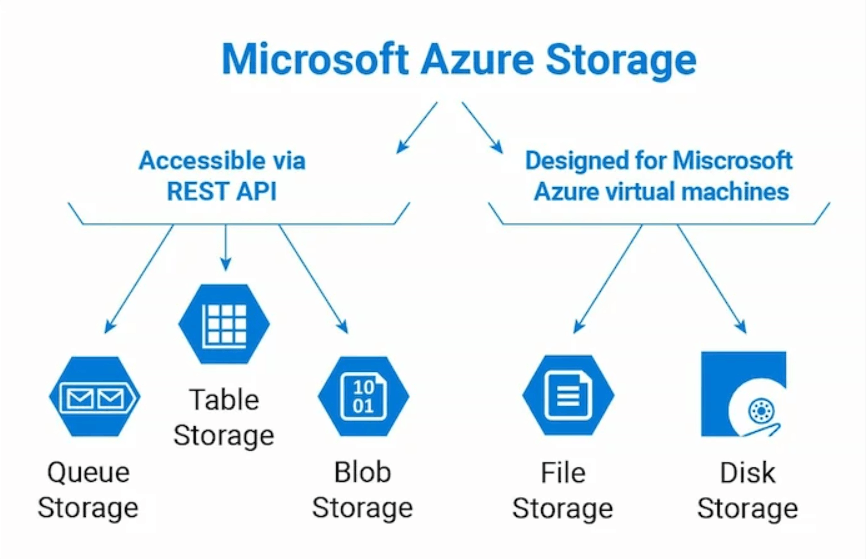
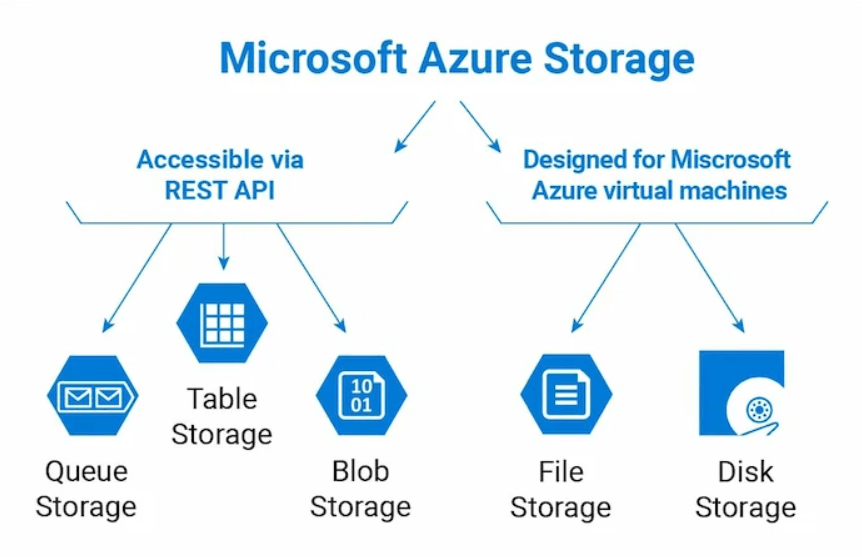
Azure offers a variety of storage services to meet diverse needs. Disk Storage is used for storing data associated with virtual machines, allowing users to choose between traditional mechanical hard drives or solid-state drives depending on performance requirements. Blob Storage is optimized for storing large volumes of unstructured data, including text, images, videos, and binary data. Additionally, File Storage provides managed file storage accessible via standard file sharing protocols, while Queue Storage is used for storing and transmitting messages between components in a distributed system.
5.6 Azure Key Vault
Azure Key Vault is a cloud-based confidential storage service that helps organizations securely store and tightly control access to tokens, passwords, digital certificates, encryption keys, and other sensitive information. This service offers centralized management, granular role-based access control, and comprehensive logging, enabling businesses to effectively protect sensitive information in the cloud environment. It also supports integration with hardware security modules to provide an additional layer of physical protection for the most critical data.
5.7 Azure Active Directory
Azure Active Directory is a cloud-based identity and access management service that plays a central role in controlling who is allowed to log in and use an organization's resources. It provides unified identity management, single sign-on allowing users to access multiple applications with a single authentication, multi-factor authentication for enhanced security, along with device management, privileged identity management, and role-based access control, creating a comprehensive identity protection system for the entire organization.
5.8 Azure Firewall
Azure Firewall is a cloud-based network security service designed to protect Azure resources such as virtual machines, virtual networks, and applications from unauthorized access or malicious traffic. It's built with high availability, virtually unlimited scalability across the cloud, and the ability to configure traffic filtering rules for both incoming and outgoing traffic. Furthermore, Azure Firewall integrates continuously updated threat intelligence and the ability to apply centralized, unified security policies across the entire organization's infrastructure.
5.9 Azure CLI
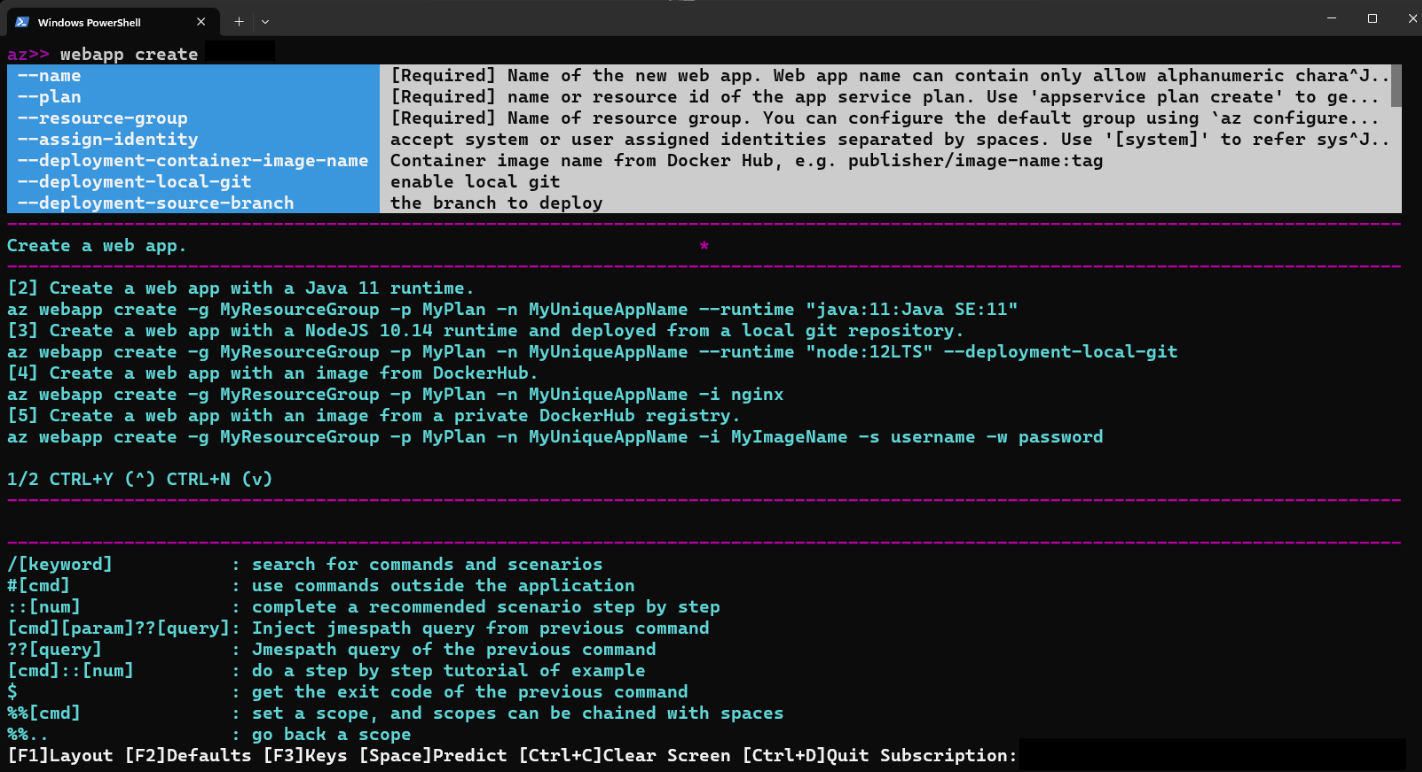
The Azure command-line interface, often abbreviated as Azure CLI, provides users with the ability to access and manipulate Azure resources through text commands instead of a graphical interface. This tool enables the automation of administrative tasks using scripts and operates reliably across various operating systems such as Windows, macOS, and Linux. Azure CLI supports comprehensive management of various resource types such as virtual machines, storage services, and databases, along with secure authentication mechanisms via service principal, providing a consistent experience when working with all Azure services. Thanks to these features, Azure CLI has become an indispensable tool for advanced users and DevOps teams looking to automate infrastructure management processes.
5.10 Azure Monitor
Azure Monitor is a comprehensive monitoring service for resources and applications running on Azure. It continuously monitors resource performance, health, and usage, and analyzes system metrics and logs to aid in troubleshooting. Azure Monitor also allows for the creation of automated alerts and notifications based on user-defined criteria, along with the ability to visualize monitoring data through intuitive charts and dashboards. Furthermore, it supports integration with existing on-premises monitoring tools, helping businesses maintain a unified view of their entire IT system.
6. Benefits of Microsoft Azure
6.1 Scalability
One of Azure's most notable benefits is its ability to flexibly scale resources according to actual needs. With this model, organizations only pay for the resources they actually use, and can scale up their systems during peak periods and downsize when demand decreases. A prime example illustrating this benefit is video streaming platforms, which often use cloud services to deliver content to millions of users simultaneously. During holidays, when viewership spikes, these platforms can purchase additional storage and processing power to meet demand, and then cut costs during periods of lower traffic.
6.2 Cost Savings
Azure's pay-as-you-use model significantly reduces the cost burden for businesses. Because there's no upfront infrastructure investment, organizations only pay for the resources they actually consume. The flexible scalability also helps optimize IT budgets. Furthermore, Azure provides a total cost of ownership calculator and transparent pricing, allowing managers to proactively forecast and control costs before deploying any service.
6.3 Global Scope
Thanks to its data center network located in multiple geographic regions around the world, Azure allows businesses to deploy applications closer to end users, significantly improving response times and user experience. Simultaneously, this global infrastructure provides effective disaster recovery and redundancy options, helping businesses maintain continuous operation even when a region experiences unexpected disruptions.
7. Basic Guide to Using Microsoft Azure
7.1 Step 1: Registration
To begin using Azure, users need to visit Microsoft's official website and register an account. After completing the registration process, the system will provide login information including a username and password, allowing access to the Azure Portal to start using services such as virtual machines, databases, and storage.
During the registration process, users should be aware of two main billing methods. The first is pay-per-use, allowing account activation and service usage without any total cost limit; invoices are aggregated and paid at the end of each billing cycle. The second is a fixed-cost method, where users pay a certain amount upfront and receive a notification when their limit is nearing its end so they can renew their service.
7.2 Step 2: Using the License
After completing registration, users will receive login information including a username and password to access the Azure admin portal. From the admin interface, users can go to the Subscriptions section to check and manage their subscriptions, add new users to the system, assign appropriate roles to each team member, and invite other Microsoft accounts to participate in resource management.
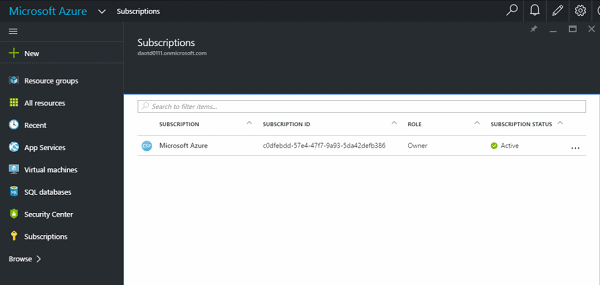
When creating a new service, users simply select the "create new" icon on the interface, then choose the desired service type, such as a virtual machine, and select an available operating system template to complete the creation process. The entire process is designed to be intuitive, allowing even those new to Azure to quickly deploy their first service.
7.3 Step 3: Cost Estimation
Before officially deploying any service, users should use Microsoft's official cost calculator to estimate the associated costs. This tool allows users to add each planned service to the calculation list, then select the geographic region, configuration type, and corresponding service package. Based on these selections, the system automatically calculates and displays the estimated cost, giving businesses a clear picture of the budget needed before officially launching the system. Users can continue adding more services to the spreadsheet to obtain the most comprehensive and complete cost picture for their entire solution.
8. Summary
Microsoft Azure has established itself as one of the world's leading cloud computing platforms, thanks to its diverse service ecosystem, robust global infrastructure architecture, and flexible capabilities to meet the needs of businesses of all sizes. From basic infrastructure services like virtual machines and storage to advanced platform solutions for application development, identity management, security, and system monitoring, Azure provides organizations with a comprehensive set of tools to build and operate modern technology solutions.
Choosing the right service to suit actual needs, along with a clear understanding of pricing and operation, will help businesses maximize the value this platform offers while effectively controlling technology investment costs. For organizations new to Azure, thoroughly reviewing official documentation, testing basic services before scaling up, and considering partnerships with experienced implementation partners are essential steps for a smooth and effective digital transformation journey on the cloud.





















VIP Products








Best Selling Products
Plugin Retouch4me
69 USD
Adobe Photoshop Copyright - Full App
120 USD
Autodesk All App Account Copyright
120 USD
Capcut Pro 1 Year
39 USD
ChatGPT Plus Account (GPT-4)
16 USD
MidJourney Account
29 USD
Genuine Adobe Illustrator account
99 USD
Upgrade Duolingo Super
29 USD
Genuine Cheap Canva Pro
39 USD
Adobe Premiere Pro Account
99 USD
Freepik Premium Account
59 USD
Copyright Adobe Lightroom Account
59 USD
Windows 10 & 11 Pro Key
36 USD
Upgrade genuine Capture One account
120 USD
Upgrade Genuine Office 365
49 USD