Best Selling Products

Capcut Pro 1 Year
39 USD

MidJourney Account
29 USD

Genuine Adobe Illustrator account
99 USD

Upgrade genuine Capture One account
120 USD

Plugin Retouch4me
69 USD

Adobe Photoshop Copyright - Full App
120 USD

Autodesk All App Account Copyright
120 USD

Copyright Adobe Lightroom Account
59 USD

Upgrade Genuine Office 365
49 USD

Upgrade Duolingo Super
29 USD

Freepik Premium Account
59 USD

Genuine Cheap Canva Pro
39 USD

ChatGPT Plus Account (GPT-4)
16 USD

Windows 10 & 11 Pro Key
36 USD

Adobe Premiere Pro Account
99 USD
What is the Windows Operating System? Its Development Journey and the Most Memorable Versions
Nội dung
- 1. Learn about the Windows operating system.
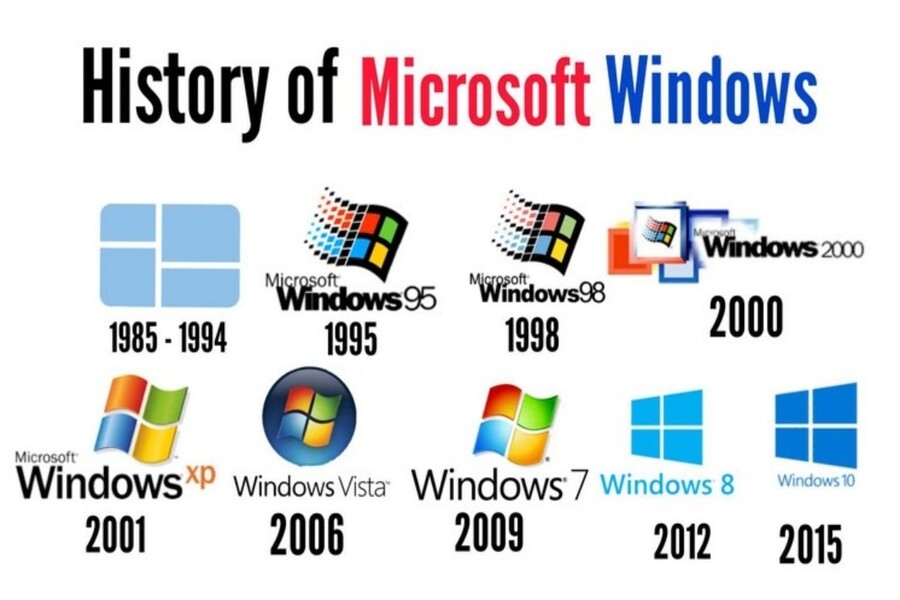
- 2. The history of Windows
- 3. The interface of the Windows operating system
- 4. Strengths of the Windows operating system
- 4.1 Widespread availability and high compatibility
- 4.2 Supports most games and applications
- 4.3 Touch support from Windows 8
- 5. Limitations of the Windows operating system
- 5.1 Common pirated Windows
- 5.2 Objectives of hackers and viruses
- 6. Previous versions of Windows
- 6.1 Windows XP and earlier
- 6.2 Windows XP
- 6.3 Windows 7
- 6.4 Windows 8 and 8.1
- 6.5 Windows 10
- 6.6 Windows 11
How has Windows evolved from its early versions to the present day? This article helps you understand the nature of the Windows operating system, its key milestones, and why it continues to dominate the personal computer market.
What is the Windows Operating System? Its Development Journey and the Most Memorable Versions
Operating systems serve as the "backbone" of every computer device. Among them, Windows is the most familiar name to billions of users worldwide. From the first desktop computers to laptops, tablets, and hybrid devices, Windows has become an icon inextricably linked to the history of personal computing. However, not everyone fully understands what the Windows operating system is, how it came about, what changes it has undergone, and why it still dominates the computer operating system market today. This article will help you gain a comprehensive understanding of the Windows operating system, from its basic concepts, history, interface characteristics, strengths and limitations, to a detailed analysis of all Windows versions to date.
1. Learn about the Windows operating system.
Windows is an operating system developed by Microsoft, designed to manage and coordinate all the operations of a personal computer. Simply put, Windows acts as a bridge between hardware and the user, allowing users to control their computer through a graphical interface instead of using complex command lines.
Technically, Windows is responsible for managing system resources such as RAM, processor, hard drive, peripherals, and running processes. At the same time, this operating system provides an environment for software, applications, and games to run smoothly. Without an operating system, a computer is essentially just a collection of components that cannot be utilized effectively.
The defining characteristic of Windows lies in its intuitive, user-friendly graphical interface, suitable for a wide range of users. From its earliest versions, Microsoft aimed to popularize personal computing, making the technology accessible and usable even for non-technical users.
.jpg)
In the field of design and content creation, Windows also serves as the primary platform for a wide range of graphic design, photo editing, video editing, and 3D design software. From Adobe Photoshop, Illustrator, and After Effects to technical tools like AutoCAD, 3ds Max, and Blender, Windows provides strong and stable support for all of them.
2. The history of Windows
The history of Windows is closely linked to the development of personal computers and the rise of Microsoft as a giant in the technology industry. Before Windows, users primarily interacted with computers through the MS-DOS operating system, which required text-based commands, posing many difficulties for those without technical knowledge.
Recognizing the potential of graphical user interfaces (GUIs), Microsoft began developing Windows as an interface layer running on top of MS-DOS. The first version of Windows was introduced in 1985, ushering in a new era for personal computing.
Over the decades, Windows has continuously improved, evolving from a simple graphical interface into a complete, independent, and powerful operating system. Each version of Windows not only reflects advancements in hardware technology but also demonstrates changes in how people interact with computers.
From the 1990s onwards, Windows began to dominate the market thanks to its ability to run on a wide range of hardware configurations and its close collaboration with computer manufacturers. This helped Windows become the default choice on most personal computers sold globally.
.jpg)
3. The interface of the Windows operating system
The user interface is one of the most important factors contributing to Windows' success. From the beginning, Microsoft focused on building a graphical interface that was intuitive, easy to learn, and suited to the usage habits of the average user.
Familiar elements such as the Desktop, Taskbar, Start Menu, application windows, and icons have become the standard in operating system interface design. Users can open multiple applications simultaneously, switch between windows flexibly, and manage tasks efficiently.
With each version, the Windows interface has been continuously improved to suit modern design trends. From the classic style of Windows XP, the transparent Aero interface of Windows 7, to the flat and minimalist design of Windows 10 and Windows 11, Microsoft has always strived to balance aesthetics and usability.
For designers, the Windows interface is also a familiar working environment where creative software can take advantage of large display space, multitasking capabilities, and support for multiple monitors simultaneously.
.jpg)
4. Strengths of the Windows operating system
4.1 Widespread availability and high compatibility
One of Windows' biggest advantages is its popularity. Thanks to its largest market share in the personal computer segment, Windows is the preferred choice for support from most software and hardware developers.
High compatibility allows users to easily install drivers, connect peripherals, and use software, both old and new, without much difficulty. This is especially important in business and educational environments, where stability and synchronization are key factors.
4.2 Supports most games and applications
Windows has long been the primary platform for the PC gaming industry. Most popular games, from offline to online and eSports titles, are developed and optimized for Windows.
Beyond games, Windows also supports a vast app store serving various fields such as graphic design, programming, accounting, engineering, media, and entertainment. This makes Windows a versatile choice for a wide range of users.
.jpg)
4.3 Touch support from Windows 8
Starting with Windows 8, Microsoft began to heavily promote touch support to adapt to the trend of hybrid devices and tablets. Although initially controversial, this was still an important step in helping Windows expand to many different types of devices.
Later versions like Windows 10 and Windows 11 significantly improved the touch experience, harmoniously combining mouse, keyboard, and touch input.
5. Limitations of the Windows operating system
5.1 Common pirated Windows
It's an undeniable fact that the use of pirated Windows is quite common, especially in developing markets. This not only harms Microsoft but also poses many risks to users, from system errors to the risk of data loss.
Using a non-licensed version of Windows also prevents users from receiving all security updates and new features, directly affecting the performance and security of their computer.
5.2 Objectives of hackers and viruses
Due to its high popularity, Windows has become a prime target for hackers and malware. Despite Microsoft's heavy investment in security, the risk of virus and malware infections on Windows remains higher than on some other operating systems.
This requires Windows users to have basic security knowledge, regularly update their systems, and use reputable antivirus software.
6. Previous versions of Windows
6.1 Windows XP and earlier
Early versions of Windows, such as Windows 1.0, 3.1, 95, 98, and ME, laid the foundation for modern graphical interfaces and interaction methods. Despite their limitations, they contributed to the widespread adoption of personal computers globally.
.jpg)
6.2 Windows XP
Windows XP is considered one of Microsoft's most successful versions. Its user-friendly interface, stable performance, and good compatibility have allowed XP to endure for many years, becoming a familiar memory for millions of users.
.jpg)
6.3 Windows 7
Windows 7 marked a strong comeback for Microsoft after previous setbacks. This version was highly praised for its performance, attractive interface, and stability, and was particularly popular in business environments.
.jpg)
6.4 Windows 8 and 8.1
Windows 8 was a bold experiment with touch interfaces and a tile-based Start Screen. Although not widely accepted, Windows 8.1 addressed some of these limitations and laid the foundation for later improvements.
.jpg)
6.5 Windows 10
Windows 10 is considered a "unified" version, combining the advantages of Windows 7 with modern improvements. Microsoft is aiming for a continuous update model for Windows 10, turning the operating system into a long-term service.
.jpg)
6.6 Windows 11
Windows 11 represents a new leap forward in design and user experience. With its minimalist interface, modern rounded corners, and optimization for both work and entertainment, Windows 11 clearly demonstrates Microsoft's future direction in the multi-device era.
.jpg)
The Windows operating system is not just a piece of software, but a platform intrinsically linked to the history of personal computer and digital technology development. Over the decades, Windows has continuously evolved to adapt to the ever-increasing needs of its users.





















VIP Products








Best Selling Products
Capcut Pro 1 Year
39 USD
MidJourney Account
29 USD
Genuine Adobe Illustrator account
99 USD
Upgrade genuine Capture One account
120 USD
Plugin Retouch4me
69 USD
Adobe Photoshop Copyright - Full App
120 USD
Autodesk All App Account Copyright
120 USD
Copyright Adobe Lightroom Account
59 USD
Upgrade Genuine Office 365
49 USD
Upgrade Duolingo Super
29 USD
Freepik Premium Account
59 USD
Genuine Cheap Canva Pro
39 USD
ChatGPT Plus Account (GPT-4)
16 USD
Windows 10 & 11 Pro Key
36 USD
Adobe Premiere Pro Account
99 USD