Best Selling Products

Upgrade Duolingo Super
29 USD

Adobe Premiere Pro Account
99 USD

Genuine Adobe Illustrator account
99 USD

Copyright Adobe Lightroom Account
59 USD

Adobe Photoshop Copyright - Full App
120 USD

ChatGPT Plus Account (GPT-4)
16 USD

Autodesk All App Account Copyright
120 USD

Genuine Cheap Canva Pro
39 USD

Capcut Pro 1 Year
39 USD

Upgrade Genuine Office 365
49 USD

MidJourney Account
29 USD

Upgrade genuine Capture One account
120 USD

Freepik Premium Account
59 USD

Windows 10 & 11 Pro Key
36 USD

Plugin Retouch4me
69 USD
What's hot in Photoshop 2025? 3 new features to help edit photos quickly - beautifully - professionally
Nội dung
Photoshop 2025 brings three groundbreaking new features: one-click removal, Generative Workspace, and Reference Image to help users edit photos faster, smarter, and with unlimited creativity.
When it comes to image editing, the name Photoshop has long been an irreplaceable symbol. As we enter 2025, Adobe has once again proven why Photoshop has always maintained its position as the "king" of the photo editing industry. The release of Photoshop 2025 has caused a stir in the global design, photography and media world. Not just a small update, this is truly a transformation when Adobe brings artificial intelligence into every detail, turning Photoshop from a traditional editing software into a truly intelligent partner.
In this new version, Adobe introduces a series of attractive features, but the most prominent and considered "game changer" are three tools: one-click detail removal , Generative Workspace and Reference Image . These three features not only save you time but also bring more powerful, smoother and more humane creative control.
1. A brief introduction to Photoshop
Since its inception in 1988, Photoshop has become an icon in the world of graphic design and photo editing. There is hardly anyone working in the creative field who has not heard of or used Photoshop at least once. From professional photographers, advertising designers, filmmakers, to digital artists, Photoshop has been an indispensable part of every creative process.
What makes Photoshop so appealing is its ability to constantly adapt and innovate. Every year, Adobe brings outstanding improvements, from a more user-friendly interface, to powerful tools that help automate complex manual tasks. The birth of Adobe Sensei AI marked a big change, when the software began to "understand" images the way humans do: recognizing objects, understanding context and processing more intelligently.
Photoshop is no longer just a photo editing software. It's become a comprehensive creative platform where you can combine photography, design, typography, and digital illustration into a single working environment. And in version 2025, Adobe continues to reinforce that philosophy by integrating AI more deeply, ushering in a new era of collaborative creativity between humans and technology.
If Photoshop in the 2000s was a “digital brush”, then Photoshop 2025 is a “digital co-creator”, a tool that not only supports but also talks, understands and suggests creative ideas with you.
2. 3 features to help you edit images more easily
2.1. Delete details with one click
How many times have you taken a nearly perfect photo, only to realize that there’s a small detail that ruins the entire composition: a power line hanging in the sky, a person walking by, or a trash can in the corner of the frame? Even though they’re small details, removing them isn’t easy. You have to use the Clone Stamp Tool , Healing Brush Tool , or Content-Aware Fill and tweak little by little to keep the image as natural as possible.
With Photoshop 2025, everything changes completely. The “one-click detail removal” feature has appeared and as the name suggests, with just one click, all the extra elements will disappear.
When you select the Find Distractions button , the software automatically analyzes the image to find details that are likely to disrupt the visual or affect the overall composition. Then, in a single operation, Photoshop removes them and fills in the empty space using the next generation of AI from Adobe Sensei .
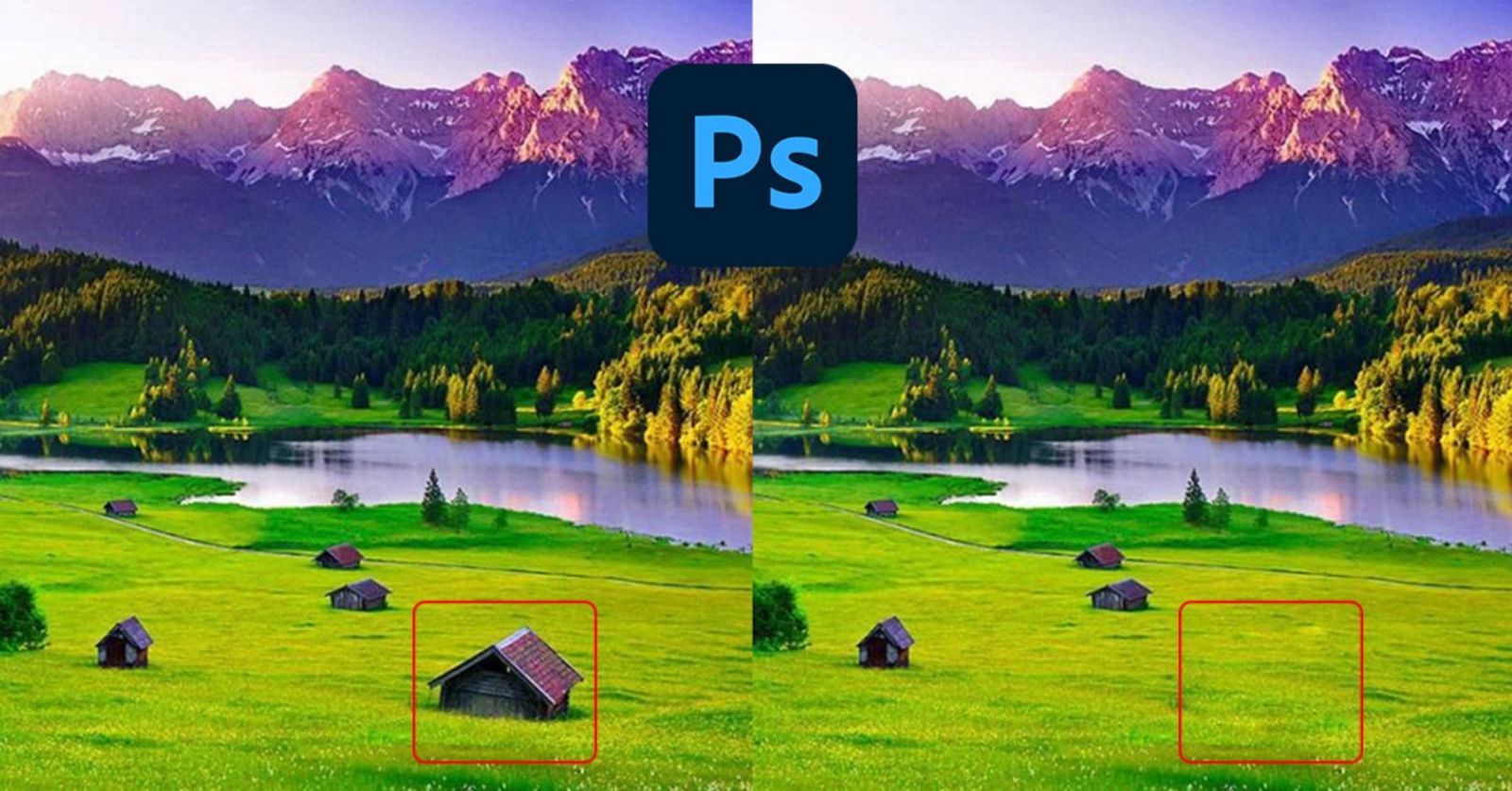
The technology behind the tool is based on a deep learning network trained on billions of images, allowing it to understand not only the object, but also the texture, lighting, depth, and context of the entire frame. As a result, the “erased” area does not just disappear, but is recreated in a way that is so subtle and natural that it is almost unrecognizable.
In real-world testing, this feature works extremely well. Although there are still some areas that are slightly off-tone, compared to the previous Content-Aware Fill tool , the accuracy and speed are greatly improved. Complex details such as tangled wires, shadows of people or objects in mixed light and dark areas are also handled convincingly.
This is especially useful for urban landscape, architectural, or outdoor product photographers. Instead of spending hours tweaking, you can now clean up an entire frame in seconds, keeping your photos cleaner and more professional than ever.
2.2. Generative Workspace
If the “one-click detail deletion” feature brings convenience and saves time, the Generative Workspace is a source of new creative inspiration for Photoshop users.
Adobe has already introduced generative AI through its Firefly tool, which allows users to create images from text. But with Photoshop 2025, they go further by integrating all AI capabilities into a unified workspace.
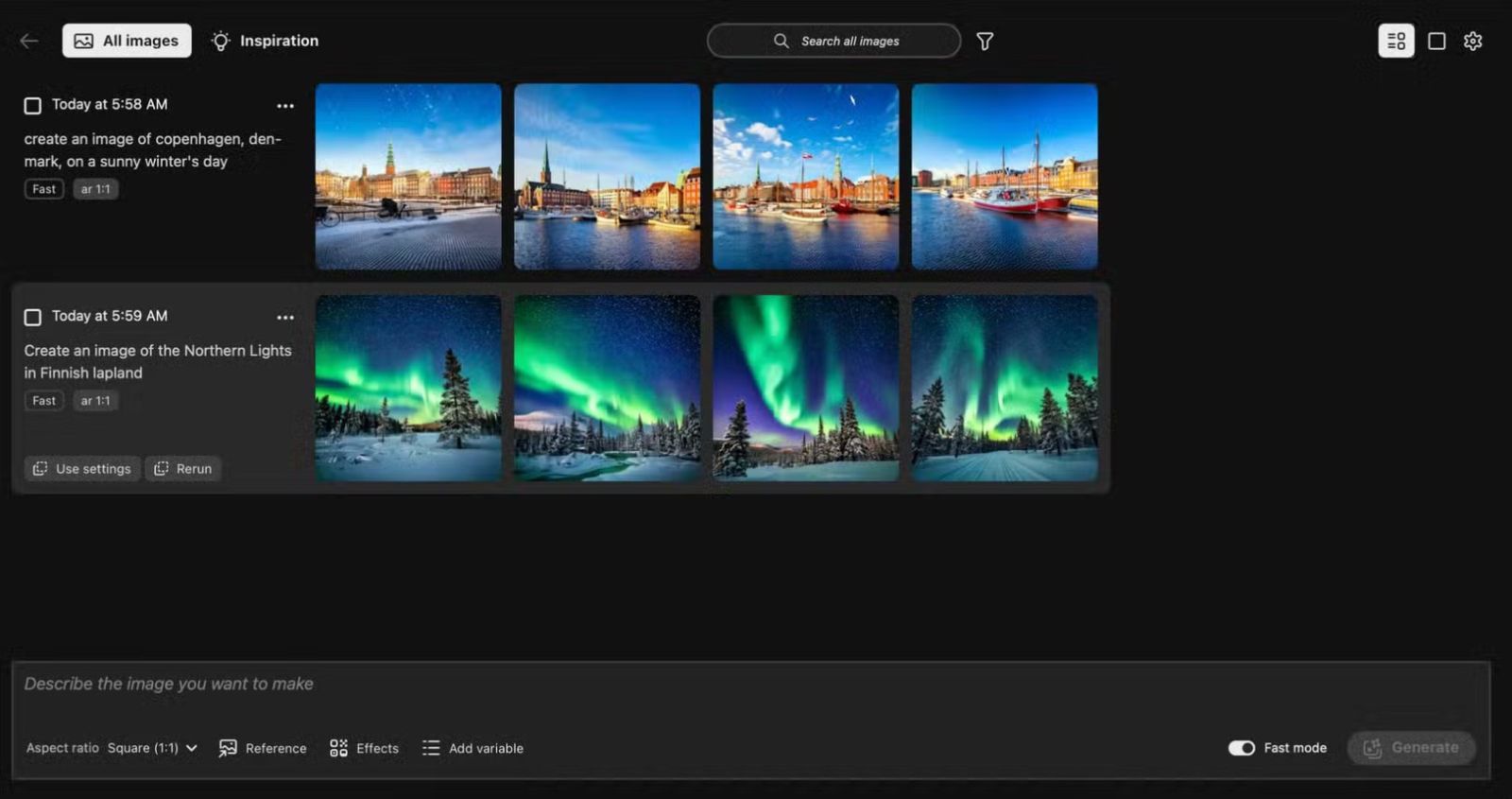
The Generative Workspace is more than just a place to store your images. It’s a true creative space where you can review your entire creative history, combine old ideas, experiment with new effects, and create unique images in minutes. Each image in the space can be opened and edited instantly, adding details, changing styles, or combining with other elements without leaving the main workspace.
Adobe designed Generative Workspace as an “extended brain” for creators. The software not only stores your images, but also understands your intentions and style through the data you create. For example, if you often create images with dark tones and a cinematic style, the AI in Generative Workspace will automatically suggest similar creative directions, helping you develop ideas faster.
Interestingly, the Generative Workspace also supports a mix of real and AI images. You can take a real photo, put it in this space, then add AI-generated elements like a sky, lighting effects, or additional objects, and everything syncs seamlessly.
Currently, this feature is in beta and users can experience it by opening the Creative Cloud application , selecting Apps > Beta > Photoshop (Beta) to download. Although still in beta, Generative Workspace has received extremely positive reviews from the creative community, because it really changes the way we think and work with images.
2.3. Reference Image: Reference Image
One of the biggest challenges with using the Generative Fill tool in previous versions of Photoshop was that the AI sometimes didn’t understand what the user was asking for. If you weren’t specific enough, the results could be far from what you wanted.
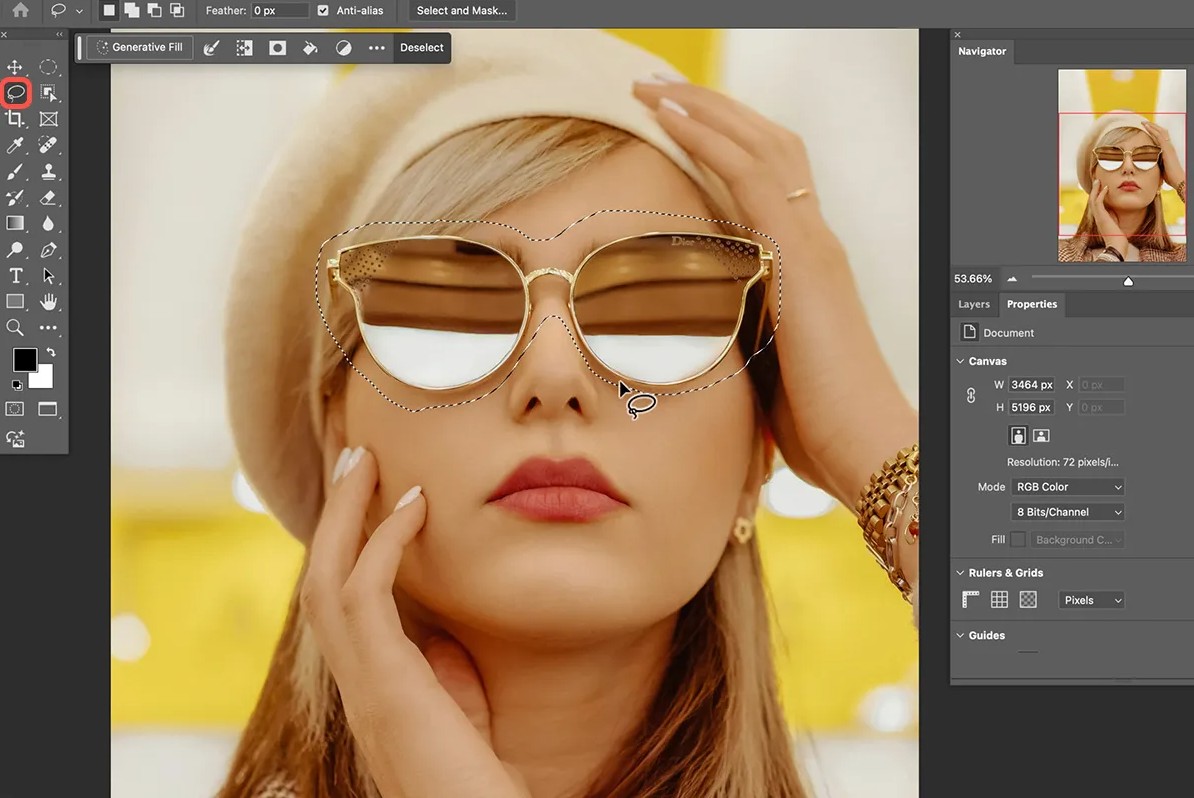
The Reference Image feature in Photoshop 2025 was created to completely solve this problem.
Instead of relying solely on text descriptions, you can now provide Photoshop with a reference image, such as a sample photo with the lighting, composition, or texture you want, and the AI will then rely on the visual data of the sample photo to produce a much more relevant result.
For example, if you want to fill in a sky similar to a reference photo, Photoshop will automatically analyze the color tones, light direction, and atmosphere in the reference photo and naturally recreate them in the photo you're editing.
This feature is especially useful in the fields of commercial design, advertising photography, and content creation. Maintaining a consistent visual style is crucial, and Reference Image makes it easier than ever. No more trying dozens of times to find the right tone or lighting, just select a sample photo and let AI do the rest.
Like Generative Workspace, Reference Image is currently in Beta. However, our experience shows that it works very well, especially when combined with Generative Fill. It turns image editing from a complicated manual process into a smart and inspiring creative journey.
3. Summary
The three new features in Photoshop 2025 are not just editing tools, but evidence of a change in Adobe's creative philosophy. Instead of putting users in the role of tool controllers, Adobe wants to turn Photoshop into an intelligent companion, capable of understanding and supporting you in every step of creation. This does not mean that AI will replace humans. On the contrary, it helps people focus more on ideas, emotions and art, while repetitive, meticulous work is completely automated. Photoshop 2025 is therefore not just a software update, but a historical milestone in the digital creative process. It blurs the line between humans and technology, between ideas and reality.





















VIP Products








Best Selling Products
Upgrade Duolingo Super
29 USD
Adobe Premiere Pro Account
99 USD
Genuine Adobe Illustrator account
99 USD
Copyright Adobe Lightroom Account
59 USD
Adobe Photoshop Copyright - Full App
120 USD
ChatGPT Plus Account (GPT-4)
16 USD
Autodesk All App Account Copyright
120 USD
Genuine Cheap Canva Pro
39 USD
Capcut Pro 1 Year
39 USD
Upgrade Genuine Office 365
49 USD
MidJourney Account
29 USD
Upgrade genuine Capture One account
120 USD
Freepik Premium Account
59 USD
Windows 10 & 11 Pro Key
36 USD
Plugin Retouch4me
69 USD