Best Selling Products
Adobe Premiere Pro Account
99 USD
Autodesk All App Account Copyright
120 USD
Plugin Retouch4me
69 USD
Copyright Adobe Lightroom Account
59 USD
Upgrade genuine Capture One account
120 USD

Genuine Adobe Illustrator account
99 USD

Freepik Premium Account
59 USD
Upgrade Genuine Office 365
49 USD
Genuine Cheap Canva Pro
39 USD
Upgrade Duolingo Super
29 USD
Adobe Photoshop Copyright - Full App
120 USD

Capcut Pro 1 Year
39 USD

MidJourney Account
29 USD
Windows 10 & 11 Pro Key
36 USD

ChatGPT Plus Account (GPT-4)
16 USD
A beginner''s guide to using the Learning feature in Gemini.
Nội dung
- 1. What is the Guided Learning feature in Gemini?
- 2. How does guided learning differ from a regular question-and-answer session?
- 3. How to use the Guided Learning feature in Gemini
- Step 1: Access Gemini
- Step 2: Find the Guided Learning mode.
- Step 3: Enter the topic you want to learn about.
- Step 4: Follow the explanation and examples.
- Step 5: Answer questions and practice
- Step 6: Request adjustments to the lesson level.
- Step 7: Review and test your knowledge.
- 4. Tips for using Gemini to study more effectively
- 5. Things to note when using the Learning feature in Gemini
- 6. Suggestions for effective study prompts with Gemini
- 7. Conclusion
AI is opening up many new ways of learning, helping users access knowledge more quickly and proactively. Instead of just searching for answers or reading ready-made solutions, you can use Gemini to explore knowledge step-by-step, practice with thought-provoking questions, and self-test your understanding. The Guided Learning feature is designed to support deeper learning, suitable for students and those who want to self-study at home. So how does this feature work and how do you use it? Let''s find out in detail in the article below!
1. What is the Guided Learning feature in Gemini?
Guided Learning is a learning experience on Gemini developed by Google, aimed at helping users understand the essence of knowledge rather than just receiving quick answers. Using this feature, you can ask the AI to explain a topic, break down difficult content into easier-to-understand parts, and ask questions to encourage independent thinking. As a result, Gemini becomes a useful tool for exam preparation, learning new knowledge, or exploring unfamiliar issues. Some highlights of Guided Learning in Gemini include:
-
Learn step-by-step: Complex content is explained in a sequential manner, making it easy for you to follow and grasp the knowledge.
-
Encouraging independent thinking: Gemini can ask thought-provoking questions to encourage you to analyze and find the answers yourself.
-
Supports multiple subjects: You can learn about mathematics, science, history, languages, and many other fields.
-
Increased interactivity: The learning process can incorporate practice questions, illustrative examples, and visual aids depending on the topic.
-
Personalize your learning: You can request explanations in simpler language, additional examples, or adjustments to the difficulty level to suit your proficiency.

2. How does guided learning differ from a regular question-and-answer session?
When you ask a regular question on Gemini, you usually get a direct answer as requested. Guided Learning, on the other hand, focuses more on the learning process. Instead of just providing a complete solution, AI can guide you in identifying the problem, thinking through each step, and checking your results. This approach makes learning more proactive, especially for subjects requiring application skills like mathematics, physics, or grammar.
Notable differences include:
-
From receiving the answer to understanding the solution: You can learn why a formula is used or how to apply the knowledge to a real-world problem.
-
From passive to active learning: Open-ended questions encourage you to form your own opinions before looking at the answers.
-
From fragmented knowledge to a systematic approach: Content is presented in a sequential manner, supporting the connection between old and new knowledge.
-
From memorization to application: Practice questions help you test your ability to apply what you've just learned to different situations.

3. How to use the Guided Learning feature in Gemini
To get started, you need a Google account and access Gemini using a supported browser or app. The interface and names of the options may vary by version, region, and account type. If you don't see the Guided Learning mode, you can try submitting a learning request directly in a regular Gemini chat.
Step 1: Access Gemini
First, open your browser on your computer and go to gemini.google.com. Log in with your Google account to use the features available to your account. If using a phone, you can open the official Gemini app if it's available in your region. After logging in, check the main interface to familiarize yourself with the question input field and support options.
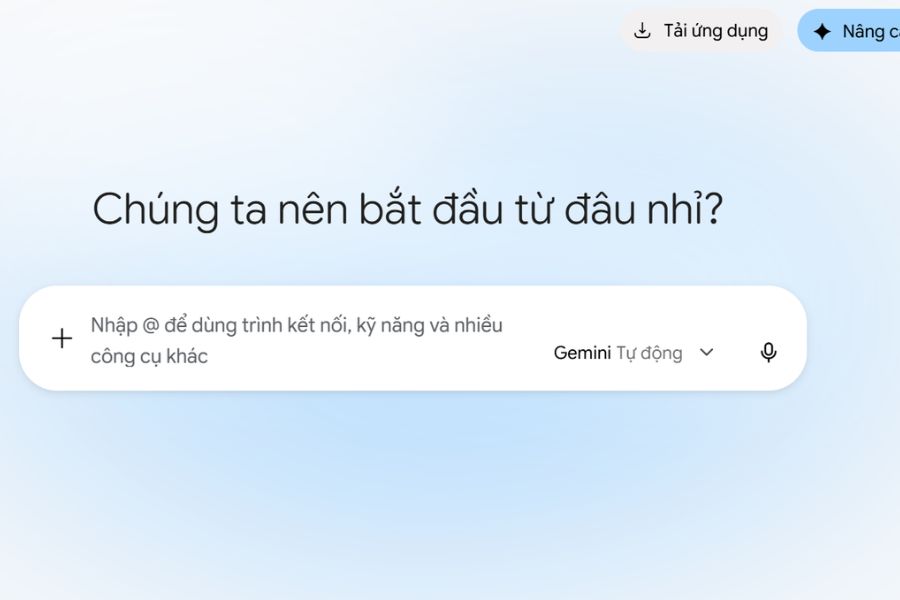
Step 2: Find the Guided Learning mode.
On the Gemini interface, observe the displayed tool options or usage modes. If there is a Guided Learning option, select it to begin a step-by-step learning experience. If the interface doesn't have a separate option, you can still ask Gemini to act as a tutor, explaining each section and asking review questions after each part. This allows you to access a similar learning method within a regular conversation.
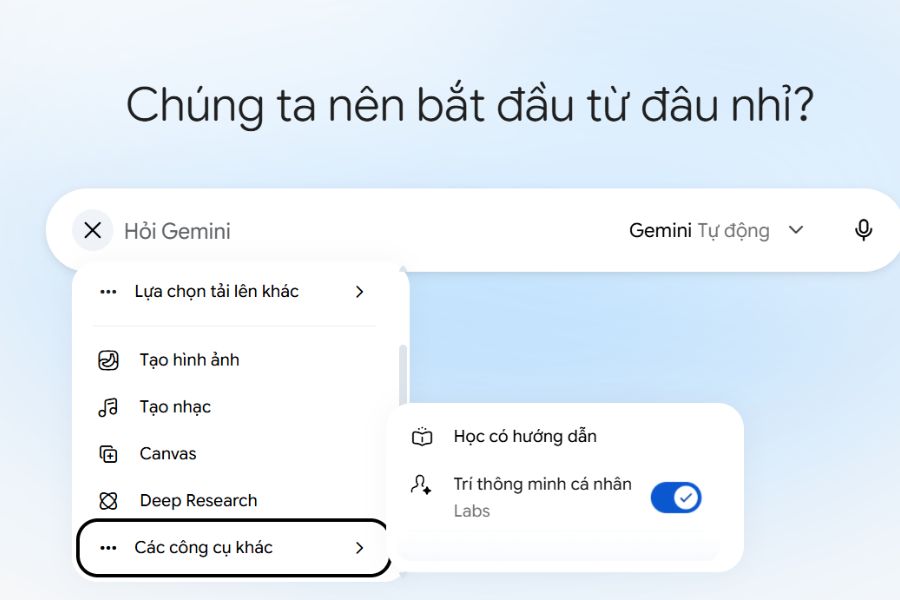
Step 3: Enter the topic you want to learn about.
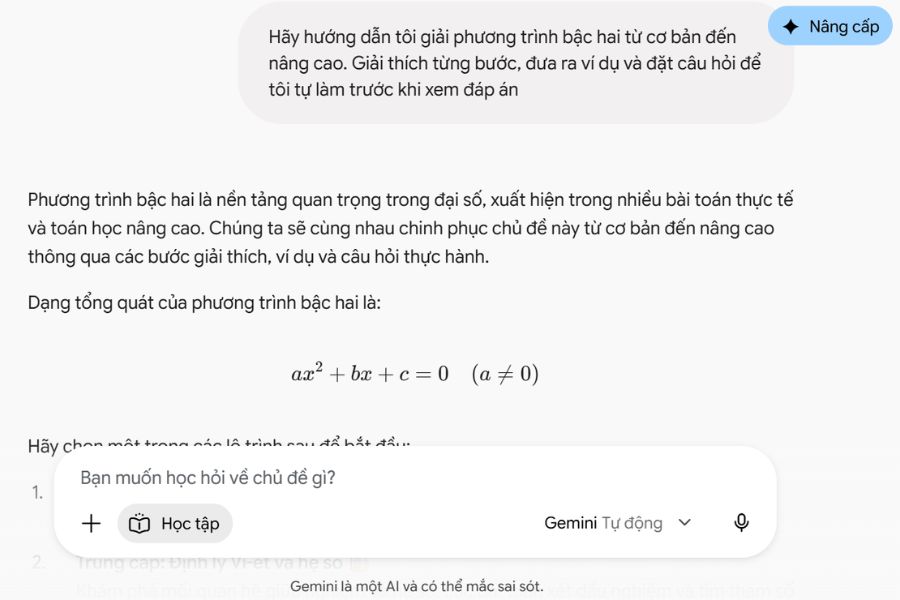
After entering the chat interface, enter the specific topic you want to learn. Instead of asking a broad question like "Teach me math," you should clearly state the content, your level, and your goals so Gemini can provide more appropriate guidance. For example, you could enter: "Please guide me in solving quadratic equations from basic to advanced. Explain each step, provide examples, and ask questions so I can practice before looking at the answers." The clearer your request, the easier the learning process will be to follow.
Step 4: Follow the explanation and examples.
Gemini will respond based on the topic and the information you provide. Read through each section, paying attention to important concepts and asking for clarification if you encounter anything difficult to understand. You can also ask the AI to provide examples that are relevant to real life to make it easier to visualize. For suitable topics, utilize images, diagrams, or visual aids to understand the connections between concepts instead of just memorizing.
Step 5: Answer questions and practice
Don't just read Gemini's answer and move on to another topic. Try solving the exercises yourself, answering the guiding questions, or explaining the knowledge in your own words. If your answer is incorrect, you can ask the AI to point out the mistake and suggest corrections instead of immediately providing the complete answer. Actively thinking, experimenting, and correcting errors will help you identify knowledge gaps, thus retaining the information longer and becoming more confident when encountering similar problems.
Step 6: Request adjustments to the lesson level.
If the content is too difficult or too easy, clearly state this to Gemini so they can adjust the instruction. Beginners can request explanations in simple language, limiting technical jargon and adding illustrative examples. Conversely, those with a foundational knowledge can request advanced exercises or scenarios requiring more complex reasoning. You should also ask the AI to summarize the main points after each section for easier note-taking and review.
Step 7: Review and test your knowledge.
When you complete a topic, ask Gemini to create a short quiz consisting of multiple-choice questions, essay questions, or application exercises. You should answer them yourself first before asking the AI to grade and explain the incorrect answers. Afterwards, ask Gemini to summarize your weaknesses and suggest areas for review. Maintaining this habit will help you assess your learning progress more clearly and allocate your time effectively to areas where you are not yet confident.
4. Tips for using Gemini to study more effectively
To make the most of Guided Learning, you should view Gemini as a learning aid rather than a tool to do your homework for you. Asking the right questions, actively practicing, and checking your information will help you utilize AI more effectively. Here are some helpful tips you can apply:
-
Break down your goals: Focus on one concept or type of problem at a time to avoid absorbing too much information at once.
-
Request multiple explanations: If you don't understand a solution, ask Gemini to use a different example, diagram, or simpler explanation.
-
Try it yourself before looking at the answer: Try to come up with your own solution first, then ask the AI to review and correct your mistakes.
-
Create a study plan: Ask Gemini to build a daily or weekly study schedule based on your goals and available time.
-
Combine authoritative materials: Use textbooks, lectures, and class notes to verify key content.
-
Reviewing previous knowledge: After each lesson, take some time to answer a few questions about the previous topic to reinforce your memory.
5. Things to note when using the Learning feature in Gemini
While Gemini offers many benefits, it cannot completely replace teachers or proven learning resources. Feedback may vary depending on the question, account, and version being used. Therefore, you need to proactively evaluate the information and use AI appropriately to avoid relying on pre-written answers. When learning with Gemini, you should pay attention to the following:
-
Availability: Guided Learning mode may not be available on all accounts or regions. Please check your current Gemini interface for available options.
-
Supported languages: Some learning resources or additional features may be language and region-restricted. If you cannot find the desired material, please try requesting an explanation in Vietnamese or a suitable reference source.
-
Accuracy: Double-check formulas, figures, citations, and other important information before using them in assignments or research papers.
-
Privacy: Do not enter passwords, financial information, sensitive personal data, or unnecessary private documents into the chat.
-
Proactiveness: Do not copy answers verbatim when submitting your assignment. Analyze and rephrase the answers using your own understanding, while adhering to the teacher's instructions.
6. Suggestions for effective study prompts with Gemini
A clear prompt will help Gemini understand the goal and provide more relevant content. You can apply the sentence patterns below and then change the topic, level, or type of exercise according to actual needs.
-
Learning new knowledge: “Please act as my tutor and guide me through the basics of [the topic]. Break the lesson down into short sections, explain in easy-to-understand language, and provide illustrative examples.”
-
To solve the problem: “Guide me through solving problem [content]. Don’t give me the final answer right away. Suggest steps so I can think for myself and point out any mistakes if I answer incorrectly.”
-
Exam preparation: “Create a 7-day study plan for [the subject] for those who are struggling with the basics. Each day includes the necessary learning material, practice exercises, and self-assessment questions.”
-
Knowledge test: “Create 10 questions on [topic], arranged from easy to difficult. Wait for me to answer each question before explaining the answer and summarizing the areas I need to improve.”
-
Language learning: “Help me practice basic English through a short conversation. After each response, correct grammar errors and explain new vocabulary.”
7. Conclusion
Gemini's Guided Learning feature offers a more proactive approach to learning, allowing users to explore step-by-step, practice, and self-assess their understanding. Simply start with a specific topic, ask clear questions, and dedicate time to practice, and you can turn Gemini into a useful learning tool every day. Remember that AI works best when combined with independent thinking, perseverance, and the habit of verifying information. This is the foundation for effective learning and developing long-term self-learning abilities.










VIP Products



Best Selling Products
Adobe Premiere Pro Account
99 USD
Autodesk All App Account Copyright
120 USD
Plugin Retouch4me
69 USD
Copyright Adobe Lightroom Account
59 USD
Upgrade genuine Capture One account
120 USD
Genuine Adobe Illustrator account
99 USD
Freepik Premium Account
59 USD
Upgrade Genuine Office 365
49 USD
Genuine Cheap Canva Pro
39 USD
Upgrade Duolingo Super
29 USD
Adobe Photoshop Copyright - Full App
120 USD
Capcut Pro 1 Year
39 USD
MidJourney Account
29 USD
Windows 10 & 11 Pro Key
36 USD
ChatGPT Plus Account (GPT-4)
16 USD