Best Selling Products

Adobe Photoshop Copyright - Full App
120 USD

Plugin Retouch4me
69 USD

Copyright Adobe Lightroom Account
59 USD

Adobe Premiere Pro Account
99 USD

Genuine Adobe Illustrator account
99 USD

Upgrade Duolingo Super
29 USD

Genuine Cheap Canva Pro
39 USD

Freepik Premium Account
59 USD

ChatGPT Plus Account (GPT-4)
16 USD

MidJourney Account
29 USD

Autodesk All App Account Copyright
120 USD

Capcut Pro 1 Year
39 USD

Windows 10 & 11 Pro Key
36 USD

Upgrade genuine Capture One account
120 USD

Upgrade Genuine Office 365
49 USD
CapCut AI Video Maker 2.0: Create videos from AI scripts in just minutes.
Nội dung
- 1. Key features of CapCut's AI 2.0 video creation software
- 1.1. Collaborating with AI agents on an infinite platform
- 1.2. Create a complete video from simple requirements
- 1.3. Replicating viral hits using clever splicing techniques.
- 1.4. Personalize with colorful digital avatars.
- 2. How to create AI videos using CapCut's AI Video Maker 2.0 software?
- 3. Benefits of using CapCut's AI Video Maker 2.0
- 4. Use cases for CapCut AI Video Maker 2.0
CapCut's AI Video Creator 2.0 helps you quickly turn ideas into complete videos. With AI-generated storyboards, no video editing experience is required.
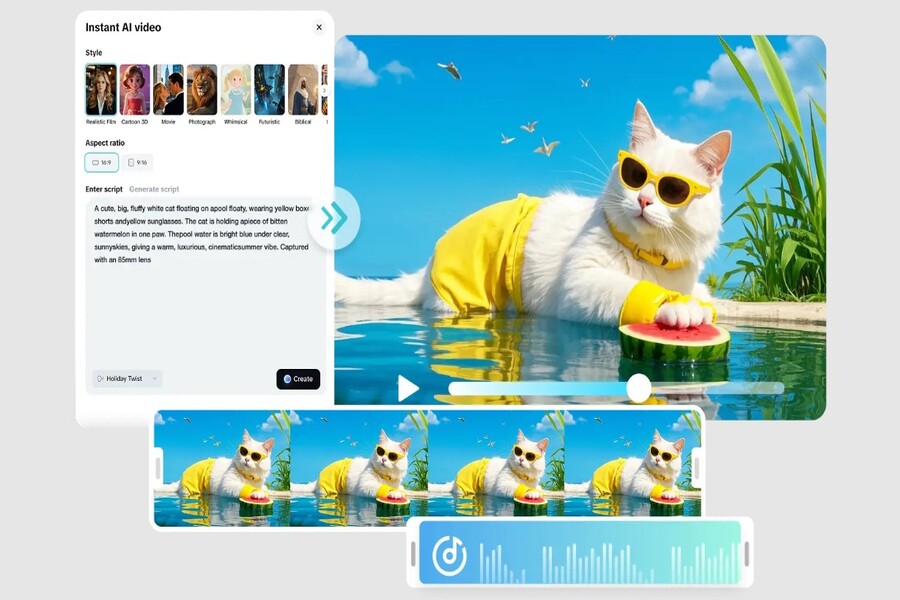
The development of free AI video makers has opened a whole new door for creative individuals, small businesses, marketing teams, and even those without a technical background. Among the standout tools on the market, CapCut AI Video Maker 2.0 is considered a significant leap forward, not just in "fast video creation," but in redefining the entire content creation process. With the ability to create videos from text or images in just seconds , CapCut offers a more seamless creative experience than ever before. In particular, AI Video Maker 2.0 integrates a completely new AI storyboard generator, allowing users to build content quickly, intuitively, and easily, even without prior video creation experience.
1. Key features of CapCut's AI 2.0 video creation software
The difference with CapCut AI Video Maker 2.0 doesn't lie in the fact that it "has AI," but in how AI is deeply integrated into the entire creative process. Instead of just supporting a few individual steps, CapCut builds an ecosystem where AI becomes a true creative partner.
1.1. Collaborating with AI agents on an infinite platform
One of the biggest obstacles in the video creation process is the chaos of ideas. Creators often have a multitude of disparate sources of inspiration, from text notes and reference images to sample videos. Bringing all these elements together into a unified space for script development often takes a great deal of time and effort.
CapCut AI Video Maker 2.0 solves this problem with an infinite canvas , where every idea can be placed side-by-side and developed in parallel. Unlike traditional scripting tools that only support text, this AI video maker allows multimodal input, including text, images, and video.
.jpg)
Users can start with a short description, a reference image, or even an existing video. The AI agent will analyze all the input data, thereby assisting in building storyboards, suggesting visual layouts, and guiding content style. This makes the brainstorming process more systematic, especially useful when working in teams or handling complex creative projects.
CapCut goes beyond just idea generation; it also allows for the reuse of creative contexts. Users can save script frameworks, visual styles, or video structures to apply to subsequent projects. This ensures consistency in content and visuals, a crucial element for brands and professional creators.
1.2. Create a complete video from simple requirements
Previously, creating videos required many manual steps and technical skills, but CapCut AI Video Maker 2.0 has streamlined this entire process to just a few basic steps. Users only need to input a prompt or dialogue describing their idea, and the AI system will automatically build a complete video prototype.
CapCut's AI video creation technology works by analyzing the semantic meaning of the prompt, combining it with existing image, audio, and layout data to create a suitable video. Within minutes, users can preview the results and assess the feasibility of the idea.
.jpg)
A key feature of version 2.0 is its batch creation capability . Instead of creating just a single video, users can export multiple versions with different lengths, aspect ratios, and styles. This is especially useful in marketing, where businesses need to experiment with various formats to find the optimal version for each platform.
The ability to quickly validate ideas minimizes risk and significantly saves production time. Instead of spending weeks perfecting a video before measuring its effectiveness, you can now test multiple ideas in a short period and make decisions based on real-world data.
1.3. Replicating viral hits using clever splicing techniques.
One of the biggest challenges for content creators is keeping up with trends and creating viral videos. Analyzing the structure of a viral video and recreating it in your own style often requires sophisticated editing skills.
CapCut AI Video Maker 2.0 solves this problem with intelligent splicing techniques . The AI video assistant can reference a sample video, analyze the content structure, editing rhythm, highlights, and then automatically replace the key elements with the user's content.
.jpg)
The AI system will combine user-provided content, public data, and pre-built AI resources to construct a logical and seamless storyline. With a language-based user interface (LUI) , users can perform complex post-production edits with just a command, such as changing the cut times, adjusting color, or adding transition effects.
This approach completely eliminates reliance on traditional editing timelines, which often pose challenges for beginners. The result is a complete, professional-looking build without complex technical manipulation.
1.4. Personalize with colorful digital avatars.
In an era where viewers are becoming increasingly desensitized to traditional advertising content, personalization plays a crucial role in retaining audiences. CapCut AI Video Maker 2.0 enhances this experience with an improved digital avatar system and AI voice.
.jpg)
The voice narration feature now supports multi-voice dialogue, allowing users to choose a style that suits the content, from a gentle storytelling tone to a dynamic advertising voice. This makes videos feel more natural and relatable to viewers.
In addition, the digital avatar creation tool allows for consistent character development across multiple videos. Whether it's digitally rendered real people for product marketing or stylized characters for storytelling, CapCut ensures visual and stylistic consistency.
These elements not only enhance the effectiveness of message delivery but also help build a clear brand identity, thereby increasing viewer engagement and memorability.
2. How to create AI videos using CapCut's AI Video Maker 2.0 software?
One of CapCut's biggest strengths is its simple and accessible user process, suitable for all users.
Step 1: Enter your video content.
First, users need to access the official CapCut website and register for a free account. After logging in, you will see the "AI Video Creator" option on the homepage.
.jpg)
Here, CapCut provides an unlimited canvas for creating multimedia videos. You can start by entering ideas, choosing a new project, or uploading existing documents, images, or videos. After completing the content input, simply click "Create Video" for the AI system to begin processing.
If you start with a prompt, CapCut will ask you to select the video type, character voice, duration, and aspect ratio. This is a crucial step that helps the AI understand the intended use and optimize the output.
Step 2: Edit and finalize your video
After the initial video is created, you can further refine it to better suit your goals. CapCut AI Video Maker 2.0 allows editing via content tags or direct dialogue with the AI.
.jpg)
Content tabs allow you to quickly change elements such as aspect ratio, platform format, voiceovers, or visual style. Meanwhile, the dialog box lets you enter commands to perform advanced edits.
Users can combine both methods to optimize the workflow, ensuring both speed and detailed control over the final product.
Step 3: Export the AI-generated video.
Once you're satisfied with the result, simply click "Export". CapCut allows you to download videos with various options for format, resolution, quality, and frame rate.
.jpg)
Once downloaded, the video can be shared directly to social media platforms for marketing, branding, or personal content creation purposes.
3. Benefits of using CapCut's AI Video Maker 2.0
The application of AI to video production offers numerous significant benefits, especially for individuals and businesses with limited resources.
Create videos quickly
CapCut allows for video prototyping in minutes thanks to one-click AI agents. Its ability to replicate viral content and create multiple versions enables users to quickly validate ideas and optimize their content strategy.
.jpg)
Low-cost production
Utilizing pre-existing templates and resources significantly reduces operating costs. CapCut AI Video Maker 2.0 lowers the barrier to entry, allowing users to create compelling stories without significant investment in equipment or personnel.
.jpg)
Enhance interaction
Personalized videos with nuanced dialogue and vivid visuals enhance engagement. This is especially important in a context where users increasingly demand high-quality, personalized content.
.jpg)
4. Use cases for CapCut AI Video Maker 2.0
CapCut AI Video Maker 2.0 is suitable for a wide range of uses, from marketing to creating entertainment content.
Video advertisement
CapCut is the ideal tool for creating professional advertising videos without the need for a production team. As a free AI-powered ad creator, CapCut helps increase brand awareness and drive effective engagement.
.jpg)
Short content
For platforms like TikTok, YouTube Shorts, or Instagram Reels, CapCut allows you to create short, trending videos and easily maintain content consistency across multiple platforms.
.jpg)
Video clips and trailers
CapCut helps build cinematic scenes and trailers quickly, even without a full production team. This opens up opportunities for independent filmmakers and content creators to tell visual stories more effectively.
.jpg)
The emergence of free AI video makers like CapCut AI Video Maker 2.0 is changing the way we approach and produce video content. No longer a task requiring high technical skills and resources, video creation is now fast, flexible, and highly personalized.
With its comprehensive AI ecosystem, CapCut not only saves users time and money but also unlocks new creative possibilities, aligning with modern digital content trends. Whether you're a creative individual, a small business, or a professional marketing team, CapCut AI Video Maker 2.0 is a tool worth experiencing and utilizing long-term.





















VIP Products








Best Selling Products
Adobe Photoshop Copyright - Full App
120 USD
Plugin Retouch4me
69 USD
Copyright Adobe Lightroom Account
59 USD
Adobe Premiere Pro Account
99 USD
Genuine Adobe Illustrator account
99 USD
Upgrade Duolingo Super
29 USD
Genuine Cheap Canva Pro
39 USD
Freepik Premium Account
59 USD
ChatGPT Plus Account (GPT-4)
16 USD
MidJourney Account
29 USD
Autodesk All App Account Copyright
120 USD
Capcut Pro 1 Year
39 USD
Windows 10 & 11 Pro Key
36 USD
Upgrade genuine Capture One account
120 USD
Upgrade Genuine Office 365
49 USD