Best Selling Products

Copyright Adobe Lightroom Account
59 USD

Freepik Premium Account
59 USD

MidJourney Account
29 USD

Upgrade Genuine Office 365
49 USD

Adobe Photoshop Copyright - Full App
120 USD

Upgrade genuine Capture One account
120 USD

Windows 10 & 11 Pro Key
36 USD

Adobe Premiere Pro Account
99 USD

Genuine Cheap Canva Pro
39 USD

Upgrade Duolingo Super
29 USD

Genuine Adobe Illustrator account
99 USD

Capcut Pro 1 Year
39 USD

Autodesk All App Account Copyright
120 USD

Plugin Retouch4me
69 USD

ChatGPT Plus Account (GPT-4)
16 USD
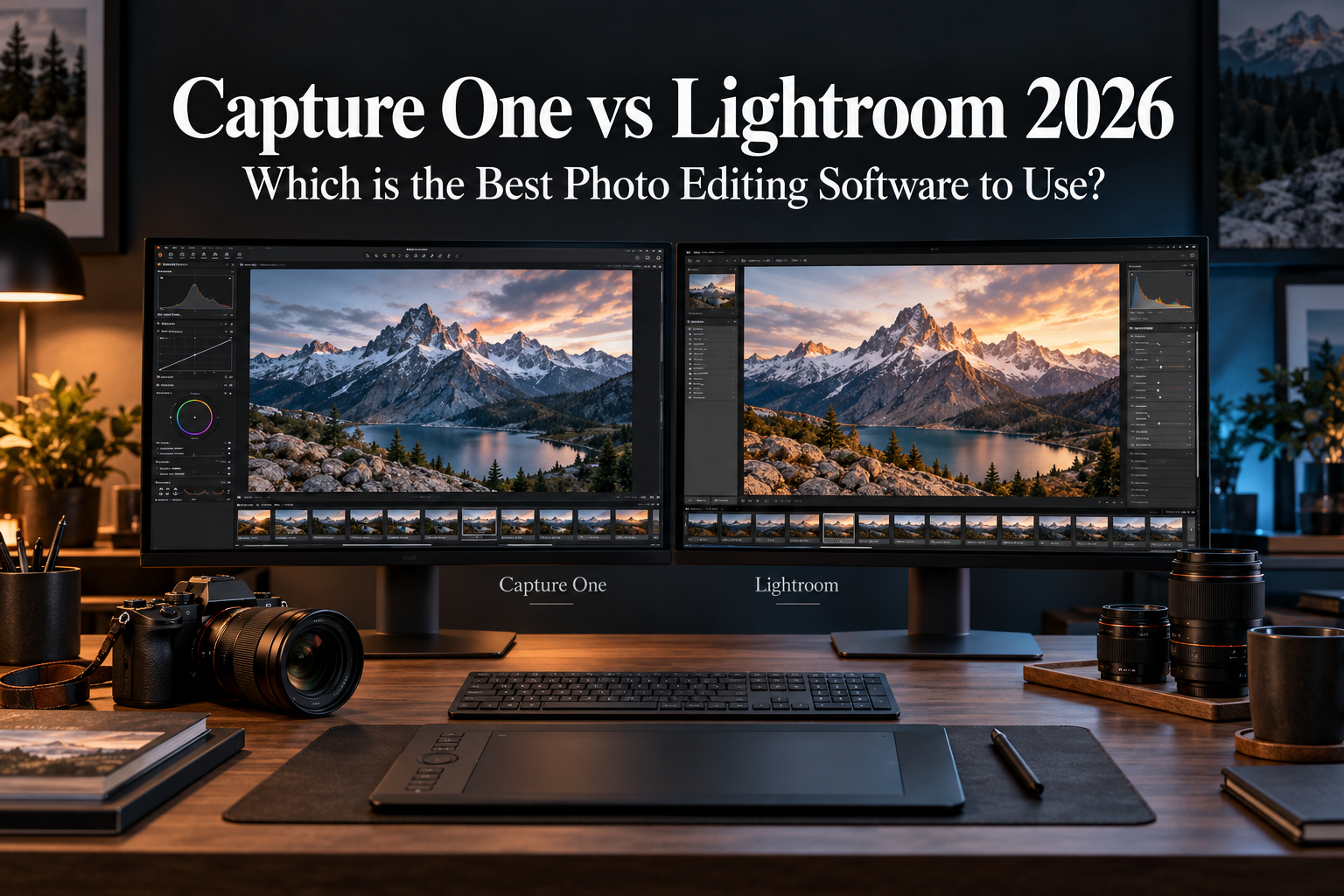
Capture One vs Lightroom 2026: Which is the Best Photo Editing Software to Use?
Nội dung
- 1. Key Differences Between Capture One and Lightroom
- 2. Comparing Capture One and Lightroom in Every Aspect
- 2.1. User Interface Experience
- 2.2. Ability to Process Raw Image Files
- 2.3. Basic Editing Tools
- 3. Highlighting the Most Valuable Features of Each Software Program
- 3.1. Capture One and the Trio of Weapons That Conquer the Professional World
- 3.2. Lightroom and the Power of Artificial Intelligence
- 4. Answering Frequently Asked Questions
Are you torn between Lightroom and Capture One? Let''s explore the key differences in interface, editing tools, performance, and photo library management capabilities. This article will help you understand the advantages of each software before making a choice.
1. Key Differences Between Capture One and Lightroom
Before delving into specific aspects, let's briefly review the core differences between these two software programs.
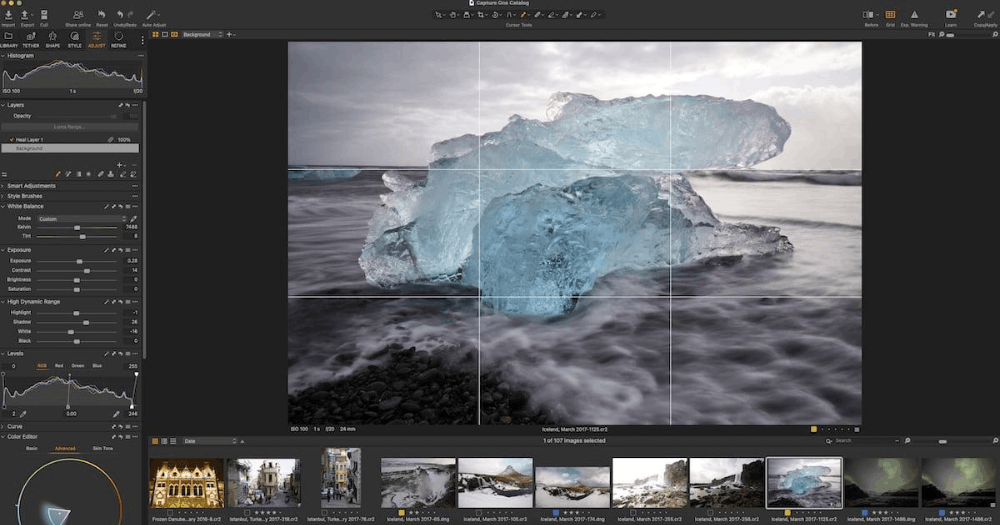
Regarding Capture One, its most outstanding strength is its ability to capture images directly via a wired connection to a computer, along with its impressive real-time image sharing capabilities. The Capture One Live feature allows those not present at the shoot to monitor the entire process online, and to mark and rate each image, providing immediate feedback to the photographer or the entire crew.
Furthermore, Capture One boasts incredibly sophisticated color control capabilities, allowing users to adjust colors with high precision, ensuring the final result always meets the standards for both photographers and clients. In addition, the Smart Adjustments feature allows users to select a reference image and apply the same color tone to subsequent images, extremely useful when ensuring consistency across a series of photos. Finally, Capture One's image selection interface is also highly regarded, helping users quickly remove unsatisfactory images to focus on the best ones.
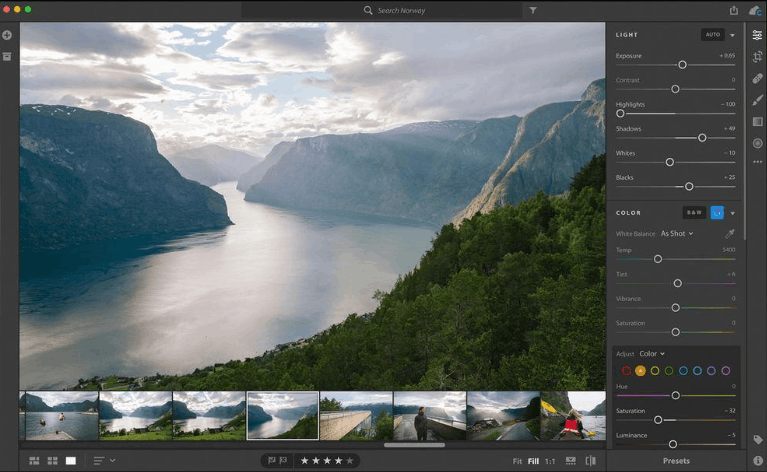
Meanwhile, Lightroom scores points thanks to its user-friendly interface and the most powerful photo library organization tools on the market today. Not only that, these tools are designed with a single intuitive interface, making the entire process of searching, organizing, and compiling images simple yet detailed. Lightroom has also recently added a host of AI features with incredible performance, including the AI masking tool, which is considered a real breakthrough, allowing even beginners to perform professional-level editing. Lightroom's noise reduction tool also performs exceptionally well compared to other editing software, helping photographers confidently shoot in low light conditions without worrying about excessive noise in their images.
Overall, Capture One is generally considered the optimal choice for studio, fashion, product, or commercial photographers who prioritize wired shooting, precise color control, and direct client collaboration. Conversely, Lightroom is more suitable for the vast majority of photographers, especially hobbyists, freelancers, or anyone managing a large photo library, thanks to its ease of learning, superior organization, and the extensive Adobe ecosystem.
It's also worth noting that the biggest difference in workflow between the two software lies in file management. Capture One uses Sessions, allowing an entire shoot, including edits and output, to be grouped into a single, easily portable folder structure, while Lightroom always links imported photos to records in its Catalog system for long-term library management.
2. Comparing Capture One and Lightroom in Every Aspect
2.1. User Interface Experience
The user-friendliness of the interface is generally more suitable for general photography enthusiasts rather than professional photographers. This is because beginners and photography enthusiasts often prioritize simple navigation, while experts and serious enthusiasts tend to seek more in-depth details and specialized functions.
After carefully comparing both software programs, it's clear that Lightroom has a much more user-friendly interface. It divides the workspace logically and makes navigating between sections very easy. In particular, while Lightroom Classic has more complex interface details, it maintains the same ease of use as Capture One.
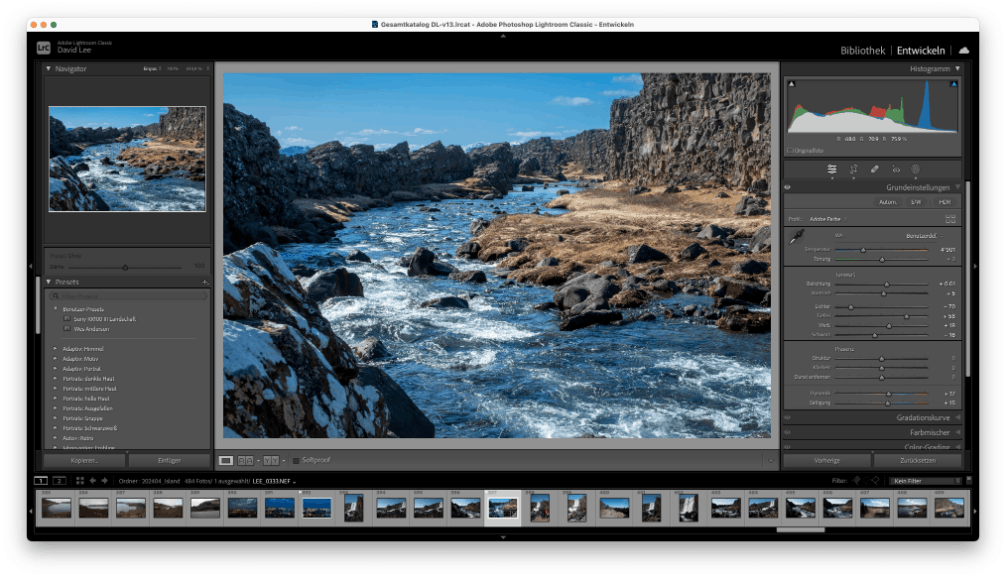
Conversely, Capture One is not aimed at beginners, but is preferred by experienced and professional photographers. The main reason is that the software's interface is completely customizable, allowing users to remove or rearrange elements to best suit their personal workflow.
2.2. Ability to Process Raw Image Files
When comparing the efficiency of processing raw image files, both software programs perform very well. However, Capture One is slightly better and is considered the best raw image processing software on the market today.
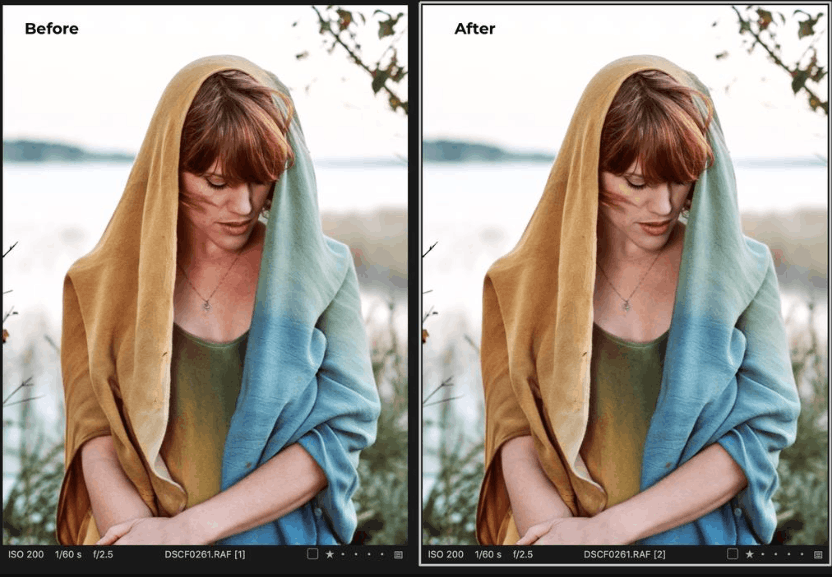
The most noticeable difference when comparing the two processing results directly is that images from Capture One generally have slightly higher color saturation. You'll also notice that the dark areas in Capture One's images are slightly brighter. This might lead you to think that the images will have more detail; however, in reality, Lightroom is better at extracting information from the subtle details in the image.
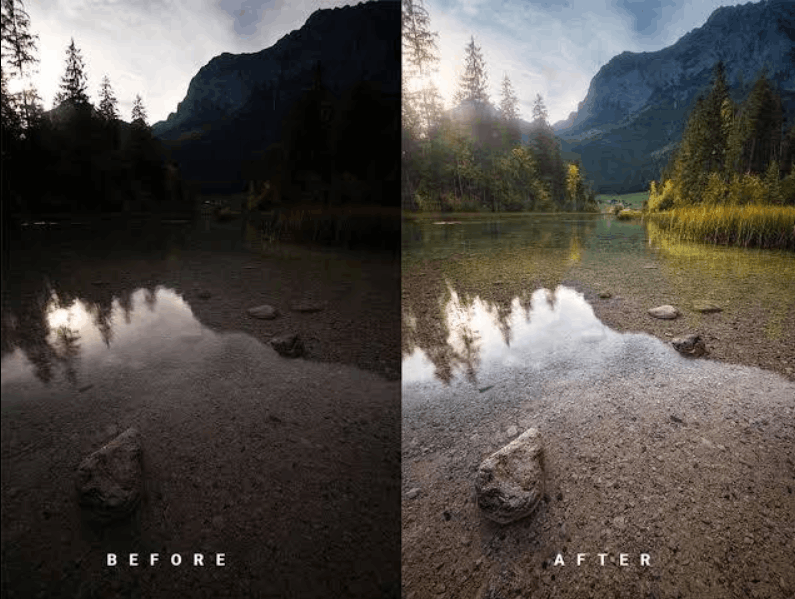
Overall, both software programs offer excellent raw image processing capabilities, so you can rest assured whichever tool you choose. The actual results show that it's difficult to definitively say which software is significantly superior in this category.
2.3. Basic Editing Tools
The basic editing tools in each photo editing software will produce different effects due to the unique processing algorithms of each platform. Therefore, you will notice a significant difference when performing the same editing operation on Capture One and Lightroom. Essentially, Lightroom offers more adjustment options, while Capture One possesses more specialized tools.
Considering exposure adjustment capabilities alone, a significant difference is noticeable between the two software programs. Lightroom allows exposure adjustment within a range of plus or minus five stops, while Capture One is limited to four stops. Additionally, Lightroom tends to flatten images more, while Capture One often produces more noise and pixelation when parameters are pushed to high levels.
When considering how each software handles dark areas in an image, the differences become even clearer. Capture One demonstrates excellent precision in adjusting shadows specifically, while Lightroom tends to slightly darken the overall image when performing similar adjustments. However, in return, Capture One generally delivers softer results than Lightroom when editing shadows.
3. Highlighting the Most Valuable Features of Each Software Program
3.1. Capture One and the Trio of Weapons That Conquer the Professional World
3.1.1. Advanced Color Correction Tools
Capture One boasts a highly-rated color correction tool among professional photographers. Simply use the color picker to select the area you want to adjust, and Capture One will automatically highlight the corresponding spectral region containing that color. From there, you can customize all color attributes, including smoothness, hue, saturation, and brightness.
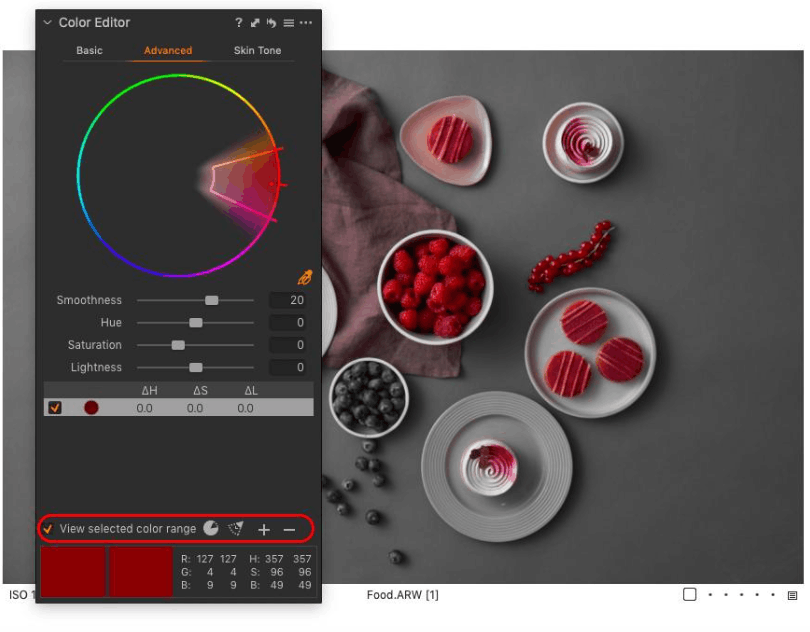
In addition, this software also has a dedicated section for adjusting skin tone. This is a great tool for making subtle changes to improve the skin tone of models in photos. This tool uses six different sliders to make dull skin tones more vibrant and realistic.
3.1.2. Advanced Image Selection Mode
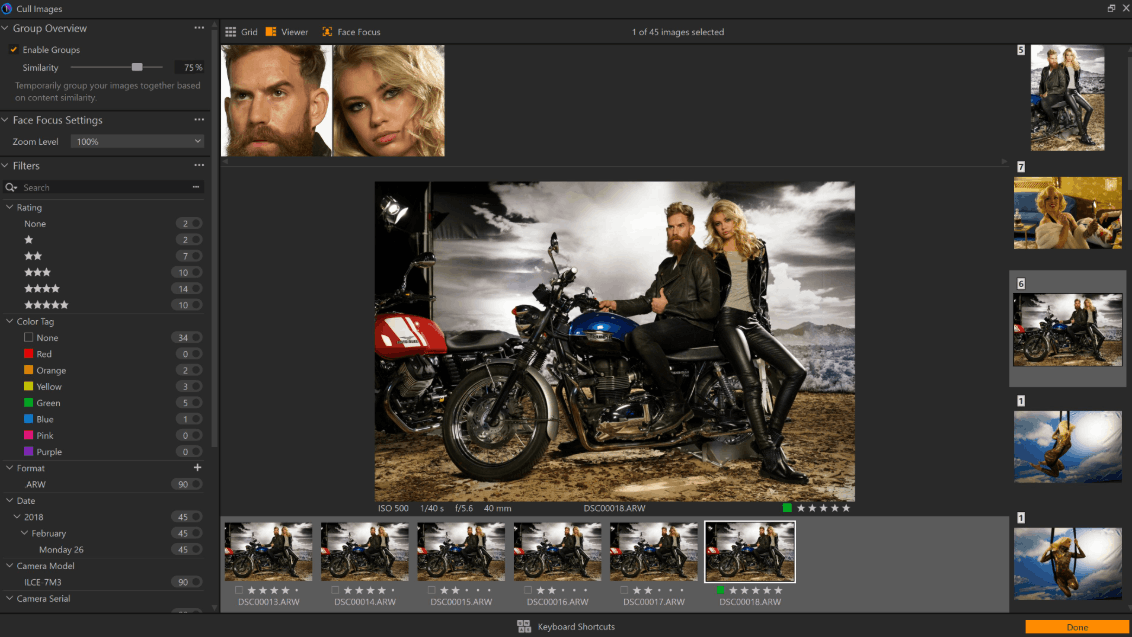
The image selection phase in Capture One allows you to examine each image in detail to remove unsatisfactory ones from your collection. This view may take longer to browse through all the images, but it offers superior accuracy and precision. Here, you can preview images while simultaneously adding initial ratings and tags.
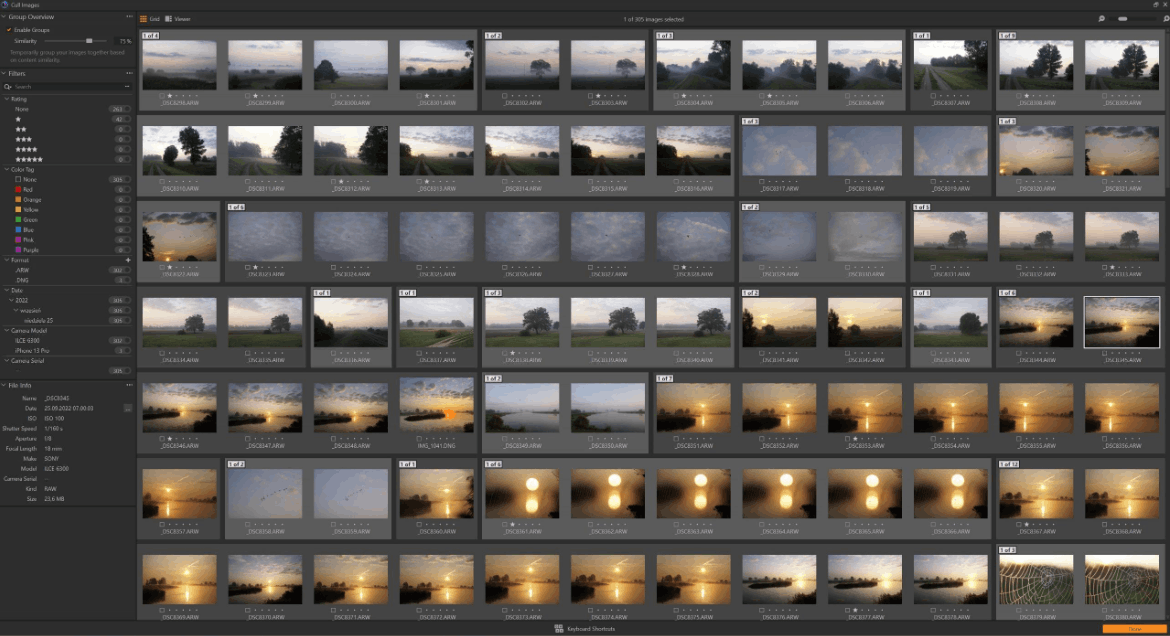
One standout feature in the photo selection mode is the automatic face focus tool, which allows you to check the sharpness of a face without having to zoom in on the image. This feature is extremely useful for quickly eliminating photos that don't meet your expectations, even when the model is wearing glasses or shooting in low light conditions.
3.1.3. Smart Editing Based on Reference Images
The intelligent editing feature allows you to select a reference photo and then apply the editing parameters to another photo to achieve a similar tone and lighting. This feature works using artificial intelligence, which detects and automatically applies intelligent adjustments to exposure and white balance.
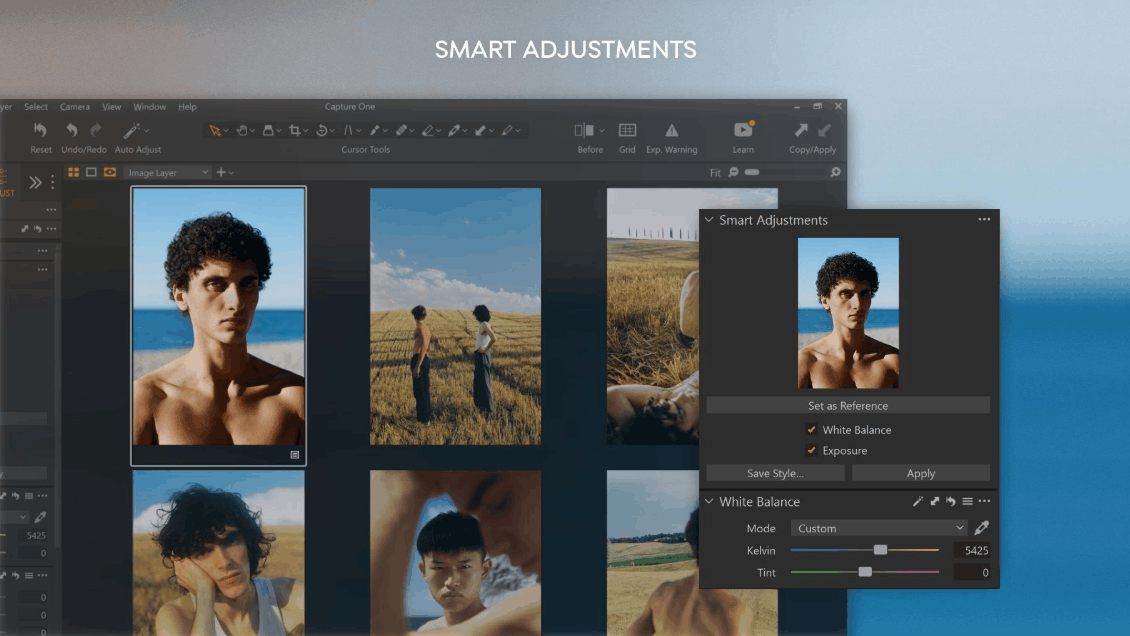
This is an incredibly useful feature when you need to ensure consistency across an entire series of photos. Any photographer will appreciate the value of this tool, as it saves considerable time compared to manually adjusting each photo to match the others.
3.2. Lightroom and the Power of Artificial Intelligence
3.2.1. Artificial Intelligence-Based Masking Tools
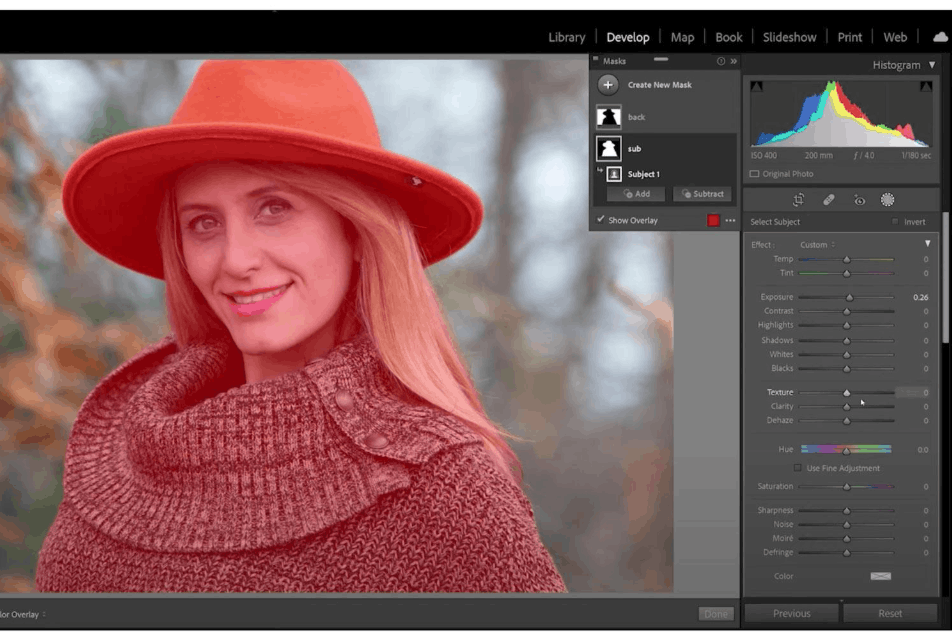
One of Lightroom's most impressive features is its AI-powered automatic masking capability . This tool allows even photographers with limited editing experience to perform advanced-level editing. Furthermore, this feature saves professionals a significant amount of time compared to manually creating masking layers in Photoshop.
The AI-powered masking tool allows you to choose between options such as subject, sky, or background. Additionally, there's a separate section for people if Lightroom detects a person in the image. Within this section, you can create separate masking layers for different body parts. This outstanding feature allows you to fine-tune images with an extremely high level of detail.
3.2.2. Superior Noise Reduction Tools
Adobe Lightroom's noise reduction tool is considered the best on the market today. It works with a simple one-click mechanism. When you activate the noise reduction feature, a new window will appear, allowing you to adjust the noise reduction level to your liking.
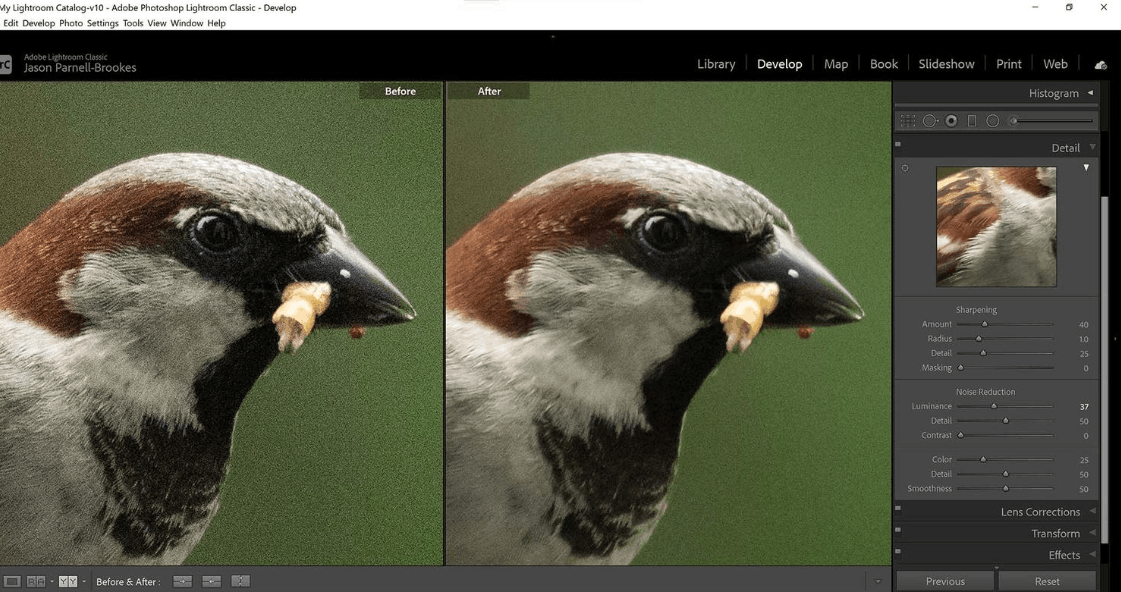
If you frequently shoot in unfavorable lighting conditions and are forced to increase your ISO sensitivity beyond your expectations, you can now rest assured thanks to this Lightroom tool. The entire processing takes only a short time but can completely transform heavily grainy photos.
3.2.3. Flexible Brush Tool Set
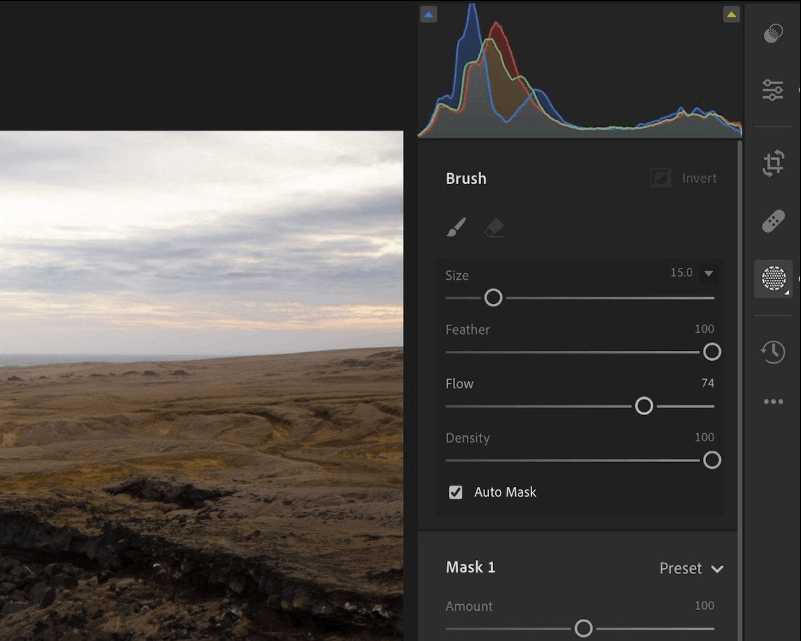
Since Adobe developed both Photoshop and Lightroom, you can find incredibly impressive brush tools built into Lightroom. This toolkit includes brushes for applying edits to specific areas, along with functions for duplicating and restoring image areas.
Having these brush tools readily available in Lightroom means that many photographers may not need to transfer their images to Photoshop for further processing. As a result, Lightroom can function both as an advanced photo editing tool and maintain its primary role as a software for organizing and managing photo libraries.
4. Answering Frequently Asked Questions
Is Capture One really better than Lightroom?
Capture One has a distinct advantage when it comes to wired studio photography, jobs requiring high color accuracy, and the ability to receive real-time client feedback. Lightroom, on the other hand, is more suitable for most photographers thanks to its easy-to-learn interface, library management system that simplifies storing large quantities of images, and AI-powered masking tools that simplify complex local editing.
Should beginners choose Capture One or Lightroom?
Overall, Lightroom is often a more suitable choice for beginners. Its workspace is easy to navigate, and its automatic masking tools for subjects, skies, backgrounds, objects, and people allow newcomers to photo editing to make selective adjustments quickly. Capture One, on the other hand, offers more flexible workspace customization, but this flexibility also creates a steeper learning curve for beginners.
Can Capture One completely replace Lightroom?
The answer is absolutely yes. Capture One can organize and edit raw image files without needing Lightroom, through its Sessions or Catalogs mechanism. This is especially a powerful alternative for photographers who frequently shoot with wired connections. However, switching entirely to Capture One becomes less appealing if you rely heavily on Adobe's cloud synchronization features or frequently transfer images back and forth between Lightroom and Photoshop.
Does Lightroom support wired photo capture like Capture One?
The answer is yes. Lightroom Classic supports wired shooting with select camera models from brands such as Canon, Fujifilm, Nikon, and Sony. However, Capture One is still considered the better choice for professional studio environments, as its wired shooting feature is seamlessly integrated with Sessions, Live View, remote camera control, and online client review via Capture One Live.





















VIP Products








Best Selling Products
Copyright Adobe Lightroom Account
59 USD
Freepik Premium Account
59 USD
MidJourney Account
29 USD
Upgrade Genuine Office 365
49 USD
Adobe Photoshop Copyright - Full App
120 USD
Upgrade genuine Capture One account
120 USD
Windows 10 & 11 Pro Key
36 USD
Adobe Premiere Pro Account
99 USD
Genuine Cheap Canva Pro
39 USD
Upgrade Duolingo Super
29 USD
Genuine Adobe Illustrator account
99 USD
Capcut Pro 1 Year
39 USD
Autodesk All App Account Copyright
120 USD
Plugin Retouch4me
69 USD
ChatGPT Plus Account (GPT-4)
16 USD