Best Selling Products

Copyright Adobe Lightroom Account
59 USD

ChatGPT Plus Account (GPT-4)
16 USD

Genuine Adobe Illustrator account
99 USD

Plugin Retouch4me
69 USD

Capcut Pro 1 Year
39 USD

Adobe Premiere Pro Account
99 USD

Upgrade Duolingo Super
29 USD

Windows 10 & 11 Pro Key
36 USD

Upgrade Genuine Office 365
49 USD

MidJourney Account
29 USD

Genuine Cheap Canva Pro
39 USD

Freepik Premium Account
59 USD

Autodesk All App Account Copyright
120 USD

Adobe Photoshop Copyright - Full App
120 USD

Upgrade genuine Capture One account
120 USD
Combine Canva and ChatGPT to Create Impressive Designs
Nội dung
- 1. Design trends with AI
- 2. Why choose Canva and ChatGPT?
- 3. How to combine ChatGPT with Canva
- 3.1 Quick Guide
- 3.2 Detailed Instructions
- 4. Benefits of combining ChatGPT with Canva
- 5. Some tips and notes
- 6. Benefits of upgrading to ChatGPT Pro
- 7. Benefits of upgrading to Canva Pro
- 8. Addresses for upgrading ChatGPT Pro and Canva Pro
- 9. Conclusion
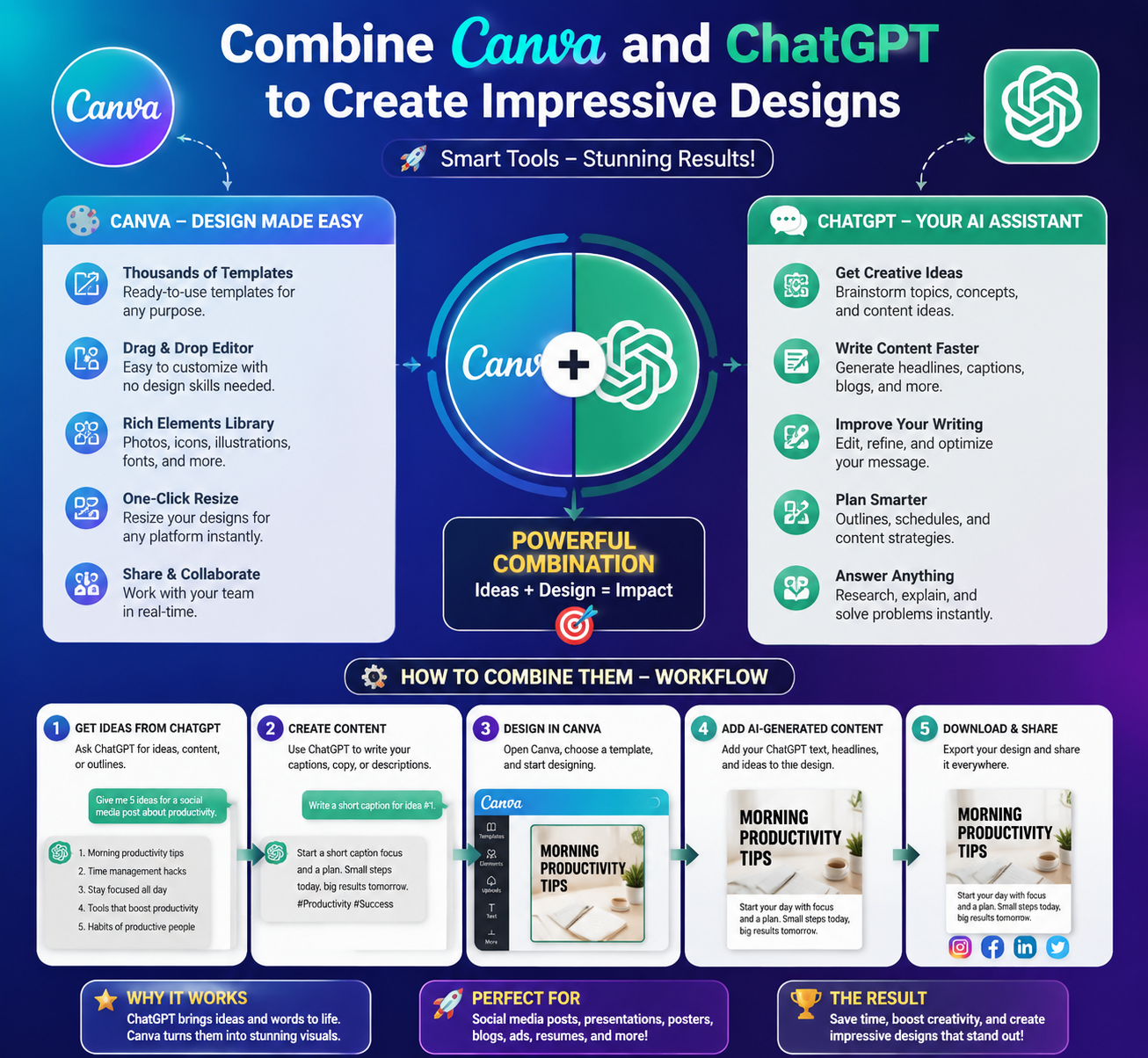
Have you ever imagined that creating impressive designs wouldn''t be a difficult and time-consuming task? With the combination of ChatGPT and Canva, everything becomes easier than ever. With just a few clicks and a little creativity, you can create unique and attractive designs. Let Sadesign help you explore this combination, saving you time and enhancing your creativity. From content brainstorming to presentation, using ChatGPT and Canva will open up a whole new world of inspiration for you.
1. Design trends with AI
In the era of Industry 4.0, graphic design is no longer exclusively for those with specialized expertise. With the advent of online tools like Canva and artificial intelligence like ChatGPT, creating impressive design products has become an achievable task for everyone. No longer requiring complex skills, you can now easily turn your ideas into reality with just a few clicks.
The combination of Canva and ChatGPT not only saves time but also opens up a diverse world of creativity. ChatGPT, with its ability to generate rich content and creative ideas, will help you overcome barriers to finding inspiration. Meanwhile, Canva provides you with an intuitive and easy-to-use platform to present those ideas professionally.
Let's explore how these two tools can be combined effectively, allowing individuals to create unique and captivating designs, thereby asserting their individual style in a world of boundless creativity.

2. Why choose Canva and ChatGPT?
Canva has become renowned as a user-friendly online design tool, allowing anyone to create beautiful graphic designs without needing to be an expert. With its drag-and-drop interface, millions of ready-made templates, and extensive image library, Canva makes it easy to realize any design idea, from book covers to social media posts. Furthermore, the platform allows you to customize everything to your liking, helping you create products with a personal touch.
ChatGPT, a product of artificial intelligence, has ushered in a new era for content creation. With its ability to understand natural language and generate intelligent responses, ChatGPT has become a powerful assistant in developing ideas and content for design projects. You can ask questions, request suggestions, or even ask for help writing content for your designs. This not only saves you time but also improves the quality of the final product.
When you combine Canva and ChatGPT, you'll find that design is not just a chore, but an exciting creative journey. ChatGPT provides you with unique ideas and rich content, while Canva takes on the task of bringing those ideas to life visually and vividly. This combination not only helps you create impressive designs but also sparks endless creative inspiration.
3. How to combine ChatGPT with Canva
Combining ChatGPT with Canva not only helps you create impressive designs but also saves time and improves work efficiency. In today's digital age, applying artificial intelligence to the creative process has become an unmissable trend. With the support of ChatGPT, you can easily develop ideas and transform them into unique visual products on the Canva platform. Let's explore this combination to unlock endless creative possibilities!
Canva has become a popular design tool thanks to its user-friendly interface and rich features. When integrated with ChatGPT, you can not only create images but also receive unique suggestions and ideas from AI. This makes it easier to find inspiration and create artwork with a personal touch. Let's explore the details of this integration process with Sforum!
3.1 Quick Guide
To get started, you need to log into ChatGPT and follow a few simple steps. First, go to "Settings" and enable the Plugins feature. Then, create a new chat and select ChatGPT-4, where you can add the Canva Plugin. This will allow you to leverage the full potential of both platforms, turning creative ideas into reality with just a few clicks.
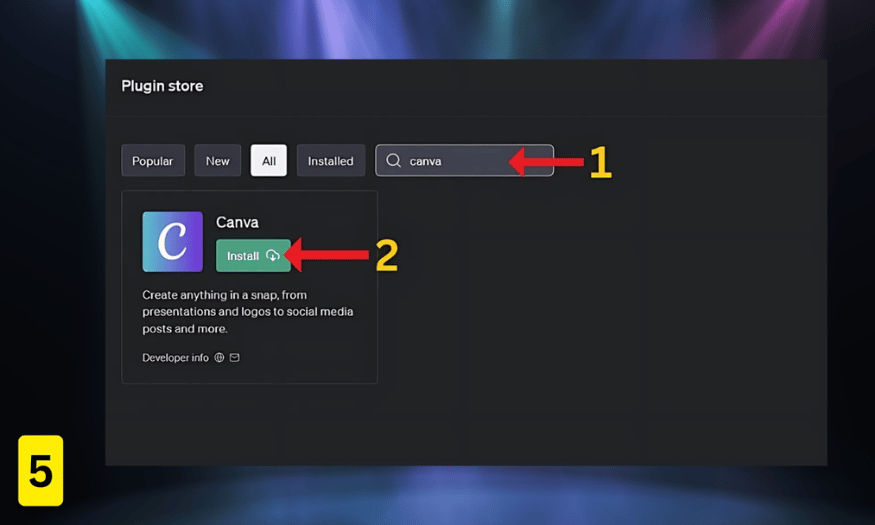
Installing the Canva plugin is very simple. Just search for "Canva" in the Plugin Store and click "Install". With these steps, you're ready to explore the design possibilities that ChatGPT and Canva offer. Get ready for a creative and exciting journey!
3.2 Detailed Instructions
To optimize the integration of ChatGPT with Canva, you need to carefully follow these steps.
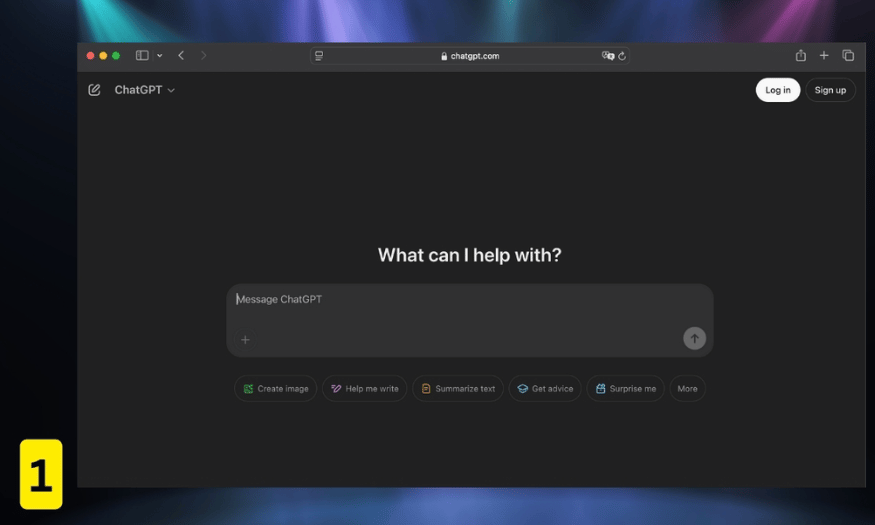
Step 1: Log in to ChatGPT
First, visit the ChatGPT website and log in to your account. Make sure you've upgraded to the ChatGPT Plus plan to get the best features. This will help you take full advantage of artificial intelligence in your design work.
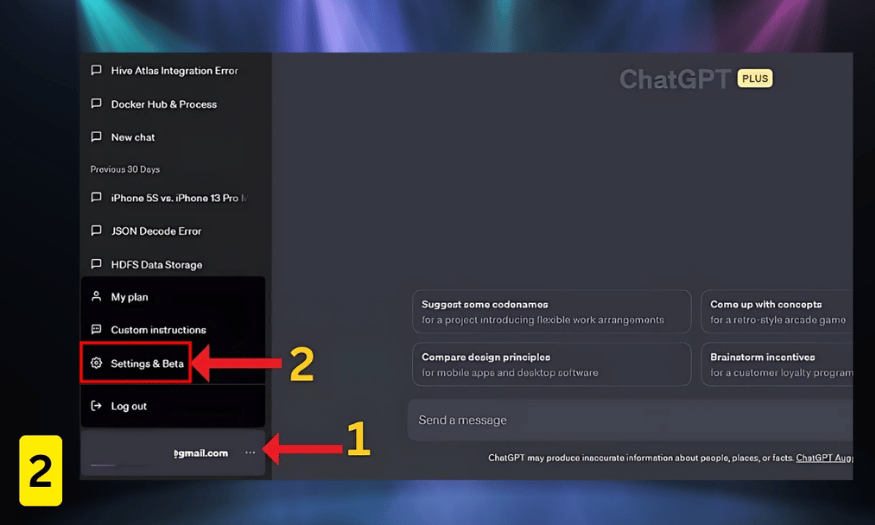
Step 2: Access settings
After logging in, click the email icon in the upper right corner to access the “Settings & Beta” section. Here, you will find options that allow you to configure and customize your experience. Make sure you are ready to enable the Plugin feature, which will help you connect with Canva quickly.
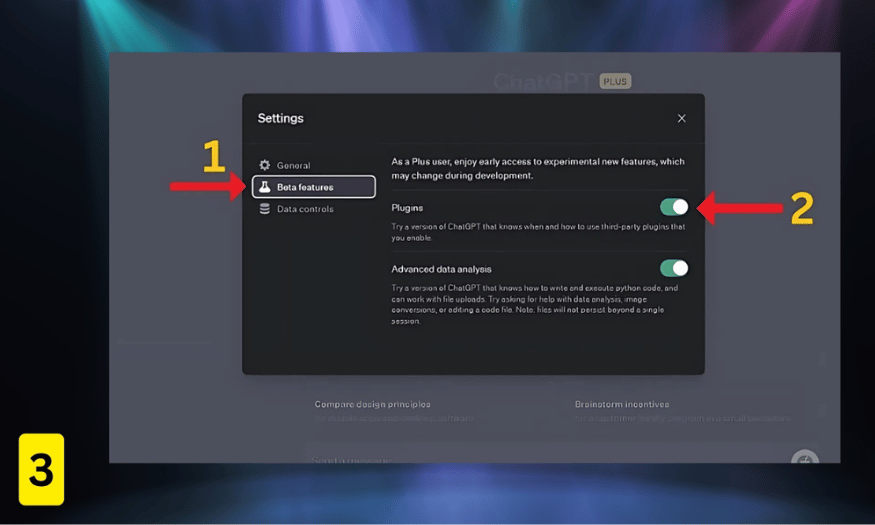
Step 3: Activate the Plugin
In the “Beta features” section, you will find the “Plugin” option. Enable this feature to allow ChatGPT to access external plugins such as Canva. This is important because it opens up possibilities for combining artificial intelligence and graphic design.
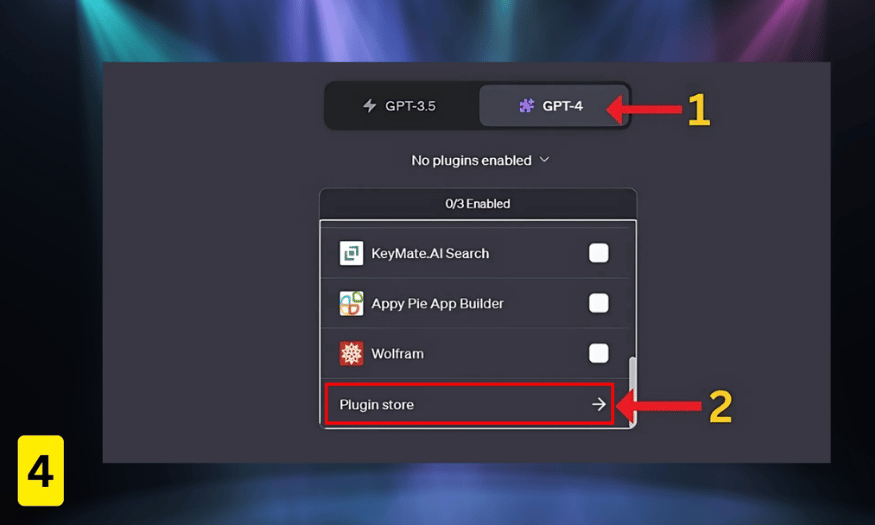
Step 4: Install the Canva Plugin
Next, switch to the ChatGPT-4 tab and click on “No plugin enabled”. You will see the “Plugin Store” option. Click on it to begin the Canva plugin installation process. This is the crucial step that will allow you to utilize the power of ChatGPT in your design work.
Step 5: Find and install Canva
Finally, in the Plugin Store, enter the keyword "Canva" in the search box and click "Install". Once completed, you are ready to use ChatGPT in conjunction with Canva. Now, designing images will be easier and more enjoyable than ever. Start exploring and creating today!
4. Benefits of combining ChatGPT with Canva
Combining ChatGPT with Canva offers a range of outstanding benefits, optimizing the creative and design process. ChatGPT, with its ability to automatically generate text content, helps users save significant time in writing and idea development. You no longer have to worry about finding the right words or sentence structure, as AI will assist you every step of the way, from writing compelling headlines to detailed descriptions for products or services.
Meanwhile, Canva offers a treasure trove of professional design tools, helping you transform text ideas into vibrant and eye-catching images. From diverse graphic templates to flexible editing features, Canva allows you to easily customize and perfect your creations. This combination is not simply about creating beautiful images, but also about effectively expressing your personality and brand.
Furthermore, using ChatGPT with Canva opens the door to unlimited creativity. Users can easily create a wide variety of designs, from social media posts and infographics to advertising banners. This not only improves work productivity but also delivers unique products that meet current needs and trends. As a result, the content creation process in media, marketing, and design becomes faster and more efficient than ever before.
5. Some tips and notes
To optimize the combination of ChatGPT and Canva, you should start by clearly defining your design goals. Use ChatGPT to develop detailed ideas, from the main message to specific colors and images. Ask clear and specific questions, such as, “I need a poster design for a music event, with bright colors and a modern style.” This will help you get more accurate and relevant feedback, creating a solid foundation for your design.
Once you have an idea from ChatGPT, move on to Canva with a ready mindset. Take advantage of the available design templates to save time and create a professional layout. After choosing a template, customize elements such as colors, fonts, and images to match your personal style. Ensure that these elements blend together to create an eye-catching and visually appealing product.
Additionally, you should regularly check for feedback from users or colleagues on your designs. Listening to suggestions will help you improve your skills and expand your creative possibilities. Don't hesitate to experiment and adjust your design until you are satisfied with the final product. The combination of ChatGPT and Canva will surely provide you with a fantastic creative experience!
6. Benefits of upgrading to ChatGPT Pro
Upgrading to ChatGPT Pro offers many valuable benefits to users. One of the highlights is access to more advanced features, allowing you to create richer and more accurate content. ChatGPT Pro can handle complex questions and provide quick responses, saving you time and boosting productivity. In particular, Pro users can experience the latest version with continuous improvements, offering a better experience and richer creative possibilities.
Furthermore, with ChatGPT Pro, you can leverage greater customization and extensibility. This means you can apply AI to a wide range of fields, from writing and marketing to research. This upgrade not only improves the quality of your work but also opens up new opportunities for personal and professional skill development.
Finally, using ChatGPT Pro also provides peace of mind regarding stability and security during your work. You won't have to worry about losing connection or experiencing interruptions, which is crucial for projects that need to be completed on time.
7. Benefits of upgrading to Canva Pro
Similar to ChatGPT, upgrading to Canva Pro also offers many benefits to users. One of the biggest advantages is access to millions of premium design templates and high-quality images. With Canva Pro, you can easily create professional-looking designs without having to start from scratch. Using these templates not only saves time but also helps you tap into a wealth of creative inspiration.
Canva Pro also offers many advanced features such as the ability to create brand identities and store design resources. You can easily manage your brand's colors, fonts, and images in a single place, making the design process more consistent and professional. This is especially useful for businesses or individuals who want to build a strong and consistent brand.
Finally, upgrading to Canva Pro also allows for more effective teamwork. You can share documents, collaborate directly with colleagues, and receive immediate feedback. This feature not only improves workflows but also fosters creativity and teamwork, leading to better products.
8. Addresses for upgrading ChatGPT Pro and Canva Pro
If you're looking for a reputable place to upgrade your ChatGPT Pro and Canva Pro accounts, Sadesign is the perfect choice. With years of experience in providing licensed software, Sadesign has established itself in the Vietnamese market. We are committed to providing customers with genuine products at reasonable prices, helping you optimize your AI and design experience.
At Sadesign, you not only get ChatGPT Pro and Canva Pro accounts at competitive prices, but also enjoy dedicated customer service. We support you from consultation and installation guidance to maintenance throughout your usage. With our guarantee of quality and data security, you can rest assured when choosing to upgrade your account here.
Furthermore, Sadesign offers a variety of flexible upgrade packages, from shared accounts to individual accounts, to suit the needs and budgets of each customer. We also support diverse payment methods, making it easy for you to complete transactions quickly and conveniently. Come to Sadesign to experience the best tools for your work and creativity.
9. Conclusion
Combining ChatGPT and Canva not only optimizes your design workflow but also expands your creative possibilities. ChatGPT helps you develop ideas and content quickly and efficiently, while Canva provides intuitive tools to turn those ideas into reality. With the support of these two tools, creating impressive designs becomes easier and more enjoyable than ever. Try it today to discover the limitless potential this combination offers!





















VIP Products








Best Selling Products
Copyright Adobe Lightroom Account
59 USD
ChatGPT Plus Account (GPT-4)
16 USD
Genuine Adobe Illustrator account
99 USD
Plugin Retouch4me
69 USD
Capcut Pro 1 Year
39 USD
Adobe Premiere Pro Account
99 USD
Upgrade Duolingo Super
29 USD
Windows 10 & 11 Pro Key
36 USD
Upgrade Genuine Office 365
49 USD
MidJourney Account
29 USD
Genuine Cheap Canva Pro
39 USD
Freepik Premium Account
59 USD
Autodesk All App Account Copyright
120 USD
Adobe Photoshop Copyright - Full App
120 USD
Upgrade genuine Capture One account
120 USD