Best Selling Products

Plugin Retouch4me
69 USD

Genuine Adobe Illustrator account
99 USD

Autodesk All App Account Copyright
120 USD

Upgrade genuine Capture One account
120 USD

Freepik Premium Account
59 USD

ChatGPT Plus Account (GPT-4)
16 USD

Upgrade Duolingo Super
29 USD

Windows 10 & 11 Pro Key
36 USD

Capcut Pro 1 Year
39 USD

Upgrade Genuine Office 365
49 USD

MidJourney Account
29 USD

Genuine Cheap Canva Pro
39 USD

Copyright Adobe Lightroom Account
59 USD

Adobe Premiere Pro Account
99 USD

Adobe Photoshop Copyright - Full App
120 USD
Discover the Top 10 Best Photo Collage Apps for Phones Today
Nội dung
Instead of just posting monotonous individual photos, combining and transforming them into eye-catching works of art is a trend loved by many people. To do that, you''ll certainly need the help of the smart photo collage apps below to freely create right on your phone.
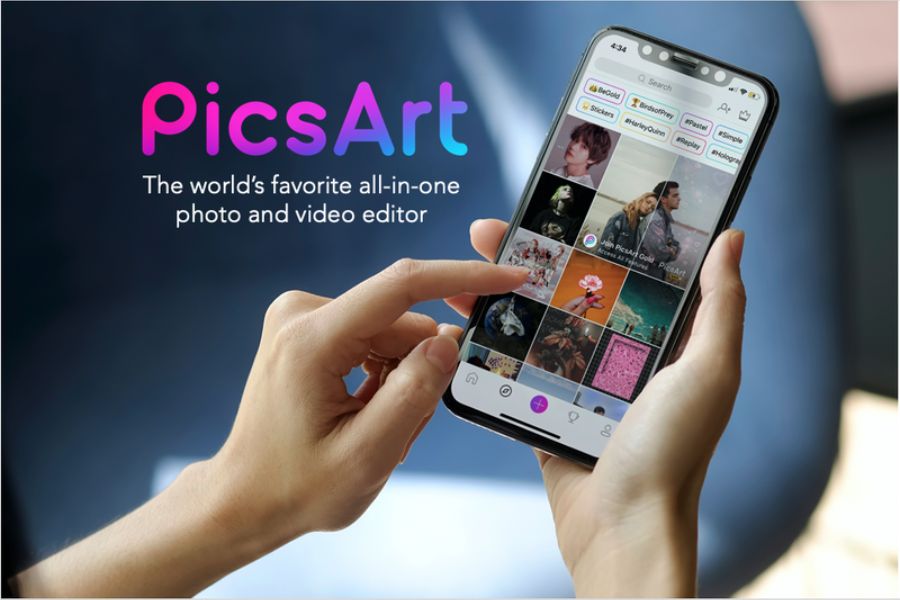
1. PicsArt Photo Editor
If you're looking for an all-powerful photo collage app that can turn any wild idea into reality, PicsArt is the "perfect match." This app has a massive creative ecosystem, smoothly combining in-depth editing tools with an extremely intuitive drag-and-drop collage feature. Whether you're a beginner just getting familiar with editing or a professional designer wanting to sketch quickly on your phone, PicsArt always offers unlimited creative space for you to soar freely.
Unlimited photo collaging: Freely combine multiple photos with a diverse grid library, easily customizing border thickness and corner rounding as you like.
A massive, rich sticker library: Access millions of unique stickers contributed by the community, making your collage lively and full of personal flair.
Magic magical effects: Turns an ordinary photo into artistic painting, a sketch, or a surreal digital effect in just one tap.
Typography text insertion: Includes hundreds of beautiful Vietnamese-localized fonts, letting you create drop-shadow, curved-text, or text-image-embedding effects.
A smart object-removal tool: Easily remove extraneous details, passersby, or background clutter using top-tier AI technology without blurring the photo.
2. Canva
Canva has completely changed how we think about graphic design thanks to its "anyone can create" philosophy. This is a photo collage app that leans toward layout and modern aesthetic thinking, extremely well suited for online shop owners, influencers, or students. Canva's greatest strength lies in its massive drag-and-drop graphics library, letting you weave multiple stories and messages into a single frame in a way that's neat, elegant, and precisely proportioned.
Thousands of ready-made design templates: Features a collage template library spanning diverse themes, from Instagram stories, invitations, and posters to Facebook cover photos.
A massive graphic-element library: Includes millions of built-in icons, illustrations, geometric borders, and freehand strokes ranging from minimalist to vibrant.
Synced cloud storage: Automatically saves your editing progress and syncs smoothly between phone and computer, letting you work anytime, anywhere.
A personal brand kit: Lets you save a favorite color palette, logo, and font to quickly apply to batches of collages.
Premium multi-format export: Supports downloading your product at sharp resolution in PNG, JPG, or PDF formats without worrying about pixelation or reduced quality.
3. Snapseed
Developed by tech giant Google, Snapseed is a premium, completely free photo collage app, free of annoying ads. In contrast to apps chasing quick-fix trends, Snapseed focuses on restoring and optimizing a photo's original quality in the most professional way. Its exclusive swipe-and-tap interface lets users precisely control every light parameter, making your collages look deep, artistic, and richly cinematic.
Flexible area-by-area editing tools: The "Selective" and "Brush" features let you change brightness and saturation at just one specific point on the photo.
Double Exposure: A unique feature that lets you blend two or more photos together, creating a mesmerizing, artistically hazy effect.
RAW-format photo editing: Supports opening and fine-tuning high-quality original image files from a professional camera directly on your phone screen.
Smart AI-powered photo expansion: Automatically calculates and fills in details at the edge of a photo when you want to expand the surrounding space without cropping.
Save personal editing formulas: Create and save color filters you've fine-tuned yourself to quickly apply to future photos with just one click.
4. VSCO
When it comes to classic, warm, poetic film tones, no name can surpass VSCO. This isn't simply a photo collage app — it's also a community dedicated to souls passionate about artistic photography. VSCO offers color filters that accurately simulate nostalgic film stock from Fujifilm, Kodak, or Agfa, giving your collages an elegant, refined look as if shot on an expensive film camera.
Premium film-simulation color filters: Features hundreds of exclusive color presets categorized by mood, from bright summer sunshine to melancholy autumn.
A Collage-space creation tool: Supports combining photos together in a timeline layout or freely arranged, overlapping each other in a bold, unconventional way.
Create artistic Grain noise effects: Adds fine grain or a light scratch texture to a photo to authentically recreate the nostalgic feel of past decades.
Advanced color-space customization: Deeply controls parameters such as Highlights Tint and Shadows Tint of the photo.
An online photo journal: A space for sharing work with no "like" or "comment" button, letting you focus entirely on the pure artistic experience.
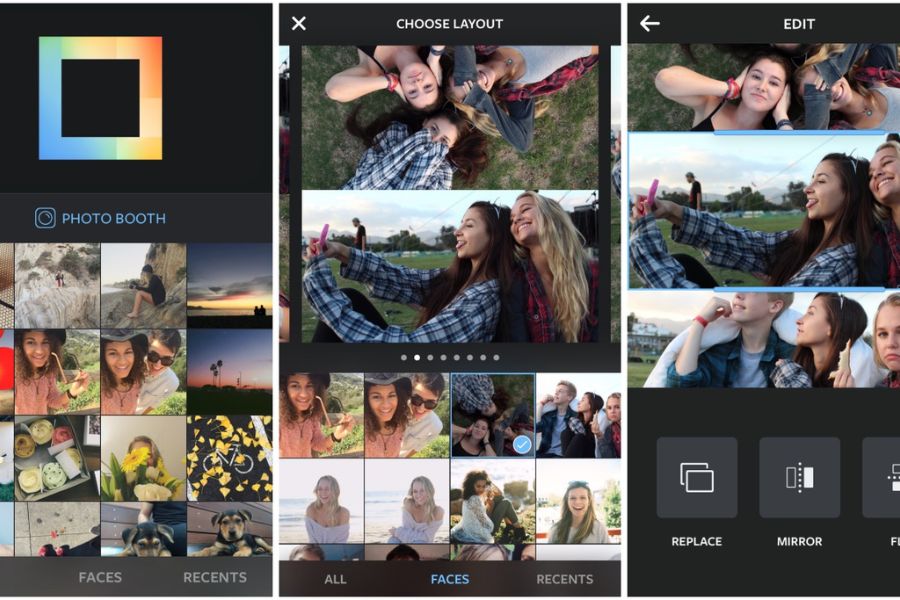
5. Layout from Instagram
If you pursue minimalism and speed and hate bulky, complicated features, Layout from Instagram is the perfect answer. Designed specifically for the purpose of combining photos, this photo collage app strips away every unnecessary detail to focus maximally on the layout-arranging experience. You just need to open the app, select your favorite photos, and the app will immediately suggest a whole range of eye-catching horizontal, vertical, or interwoven grid styles.
An extremely fast, intuitive interface: Select up to 9 photos from your library at once and instantly see the collage result displayed in real time.
Flip and mirror features: Easily change the perspective of each photo in the grid by mirroring or rotating it in the opposite direction.
Photo Booth mode: Triggers the camera to continuously shoot multiple portrait shots and automatically arrange them into a fun frame.
Flexible frame resizing: Just drag the boundary lines between photos to expand or shrink the display area of each one.
Optimized social media sharing: Connects directly with Instagram and Facebook, letting you post your freshly made work to your feed in the blink of an eye.
6. Pixlr
Pixlr is a photo collage app that perfectly balances powerful editing features with simplicity and accessibility for everyday users. This app's standout point lies in its ability to offer thousands of unique overlays and light-leak effects. Thanks to this, you can easily cover your collage with a mystical fog layer, sunbeams shining through leaves, or sparkling bokeh spots like a fairy tale.
An automatic Collage-creation system: Provides hundreds of ready-made layout styles along with the ability to automatically adjust the spacing between photos.
A rich set of Overlay effects: Adds weather effects such as falling rain, snow cover, hazy smoke, or extremely natural light-leak effects.
A one-touch Auto Fix editing feature: Automatically balances color, contrast, and lighting for the entire photo with just one button press.
Creative drawing with a specialized brush: Lets you hand-draw, write text, or erase details directly onto the collage layers smoothly.
An editorial frame collection: Adds unique photo border styles, from a negative-film style and torn-paper edges to classic wooden frames.
7. inShot
Although widely known as a top short-video editing tool, inShot also has an extremely powerful and convenient photo collage feature. This app was made to serve the generation of content creators on TikTok, Instagram Reels, or Facebook Stories. inShot's big advantage is its excellent ability to handle aspect ratios, quickly turning a jumble of horizontal and vertical photos into a unified layout that fits perfectly on a phone screen.
Smart blurred-background customization: Creates a background-blur effect using the very same photo, making the collage look more depth-filled and professional.
Standard social-media aspect ratios: Quickly formats collage sizes to precise 1:1 (Instagram), 9:16 (TikTok), or 4:5 standards.
A library of cute animated stickers: Includes trending sticker sets, continuously updated to match hot global youth trends.
Fresh, modern color filters: inShot's tones carry a youthful, energetic style, well suited for memory and travel photos.
Border-spacing adjustment: Lets you drag a slider to change the width of the gap between photos and round the corners as you like.

8. Fotor
Known as "Photoshop in miniature," Fotor is a photo collage app that applies extremely powerful artificial intelligence (AI) technology to elevate the user experience. Fotor's strength lies in its batch-processing ability and its algorithms for automatically sharpening blurry images. When using Fotor to make a collage, you won't have to worry about photos of inconsistent quality, because the AI system will automatically analyze and balance the sharpness and lighting of all the photos into a unified whole.
One-touch AI photo upgrade: Automatically fixes underexposure, backlighting, or blur caused by camera shake in just a few short seconds.
A Magazine collage mode: Turns your everyday photos into an elegant fashion-magazine cover with finely arranged text layouts.
Ultra-fast background separation and editing: Automatically detects a human or object subject to separate it from the old background, ready to composite into new backgrounds.
In-depth RGB curve adjustment: Lets graphics-savvy users finely adjust each individual red, green, and blue color range of the photo.
A premium multi-language font library: Provides a whole range of artistic fonts designed specifically for commercial purposes or for creating a watermark to protect your photo.
9. Meitu
If you're a fan of a sweet, adorable style and want your collages to shine as brightly as Chinese or Korean stars, Meitu is the number-one choice. This is a photo collage app that perfectly combines top-tier portrait-editing technology with a treasure trove of cute anime-style graphics. Meitu helps you transform your beauty in the most natural way, while also weaving it into romantic, dreamily colorful frames.
Smart AI portrait editing: Automatically smooths skin, slims the chin, lifts the nose, and brightens the eyes while still preserving the face's natural features.
Comic-style collaging: Turns your real-life photos into creative, one-of-a-kind comic-book-style frames.
Exclusive artistic hand-drawn effects: Converts a portrait photo into a beautiful watercolor painting, oil painting, or pencil-sketch drawing.
A daily-updated background and frame library: Thousands of border templates, stickers, and backgrounds designed for the seasons, holidays, or hot trends.
A leg-lengthening height-boosting tool: Finely adjusts body proportions, giving you a model-standard figure in full-body collages.
10. Foodie
The name says it all — Foodie is a photo collage app developed specifically for food-loving, travel-loving souls. However, don't let the name fool you, because besides making dishes look more delicious and juicy, Foodie's color filters are also extremely excellent when applied to outdoor picnic landscape photos or outdoor portraits. Foodie's collaging ability helps you create incredibly eye-catching, visually stimulating collections of food and travel experiences.
Over 30 color filters specialized for food: Color groups named directly after dishes, such as "Delicious," "Fresh," "BBQ," and "Sweet."
Top-View shooting feature: Displays a smart color bar that notifies you when your phone is perfectly parallel to the dining table's surface.
Culinary travel-journey collaging: Easily gather moments from appetizers and main courses to desserts into one neat frame.
A background-blur effect to highlight the dish: Gently blurs the surrounding setting to draw all of the viewer's attention to the plate of food at the center.
Live color-graded short video recording: Supports recording 60-second short clips with a color filter applied instantly, ready to share to a story.
11. Conclusion
Each photo collage app suggested above has its own unique strengths. If you love bold, unlimited creativity, choose PicsArt. If you need a tool to support quick work and design, Canva will be your powerful assistant. And if you just want your everyday photos to become more artistic and evocative, the duo of Snapseed and VSCO certainly won't disappoint you. Download the app that suits you now to start your journey of transforming your photos into stunning, million-like-attracting works today!





















VIP Products








Best Selling Products
Plugin Retouch4me
69 USD
Genuine Adobe Illustrator account
99 USD
Autodesk All App Account Copyright
120 USD
Upgrade genuine Capture One account
120 USD
Freepik Premium Account
59 USD
ChatGPT Plus Account (GPT-4)
16 USD
Upgrade Duolingo Super
29 USD
Windows 10 & 11 Pro Key
36 USD
Capcut Pro 1 Year
39 USD
Upgrade Genuine Office 365
49 USD
MidJourney Account
29 USD
Genuine Cheap Canva Pro
39 USD
Copyright Adobe Lightroom Account
59 USD
Adobe Premiere Pro Account
99 USD
Adobe Photoshop Copyright - Full App
120 USD