Best Selling Products

Plugin Retouch4me
69 USD

Genuine Cheap Canva Pro
39 USD

Capcut Pro 1 Year
39 USD

Adobe Photoshop Copyright - Full App
120 USD

Upgrade Duolingo Super
29 USD

Copyright Adobe Lightroom Account
59 USD

Upgrade genuine Capture One account
120 USD

Windows 10 & 11 Pro Key
36 USD

ChatGPT Plus Account (GPT-4)
16 USD

Upgrade Genuine Office 365
49 USD

MidJourney Account
29 USD

Autodesk All App Account Copyright
120 USD

Freepik Premium Account
59 USD

Adobe Premiere Pro Account
99 USD

Genuine Adobe Illustrator account
99 USD
Don't Miss These 9 Outstanding Free Video Editing Software Programs
Nội dung
Choosing the right video editing software can help you improve content quality without making a major financial investment. Today, there are many free tools that still offer powerful features, meeting needs ranging from basic to professional.
1. Overview of Using Free Software for Video Editing
Free video editing software has made tremendous progress in recent years. In the past, free tools were often limited in features, performance, and output quality. Today, however, many programs have been significantly upgraded and even approach the capabilities of paid solutions.
Using free software offers many clear advantages, especially for students, freelancers, or beginners. Users can learn the video production process, editing, color correction, and effects application without any initial investment. This serves as an important stepping stone for building skills before transitioning to more professional software.
However, free software also has certain limitations. Some tools may restrict effects, plugins, or export capabilities. In addition, performance often depends on hardware specifications, especially with resource-intensive applications. Therefore, choosing software that matches both your needs and device is extremely important.
.jpg)
2. Top 9 Best Free Video Editing Software Programs in 2026
2.1 OpenShot
OpenShot is one of the most popular free video editing programs today, especially suitable for beginners. With an intuitive and easy-to-learn interface, OpenShot allows users to quickly perform basic tasks such as video trimming, transitions, text insertion, and audio processing without requiring extensive technical knowledge.
The software supports a wide range of video formats and allows work on multi-layer timelines, providing greater flexibility in content organization. Additionally, OpenShot includes basic effects such as fade, zoom, and simple animations, which are sufficient for personal video projects or social media content. Its stable performance on Windows, macOS, and Linux is also a significant advantage.
However, because it focuses on simplicity, OpenShot is not particularly strong in advanced features such as professional color grading or complex effects. Users working on more demanding projects may find it somewhat limiting. Nevertheless, it remains an ideal choice for beginning the journey of learning video editing.
.jpg)
2.2 Blender
Blender is not only famous as a 3D modeling software but also includes a powerful built-in video editor. Blender allows users to perform advanced editing tasks such as cutting, effects creation, audio processing, and integrating 3D graphics into videos.
The software’s standout feature is its ability to create complex effects and advanced animations. Users can build 3D scenes, add cinematic visual effects, or produce highly creative personalized content. This makes it an ideal tool for those who want to combine video editing and 3D graphics within the same workflow.
However, Blender has a relatively complex interface and is not particularly beginner-friendly. The learning process can take time, especially if you are unfamiliar with 3D environments. Even so, for users aiming for advanced skills, Blender is an extremely powerful and flexible choice.
.jpg)
2.3 VSDC
VSDC Free Video Editor is a free video editing software designed specifically for Windows, notable for its non-linear editing capabilities and diverse toolset. VSDC allows users to work with multiple video, audio, and effect layers within a single project, providing significant flexibility during production.
The software offers many color correction tools, visual effects, and filters that can substantially improve video quality. In addition, VSDC supports exporting videos in various formats and resolutions, making it suitable for platforms such as YouTube, Facebook, and TikTok.
Although it offers many powerful features, VSDC’s interface can be challenging for beginners because it is not particularly intuitive. However, once users become familiar with it, they will find it to be a highly flexible tool suitable for both semi-professional and professional needs.
.jpg)
2.4 Lightworks
Lightworks is a professional video editing software that has been used in many major film productions. The free version still retains many essential features, enabling users to create high-quality video projects.
Lightworks stands out for its precise editing capabilities, support for numerous video formats, and professional timeline system that optimizes workflow efficiency. The software’s interface is designed with professional use in mind, making it suitable for industry-standard filmmaking workflows.
However, the free version does have some limitations regarding export formats and resolution. Additionally, the professional interface may feel intimidating to beginners. Even so, if you want to familiarize yourself with a professional editing environment, Lightworks is a highly worthwhile option.
.jpg)
2.5 HitFilm Express
HitFilm Express combines video editing with visual effects (VFX), delivering a powerful creative experience. It is an excellent tool for users who want to produce videos with impressive cinematic effects.
The software provides a full range of tools, from editing and color grading to creating special effects such as explosions, lighting effects, and complex motion graphics. Furthermore, HitFilm Express supports numerous plugins that expand creative possibilities, allowing users to upgrade functionality when needed.
However, smooth performance requires relatively powerful hardware. Additionally, the interface and extensive feature set mean that beginners may need time to become comfortable. Even so, for those pursuing professional content creation, it is a tool well worth investing time in learning.
.jpg)
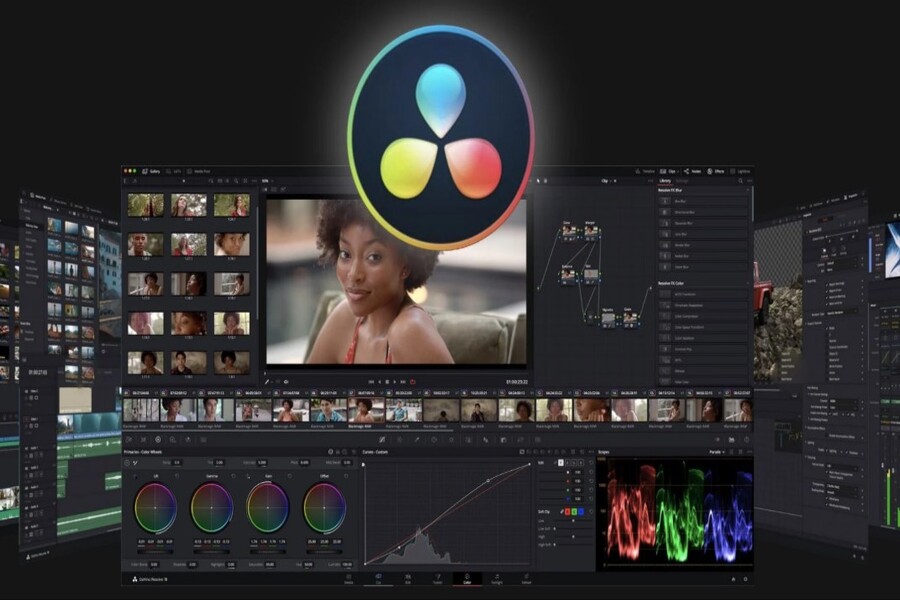
2.6 DaVinci Resolve
DaVinci Resolve is one of the most powerful free video editing programs available today and is widely used throughout the film and television industry. It is a comprehensive solution that integrates video editing, color grading, audio processing, and visual effects into a single platform.
Its greatest strength is its advanced color grading system, which gives users detailed and precise control over color. In addition, the software supports professional timelines, multi-layer editing, and high-quality video exports, meeting the demanding requirements of content production.
However, DaVinci Resolve requires a fairly powerful computer and has a steep learning curve, particularly for beginners. The learning process can take time, but once mastered, it becomes an extremely powerful tool capable of replacing many paid alternatives. It is an ideal choice for those pursuing long-term development in professional video production.
.jpg)
2.7 Shotcut
Shotcut is an open-source video editing software that is completely free and runs on multiple platforms including Windows, macOS, and Linux. It is a suitable choice for users seeking a balance between functionality and ease of use.
Shotcut supports many video formats without requiring additional codec installation, saving both time and effort. The software provides a flexible timeline that supports multi-layer editing along with numerous video and audio filters. Users can perform tasks such as trimming, basic color correction, adding effects, and exporting videos in multiple resolutions.
Although the interface is not particularly modern, it becomes quite intuitive once users become familiar with it. This makes it a good choice for those looking to move beyond basic software while maintaining simplicity.
(1).jpg)

2.8 Avidemux
Avidemux is a free video editing software focused on simple tasks such as cutting, encoding, and converting video formats. With its lightweight design and minimalist interface, Avidemux is ideal for users who do not require complex features.
The software supports many popular video formats and enables quick handling of basic tasks such as trimming clips, applying simple filters, or changing codecs. It is an ideal tool for fast editing, particularly when videos need to be processed within a short time frame.
However, Avidemux lacks a multi-layer timeline and advanced tools such as effects or professional color grading. Therefore, it is best suited for basic editing needs or quick processing before importing footage into more advanced software.
.jpg)
2.9 Windows Movie Maker
Windows Movie Maker is a familiar name to many Windows users over the years. Although Microsoft no longer officially develops it, the software continues to be used by many because of its simplicity and accessibility.
Windows Movie Maker provides basic features such as video trimming, music insertion, text overlays, and transition effects. Its user-friendly interface allows beginners to quickly create completed videos without learning many technical skills.
.jpg)
However, because it is outdated, the software does not support many modern formats and lacks contemporary features. Even so, for users who need a simple tool for quick video editing, Windows Movie Maker remains a worthwhile option.
Choosing the right software not only helps save costs but also improves productivity and content quality. Hopefully, this article will help you find the right tool to begin your video creation journey in 2026.





















VIP Products








Best Selling Products
Plugin Retouch4me
69 USD
Genuine Cheap Canva Pro
39 USD
Capcut Pro 1 Year
39 USD
Adobe Photoshop Copyright - Full App
120 USD
Upgrade Duolingo Super
29 USD
Copyright Adobe Lightroom Account
59 USD
Upgrade genuine Capture One account
120 USD
Windows 10 & 11 Pro Key
36 USD
ChatGPT Plus Account (GPT-4)
16 USD
Upgrade Genuine Office 365
49 USD
MidJourney Account
29 USD
Autodesk All App Account Copyright
120 USD
Freepik Premium Account
59 USD
Adobe Premiere Pro Account
99 USD
Genuine Adobe Illustrator account
99 USD