Best Selling Products

Genuine Adobe Illustrator account
99 USD

Plugin Retouch4me
69 USD

Adobe Photoshop Copyright - Full App
120 USD

ChatGPT Plus Account (GPT-4)
16 USD

Copyright Adobe Lightroom Account
59 USD

Genuine Cheap Canva Pro
39 USD

Adobe Premiere Pro Account
99 USD

Autodesk All App Account Copyright
120 USD

Capcut Pro 1 Year
39 USD

Upgrade genuine Capture One account
120 USD

Freepik Premium Account
59 USD

MidJourney Account
29 USD

Upgrade Genuine Office 365
49 USD

Upgrade Duolingo Super
29 USD

Windows 10 & 11 Pro Key
36 USD
Figure AI 3D – Using Nano Banana to Create 3D Models Taking Social Media by Storm
Nội dung
- 1. What is Figure AI 3D and Why Has It Become a Trend?
- 2. What Technology Powers Figure AI 3D?
- 2.1 Gemini Flash Image 2.5 – The Power of Google DeepMind
- 2.2 Google AI Studio and Nano Banana Model
- 2.3 ChatGPT in the Figure AI Creation Process
- 3. Step-by-Step Guide to Creating Figure AI 3D
- 3.1 Creating Figure 3D with Gemini Flash Image 2.5
- 3.2 Creating Figure 3D on Google AI Studio
- 3.3 Creating Figure 3D with ChatGPT
- 4. Popular Prompts for Creating Ultra-Realistic Figure AI 3D
- 5. Important Things to Note for Creating the Perfect Figure 3D
- 6. Frequently Asked Questions (FAQ)
- 1. Is Figure AI 3D a real physical model?
- 2. Do I need 3D skills to create AI figures?
- 3. Is Figure AI 3D safe?
- 4. Can Figure AI 3D be created on mobile phones?
- 5. Can I use Figure AI 3D for commercial purposes?
- 7. Conclusion
Recently, social media in Vietnam and around the world has been “exploding” with the Figure AI 3D phenomenon — a trend of creating ultra-realistic 3D models from portrait photos and short descriptions. With just one image, a few prompt lines, and advanced AI tools like Gemini Flash Image 2.5 or Nano Banana, you can own a vivid mini 3D model so realistic that it leaves viewers amazed.
1. What is Figure AI 3D and Why Has It Become a Trend?
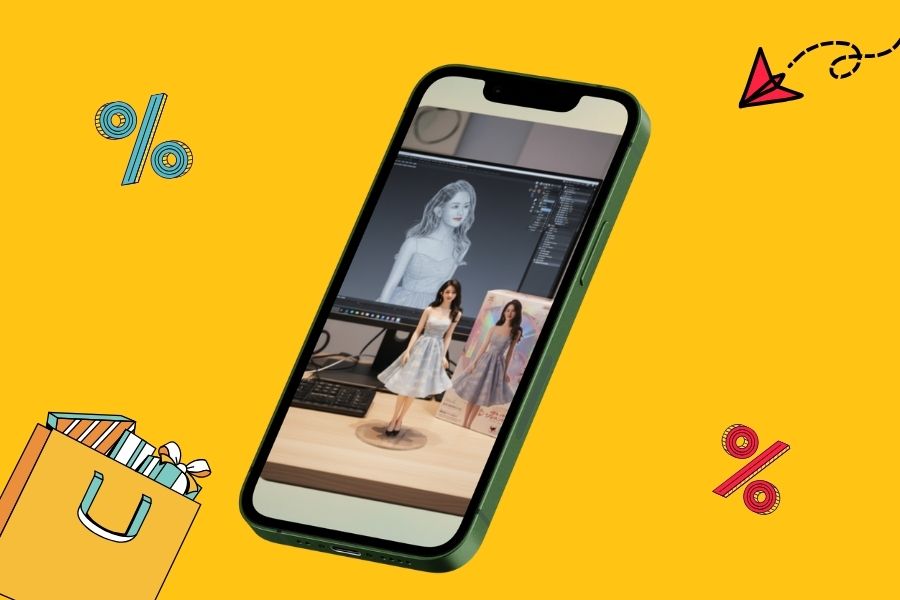
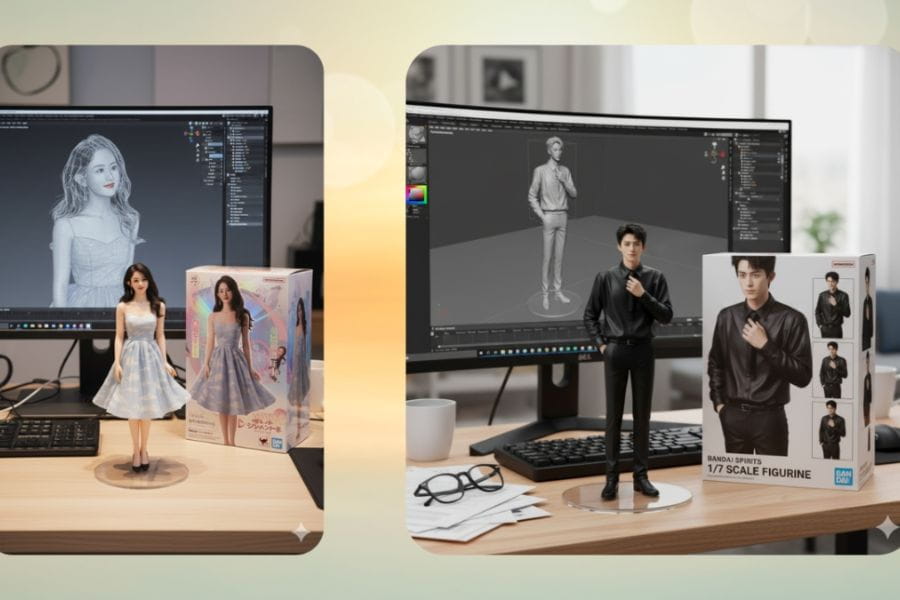
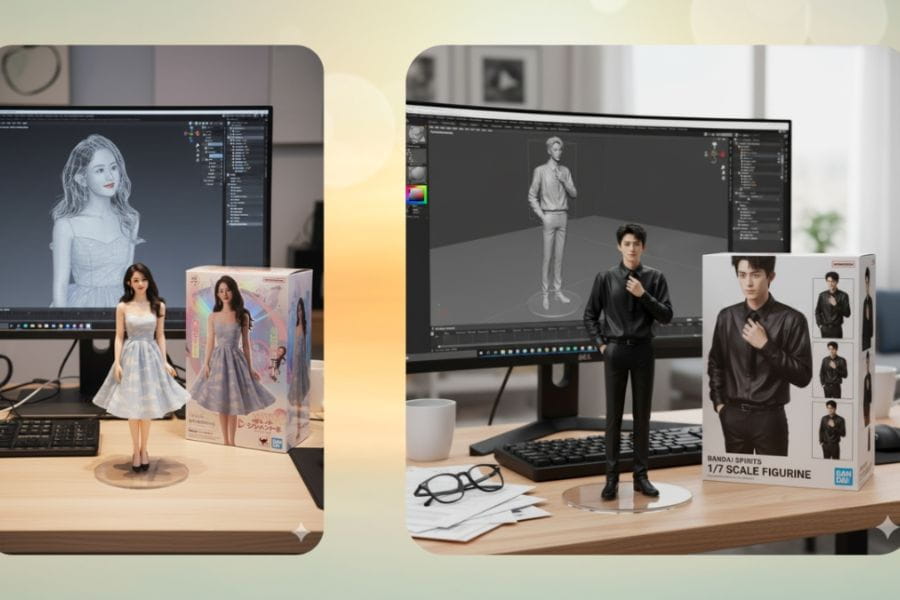
Figure AI 3D is a unique AI-powered 3D image creation technology that transforms any portrait photo into a vivid miniature wax-figure-style model. These models are not just simple 3D images but can also be displayed on desks, attached to transparent acrylic bases, or “packaged” in collectible toy-box styles similar to BANDAI, bringing users a fun and immersive experience.
What makes Figure AI 3D become a trend is its accessibility and speed. You do not need to know how to use complicated 3D software like Blender or Maya. With just one image and a few simple descriptive lines, AI can process and generate a model within about 30 seconds to 1 minute. Moreover, every model is fully personalized, preserving the face, outfit, and even the background you want, making the final product truly “one of a kind”.
Its shareability and viral potential are also reasons why this trend has exploded across social media. Users can easily post their AI 3D models on TikTok, Facebook, and Instagram, gaining thousands of interactions within just a few hours. More importantly, Figure AI 3D brings experiences once limited to the film, gaming, or design studio industries closer to everyone, making high technology more approachable, exciting, and highly “viral”.
2. What Technology Powers Figure AI 3D?
2.1 Gemini Flash Image 2.5 – The Power of Google DeepMind
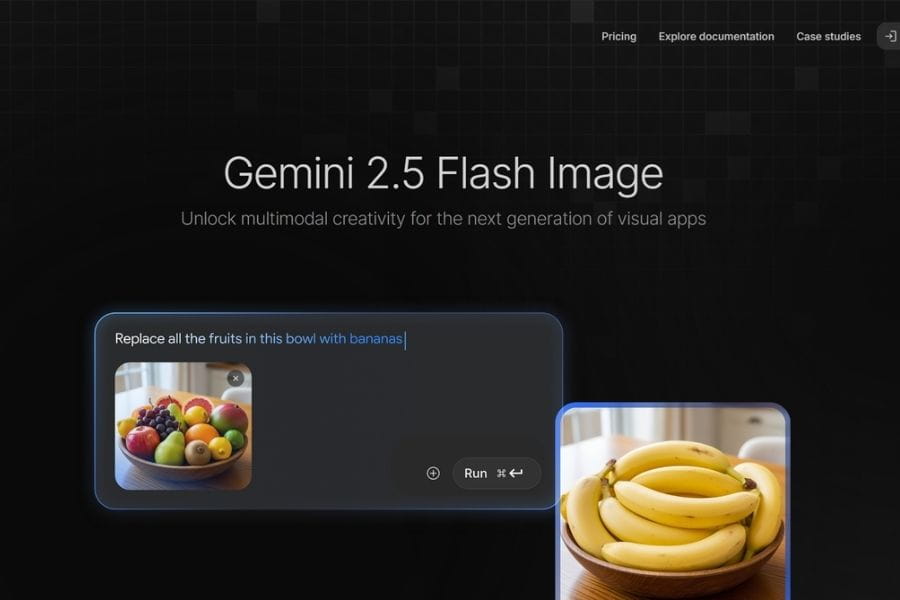
Gemini Flash Image 2.5 is the most advanced AI image platform from Google DeepMind, standing out with its ability to understand and process prompts in incredible detail. With just a single static image, this tool can create vivid, photorealistic 3D models, making every detail such as facial features, clothing, and backgrounds appear surprisingly realistic. Users can even generate 1/7 scale models placed on work desks with transparent acrylic bases, creating the feeling of a genuine miniature sculpture.
What makes Gemini Flash Image 2.5 special is its simulation of a digital sculpting workflow similar to ZBrush, allowing 3D models to have not only beauty but also depth and realism. This is exactly why this technology is considered the “heart” of Figure AI 3D, bringing the 3D creation experience closer to everyone, including non-designers.
2.2 Google AI Studio and Nano Banana Model
Alongside Gemini, Google AI Studio also plays an important role in spreading the Figure AI 3D trend. This platform integrates the Nano Banana model, allowing any portrait image to be transformed into an extremely realistic 3D model with just a few simple steps. Its biggest advantage is that users do not need to install heavy software or complicated configurations; everything is done directly through a web browser, making the trend more accessible and easier to spread quickly.
The Nano Banana Model stands out thanks to its ability to preserve users’ signature details, from faces and outfits to backgrounds. Combined with AI Studio, you can customize models however you like, creating unique works ready to share on social media while maintaining vivid, professional studio-quality 3D results.
2.3 ChatGPT in the Figure AI Creation Process
Alongside Gemini and AI Studio, ChatGPT has also become a powerful assistant in creating 3D models. Users only need to enter prompts, upload portrait photos, and AI will generate complete models with distinct personal styles. From models sitting on study desks and gaming rooms to vast outdoor scenes, ChatGPT allows users to customize every detail easily, turning ideas into reality within minutes.
The flexibility and intuitive experience of ChatGPT make the creative process much easier, even for beginners unfamiliar with 3D. Combined with Gemini Flash Image 2.5 and Nano Banana, ChatGPT completes the “power trio” that makes Figure AI 3D not just a trend, but also a top-tier creative tool opening limitless opportunities for digital art enthusiasts.
3. Step-by-Step Guide to Creating Figure AI 3D
3.1 Creating Figure 3D with Gemini Flash Image 2.5
Step 1: Access Gemini and Select the “Imagen” Section
Open your browser and access the Gemini Flash Image 2.5 platform. On the main interface, select the “Imagen” section, where you can upload images and enter prompts for AI processing.
Step 2: Upload Your Portrait Image to the System
Choose the portrait photo you want to transform into a 3D model. Make sure the image is sharp and well-lit so AI can recognize facial details, expressions, and clothing styles more accurately.
Step 3: Enter a Detailed Prompt
In the prompt box, clearly describe what you want the model to display. For example:
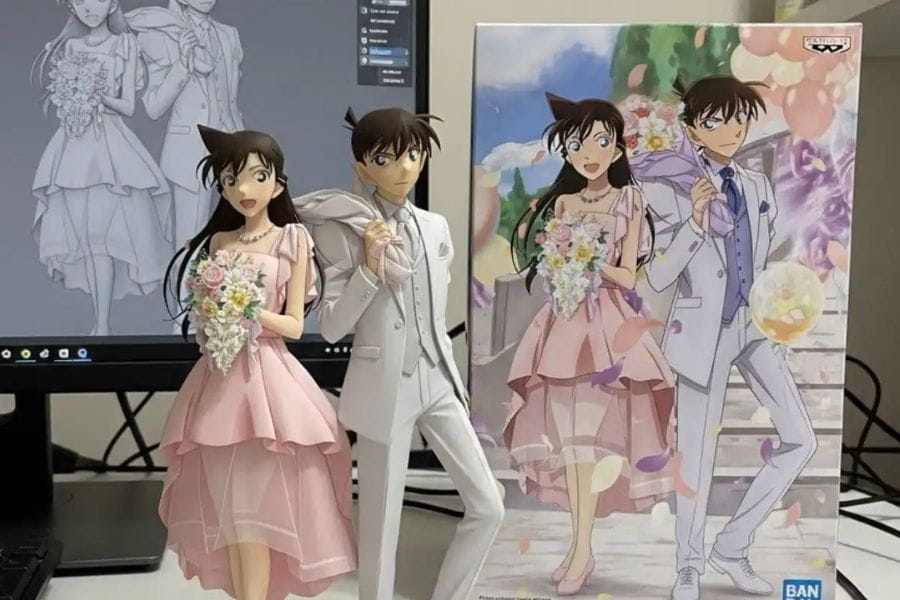
“Create a 1/7 scale commercial figure of the character in the illustration, photorealistic style, natural lighting. Place the figure on a computer desk with a transparent acrylic base. Show the sculpting process using ZBrush, with a Bandai-style toy box beside it.”
The more detailed the prompt, the closer the AI-generated result will match your expectations.
Step 4: Wait for AI Processing and Download the Model
Within about 30 seconds to 1 minute, Gemini will process and display the completed 3D Figure. Once finished, you can download the model and share it on social media or use it as a digital decoration.
3.2 Creating Figure 3D on Google AI Studio
Step 1: Access Google AI Studio and Select “Upload Image”
Open Google AI Studio in your browser and choose the “Upload Image” feature to begin. This is a basic yet important step because image quality directly affects model details.
Step 2: Upload a High-Resolution Original Image
To help AI generate accurate 3D models, choose images with high resolution, balanced lighting, and clear facial details. This allows the Nano Banana Model in AI Studio to recognize features and personal styles accurately.
Step 3: Enter a Detailed Prompt and Click “Generate Figure”
Describe in detail the elements you want in the model, from pose, style, and clothing to the background setting. Once finished, click “Generate Figure” to let AI begin the creation process.
Step 4: Review the Result and Save the Model
Within seconds, the 3D model will appear. You can preview it, adjust the prompt if needed, and save the model for sharing or further editing.
3.3 Creating Figure 3D with ChatGPT
Step 1: Access ChatGPT and Select the Image Generation Feature
Open ChatGPT and select the image generation feature. This is a user-friendly tool suitable for both beginners and users who want to customize models based on personal ideas.
Step 2: Upload the Portrait Photo You Want to Convert
Choose a high-quality, clear portrait photo. ChatGPT will use this image as the base for generating the Figure 3D, ensuring facial features and personal style remain accurate.
Step 3: Enter a Detailed Prompt
The more detailed your description, the easier it is for AI to generate the exact 3D model you want. You can add backgrounds, poses, lighting, figure bases, or accessories to create a more vivid feel.
Step 4: Wait for AI Processing and Download the Model
Within a few dozen seconds, ChatGPT will complete the model generation process. You can then download it and use it for social media, personal portfolios, or creative projects.
4. Popular Prompts for Creating Ultra-Realistic Figure AI 3D
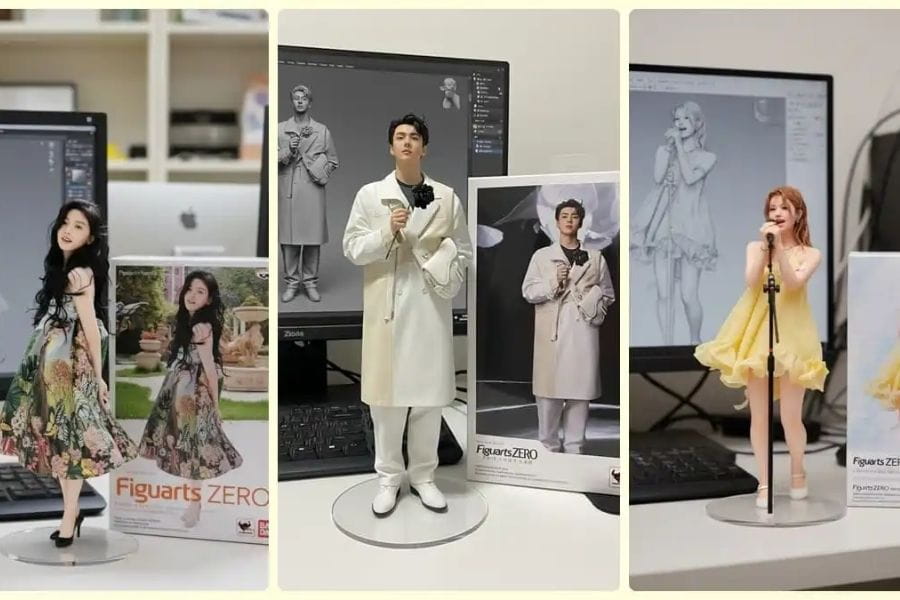
In the world of Figure AI 3D, prompts are considered the “soul” of every model. They are the tools you use to communicate ideas, styles, and backgrounds to AI, helping generate the most vivid and realistic 3D models possible. The more detailed, creative, and specific your prompt is, the closer the resulting 3D model will match your imagination, from lighting and materials to small details like accessories or surrounding environments.
Below are some popular prompt examples currently used by many people to create hyper-realistic Figure AI 3D models:
Template 1 – PC Work Desk
“1/7 scale mini figure placed on a work desk, PC monitor displaying the sculpting process in ZBrush, Bandai toy box beside it, natural lighting, photorealistic material.”
This prompt creates a familiar feeling, as if the model were a real desk decoration while also showcasing the AI creative process, making the figure feel more alive.
Template 2 – MacBook Setup
“Photorealistic 3D figure placed beside a MacBook, cinematic lighting, realistic materials, refined details, modern office setting, top-down perspective.”
This prompt suits users who want artistic and professional-looking models while emphasizing the beauty of the figure combined with a modern environment, creating a cool and luxurious atmosphere.
Template 3 – Festival Square
“Figure placed on a table, behind it is a crowded square with thousands of people wearing red shirts with yellow stars, lively festival atmosphere, brilliant lighting, sharp details.”
This prompt creates a sense of community and festive energy, making the model blend into a large, impressive, and vivid environment rather than standing alone.
Template 4 – Luxury Gaming Room
“Photorealistic mini figure placed beside a gaming monitor, PS5, dollars and gold, colorful RGB lighting, premium gaming room style, highly detailed.”
This is a favorite prompt among young users, especially content creators who want modern, stylish 3D models with a strong gaming aesthetic.
Overall, prompt creation is the most important step for allowing Figure AI 3D to fully express your style and personality. You can combine elements such as scale, materials, lighting, backgrounds, and tiny details to create unique models that attract attention on social media. With a good prompt, your figure will not only be a 3D model but also an admirable piece of digital art.
5. Important Things to Note for Creating the Perfect Figure 3D
To own a vivid, realistic Figure AI 3D capable of attracting attention on social media, you need to focus not only on technology but also on image quality, prompt writing, and several other important factors. Just a few small but effective adjustments can help your model achieve studio-level quality while remaining personalized to your style.
Important Factors for a Perfect Figure 3D
Sharp original image with proper lighting: Input image quality directly determines the final result. Choose high-resolution portrait photos where the face is not obscured or overly dark. Natural or studio lighting helps AI recognize facial details, expressions, and contours accurately, resulting in sharper and more vivid 3D models.
Clear outfits and colors: Simple clothing with harmonious colors helps AI recreate clothing shapes and details more accurately. Avoid overly complex patterns or distracting elements, as these may cause incorrect rendering or unwanted details. Minimal yet attractive outfits can instantly elevate your Figure 3D.
Detailed and creative prompts: Prompts are the “key” for AI to fully understand your ideas. The more detailed the description — from lighting styles, materials, and figure proportions to surrounding backgrounds — the more accurate the model will be. Do not hesitate to add natural or cinematic lighting, accessories, or environmental elements to create unique and eye-catching personalized figures.
Avoid using sensitive images: To ensure personal data safety, avoid uploading important images such as identification documents, financial data, or private photos. Use images intended solely for creative purposes to minimize privacy risks.
Application permissions: Before using any AI platform, carefully review requested permissions such as camera, photo library, or location access. Only grant necessary permissions to protect personal information and avoid unintended data exposure. This is an essential step for staying safe while enjoying AI technology.
Review results before sharing: After AI generates the 3D model, inspect every detail carefully. Ensure the model has no issues with proportions, lighting, or colors. Fine-tuning and choosing suitable backgrounds can make your Figure 3D even more perfect and ready to “go viral” on social media.
6. Frequently Asked Questions (FAQ)
1. Is Figure AI 3D a real physical model?
Figure AI 3D is not a real physical model but an AI-generated product in image or video form. However, if desired, you can absolutely 3D print the model to create a physical version, turning digital ideas into unique collectibles.
2. Do I need 3D skills to create AI figures?
Not at all. Even if you have never learned 3D or used complicated software, tools like Gemini or Google AI Studio can automatically generate vivid 3D models from portrait photos and detailed prompts, allowing you to create like a professional designer.
3. Is Figure AI 3D safe?
When using normal images, Figure AI 3D is generally safe and does not affect personal data. However, you should avoid uploading sensitive images such as ID cards, financial documents, or private information to ensure privacy and security.
4. Can Figure AI 3D be created on mobile phones?
Absolutely. Both Gemini and Google AI Studio support mobile browsers as long as you have a stable internet connection. This allows you to create Figure AI 3D anytime and anywhere without requiring a high-performance computer.
5. Can I use Figure AI 3D for commercial purposes?
This depends on the AI platform you use. Some tools allow commercial use of Figure AI 3D, but there may still be limitations. You should carefully review the terms of use on the official Google DeepMind website or related platforms before applying them commercially.
7. Conclusion
Figure AI 3D, powered by Nano Banana and modern AI tools, is opening a new era for visual creativity. Creating realistic and vivid 3D models is no longer a challenge reserved only for professional designers — now anyone can try it. Whether you are a content creator, influencer, or simply someone who wants to preserve moments in a unique way, AI 3D is the key to turning your ideas into distinctive digital “wax figures.” Try it today to conquer the Figure AI 3D trend, amaze online communities, and elevate your own creativity.





















VIP Products








Best Selling Products
Genuine Adobe Illustrator account
99 USD
Plugin Retouch4me
69 USD
Adobe Photoshop Copyright - Full App
120 USD
ChatGPT Plus Account (GPT-4)
16 USD
Copyright Adobe Lightroom Account
59 USD
Genuine Cheap Canva Pro
39 USD
Adobe Premiere Pro Account
99 USD
Autodesk All App Account Copyright
120 USD
Capcut Pro 1 Year
39 USD
Upgrade genuine Capture One account
120 USD
Freepik Premium Account
59 USD
MidJourney Account
29 USD
Upgrade Genuine Office 365
49 USD
Upgrade Duolingo Super
29 USD
Windows 10 & 11 Pro Key
36 USD