Best Selling Products

Adobe Premiere Pro Account
99 USD

Capcut Pro 1 Year
39 USD

Genuine Adobe Illustrator account
99 USD

Copyright Adobe Lightroom Account
59 USD

Windows 10 & 11 Pro Key
36 USD

Upgrade genuine Capture One account
120 USD

Autodesk All App Account Copyright
120 USD

Upgrade Genuine Office 365
49 USD

MidJourney Account
29 USD

Upgrade Duolingo Super
29 USD

Freepik Premium Account
59 USD

Adobe Photoshop Copyright - Full App
120 USD

ChatGPT Plus Account (GPT-4)
16 USD

Plugin Retouch4me
69 USD

Genuine Cheap Canva Pro
39 USD
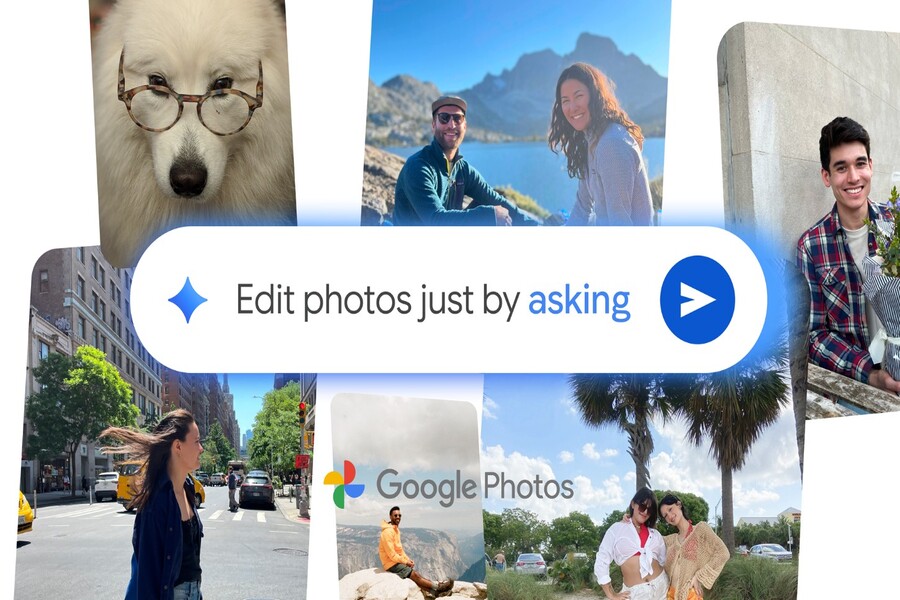
Google Photos brings AI “Help Me Edit” to iPhone: Easily edit photos using text descriptions.
Nội dung
The new AI assistant makes photo editing effortless, intuitive, and fast. This feature combines intelligent facial recognition with convenient touch and swipe gestures, optimizing the user experience.
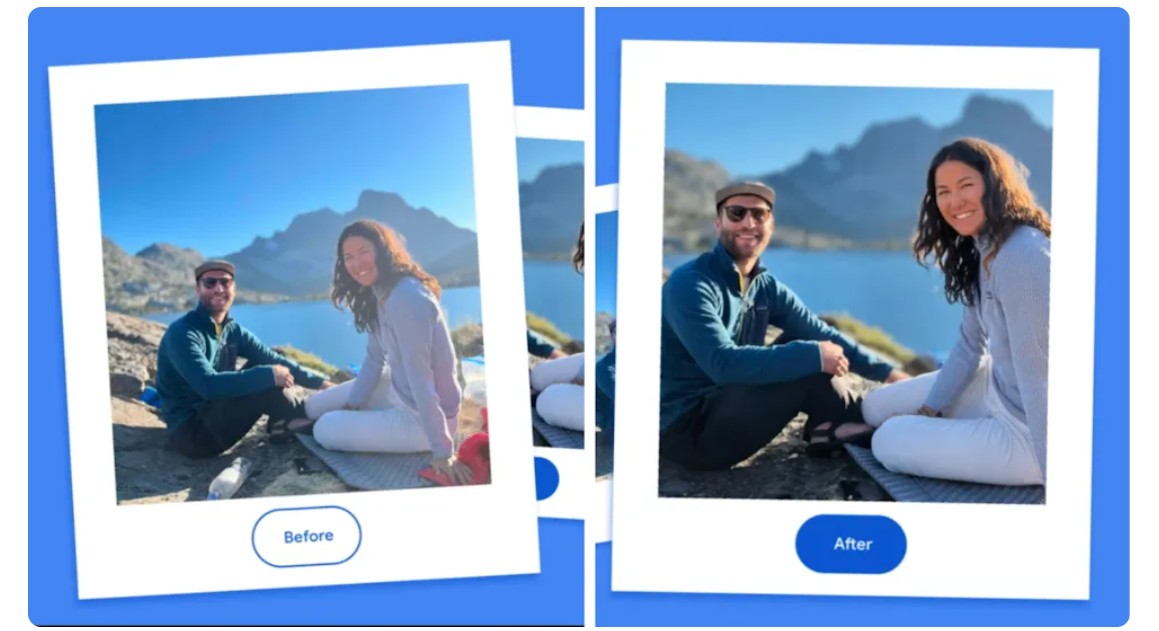
Google Photos continues to assert its pioneering position by launching the AI-powered “Help Me Edit” feature for iPhone users in the US. Instead of having to learn how to use traditional editing tools that require many steps and knowledge of composition, lighting, color, or retouching, users can now simply describe what they want. You can type or say: “Make the photo brighter,” “Remove the person in the background,” “Help me create a natural smile,” “Open your eyes in this picture,” or even request a more creative edit like “Make the sunset sky more vibrant.” All of this will be processed by artificial intelligence in seconds.
Google Photos has previously used AI in features like Magic Eraser, Portrait Light, and Cinematic Photos, but "Help Me Edit" represents a higher level: transforming photo editing from a technical operation into a natural conversation with artificial intelligence. This is ideal for non-professionals who want to create beautiful, sophisticated photos that perfectly match their vision.
1. Edit the image using the description "Help Me Edit"
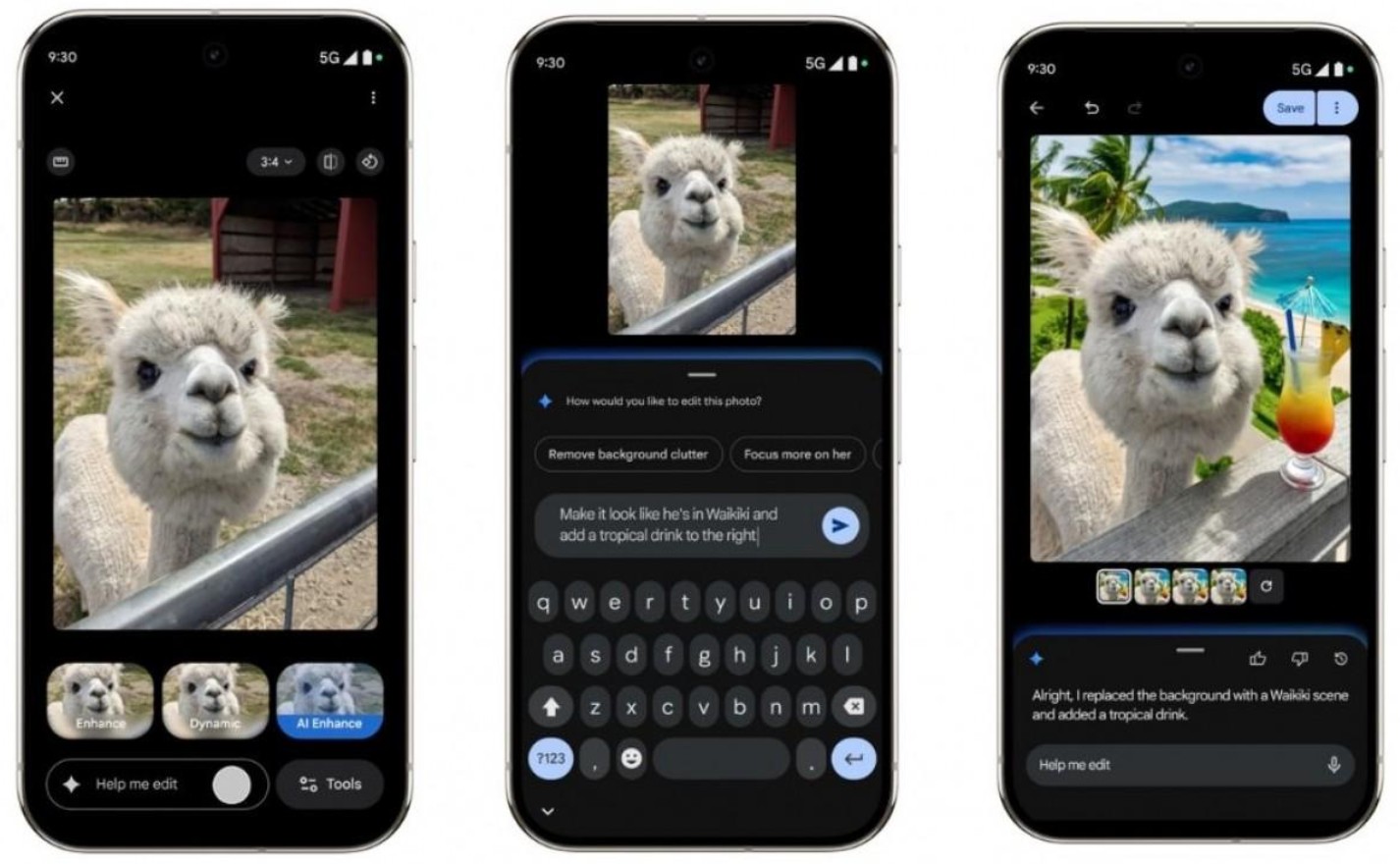
Google Photos has taken text-based editing to a new level with "Help Me Edit." This feature allows iPhone users in the US to perform all photo editing operations through natural voice commands. No more complicated toolbars, no more remembering where each effect is located; the entire editing process is simplified to an interactive format: the user speaks and the AI does the work.
With "Help Me Edit," you can perform everything from basic to advanced edits without needing any professional knowledge. Requests such as skin brightening, blemish removal, sharpening, color balancing, or smoothing are all handled intelligently by the AI, minimizing brute force. Even complex requests like changing facial expressions, recreating smiles, or opening and closing eyes are performed more naturally thanks to the upgraded facial recognition system.
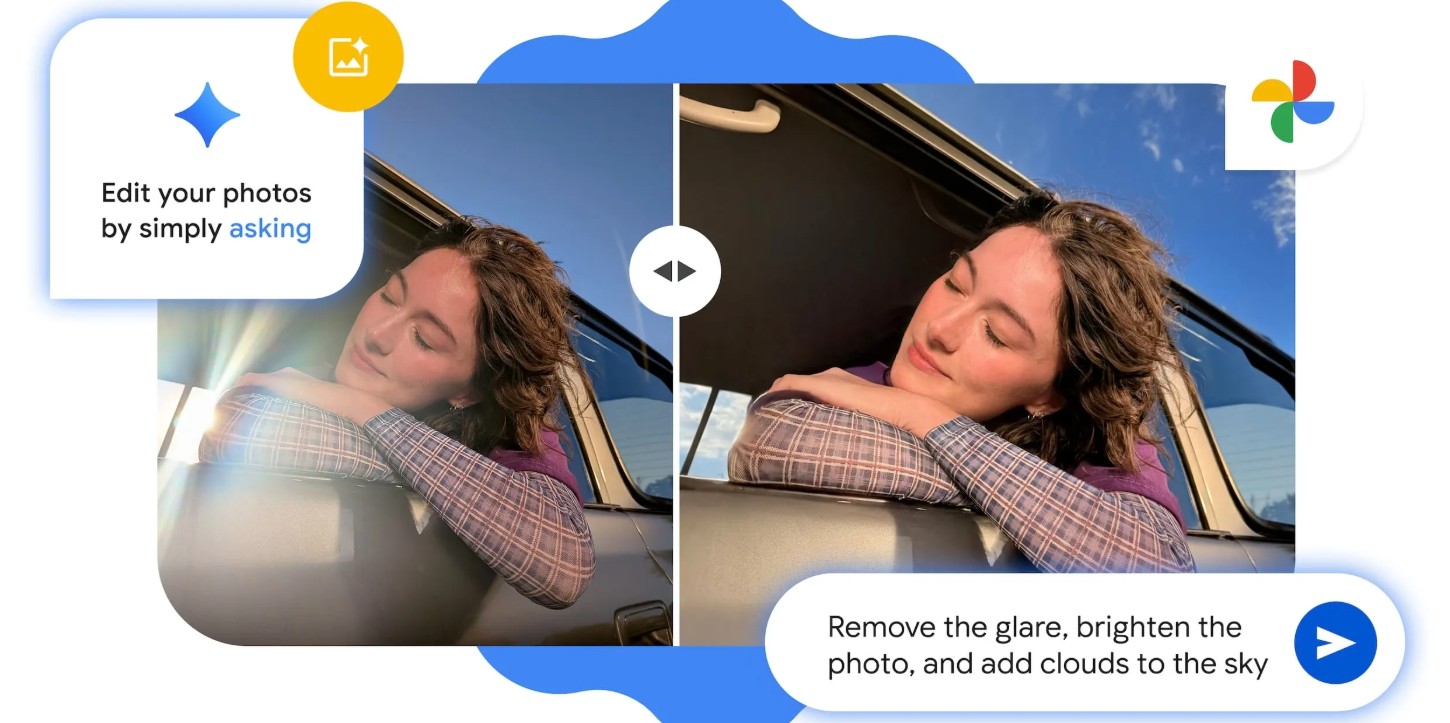
This is a significant step forward because it allows users to approach photo editing in the same way as having a professional retoucher assist them. You don't need to know terms like "exposure," "contrast," "tone curve," or "healing brush"; you just need to say exactly what you want. This shift from manual manipulation to conversational description reflects a larger trend in the technology industry: AI integrating into the creative process using human language.
With iPhones already strong in camera capabilities and image quality, the appearance of "Help Me Edit" on the iOS platform further enriches the mobile photo editing ecosystem. Apple users now have another powerful tool to quickly fine-tune images without having to switch to another app.
2. Improved Google Photos interface
Alongside the launch of "Help Me Edit," Google Photos is also significantly improving its interface and user experience. This isn't a minor, incremental change, but rather a redesign focused on minimalism, smoothness, and better alignment with the iOS style.
On iPhone, the new Google Photos interface offers a consistent touch-swipe experience, making it easier to identify and access editing features. Drag, swipe, and brightness/color adjustments are organized into groups, and important editing options are always within easy reach. This addresses the previous limitation where users had to tap multiple items to find the desired effect.
Another highlight is the significantly improved one-touch editing suggestions. The AI automatically analyzes the composition, subject, lighting, and color before offering optimal recommendations. This is especially useful for quick snapshots, low-light shots, or noisy photos taken in challenging environments. Instead of experimenting with each effect, users only need to tap once to receive a suitable suggestion.
Google is also focusing on improving facial recognition capabilities. The new system allows referencing the entire personal photo library to understand the characteristics, style, and expressive states of each person in the album. When editing, the AI will produce the most natural results, avoiding errors such as facial distortion, lighting misalignment, or over-editing that were common with previous automatic tools. This is especially important for requests such as beautification, eye enhancement, facial sharpening, or smile enhancement.
3. “Ask Photos” intelligently edits photos with AI via a chat interface.
In addition to "Help Me Edit," Google Photos also integrates "Ask Photos," which works in a conversational format. This opens up a completely new experience when editing photos, because instead of directly manipulating the image, you can chat with the AI as if you were talking to a professional retoucher.
Ask Photos understands natural language and can answer complex requests such as:
"Show me the photos you took at the beach last year."
"Find photos of me and my best friend at the wedding."
"Selection of the best photos from the trip to Da Lat."
"Adjust the colors to be brighter in the third photo."
"Smoothe the skin and brighten the face in this picture."
Ask Photos is more than just a navigation tool; it's a handheld photo editing expert. Combined with "Help Me Edit," users can ask questions, edit, and manage photos all within a seamless conversational space. This signals a future where photo editing is no longer a separate process of manipulation and conversation.
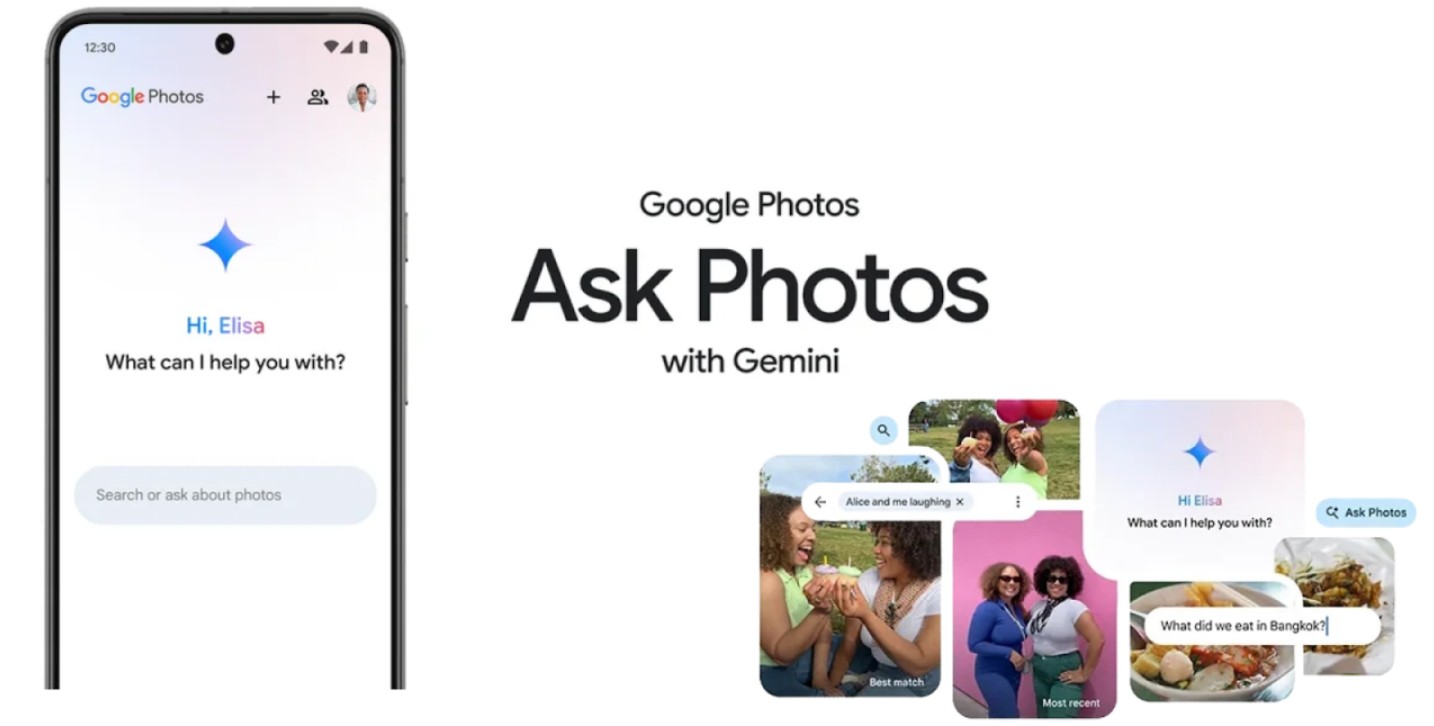
Ask Photos' greatest strength lies in its contextual suggestion capabilities. Google confirms that its AI system can understand the content of a photo, including the scene, emotion, composition, lighting, and subtle details like eye contact, facial features, or unwanted details. This allows the AI to suggest appropriate edits before the user even realizes it.
Furthermore, Ask Photos has been expanded to include contextual quick search in over 100 countries and supports 17 languages. This is strategic as Google aims to bring its AI technology to global users, not just limited to the English-speaking market.
4. AI in photography
The emergence of “Help Me Edit” shows that Google is leading the trend of transforming AI from a mere tool to a creative partner. Mobile photography has flourished for years, but a clear limitation for users remains in editing skills. Not everyone knows how to balance lighting, adjust color, or remove unwanted details, even if they capture beautiful moments.
AI helps break down that barrier by making photo editing a natural action. You simply say what you want, as opposed to learning time-consuming editing techniques. This allows users to focus more on the emotion and story of the photo instead of being pressured by technical manipulations.
Especially in the age of social media, where images play a crucial role in expressing personality and building personal branding, editing photos quickly, beautifully, and accurately has become essential. Google Photos, combined with AI, helps iPhone users achieve this quickly.
The text-based photo editing feature isn't just for those who want beautiful photos. It's also suitable for content creators, online business owners, people who like to preserve family moments, or anyone who wants to optimize their personal images.
This development suggests that the future of photo editing will move towards deep personalization, where AI understands each individual's style and delivers results that match their aesthetic preferences.
5. The combination of iPhone and Google Photos
The iPhone already boasts a superior camera system and market-leading image processing capabilities. However, Google Photos offers an added bonus: advanced AI-powered editing and tools that even Apple's default Photos app lacks.
With “Help Me Edit,” the iOS ecosystem gains a new depth in editing. iPhone users can now:
• Quickly edit photos using natural descriptions
Leverage AI to create artistic results.
Use Ask Photos to visually search for contextually relevant images.
Manage large photo archives with more powerful AI.
This creates a unique collaboration between Apple and Google, where each platform contributes to a more complete experience.
6. Personalized editing experience
These upgrades demonstrate Google's pursuit of a highly personalized experience. Beyond simply "editing photos to your specifications," Google's AI learns each user's individual style based on:
The edits they like
What kind of photos do they usually take?
How they interact with the suggestions
• Individual color aesthetics
Over time, Google Photos can become an assistant that understands your photography preferences, automating many processes and delivering more refined results. This is something traditional photo editing apps struggle to achieve due to their inability to learn user habits.
Furthermore, the integration with a contextual image search browser that expands to over 100 countries and 17 languages further reinforces Google's global goal: building the world's smartest photo management platform.
With “Help Me Edit,” Google Photos has taken photo editing to a new level: more intuitive, more natural, and more deeply personalized. Editing photos using text or voice descriptions opens up a new approach, suitable for the age of conversational AI. The revamped interface, the introduction of the Ask Photos assistant, and expanded contextual search features have transformed photo editing on the iPhone into a powerful, intelligent, and inspiring experience





















VIP Products








Best Selling Products
Adobe Premiere Pro Account
99 USD
Capcut Pro 1 Year
39 USD
Genuine Adobe Illustrator account
99 USD
Copyright Adobe Lightroom Account
59 USD
Windows 10 & 11 Pro Key
36 USD
Upgrade genuine Capture One account
120 USD
Autodesk All App Account Copyright
120 USD
Upgrade Genuine Office 365
49 USD
MidJourney Account
29 USD
Upgrade Duolingo Super
29 USD
Freepik Premium Account
59 USD
Adobe Photoshop Copyright - Full App
120 USD
ChatGPT Plus Account (GPT-4)
16 USD
Plugin Retouch4me
69 USD
Genuine Cheap Canva Pro
39 USD