Best Selling Products

Genuine Adobe Illustrator account
99 USD

Upgrade Genuine Office 365
49 USD

Adobe Premiere Pro Account
99 USD

Freepik Premium Account
59 USD

MidJourney Account
29 USD

Upgrade Duolingo Super
29 USD

ChatGPT Plus Account (GPT-4)
16 USD

Autodesk All App Account Copyright
120 USD

Plugin Retouch4me
69 USD

Adobe Photoshop Copyright - Full App
120 USD

Upgrade genuine Capture One account
120 USD

Genuine Cheap Canva Pro
39 USD

Capcut Pro 1 Year
39 USD

Windows 10 & 11 Pro Key
36 USD

Copyright Adobe Lightroom Account
59 USD
Guide to “Catching the Trend” of Creating 3D Figure Images with Gemini Flash Image 2.5
Nội dung
- 1. What feature is Gemini Flash Image 2.5?
- 2. Detailed steps to create a 3D figure with Gemini Flash Image 2.5
- 2.1 Step 1: Access Google AI Studio and choose Create Image mode (Nano Banana)
- 2.2 Step 2: Prepare and upload the portrait photo to the system
- 2.3 Step 3: Enter a prompt for AI to create a professional 3D figure
- 3. Tips for creating beautiful and realistic 3D Figure images with Gemini Flash Image 2.5
- 4. Suggested Vietnamese prompts to create 3D figure images
- 5. Suggested English prompts to create 3D figure images
- 6. Suggestions for some other tools to create 3D figure images from portrait photos
- 6.1 Midjourney
- 6.2 DALL·E 3 (OpenAI)
- 6.3 Leonardo AI – A powerful AI platform for creating Figure 3D images
- 6.4 Fotor AI Art Generator – A simple and fast solution
- 6.5 Artbreeder – An AI tool for unlimited creativity
- 7. Conclusion
In recent days, social media has been buzzing with the trend of creating 3D figure models from portrait photos, attracting thousands of shares and millions of views. The special thing is that you do not need to understand 3D design or use complicated software, but only need a few simple steps with Gemini Flash Image 2.5, Google’s powerful AI tool. With support from this technology, an ordinary portrait photo can quickly turn into a vivid 3D figure model, from the face and expression to clothing details, all recreated extremely realistically.
1. What feature is Gemini Flash Image 2.5?
Gemini Flash Image 2.5 is one of the most outstanding features in Google’s powerful AI ecosystem. This is a tool specialized in processing and creating high-quality images from text descriptions or existing images, with extremely fast speed and superior accuracy. The special point of Gemini Flash Image 2.5 lies in its ability to deeply understand context and recreate image details vividly, from lighting, colors to surface textures. This technology was developed by Google to support users in creating visual content, serving many different purposes such as design, communication, entertainment and especially “trend-catching” movements on social networks.
Not only stopping at creating ordinary images, Gemini Flash Image 2.5 also stands out with the ability to convert static photos into realistic 3D models. Thanks to advanced artificial intelligence, this tool can analyze every detail in a portrait photo such as the face, expression, clothes and accessories to recreate them into a sharp and lifelike 3D figure. This is exactly why Gemini Flash Image 2.5 has become a name extremely loved by the content creator community, designers and social media users. With this tool, anyone can turn ideas into reality in just a few seconds without needing in-depth knowledge of 3D design or complicated software.
.jpg)
2. Detailed steps to create a 3D figure with Gemini Flash Image 2.5
Creating a 3D figure from a portrait photo with Gemini Flash Image 2.5 is very simple and anyone can do it with just a few steps. Below is a detailed step-by-step guide, helping you easily create a vivid figure model and catch up with the trend that is going viral on social media.
2.1 Step 1: Access Google AI Studio and choose Create Image mode (Nano Banana)
First, you need to open a web browser and access Google AI Studio, where the Gemini Flash Image 2.5 tool is integrated. This is a completely free online platform that does not require installing complicated software.
At the main interface, find the image creation section (Create Image). In this section, choose Nano Banana mode. This is the optimized mode for quick rendering while still ensuring sharp images and high realism. Nano Banana is specially designed for projects that require fast results without reducing image quality.
After successfully selecting it, you will see a command box to enter the prompt and an area to upload the portrait photo. Make sure your internet connection is stable to avoid interruptions during image processing.
2.2 Step 2: Prepare and upload the portrait photo to the system
The next step is choosing a portrait photo as the material for the 3D figure model. To get beautiful and realistic results, you need to prepare a clear, bright photo with the face not covered. Details such as hair, eyes, nose and mouth need to appear clearly so AI can analyze and recreate them as accurately as possible.
Some important notes when choosing a photo:
The photo should have high resolution, at least 1080px, to ensure sharp details.
The face should face forward or slightly tilted, avoiding an angle that is too narrow and makes it difficult for AI to recognize.
Do not use blurry, dark photos or photos covered by hair, masks, sunglasses, etc., because this can reduce accuracy when creating the figure.
Once you have selected a suitable photo, you only need to upload it to Gemini Flash Image 2.5 by pressing the “Upload Image” button. The tool will automatically recognize and analyze the photo, ready for the next step.
.jpg)
2.3 Step 3: Enter a prompt for AI to create a professional 3D figure
This is the most important step, determining the quality of the 3D figure model. The prompt is the detailed description that helps AI clearly understand what you want the final result to look like.
You only need to copy the prompt below and paste it into the command box of Gemini Flash Image 2.5:
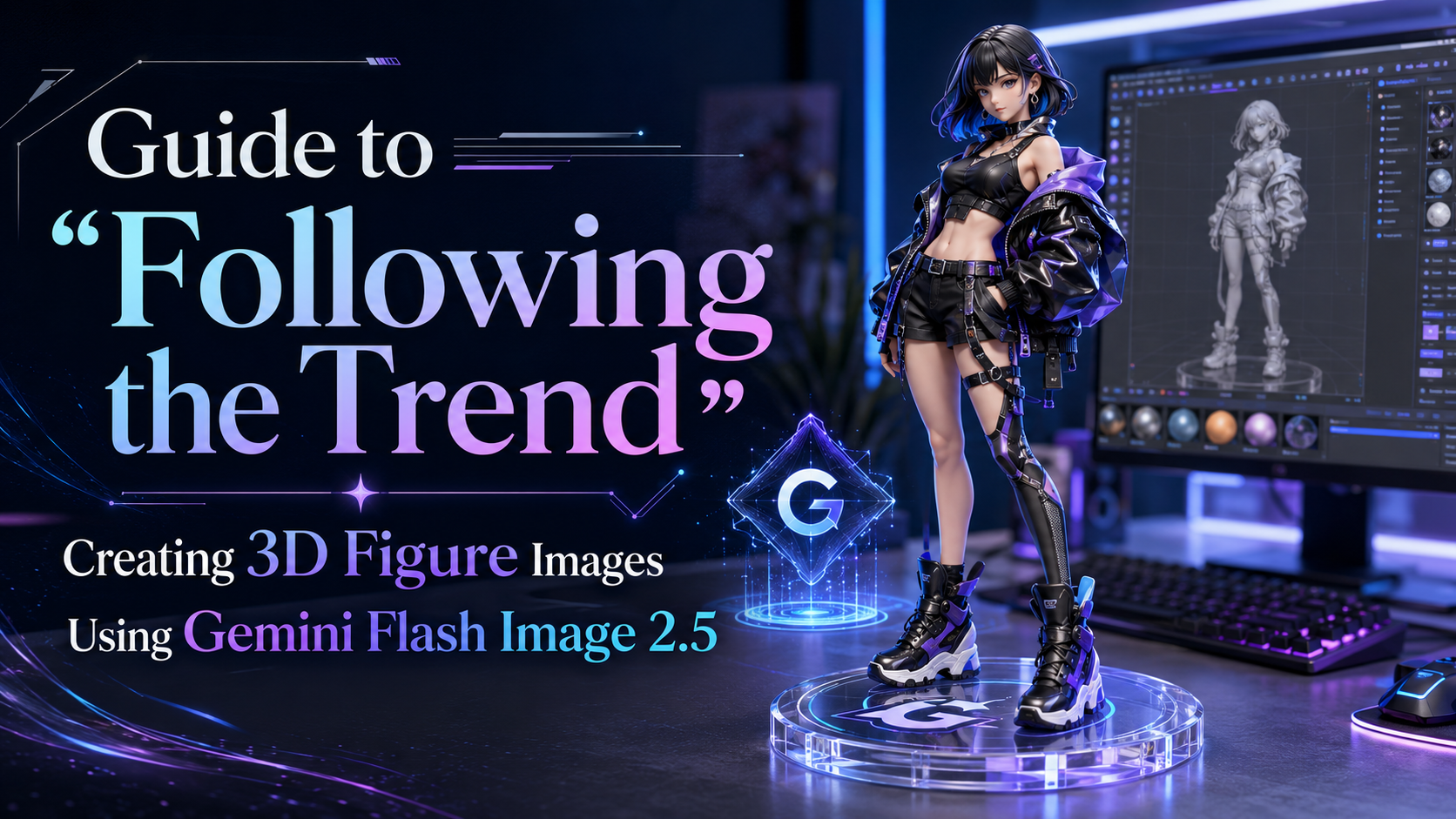
Create a 1/7 scale commercialized figure of the character in the illustration, in a realistic style and environment. Place the figure on a computer desk, using a circular transparent acrylic base without any text. On the computer screen, display the ZBrush modeling process of the figure. Next to the computer screen, place a BANDAI-style toy packaging box printed with the original artwork.
Meaning of the prompt:
“1/7 scale commercialized figure”: Requests AI to create a 1:7 scale figure model, similar to high-end commercial figures.
“Realistic style and environment”: The image will be shown in a realistic style, from lighting, materials to the surrounding space.
“Circular transparent acrylic base”: The figure will be placed on a round, transparent acrylic base without text, just like real-life products.
The special “computer screen” part: The computer screen in the image will display the modeling process using ZBrush software, creating the feeling of a professional studio.
“BANDAI-style toy packaging box”: Next to the screen, there will be a figure box designed in BANDAI style, printed with the original artwork, increasing the realism and commercial feel of the product.
Thanks to this prompt, Gemini Flash Image 2.5 will create a perfect figure in terms of character, background and supporting details.
2.4 The result received: “Virtual image but truly realistic”
After completing the steps above, you only need to wait less than a minute for Gemini Flash Image 2.5 to process and return the result. The final result will definitely surprise you:
The character in your portrait photo is transformed into a 3D figure standing on a transparent acrylic base, with every detail of the face, hair and clothing recreated sharply.
On the work desk appears a computer screen displaying the 3D modeling process using ZBrush software, bringing the feeling that you are in a professional design studio.
Next to the screen is a BANDAI-style figure box printed with the original image, just like the high-end commercial products you often see on the market.
The final result is both artistic and realistic, exactly matching the hot trend on social media. Even better, you can experiment with many different photos, change expressions, outfits or even create an entire unique figure collection with your own personal mark. This is also a way for you to impress your friends and online community, while catching up with the latest creative trend.
.jpg)
3. Tips for creating beautiful and realistic 3D Figure images with Gemini Flash Image 2.5
Do you want to create extremely vivid and impressive 3D figures? Below are some important tips to help you optimize results when using Gemini Flash Image 2.5, ensuring that the generated images are both sharp and on-trend.
Choose high-quality photos: Portrait photos need to be clear, the face bright and not covered by hair, masks or accessories so AI can accurately analyze every detail.
Use natural lighting: Photos taken under natural light help the face have depth and accurate colors, making the 3D figure look more vivid.
Keep the composition neat: The photo should have a simple background, not too many distracting details, so AI can focus on recreating the main character.
Adjust the prompt flexibly: You can add or change details in the prompt such as figure style, colors or accessories to create a unique product with a personal mark.
Avoid blurry or shaky photos: Photos lacking sharpness will make the figure flawed or unlike real life.
Try many different styles: Try many expressions, outfits and shooting angles to create a one-of-a-kind 3D figure collection.
Be patient with the result: If the first attempt is not as desired, you can adjust the prompt or change the source photo so AI can improve the result better.
Applying these tips, you will easily create beautiful and realistic 3D figures, both to share on social networks and to preserve memorable moments in a completely new way.
4. Suggested Vietnamese prompts to create 3D figure images
When entering prompts in Vietnamese in Gemini Flash Image 2.5, you should describe in detail the style, figure ratio and surrounding background. This helps AI understand the request clearly and return beautiful, vivid images.
"Create a 1/7 scale figure model from a portrait photo, in a realistic style. Place the figure on a transparent acrylic base without any text. The setting is a work desk with a computer, the screen displays the 3D modeling process using ZBrush software, and next to it is a BANDAI-style figure packaging box printed with the original artwork."
"Turn the character in the photo into a 1/6 scale 3D figure, anime style combined with realistic. Place the figure inside a glass display case, with a background of figure shelves and multicolored LED lighting."
"Create a 3D figure of the character in the photo in a fantasy style, with armor and weapons. Place the figure standing on a stone base, surrounded by mist and magical lighting."
"Create a cute-style figure, chibi 1/8 scale, placed on a study desk with books, pens and a laptop, natural lighting, clear details."
"Convert the photo into a commercial-style figure, like a premium Bandai figure, with a modern-designed packaging box and professional white lighting."
.jpg)
5. Suggested English prompts to create 3D figure images
Prompts in English are often understood more accurately by AI and easily produce professional results, especially when describing specific technical details or styles.
"Create a 1/7 scale commercialized figure of the character in the photo, in a realistic style. Place the figure on a circular transparent acrylic base without any text. On the desk, show a computer screen displaying the ZBrush modeling process and a BANDAI-style toy box printed with the original artwork."
"Transform the character in the portrait into a 1/6 scale anime-style figure with realistic textures. Display the figure inside a glass showcase with colorful LED lighting and a background of collectible figures."
"Generate a fantasy-themed figure with armor and weapons, standing on a stone base surrounded by mist and dramatic lighting."
"Create a cute chibi-style 1/8 scale figure of the character, placed on a study desk with books, pens, and a laptop, using natural lighting and clear details."
"Produce a professional commercial figure with a premium BANDAI-style box, white studio lighting, and realistic textures for hair, clothes, and accessories."
6. Suggestions for some other tools to create 3D figure images from portrait photos
6.1 Midjourney
Midjourney is famous for its impressive ability to create artistic and photorealistic images, especially suitable when you want to turn a portrait photo into a 3D figure with depth and style. This tool mainly works through a community platform, allowing you to experiment with many different render styles, from studio lighting to acrylic plastic material or matte paint, helping the figure look like a real commercial product.
When using Midjourney to create a 3D figure, you only need to upload a portrait photo as a reference and write a prompt describing in detail the scale, material, viewing angle and setting. Combining parameters for resolution, style and variations will help you get images from many different angles to choose from and post-process easily.
.jpg)
6.2 DALL·E 3 (OpenAI)
DALL·E 3 stands out with its ability to understand natural prompts very well, suitable for those who want to describe in detail using language so AI can create a realistic 3D figure. The tool supports image editing and inpainting, so you can directly edit small details on the figure such as hairstyle, outfit or lighting without having to recreate everything from the beginning.
To turn a portrait photo into a 3D figure, use the original photo as the reference source and clearly describe the scale, realistic style, type of figure base and studio background. Use the inpainting feature to fix small areas and the upscaler to improve final quality, making the product look sharper and more professional.
6.3 Leonardo AI – A powerful AI platform for creating Figure 3D images
Leonardo AI is one of the outstanding 3D image creation tools today, loved by the creative community thanks to its ability to turn portrait photos into extremely realistic 3D figure models. The biggest advantage of Leonardo AI is its friendly interface, easy to use even for beginners. Users only need to upload a portrait photo, choose 3D rendering mode and add detailed descriptions, and the system will automatically create a complete product in just a few minutes.
The special point of Leonardo AI lies in its flexible customization ability. You can change the pose, lighting, figure material or background to make the image look like a commercial model in real life. Besides, this tool also supports many ready-made templates, suitable for both personal purposes and professional product production. With Leonardo AI, you can freely create and own one-of-a-kind figures without needing in-depth 3D design skills.
6.4 Fotor AI Art Generator – A simple and fast solution
Fotor AI Art Generator is an ideal choice for those who want to create 3D figures from portrait photos without spending much time getting used to complicated tools. With Fotor, you only need to upload a photo, choose a rendering template and enter a detailed description, and the AI system will automatically process and return an extremely sharp and vivid 3D image.
Besides the figure creation feature, Fotor also stands out with a rich preset library, including figure styles such as anime, realistic or cartoon style. This allows users to customize according to personal preference and create many different versions from one original photo. Thanks to fast processing speed and an interface optimized for beginners, Fotor becomes a tool worth trying if you want to catch up with the 3D figure trend that is going viral on social media.
6.5 Artbreeder – An AI tool for unlimited creativity
Artbreeder is a famous AI platform with the ability to transform images in creative styles, especially suitable for creating unique 3D figures. This tool allows users to blend and fine-tune facial features, body shape, colors, materials and even figure outfits with just a few drag-and-drop steps. Thanks to that, you can create figures with a personal style that do not overlap with anyone else.
Another strength of Artbreeder is its large creative community. Users can share works, explore new ideas or download available rendering templates for further editing. This makes Artbreeder not only a 3D image creation tool but also a place to communicate, learn and find inspiration. If you love creative freedom, Artbreeder is certainly a choice not to be missed to elevate your 3D figure collection.
7. Conclusion
The trend of creating 3D figures from portrait photos not only brings an exciting experience but also opens a new perspective on the combination of AI and personal creativity. With Gemini Flash Image 2.5, anyone can personally create unique figure models without expensive software or in-depth design knowledge. With just a few minutes of operation, you can already own a “masterpiece” that makes your friends admire it. If you are looking for a way to catch the trend quickly and keep up with the creative wave on social media, then this is exactly the time to experience and explore the power of AI in turning ordinary photos into impressive 3D artworks.





















VIP Products








Best Selling Products
Genuine Adobe Illustrator account
99 USD
Upgrade Genuine Office 365
49 USD
Adobe Premiere Pro Account
99 USD
Freepik Premium Account
59 USD
MidJourney Account
29 USD
Upgrade Duolingo Super
29 USD
ChatGPT Plus Account (GPT-4)
16 USD
Autodesk All App Account Copyright
120 USD
Plugin Retouch4me
69 USD
Adobe Photoshop Copyright - Full App
120 USD
Upgrade genuine Capture One account
120 USD
Genuine Cheap Canva Pro
39 USD
Capcut Pro 1 Year
39 USD
Windows 10 & 11 Pro Key
36 USD
Copyright Adobe Lightroom Account
59 USD