Best Selling Products

Adobe Photoshop Copyright - Full App
120 USD

Autodesk All App Account Copyright
120 USD

ChatGPT Plus Account (GPT-4)
16 USD

MidJourney Account
29 USD

Windows 10 & 11 Pro Key
36 USD

Upgrade genuine Capture One account
120 USD

Adobe Premiere Pro Account
99 USD

Plugin Retouch4me
69 USD

Genuine Adobe Illustrator account
99 USD

Upgrade Duolingo Super
29 USD

Genuine Cheap Canva Pro
39 USD

Freepik Premium Account
59 USD

Copyright Adobe Lightroom Account
59 USD

Upgrade Genuine Office 365
49 USD

Capcut Pro 1 Year
39 USD
Guide to Creating 2026 Fireworks Images with Gemini AI Anyone Can Do
Nội dung
- 1. What is Gemini AI? Why is it used to create 2026 fireworks images?
- 2. The AI-generated 2026 fireworks image trend loved during New Year’s Eve
- 3. What should you prepare before creating 2026 fireworks images with Gemini AI?
- 4. Suggested trending and eye-catching 2026 fireworks image concepts
- 5. Editing tips to make 2026 fireworks images look more realistic
- 6. Common mistakes when creating fireworks images with Gemini AI and how to fix them
- 7. Steps to Create 2026 Fireworks Images with Gemini AI
- 7.1 Step 1: Prepare the original image and descriptive prompt
- 7.2 Step 2: Access Gemini AI and enter the prompt
- 7.3 Step 3: Download and use the image
- 8. Amazing prompts to create 2026 New Year fireworks images with Gemini AI
- 8.1 Prompt 1
- 8.2 Prompt 2
- 8.3 Prompt 3
- 8.4 Prompt 4
- 8.5 Prompt 5
- 8.6 Prompt 6
- 8.7 Prompt 7
- 8.8 Prompt 8
- 9. Conclusion
New Year’s Eve 2026 is approaching very soon, and the skies across major cities will light up with colorful fireworks displays. However, not everyone has the chance to watch fireworks in person or capture a truly beautiful photo at the perfect moment.
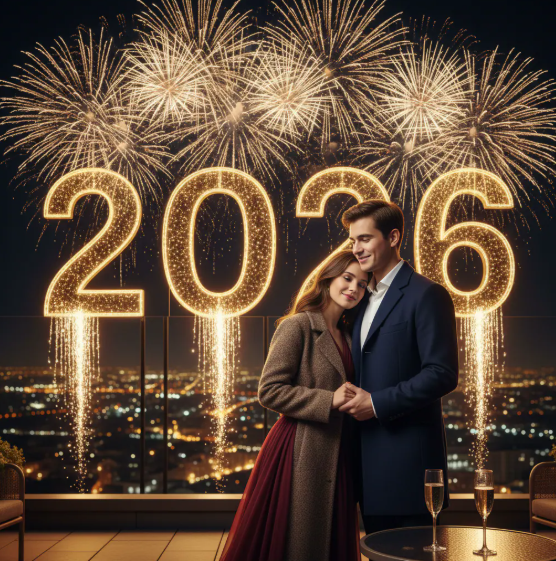
1. What is Gemini AI? Why is it used to create 2026 fireworks images?
Gemini AI is an artificial intelligence platform developed by Google that allows users to create images, content, and creative ideas using only text descriptions. The strength of Gemini AI lies in its ability to understand context very well, recreate realistic visuals, produce harmonious colors, and especially suit emotional concepts such as festivals, New Year celebrations, or New Year’s Eve moments. Thanks to this, creating 2026 fireworks images with Gemini AI has become easier than ever, even for people who have never used AI tools or do not have design skills.
Why many people choose Gemini AI to create 2026 fireworks images:
Create vivid fireworks visuals with brilliant colors and spatial depth
Easy to use, simply enter descriptions in Vietnamese and still get beautiful results
Allows combining fireworks with cities, people, the text “2026,” or Tet atmosphere
Fast image generation without waiting or complicated editing
Suitable for social media posts, Tet greeting images, banners, or New Year avatars
2. The AI-generated 2026 fireworks image trend loved during New Year’s Eve
In recent years, capturing New Year’s Eve moments has no longer been limited to real-life photography. Many people have started turning to AI as a new way to preserve New Year emotions, becoming more proactive and independent of time or location. Especially during New Year’s Eve 2026, the trend of creating fireworks images with AI is booming strongly as everyone wants to own a beautiful image to start the new year.
What makes this trend so loved is the ability to personalize images. Instead of using familiar fireworks photos, users can create their own fireworks skies based on personal ideas: dazzling fireworks over Saigon or Hanoi, combined with birth years, Tet wishes, or even their own portraits. As a result, each image is not only beautiful but also carries a very personal story and emotion.
In addition, the strong development of social media has contributed to spreading this trend even further. A 2026 fireworks image created by yourself using AI can easily attract attention and create a distinct impression among countless repetitive images during the New Year season. Without squeezing into crowds on New Year’s Eve or worrying about missing beautiful moments, you can still proactively create a truly memorable and complete image to begin 2026.
%20(1).jpg)
3. What should you prepare before creating 2026 fireworks images with Gemini AI?
Before starting to create 2026 fireworks images with Gemini AI, you should prepare some basic elements so the generated images match your ideas and achieve the best quality. Preparing in advance does not take much time but will help you avoid having to edit repeatedly and make it easier to create a satisfying image from the first attempt.
Things you should prepare:
A Google account that can access Gemini AI
A clear idea of the image you want to create: simple fireworks or fireworks combined with people, cities, or the text 2026
Detailed descriptions written in simple language: fireworks colors, nighttime setting, image style
Determine the purpose of the image: social media post, Tet greeting image, banner, or avatar
4. Suggested trending and eye-catching 2026 fireworks image concepts
When creating 2026 fireworks images with Gemini AI, choosing the right concept will largely determine the “wow” factor of the image. Popular concepts are usually connected with New Year emotions, festival atmosphere, and personalization elements, helping the image become trendy without looking repetitive. Instead of creating simple fireworks only, you can combine backgrounds, people, or messages to make the image more soulful and more likely to spread on social media.
Some popular and photogenic 2026 fireworks image concepts:
Brilliant fireworks over the skylines of Saigon, Hanoi, or Da Nang viewed from above
Fireworks combined with the text “Happy New Year 2026” or short New Year wishes
A portrait of someone watching fireworks from behind, creating a romantic and peaceful feeling
Fireworks in red and golden tones, evoking the atmosphere of traditional Vietnamese Tet
Fireworks combined with New Year symbols, city lights, and a deep night sky
5. Editing tips to make 2026 fireworks images look more realistic
Although Gemini AI can generate very beautiful images from the beginning, with a few additional edits, your 2026 fireworks image can become more natural and look more like a real photograph. Adjusting lighting, colors, and small details helps the image avoid feeling overly “AI-generated” or too harsh, especially important if you use the image for social media posts or Tet greeting cards.
Some editing tips to make fireworks images look more realistic:
Slightly reduce color saturation so the fireworks are not too intense or harsh
Increase contrast moderately so the fireworks stand out against the night sky
Slightly blur distant backgrounds to create depth and a realistic sense of space
Keep the fireworks glow spreading naturally, avoiding overly sharp edges
Maintain a consistent overall color tone between the fireworks and surrounding scenery
%20(1).png)
6. Common mistakes when creating fireworks images with Gemini AI and how to fix them
During the process of creating 2026 fireworks images with Gemini AI, many people encounter certain issues that make the results less satisfactory. These mistakes are not serious and can be completely fixed if you identify the causes and adjust the descriptions or image creation method. Understanding common mistakes will help you save time and create better images more easily.
Common mistakes and effective solutions:
Fireworks look messy with too many details → Reduce the number of fireworks in the description and focus on one main highlight
Fireworks colors are not harmonious → Clearly describe the desired color palette or limit the number of colors used
Fireworks do not stand out against the sky → Emphasize the nighttime setting, dark sky, and contrasting lighting
The image looks too “artificial” → Add keywords such as natural, realistic, and soft lighting
The composition feels unbalanced → Clearly describe the fireworks position and viewing angle from afar or above
7. Steps to Create 2026 Fireworks Images with Gemini AI
Creating fireworks images with AI is no longer as complicated as many people think. With just a phone or computer connected to the internet, you can create dazzling 2026 fireworks images with your own personal touch without knowing photo editing or design. Below are the simple steps to get started.
7.1 Step 1: Prepare the original image and descriptive prompt
First, you need to prepare an original image to place into the fireworks setting. It can be a portrait, half-body, or full-body photo of yourself, family members, or any character you want to appear in the frame. The image should clearly show the face, have enough lighting, and not be blurry so Gemini AI can recognize and blend it naturally.
Besides the original image, you should also think in advance about a simple but clear prompt. Imagine the image you want to create: where the fireworks appear, which city is in the background, whether the style is vibrant or gentle, and whether the text “2026” is included. Preparing ideas beforehand will make the image creation process faster and produce better results from the first try.
7.2 Step 2: Access Gemini AI and enter the prompt
After preparing your image and ideas, open the Google Gemini app on your phone or access Gemini through a web browser on your computer. On the main interface, look for the image creation feature, usually displayed with an image or camera icon that is easy to recognize.
Next, upload the original image you prepared and enter the descriptive prompt into the chat box. The clearer the prompt, the more accurate the generated image will be. After checking the description again, simply send the request and wait a few seconds for Gemini AI to process it. At that point, the system will automatically create a 2026 fireworks image based on the exact setting you requested.
7.3 Step 3: Download and use the image
When Gemini AI returns the results, take a moment to review the overall image. If you are satisfied, you can directly download the image to your device with a simple action. If the result is not ideal yet, you can completely adjust the prompt or request regeneration to get better alternative versions.
After downloading the image, you can immediately use it for social media posts, Tet greeting images, cover photos, or New Year 2026 avatars. With just a few basic steps, you will already have a unique fireworks image with a strong personal touch without needing any complicated editing tools.
8. Amazing prompts to create 2026 New Year fireworks images with Gemini AI
8.1 Prompt 1
Create a photorealistic New Year 2026 portrait using the exact same face as the reference image. The subject is a young East Asian woman with long wavy brown hair, soft curtain bangs framing her face, fair glowing skin, and a gentle warm smile. She is holding a lit golden sparkler in one hand, raised slightly to the side, with bright orange and yellow sparks flying softly in the air. Her eyes are sharp and expressive, catching the warm light from the sparkler, creating a natural and emotional New Year feeling.
She is wearing a fluffy white beret with a small red bow, a cozy white faux fur scarf wrapped loosely around her neck, and a red wool coat with soft fur trim. The scene takes place on a dark urban street at night, with blurred orange city lights and bokeh in the background. The sparkler light softly illuminates her face, creating cinematic depth of field and a professional photography look. Ultra-realistic textures, natural skin details, highly detailed hair strands, HDR, 8k resolution, raw style, aspect ratio 2:3.
%20(1).jpg)
8.2 Prompt 2
Create a cinematic and photorealistic portrait of a beautiful young Asian woman celebrating New Year 2026 at night. She is holding sparklers in both hands, with glowing sparks flying around her. Her long black hair is gently blown by the wind, and she has a sweet, calm smile while slightly tilting her head and looking directly at the camera. The mood is soft, romantic, and full of New Year emotions.
She is wearing a cozy white fluffy sherpa jacket that gives a warm winter feeling. The background is filled with colorful fireworks exploding in the night sky, mixed with soft bokeh city lights, creating a dreamy and festive New Year’s Eve atmosphere. Soft warm lighting highlights her face, with shallow depth of field for a cinematic look. High-quality photography style, realistic skin texture, smooth lighting, ultra-detailed, 8k resolution.
8.3 Prompt 3
Create a full-body photorealistic New Year 2026 image using my face from the reference image. A young woman is standing on a dark rooftop at night, her body slightly angled, head gently tilted, and hands clasped together near her chin. Her long dark hair flows naturally in the wind, giving the image a sense of motion and freedom. The pose feels elegant, calm, and confident.
She is wearing a white fuzzy faux fur sweater, a white lace tiered mini skirt, a red and black plaid scarf, and a white fluffy beanie. On her legs are white fuzzy thigh-high leg warmers with small yellow chick details at the top. Behind her is a dramatic night sky filled with massive golden fireworks exploding above a dark city silhouette, with a subtle orange glow on the horizon. Cinematic flash photography, sharp focus on the subject, ultra-detailed textures, realistic lighting, professional photo quality, 8k resolution.
%20(1).png)
8.4 Prompt 4
Create a high-quality full-body New Year 2026 image using the exact face and facial features from the reference image. A beautiful young woman is standing on a sandy beach at night, smiling joyfully and raising one arm high while making a peace sign. Her pose feels energetic, happy, and full of New Year excitement, capturing a carefree celebration moment.
She is wearing a white off-the-shoulder ruffled mini dress with buttons down the front, softly flowing with the night breeze. The sky above is filled with massive pink and magenta fireworks exploding dramatically, casting a vibrant pinkish-purple glow across the beach and her outfit. In the far background, silhouettes of a cheering crowd add to the festive atmosphere. Cinematic lighting, flash photography style, sharp focus on the woman, ultra-detailed textures, professional photo quality, 8k resolution.
%20(1).jpg)
8.5 Prompt 5
Create a cinematic close-up portrait for New Year 2026 using my face from the provided reference image. A young woman is holding a glowing sparkler at night, her long dark hair loose and slightly windswept, with a few soft strands falling naturally across her face. Her expression is gentle, calm, and serene, conveying a quiet and emotional New Year moment.
The warm golden light from the sparkler softly illuminates her face, creating dreamy amber highlights on her skin and eyes. The background is dark with a smooth bokeh effect, keeping all focus on her expression and the sparkler glow. Style inspired by high-end film photography, warm color palette, shallow depth of field, realistic skin texture, ultra-detailed, 8k resolution.
8.6 Prompt 6
Create a cinematic close-up New Year 2026 portrait using my face from the reference image. A young woman is wearing a simple white headband and a soft white dress, holding a lit sparkler gently at her side. Her expression is peaceful and romantic, with a subtle smile and relaxed gaze, capturing a quiet New Year transition moment.
The scene takes place during blue hour, with a deep blue twilight sky in the background mixed with soft city bokeh lights. The warm golden glow of the sparkler softly lights her face, creating a beautiful contrast between warm and cool tones. Sharp focus on the face, shallow depth of field, dreamy and romantic atmosphere, professional cinematic photography style, 8k resolution, aspect ratio 3:4.
8.7 Prompt 7
Create a high-quality candid-style New Year 2026 image of a beautiful young woman captured in a natural, unposed moment. She is looking slightly upward and to the side with a big, joyful smile, as if reacting to something magical in the sky. Her expression feels genuine and full of excitement, reflecting the happiness of a New Year celebration.
She is wearing a dark charcoal gray high-neck half-zip fleece jacket, simple and modern. Behind and above her, the dark night sky is filled with a massive explosion of golden, red, and green fireworks, lighting up the entire scene. The warm glow from the fireworks softly illuminates her face and hair. Shot from a slightly low angle with a vintage film photography aesthetic, subtle grain, rich textures, cinematic lighting, authentic festival atmosphere, ultra-detailed, 8k resolution, aspect ratio 3:4.
%20(1).jpg)
8.8 Prompt 8
Create a high-quality candid New Year 2026 photo of a beautiful young woman with long straight hair, captured from a three-quarter side profile. She has a calm, serene expression and is gazing off to the side, creating a quiet contrast to the lively celebration around her. The moment feels intimate, natural, and emotionally grounded.
She is wearing a simple black jacket and is standing among a massive, dense crowd at an outdoor nighttime festival. High above the crowd, spectacular golden fireworks explode across the dark sky, filling the frame with light and energy. The lighting feels authentic to a real night event, with strong contrast and a realistic smartphone photography look. Sharp focus on her face, ultra-detailed textures, cinematic yet natural atmosphere, 8k resolution, aspect ratio 3:4.
9. Conclusion
Creating 2026 fireworks images with Gemini AI is a simple way for anyone to own beautiful images during the New Year season. Without going to fireworks locations or needing complicated skills, you can still create impressive visuals in just a few minutes. With Gemini AI, preserving New Year’s Eve 2026 moments becomes easier, more proactive, and more personal than ever before.





















VIP Products








Best Selling Products
Adobe Photoshop Copyright - Full App
120 USD
Autodesk All App Account Copyright
120 USD
ChatGPT Plus Account (GPT-4)
16 USD
MidJourney Account
29 USD
Windows 10 & 11 Pro Key
36 USD
Upgrade genuine Capture One account
120 USD
Adobe Premiere Pro Account
99 USD
Plugin Retouch4me
69 USD
Genuine Adobe Illustrator account
99 USD
Upgrade Duolingo Super
29 USD
Genuine Cheap Canva Pro
39 USD
Freepik Premium Account
59 USD
Copyright Adobe Lightroom Account
59 USD
Upgrade Genuine Office 365
49 USD
Capcut Pro 1 Year
39 USD