Best Selling Products

Copyright Adobe Lightroom Account
59 USD

Capcut Pro 1 Year
39 USD

Genuine Cheap Canva Pro
39 USD

Adobe Premiere Pro Account
99 USD

Upgrade Genuine Office 365
49 USD

Autodesk All App Account Copyright
120 USD

ChatGPT Plus Account (GPT-4)
16 USD

Upgrade genuine Capture One account
120 USD

Freepik Premium Account
59 USD

MidJourney Account
29 USD

Windows 10 & 11 Pro Key
36 USD

Adobe Photoshop Copyright - Full App
120 USD

Upgrade Duolingo Super
29 USD

Plugin Retouch4me
69 USD

Genuine Adobe Illustrator account
99 USD
How To Use AI Gemini To Analyze Outfits In The Most Detailed Way
Nội dung
- 1. What is AI Gemini and why is the fashion industry interested in it?
- 2. Why is the AI Gemini outfit analysis trend “going viral” on social media?
- 3. What factors does AI Gemini use to analyze outfits?
- 4. What should you prepare before using AI Gemini to analyze outfits?
- 5. Detailed steps to create AI outfit analysis images
- 5.1 Step 1: Access Gemini and log into your account
- 5.2 Step 2: Select the image creation section and upload the outfit photo for analysis
- 5.3 Step 3: Enter the prompt requesting AI to create the outfit analysis image
- 5.4 Step 4: Review results, edit, and download the image
- 6. General notes when creating AI outfit analysis images
- 6.1 Prioritize high-quality input images
- 6.2 Outfits should be fully visible within the frame
- 6.3 Avoid overly cluttered or detailed backgrounds
- 6.4 Prompts should be clear and goal-oriented
- 6.5 Actively experiment with different prompts
- 7. Conclusion
Fashion is no longer just about personal inspiration or a purely aesthetic eye, but is entering a new era where artificial intelligence becomes a smart “stylist” for everyone.
1. What is AI Gemini and why is the fashion industry interested in it?
AI Gemini is a next-generation artificial intelligence platform developed by Google, standing out for its ability to flexibly analyze images combined with language. For fashion, a field that emphasizes visuals and emotions, Gemini is considered a “digital stylist” capable of viewing outfits from many different angles. Instead of only describing clothing superficially, AI Gemini can also explain why an outfit looks harmonious, why certain parts may not work, and how to improve it while still preserving the wearer’s personal identity.
Reasons why AI Gemini is receiving special attention from the fashion industry:
Ability to analyze outfits from everyday photos without requiring studio shots or professional editing
Strong recognition of color combinations, silhouettes, and overall styling
Provides in-depth comments with perspectives similar to stylists or fashion editors
Suggests outfit improvements in a more refined direction without losing personal identity
Suitable for both fashion beginners and people who already have their own style
.jpg)
2. Why is the AI Gemini outfit analysis trend “going viral” on social media?
The appeal of the AI Gemini outfit analysis trend comes from its perfect combination of technology and fashion — two fields that are highly loved by young people. Users are no longer just posting photos to show off outfits, but turning those photos into stories: analyzed, evaluated, and improved by AI. This makes the content more interesting, deeper, and more engaging for viewers.
Factors that make this trend spread rapidly:
Easy to join, anyone can try it with just a regular outfit photo
The analysis content feels fresh, combining expertise with accessibility
Creates the feeling of having your fashion sense “reviewed” objectively without pressure
Perfect for TikTok content, Reels, or personal style posts
Viewers can learn outfit coordination ideas through other people’s outfits
3. What factors does AI Gemini use to analyze outfits?
When analyzing an outfit, AI Gemini does not view each clothing item separately but places them within a unified whole. AI evaluates the connection between items and then comments on harmony, practicality, and the style message the outfit conveys. As a result, the analysis feels comprehensive while still pointing out specific areas for improvement.
Main factors AI Gemini usually focuses on:
Color coordination between tops, bottoms, accessories, and shoes, including contrast and visual balance
Clothing silhouettes and how they flatter or expose body shape weaknesses
The dominant outfit style such as casual, minimalist, streetwear, or smart-casual
Suitability of the outfit for occasions such as work, casual outings, or events
The overall feeling the outfit gives: elegant, youthful, edgy, or energetic
.jpg)
4. What should you prepare before using AI Gemini to analyze outfits?
To help AI Gemini provide accurate and useful feedback, preparing the input is an essential step. A clear outfit photo with the right angle and full outfit visibility helps AI analyze much more effectively. In addition, determining the direction in which you want the outfit analyzed will also make the results more aligned with your actual needs.
Things you should prepare before using AI Gemini for outfit analysis:
Sharp outfit photos with natural lighting, avoiding dark shadows or harsh artificial light
Photo angles showing the full outfit from top to bottom without covering important details
Clothing worn neatly and fitting properly for easier silhouette recognition
Clearly identify the purpose of analysis: improving personal style, choosing suitable outfits, or creating social content
Prepare prompts with as much specific analysis direction as possible for more detailed results
5. Detailed steps to create AI outfit analysis images
The trend of creating AI outfit analysis images is gaining huge popularity among fashion lovers because of its simple process yet highly impressive results. Even if you have never used AI before, just follow the steps below and you can create your own professional outfit analysis image that looks exactly like the fashion posters seen on Pinterest or Instagram. Below is the most detailed, easy-to-understand, and beginner-friendly guide.
5.1 Step 1: Access Gemini and log into your account
First, you need to access the Gemini platform, the AI tool developed by Google. This is where you will perform the entire outfit analysis process using images. Logging into an account is required so Gemini can process images, save work history, and ensure a seamless experience.
After successfully logging in, Gemini’s main interface will appear with a minimalist and user-friendly design. Here, you will see areas for entering content, uploading images, and options related to AI image creation. Even for beginners, this interface is easy to navigate and not confusing.
.jpg)
5.2 Step 2: Select the image creation section and upload the outfit photo for analysis
Once you access the main interface, the next step is selecting the image creation section in Gemini. This is where you upload outfit photos for AI to analyze and recreate the layout according to your request.
You should prepare a clear outfit photo, preferably a full-body shot with sufficient lighting and no obstruction of the outfit. Once uploaded, Gemini will use the outfit, pose, accessories, and overall image as the “main character” of the analysis. The clearer the input image, the more detailed and realistic the analysis results will be.
.jpg)
5.3 Step 3: Enter the prompt requesting AI to create the outfit analysis image
This is considered the most important step that determines the quality of the outfit analysis image. The prompt is the “instruction” that helps AI Gemini understand the style, layout, and level of detail you want.
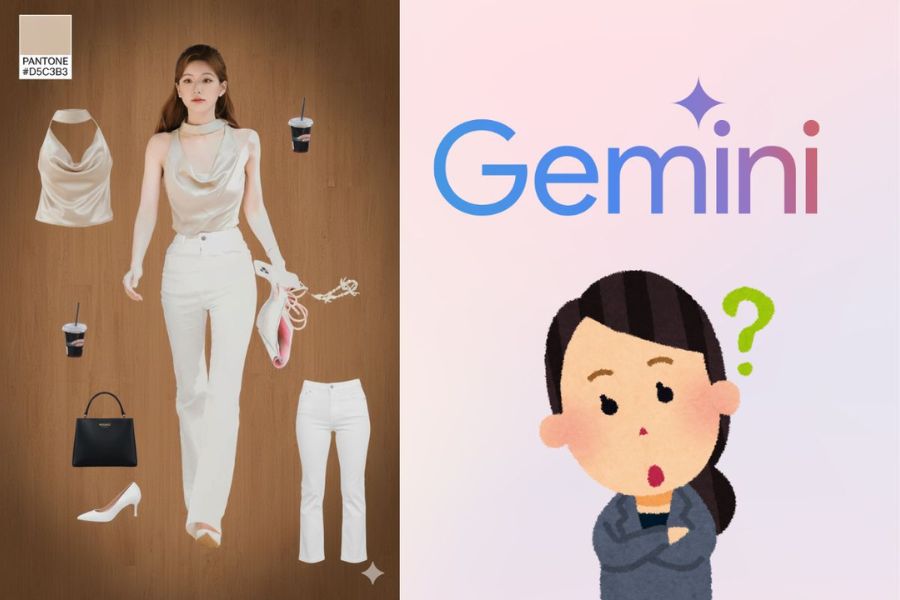
In the description section, you need to paste the prompt requesting outfit analysis image creation in the correct format. The clearer and more detailed the prompt, the closer the AI result will resemble the professional viral outfit analysis posters currently trending on social media. This sample prompt focuses on preserving the original outfit, creating a fashion poster layout, separating each item individually, and adding a Pantone color palette — the key factor that makes the image look premium and visually deeper.
Below is a suggested prompt you can use:
“Create a high-end fashion OOTD breakdown poster that perfectly matches the visual style of the reference images.
SOURCE IMAGE
Use the subject from the user-uploaded photo only. Preserve the original outfit exactly as shown, including proportions, pose, hairstyle, accessories, and overall appearance. Do not alter or reinterpret any clothing details.
CANVAS & BACKGROUND
Full-bleed canvas with no borders, frames, or empty margins
Background must cover the entire canvas edge to edge
Use a warm, medium-to-dark wooden texture identical to the reference style
A very soft vignette is allowed, but it must remain subtle and natural
Portrait orientation
Rounded corners are acceptable only if they blend seamlessly into the background (no visible outer frame)
PANTONE COLOR SWATCH (TOP LEFT CORNER)
Extract one dominant color from the outfit
Create a Pantone-style color swatch that matches the reference format exactly:
Solid color rectangle
White square beneath with the text “PANTONE”
HEX color code displayed directly below
The swatch must look like a realistic Pantone card
It should integrate naturally into the poster without any global border or frame
SUBJECT RENDERING
Full-body subject centered in the composition
Photorealistic rendering with soft, studio-style lighting
Natural skin tones and accurate fabric textures
No stylization, cartoon effects, smoothing, or artistic filters
Maintain the original pose, body proportions, and stance from the uploaded photo
Do not add any text, labels, titles, or descriptions on or near the subject
CLOTHING ITEM BREAKDOWN
Identify and extract 5–8 key items from the outfit, such as:
Tops (turtleneck, sweater, blouse, shirt)
Outerwear (cardigan, jacket, hoodie, coat)
Bottoms (pants, skirt, shorts)
Shoes
Handbags
Accessories (jewelry, socks, scarves, belts)
ITEM CUTOUT REQUIREMENTS
Each item must appear as a clean, product-style cutout
Absolutely no white borders, outlines, glows, halos, or harsh edges
Edges should be natural, smooth, and seamless
Items should resemble high-quality catalog images with transparent-style edges
No drop shadows unless extremely soft and barely noticeable
ITEM PLACEMENT
Evenly distribute the items across the layout
Place items in the upper-left, lower-left, upper-right, and lower-right areas
Maintain visual balance and spacing for a clean, editorial-style composition”
After entering the prompt, simply press send for Gemini to begin processing. Waiting time is usually quite short depending on the complexity of the prompt and image.
.jpg)
5.4 Step 4: Review results, edit, and download the image
Once Gemini completes processing, you will receive an outfit analysis image based on the entered prompt. At this stage, take time to carefully review every detail: the overall layout, colors, item separation, and how accurately it matches the original outfit.
If some details are not exactly as expected — for example missing items, inaccurate colors, or an unbalanced layout — you can completely revise the prompt or add more requests for Gemini to generate another version. This is one of AI’s greatest advantages, allowing unlimited experimentation until you achieve the most satisfying result.
When satisfied, simply download the image to your device for storage or sharing on social media. These outfit analysis images are perfect for posting on TikTok, Instagram, Pinterest, or using as personal branding content in the fashion field.
.jpg)
6. General notes when creating AI outfit analysis images
Although creating AI outfit analysis images offers many conveniences and exciting experiences, users still need to understand that AI can only produce good results when provided with suitable input data. A beautiful, clear image combined with properly written prompts will help AI “read” the outfit more accurately and provide truly useful analysis. On the contrary, if the input image quality is poor or the request is too vague, the analysis results can easily differ from expectations. Therefore, before joining this trend, you should understand a few important notes below to maximize the value of AI outfit analysis tools.
6.1 Prioritize high-quality input images
Image quality directly affects the accuracy of the outfit analysis. AI cannot “guess” colors or silhouettes if the image is blurry, underexposed, or pixelated. A clear photo with stable lighting helps AI correctly recognize fabric textures, outfit tones, and small details such as accessories or garment shapes. Therefore, prioritize bright, sharp, and stable photos so the analysis reflects the actual outfit accurately.
6.2 Outfits should be fully visible within the frame
For AI to gain a complete understanding, outfit photos should show the entire body from head to toe or at least a clear half-body shot. Photos taken too close or only showing part of the outfit often prevent AI from analyzing body proportions, silhouettes, or item harmony. When the outfit is fully visible, AI can evaluate overall style, balance, and outfit practicality more accurately.
6.3 Avoid overly cluttered or detailed backgrounds
A background with too many objects or colors can distract AI and even cause confusion between clothing and surrounding elements. Simple and clean backgrounds help AI focus entirely on the outfit, improving color, silhouette, and styling analysis accuracy. If possible, choose plain walls, bright backgrounds, or spaces with minimal details for better results.
6.4 Prompts should be clear and goal-oriented
The prompt is the “key” that helps AI understand the direction in which you want the outfit analyzed. Instead of making general requests, clearly describe your goal such as analyzing personal style, evaluating body-shape suitability, or suggesting outfit improvements. When prompts are detailed and focused, AI will concentrate on the right aspects and provide results closer to your expectations.
6.5 Actively experiment with different prompts
One of the greatest advantages of AI is unlimited experimentation. Do not hesitate to change your wording, add requests, or try multiple prompt versions for the same outfit. Each phrasing can provide a different analysis perspective, helping you better understand your clothing, personal style, and effective outfit coordination. This experimentation not only optimizes results but also creates a more enjoyable experience while following the AI outfit analysis trend.
7. Conclusion
It can be seen that AI Gemini is not simply a technology tool but is becoming a powerful assistant in discovering and refining personal style. Thanks to its ability to analyze outfits in detail from images, users can better understand outfit coordination, colors, and silhouettes that suit them, thereby identifying strengths to keep and areas to improve. Whether you are a fashion beginner, a fashionista with your own taste, or a social media content creator, AI Gemini offers clear value such as saving time, inspiring new ideas, and improving personal image quality. When used with the right prompts and well-structured questions, AI Gemini can truly become a personal “stylist” that helps you refresh your style and keep up with modern fashion trends easily. In a context where technology increasingly influences clothing habits and self-expression, using AI to better understand personal style is a major advantage. If used effectively, outfit analysis with AI Gemini will not only help you dress better but also become more confident when building your own image.





















VIP Products








Best Selling Products
Copyright Adobe Lightroom Account
59 USD
Capcut Pro 1 Year
39 USD
Genuine Cheap Canva Pro
39 USD
Adobe Premiere Pro Account
99 USD
Upgrade Genuine Office 365
49 USD
Autodesk All App Account Copyright
120 USD
ChatGPT Plus Account (GPT-4)
16 USD
Upgrade genuine Capture One account
120 USD
Freepik Premium Account
59 USD
MidJourney Account
29 USD
Windows 10 & 11 Pro Key
36 USD
Adobe Photoshop Copyright - Full App
120 USD
Upgrade Duolingo Super
29 USD
Plugin Retouch4me
69 USD
Genuine Adobe Illustrator account
99 USD