Best Selling Products

Upgrade Genuine Office 365
49 USD

Capcut Pro 1 Year
39 USD

Plugin Retouch4me
69 USD

MidJourney Account
29 USD

Freepik Premium Account
59 USD

Adobe Photoshop Copyright - Full App
120 USD

Genuine Adobe Illustrator account
99 USD

Genuine Cheap Canva Pro
39 USD

Copyright Adobe Lightroom Account
59 USD

ChatGPT Plus Account (GPT-4)
16 USD

Windows 10 & 11 Pro Key
36 USD

Upgrade genuine Capture One account
120 USD

Adobe Premiere Pro Account
99 USD

Upgrade Duolingo Super
29 USD

Autodesk All App Account Copyright
120 USD
Guide to Creating a Mood Board Using AI ChatGPT: Simple and Easy to Follow
Nội dung
- 1. What is a moodboard?
- 2. Why should you create a moodboard using ChatGPT?
- 3. Who should use ChatGPT to create moodboards?
- 4. Simple guide to creating a moodboard using AI ChatGPT, anyone can do it.
- 4.1 Step 1: Clearly define your idea
- 4.2 Step 2: Write a prompt that is detailed and easy to understand.
- 4.3 Step 3: Use ChatGPT to create the image and check the results.
- 4.4 Step 4: Save the moodboard and use it for various purposes.
- 5. Suggested prompt for creating a moodboard.
- 5.1 5 prompt questions in Vietnamese
- 5.2 5 prompt questions in English
- 6. Upgrade your account at SaDesign at a super discounted price.
- 7. Fast and flexible payment methods at SaDesign
- 8. Conclusion
Previously, creating a beautiful moodboard was daunting for many because it required design skills and specialized software like Photoshop, Canva, or Figma. But the explosion of AI has changed everything. Now, with ChatGPT, anyone can create creative and unique moodboards without needing any technical expertise. This article from Sadesign will guide you step-by-step to turn your ideas into a complete moodboard with just a few commands using AI – faster and easier than ever!
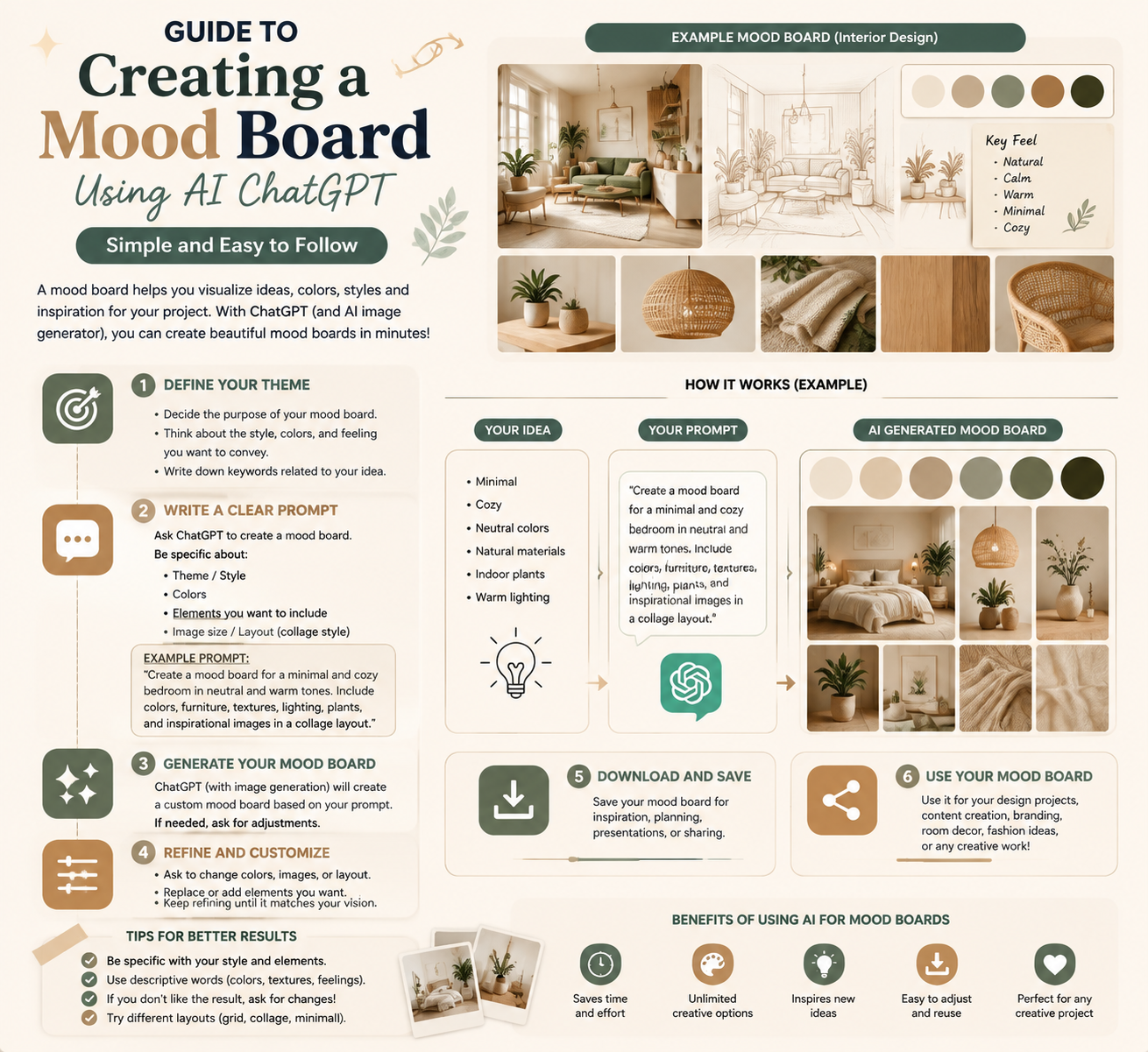
1. What is a moodboard?
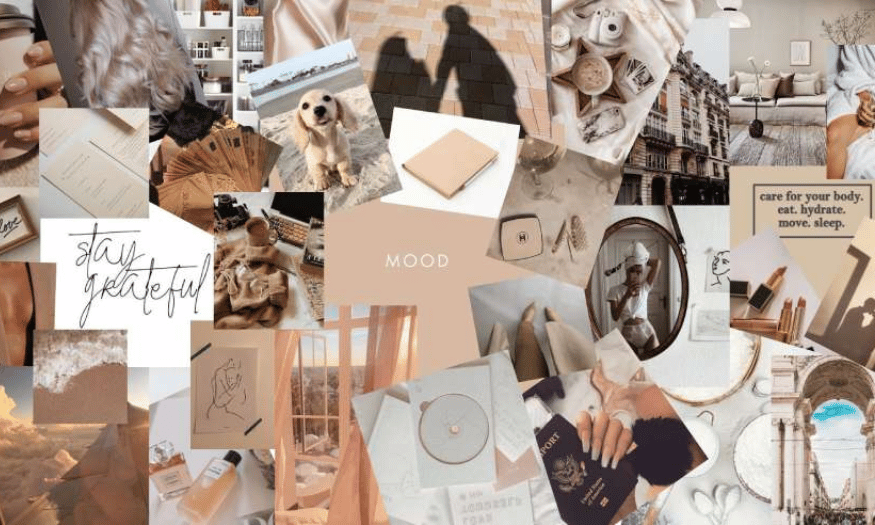
A moodboard, also known as an inspiration board, is a visual tool that brings together images, colors, typography, and other design elements to express the overall idea or spirit of a project. It's like a creative "map," helping you clearly visualize the style, main colors, and atmosphere you want to convey before you start working on it. Thanks to moodboards, disparate ideas in your head are strung together into a harmonious whole, making it easy to present and share with teammates or clients.
Beyond design, moodboards are also flexibly applied in fashion, photography, interior design, or even brainstorming for an important event. With a moodboard, every small detail is placed side-by-side to verify its suitability and harmony with the overall design, thereby saving effort on adjustments later.
Therefore, a well-designed and effective moodboard not only clarifies the idea but also serves as an effective bridge between the creator and the partner. It becomes an indispensable part of projects that need to communicate emotions, style, or design direction in a specific and easily understandable way.
2. Why should you create a moodboard using ChatGPT?
Previously, creating moodboards required a lot of effort searching for images, manually editing and meticulously arranging them on complex design software. Now, ChatGPT has opened up a completely new way. With the power of AI, ChatGPT not only suggests suitable ideas but also helps you organize them by theme, even creating descriptions for each section, saving hours compared to traditional manual methods.
A major advantage of using ChatGPT to create moodboards is its limitless creativity. Simply describe your initial idea, and the AI will automatically suggest styles, color palettes, illustrations, and even keywords to help you expand or refine the moodboard. This makes it easy for even those with no design experience to get started, without needing to spend time struggling with professional tools.
Above all, ChatGPT makes the moodboard creation process more flexible and enjoyable. You can change ideas and try different styles with just a few commands, without having to rearrange everything from scratch. It's truly a powerful "creative assistant," transforming any idea into a complete, clear moodboard, ready to serve your work and inspire your team.
3. Who should use ChatGPT to create moodboards?
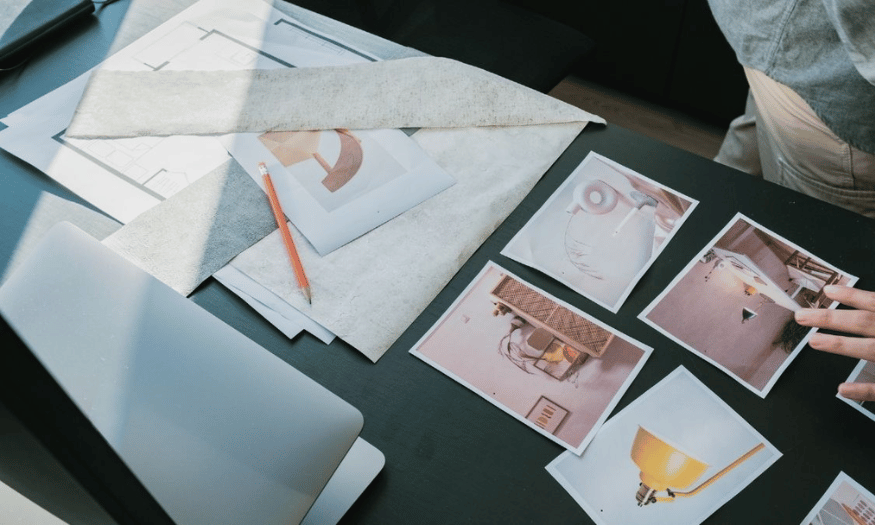
Anyone who needs to quickly turn ideas into visuals should try creating moodboards with ChatGPT. Designers, freelancers, and marketers will find this tool incredibly useful for sketching initial ideas, preparing for brainstorming sessions, or presentations to clients. With ChatGPT, you not only save time but also easily adjust the moodboard to suit the requirements of each specific project.
Not limited to work, those who enjoy personal creativity should also take advantage of ChatGPT to create moodboards. You can design moodboards for birthday parties, home decorating plans, or simply record lifestyle or travel ideas. Creating moodboards with ChatGPT will transform vague intentions into concrete, more actionable plans.
In particular, young people who are just starting to learn design or are unfamiliar with complex software will find ChatGPT an incredibly accessible "entry-level" tool. No professional knowledge is needed; just be willing to share your ideas, and you can create impressive, neat moodboards that reflect your personal style. This is why more and more people are choosing ChatGPT as their "companion" on their creative journey.
4. Simple guide to creating a moodboard using AI ChatGPT, anyone can do it.
4.1 Step 1: Clearly define your idea
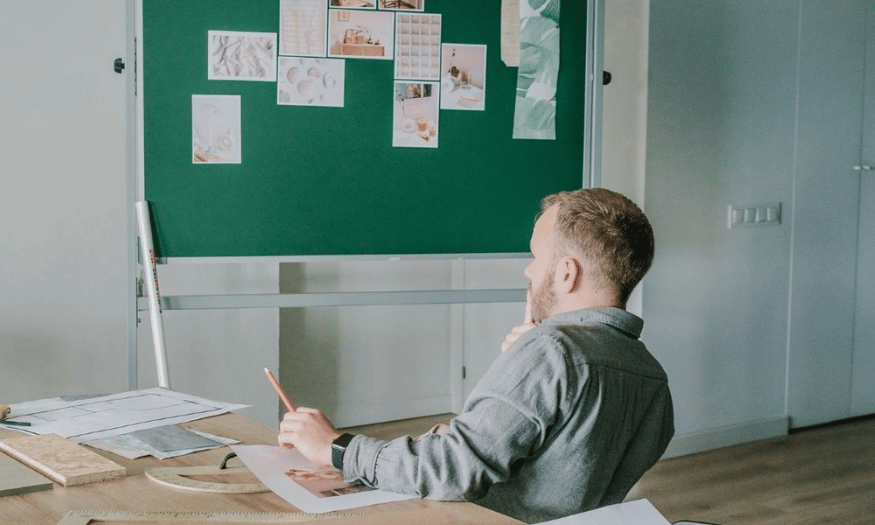
First, take some time to sit down, close your eyes, and clearly visualize what you want to express. A moodboard is like a "mirror" reflecting the entire spirit of the project, so the clearer the initial idea, the more accurate the final moodboard will be. Don't hesitate to ask yourself: What is the purpose of creating this moodboard? Is it for design, advertising, or simply to inspire?
After defining the purpose, continue answering more detailed questions such as: What is the main theme? What feeling do you want to convey — warm, youthful, mysterious, or sophisticated? Are there any objects or images that absolutely must be included? The more information you provide, the easier it will be for the AI to create the image exactly as you envisioned. A helpful tip is to write down important keywords like main color, material, and style, so you can use the prompt more quickly later.
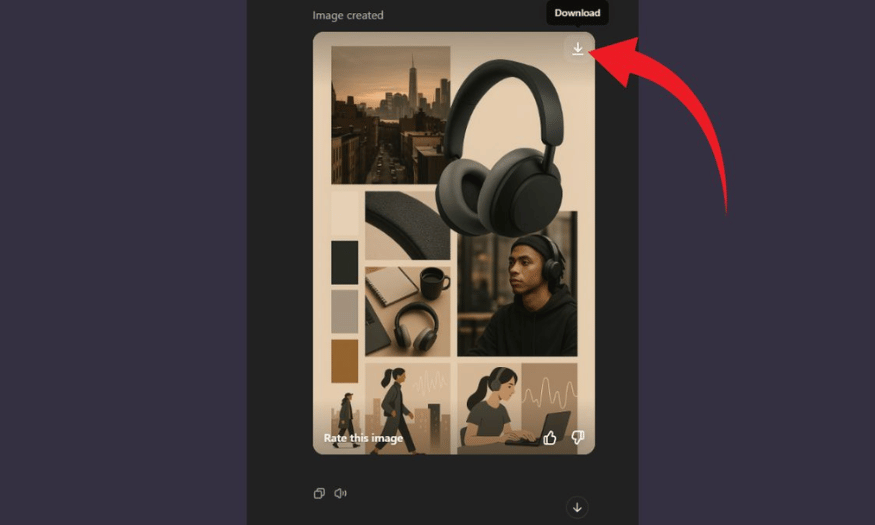
For example, if you're looking to create a moodboard for a line of modern-style wireless headphones, you could sketch out a few key points beforehand: beige and matte black tones, minimalist style, a gentle urban setting, and an emphasis on portability and creativity. With just these few notes, you'll have a solid foundation to move on to the next stage.
4.2 Step 2: Write a prompt that is detailed and easy to understand.
Writing the prompt is a crucial step in determining whether your moodboard is beautiful and "on point." The prompt is a description of the idea you want ChatGPT to understand and create as a visual representation. The basic principle is: the more detailed the prompt, the closer the visual representation will be to your vision. If you write too generally, the AI will create a rather bland moodboard with no clear focal point.
To begin, gather all the keywords you prepared in the previous step and arrange them into a coherent sentence. You can describe the overall layout, background color, main subject, supporting elements, and lighting style. For example: “Create a moodboard in a vertical 3:4 ratio, with a warm beige background, highlighting matte black wireless headphones in the center. Surrounding it are images of a city at sunset, a minimalist desk, a few icons illustrating people listening to music, and the main color blocks. The lighting is soft, the layout is airy, and it has a modern, creative feel.”
If you're not confident in your English, just write your prompt clearly in Vietnamese. Then, simply use ChatGPT to translate it into standard English before using it to create the image. This will help the AI understand exactly the details you want.
4.3 Step 3: Use ChatGPT to create the image and check the results.
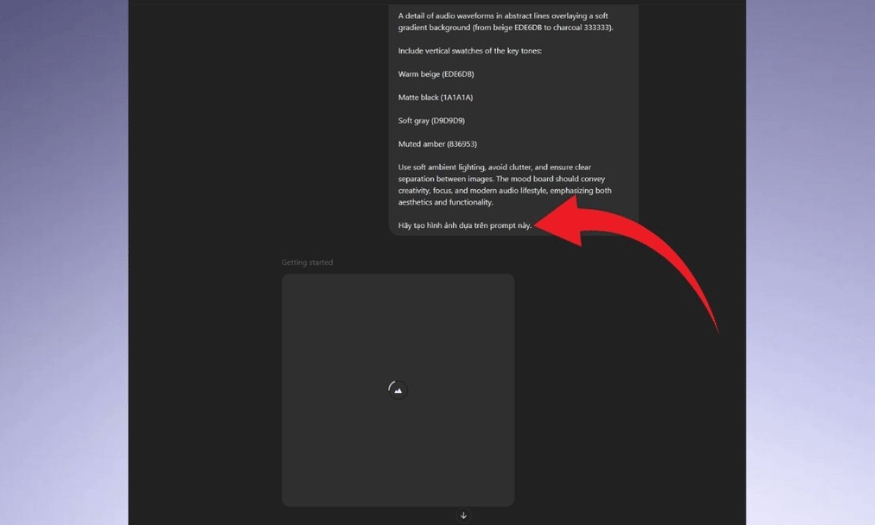
Once you have a satisfactory prompt, open ChatGPT (the version that supports image creation), paste the prompt in, and type: "Create a moodboard based on this description." In just a few seconds, you'll see a complete moodboard appear before your eyes—something that previously would have taken you hours to do manually using complex software.
Look closely at the image and ask yourself: Is the layout neat? Are the colors to my liking? Are there any details that aren't quite right? If you find anything unsatisfactory, simply adjust the prompt: add colors, change the position of objects, increase or decrease detail, and then ask ChatGPT to create a new version. Be patient and fine-tune it several times if needed, because the more accurate the final moodboard is, the less effort you'll have to make later.
4.4 Step 4: Save the moodboard and use it for various purposes.
Once you're satisfied, don't forget to download the moodboard to your computer for immediate use. This moodboard can be inserted into idea presentations, sent to clients for concept approval, attached to project proposals, or simply hung in your workspace as a visual source of inspiration. If you're working in a team, share the moodboard with your teammates so everyone can visualize and stay on track.
Additionally, you can store moodboards as part of your personal portfolio, or post them on social media to share your own style and ideas. Many creatives even use moodboards as an "idea bank"—just open them up and inspiration will flow, ready for new projects.
5. Suggested prompt for creating a moodboard.
5.1 5 prompt questions in Vietnamese
-
Create a moodboard in a minimalist Nordic style, using shades of white, light gray, and light wood to highlight a modern living room space with a linen sofa, wooden coffee table, and a few small green plants to create a warm and inviting atmosphere.
-
Create a moodboard for the fall fashion collection, focusing on muted tones such as chocolate brown, earthy orange, and moss green; images of models wearing oversized sweaters and wool scarves, fallen golden leaves on the streets, and the soft light of sunset.
-
Design a moodboard with a futuristic, tech-inspired theme, using glossy black, neon green, and metallic tones. The main visuals should feature an ultra-thin laptop, wireless headphones, and vector graphics symbolizing speed and innovation.
-
Create a moodboard inspired by tropical nature, featuring refreshing greens, vibrant oranges, images of palm leaves, white sandy beaches, fruit cocktails, and luxurious resort scenes amidst pristine nature.
-
Design a moodboard with a Bohemian wedding theme, using beige, cream, and pastel pink tones; featuring images of a delicate lace wedding dress, a floral headpiece, a floral arch adorned with vines, and an outdoor reception table under twinkling string lights.
5.2 5 prompt questions in English
-
Create a vertical moodboard inspired by minimalist Japanese interiors, featuring soft white walls, warm wooden floors, tatami mats, low furniture, and a cozy reading nook with natural light filtering through rice paper sliding doors.
-
Design a moodboard that captures the essence of a vibrant summer festival, using bright pops of red, yellow, and turquoise, with images of fireworks, street food stalls, colorful paper lanterns, and people laughing and dancing in traditional outfits.
-
Make a moodboard for a luxury skincare brand concept, highlighting clean, soft pastel colors like blush pink and pearl white, product shots with water droplets, delicate flowers, and close-ups of glowing, healthy skin under soft natural light.
-
Generate a moodboard themed around an urban streetwear look, focusing on monochrome outfits, graffiti walls, skateboards, chunky sneakers, and candid shots of young people hanging out in city alleys under neon signs.
-
Build a moodboard showcasing a cozy winter cabin retreat, with warm earthy tones like deep brown and burnt orange, images of a crackling fireplace, knitted blankets, hot cocoa mugs, snow-covered pine trees, and rustic wooden decor.
6. Upgrade your account at SaDesign at a super discounted price.
SaDesign has long been one of Vietnam's leading and most reputable software providers, trusted by numerous individual and business users when they need to upgrade their ChatGPT Plus accounts. Thanks to years of experience in the technology field, SaDesign is committed to providing stable, fast service at reasonable prices, helping customers save significantly on costs compared to purchasing directly from foreign suppliers.
A major advantage that makes SaDesign popular is its highly competitive upgrade pricing, suitable for students and companies needing a large number of accounts. Importantly, all upgrade procedures are automated and transparent, eliminating concerns about service interruptions. This is also why SaDesign's service consistently receives positive feedback and long-term repeat business from customers nationwide.
In addition to ensuring competitive pricing, SaDesign places special emphasis on data security. All personal and transaction data is guaranteed to be stored securely and will absolutely not be shared with third parties. This professionalism and dedication allows users to confidently experience ChatGPT Plus with its full range of advanced features without worrying about security issues.
7. Fast and flexible payment methods at SaDesign
To provide maximum convenience for users, SaDesign has developed a diverse payment system to suit various needs. You can choose traditional bank transfers or use domestic and international Visa cards for quick transactions. For those who frequently purchase services online, this is a very familiar and easy-to-use option.
Besides bank transfers, SaDesign also supports payments through many popular e-wallets such as Momo, ZaloPay, VietPay, etc. Scanning the QR code for payment takes only a few seconds, saving time and minimizing the risk of information errors. This is a very convenient solution, especially suitable for young customers who frequently use mobile payment apps.
Furthermore, all SaDesign bank account and e-wallet information is transparently disclosed, allowing customers to easily verify and check transactions after each transaction. SaDesign's support team is also always ready to answer questions and provide detailed guidance if customers need assistance during the payment process. Therefore, upgrading to ChatGPT Plus at SaDesign is not only fast but also completely secure.
8. Conclusion
So, in just a few minutes with ChatGPT, you can create your own AI moodboard in your own style without having to learn complex software. Try it out now to save time, record ideas, and convey inspiration for any project. We hope you create some great moodboards, and don't forget to share your creations to spread the inspiration!





















VIP Products








Best Selling Products
Upgrade Genuine Office 365
49 USD
Capcut Pro 1 Year
39 USD
Plugin Retouch4me
69 USD
MidJourney Account
29 USD
Freepik Premium Account
59 USD
Adobe Photoshop Copyright - Full App
120 USD
Genuine Adobe Illustrator account
99 USD
Genuine Cheap Canva Pro
39 USD
Copyright Adobe Lightroom Account
59 USD
ChatGPT Plus Account (GPT-4)
16 USD
Windows 10 & 11 Pro Key
36 USD
Upgrade genuine Capture One account
120 USD
Adobe Premiere Pro Account
99 USD
Upgrade Duolingo Super
29 USD
Autodesk All App Account Copyright
120 USD