Best Selling Products

Genuine Adobe Illustrator account
99 USD

Capcut Pro 1 Year
39 USD

Upgrade Duolingo Super
29 USD

Upgrade Genuine Office 365
49 USD
Copyright Adobe Lightroom Account
59 USD

Freepik Premium Account
59 USD

MidJourney Account
29 USD

Windows 10 & 11 Pro Key
36 USD
Genuine Cheap Canva Pro
39 USD
Plugin Retouch4me
69 USD
Upgrade genuine Capture One account
120 USD
Autodesk All App Account Copyright
120 USD
Adobe Photoshop Copyright - Full App
120 USD

Adobe Premiere Pro Account
99 USD

ChatGPT Plus Account (GPT-4)
16 USD
Guide to creating stunning Christmas photos using AI that look like they were taken in a studio.
Nội dung
- 1. Why is creating Christmas images using AI becoming a trend?
- 2. AI tools to help create beautiful Christmas photos
- 2.1. Gemini AI
- 2.2. ChatGPT
- 2.3. Other AI photo editing tools
- 3. Guide to creating Christmas images using AI with Gemini
- Step 1: Access Gemini
- Step 2: Upload your portrait photo.
- Step 3: Enter the Christmas image creation prompt.
- Step 4: Check and edit the results
- Step 5: Download the image to your device.
- 4. A compilation of AI-powered prompts for creating stunning Christmas photos that look like they were taken in a studio.
- 4.1. Prompt for creating luxurious studio-style Christmas photos.
- 4.2. Prompt for creating Korean-style Christmas photos
- 4.3. Prompt to create an outdoor Christmas photo with snow.
- 4.4. Prompt to create cute Christmas photos with a Christmas tree
- 4.5. Prompt to create elegant lady-style Christmas photos
- 4.6. Prompt for creating fairytale-style Christmas photos
- 4.7. Prompt to create Christmas photos for couples
- 4.8. Prompt to create Christmas images for social media avatars
- 5. Tips for making your Christmas photos with AI more beautiful and realistic.
- 6. Common mistakes when creating Christmas images using AI
- 7. Conclusion
Creating Christmas photos using AI is becoming a popular trend every Christmas season. With just a portrait photo and a few lines of description, you can transform a familiar image into a dazzling Christmas photo set with a Christmas tree, gift boxes, golden lights, and romantic white snow. No need to schedule a photoshoot, prepare elaborate outfits, or spend a lot of money at a studio; you can still have beautiful pictures to use as avatars, post on Facebook or TikTok, or keep as end-of-year memories. In this article, let''s explore with Sadesign how to easily create Christmas photos using AI, beautiful prompts, and secrets to making your images look more natural and professional.

1. Why is creating Christmas images using AI becoming a trend?
Every Christmas season, photos of people next to Christmas trees, under twinkling lights, or in snow-covered landscapes flood social media. However, to get a beautiful set of photos, you usually have to prepare outfits, find a suitable location, and spend time posing. With AI, everything becomes simpler as you can change the background, lighting, and shooting style right on your phone or computer. The appeal of this method is the ability to personalize images according to your preferences. You can transform yourself into a girl in a warm Christmas room, a boy in a snowy European street, or the main character in a fairytale setting. Some notable advantages include:
-
Cost-effective: No need to rent a studio, buy many accessories, or travel to shooting locations.
-
Easily experiment with various styles: from gentle Korean-style Christmas photos to sophisticated concepts like fashion magazines.
-
Quick and easy: Simply prepare the original image and enter the appropriate command.
-
Creative freedom: Change colors, outfits, hairstyles, and backgrounds as you wish.
-
Suitable for social media: Easily create profile pictures, cover photos, stories, or Christmas photo albums with friends.
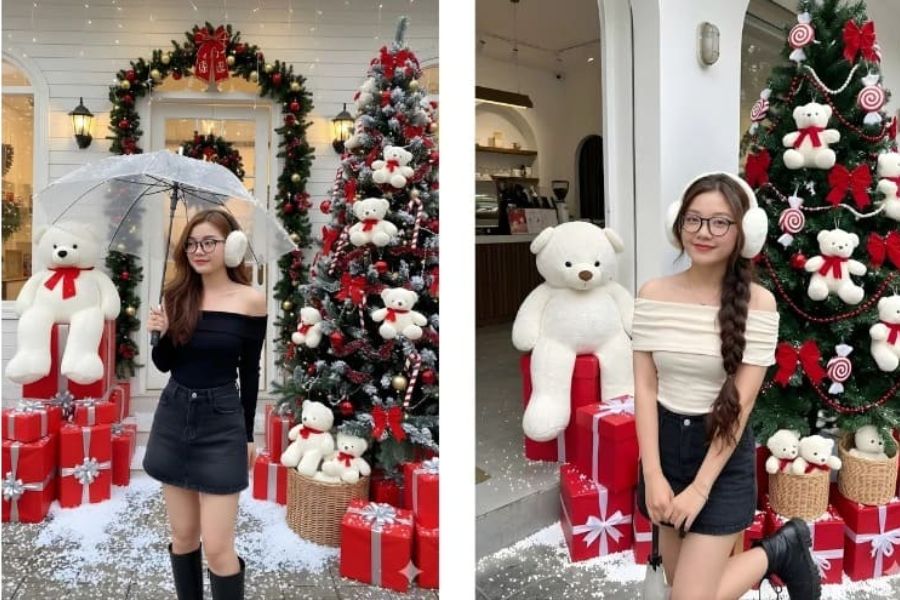
2. AI tools to help create beautiful Christmas photos
Currently, you can choose from many AI image creation tools depending on your needs and desired style. If you're just starting out, prioritize tools with an easy-to-use interface, support for uploading portrait photos, and the ability to edit using command lines.
2.1. Gemini AI
Gemini is a great option for those who want to create Christmas-themed photos from existing portraits. You can upload your photo, describe your desired Christmas scene, and then ask the AI to change the outfit, lighting, or surrounding space. For example, a regular photo can be transformed into a portrait in front of a Christmas tree with soft lighting and a beautiful bokeh effect.
2.2. ChatGPT
ChatGPT can assist in creating and editing images based on descriptions, depending on the features provided in your account. You can request the creation of a completely new Christmas concept or use a reference image to guide the style. When you want to keep the face from the original image, specify your request to preserve identifying features and only change elements such as clothing, background, or lighting.
2.3. Other AI photo editing tools
Besides Gemini and ChatGPT, several other photo editing apps also offer Christmas filters, snow effects, or AI-powered portrait creation features. These tools are suitable for quick photo editing on your phone or creating photos using pre-made templates. When choosing a tool, you should consider image quality, the ability to preserve faces, resolution, and usage limitations. Some features may require a paid account or have a limit on the number of photo creations.
3. Guide to creating Christmas images using AI with Gemini
Gemini is a worthwhile option if you want to transform portraits into Christmas photos without needing any design skills. The process is quite simple, especially if you have the right photos and prompt ready.
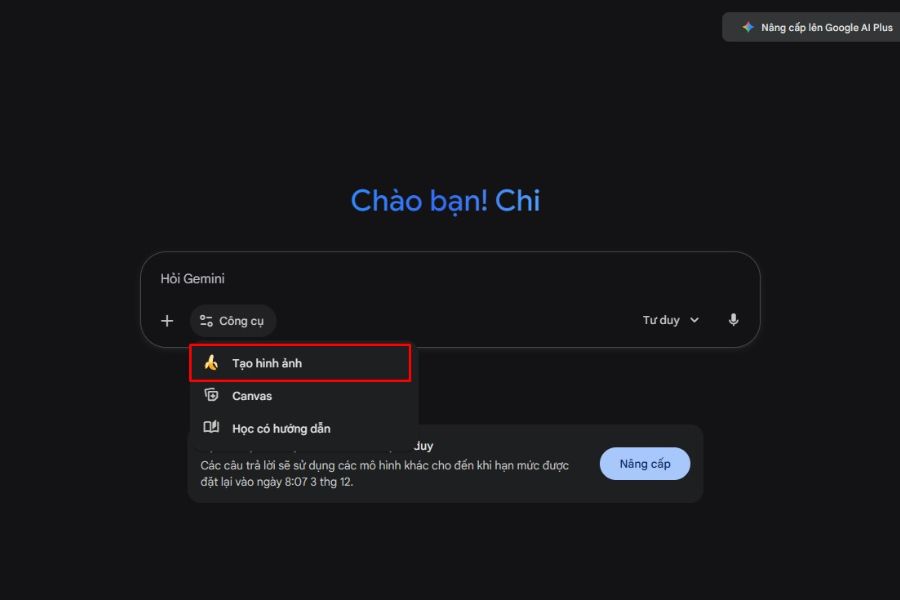
Step 1: Access Gemini
Open Gemini in your browser or a compatible app on your phone. Log in to your account if prompted, then find the image creation or editing feature. The interface and feature names may vary depending on the version, account type, and time of use.
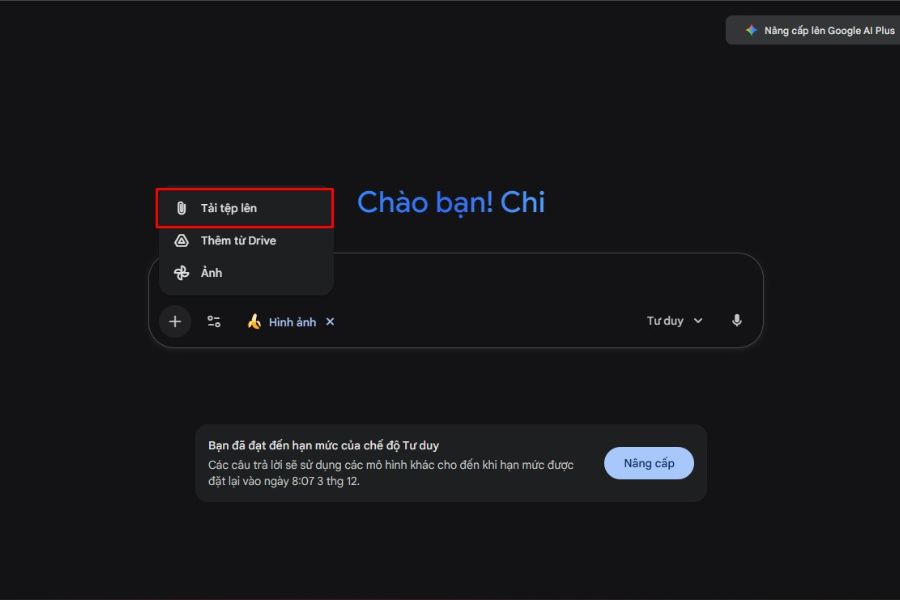
Step 2: Upload your portrait photo.
Select the attach or upload photo icon to bring the portrait you want to edit into the conversation. For better AI processing, you should choose a photo with a clear face, relatively even lighting, and not obscured by hair, a mask, or large accessories.
Some things to keep in mind when selecting original images:
-
Prioritize photos with good resolution and no blurring.
-
Choose a frontal or slightly angled shot to make it easier for the AI to recognize your face.
-
Avoid photos with too many people if you only want to create a personal photo.
-
Use photos that you have permission to edit and share.
Step 3: Enter the Christmas image creation prompt.
After uploading the image, enter a statement clearly describing the style you want. Instead of just writing "create beautiful Christmas photos," you should specify the outfit, background, lighting, shooting angle, and image quality.
Example: “Use the uploaded portrait photo as a reference. Maintain the facial features and create a professional studio-style Christmas portrait, wearing an elegant red sweater, standing next to a gold-decorated Christmas tree, with soft lighting, warm colors, natural skin tone, sharp details, balanced composition, and a 4:5 vertical aspect ratio.”
Step 4: Check and edit the results
When Gemini returns the image, check the face, hands, clothing, and decorative details. If the image isn't to your liking, you can request further edits without necessarily starting over.
For example, you could enter: “Keep the current face and pose, soften the lighting, reduce the skin smoothing effect, add yellow light in the background, and create depth like a studio photo.”
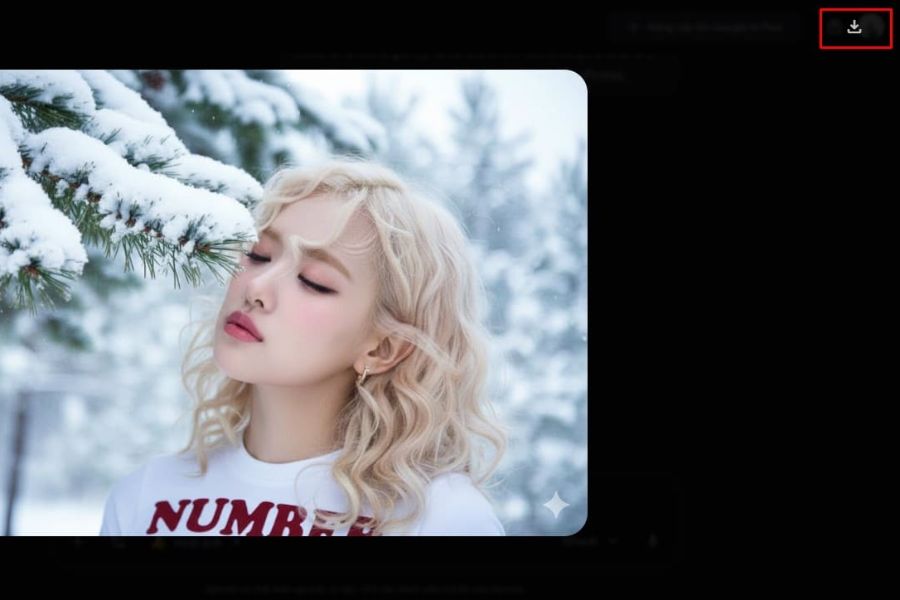
Step 5: Download the image to your device.
Once you're satisfied, open the image and select the download option if supported. You can use the image to post on social media, as a wallpaper, or print it as a keepsake. If you need to post it on multiple platforms, choose the appropriate aspect ratio and check the resolution before use.
4. A compilation of AI-powered prompts for creating stunning Christmas photos that look like they were taken in a studio.
Prompts are a crucial element in determining image style and quality. A good prompt should clearly describe the subject, background, clothing, lighting, and facial requirements. Below are some prompts you can copy and use immediately.
4.1. Prompt for creating luxurious studio-style Christmas photos.
“Based on a reference portrait, create a professional-looking Christmas photo, just like a high-end studio shoot. Preserve the face and identifying features of the person in the photo. The subject is dressed in elegant burgundy attire, standing next to a Christmas tree decorated with gold ornaments, velvet bows, and warm LED lights. The background is a combination of cream and burgundy, with soft studio lighting, natural shadows, realistic skin tones, sharp hair details, a refined composition, and professional portrait quality.”
4.2. Prompt for creating Korean-style Christmas photos
“Create a modern Korean-style Christmas portrait from a reference photo. Preserve facial features, natural expressions, and skin tone. The subject wears a white sweater with a red scarf, sitting next to a small Christmas tree in a cozy room. Soft lighting, creamy white and pastel red tones, fresh makeup, natural skin texture, slightly blurred background, a youthful, sophisticated, and romantic feel.”
4.3. Prompt to create an outdoor Christmas photo with snow.
“Using the uploaded image as a reference, create an outdoor Christmas photo that looks like it was taken by a professional photographer. Keep the face and identifying features intact. The subject should be wearing a light-colored wool coat and a red scarf, standing in a snowy winter street. Behind them are shops decorated with Christmas lights, a glowing Christmas tree, and yellow lights reflecting off the snow. The lighting should be cinematic, the colors harmonious, the depth of field natural, the expression genuine, and the image sharp.”
4.4. Prompt to create cute Christmas photos with a Christmas tree
“Create a cute Christmas portrait from a reference photo, preserving the face and key identifying features. The subject is wearing a red sweater with winter patterns, posing happily next to a Christmas tree decorated with bows, ornaments, and colorful gift boxes. The setting is warm, the lighting is soft yellow, the colors are bright but not overly vibrant, the expression is natural, the composition is neat, and the style is high-end lifestyle photography.”
4.5. Prompt to create elegant lady-style Christmas photos
“Create a high-fashion Christmas portrait series based on a reference photo. Maintain the natural facial features and proportions. The subject wears an elegant red velvet dress, delicate accessories, and stands in a Christmas-decorated room with a large Christmas tree, candles, and warm yellow lights. The elegant pose, confident gaze, deep studio lighting, bokeh background, and wine-red and champagne gold color palette create a realistic, magazine-worthy photograph.”
4.6. Prompt for creating fairytale-style Christmas photos
“Transforming a reference portrait into a fairytale Christmas scene, preserving the character's identifying features. The character, dressed in a white winter cloak, stands amidst a snow-covered garden with a glowing Christmas tree, small lanterns, and sparkling snowflakes. The lighting is ethereal yet natural, the silver-white tones combined with warm gold, the composition is cinematic, the details are exquisite, and the image is rich in emotion and depth.”
4.7. Prompt to create Christmas photos for couples
“Create a romantic Christmas photo for two using a reference photo, trying to preserve each person's distinctive features. The couple wears matching winter outfits with cream sweaters and red scarves, standing next to a Christmas tree in a cozy setting. Both have natural expressions, gentle interaction, soft yellow lighting, a background decorated with small lights and gift boxes, a romantic studio style, harmonious colors, and realistic facial details.”
4.8. Prompt to create Christmas images for social media avatars
"Create a Christmas profile picture from a reference portrait. Keep the face, hairstyle, and key identifying features. Take a close-up shot from the shoulders up, the subject wearing a red sweater, with a Christmas tree in the background illuminated by yellow bokeh lights. The lighting should be even on the face, the expression cheerful, the background neat, the colors vibrant yet natural, the composition focused on the subject, and the resolution high, suitable for Facebook, TikTok, and Instagram avatars."
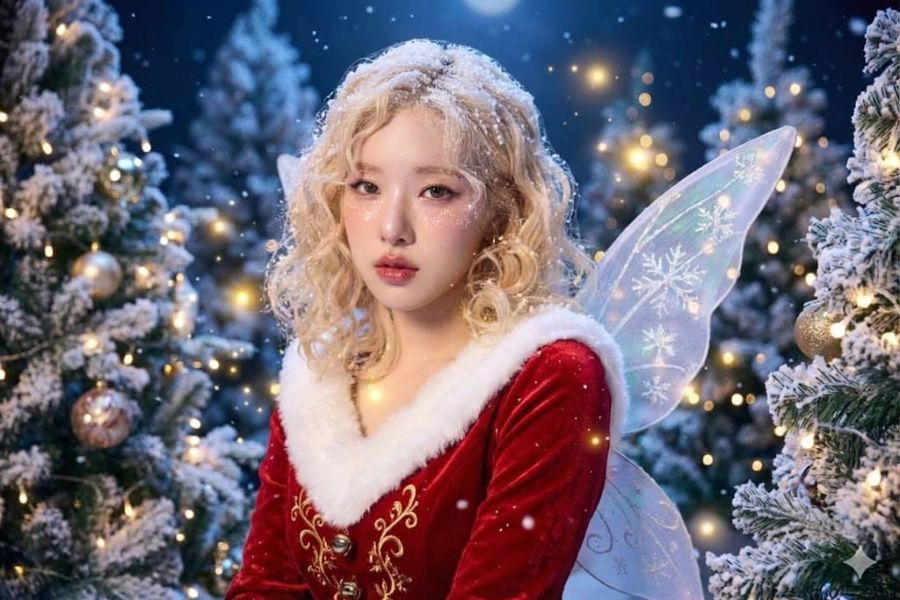
5. Tips for making your Christmas photos with AI more beautiful and realistic.
Simply typing a long prompt doesn't guarantee a perfect image. To achieve a studio-quality result, you need to combine a suitable reference image with clear commands and know how to adjust it after each creation.
-
Description of the request to preserve the face: Add the phrase "preserve the identifying features, facial shape, and natural skin tone" if you want the image to be close to the original photo.
-
Specify the lighting: Use phrases like soft studio light, warm yellow light, or natural light to guide the results.
-
Choose a main color palette: Red, green, champagne gold, and creamy white are characteristic colors of Christmas.
-
Describe the clothing materials: Knitted sweaters, red velvet, wool scarves, or wool coats can help make the photo feel more realistic.
-
Avoid overcrowding the space with too many details: A Christmas tree, a few gift boxes, and some lights are enough to create a festive atmosphere without making the background look cluttered.
-
Adjust each element individually: If the photo is already good but the lighting isn't right, ask for lighting adjustments first instead of changing the entire scene.
6. Common mistakes when creating Christmas images using AI
During the image creation process, beginners may encounter issues such as altered faces, unnatural-looking images, or backgrounds that don't match the description. Most of these problems can be improved by selecting better input images and writing more specific prompts.
-
Different from the original photo: Use a clear portrait photo and emphasize the requirement to preserve identifying features.
-
Skin that is too smooth and unnatural: Supplementation is required to maintain the natural skin texture and limit excessive beautifying effects.
-
Faulty hands or accessories: Require a simple layout, avoiding hands covering the face or holding too many items.
-
The image is too dark or the colors lack harmony: Clearly describe the desired light source, tone, and contrast.
-
Incorrect attire: Specify the color, style, and material of the clothing in the prompt.
-
The image doesn't look like a studio shot: Add descriptions of professional lighting, a clean background, portrait composition, and depth of field.
7. Conclusion
Creating Christmas photos with AI is a simple way to have beautiful Christmas pictures without needing a fancy studio shoot. With just a portrait photo, the right tool, and a clear description prompt, you can experiment with many styles, from gentle and cute to elegant and cinematic. Start with a simple command, adjust each detail to your liking, and choose the photo you're most satisfied with to keep or share this Christmas season.
















VIP Products




Best Selling Products
Genuine Adobe Illustrator account
99 USD
Capcut Pro 1 Year
39 USD
Upgrade Duolingo Super
29 USD
Upgrade Genuine Office 365
49 USD
Copyright Adobe Lightroom Account
59 USD
Freepik Premium Account
59 USD
MidJourney Account
29 USD
Windows 10 & 11 Pro Key
36 USD
Genuine Cheap Canva Pro
39 USD
Plugin Retouch4me
69 USD
Upgrade genuine Capture One account
120 USD
Autodesk All App Account Copyright
120 USD
Adobe Photoshop Copyright - Full App
120 USD
Adobe Premiere Pro Account
99 USD
ChatGPT Plus Account (GPT-4)
16 USD