Best Selling Products

Copyright Adobe Lightroom Account
59 USD

Upgrade genuine Capture One account
120 USD

Windows 10 & 11 Pro Key
36 USD

Adobe Photoshop Copyright - Full App
120 USD

ChatGPT Plus Account (GPT-4)
16 USD

Capcut Pro 1 Year
39 USD

Autodesk All App Account Copyright
120 USD

Genuine Adobe Illustrator account
99 USD

Plugin Retouch4me
69 USD

Freepik Premium Account
59 USD

Upgrade Duolingo Super
29 USD

Adobe Premiere Pro Account
99 USD

Upgrade Genuine Office 365
49 USD

Genuine Cheap Canva Pro
39 USD

MidJourney Account
29 USD
How to Build an Impressive Moodboard for 2D Character Design
Nội dung
- 1. The concept of a moodboard
- 2. The role of a moodboard in 2D character design
- 3. Steps to build a moodboard for 2D character design
- 3.1 Identify the character style and creative direction
- 3.2 Find and use suitable references
- 3.3 Arrange, classify, and design the moodboard layout
- 3.4 Complete the moodboard and check consistency
- 4. Online tools that support moodboard creation
- 4.1 Canva
- 4.2 Pinterest
- 4.3 Milanote
- 5. Should you upgrade Canva to create Moodboards?
- 6. Address for upgrading Canva at a low price
- 6.1 AI Software World – A leading reputable unit
- 6.2 Dedicated and fast support
- 6.3 Reasonable and transparent pricing
- 7. Conclusion
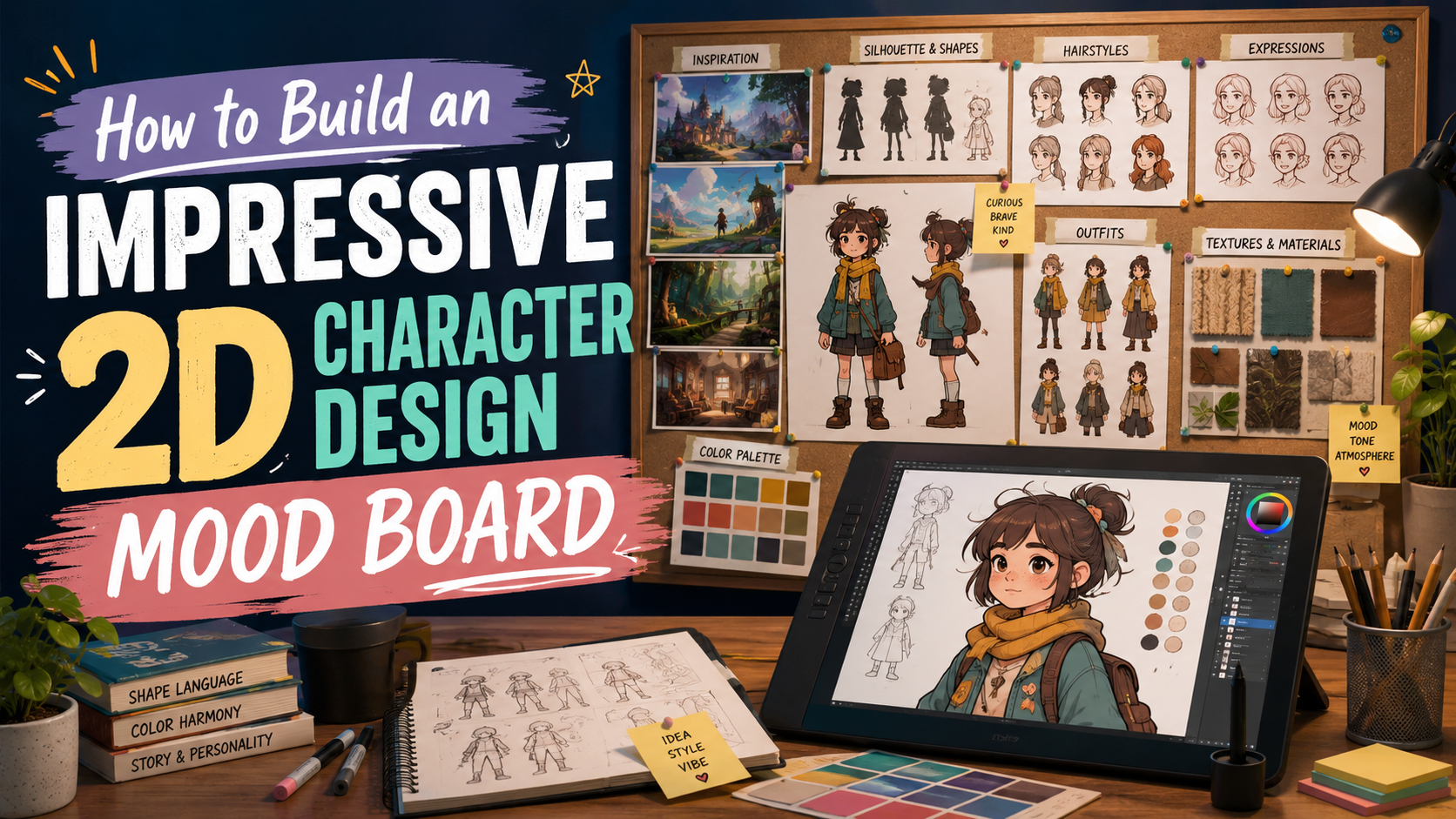
A moodboard is an important tool that helps beginners in 2D character design clearly visualize the style, emotions, and personality of a character. Through the proper selection of images, colors, materials, and layout, a moodboard not only inspires creative ideas but also keeps the concept closely aligned with the original goal. This is the “visual map” that helps designers easily exchange ideas, save time during the development process, and create a solid foundation for characters to become lively, attractive, and distinctive. Let’s explore it now with AI Software World!
1. The concept of a moodboard
A moodboard is a visual inspiration board that gathers images, colors, textures, illustration styles, reference materials, or even cultural elements and quotes with symbolic meaning. In 2D character design, a moodboard is considered a visual language, clearly conveying the spirit and emotions that the character needs to aim for. Thanks to this, every detail, from shape, color tone to facial expression, is consistently oriented with the original concept, helping the character become vivid and have its own identity.
Especially for those who are new to the design field, a moodboard also serves as a roadmap. Instead of struggling with scattered sketches, you will have a clear reference system to save time, minimize deviations, and maintain a continuous creative flow. It can be said that a moodboard is the solid foundation that helps you both create freely and maintain cohesion throughout the entire character design process.
.jpg)
2. The role of a moodboard in 2D character design
In 2D character design, a moodboard is compared to a solid foundation that helps you build a character from the initial ideas until it is fully formed. This is not only an inspiration board but also a tool that guides the entire creative process, helping designers maintain artistic freedom while ensuring logic and consistency. Thanks to a moodboard, all elements from colors, shapes to style are closely connected, creating a character with depth and a unique mark.
Specifically, a moodboard brings the following important roles:
Shaping the character’s style and emotions: A moodboard helps you clearly determine what personality traits the character will have, from cute and energetic to cold or mysterious. Through the selection of images, color palettes, and reference materials from movies, games, or comics, you will have a foundation to develop the character in accordance with the original goal.
Ensuring consistency in design: When all reference elements are gathered in one place, deciding on hairstyle, outfit, colors, or body proportions will become more coherent and synchronized. This helps the character avoid being fragmented, lacking direction, or changing style halfway through.
Inspiring and expanding creative ideas: A moodboard not only reflects what you have selected but also suggests new directions. The process of arranging and combining different elements stimulates creativity, helping you experiment with many diverse concepts without having to spend effort sketching repeatedly.
Saving time and limiting revisions: Instead of having to redraw continuously to find a suitable style, a moodboard allows you to verify ideas early through visuals. This helps shorten the creative process while minimizing the amount of editing in later stages, bringing higher working efficiency.
Increasing communication effectiveness within the team or with clients: When working in a group or presenting to clients, a moodboard acts as a visual communication tool. Instead of giving lengthy verbal explanations, you can help others clearly visualize the character’s style and direction, thereby making the feedback and review process faster and more accurate.
.jpg)
3. Steps to build a moodboard for 2D character design
3.1 Identify the character style and creative direction
The first step to building an effective moodboard is to clearly identify the character style and creative direction you want to pursue. This is the stage that lays the foundation for the entire design process, because without a specific direction, the moodboard can easily become fragmented and unfocused. You need to clarify what personality the character will have, what context the character will appear in, and what emotions the character will express. Choosing the drawing style is also very important, whether it is a fun cartoon style, semi-realistic with a balance between reality and imagination, or a cute chibi style. Once there is a clear direction, the moodboard will become a guiding compass that helps you save time and keep the character’s identity consistent.
Identify the main personality and emotions of the character: cute, mysterious, strong, or humorous.
Choose the expression style: cartoon, semi-realistic, anime, chibi…
Write down a list of keywords related to the character to serve as a guide when selecting images and color palettes.
3.2 Find and use suitable references
References are visual resources that help you imagine the character more specifically and accurately. At this step, you need to search for images, colors, materials, or illustrative details from many sources such as animated films, concept art, comics, games, or even real life. Choosing suitable references not only inspires creativity but also ensures that the moodboard accurately reflects the character’s spirit. However, you also need to know how to filter them to avoid making the moodboard messy or lacking focus.
Reference images: from films, comics, games, or real-life photos to get ideas about body shape, expressions, and costumes.
Color palette: choose colors that match the character’s personality, for example bright tones for energetic characters and dark tones for mysterious characters.
Materials and textures: refer to fabric, metal, leather, or lighting effects to clarify costume and accessory details.
Prioritize selecting images that are directly relevant so the moodboard is clear and easy to orient.
.jpg)
3.3 Arrange, classify, and design the moodboard layout
After collecting enough references, the next step is to arrange them scientifically and visually. This is the stage of turning a collection of separate images into a complete moodboard that is easy to view and logical. You can group elements by themes such as color palettes, hairstyles, costumes, expressions, or body poses. Choosing the layout is also very important, whether it is a grid format, divided sections, or a sequence from overview to detail. If you use digital tools such as Photoshop, Canva, or Figma, you will easily adjust positions, sizes, and test many different arrangements to find the optimal layout.
Group images by type: colors, costumes, hairstyles, expressions, and body poses.
Choose a visual and easy-to-follow layout: grid frame, layered structure, or timeline.
Use digital tools to easily move, edit, and arrange images.
Make sure that when looking at the moodboard, viewers can immediately understand the spirit and style of the character.
3.4 Complete the moodboard and check consistency
The final step in the process is to complete the moodboard and review the consistency of all selected elements. This is the time when you need to evaluate whether all images, color palettes, and details are truly synchronized in style and emotion. Elements that are visually distracting or unsuitable should be removed so the moodboard becomes coherent and focused. In addition, you should also compare the moodboard with the original concept to make sure that it reflects the true spirit of the character you want to build. Once completed, the moodboard will become a reliable guiding tool for the entire 2D character design process, helping save time, maintain creativity, and ensure that the final result is highly attractive.
Check the consistency of style, color palette, and overall emotion.
Remove unnecessary or irrelevant references.
Compare with the original concept to make sure the moodboard stays close to the idea.
Use the moodboard as a foundational document for the drawing and character development steps.
4. Online tools that support moodboard creation
For 2D designers, especially beginners, building a moodboard is not simply about gathering reference images but also a way to create a map of emotions, style, and the character’s spirit. The online tools below will help you design moodboards quickly, visually, and full of inspiration, while maintaining consistency throughout the creative process.
4.1 Canva
Canva is one of the most popular online design platforms today, especially friendly for beginners. This tool allows you to easily drag and drop images, arrange layouts, add text, or insert icons in just a few simple steps. The outstanding point of Canva is its available moodboard template library with many different styles, helping you save time while still creating neat and professional products.
In addition, Canva also supports color customization, fonts, and extremely convenient online sharing. This makes Canva a suitable choice for those who want to create visual and easy-to-use moodboards without needing too many design skills. Thanks to its flexibility and user-friendly interface, you can focus more on shaping the character instead of struggling with layout handling.
.jpg)
4.2 Pinterest
Pinterest has long been considered a “treasure trove” of images for designers and artists around the world. With abundant resources from concept art, comics, animated films to professional color palettes, Pinterest gives you countless suggestions to build a character moodboard. You can create separate “boards” by topic such as drawing style, character personality, or colors, making it easier to search and store references.
The greatest strength of Pinterest is its ability to suggest related images, thereby expanding inspiration in ways you may never have thought of. Not only does it stop at storage, Pinterest also helps you turn scattered ideas into a coherent, consistent moodboard system that can always be accessed again at any time. This is an ideal tool to spark creative inspiration whenever you are stuck for ideas.
4.3 Milanote
Milanote is a professional tool chosen by many concept artists and designers thanks to its ability to manage many elements at the same time on a visual canvas. With Milanote, you can not only arrange images but also add notes, reference links, color palettes, and textures into the same project. Thanks to this, all ideas and resources are neatly organized, convenient to follow or share with teammates.
Besides that, Milanote also supports collaboration features, allowing many people to work together and edit the moodboard in real time. This is extremely useful when you need to discuss, compare styles, or present ideas to clients. It can be said that Milanote is not only a moodboard creation tool, but also a comprehensive solution for creative management in 2D character design.
.jpg)
5. Should you upgrade Canva to create Moodboards?
The answer is definitely yes. The Canva Pro version gives you a massive resource library including millions of images, fonts, icons, and premium templates. This helps the moodboard creation process become faster, more professional, and more unique. You are no longer limited by the free library with few options, but can take full advantage of all tools to express character styles in many different depths.
Not only that, Canva Pro also supports color management, brand synchronization, cloud storage, and high-quality file export. These utilities help designers save time, keep moodboards neat, and easily share them with teams or clients. With such a versatile tool, upgrading Canva is a smart investment for every designer.
6. Address for upgrading Canva at a low price
6.1 AI Software World – A leading reputable unit
AI Software World is trusted by many designers and businesses when they want to upgrade Canva Pro as well as other licensed software. With many years of experience in providing software, the unit always ensures genuine products, full features, and continuous updates. This is the factor that helps users feel completely secure when using it, without worrying about risks or feature limitations.
Besides Canva Pro, AI Software World also brings many other design solutions and creative tools such as Photoshop, Capcut Pro, Zoom Pro, Google One… Each product is provided officially, clearly, and transparently, meeting the needs of both individuals and businesses. This makes AI Software World a leading address where you can confidently invest in your creative tools.
6.2 Dedicated and fast support
When upgrading Canva Pro at AI Software World, you do not only buy software but also receive professional support from an experienced technical team. The entire activation and usage process will be guided in detail and easy to understand, helping you operate quickly even if you are not familiar with design software. This is a major plus that helps customers feel assured and save considerable time.
Not only stopping at installation, AI Software World always accompanies customers throughout their experience. All questions or problems are answered promptly, ensuring that your creative work is not interrupted. With the motto “customers are number 1,” the unit is committed to bringing a complete experience from the purchasing stage to the usage process.
6.3 Reasonable and transparent pricing
One of the major advantages of choosing AI Software World is its extremely competitive and reasonable pricing compared to the market. Users can own Canva Pro with a full licensed feature set at a much more economical cost than buying directly from international providers. Not only that, the company also supports issuing full VAT invoices for individuals and businesses, making transactions transparent, clear, and reliable.
With a commitment to quality along with reasonable pricing, AI Software World brings an optimal solution for those who want to upgrade Canva while still ensuring cost savings. This is a safe, smart, and sustainable choice for you to maximize the power of Canva Pro in creating moodboards, designing characters, or any creative project.
7. Conclusion
A moodboard is not simply a collection of images or spontaneous color palettes, but also serves as a visual guiding compass for the entire 2D character design process. When built systematically, a moodboard helps designers shape style, maintain consistency, optimize time, and communicate ideas more clearly. By taking advantage of modern design tools, you will make the creative process more visual, faster, and full of inspiration, thereby turning the initial idea into a complete character that is emotional and truly impressive in the eyes of viewers.





















VIP Products








Best Selling Products
Copyright Adobe Lightroom Account
59 USD
Upgrade genuine Capture One account
120 USD
Windows 10 & 11 Pro Key
36 USD
Adobe Photoshop Copyright - Full App
120 USD
ChatGPT Plus Account (GPT-4)
16 USD
Capcut Pro 1 Year
39 USD
Autodesk All App Account Copyright
120 USD
Genuine Adobe Illustrator account
99 USD
Plugin Retouch4me
69 USD
Freepik Premium Account
59 USD
Upgrade Duolingo Super
29 USD
Adobe Premiere Pro Account
99 USD
Upgrade Genuine Office 365
49 USD
Genuine Cheap Canva Pro
39 USD
MidJourney Account
29 USD