Best Selling Products

MidJourney Account
29 USD

ChatGPT Plus Account (GPT-4)
16 USD

Copyright Adobe Lightroom Account
59 USD

Upgrade genuine Capture One account
120 USD

Plugin Retouch4me
69 USD

Upgrade Duolingo Super
29 USD

Adobe Premiere Pro Account
99 USD

Genuine Cheap Canva Pro
39 USD

Capcut Pro 1 Year
39 USD

Upgrade Genuine Office 365
49 USD

Autodesk All App Account Copyright
120 USD

Genuine Adobe Illustrator account
99 USD

Freepik Premium Account
59 USD

Adobe Photoshop Copyright - Full App
120 USD

Windows 10 & 11 Pro Key
36 USD
JPEG vs. HEIC: Which Format Is Right for You?
Nội dung
- 1. Overview of JPEG format
- 1.1 Advantages of JPEG
- 1.2 Disadvantages of JPEG
- 2. Overview of the HEIC format
- 2.1 Advantages of HEIC
- 2.2 Disadvantages of HEIC
- 3. Regarding the flexibility of JPEG and HEIC in post-processing.
- 4. Compare the file sizes of JPEG and HEIC.
- 5. Sharing files using JPEG versus sharing files using HEIC
- 6. JPEG vs. HEIC: Metadata
- 7. Conclusion
- 8. Frequently Asked Questions about JPEG vs. HEIC
- Can I convert a JPEG file to HEIC?
- Can I convert a HEIC file to JPEG?
- How do I know if my camera supports HEIC image capture?
- What is the best format for sharing photos on social media from a mobile phone?
- Will HEIC be replaced like JPEG in the future?
Both JPEG and HEIC are good options, each with its own advantages and limitations. The most important thing is to choose the format that truly suits your needs. This article will delve into the pros and cons of both formats, and suggest who should use JPEG and who should switch to HEIC.
1. Overview of JPEG format
JPEG is an image format developed by a consortium of photography experts in the early 1990s. It was created to solve a problem that plagued older formats like GIF and BMP: how to store a large amount of color information while keeping file sizes small enough for easy sharing over the internet, which was very slow at the time. JPEG quickly became the most popular image format across the entire digital photography ecosystem, from mirrorless cameras and DSLRs to mobile phones, all capable of creating JPEG files.

One of JPEG's most useful features, and the reason for its explosive popularity, is the flexibility it offers users when creating images. You can decide whether to prioritize image quality or smaller file size by adjusting the compression level directly on the camera or in the editing software. However, despite offering a good balance between quality and file size, JPEG still lacks many capabilities crucial for modern digital photography. The format removes a significant amount of color data to reduce file size, leaving editors with little room to adjust color and bring detail to the surface or create images with high dynamic range. Furthermore, JPEG is only an 8-bit format, meaning each pixel can only contain 256 tonal values for each primary color channel: red, green, and blue. This number was more than enough in the 1990s, but with the enormous amount of information that modern digital cameras can capture, 8-bit color is sometimes no longer sufficient for the needs of professional editors.
1.1 Advantages of JPEG
In terms of advantages, JPEG is one of the most widely used image formats worldwide. Almost every existing device and software can easily open, view, and edit JPEG files thanks to its overwhelming popularity. This high compatibility makes sharing and editing JPEG files incredibly convenient, without any obstacles regardless of the recipient's device or operating system. Furthermore, JPEG offers a reasonable balance between file size and image quality, suitable for most everyday photography needs without requiring extensive post-processing.
1.2 Disadvantages of JPEG
Despite its aforementioned advantages, JPEG also has several limitations. The 8-bit color format of JPEG can significantly hinder modern photographers who want to maximize color data during post-processing. JPEG compression can also leave unwanted noise, graininess, or loss of detail, particularly noticeable in areas with smooth color transitions, such as the sky. Finally, JPEG is almost unusable for video storage, making it significantly less versatile for today's increasingly common multimedia needs.
2. Overview of the HEIC format
HEIC, an acronym for High-Performance Image Storage Format, was developed in 2015. HEIC was created to meet the needs of modern photographers while maintaining the compact file size essential for uploading and sharing photos online.
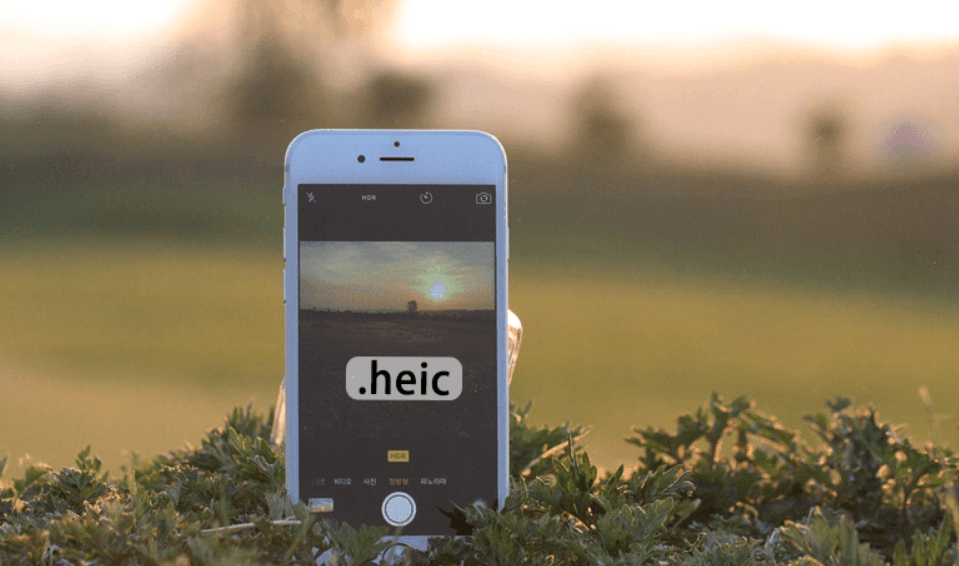
HEIC uses a compression algorithm that allows for the creation of image files with a size similar to JPEG but still retains enough color information for in-depth editing. HEIC also supports features that JPEG completely lacks, such as the ability to create transparent backgrounds or store multiple images in a single file. Notably, HEIC is a 10-bit color format, meaning each pixel can contain up to 1024 values for each red, green, and blue color channel, a significant increase compared to JPEG's 256 values. Therefore, HEIC can capture rich color detail and sharpness that JPEG struggles to achieve. Because a HEIC file can contain multiple images at once, this format is also used for video, a trend that is increasingly popular in the photography industry today.
The popularity of HEIC has skyrocketed since Apple made it the default format on iPhone models launched in September 2017. Since then, many other manufacturers have gradually adopted HEIC, and it is now widely supported on popular mobile and computer operating systems, as well as on many DSLR and mirrorless cameras.
2.1 Advantages of HEIC
HEIC offers significantly smaller file sizes compared to JPEG while maintaining comparable or even better image quality. HEIC's ten-bit color format allows for images with much greater detail and color depth than JPEG. Furthermore, the ability to contain multiple images in a single file makes HEIC an ideal choice for those who frequently shoot video or capture continuous motion.
2.2 Disadvantages of HEIC
Despite its many advantages, HEIC has not yet achieved the same popularity as JPEG, making it difficult to share or open files on some devices and platforms. Many older DSLR and mirrorless cameras still do not support this format. Furthermore, not all image editing software can handle HEIC files smoothly, especially older versions or computers running outdated operating systems.
3. Regarding the flexibility of JPEG and HEIC in post-processing.
Although HEIC possesses several significant advantages over JPEG, this older format still has many good reasons to continue being used, especially by those who prefer a manual, direct editing approach. Most modern photo editing software can handle HEIC files, but older software, such as older versions of Photoshop or computers running outdated operating systems, often do not support this format. Therefore, the likelihood of encountering problems opening HEIC files due to software or operating system limitations is still higher than working with JPEG files, which almost never cause problems.
Fortunately, these obstacles will become less frequent as software is regularly updated and users gradually switch to newer devices. At the same time, HEIC's support for transparent backgrounds gives this format a significant advantage in many post-processing situations. Overall, no format has an absolute advantage in terms of post-processing flexibility; it all depends on individual needs, the software being used, and the ultimate editing goals. JPEG excels when working with older software and computers, while HEIC is more suitable for those who are always up-to-date with the latest image editing technology.
4. Compare the file sizes of JPEG and HEIC.
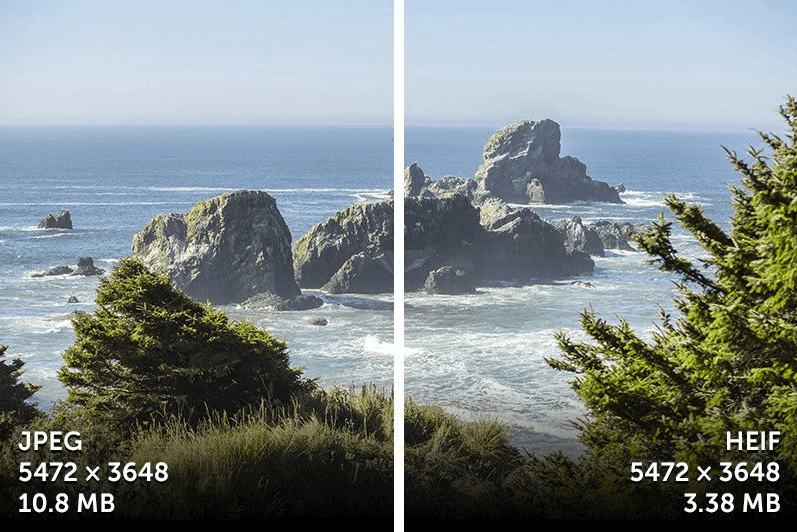
In terms of file size, HEIC is far superior to JPEG. The compression algorithm used to create HEIC files is capable of storing more color data in a smaller file size in almost every case, meaning that those who prioritize saving storage space should almost always choose HEIC over JPEG.
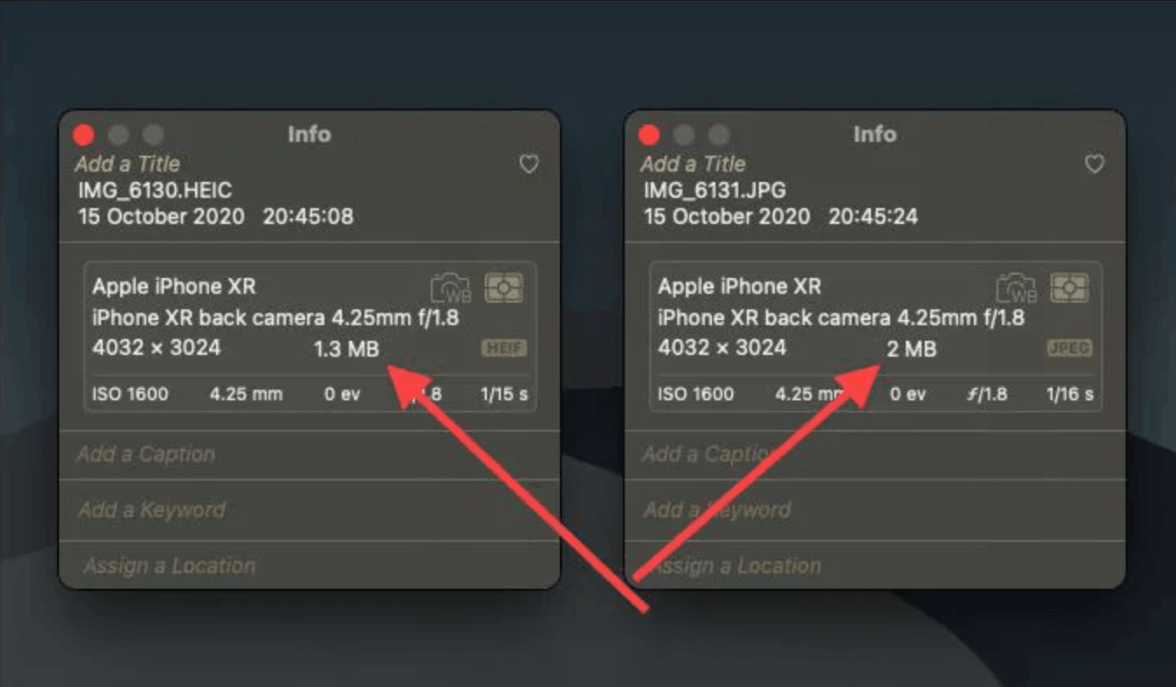
HEIC also offers lossless compression options, allowing for a reduction in file size without any degradation in image quality. JPEG completely lacks this capability; even at the highest quality level, JPEG files always undergo a certain degree of lossy compression. In fact, for the same image, a file exported in HEIC format is often about half the size of a corresponding JPEG file—a significant difference if you frequently take and store large numbers of images, especially on devices with limited internal memory like mobile phones.
5. Sharing files using JPEG versus sharing files using HEIC
One of the most significant advantages JPEG has over HEIC lies in its overwhelming popularity. When you take a picture in JPEG format and share it via text message, email, or social media, the image file will always display correctly, regardless of the recipient's device, software, or internet browser. Even websites that require image uploads for product warranties or proof of purchase accept JPEG, while HEIC is rarely accepted.
Conversely, HEIC is still relatively new, so you can't be absolutely certain that your photos will display correctly when shared with others. The list of websites, apps, and social networks supporting HEIC is growing rapidly, but it still can't match the overwhelming popularity that JPEG holds in the photo-sharing field. Even Apple, which sets HEIC as the default format on iPhones, acknowledges the compatibility limitations of this format by offering users two options when taking photos: a high-performance mode using HEIC and a maximum compatibility mode using JPEG. As HEIC becomes more popular, this limitation will gradually become less important, but at the moment, if you want your photos to be shareable with as many people on as many platforms as possible, JPEG remains the safer choice.
6. JPEG vs. HEIC: Metadata
This factor might not be crucial for casual recreational photographers, but for photographers looking to maximize the potential of their images, HEIC offers a distinct advantage in its ability to store additional information. Both formats can store EXIF data such as exposure parameters, camera model, time, date, and even global location.
However, HEIC also has the ability to store other types of metadata, such as depth maps—information that editing software like Lightroom can use to apply masks based on the proximity of different areas in the image. These additional metadata options may not be necessary for many average users, but for professional photographers, serious photography enthusiasts, or anyone wanting to explore more advanced editing options, HEIC's metadata storage capabilities are clearly superior to what JPEG can offer.
7. Conclusion
Overall, both JPEG and HEIC are perfectly reliable image formats; however, HEIC is considered a more suitable choice for forward-thinking photographers who want to maximize the capabilities of their cameras and modern editing software. JPEG was a great choice for decades, but in many aspects, it is gradually being surpassed by HEIC.
However, that doesn't mean JPEG is useless. This format remains the default choice on many cameras and mobile phones today, boasting unparalleled compatibility. Meanwhile, HEIC offers superior features with smaller storage capacity, and although not yet as widely used as JPEG, it's highly likely to become more popular in the future. For those who want to take advantage of HEIC's advanced features right now, it's clearly an excellent option to consider.
8. Frequently Asked Questions about JPEG vs. HEIC
Can I convert a JPEG file to HEIC?
It's entirely possible. Many modern editing software programs like Photoshop or Luminar support converting JPEG files to HEIC. However, it's important to note that while the converted HEIC file will be smaller, you won't be able to automatically add metadata like depth maps simply by converting the format.
Can I convert a HEIC file to JPEG?
Yes. Most applications capable of opening HEIC files allow you to export them as JPEG. This is a very useful solution for those who want to take photos in HEIC format but occasionally need to share the files with people using computers or devices that don't support HEIC.
How do I know if my camera supports HEIC image capture?
Most DSLR and mirrorless cameras offer options to select image file formats and quality. Previously, these options were often limited to JPEG and RAW, but now HEIC is a standard option on many cameras. You should check the image quality or format settings on your camera, or consult the manufacturer's official website to find out exactly if your camera supports this format.
What is the best format for sharing photos on social media from a mobile phone?
If your phone supports HEIC, it's usually the preferred choice over JPEG. Most social media apps now support HEIC, and the superior image quality this format offers will make your photos stand out. Some social media filters even utilize HEIC metadata, such as depth maps, to create more creative effects for your photos.
Will HEIC be replaced like JPEG in the future?
In the long run, HEIC will likely be replaced by a more advanced image format, but that's no reason to delay adopting HEIC now. No one knows for sure which format will replace HEIC in the future, and it could take many years, even decades, to happen. In the meantime, the advantages HEIC offers over JPEG will become increasingly important, especially as more and more people switch to HEIC instead of JPEG.





















VIP Products








Best Selling Products
MidJourney Account
29 USD
ChatGPT Plus Account (GPT-4)
16 USD
Copyright Adobe Lightroom Account
59 USD
Upgrade genuine Capture One account
120 USD
Plugin Retouch4me
69 USD
Upgrade Duolingo Super
29 USD
Adobe Premiere Pro Account
99 USD
Genuine Cheap Canva Pro
39 USD
Capcut Pro 1 Year
39 USD
Upgrade Genuine Office 365
49 USD
Autodesk All App Account Copyright
120 USD
Genuine Adobe Illustrator account
99 USD
Freepik Premium Account
59 USD
Adobe Photoshop Copyright - Full App
120 USD
Windows 10 & 11 Pro Key
36 USD