Best Selling Products

Genuine Cheap Canva Pro
39 USD

MidJourney Account
29 USD

Copyright Adobe Lightroom Account
59 USD

Windows 10 & 11 Pro Key
36 USD

Genuine Adobe Illustrator account
99 USD

Freepik Premium Account
59 USD

Adobe Premiere Pro Account
99 USD

Capcut Pro 1 Year
39 USD

Upgrade genuine Capture One account
120 USD

Upgrade Duolingo Super
29 USD

Upgrade Genuine Office 365
49 USD

Autodesk All App Account Copyright
120 USD

Plugin Retouch4me
69 USD

ChatGPT Plus Account (GPT-4)
16 USD

Adobe Photoshop Copyright - Full App
120 USD
Key Features of Google Search Console That SEO Professionals Need to Know
Nội dung
- 1. Introduction to Google Search Console
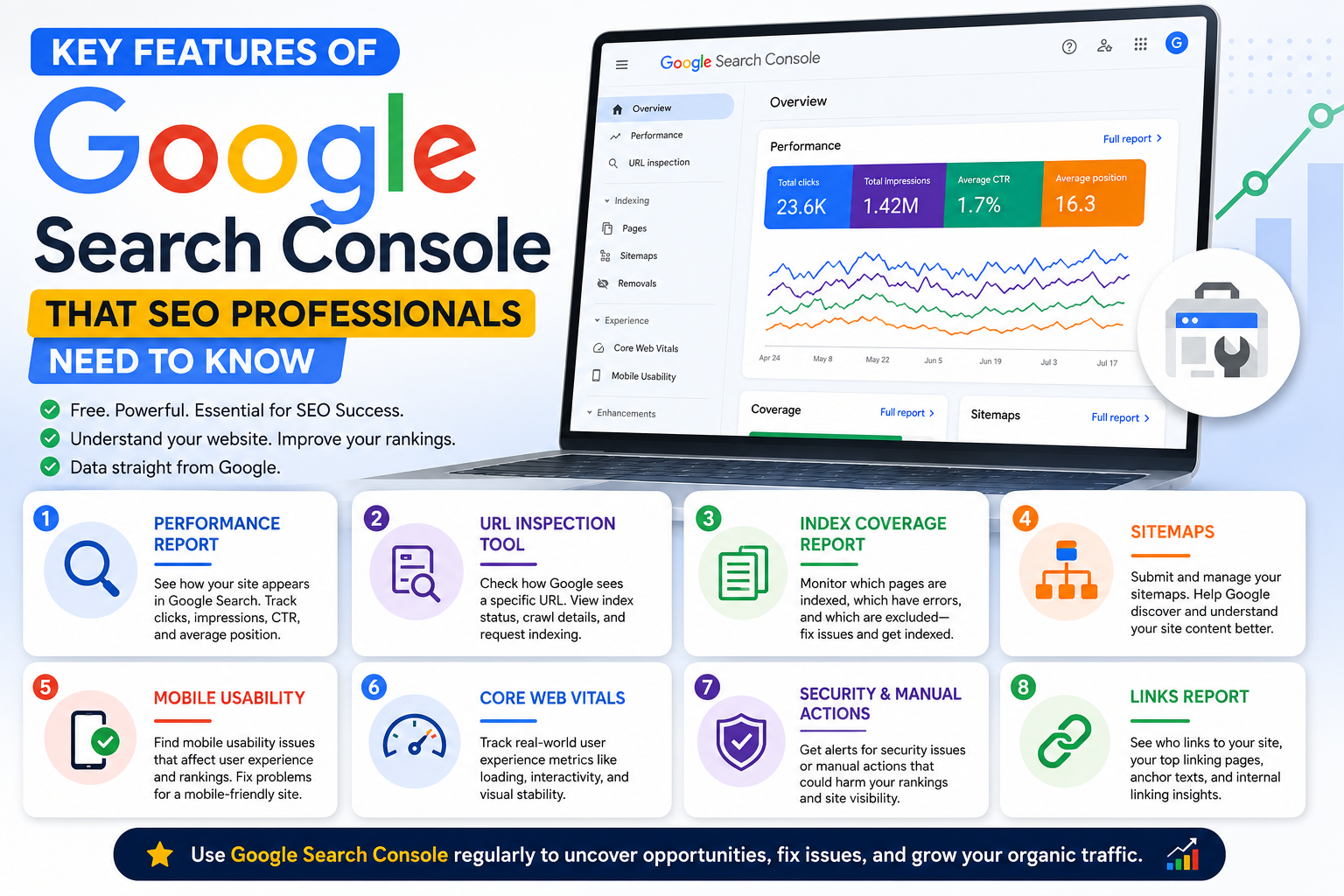
- 2. Key features of Google Search Console
- 3. Benefits of using Google Search Console
- 4. 7 simple steps to connect Google Search Console to your website
- 5. What are the methods for optimizing a website for Google Search Console?
- 5.1 Performance
- 5.2 URL Inspection
- 5.3 Coverage
- 5.4 Sitemaps
- 5.5 Mobile Usability
- 5.6 Sitelink Searchbox
- 5.7 Links
- 6. Conclusion
In the digital age, optimizing websites to attract users and improve search rankings is extremely important.
1. Introduction to Google Search Console
Google Search Console (GSC) is a completely free tool provided by Google that helps manage and optimize website performance. GSC allows users to monitor, maintain, and address SEO-related issues, both on-page SEO and off-page SEO. By using GSC, you can ensure that your website performs effectively and is search engine friendly.
2. Key features of Google Search Console
One of the features that GSC offers is the ability to monitor the crawl status of your website. You can see which pages have been indexed and which pages are experiencing problems. Additionally, GSC allows you to declare newly updated content, making it easier for Google to identify and index it more quickly.
Furthermore, GSC provides detailed information on website traffic, click-through rate (CTR), and impressions. This helps you understand keyword performance and adjust your SEO strategy effectively. In addition, this tool also supports handling issues related to mobile access, ensuring your website works well across all platforms.
3. Benefits of using Google Search Console
The biggest benefit of using GSC is its ability to track and analyze links. You can monitor internal links and analyze backlinks pointing to your website, thereby identifying and removing low-quality backlinks through the disavow feature. This not only helps improve search rankings but also protects your website from Google penalties.
Additionally, in SEO company kick-off meetings, GSC can be used to analyze metrics and define goals for the SEO strategy. Thanks to the insights provided by GSC, SEO teams can make more informed decisions about website optimization, thereby improving performance and attracting more traffic.
4. 7 simple steps to connect Google Search Console to your website
Connecting Google Search Console (GSC) to your website is a crucial step in monitoring search performance and optimizing SEO more effectively. Below is a detailed step-by-step guide to help you easily make this connection.
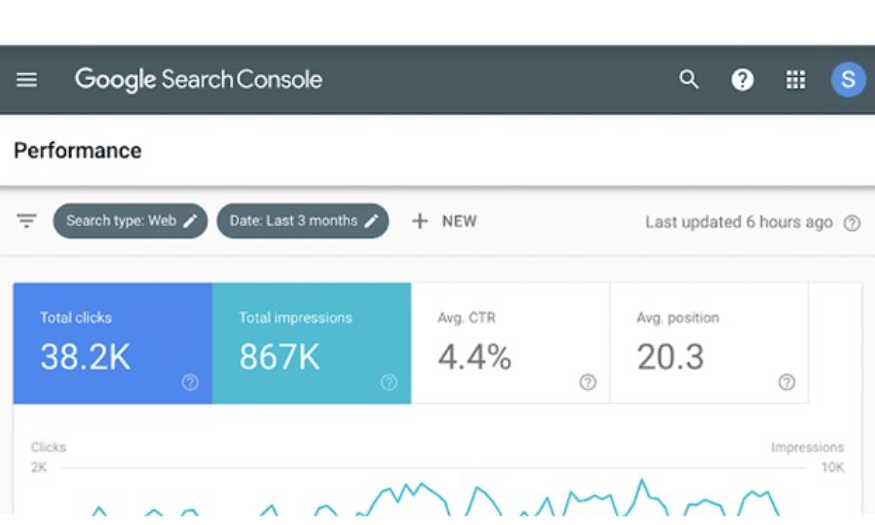
Step 1: Access Google Search Console
To begin, you need to access the official Google Search Console website. You can do this by entering https://search.google.com/search-console into your browser. Once on the page, you will see the main GSC interface with many useful options and information.
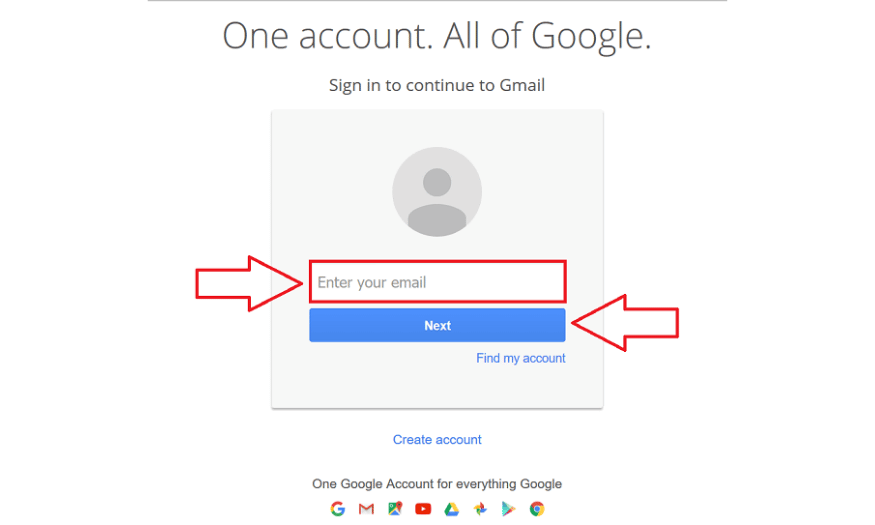
Step 2: Log in using your Gmail account.
After accessing GSC, the next step is to log in using your Gmail account. If you don't already have an account, you'll need to create a new one. When logging in, make sure the account you're using has permission to access the features that GSC offers.
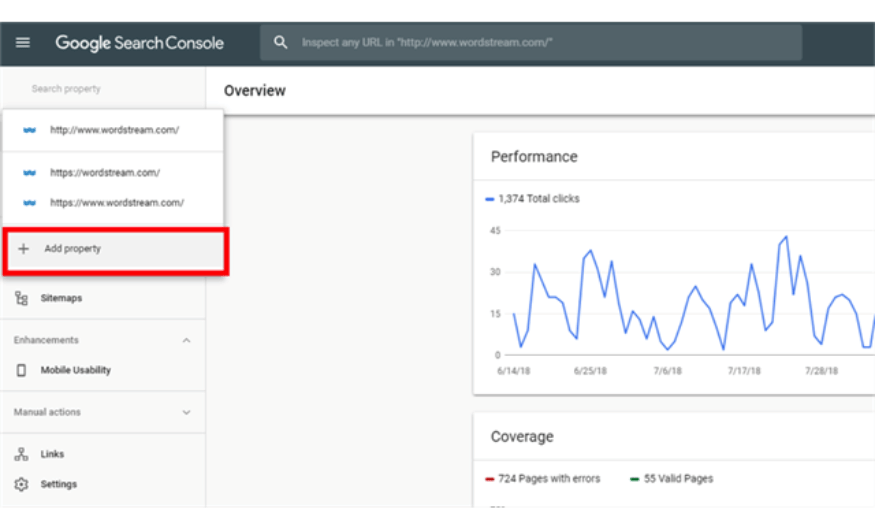
Step 3: In the "Search Property" section, select "Add Property"
After successfully logging in, you will see the "Search Property" section on the main interface. Here, find and select the "Add Property" option. This will allow you to add the websites you want to monitor and analyze in GSC.
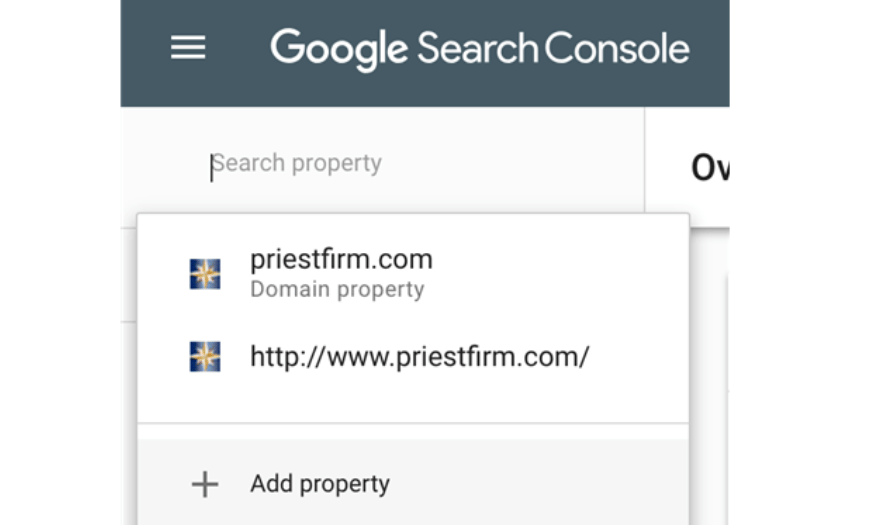
Step 4: Add the website/domain you want to connect.
Once you've selected "Add Property," you'll be prompted to enter the website or domain address you want to connect. Make sure you enter the correct URL, including the protocol (http:// or https://). After entering the information, click the "Continue" button to proceed to the next step.
Step 5: Select "HTML Tag" and get the HTML code.
After adding your website, GSC will offer you several different verification methods. Here, choose the "HTML Tag" method. The system will generate an HTML code snippet for you. Copy this code, as you will need to paste it into your website to complete the verification process.
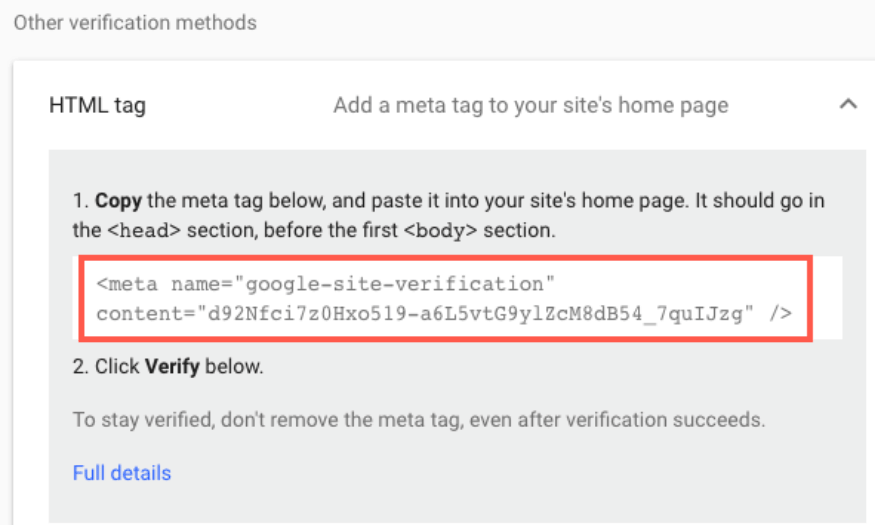
Step 6: If using Yoast SEO, go to SEO > General > Webmaster Tools > Google Verification Code and paste the code.
If your website is using the Yoast SEO plugin, you can easily add the copied HTML code to the plugin's settings. Simply go to the "SEO" menu, select "General," then find the "Webmaster Tools" tab. Paste the code into the "Google Verification Code" field and save the settings.
If you're not using Yoast SEO, you can add this code by going to "Appearance" > "Theme Editor". Find the header.php file and paste the code right below the `head` tag. Remember to save your changes before exiting.
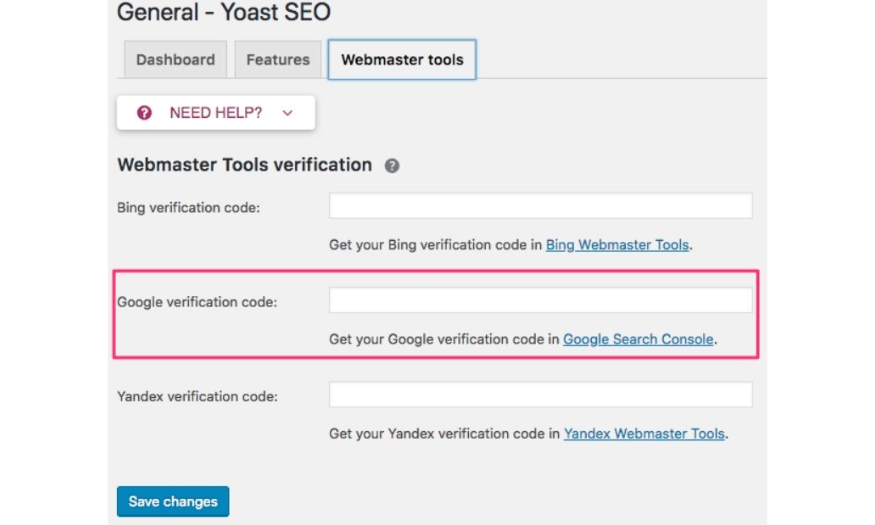
Step 7: Return to Google Search Console and click Verify to confirm.
Finally, after pasting the HTML code into your website, return to the Google Search Console page. Here, click the "Verify" button to confirm that you have completed the necessary steps. If everything is correct, you will receive a success confirmation message. Now you have successfully connected Google Search Console to your website and can start monitoring performance and optimizing SEO!
5. What are the methods for optimizing a website for Google Search Console?
Once you've connected your website to Google Search Console (GSC), you may have to wait 3 to 5 days for Google to crawl your data. However, while you wait, you can start familiarizing yourself with the tool's key features. Below are some of the standout features you should utilize to optimize your website.
5.1 Performance
The Performance feature in GSC provides you with an overview of your website's performance through key metrics. You can track total clicks from various sources such as social media, organic search, and referral links. This helps you better understand the traffic sources to your website.
Additionally, the total impressions metric indicates the number of times a website appears in search results, regardless of its position. Average click-through rate (CTR) and average position also help you evaluate the performance of your target keywords. You can categorize and sort data by keyword, landing page, geographic location, and access device, making it easier to identify areas for improvement.
5.2 URL Inspection
The URL Inspection feature is crucial for ensuring Google keeps up-to-date with your website's data. If you make changes to your site, such as updating content or altering URL structure, waiting for Google to crawl the data can take time. This tool allows you to notify Google of new updates, speeding up the indexing process for important pages.
When you use URL Inspection, you get detailed information about the indexing status of each URL, including any errors. This helps you quickly adjust and optimize your content, ensuring that all changes are recognized by Google and reflected in search results.
5.3 Coverage
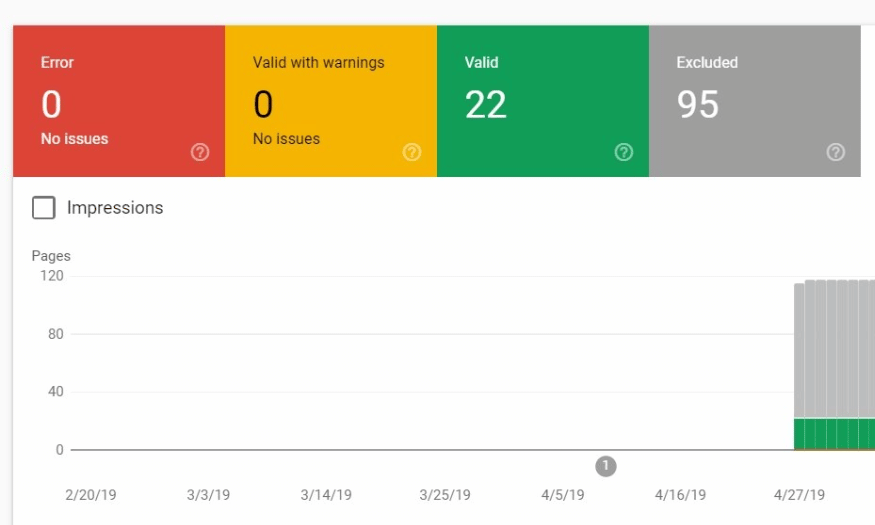
Coverage in GSC helps you monitor the crawling status of your website content. You can see the number of pieces of content that have been successfully indexed, as well as any errors encountered during the crawling process, such as 404 or 500 errors. This is very useful in detecting and fixing issues that affect website visibility.
If you have content that is not indexed (Noindex), you need to ensure that important pages are not included in that list. If they are, check and report it to Google to ensure your pages are indexed correctly. This will not only improve rankings but also increase website traffic.
5.4 Sitemaps
A sitemap is a crucial tool that helps Google crawl your site more effectively. You can create sitemaps automatically through plugins like Yoast SEO or use other tools like Screaming Frog. In GSC, the Sitemaps feature allows you to track whether Google has read your sitemap and if there are any errors in the reading process.
By declaring a sitemap, you help Google easily find new or updated pages, thereby improving indexing speed. Additionally, when there are changes to the sitemap, you can notify Google so they can update the latest information about your website's structure.
5.5 Mobile Usability
With the increasing number of mobile users, the Mobile Usability feature in GSC helps you assess your website's mobile-friendliness. Google will provide insights into issues related to user experience on mobile devices, such as page load speed and interface design.
If any issues are detected, GSC will pinpoint the specific errors and guide you on how to fix them. Optimizing the mobile experience not only improves rankings but also creates a better user experience, thereby increasing customer satisfaction and retention.
5.6 Sitelink Searchbox
Sitelink Searchbox is a useful feature that helps you better understand user search behavior. When users search for information on your site, this tool displays keywords or information related to your content. This allows you to effectively research and analyze customer needs.
Based on data from Sitelink Searchbox, you can tailor your content to better meet user needs. For example, you can put frequently searched content on the homepage or create articles answering frequently asked questions, thereby increasing engagement and retaining customers.
5.7 Links
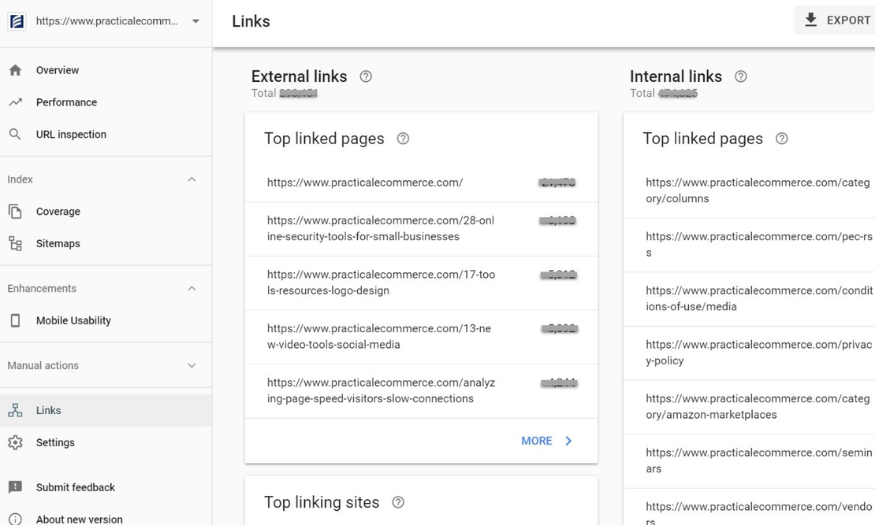
The Links feature in GSC is one of the most important tools for SEO. It not only helps you track the number of backlinks from other sites to your website but also provides information about internal links. You can easily see which pages receive the most links, thereby determining the importance of those pages within your website structure.
Furthermore, monitoring backlinks from reputable websites is also crucial. You need to consider whether these links are relevant to your content, and check if the anchor text (keywords) used are appropriate. From there, you can adjust your link building strategy, improve search rankings, and enhance website performance.
6. Conclusion
Google Search Console is not just a monitoring tool, but also a powerful assistant in SEO optimization. With outstanding features such as tracking search performance, analyzing CTR, checking indexing status, and many more, GSC helps SEO professionals make smarter decisions in their optimization strategies. If you want to improve website performance and attract more traffic, make sure you are taking full advantage of all the features that Google Search Console offers.





















VIP Products








Best Selling Products
Genuine Cheap Canva Pro
39 USD
MidJourney Account
29 USD
Copyright Adobe Lightroom Account
59 USD
Windows 10 & 11 Pro Key
36 USD
Genuine Adobe Illustrator account
99 USD
Freepik Premium Account
59 USD
Adobe Premiere Pro Account
99 USD
Capcut Pro 1 Year
39 USD
Upgrade genuine Capture One account
120 USD
Upgrade Duolingo Super
29 USD
Upgrade Genuine Office 365
49 USD
Autodesk All App Account Copyright
120 USD
Plugin Retouch4me
69 USD
ChatGPT Plus Account (GPT-4)
16 USD
Adobe Photoshop Copyright - Full App
120 USD