Best Selling Products

Windows 10 & 11 Pro Key
36 USD

ChatGPT Plus Account (GPT-4)
16 USD

Capcut Pro 1 Year
39 USD

Autodesk All App Account Copyright
120 USD

Adobe Premiere Pro Account
99 USD

Adobe Photoshop Copyright - Full App
120 USD

MidJourney Account
29 USD

Genuine Adobe Illustrator account
99 USD

Freepik Premium Account
59 USD

Plugin Retouch4me
69 USD

Upgrade genuine Capture One account
120 USD

Upgrade Duolingo Super
29 USD

Genuine Cheap Canva Pro
39 USD

Upgrade Genuine Office 365
49 USD

Copyright Adobe Lightroom Account
59 USD
Quick and Easy Math-Solving Secrets with Nano Banana Pro for Beginners
Nội dung
- 1. What is Nano Banana Pro?
- 2. Versions of Nano Banana AI
- 3. Key Highlights of Nano Banana Pro
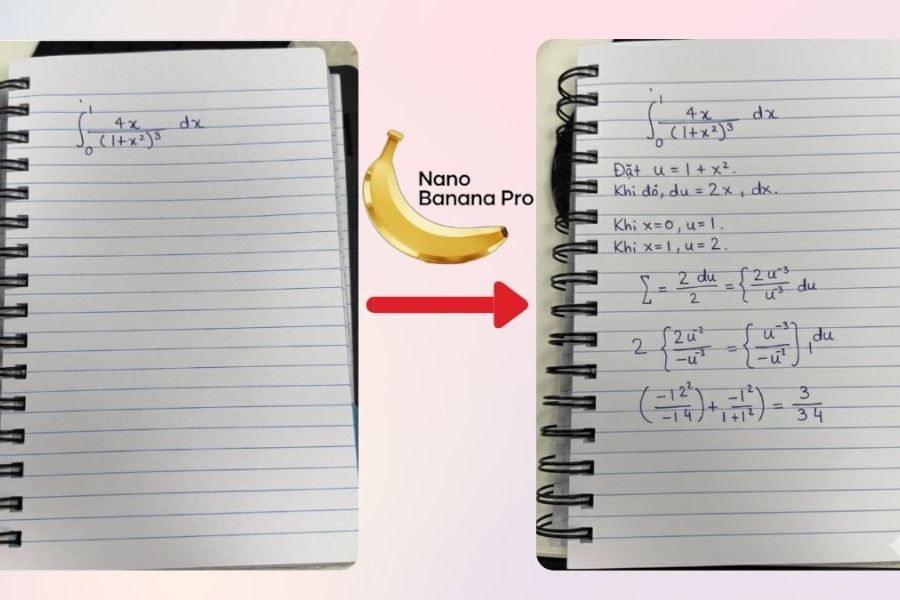
- 4. Nano Banana Pro Solves Math Using User Handwriting
- 4.1 Nano Banana Pro Solves Math for Users
- 4.2 Responds in Handwriting Similar to the User’s
- 4.3 Nano Banana Pro Easily Analyzes and Recognizes Handwriting
- 4.4 Complete Solutions with Clear Explanations
- 4.5 Solves Various Types of Math Problems
- 5. Guide to Solving Math with Nano Banana Pro in Handwriting Style
- 5.1 Step 1: Access the Gemini Nano Banana Pro Website
- 5.2 Step 2: Select “Guided Learning” Mode
- 5.3 Step 3: Upload a Handwritten Math Problem Image
- 5.4 Step 4: Enter a Prompt Requesting AI to Solve the Problem
- 5.5 Step 5: Submit the Request and Receive Results
- 6. General Notes When Using Nano Banana Pro for Handwriting-Style Math Solving
- 7. Comparing Math-Solving Capabilities: Nano Banana Free vs Nano Banana Pro
- 8. Conclusion
Solving math problems with Nano Banana Pro is becoming a popular choice thanks to its fast, efficient, and highly effective learning support. The application not only provides answers but also presents detailed step-by-step solutions, helping learners understand the essence of each problem instead of relying on mechanical memorization.
1. What is Nano Banana Pro?
Nano Banana Pro (also known as Nano Banana AI) is a next-generation AI image creation and editing tool developed by Google and deeply integrated into the Gemini ecosystem. This tool allows users to input text descriptions to generate realistic images with clear layouts and sharp text rendering. Beyond creating images from scratch, Nano Banana Pro also supports editing existing images while preserving characters, style, and overall consistency, turning creative ideas into visuals in a short amount of time.
The most outstanding strength of Nano Banana Pro lies in its contextual understanding and detailed processing capabilities. Thanks to Gemini AI integration, the tool can generate highly accurate images with harmonious colors and content that closely matches the user’s description. Whether you are a beginner or an experienced designer, Nano Banana Pro is easy to use, requiring no advanced graphic design skills while still producing professional-quality results.
In terms of operation, Nano Banana AI uses the Gemini model to analyze prompts (text descriptions), then combines image and language data to generate visuals that precisely match the request. This technology ensures images are not only visually appealing but also logically consistent in every detail. As a result, Nano Banana Pro is becoming an ideal choice for content creation, marketing, design, and many other visual needs in today’s AI era.
.jpg)
2. Versions of Nano Banana AI
Currently, Google offers Nano Banana AI in 2 main versions, flexibly meeting the needs of beginners to professional users. Each version is optimized for different purposes, allowing users to choose the most suitable tool for their work and budget.
Gemini 2.5 Flash Image (Nano Banana): Fast image generation, 1K–2K quality, supports basic editing, and is easy to use—perfect for beginners, personal creators, and everyday needs.
Gemini 3 Pro Image Preview (Nano Banana Pro): The advanced version offering 4K lossless image generation, professional editing, preserved details and consistency, plus SynthID integration for AI image detection—ideal for professional design, marketing, and e-commerce.
Thus, Nano Banana Pro is the fully upgraded version of Nano Banana AI, powerfully optimized for projects requiring high image quality, precision, and professional commercial application.
3. Key Highlights of Nano Banana Pro
Nano Banana Pro is considered a premium AI image-generation tool with many outstanding advantages compared to others in the same segment, especially suitable for professional design, marketing, and content creation. It focuses not only on image quality but also on processing speed, detailed control, and operational accuracy, helping users create polished products quickly while still meeting commercial standards.
Creates 4K lossless images in about 10 seconds while preserving sharpness, details, and true-to-life colors, suitable for printing, advertising, and cross-platform use.
Supports exporting transparent PNG images with large file sizes of 15–20MB, making background removal, layout compositing, and post-processing easier without quality loss.
Integrated with Google’s SynthID technology, allowing detection and labeling of AI-generated images to ensure transparency and safety in commercial use.
Processes Vietnamese text almost perfectly, minimizing font errors, missing accents, or text distortion—an excellent advantage for banners, posters, and advertising content in the Vietnamese market.
Advanced image editing with the ability to change backgrounds, lighting, outfits, and visual style while preserving characters and overall composition, enabling flexible creativity without losing consistency.
Thanks to these strengths, Nano Banana Pro is not just an AI image generator but also a complete solution for professional visual projects requiring high quality, fast speed, and optimal accuracy..jpg)
4. Nano Banana Pro Solves Math Using User Handwriting
4.1 Nano Banana Pro Solves Math for Users
Nano Banana Pro introduces a completely new approach to solving math problems by allowing users to handwrite problems directly instead of retyping complex symbols. Advanced AI technology enables the app to accurately recognize handwriting, mathematical symbols, and problem structures—even with imperfect strokes. This allows learners to maintain natural note-taking habits while saving time when handling lengthy or formula-heavy problems.
Beyond simply “reading” the problem, Nano Banana Pro intelligently analyzes mathematical content, correctly identifies problem types, and applies suitable solving methods. This makes the solving process smooth, clear, and aligned with learners’ thought processes, especially useful for students during revision or advanced assignments.
4.2 Responds in Handwriting Similar to the User’s
One of Nano Banana Pro’s most unique features is its ability to respond using handwriting that closely resembles the user’s own writing style. Instead of displaying results in rigid computer fonts, the application recreates familiar handwriting strokes, making it feel like reviewing your own written solution.
This natural presentation helps learners absorb knowledge more easily without disruption between handwritten questions and machine-generated solutions. For users who study math through extensive writing, seeing solutions in handwritten form improves memory retention and creates the feeling of having a private tutor.
4.3 Nano Banana Pro Easily Analyzes and Recognizes Handwriting
Nano Banana Pro is equipped with modern handwriting recognition technology capable of accurately processing numbers, mathematical symbols, and complex expressions. Even if handwriting is slanted, uneven, or imperfectly arranged, the application can still correctly interpret the content and minimize recognition errors.
This capability is especially useful for long, multi-step problems or formula-heavy tasks. Users no longer need to rewrite problems or worry about input errors, allowing full focus on understanding solutions and improving mathematical thinking.
4.4 Complete Solutions with Clear Explanations
Unlike many tools that only provide final answers, Nano Banana Pro offers detailed step-by-step solutions, from analyzing the problem and choosing methods to execution and conclusion. Every transformation is clearly explained, helping learners understand why each step is taken instead of simply knowing whether an answer is correct.
This in-depth presentation helps learners grasp the essence of each problem type and avoid rote memorization. It is a major advantage for those who want solid understanding, especially during exam preparation or advanced study.
4.5 Solves Various Types of Math Problems
Nano Banana Pro can handle a wide variety of math problems, from basic arithmetic and algebraic equations to more advanced tasks. The application works effectively with equations, inequalities, multi-variable systems, and many common curriculum-based problem types.
Additionally, Nano Banana Pro performs well with difficult topics such as derivatives, integrals, limits, and high-level logical reasoning problems. This allows users to rely on a single tool for different learning levels, from basic to advanced, conveniently and efficiently.
5. Guide to Solving Math with Nano Banana Pro in Handwriting Style
To fully utilize Nano Banana Pro’s power when solving handwritten math problems, users should follow the process below. These steps are designed to be simple and easy to follow, suitable for middle school, high school, and university students who need fast solutions while still understanding each step clearly.
5.1 Step 1: Access the Gemini Nano Banana Pro Website
First, open your browser on a computer or smartphone and visit the Gemini Nano Banana Pro website. This platform integrates Gemini AI technology, enabling highly accurate handwritten image processing and math solving. Its intuitive interface makes it easy even for beginners.
An important note: to use handwriting-style math solving, your account must be upgraded to the Pro plan. Once logged in, you are ready to begin solving math naturally as if working on paper.
.jpg)
5.2 Step 2: Select “Guided Learning” Mode
On the Gemini Nano Banana Pro homepage, locate the Tools section and select “Guided Learning.” This mode is optimized for learning and math solving, ensuring AI not only provides results but also presents each step logically.
Choosing the correct mode helps Nano Banana Pro understand that your goal is learning and understanding solutions rather than just receiving quick answers. This ensures detailed, easy-to-follow explanations aligned with academic programs.
.jpg)
5.3 Step 3: Upload a Handwritten Math Problem Image
Next, click the “+” icon in the input box and select Upload File to submit your handwritten math problem image. You can take a photo directly from your notebook or upload one saved on your device.
Nano Banana Pro has excellent handwriting recognition, even if handwriting is uneven or contains complex mathematical symbols. Just ensure the image is clear, well-lit, and not blurry for accurate analysis.
(1).jpg)
5.4 Step 4: Enter a Prompt Requesting AI to Solve the Problem
After uploading the image, enter a prompt instructing AI to solve the problem and present the solution in your handwriting style. A simple yet effective prompt might be: “Imitate the handwriting in the image and create a continuation image showing the completed math solution.”
You can customize prompts further by requesting more detailed explanations, step-by-step formatting, or preserving your exact handwriting style. Clear prompts help Nano Banana Pro deliver the most accurate results for your learning needs.
.jpg)
5.5 Step 5: Submit the Request and Receive Results
Finally, click Submit to let Gemini Nano Banana Pro process the request. Within seconds, the system will return a complete solution, including analysis, transformations, and final conclusions.
Most impressively, the result includes an AI-generated image mimicking your handwriting, creating the natural feeling of reviewing your own completed work. This is what makes Nano Banana Pro both intelligent and learner-friendly for users at every level.
.jpg)
6. General Notes When Using Nano Banana Pro for Handwriting-Style Math Solving
Although Nano Banana Pro offers highly accurate handwriting recognition and math solving, users should still follow some basic principles for the best results.
Write clearly with even strokes and avoid overly thin, faint, or overlapping characters, as these may cause recognition errors.
Mathematical symbols should follow standard notation, especially square roots, fractions, exponents, and subscripts, with reasonable spacing for accurate analysis.
Ensure proper lighting when photographing problems, avoiding shadows, glare, wrinkles, or folded paper that may distort handwriting.
Keep the camera angle straight and perpendicular to the paper to prevent stretching or distortion.
For long or multi-part problems, capture the full content in one frame instead of splitting it into multiple disconnected images.
Treat Nano Banana Pro as a learning support tool rather than depending on it entirely—always read, analyze, and verify solutions to strengthen understanding and mathematical thinking.
7. Comparing Math-Solving Capabilities: Nano Banana Free vs Nano Banana Pro
8. Conclusion
With outstanding advantages in speed, accuracy, and easy-to-understand explanations, Nano Banana Pro is not just a math-solving tool but also a reliable study assistant for beginners. It helps shorten problem-solving time, reduce pressure when facing difficult math, and build logical thinking through detailed solution steps. Whether you are a student, university learner, or self-learner, choosing Nano Banana Pro will make learning math easier, more effective, and more accessible in today’s technological era.





















VIP Products








Best Selling Products
Windows 10 & 11 Pro Key
36 USD
ChatGPT Plus Account (GPT-4)
16 USD
Capcut Pro 1 Year
39 USD
Autodesk All App Account Copyright
120 USD
Adobe Premiere Pro Account
99 USD
Adobe Photoshop Copyright - Full App
120 USD
MidJourney Account
29 USD
Genuine Adobe Illustrator account
99 USD
Freepik Premium Account
59 USD
Plugin Retouch4me
69 USD
Upgrade genuine Capture One account
120 USD
Upgrade Duolingo Super
29 USD
Genuine Cheap Canva Pro
39 USD
Upgrade Genuine Office 365
49 USD
Copyright Adobe Lightroom Account
59 USD