Best Selling Products

Freepik Premium Account
59 USD

Copyright Adobe Lightroom Account
59 USD

ChatGPT Plus Account (GPT-4)
16 USD

Genuine Cheap Canva Pro
39 USD

Capcut Pro 1 Year
39 USD

Windows 10 & 11 Pro Key
36 USD

MidJourney Account
29 USD

Genuine Adobe Illustrator account
99 USD

Autodesk All App Account Copyright
120 USD

Upgrade Genuine Office 365
49 USD

Plugin Retouch4me
69 USD

Upgrade genuine Capture One account
120 USD

Upgrade Duolingo Super
29 USD

Adobe Photoshop Copyright - Full App
120 USD

Adobe Premiere Pro Account
99 USD
THE MOST STANDARD WAY TO CLEAN A CAMERA: SECRETS TO PROTECT A PHOTOGRAPHER’S ASSET
Nội dung
- 1. The importance of periodic camera cleaning
- Preventing mold and root-like fungus
- Maintaining absolute image quality
- 2. Essential tools in a professional camera cleaning kit
- Air Blower
- Lens Pen and soft brush
- Microfiber Cloth and specialized cleaning solution
- 3. Detailed process of cleaning the camera body (Camera Body)
- Cleaning dust in gaps and joints
- Cleaning LCD screen and rubber grip
- 4. The art of cleaning the lens (Lens) to expert standards
- Removing surface dust and fine sand
- Removing oil stains and fingerprints
- Cleaning the rear lens and electronic contacts
- 5. How to safely clean the sensor at home
- Checking the level of dust on the sensor
- Using automatic cleaning mode and air blower
- Technique of using Sensor Swab
- 6. Critical notes when cleaning a camera
- Never use industrial compressed air
- Avoid cleaning in windy or dusty areas
- Always ensure full battery when cleaning the sensor
- 7. How to store a camera after cleaning to prevent mold
- Using a specialized dry cabinet (Dry Box)
- Using desiccant bags and sealed containers when traveling
- 8. The mindset of a professional photographer in maintaining equipment
- Forming habits of checking before and after each shoot
- Knowing when to DIY and when to seek professionals
- 9. Handling specific environmental hazards
- Removing sea salt and salty humidity Clean with damp cloth after beach use.
- Handling fine sand and construction dust
- Building a standard “Dry - Wet - Dry” cleaning process
- 10. Conclusion
A detailed guide on how to properly clean a camera from the body to the lens and sensor. A handbook for maintaining photography equipment durability, preventing mold and dust professionally.
1. The importance of periodic camera cleaning
The mirror system, sensor, and lens are extremely precise and sensitive to external impacts. A small scratch caused by improper cleaning can greatly reduce the camera’s value or even damage focusing and metering functions.
.jpg)
Preventing mold and root-like fungus
Saigon or high-humidity areas are ideal environments for mold spores to develop inside lens layers. Without proper cleaning and storage, mold spreads, corrodes coatings, and creates irreversible “root-like” patterns. Cleaning and maintaining a dry environment prevents these issues early.
Maintaining absolute image quality
Dust on the sensor is a nightmare for photographers, especially when shooting at small apertures like $f/11$ or $f/16$. These spots become visible in flat areas like skies, requiring heavy post-processing. Proper cleaning ensures each pixel is captured clearly.
2. Essential tools in a professional camera cleaning kit
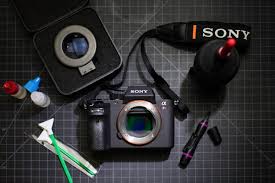
To begin, prepare specialized tools. Never use household tissues, industrial alcohol, or rough fabrics.
Air Blower
This is the most important tool. It removes dust without contact and prevents scratches.
Lens Pen and soft brush
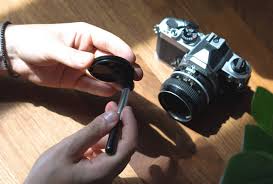
Lens Pen has two ends: a brush and a carbon tip for removing oil stains. The brush reaches tight areas.
Microfiber Cloth and specialized cleaning solution
Microfiber absorbs dust without leaving fibers. Cleaning solution evaporates quickly and protects coatings.
3. Detailed process of cleaning the camera body (Camera Body)
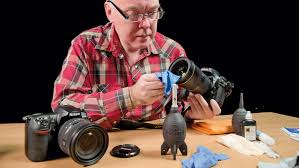
The body is exposed to sweat and dust. Cleaning ensures functionality.
Cleaning dust in gaps and joints
Use blower and brush to remove dust. Use cotton swabs if necessary.
Cleaning LCD screen and rubber grip
Use microfiber cloth with solution. Clean rubber grip to restore texture.
4. The art of cleaning the lens (Lens) to expert standards
Removing surface dust and fine sand
Use blower and brush before wiping.
Removing oil stains and fingerprints
Use microfiber cloth with solution in circular motion.
Cleaning the rear lens and electronic contacts
Use dry cloth. Avoid liquids.
5. How to safely clean the sensor at home
Checking the level of dust on the sensor
Take test photo to identify dust.
Using automatic cleaning mode and air blower
Use built-in cleaning and blower.
Technique of using Sensor Swab
Use proper swab and clean in one direction only.
6. Critical notes when cleaning a camera
Never use industrial compressed air
It can damage internal parts.
Avoid cleaning in windy or dusty areas
Choose a clean environment.
Always ensure full battery when cleaning the sensor
Avoid mechanical damage.
7. How to store a camera after cleaning to prevent mold
Using a specialized dry cabinet (Dry Box)
Maintain humidity at 40–50%.
Using desiccant bags and sealed containers when traveling
Replace silica gel regularly.
8. The mindset of a professional photographer in maintaining equipment
Forming habits of checking before and after each shoot
Inspect before and after use.
Knowing when to DIY and when to seek professionals
Seek experts for serious issues.
9. Handling specific environmental hazards
Removing sea salt and salty humidity
Clean with damp cloth after beach use.
Handling fine sand and construction dust
Use blower or vacuum before wiping.
Building a standard “Dry - Wet - Dry” cleaning process
Dry: remove dustWet: clean stainsDry: final wipe
10. Conclusion
Proper camera cleaning is a meticulous care process requiring knowledge and patience. Using correct tools and procedures ensures your camera remains in perfect condition. Clean equipment is the foundation for creating outstanding photography works.





















VIP Products








Best Selling Products
Freepik Premium Account
59 USD
Copyright Adobe Lightroom Account
59 USD
ChatGPT Plus Account (GPT-4)
16 USD
Genuine Cheap Canva Pro
39 USD
Capcut Pro 1 Year
39 USD
Windows 10 & 11 Pro Key
36 USD
MidJourney Account
29 USD
Genuine Adobe Illustrator account
99 USD
Autodesk All App Account Copyright
120 USD
Upgrade Genuine Office 365
49 USD
Plugin Retouch4me
69 USD
Upgrade genuine Capture One account
120 USD
Upgrade Duolingo Super
29 USD
Adobe Photoshop Copyright - Full App
120 USD
Adobe Premiere Pro Account
99 USD