Best Selling Products

Upgrade Duolingo Super
29 USD

Freepik Premium Account
59 USD

MidJourney Account
29 USD

Upgrade Genuine Office 365
49 USD

Autodesk All App Account Copyright
120 USD

Adobe Photoshop Copyright - Full App
120 USD

Plugin Retouch4me
69 USD

Genuine Cheap Canva Pro
39 USD

Copyright Adobe Lightroom Account
59 USD

Genuine Adobe Illustrator account
99 USD

Windows 10 & 11 Pro Key
36 USD

ChatGPT Plus Account (GPT-4)
16 USD

Adobe Premiere Pro Account
99 USD

Capcut Pro 1 Year
39 USD

Upgrade genuine Capture One account
120 USD
Top 5 Beautiful Fonts in Photoshop Preferred by Designers
Nội dung
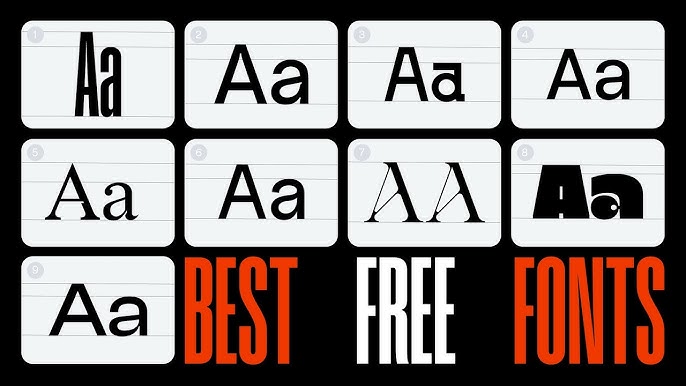
Fonts are important elements that enhance aesthetics and effectively convey messages in Photoshop design. Choosing the right font not only helps create a harmonious layout but also leaves a unique impression on the final product.
1. Understanding Fonts
A font, also known as a typeface, is a collection of characters including letters, numbers, punctuation marks, and symbols designed in a specific style. In graphic design, fonts are not merely tools for displaying text but also highly expressive elements that help convey brand personality and product messages clearly and consistently. When working with Adobe Photoshop, fonts not only support content but also become an important design element alongside color and imagery.
Each font has unique characteristics in terms of shape, weight, spacing, and proportion, creating different emotional responses from viewers. For example, serif fonts often create a formal and classic feel, while sans-serif fonts represent modernity and minimalism. Script fonts tend to be softer and more artistic, whereas display fonts are commonly used to create emphasis with bold and distinctive styles. Understanding the characteristics of each font type helps designers choose the right style for their design goals.
Beyond aesthetics, fonts directly affect readability and user experience. A beautiful font that is difficult to read can reduce the effectiveness of communication, especially in content-heavy designs. Therefore, font selection should balance artistic appeal and functionality to ensure designs are both visually attractive and easy to understand.
.jpg)
2. The Importance of Fonts in Photoshop Design
In many cases, viewers read the content before observing the images, making fonts the bridge that communicates messages quickly and effectively. The right font choice can improve memorability, create a strong impression, and keep viewers engaged for longer.
When working in Adobe Photoshop, fonts directly influence layout and visual balance. A font that is too bold can make a layout feel heavy, while one that is too thin may lack emphasis. In addition, factors such as tracking, leading, and font proportions play important roles in creating harmony and readability.
Fonts are not only aesthetic elements but also crucial components of brand identity. Each brand is often associated with a particular font style to create a distinctive image. For example, premium brands often use serif or thin fonts to convey sophistication, while youthful brands prefer modern and dynamic sans-serif fonts. Consistent font usage increases brand recognition and reinforces professionalism.
In addition, fonts help establish information hierarchy in a design. Using multiple font styles or variations such as bold, light, and italic helps viewers quickly identify headlines, main content, and supporting information. This is particularly important in designs such as posters, banners, and social media posts, where information must be communicated quickly and clearly.
.jpg)
3. Beautiful Fonts for Photoshop
Below are some beautiful, popular, and highly regarded fonts that every designer should consider using in creative projects.
3.1 Helvetica
Helvetica is one of the most famous and influential sans-serif fonts in the history of graphic design. With balanced, clean, and minimalist letterforms, Helvetica provides a modern, professional appearance and excellent readability across different platforms.
This font is commonly used in poster design, banners, website interfaces, and especially corporate branding. Thanks to its neutrality and flexibility, Helvetica works well with many design styles without causing visual conflict. It is considered a “safe choice” that still delivers excellent results, particularly for projects requiring precision and professionalism.
In addition, Helvetica comes in various weights such as Light, Regular, and Bold, allowing designers to create content hierarchy while maintaining consistency throughout the design.
.jpg)
3.2 Montserrat
Montserrat is a modern font inspired by urban typography, particularly the signage found in the Montserrat district of Argentina. It features clear geometric forms, balanced proportions, and a youthful, energetic character.
Montserrat is highly suitable for digital design projects such as websites, social media graphics, landing pages, and UI/UX design. Its excellent readability at different sizes allows it to remain sharp whether used for headlines or body text. It is also one of the most popular fonts on Google Fonts thanks to its free availability and ease of integration.
Another strength of Montserrat is its wide variety of weights and styles, enabling designers to build layouts and information hierarchies flexibly while maintaining a modern and consistent appearance.
.jpg)
3.3 Beautiful Bloom
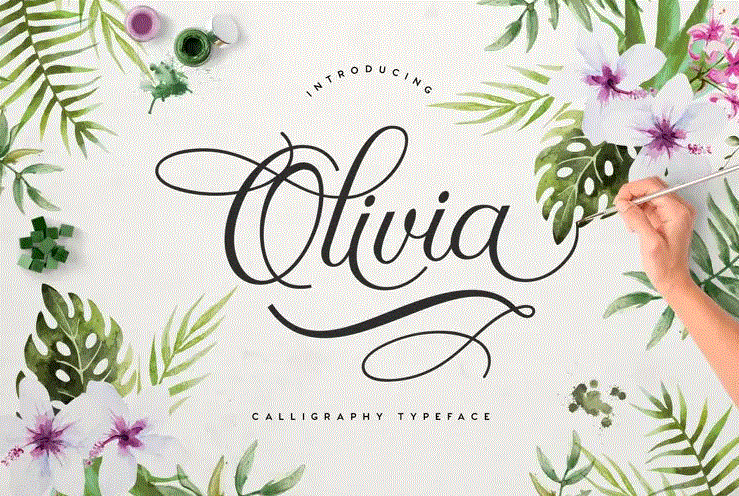
Beautiful Bloom is a script font with a soft handwritten style that creates an artistic and emotional feel. With naturally flowing letterforms, Beautiful Bloom is often used in personalized designs or projects requiring a strong aesthetic appeal.
This font is ideal for wedding invitations, artistic posters, fashion logos, or lifestyle-related products. Beautiful Bloom creates a striking focal point while conveying elegance, romance, and warmth.
However, because it is a script font, Beautiful Bloom should be used carefully and avoided in long text passages, as it may reduce readability. Instead, it is best suited for headlines, taglines, or emphasized details where it can maximize visual impact.
.jpg)
3.4 Linotte
Linotte is a modern sans-serif font with soft rounded edges, creating a friendly and approachable feel. Less rigid than many geometric fonts, Linotte offers a balance between professionalism and warmth.
This font is commonly used in packaging design, consumer products, youth-oriented content, or brands focused on user friendliness. Thanks to its clear letterforms and well-balanced spacing, Linotte ensures excellent readability across different applications.
In addition, Linotte is available in multiple weights, giving designers flexibility when building layouts and creating emphasis without relying on too many different fonts in a single design.
.jpg)
3.5 Playlist
Playlist is a font with a distinctive and creative personality, often used to create strong visual impact in design. Featuring unique letterforms with a handwritten influence combined with display-style characteristics, Playlist conveys freedom, creativity, and artistic expression.
This font is commonly used for poster headlines, advertising banners, music-related designs, or communication campaigns that require a bold presence. When used effectively, Playlist can become a signature element that makes a design more recognizable and memorable.
However, like many display fonts, Playlist is not suitable for long blocks of text and should instead be reserved for key positions such as headlines or slogans. When paired with simpler fonts, Playlist achieves maximum effectiveness and creates balance within the overall design.
.jpg)
4. How to Install Beautiful Fonts in Photoshop
To use beautiful fonts in Adobe Photoshop, you first need to install them on your system. This is a basic but essential step for expanding your font library and enhancing your creative possibilities.
The first step is downloading fonts from reliable sources. You can search through Google Fonts, which offers thousands of free fonts that are easy to use and suitable for many purposes. In addition, DaFont provides a wide variety of unique fonts ranging from classic to modern styles. If you are using the Adobe ecosystem, Adobe Fonts is an ideal option with a collection of high-quality fonts and built-in integration.
After downloading, simply open the font file in .ttf or .otf format and select Install. The operating system will automatically add the font to its library, and Photoshop will recognize it immediately upon launch.
When using fonts in Photoshop, simply select the Text Tool (T), choose the font from the list, and begin designing. From there, you can customize size, spacing, color, and many other settings to fit the overall layout.
Hopefully, this article helps you gain a deeper understanding of fonts and learn how to apply them effectively in Photoshop, allowing you to improve design quality and create more impressive products throughout your creative journey.





















VIP Products








Best Selling Products
Upgrade Duolingo Super
29 USD
Freepik Premium Account
59 USD
MidJourney Account
29 USD
Upgrade Genuine Office 365
49 USD
Autodesk All App Account Copyright
120 USD
Adobe Photoshop Copyright - Full App
120 USD
Plugin Retouch4me
69 USD
Genuine Cheap Canva Pro
39 USD
Copyright Adobe Lightroom Account
59 USD
Genuine Adobe Illustrator account
99 USD
Windows 10 & 11 Pro Key
36 USD
ChatGPT Plus Account (GPT-4)
16 USD
Adobe Premiere Pro Account
99 USD
Capcut Pro 1 Year
39 USD
Upgrade genuine Capture One account
120 USD