Best Selling Products
Adobe Photoshop Copyright - Full App
120 USD
Copyright Adobe Lightroom Account
59 USD
Windows 10 & 11 Pro Key
36 USD
Upgrade Duolingo Super
29 USD
Plugin Retouch4me
69 USD
Genuine Adobe Illustrator account
99 USD
Upgrade Genuine Office 365
49 USD

Freepik Premium Account
59 USD
Adobe Premiere Pro Account
99 USD
Genuine Cheap Canva Pro
39 USD
Autodesk All App Account Copyright
120 USD

ChatGPT Plus Account (GPT-4)
16 USD
Capcut Pro 1 Year
39 USD

MidJourney Account
29 USD
Upgrade genuine Capture One account
120 USD
Top apps for creating professional and easy-to-use advertising videos, even for beginners.
Nội dung
- 1. Why should you use a video advertising app?
- 2. Top video advertising apps worth trying
- 2.1. CapCut
- 2.2. Canva
- 2.3. Adobe Express
- 2.4. InShot
- 2.5. VN Video Editor
- 2.6. Adobe Premiere Pro
- 3. Comparison table of video advertising applications
- 4. How to choose the right video advertising app
- 5. Secrets to creating engaging advertising videos that attract customers.
- 6. Mistakes to avoid when making promotional videos
- 7. Conclusion
In the age of increasingly popular short videos, a compelling advertising video can help brands attract customers, showcase products, and effectively increase conversion rates. You don''t need expensive cameras or advanced video editing skills to create eye-catching videos. With the help of video advertising apps, transforming images, sound, and sales messages into professional content has become much simpler. Let Sadesign help you explore some of the outstanding apps below to choose the tool that best suits your needs.
1. Why should you use a video advertising app?
Video advertising helps convey information more visually, vividly, and memorably than content consisting only of images or text. A well-produced video can showcase product features, highlight benefits, and make a strong impression on customers from the very first seconds. In particular, using video editing apps allows you to proactively produce content without hiring a professional production team. Key benefits of using video advertising apps include:
-
Cost savings: Utilize existing images, videos, and design templates to create promotional content without investing in extensive equipment.
-
Reduced production time: Automatic editing, effects, and subtitling tools help to complete videos quickly.
-
Enhance creativity: Easily combine music, animated text, images, and transition effects.
-
Compatible with multiple platforms: Export videos in portrait, landscape, or square aspect ratios for posting on TikTok, Facebook, Instagram, and YouTube.
-
Content updates are easy: You can change the selling price, promotional information, or product images as needed.
2. Top video advertising apps worth trying
Each application possesses its own strengths, from editing short videos to designing professional advertisements. Depending on your budget, skills, and intended use, you can choose the right tool to optimize your content production process.
2.1. CapCut
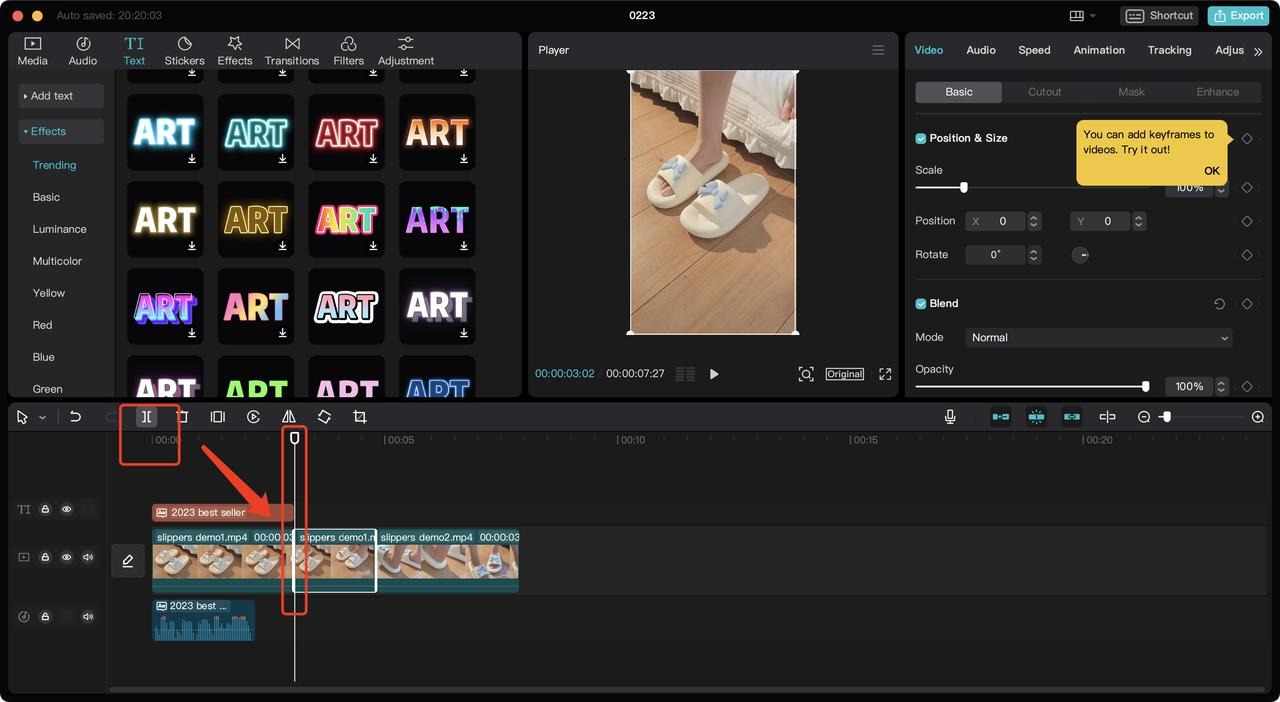
CapCut is a familiar choice for those who frequently create promotional videos on TikTok, Facebook Reels, or YouTube Shorts. The app offers many intuitive editing tools, making it easy for users to transform ordinary footage into engaging, rhythmic videos. You can use CapCut to create product introduction videos, advertisements for cosmetics, fashion, household goods, or affiliate marketing content.
Key features:
-
Edit and splice videos, adjust speed, and arrange footage.
-
Add text, automatic subtitles, background music, and sound effects.
-
Use transition effects, color filters, and visual effects.
-
Utilize existing video templates to save time in video editing.
-
It provides AI tools to support a number of content editing and creation tasks.
2.2. Canva
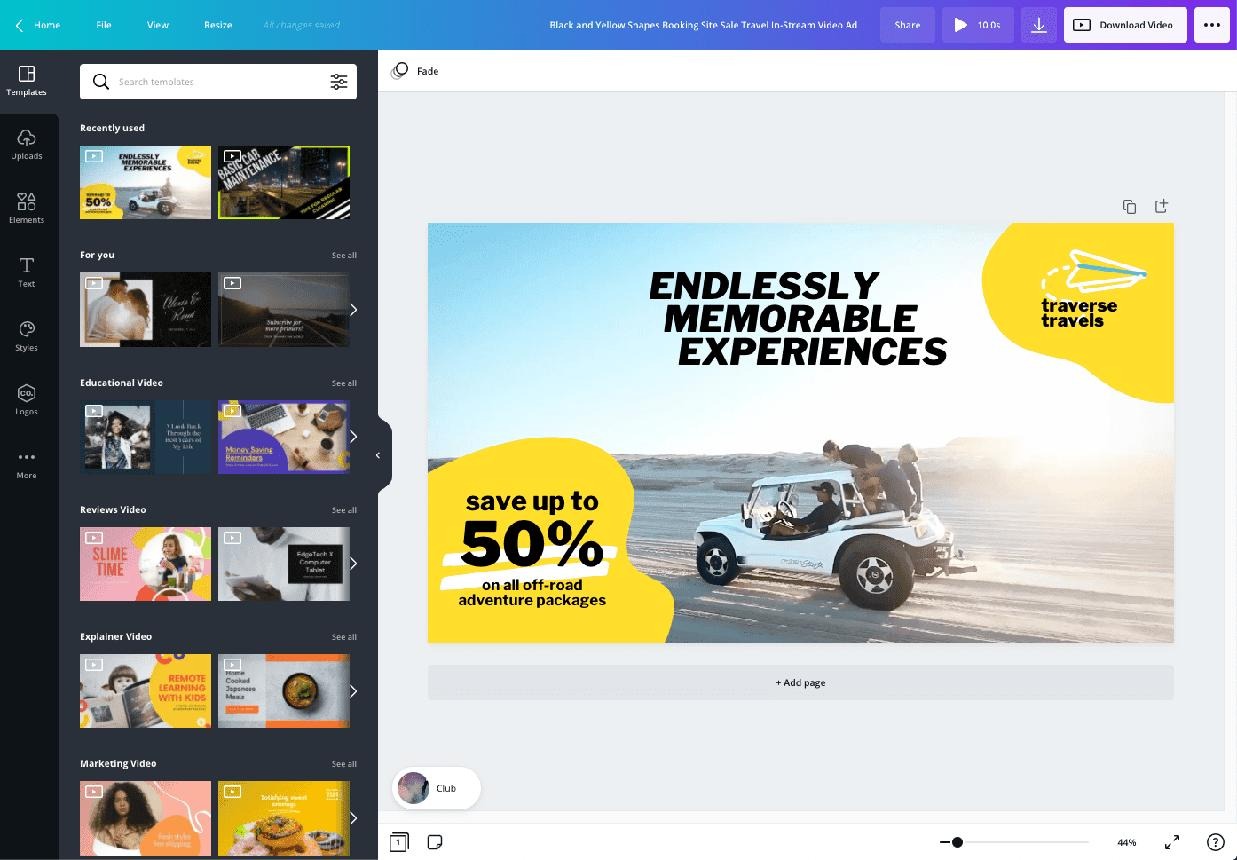
Canva stands out thanks to its extensive library of design templates and user-friendly drag-and-drop interface. Even without much video editing experience, you can still create advertising videos simply by replacing images, editing text, and choosing colors that match your brand. Canva is especially useful when you want to build a consistent visual identity for your store or business. From product introduction videos and discount promotions to event announcement videos, you can start with pre-designed templates.
Key features:
-
We offer a variety of video advertising templates tailored to different industries and purposes.
-
Additional support is available for logos, images, icons, and brand colors.
-
Integrate background music, motion effects, and animations into your text.
-
Allows for content design that is compatible with multiple social media platforms.
-
There are AI-powered features to support creativity, depending on the service package and availability.
2.3. Adobe Express
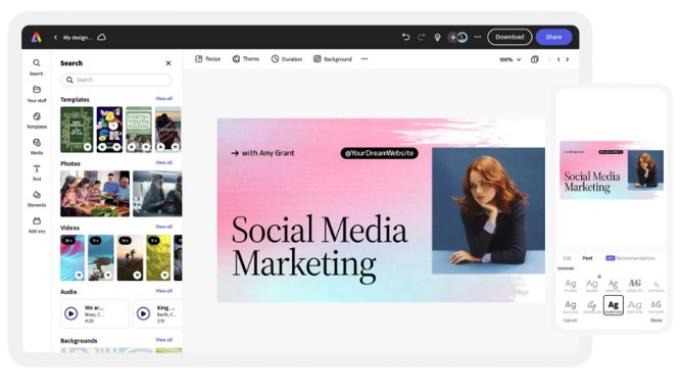
Adobe Express is a tool that supports image and video design for users who want to create polished advertising content. The application offers pre-designed templates, graphic resources, and editing tools to make video production more convenient. A notable feature of Adobe Express is its ability to integrate visual content with brand identity. You can create videos showcasing services, promoting special offers, or producing corporate communication content without starting from scratch.
Key advantages:
-
There are video templates that serve many advertising purposes.
-
Supports adding text, images, icons, and graphic elements.
-
Providing design tools to help maintain brand style.
-
Integrating several AI features supports content creation.
-
It can be used online and on mobile devices, depending on the version.
2.4. InShot
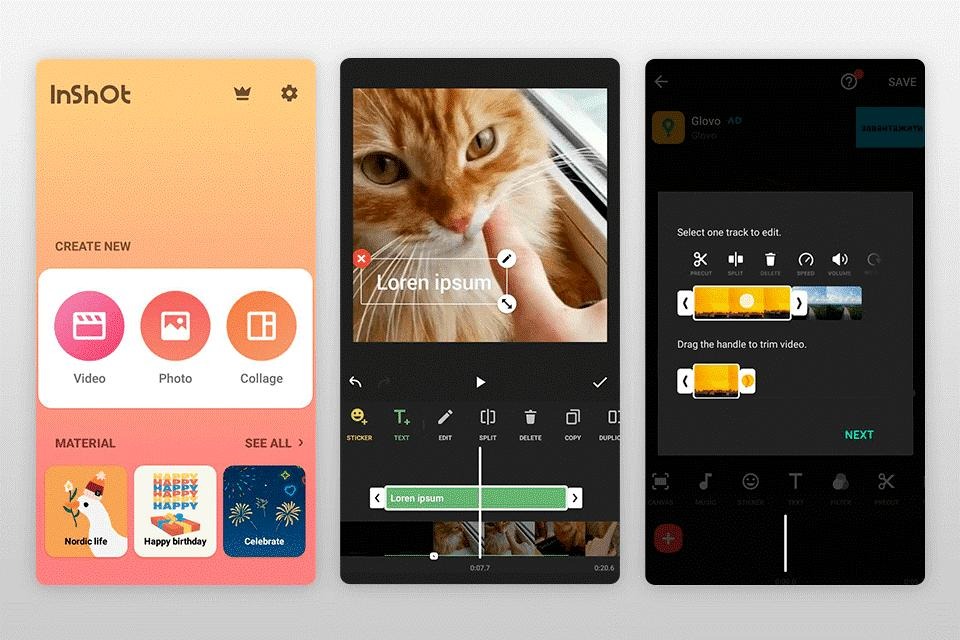
InShot is an app suitable for those who want to edit videos directly on their phones. Its simple interface makes it easy to use, even for those who have never used video editing software before. InShot effectively meets the needs of creating short promotional videos for online stores. You can combine multiple product clips, add text describing the product's uses, insert background music, and adjust the frame rate to suit different platforms.
Useful features:
-
Cut, splice, and arrange video clips.
-
Add text, stickers, effects, and sounds.
-
Adjust the aspect ratio to suit your upload needs.
-
Adjust the playback speed to highlight product details.
-
Export videos to share on social media.
2.5. VN Video Editor
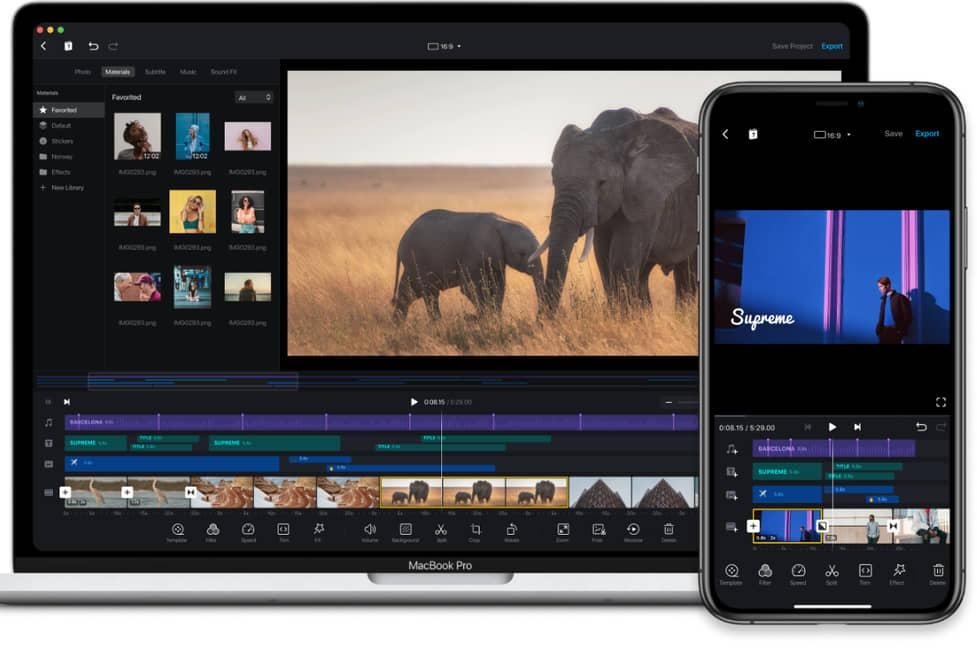
VN Video Editor is a worthwhile option if you want more detailed control over the video editing process. The tool offers a timeline interface, allowing you to arrange multiple video clips, images, audio, and text in your desired order. For advertising videos, VN helps you build a clear story instead of just piecing together disjointed footage. For example, you can start with a common customer problem, then introduce the product, and end with purchase information.
Some notable features:
-
Edit multiple layers of content on the timeline.
-
Add music, sound effects, and text.
-
Adjust speed, color, and transitions.
-
Control the duration of each scene.
-
Supports video export with quality options depending on the device and version.
2.6. Adobe Premiere Pro
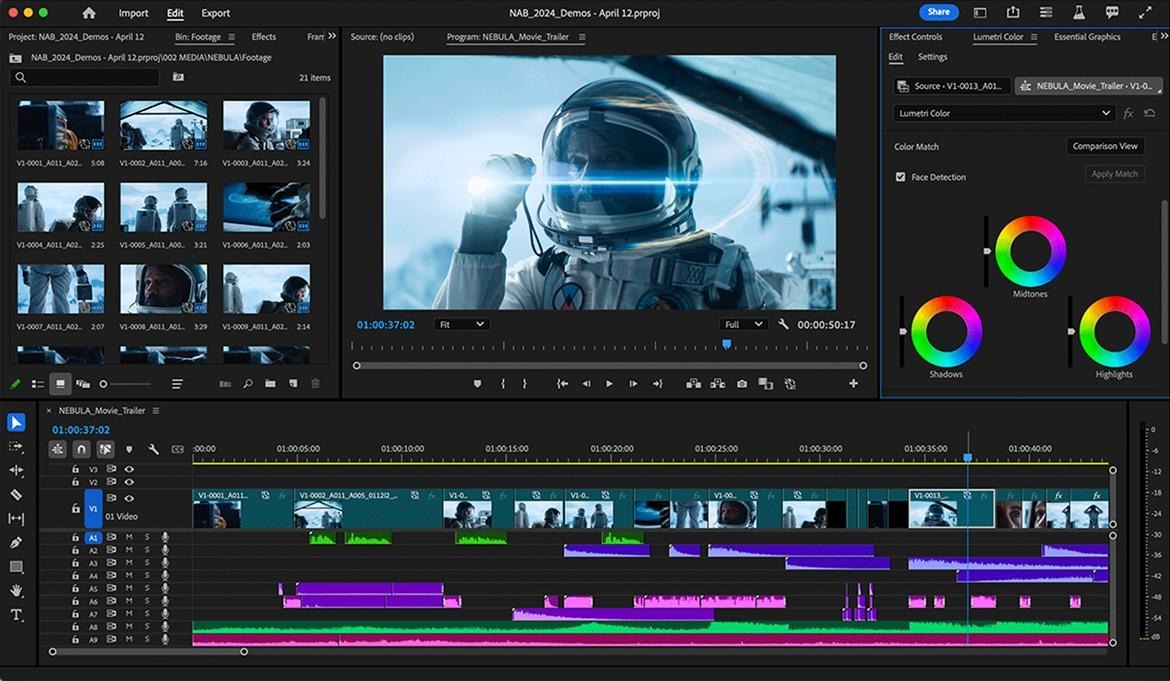
If you need to produce a complex advertising video with multiple shots and requiring in-depth editing, Adobe Premiere Pro is a worthwhile tool to consider. The software offers a timeline-based editing system, audio and color processing capabilities, and numerous tools to support the post-production process. Premiere Pro is suitable for advertising campaigns that require consistent visuals, a purposeful editing pace, and control over every detail. However, beginners will need time to familiarize themselves with the interface and specialized operations.
Notable advantages:
-
Edit videos with multiple layers of images and sound.
-
Control color, lighting, and editing rhythm.
-
Supports subtitle processing and various content formats.
-
Suitable for team workflows and longer-term advertising projects.
-
It can be integrated with other software within the Adobe ecosystem.
3. Comparison table of video advertising applications
Each tool is suited to a different need. The table below will help you quickly identify which application to try based on your intended use and level of proficiency.
4. How to choose the right video advertising app
The app with the most effects isn't necessarily the best choice. What's important is whether the tool helps you convey your message clearly, saves time, and fits your budget. Before deciding, determine your advertising goals, the devices you'll be using, and the platforms where you plan to post your videos. You can base your decision on the following criteria:
-
Based on intended use: For TikTok or Reels videos, prioritize CapCut or InShot. If you need videos that combine graphics and brand identity, try Canva or Adobe Express.
-
Based on skill level: Beginners should start with a simple interface and pre-made templates. Those already familiar with video editing can choose VN Video Editor or Premiere Pro.
-
Budget-conscious: Check out the free features before subscribing to a paid plan, especially if you only need basic text editing and insertion.
-
Depending on the device: If you frequently film products with your phone, a mobile app will make editing more convenient.
-
Based on output quality: Check resolution, frame rate, watermark, and video output format before finalizing the content.
5. Secrets to creating engaging advertising videos that attract customers.
A good app only supports the production process; the effectiveness of advertising depends heavily on how you tell the story and present the product's benefits. Instead of cramming too much information into a video, focus on one main message and convey that message with easily understandable visuals. To make your advertising video more engaging, you should apply the following tips:
-
Engaging from the start: Begin the video with a question, a familiar situation, or a striking detail that makes viewers want to continue watching.
-
Clarify the benefits: Instead of just listing features, show customers what problem the product solves.
-
Prioritize clear images: Ensure the product is well-lit, has a neat composition, and that important details are easily visible.
-
Use sound appropriately: Choose suitable background music and adjust the volume so that the dialogue is not drowned out.
-
Add easy-to-read subtitles: Use clear fonts, colors with good contrast, and avoid placing the text too close to the edge of the video.
-
Conclude with a call to action: Guide viewers to the next step, such as learning more, visiting the store, or viewing further details.
-
Track effectiveness: Observe views, watch time, clicks, and conversion rates to adjust content for future campaigns.
6. Mistakes to avoid when making promotional videos
Whether using simple tools or professional software, video advertising can still be ineffective if it makes basic mistakes. Content that's too long, inconsistent visuals, or a confusing message can easily cause viewers to skip over it before grasping the important information. Here are some mistakes you should watch out for:
-
Overloading with information: Choose one key benefit to emphasize instead of trying to showcase everything in a single video.
-
Overuse of effects: Constant scene changes and dense animated text can distract viewers.
-
Using inappropriate images and music: Please check the permissions for using these resources, especially when the video is used for commercial purposes.
-
Ignore the posting format: Vertical video ads are generally better suited to short content on mobile devices, while horizontal videos are suitable for a wider range of display formats.
-
No pre-publication proofreading: Spelling errors, audio, subtitles, pricing, and contact information need to be reviewed.
-
Lack of a call to action: Viewers need to know what to do after watching the video.
7. Conclusion
Video editing applications like CapCut, Canva, Adobe Express, InShot, VN Video Editor, and Premiere Pro offer many options for both beginners and professional content creators. If speed is your priority, you can start with CapCut or InShot. If you want visually appealing designs and brand consistency, Canva and Adobe Express are worth trying. Meanwhile, Premiere Pro is more suitable for projects requiring in-depth post-production. Choose the tool that best suits your needs, start with a short video, and continuously improve the content based on customer feedback. When the visuals are polished, the message is clear, and the presentation is engaging enough, the advertising video will become a useful tool to help you improve communication effectiveness and grow your business.










VIP Products

Best Selling Products
Adobe Photoshop Copyright - Full App
120 USD
Copyright Adobe Lightroom Account
59 USD
Windows 10 & 11 Pro Key
36 USD
Upgrade Duolingo Super
29 USD
Plugin Retouch4me
69 USD
Genuine Adobe Illustrator account
99 USD
Upgrade Genuine Office 365
49 USD
Freepik Premium Account
59 USD
Adobe Premiere Pro Account
99 USD
Genuine Cheap Canva Pro
39 USD
Autodesk All App Account Copyright
120 USD
ChatGPT Plus Account (GPT-4)
16 USD
Capcut Pro 1 Year
39 USD
MidJourney Account
29 USD
Upgrade genuine Capture One account
120 USD