Best Selling Products

ChatGPT Plus Account (GPT-4)
16 USD

Upgrade genuine Capture One account
120 USD

Plugin Retouch4me
69 USD

Upgrade Genuine Office 365
49 USD

Genuine Cheap Canva Pro
39 USD

Adobe Photoshop Copyright - Full App
120 USD

Adobe Premiere Pro Account
99 USD

Upgrade Duolingo Super
29 USD

MidJourney Account
29 USD

Capcut Pro 1 Year
39 USD

Autodesk All App Account Copyright
120 USD

Freepik Premium Account
59 USD

Windows 10 & 11 Pro Key
36 USD

Genuine Adobe Illustrator account
99 USD

Copyright Adobe Lightroom Account
59 USD
Top Photo Sharpening Apps Today: The Secret to Reviving a Blurry Photo in 3 Seconds
Nội dung
- 1. Why do you need a pocket photo sharpening app?
- 2. Criteria for choosing the right photo-sharpening app
- 2.1 Automatic processing capability using AI technology
- 2.2 In-depth manual intervention and control capability
- 2.3 Platform compatibility and cost of use
- 3. Detailed review of each of the best photo sharpening apps today
- 3.1 Remini – The King of Blurry Photo Restoration Using AI Technology
- 3.2 Adobe Lightroom Mobile – Professional Photo Editing Prestige
- 3.3 Snapseed – A Completely Free, All-Powerful Sharpening Assistant
- 3.4 YouCam Enhance – Quickly Sharpen a Photo in an Instant
- 3.5 Fotor – A Versatile Photo Editor Integrated With Premium AI Technology
- 4. Step-by-step guide to sharpening a photo correctly without breaking it up
- 4.1 Step 1: Denoise before increasing sharpness
- 4.2 Step 2: Increase sharpness moderately (Sharpening)
- 4.3 Step 3: Optimize surface structure and balance contrast
- 5. Conclusion
Do you want to upgrade your image quality to post on social media and attract millions of likes, but don''''''''t yet know which tool actually works? Don''''''''t worry — the remarkable growth of artificial intelligence (AI) technology today has brought a perfect solution for every beauty enthusiast. This article from AppVip.ai will round up and give an in-depth review of the top photo sharpening apps available today, helping you turn hopelessly blurry, pixelated photos into sharp, vivid, high-resolution ones.
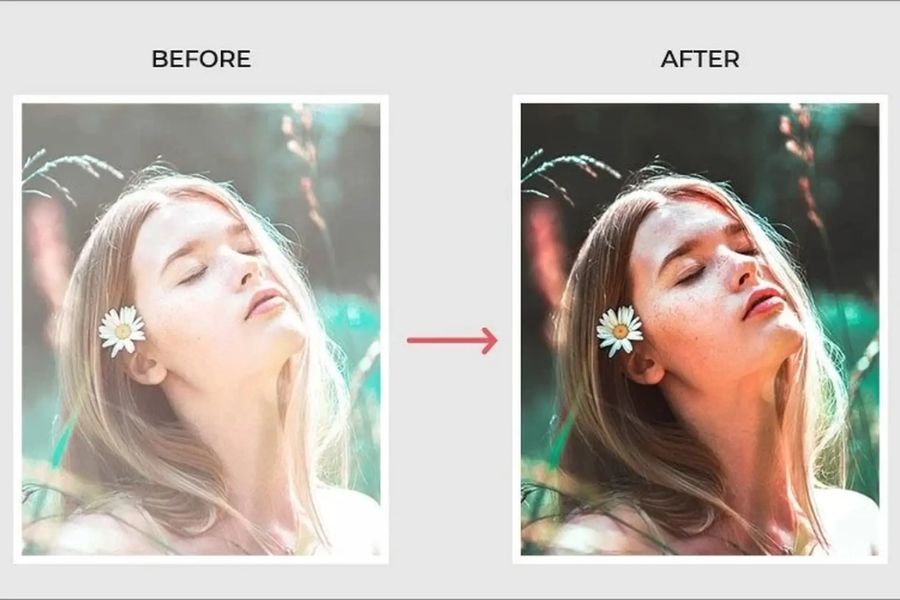
1. Why do you need a pocket photo sharpening app?
Maximum time and cost savings: You don't need to go through complicated, in-depth Photoshop graphics courses, nor invest tens of millions of VND into expensive professional camera equipment, to still get beautiful photos.
Reviving priceless memories: These apps have a magical ability to restore old family memory photos that are blurry, moldy, or scratched, making them sharp and vivid as if just taken yesterday.
Elevating the aesthetic value of a work: By increasing depth and clarifying tiny details such as strands of hair, skin, and the eyes, the app helps your photo become soulful, conveying stronger emotion to the viewer.
.jpg)
2. Criteria for choosing the right photo-sharpening app
2.1 Automatic processing capability using AI technology
If you're a busy person without much free time, or aren't deeply familiar with technical image-editing parameters, prioritize choosing apps with a "one-touch" feature. The AI technology built into the system will automatically scan and analyze the entire blurry area, automatically fill in pixels missing structural detail, and restore sharpness to the whole frame in just a few short seconds.
2.2 In-depth manual intervention and control capability
For young people passionate about artistic photography who want to hand-craft works that carry their own personal mark, the chosen app must provide a full set of detailed adjustment sliders. These parameters include edge sharpness, material surface structure, highlight/shadow contrast, and in-depth digital noise reduction capability so as not to lose the photo's authenticity.
2.3 Platform compatibility and cost of use
You need to carefully check whether the app runs smoothly on your phone's operating system (Android or iOS), whether the install size is heavy or light, and what the pricing policy is. Find out whether the app is completely free to use, free with ads, or requires a mandatory recurring monthly fee to unlock higher-quality upgrade features.
3. Detailed review of each of the best photo sharpening apps today
3.1 Remini – The King of Blurry Photo Restoration Using AI Technology
When it comes to the keyword "image-clarifying app," Remini is always the first name cited by the vast majority of users and tech experts. This is a globally pioneering app applying next-generation AI technology to magically and extremely realistically recreate damaged image details.
Remini has a specialized smart algorithm capable of excellently recognizing human facial structure, automatically redrawing blurred details such as the eyes, nose, mouth, and skin to turn a blurry portrait photo crystal clear.
This app helps users comprehensively upgrade low-resolution, hopelessly blurry photos from older phone models into photos with sharp display quality reaching HD, 2K, or even 4K resolution standards.
Besides its sharpening capability, Remini also integrates a unique feature that lets you restore and automatically colorize ancient black-and-white photos, helping recreate a family's historical moments in an extremely vivid, warm way.
.jpg)
3.2 Adobe Lightroom Mobile – Professional Photo Editing Prestige
If you're a perfectionist who wants to personally control every smallest pixel of a photo, Adobe Lightroom is the optimal choice. This is known as the perfect miniature version of the legendary desktop photo-editing software that every photographer knows.
The app provides a detailed control panel with in-depth features such as Sharpening, Radius, and Detail, letting users precisely control the sharpness edge around the outlines of the subject being photographed.
Lightroom's most worthwhile feature is smart Masking, letting you actively select an area to sharpen just the main subject, while keeping the soft, smooth quality of the background behind it intact, without introducing noise.
This app's light-management, white-balance, and color-range system is among the most in-depth in the mobile app world, helping a sharpened photo still keep a natural, harmonious, artistic color transition.
3.3 Snapseed – A Completely Free, All-Powerful Sharpening Assistant
Researched and developed directly by tech giant Google, Snapseed has long affirmed its solid position as one of the most comprehensive, powerful photo-editing apps, and one that charges users absolutely nothing.
Snapseed has an extremely exclusive detail-editing tool including two core sliders — Structure and Sharpening — that make details in a photo appear clear and distinct without ever looking spiky or rough.
The app offers an extremely powerful Selective feature, letting you tap directly on any single point or small area of a photo to increase sharpness for just that area without affecting the overall surrounding positions.
A wonderful advantage of Snapseed is its commitment to fully preserving the original file's size and quality, with absolutely no annoying copyright logo (watermark) inserted and no requirement for users to watch ads when exporting a file.
.jpg)
3.4 YouCam Enhance – Quickly Sharpen a Photo in an Instant
YouCam Enhance was created as a perfect lifesaving solution for busy users who love simplicity, speed, and convenience, focusing performance maximally on optimizing the photo's display quality.
The app has an extremely intuitive interface design, streamlining every action with a clear "Before-After" comparison slider mechanism, making it easy for users to immediately assess the difference in the photo before and after sharpening.
Besides the ability to clarify blurry details, YouCam Enhance also supports an extremely effective digital noise-reduction algorithm, helping cleanly remove the tiny noise specks that commonly appear in nighttime photos.
This app's image-processing speed is rated as outstanding thanks to a well-optimized AI server system, giving users a sharp photo result instantly without having to wait long.
3.5 Fotor – A Versatile Photo Editor Integrated With Premium AI Technology
Fotor isn't simply an ordinary photo-sharpening support app — it's also seen as a versatile mini graphic-design toolkit, extremely convenient, built right into your compact mobile phone.
Fotor has an extremely powerful AI Enlarger feature, letting users enlarge a photo's size multiple times over from the original file without running into pixelation, blurring, or any quality degradation.
The app comes with a rich ecosystem built in by the developer, including hundreds of eye-catching artistic color filters, letting you easily apply them right onto a photo to create a unique highlight after sharpening is done.
This tool offers wonderful flexibility by supporting cross-platform use, including apps on Android, iOS, and even a version that runs directly in a web browser, letting you easily sync data for editing on a computer.
.jpg)
4. Step-by-step guide to sharpening a photo correctly without breaking it up
4.1 Step 1: Denoise before increasing sharpness
When a photo is blurry due to low light or a poor-quality camera, it itself always contains a lot of tiny digital noise grains. If you make the mistake of directly pushing up the sharpness slider right from the start, these noise grains will also get magnified along with it, making the photo's surface look extremely rough, spiky, and losing its natural aesthetic. So, always turn to a noise-reduction tool to smooth the photo's surface first as a preliminary step.
4.2 Step 2: Increase sharpness moderately (Sharpening)
No matter which app in the list above you decide to use, the golden rule is to adjust the sharpness slider gradually and carefully observe the change. According to the experience of photo-editing experts, the ideal sweet spot usually falls somewhere between 15% and 30%. If you get too greedy and push sharpness all the way to the maximum, it will inadvertently create white outline borders around the subject, making the photo look very fake and harsh.
4.3 Step 3: Optimize surface structure and balance contrast
After shaping the sharpness of the edges, gently increase the structure parameter a bit to clearly highlight geometric forms, material surfaces, or fabric and skin details in the photo. Finally, add a bit of contrast to clearly separate the boundary between bright and dark areas in the frame, thereby creating a perfect sense of spatial depth and giving your work a stronger pull.
.jpg)
5. Conclusion
Choosing and installing a quality, trustworthy photo-sharpening app right on your smartphone is like carrying around a powerful magic wand, capable of reviving and rescuing every flawed youthful moment. If your work requires speed, convenience, and mainly involves editing portrait photos and human faces, then Remini or YouCam Enhance will certainly be your ideal, inseparable companions. On the other hand, if you're someone who loves refined artistic beauty and wants to meticulously hand-polish and create every frame in your own style, download Snapseed or Adobe Lightroom Mobile to your device to try it out right now.





















VIP Products








Best Selling Products
ChatGPT Plus Account (GPT-4)
16 USD
Upgrade genuine Capture One account
120 USD
Plugin Retouch4me
69 USD
Upgrade Genuine Office 365
49 USD
Genuine Cheap Canva Pro
39 USD
Adobe Photoshop Copyright - Full App
120 USD
Adobe Premiere Pro Account
99 USD
Upgrade Duolingo Super
29 USD
MidJourney Account
29 USD
Capcut Pro 1 Year
39 USD
Autodesk All App Account Copyright
120 USD
Freepik Premium Account
59 USD
Windows 10 & 11 Pro Key
36 USD
Genuine Adobe Illustrator account
99 USD
Copyright Adobe Lightroom Account
59 USD