Best Selling Products

Windows 10 & 11 Pro Key
36 USD

Plugin Retouch4me
69 USD

MidJourney Account
29 USD

Genuine Adobe Illustrator account
99 USD

ChatGPT Plus Account (GPT-4)
16 USD

Autodesk All App Account Copyright
120 USD

Adobe Premiere Pro Account
99 USD

Upgrade genuine Capture One account
120 USD

Freepik Premium Account
59 USD

Copyright Adobe Lightroom Account
59 USD

Upgrade Genuine Office 365
49 USD

Adobe Photoshop Copyright - Full App
120 USD

Capcut Pro 1 Year
39 USD

Upgrade Duolingo Super
29 USD

Genuine Cheap Canva Pro
39 USD
What are ChatGPT Ads? Learn how to advertise and reach customers on ChatGPT.
Nội dung
- 1. What are ChatGPT Ads? How are they different from regular advertising?
- 2. Who can run ads on ChatGPT in Vietnam?
- 3. Step-by-step guide to running ads in ChatGPT
- Step 1: Access the advertising page and create an account.
- Step 2: Create an advertising campaign
- Step 3: Set goals, budget, time, and location.
- Step 4: Create ad groups based on products or needs.
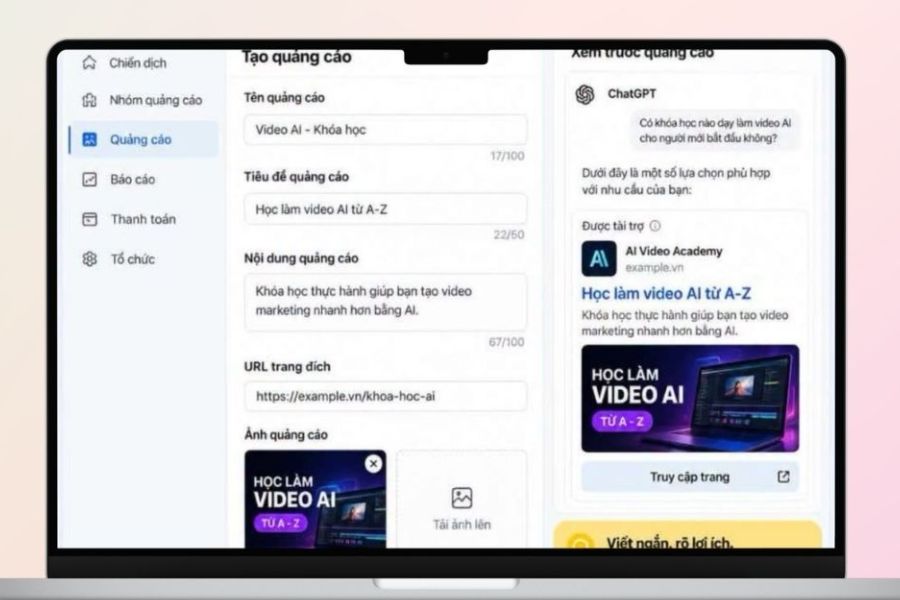
- Step 5: Create ad template and add landing page
- 4. How to optimize ads in ChatGPT after launching.
- 5. Should you implement ChatGPT Ads? Suggestions for reputable upgrade providers.
- 6. Conclusion
So what are ChatGPT Ads, how do the ads appear, and what do businesses need to prepare to get started? If you''re interested in learning about this new advertising channel, the content below will help you understand everything from the concept and participation requirements to the campaign setup process. Let''s explore with Sadesign!
1. What are ChatGPT Ads? How are they different from regular advertising?
ChatGPT Ads are a form of paid advertising that can appear within the ChatGPT environment and are separate from the AI-generated responses. An ad can include the advertiser's name, brand logo, title, description, image, and a landing page link. The key feature is the conversational context, as ads can be selected based on the content of the conversation and the user's needs. However, businesses cannot use ads to edit responses or force ChatGPT to recommend their products. Here are some key characteristics of ChatGPT Ads:
-
This is paid advertising content and is uniquely identified with a ChatGPT response.
-
It may contain brand information, titles, descriptions, images, and links.
-
The advertisement aims to drive users to a website or landing page.
-
Context and intent within a conversation can play a role in ad delivery.
-
Advertising content should be directly related to customer needs.
-
Advertisers do not have the right to edit or directly influence ChatGPT's responses.
-
The landing page needs to provide information that is relevant to the content the advertisement is promoting.

2. Who can run ads on ChatGPT in Vietnam?
To run ChatGPT Ads, businesses first need to verify access to the advertising system and complete the required information. Vietnam is among the supported markets for registration, as indicated in the reference content; however, registering an account does not mean the campaign will run immediately. Businesses still need to complete verification, set up payment, and meet approval requirements before ads are distributed. Before starting, you should prepare the following:
-
Business name or brand name.
-
The website or landing page you want to promote.
-
Logo and brand imagery.
-
Contact information.
-
Information used for business verification.
-
Payment methods.
-
The content of the advertisement headline and description.
-
Images used in the advertisement.
-
Specific objectives of the campaign.
Upgrade ChatGPT at a low cost.
3. Step-by-step guide to running ads in ChatGPT
Step 1: Access the advertising page and create an account.
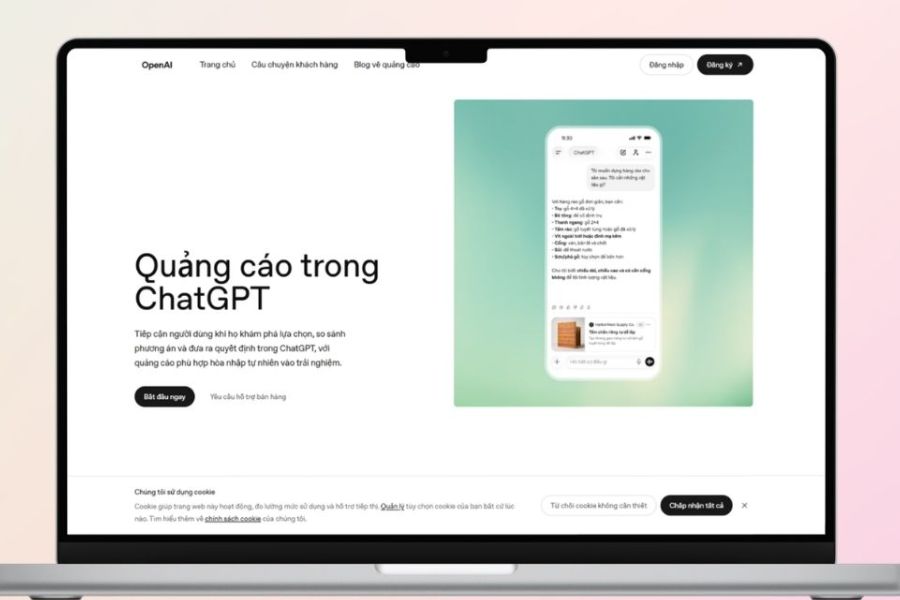
First, access the ChatGPT ad management system and select register or log in if you already have a suitable account. During setup, the system may request information about your business, website, industry, country, and contact information. You should use accurate information from the start to avoid having to edit your profile later. After completing the basic information, double-check your account name, country or region, currency, and time zone. These settings may be relevant to campaign management. Next, complete the verification step if required and set up your payment profile. An account that has been created but has not completed verification or payment may not be eligible for ads to start being delivered.
-
Access the ChatGPT advertising system.
-
Choose Register or Log in .
-
Fill in the business information as requested.
-
Add a website or landing page.
-
Complete the verification steps.
-
Check your country, currency, and time zone.
-
Set up your payment method.
Step 2: Create an advertising campaign
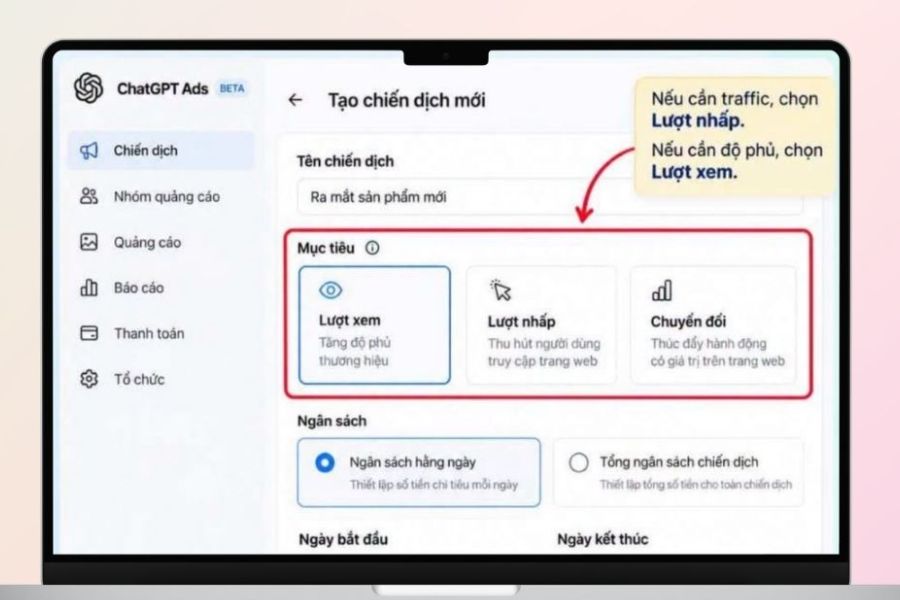
Once you've completed the account setup, the next step is creating a campaign. In Ads Manager, select Create and begin setting up a new campaign. Think of the campaign as the main framework of your entire advertising operation, where you define your goals and overview information before delving into ad groups or specific ad creatives. At this stage, take the time to determine the campaign's purpose. If you want to drive traffic to your website, the setup and evaluation will differ from a conversion-focused campaign. Defining your goals from the start also makes it easier to track performance once the ads start generating data, instead of just looking at impressions without knowing if those results truly align with your business needs.
-
Go to Ads Manager.
-
Select Create .
-
Select Create campaign .
-
Give your campaign a recognizable name.
-
Identify the main objective.
-
Double-check the information before moving on to the next step.
Step 3: Set goals, budget, time, and location.
After creating a campaign, you need to set up important information related to distribution. Depending on your goals, you can choose to focus on impressions, clicks, or conversions. This is a crucial part to consider carefully because the chosen goal will affect how you interpret the data later. For example, a campaign focused on website traffic will need to pay more attention to clicks and click-through rates than just looking at the number of times the ad is displayed. Next are the budget, timing, and distribution locations. With an initial budget, you can start at a level suitable for testing instead of allocating the entire budget at the beginning. Adjustments will be easier once you have real-world data. Also, define a clear running time to avoid the campaign running outside the desired timeframe for your business.
-
Choose your campaign goal.
-
Set a budget.
-
Specify the start and end times if necessary.
-
Choose the right distribution location.
-
Double-check the settings before saving.
-
Monitor the data after the campaign has started.
Step 4: Create ad groups based on products or needs.
Ad groups help you organize campaigns by specific products, services, or customer needs. Instead of putting all products into one general group, you can divide them into clearly defined thematic groups. For example, a business selling multiple product lines can create separate groups for each need so that the advertising message is more targeted to the business. When building groups, think from the customer's perspective rather than just from the product catalog. Users typically don't start by searching for a brand name but rather by a problem they want to solve. Therefore, organizing ad groups around needs, themes, or product types can make the message more specific. Then, you can use real-world data to adjust how you divide the groups.
-
Group by product.
-
Grouping based on customer needs.
-
Define a clear topic for each group.
-
Use messages that are appropriate for each group.
-
Avoid grouping too many unrelated products into one category.
-
Monitor the individual results of each group to establish a basis for optimization.
Step 5: Create ad template and add landing page
This step transforms your advertising idea into content that customers actually see. You can prepare the title, description, images, and a link to the landing page or product page. The content should be concise but informative enough for users to understand what the brand offers and why they should continue learning. The landing page is just as important as the ad itself. If the ad introduces a specific product but the link leads to a very general page, users may have to take extra steps to find the right information. Therefore, ensure that the title, images, description, and landing page are consistent. Before launching, test the link to check loading speed, content, and action buttons.
-
Write a title that is concise and easy to understand.
-
Accurately describe the benefits or value of the product.
-
Use appropriate images.
-
Attach the correct landing page URL.
-
Ensure your ad content matches your landing page.
-
Check the link before activating.
-
Review all information carefully before submitting for approval.
4. How to optimize ads in ChatGPT after launching.
Once your ads are running, don't jump to conclusions about their effectiveness based on the first few hours. Look at the data against your initial goals to identify the problem. A campaign with many impressions but few clicks might need a message review, while one with many visits but few conversions requires a thorough landing page check. You can start optimizing from the following factors:
-
Track the right metrics: See impressions, clicks, click-through rates, or conversions depending on your goal.
-
Content experimentation: Change the title, description, or image to find a more effective way to convey your message.
-
Verify the landing page: Ensure users find the right product and information they need after clicking.
-
Compare ad groups: See which group is delivering data that aligns with your goals.
-
Adjust the budget: Once you have enough data, consider reallocating the budget to campaigns that align with your business goals.
-
Avoid premature judgments: Some indicators may need time to update, so it's advisable to monitor the data over a sufficiently long period before making major adjustments.
Upgrade ChatGPT at a low cost.
5. Should you implement ChatGPT Ads? Suggestions for reputable upgrade providers.
If you frequently work with AI tools and need to upgrade services to support your work, studies, or content creation, you can consider Sadesign for a suitable option. Sadesign focuses on providing account upgrade solutions and user support, with a relatively convenient registration process and pricing suitable for various needs. Here are some reasons why users might consider Sadesign:
-
Support for upgrading various tools and services to facilitate work.
-
The registration process is clearly explained.
-
Support is available during use.
-
Pricing is structured according to usage requirements.
-
Suitable for users who frequently work with AI tools and creative software.
6. Conclusion
Overall, ChatGPT Ads is a noteworthy advertising approach as user search behavior shifts towards conversational AI environments. The key isn't about running ads quickly, but rather understanding customer needs, crafting contextually relevant messages, and directing them to a clear landing page. Combining these three elements with regular data monitoring provides businesses with a better foundation for experimenting and adjusting campaigns to realistic goals.





















VIP Products








Best Selling Products
Windows 10 & 11 Pro Key
36 USD
Plugin Retouch4me
69 USD
MidJourney Account
29 USD
Genuine Adobe Illustrator account
99 USD
ChatGPT Plus Account (GPT-4)
16 USD
Autodesk All App Account Copyright
120 USD
Adobe Premiere Pro Account
99 USD
Upgrade genuine Capture One account
120 USD
Freepik Premium Account
59 USD
Copyright Adobe Lightroom Account
59 USD
Upgrade Genuine Office 365
49 USD
Adobe Photoshop Copyright - Full App
120 USD
Capcut Pro 1 Year
39 USD
Upgrade Duolingo Super
29 USD
Genuine Cheap Canva Pro
39 USD