Best Selling Products

Genuine Adobe Illustrator account
99 USD

Autodesk All App Account Copyright
120 USD

Adobe Premiere Pro Account
99 USD

Copyright Adobe Lightroom Account
59 USD

Upgrade Genuine Office 365
49 USD

Upgrade Duolingo Super
29 USD

Adobe Photoshop Copyright - Full App
120 USD

Upgrade genuine Capture One account
120 USD

Freepik Premium Account
59 USD

Capcut Pro 1 Year
39 USD

Plugin Retouch4me
69 USD

MidJourney Account
29 USD

Windows 10 & 11 Pro Key
36 USD

Genuine Cheap Canva Pro
39 USD

ChatGPT Plus Account (GPT-4)
16 USD
What is a Backdrop? Differentiating Between Background and Backdrop in Design
Nội dung
- 1. What is a backdrop and why is it important?
- 2. The fundamental difference between a backdrop and a background.
- 3. Applications of Backdrops in Design
- 3.1 Applications of Backdrops in Photography
- 3.2 Applications of Backdrops in Stage Design
- 3.3 Applications of Backdrops in Media and Film
- 3.4 Applications of Backdrops in Interior Design
- 4. Common mistakes when designing backdrops
- 5. Tools to help create the perfect backdrop design
- 5.1 Canva – Easy online design, no experience required.
- 5.2 Adobe Photoshop – Professional tools for complex designs
- 5.3 FotoJet – An online tool with many ready-made backdrop templates
- 6. Where should I upgrade my backdrop design tools?
- 7. Conclusion
Did you know that a backdrop is not just a simple decorative background, but also a "silent storyteller" in every design project?
1. What is a backdrop and why is it important?
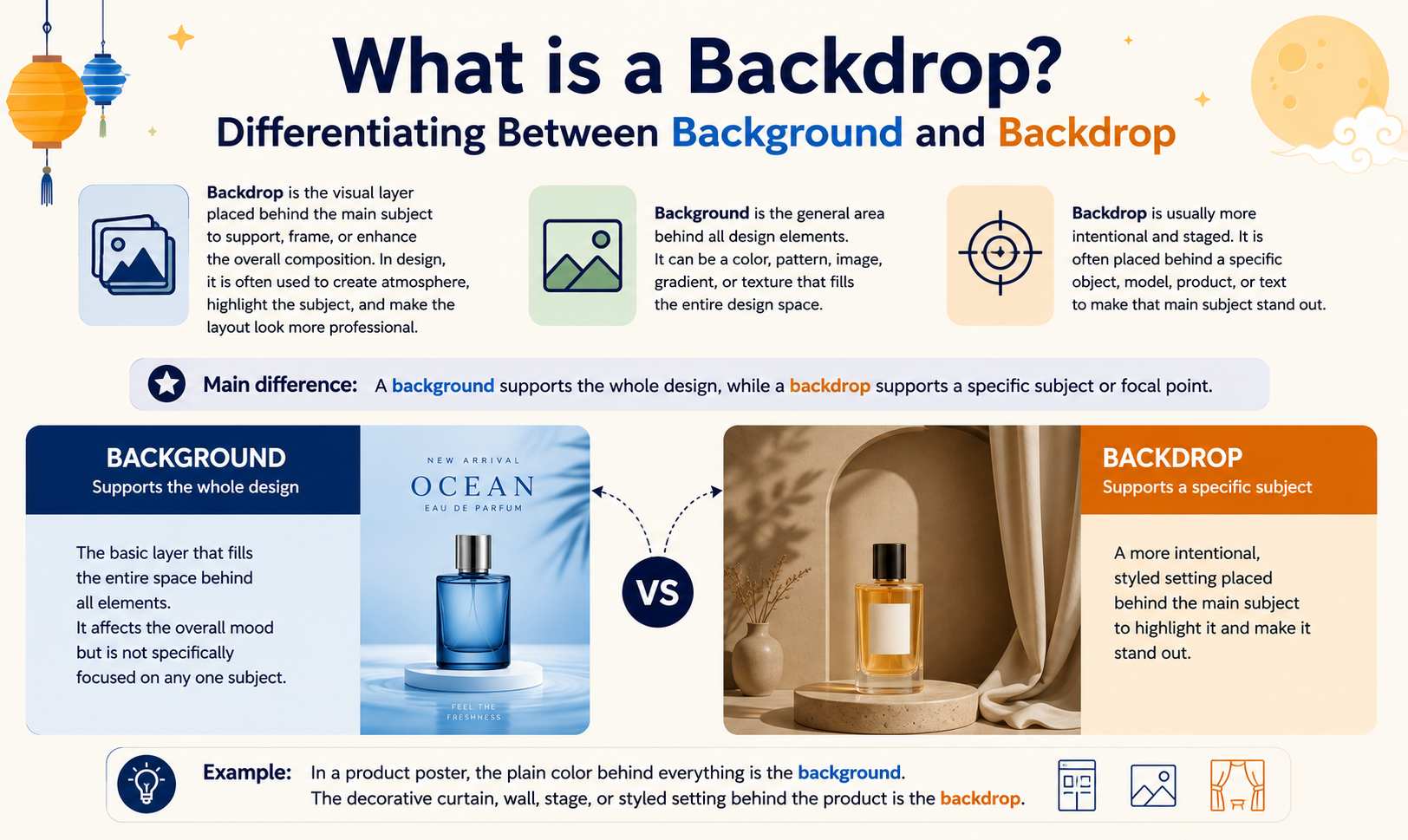
In graphic design, a backdrop is a background placed behind the main subject, serving to create context, depth, and visual space for the artwork. It's like a "miniature stage" that helps important elements stand out and become more vibrant. Not only appearing in posters or banners, backdrops are also widely used in photography, event design, video, and livestreaming, where every background detail contributes to guiding the viewer's visual experience.
Clever use of backdrops helps create a clear visual hierarchy, guiding the viewer's eye to key design elements. This is especially crucial in commercial design, advertising, or marketing, where you only have seconds to capture and retain the audience's attention. A well-designed backdrop not only enhances the product but also increases the value of the message, elevating the overall viewer experience.

2. The fundamental difference between a backdrop and a background.
Backdrops and backgrounds, while both serving as a "foundation" in design, differ significantly in their nature, purpose, and presentation. Understanding these differences will help you apply them more effectively in graphic design, photography, and other media products.
| Criteria | Background | Backdrop |
| Define | Background is a static, simple layer, usually just a neutral color or image, used as a basic backdrop on which other elements are placed. | A backdrop is a more complex and dynamic background design, incorporating lighting effects, textures, patterns, or 3D elements rendered in 2D to create depth, mood, and emotion for the overall design. |
| Purpose of use | By creating a basic backdrop that doesn't draw too much attention, the main subjects stand out. | Guide the viewer's visual perception, emphasize the message, evoke emotions, and highlight the subject and important details in the design. |
| Layer structure | Usually, there's only a single layer, with few details, simple, and easy to edit. | Comprising multiple layers, each with its own function, from lighting and shadows to background patterns, the overall effect is harmonious and vibrant. |
| Complexity | Low profile, easy to create and use, suitable for quick designs or those requiring simplicity. | Taller designs, requiring more technical expertise and design time, are typically found in professional projects, events, or advertising. |
| Intuitive features | Neutral, non-emotional, focused on supporting key elements. | Vivid and expressive, it can simulate lighting, shadows, 3D spatial effects, or interactive visual elements, enhancing the visual experience. |
| Typical applications | Website, simple slideshow, static poster, basic banner. | Professional advertising posters, event design, photo studio, livestream, video marketing, and products requiring emotional impact and visual depth. |
| Impact on viewers | It helps viewers focus on the main content without being distracted by the background. | Creating a strong visual impact and evoking emotional experiences helps make the design message more memorable. |
3. Applications of Backdrops in Design
3.1 Applications of Backdrops in Photography
In photography, a backdrop is not simply a background, but a tool that helps photographers control the entire scene. It eliminates distracting elements, creating a clean, unified space, thereby highlighting the main subject of the photograph. Backdrops also help adjust lighting, color, and atmosphere, helping each photograph achieve maximum aesthetic effect.
Backdrops are especially important in portrait, product, or event photography, where every detail contributes to conveying emotion and a story. Choosing the right backdrop helps create the right mood for the photo, from formal and professional to relaxed and creative, while simultaneously enhancing the quality and value of the image.

3.2 Applications of Backdrops in Stage Design
In the event industry, backdrops are an indispensable element for defining the space, conveying the brand, and the theme of the program. A well-designed backdrop not only serves as a background for speakers or performers but also creates a professional feel, attracts attention, and enhances the aesthetics of the entire stage.
Stage backdrops also help transform empty spaces into impressive and vibrant venues, from opening ceremonies and conferences to fashion shows and music concerts. The flexible use of backdrops also enhances the audience experience, ensuring that all eyes are focused on the specific moment and place the organizer wants to emphasize.
3.3 Applications of Backdrops in Media and Film
In video and film production, backdrops are a great tool for creating a setting without the need for expensive real-life construction. Thanks to techniques like the green screen, backdrops allow for the creation of complex virtual settings, delivering vivid and impressive visual effects.
Furthermore, backdrops ensure consistency between shots, helping to maintain the emotional flow and story, while saving time and production costs. From commercials and music videos to short films and feature films, backdrops are a versatile solution that helps producers realize their creative ideas effectively.
3.4 Applications of Backdrops in Interior Design
In interior design, backdrops are used to create focal points in a space, such as accent walls or photo-worthy corners at home. They are not just decorative backgrounds but also enhance aesthetic value, providing an enjoyable visual experience for users.
Backdrops can also serve as decorative partitions, adding depth to small spaces and creating a more spacious and airy feel. Thanks to the flexibility in materials, colors, and patterns, interior backdrops not only serve aesthetic purposes but also combine functionality, highlighting specific areas or functional corners in a home or workspace.

4. Common mistakes when designing backdrops
In backdrop design, simplicity and balance are key to attracting viewers and highlighting the main message. Many designers often make basic mistakes that render backdrops ineffective, reducing their aesthetic appeal and ability to convey the message.
- Overly complex design: When a backdrop contains too many details, patterns, or effects, viewers will have difficulty identifying the main focal point. A simple and clean backdrop helps important content such as the program name, logo, or product stand out more, while avoiding a cluttered look.
- Color conflict: Using background colors that don't harmonize with foreground elements can make the entire design visually jarring and unbalanced. Applying color theory, choosing a harmonious color palette, and considering appropriate contrasts is a way to make the backdrop both aesthetically pleasing and effective in guiding the viewer's gaze.
- Inconsistent proportions: The elements on the backdrop need to be proportionate to the overall design. If they are too large, they will steal the spotlight and overshadow the main content; if they are too small, they will create visual "noise," making the backdrop look cluttered and unprofessional.
- Lack of focus on the main content: Some backdrops focus too much on decoration and forget to emphasize the main message. Ensure that all elements on the backdrop support, and do not compete with, the key focal point, making it easy for viewers to identify the necessary information.
- Overuse of effects: Excessive lighting, shadows, or textures can be visually distracting and detract from the backdrop's aesthetic appeal. Effects should be used subtly, just enough to create depth and mood, but without dominating the entire composition.

5. Tools to help create the perfect backdrop design
5.1 Canva – Easy online design, no experience required.
Canva is a popular online design tool, highly regarded for its intuitive interface and easy drag-and-drop functionality. With Canva, even beginners can create professional backdrops without needing advanced design skills. This tool is especially useful when you need to quickly create backdrops for events, conferences, livestreams, or product photoshoots.
Canva boasts a vast library of templates with thousands of ready-made designs, from simple backdrops to complex layouts, easily customizable to your needs. In addition, Canva offers a wide variety of images, icons, fonts, and other graphic elements, allowing you to unleash your creativity while ensuring consistency and harmony in your design. High-quality file export also ensures that your backdrops will always look sharp and professional when printed or displayed online.

5.2 Adobe Photoshop – Professional tools for complex designs
Adobe Photoshop is a professional graphic design software widely used for creating backdrops for events, advertisements, stage productions, and product photography. Photoshop allows for designs ranging from simple to complex, with extremely powerful image processing and effects capabilities, making backdrops vibrant and eye-catching.
Photoshop's strength lies in its flexibility and high degree of customization. You can edit even the smallest details, combine multiple layers, create lighting effects, shadows, textures, or render 3D elements into 2D. This allows each backdrop to become a unique design, showcasing creative ideas while ensuring high visual quality. Photoshop also supports exporting files in various formats, suitable for both printing and online presentations, helping designers complete their projects in the most professional way.
5.3 FotoJet – An online tool with many ready-made backdrop templates
FotoJet is an easy-to-use online design tool, especially suitable for beginners or those who need to create backdrops quickly. With FotoJet, you don't need to install complicated software; just open your browser and you can design an impressive backdrop in minutes.
This tool offers a diverse library of backdrop templates suitable for various themes such as events, festivals, advertising, or personal photography. FotoJet also supports basic editing features such as adding text, images, color effects, and layout, allowing users to easily customize designs to their liking. The user-friendly drag-and-drop interface makes design quick and intuitive, allowing you to focus on creative ideas instead of spending a lot of time on technical details.
6. Where should I upgrade my backdrop design tools?
Once you have a basic understanding of backdrop design and want to improve your design quality, owning a professional, licensed, and fully featured tool is crucial. Properly upgraded software not only helps you create harmonious layouts and sophisticated colors, but also allows you to apply lighting effects, shadows, textures, or even complex 3D elements, making your backdrops more vibrant and professional. Upgrading your tools also means accessing the latest features, keeping up with modern design trends, from poster and banner design to photo studios and event stage backdrops.
If you're looking for a reputable place to upgrade your backdrop design tools, AI Software World is the top choice. This platform provides fully featured, licensed design software, from easy-to-use online tools like Canva to professional software like Adobe Photoshop and Illustrator. When you upgrade at AI Software World, you not only get stable and up-to-date software, but also dedicated technical support and advice on choosing the right tools to suit the creative needs of each project.
7. Conclusion
A backdrop is not simply a background element; it's a strategic design tool that emphasizes the message, evokes emotion, and connects viewers with the content. Clearly distinguishing a backdrop from a background and knowing how to apply it in different contexts will help you create visually appealing and professional designs. Once you understand the role of a backdrop, you can transform every frame, every stage, or every event into a unique and memorable visual experience.





















VIP Products








Best Selling Products
Genuine Adobe Illustrator account
99 USD
Autodesk All App Account Copyright
120 USD
Adobe Premiere Pro Account
99 USD
Copyright Adobe Lightroom Account
59 USD
Upgrade Genuine Office 365
49 USD
Upgrade Duolingo Super
29 USD
Adobe Photoshop Copyright - Full App
120 USD
Upgrade genuine Capture One account
120 USD
Freepik Premium Account
59 USD
Capcut Pro 1 Year
39 USD
Plugin Retouch4me
69 USD
MidJourney Account
29 USD
Windows 10 & 11 Pro Key
36 USD
Genuine Cheap Canva Pro
39 USD
ChatGPT Plus Account (GPT-4)
16 USD