Best Selling Products

Upgrade genuine Capture One account
120 USD

ChatGPT Plus Account (GPT-4)
16 USD

Genuine Cheap Canva Pro
39 USD

Upgrade Duolingo Super
29 USD

Freepik Premium Account
59 USD

Autodesk All App Account Copyright
120 USD

Adobe Photoshop Copyright - Full App
120 USD

Plugin Retouch4me
69 USD

Adobe Premiere Pro Account
99 USD

Upgrade Genuine Office 365
49 USD

Capcut Pro 1 Year
39 USD

Copyright Adobe Lightroom Account
59 USD

Windows 10 & 11 Pro Key
36 USD

Genuine Adobe Illustrator account
99 USD

MidJourney Account
29 USD
What is AutoCAD?
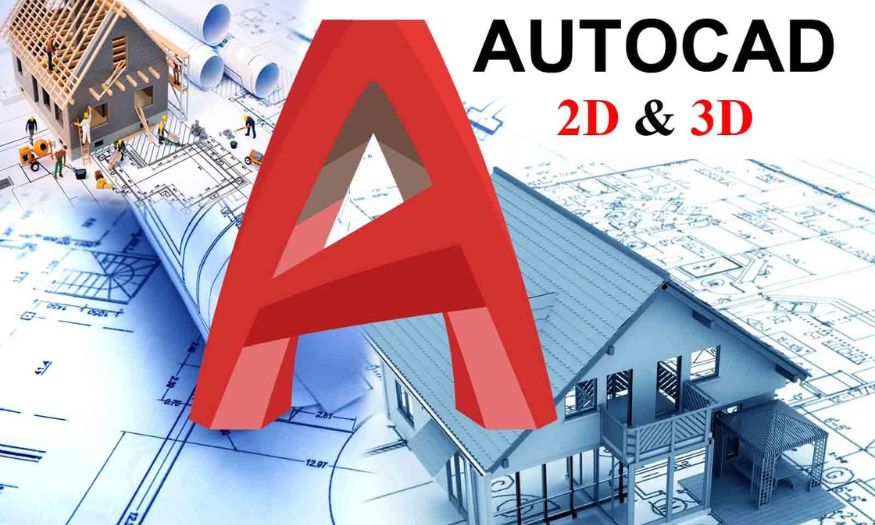
A 1-year licensed AutoCAD account provides users with a powerful technical design toolkit, supporting the creation of accurate and professional 2D and 3D drawings. This is indispensable software for engineers, architects, and anyone working in the fields of construction and design.
1. What is AutoCAD?
AutoCAD is one of the most famous and widely used technical design software programs in the world. Developed by Autodesk since 1982, AutoCAD allows users to create detailed technical drawings in both 2D and 3D with almost absolute accuracy. Not only is it a drawing support tool, AutoCAD is also a platform that helps engineers and designers turn ideas into visual models that are easy to edit and easy to share with colleagues or customers.
Thanks to its flexibility and powerful processing capabilities, AutoCAD is widely applied in many fields such as architecture, construction, mechanics, electricity, electronics, and interior design. Using AutoCAD helps shorten drawing implementation time, minimize errors during the design process, and provide more visual and accurate solutions for every project. This is why AutoCAD has been and continues to be indispensable software for those working in the technical and creative industries.
.jpg)
2. Outstanding features of AutoCAD
AutoCAD is not only a simple technical design tool, but also a comprehensive solution that helps optimize performance and improve accuracy in every drawing. With modern features and strong customization capabilities, this software has become the top choice of engineers, architects, and professional designers.
Professional 2D and 3D design: Easily create 2D technical drawings and 3D models with high accuracy, from small details to complex projects.
Diverse drawing toolkit: Provides a wide range of powerful tools to design, edit, and optimize every detail according to individual needs.
Fast command line support: Helps perform design, editing, and drawing management operations effectively, saving operating time.
High integration capability: Easily connects with many other software programs and platforms, increasing the efficiency of teamwork workflows.
Work anytime, anywhere: Supports direct use on the web and mobile devices, convenient for creating, viewing, and editing drawings wherever you are.
Customize workspace: Allows personalization of the interface and tools, meeting the unique design needs of each user.
Outstanding performance: New versions are continuously upgraded, optimizing collaboration and workflow automation capabilities, helping save significant time.
Secure collaboration: Share drawings securely and effectively across multiple platforms, ensuring data is always safe.
Absolute accuracy: Autodesk’s exclusive TrustedDWG technology ensures accurate DWG files and absolute compatibility with every AutoCAD version.
3. Some applications of AutoCAD in different fields and daily life
3.1. Aerospace industry
In the aerospace industry, AutoCAD plays an important role in designing and simulating extremely complex details such as rockets, satellites, space stations, or advanced aircraft models. This software allows engineers to calculate each technical parameter accurately, from frame structure to power systems, ensuring safety and optimal performance before entering the actual manufacturing process.
3.2. Automotive design industry
AutoCAD is a familiar tool for engineers in the automotive design industry, helping them build and simulate each important component such as chassis, engines, transmission systems, or vehicle interiors. Using AutoCAD not only increases design accuracy but also supports checking operating capabilities and optimizing every detail, bringing more modern, safe, and durable vehicle models.
3.3. Civil engineering industry
In the field of civil engineering, AutoCAD is used to plan and implement infrastructure projects such as bridges, roads, industrial zones, or water supply and drainage systems. The software helps engineers calculate material quantities, analyze structures, and control project progress, contributing to improved construction efficiency and reduced errors during implementation.
.jpg)
3.4. Architecture and interior design industry
AutoCAD is an effective tool for architects and interior designers in creating detailed drawings for houses, offices, shopping centers, or complex projects. With the ability to provide accurate parameters on area, volume, and materials, AutoCAD makes the design process more visual, saves time, and ensures aesthetics and optimal functionality.
3.5. Landscape planning
Not limited to construction or industrial fields, AutoCAD is also widely applied in landscape design and planning. Designers use the software to arrange greenery, walkways, fences, or outdoor campuses reasonably, bringing harmonious and convenient space solutions that meet both aesthetic and functional factors.
.jpg)
4. Comparing AutoCAD with related tools
Criteria
AutoCAD
SketchUp
SolidWorks
Main purpose
2D & 3D technical design, detailed mechanical, architectural, and infrastructure drawings.
Architectural design, interior design, visual 3D modeling.
Mechanical 3D design, simulation of machine details, industrial products.
Interface
Professional, many advanced features, requires time to learn.
Friendly, easy to use, suitable for beginners.
More complex, aimed at specialized technical users.
Modeling capability
Powerful in both 2D and 3D, high accuracy.
Focuses on visual 3D, less used for detailed 2D.
Specialized 3D with dynamic simulation and technical analysis.
Implementation speed
Depends on user experience, suitable for large-scale projects.
Fast and simple, suitable for quick concept design.
Requires high professional skills but strong in simulation and testing.
Scalability
Supports many add-ons and customizable APIs.
Less customizable, mainly for architecture and interior design.
Supports simulation, in-depth technical analysis, compatible with PLM systems.
Supported devices
PC, Web, Mobile (AutoCAD Web & Mobile App).
Mainly PC, with a web version but limited features.
Powerful PC, requires high configuration.
Target users
Engineers, architects, professional designers.
Architects, interior designers, 3D beginners.
Mechanical engineers, industrial product designers.
License cost
Relatively high, annual/monthly subscription.
Lower, with a limited free version.
High, focused on enterprise customers.
5. Where should you upgrade AutoCAD?
Upgrading to licensed AutoCAD not only helps you enjoy all modern features but also ensures stability and safety during use. However, to avoid risks from unreliable suppliers, you need to choose a trustworthy, professional partner that always puts customer interests first. Software Warehouse is one of the addresses worth considering.
5.1.Software Warehouse – A reputable provider of licensed AutoCAD
Software Warehouse is an official software distributor trusted by many individual and business customers. With many years of experience, this unit provides not only licensed AutoCAD but also many other popular software programs such as Photoshop, Canva Pro, Zoom Pro, or Google Workspace. The special point is that Tổng Kho Phần Mềm always ensures full VAT invoices, valid documents, and dedicated support services from the time of purchase throughout the usage process.
5.2. Dedicated support service, customer-centered
Coming toSoftware Warehouse , you will receive fast installation support and detailed guidance from the technical team, helping you easily use the software even if you are not familiar with it. Any questions will be answered promptly, helping you feel more assured when choosing to upgrade licensed AutoCAD here. Customer care policies are always prioritized, creating absolute trust from users.
5.3. Competitive and reasonable prices
Software Warehouse is committed to bringing you the most competitive price along with the full features of licensed AutoCAD. You can completely upgrade the software without worrying about costs, because the price is always optimized and transparent. This is an ideal choice for you to both save budget and ensure maximum work efficiency.
.jpg)
6. Conclusion
Upgrading to licensed AutoCAD is a smart investment decision. You will have a powerful, stable tool that is always officially supported, helping save time and improve design quality. In today’s fiercely competitive environment, owning licensed AutoCAD is the step forward that helps you work more professionally and create the most optimal products.





















VIP Products








Best Selling Products
Upgrade genuine Capture One account
120 USD
ChatGPT Plus Account (GPT-4)
16 USD
Genuine Cheap Canva Pro
39 USD
Upgrade Duolingo Super
29 USD
Freepik Premium Account
59 USD
Autodesk All App Account Copyright
120 USD
Adobe Photoshop Copyright - Full App
120 USD
Plugin Retouch4me
69 USD
Adobe Premiere Pro Account
99 USD
Upgrade Genuine Office 365
49 USD
Capcut Pro 1 Year
39 USD
Copyright Adobe Lightroom Account
59 USD
Windows 10 & 11 Pro Key
36 USD
Genuine Adobe Illustrator account
99 USD
MidJourney Account
29 USD