
Best Selling Products
Upgrade genuine Capture One account
120 USD
Genuine Adobe Illustrator account
99 USD

Copyright Adobe Lightroom Account
59 USD
Upgrade Genuine Office 365
49 USD
Adobe Premiere Pro Account
99 USD
Plugin Retouch4me
69 USD

Freepik Premium Account
59 USD

MidJourney Account
29 USD

Capcut Pro 1 Year
39 USD
Autodesk All App Account Copyright
120 USD
Adobe Photoshop Copyright - Full App
120 USD
Genuine Cheap Canva Pro
39 USD
Windows 10 & 11 Pro Key
36 USD

ChatGPT Plus Account (GPT-4)
16 USD

Upgrade Duolingo Super
29 USD
What is Gamma AI? A guide to creating professional presentation slides using AI.
Nội dung
- 1. What is Gamma AI?
- 2. Key features of Gamma AI
- 2.1. Quickly create presentation slides
- 2.2. Attractive and professional interface design
- 2.3. Support for visual images and charts
- 2.4. Natural Language Processing
- 2.5. Convenient editing and collaboration
- 3. Advantages and disadvantages of Gamma AI
- 3.1. Advantages of Gamma AI
- 3.2. Disadvantages to note
- 4. Instructions on how to create presentation slides using Gamma AI
- Step 1: Access Gamma AI and log in.
- Step 2: Set up your workspace
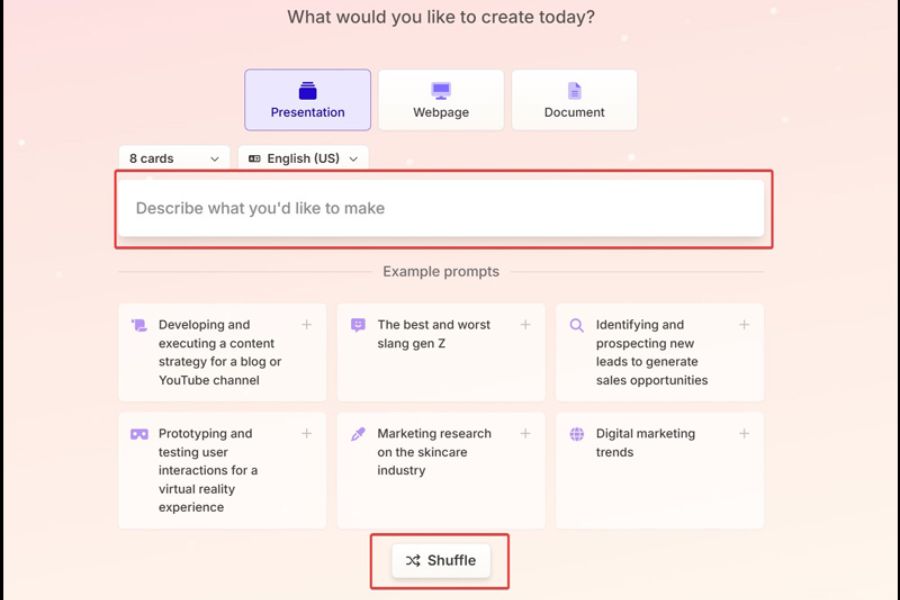
- Step 3: Choose how to create your presentation.
- Step 4: Enter the subject and description of the request.
- Step 5: Create and check the outline
- Step 6: Choose a theme and create slides.
- Step 7: Edit and finalize the presentation
- 5. Tips for using Gamma AI to create more professional slides
- 6. Conclusion
In academics and work, an impressive presentation requires not only good content but also a clear layout, eye-catching visuals, and an easy-to-understand presentation style. However, designing each slide in PowerPoint can sometimes take hours, especially if you lack design experience. This is why Gamma AI is gaining popularity due to its ability to use artificial intelligence to quickly create slides from existing ideas or content. So, what is Gamma AI, what are its outstanding features, and how do you use it? Let''s explore the details in the article below to learn how to create professional presentations that save time and suit your needs.
1. What is Gamma AI?
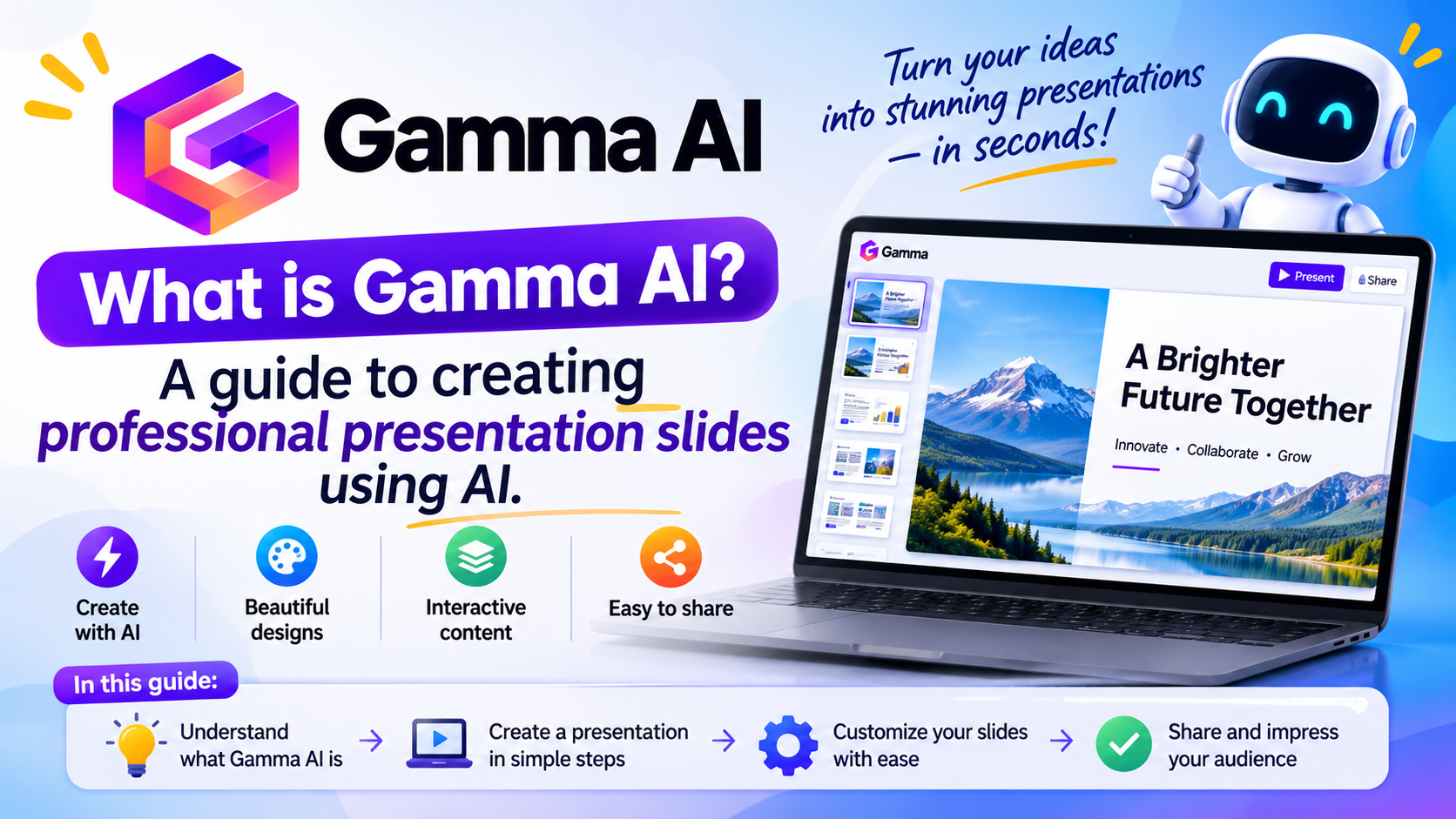
Gamma AI is an artificial intelligence-powered tool that helps users create presentations, visual materials, and presentation content from text or initial ideas. Instead of manually creating each page, adjusting images, or choosing colors, you can input your desired topic, and the system will suggest an outline, content arrangement, and layout design. This allows even those unfamiliar with PowerPoint to start creating a polished presentation without needing extensive design skills.
A key feature of Gamma AI is its ability to combine content with images and layout in a single process. The tool can support various purposes such as group assignments, project reports, product presentations, business plan development, or presenting creative ideas. Users can still edit drafts after the AI has finished generating them to ensure the content aligns with the intended purpose.
-
Create slides automatically: Transform your topic, outline, or text into a well-structured presentation.
-
Visual design: Suggestions on how to arrange headings, paragraphs, images, and graphic elements.
-
Supports a wide range of needs: Suitable for students, teachers, office workers, and business people.
-
Flexible customization: Allows users to adjust content, interface, and presentation style to their liking.
Gamma AI can significantly reduce slide preparation time. However, for a truly high-quality presentation, you still need to check information, select important content, and adjust the design before officially using it.

2. Key features of Gamma AI
Gamma AI has garnered significant attention due to its ability to combine content creation and design in a relatively simple process. Instead of starting with a blank slide, you can leverage AI suggestions to quickly form the overall layout, and then refine the presentation to suit your needs.
2.1. Quickly create presentation slides
One of Gamma AI's highlights is its ability to transform ideas into draft presentations in a short amount of time. You simply provide the topic, describe the requirements, or paste existing text. The system will use the input to build an outline, divide the content into sections, and suggest a suitable presentation style.
This feature is especially useful when preparing a presentation quickly or dealing with topics that contain a lot of information. Instead of spending time organizing each page, you can focus on checking your knowledge, adding examples, and refining your main message.
2.2. Attractive and professional interface design
A well-followed presentation requires consistency in color, typography, and information layout. Gamma AI assists in creating visually appealing layouts, ensuring content is logically divided instead of cramming too much text onto a single page. Depending on the topic, users can choose a minimalist, modern, creative, or formal style.
-
Use design templates to create consistency across pages.
-
Combine headlines, text, and images to highlight important information.
-
Adjust the colors, layout style, and visual elements to suit your needs.
-
Create a cover page that is appropriate for your study topic, report, or product presentation.
However, the design suggested by AI should only be considered a starting point. You need to check the contrast, font size, and spacing between elements to ensure the content is easy to read when displayed on a large screen.
2.3. Support for visual images and charts
Long paragraphs often make it difficult for viewers to grasp information, especially when presentations contain many complex figures or concepts. Gamma AI makes presentations more intuitive through visual layouts, graphic elements, and appropriate information organization. With comprehensive data provided, you can create clear, easy-to-follow data presentations.
To take advantage of this feature, prioritize images that are directly relevant to the content and charts that accurately represent the data. Avoid adding too many illustrations just to make the slide more visually appealing, as this can distract viewers from the main message.
2.4. Natural Language Processing
Gamma AI's natural language processing capabilities allow it to understand and develop requests using everyday language. You can describe your audience, presentation goals, desired tone, and key points instead of performing complex operations.
For example, when creating a presentation on environmental protection for students, you might request that the content be concise, easy to understand, include real-world examples, and include a call to action. For a work report, you can aim for a professional style, focusing on results and recommendations. The more specific the requirements, the better the draft will likely reflect your vision.
2.5. Convenient editing and collaboration
After completing the draft, users can further adjust the text, change the layout, and refine the slides. Editing helps to make the presentation more suitable to their personal style, instructor requirements, or company standards.
In addition, sharing and collaboration features, depending on the service plan and access rights, can support multiple people viewing or participating in editing content. This is a useful option for groups of students working on assignments together or staff members needing to collaborate on preparing reports.

3. Advantages and disadvantages of Gamma AI
Before choosing Gamma AI as your regular slide creation tool, you should understand the platform's benefits and limitations. AI can be a powerful tool in content creation and design, but the ultimate effectiveness still depends on the quality of the input information and how users review the product.
3.1. Advantages of Gamma AI
The biggest advantage of Gamma AI is that it simplifies the presentation creation process. You don't need to start from scratch or spend a lot of time searching for design templates. With just a clearly described topic, the tool can help you create an outline and an initial presentation for you to further refine.
Notable advantages include:
-
Save time: Streamline the brainstorming, content division, and slide design processes.
-
Easy to use: Suitable for even beginners using presentation tools.
-
Modern interface: Supports the creation of presentations with an intuitive and consistent layout.
-
Versatile applications: Can be used in learning, work, training, and business.
-
Easy to adjust: Users can continue editing the draft instead of having to start over from scratch.
3.2. Disadvantages to note
Despite its many benefits, Gamma AI doesn't always produce perfect results the first time around. If the request is too general, the content may lack depth, be off-topic, or not be suitable for the target audience. Some of the information suggested by the AI may also be inaccurate, so you shouldn't use it verbatim without checking.
Additionally, features and usage limitations may vary depending on the service package, time, and platform policy. You should check the current information before upgrading your account.
-
It is necessary to verify data, citations, and important information.
-
The image, layout, or content may need to be edited if it's not suitable.
-
Some advanced features may require a paid plan.
-
Privacy considerations are necessary when uploading internal data or sensitive information to AI tools.
-
It is advisable to check the rights to use images, content, and publishing conditions before using them for commercial purposes.
Overall, Gamma AI is best suited for use as a creative assistant. You can delegate time-consuming tasks like drafting and layout design to the AI, while taking an active role in checking accuracy and deciding how to convey information.
4. Instructions on how to create presentation slides using Gamma AI
If you're new to Gamma AI, you can start with a simple topic to familiarize yourself with the process. The steps below guide you through creating a presentation from idea generation and outline to final editing. The names or locations of some buttons may vary depending on the current interface.
Step 1: Access Gamma AI and log in.
First, open a browser on your computer or device with an internet connection, then access the official website at Gamma . On the main interface, find the login or account registration option to start using the service.
If you already have an account, simply log in. If not, follow the on-screen registration instructions and complete the necessary verification steps.
Step 2: Set up your workspace
After logging in, you may be asked to select a usage purpose such as personal, study, group work, or business. Choose the option that best suits your needs for convenient document management.
If you need to create a separate workspace, you can give it an easy-to-remember name, such as "Marketing Presentation" or "October Project Report". Organizing your documents by topic will help you find and edit your presentations faster when you have multiple projects running simultaneously.

Step 3: Choose how to create your presentation.
In the new content creation interface, choose the method that best suits your existing document. Specific options may vary by version, but typically you can start from a theme, use existing text, or convert the document.
-
Create from idea: Suitable when you have a new topic and want AI to suggest an outline.
-
Using existing text: Suitable when you already have an article, report, or document that needs to be converted into a slide.
-
Document conversion: Useful when you want to leverage content from sources supported by the platform.
If you're giving a class presentation, you can enter the topic along with the key requirements. If you're preparing a work report, use a pre-approved document to minimize informational errors.
Step 4: Enter the subject and description of the request.
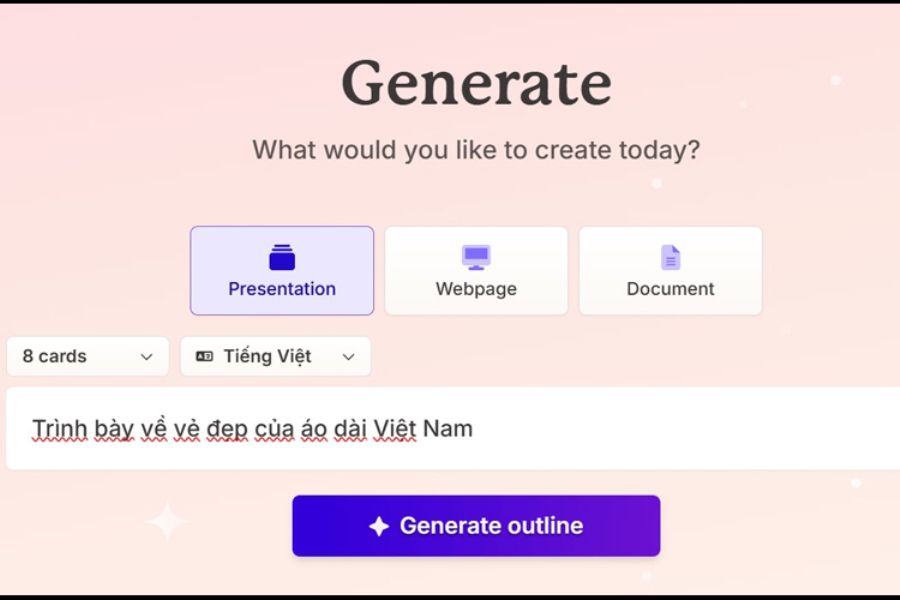
This is a crucial step that directly impacts the quality of your presentation. Instead of just typing a short phrase, you should clearly describe your goals, target audience, desired content volume, and presentation style.
For example, with the topic of environmental protection, you could ask students to create a presentation that includes an introduction, current situation, causes, solutions, and conclusion. Each section should be concise, include relatable examples, and prioritize visual aids.
A good request should clarify:
-
The main topic and objectives of the presentation.
-
The target audience and their level of knowledge are appropriate.
-
These are required points.
-
The tone, design style, and expected presentation length are all important considerations.
Step 5: Create and check the outline
After entering your requirements, use the outline creation option if the interface provides it. Gamma AI will suggest a structure for you to review before moving on to the design phase.
Don't rush to create all the slides if the outline isn't well-structured. Check that the sections are arranged in an easy-to-understand order, and that there are no duplicate points or missing important information. You should also remove any content that is outside the main objective to prevent the presentation from becoming rambling.
Step 6: Choose a theme and create slides.
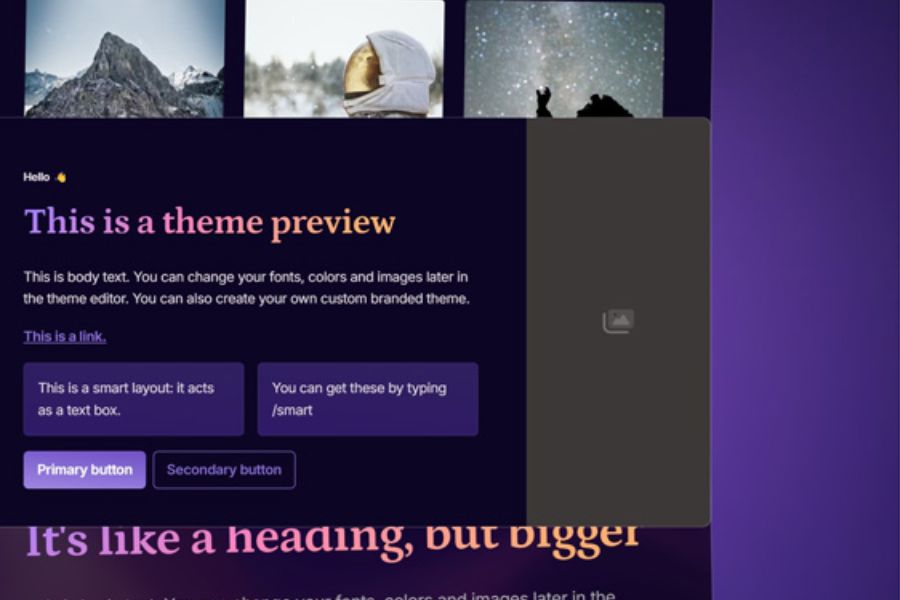
Once you've finalized the outline, choose a design style that suits the purpose. Educational presentations might prioritize bright colors and easy-to-understand illustrations, while business reports should use a clean layout, consistent colors, and clear charts.
Next, launch the content creation process following the on-screen instructions. Gamma AI will build the presentation based on your chosen topic, outline, and style. Completion time depends on the content length and system status.
Step 7: Edit and finalize the presentation
After creating your presentation, reread each page to identify spelling errors, confusing sentences, or inaccurate information. You can shorten long paragraphs, replace inappropriate images, and adjust the layout to highlight the main message.
Finally, review the entire presentation in preview mode. If you need to send it to others or present it on a different device, check the sharing, file export, and format options supported in your account.
5. Tips for using Gamma AI to create more professional slides
To fully utilize Gamma AI's capabilities, you shouldn't rely entirely on AI-generated content. Combine the tool with your own information organization skills and creativity. A few small adjustments can make your presentation clearer, more persuasive, and easier to remember.
-
Write a specific prompt: Clearly describe the topic, objectives, target audience, and desired style so that the AI understands the requirements correctly.
-
Prioritize concise content: Each slide should focus on a single main message, avoiding overly long paragraphs.
-
Maintain consistency: Use consistent colors, fonts, and presentation styles throughout the presentation.
-
Combine images appropriately: Choose illustrations that are directly related to the content, avoiding excessive decoration that can be visually distracting.
-
Verify information thoroughly: Compare figures, proper names, evidence, and key statements before presenting.
-
Practice before the presentation: Read through the content, check the time allocation, and prepare explanations for sections with complex information.
Another helpful tip is to ask Gamma AI to structure your content in an introduction, problem statement, analysis, solution, and conclusion. This arrangement makes it easier for the audience to follow the information flow and gives you more control when presenting in class or meetings.
6. Conclusion
Gamma AI is an AI-powered presentation slide creation tool that simplifies the process of brainstorming, outlining, and designing visual content. With its user-friendly interface and ability to create presentations quickly, this tool is suitable for students, office workers, and anyone who frequently needs to present ideas. For best results, you should provide clear requirements, review the content after creation, and customize the design according to your needs. By combining the power of AI with your own information filtering skills, you can create professional, easy-to-understand presentations that make a strong impression on your audience.
















VIP Products



Best Selling Products
Upgrade genuine Capture One account
120 USD
Genuine Adobe Illustrator account
99 USD
Copyright Adobe Lightroom Account
59 USD
Upgrade Genuine Office 365
49 USD
Adobe Premiere Pro Account
99 USD
Plugin Retouch4me
69 USD
Freepik Premium Account
59 USD
MidJourney Account
29 USD
Capcut Pro 1 Year
39 USD
Autodesk All App Account Copyright
120 USD
Adobe Photoshop Copyright - Full App
120 USD
Genuine Cheap Canva Pro
39 USD
Windows 10 & 11 Pro Key
36 USD
ChatGPT Plus Account (GPT-4)
16 USD
Upgrade Duolingo Super
29 USD