Best Selling Products

Adobe Photoshop Copyright - Full App
120 USD

ChatGPT Plus Account (GPT-4)
16 USD

MidJourney Account
29 USD

Plugin Retouch4me
69 USD

Genuine Adobe Illustrator account
99 USD

Genuine Cheap Canva Pro
39 USD

Upgrade Duolingo Super
29 USD

Capcut Pro 1 Year
39 USD

Windows 10 & 11 Pro Key
36 USD

Copyright Adobe Lightroom Account
59 USD

Autodesk All App Account Copyright
120 USD

Freepik Premium Account
59 USD

Upgrade Genuine Office 365
49 USD

Adobe Premiere Pro Account
99 USD

Upgrade genuine Capture One account
120 USD
What Is Photoshop Portable? Is It Safe, and What''s the Right Way to Use Photoshop?
Nội dung
- 1. What is Photoshop Portable?
- 2. How does Photoshop Portable differ from the official Photoshop version?
- 3. Is Photoshop Portable safe? Risks you should be aware of.
- 4. How to use Photoshop more properly and safely.
- Step 1: Identify your photo editing needs.
- Step 2: Prioritize official software sources.
- Step 3: Check configuration and compatibility
- Step 4: Protect data during editing
- 5. Should you use Photoshop Portable? You should upgrade at Sadesign.
- 6. Conclusion
Photoshop is a familiar name for anyone who regularly edits images, designs banners, processes product photos, or creates content. However, when searching online, users may come across versions called Photoshop Portable, advertised with claims like being lightweight, requiring no installation, and being able to open and run instantly. This makes quite a few people curious about what Photoshop Portable actually is and whether it can be used long-term. Compared to the official Photoshop version, Photoshop Portable works in a fairly different way. If you''re considering using Photoshop Portable, you should clearly understand what this version really is before downloading it.

1. What is Photoshop Portable?
Photoshop Portable is a common term for versions of Photoshop that have been packaged or modified to run directly on a computer without the need for a full installation process like regular software. Instead of installing multiple components, users typically only need to open the program's folder and launch the executable file to use it. This is also why Photoshop Portable is often advertised with phrases like "lightweight," "no installation required," or "runs directly." It's important to know that Adobe does not release an official product called Photoshop Portable . The official Photoshop for computers is distributed by Adobe through its ecosystem, along with login mechanisms, updates, and corresponding service packages. Therefore, files labeled Photoshop Portable shared on the internet are usually not the original versions provided by Adobe.
Some common features of Photoshop Portable include:
-
It can be run directly from a folder after extraction.
-
They are often advertised as not requiring traditional installation.
-
The file size may be smaller than the full version due to simplification or changes to some components.
-
It can run on several computers without requiring too many setup steps.
-
Depending on the specific file, the interface, features, and compatibility may vary.
-
There is no official update channel from Adobe like the version released through the company's system.
-
Adobe does not guarantee the source of files downloaded from third parties.
2. How does Photoshop Portable differ from the official Photoshop version?
The difference between Photoshop Portable and the official version isn't just about how it launches. The two options also differ in release source, updates, support, stability, and the level of control over the software. For users who only care about launching Photoshop quickly, the Portable version might seem convenient. But when using it frequently or working on important projects, these differences become more noticeable.
The differences can be visualized through the following criteria:
-
Source of release: Official Photoshop is provided by Adobe, while portable versions are usually found through external sharing sources.
-
How to use: Portable versions are usually designed to run directly from a folder, while the official version is installed through Adobe's system.
-
Update: Official Photoshop has an update mechanism through the Adobe system; Portable versions usually do not have an official update channel.
-
Features: Some portable versions may have simplified or altered components compared to the full version.
-
Compatibility: The official version is developed and tested by Adobe according to supported environments, while the portable version depends on how each source packages it.
-
Support: Official Photoshop users have access to Adobe's support system, while the portable version is not guaranteed support.
-
Security: With official versions, the software source is clearly identified. With portable versions from the internet, users must assess the reliability of the file themselves.
-
Long-term usability: The official version has a clear update roadmap, while the portable version may stop working when the operating system or computer environment changes.
If you only look at the file size, Photoshop Portable might seem more convenient. However, when considering the long-term usage, a photo editing software also needs to ensure stability, compatibility, and data security. These are factors that users shouldn't overlook just to save space.
3. Is Photoshop Portable safe? Risks you should be aware of.
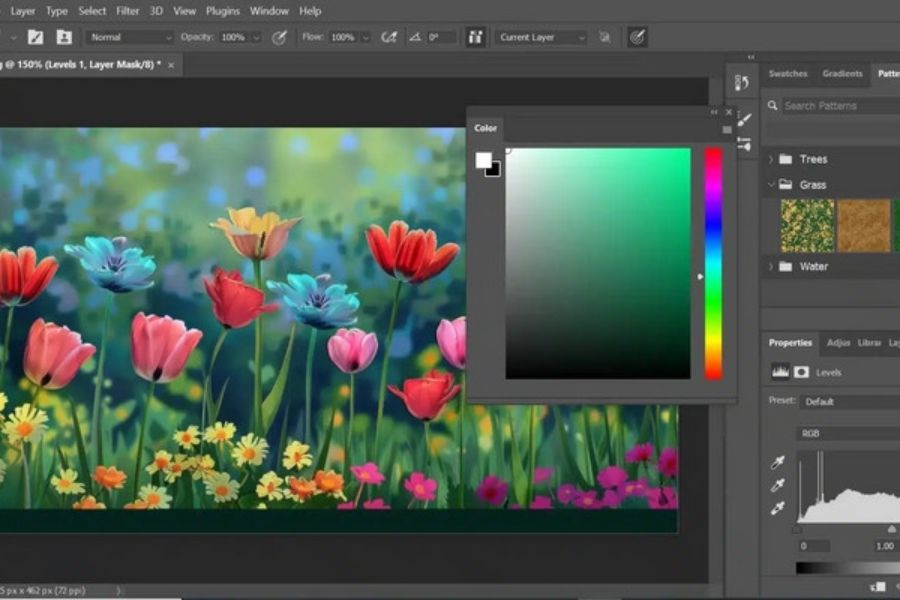
The question of whether Photoshop Portable is safe cannot be answered solely based on the version name. The crucial factor lies in the source of the file and the changes made within it. Since Portable is not an official version released by Adobe, users cannot assume that every file shared with that name is safe. In particular, files downloaded from websites of unknown origin may have been modified before being shared. Users also find it difficult to know exactly which components of the program have been altered. This is why downloading software simply because it's small or has many shares isn't a sufficient way to assess its safety.
Some potential risks when using Photoshop Portable include:
-
Malware risk: Modified software files may contain unwanted components.
-
Data leaks: The risk is even more significant if the computer contains important personal accounts, documents, or data.
-
Compatibility issue: Older versions may not work reliably on newer Windows versions.
-
Missing features: Some components may have been removed during the packaging process.
-
Not receiving updates: Users may not be receiving bug fixes and updates from Adobe.
-
Errors when saving files: This may result in the program freezing, closing unexpectedly, or errors occurring during project processing.
-
Troubleshooting is difficult: There is no official support system for portable versions not distributed through Adobe's channels.
-
Security disabling request: Some files may include instructions to disable security software to run the program; this is a sign that users should be especially cautious.
If a portable file prompts you to disable Windows Security, deactivate antivirus software, or grant unusual system permissions, users should not ignore that warning. Disabling your computer's protection just to run a program from an unknown source can put your device at even greater risk. For computers used for work, storing client documents, or logging into important accounts, choosing software from a trusted source is even more crucial. Saving a little space shouldn't come at the cost of data loss and system stability.
4. How to use Photoshop more properly and safely.
Step 1: Identify your photo editing needs.
Before choosing a version of Photoshop, determine what you actually need to do. If you only need to resize, crop images, adjust colors, or perform a few simple operations, an online editing tool may suffice. Conversely, those who do design work frequently will need a more feature-rich environment.
Identifying your needs early on helps avoid downloading a portable file simply because it's advertised as "super lightweight," only to later discover it lacks the necessary tools. For professional work, stability and compatibility are often more important than how small the software file is.
Step 2: Prioritize official software sources.
When using Photoshop on a computer, look for the version provided through Adobe's official channels. This helps users identify the software source, receive updates, and reduce the risk of having files modified by third parties.
For those who prefer not to install the software, web-based Photoshop can be a convenient option for suitable needs. Users simply need to use a supported browser and log in as required by Adobe to begin working.
Step 3: Check configuration and compatibility
One of the reasons users turn to Photoshop Portable is concern about their computer not being powerful enough. However, instead of looking for a portable version from an unknown source, you should check the system requirements of the version of Photoshop you intend to use.
Next, you might consider upgrading your RAM, optimizing your hard drive space, or using the web version of Photoshop if needed. This approach addresses the root cause instead of relying on modified versions from external sources.
Step 4: Protect data during editing
Regardless of the tool used, users should make it a habit to back up important files. Design projects with multiple layers, original images, or client documents should not be stored in a single location.
Additionally, avoid downloading executable files from unknown sources. If the software prompts you to disable security programs, change system settings, or perform unusual actions, it's best to stop and check the source before continuing.
5. Should you use Photoshop Portable? You should upgrade at Sadesign.
Photoshop Portable is appealing due to its compact size and seemingly simple usage, but it's not the official version released by Adobe. Therefore, before using it, users need to weigh the immediate convenience against issues related to security, updates, stability, and support. In particular, don't assume all Portable files are safe just because they have many downloads or are widely shared. If you frequently edit photos, design banners, create content, or need to use Photoshop for work, choosing the official version will ensure a more stable and proactive workflow. Instead of searching for Portable files from unknown sources, users can explore options for using the official Photoshop version that suit their needs and budget.
Some reasons why the official option should be preferred include:
-
The software has a clear source.
-
Supported by Adobe's system updates.
-
Minimize the risks associated with files that have been modified by third parties.
-
It offers better compatibility with the supported environment.
-
Suitable for long-term Photoshop use.
-
New features may be accessible depending on the version and service package.
-
It's more convenient when you need to use Photoshop for professional work.
If you're looking for a convenient Photoshop support service, you can check out Sadesign to find suitable upgrade options. Choosing the right account and package for your needs will give you a more stable working environment instead of relying on unreliable Photoshop portable versions found on the internet.
6. Conclusion
What is Photoshop Portable? This usually refers to a packaged or modified version of Photoshop that can be run directly without the usual installation process. Its obvious advantages are its portability and convenience, but because it's not an official version released by Adobe, its origin, stability, and security need careful consideration. If you only need basic photo editing, web-based Photoshop might be a suitable alternative in cases supported by Adobe. However, for users who frequently design, edit photos, or use Photoshop for work, choosing the official version will provide a more proactive and stable experience. Most importantly, don't compromise on security and data safety on your computer just to find a "lightweight" software.





















VIP Products








Best Selling Products
Adobe Photoshop Copyright - Full App
120 USD
ChatGPT Plus Account (GPT-4)
16 USD
MidJourney Account
29 USD
Plugin Retouch4me
69 USD
Genuine Adobe Illustrator account
99 USD
Genuine Cheap Canva Pro
39 USD
Upgrade Duolingo Super
29 USD
Capcut Pro 1 Year
39 USD
Windows 10 & 11 Pro Key
36 USD
Copyright Adobe Lightroom Account
59 USD
Autodesk All App Account Copyright
120 USD
Freepik Premium Account
59 USD
Upgrade Genuine Office 365
49 USD
Adobe Premiere Pro Account
99 USD
Upgrade genuine Capture One account
120 USD