Best Selling Products

Copyright Adobe Lightroom Account
59 USD

Plugin Retouch4me
69 USD

Genuine Adobe Illustrator account
99 USD

Genuine Cheap Canva Pro
39 USD

Autodesk All App Account Copyright
120 USD

ChatGPT Plus Account (GPT-4)
16 USD

Adobe Premiere Pro Account
99 USD

Freepik Premium Account
59 USD

MidJourney Account
29 USD

Upgrade Genuine Office 365
49 USD

Capcut Pro 1 Year
39 USD

Upgrade genuine Capture One account
120 USD

Adobe Photoshop Copyright - Full App
120 USD

Upgrade Duolingo Super
29 USD

Windows 10 & 11 Pro Key
36 USD
YouTube Premium Family: Features, Pricing, and How to Subscribe
Nội dung
- 1. What is YouTube Premium Family?
- 2. Price of the YouTube Premium Family subscription
- 3. Benefits of using YouTube Premium Family
- 3.1 The ultimate entertainment experience for the whole family.
- 3.2 Customize your private experience
- 3.3 Exclusive access to YouTube Originals content
- 4. Things to note before signing up for YouTube Premium Family
- 5. How to sign up for YouTube Premium Family at a low price
- 5.1 Step 1: Access the account management section
- 5.2 Step 2: Learn about the YouTube Premium package
- 5.3 Step 3: Enter payment information
- 6. How to share YouTube Premium Family
- 6.1 Step 1: Access the member management section
- 6.2 Step 2: Set up family sharing
- 6.3 Step 3: Invite family members
- 7. Reliable YouTube Premium Upgrade Addresses
- 8. Conclusion
The price of the YouTube Premium Family plan is a topic of interest for many users looking to upgrade to an ad-free experience. Beyond just the cost, subscribing to YouTube Premium Family comes with many notable benefits. With this plan, you can share the benefits with up to 5 family members, allowing each person to enjoy features such as ad-free video viewing, offline music streaming, and access to YouTube Music. If you''re wondering whether this plan is right for you, the following content will give you a clearer picture. Let''s explore it together with Sadesign!

1. What is YouTube Premium Family?
YouTube Premium Family is a subscription plan specifically designed for families, offering the opportunity to enjoy diverse content without interruption from ads. With this plan, one main manager can share the premium benefits of YouTube Premium with up to five other household members. This is a perfect solution for those who want to experience YouTube's rich content to the fullest.
The highlight of the YouTube Premium Family plan is its personalization capabilities. Each family member will have their own library, including viewing history and video recommendations tailored to their individual preferences. This not only allows each person to enjoy their favorite content but also protects their privacy, preventing them from being influenced by others' choices.
Additionally, this package offers exclusive features like YouTube Originals, allowing users to discover high-quality shows and movies. With Family Link integration, parents can easily manage content for their children, ensuring that younger family members have access to appropriate and safe content.
2. Price of the YouTube Premium Family subscription
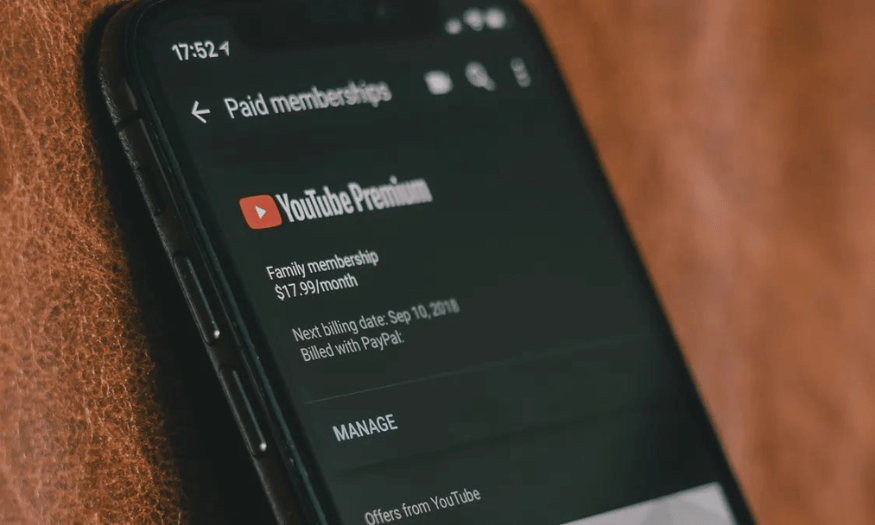
The YouTube Premium Family subscription currently costs 149,000 VND per month for up to 6 members, excluding VAT. This is a reasonable price considering the benefits this package offers. New users can try the service for free for the first month, giving them a chance to test it before deciding to subscribe.
Please note that the price of the YouTube Premium Family plan may change over time and due to various factors. To avoid missing any promotions or adjustments, users should check directly on the official YouTube website. This will not only help you stay up-to-date with the latest information but also allow you to save money on special offers.
With the value that YouTube Premium Family offers, this package is becoming an increasingly popular choice for families who want to enjoy quality entertainment together.
3. Benefits of using YouTube Premium Family
3.1 The ultimate entertainment experience for the whole family.
The YouTube Premium Family package offers a top-notch entertainment experience for the whole family at an affordable price. Not only is it cost-effective, but it also unlocks many attractive privileges, allowing every family member to enjoy wonderful moments of relaxation. From watching videos to listening to music, everything becomes easier and more enjoyable than ever before.
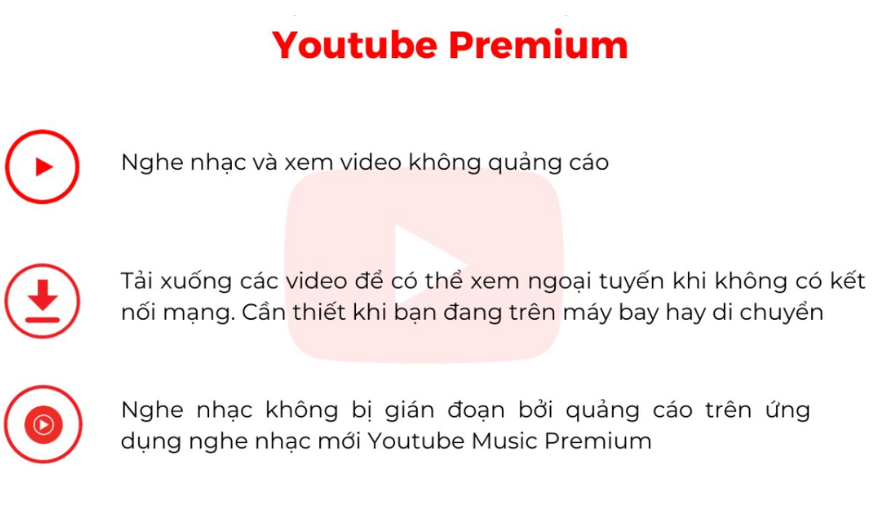
One of the most outstanding benefits of YouTube Premium Family is the complete removal of ads. This not only helps viewers focus on the content but also creates a seamless experience. In addition, you can play videos and music even when the screen is locked, saving battery power and increasing convenience. These are features that modern families will certainly appreciate.
In addition, YouTube Music Premium lets you explore a vast library of music, from the latest hits to classic tunes. Your family can enjoy favorite playlists together and discover new artists, all without interruption from ads. This combination not only enhances the entertainment experience but also brings family members closer together.
3.2 Customize your private experience
One of the strengths of YouTube Premium Family is the ability to customize the experience for each member. Each user will have their own library, including viewing history and video recommendations tailored to their personal preferences. This not only keeps content clearly categorized but also ensures privacy for each family member.
Personalizing the experience also makes it easier for each person to find their favorite videos, music, or shows without spending too much time. Whether children or adults, each member can create their own entertainment space, thereby increasing satisfaction and engagement with the platform.
Furthermore, this package is also very child-friendly, thanks to the support from Family Link. Parents can easily manage the content their children can access, ensuring that they always enjoy safe and appropriate content. This is an indispensable benefit for families with young children, giving parents greater peace of mind when letting their children use the service.
3.3 Exclusive access to YouTube Originals content
Another highlight of the YouTube Premium Family package is access to exclusive content from YouTube Originals. These are shows and movies produced exclusively by YouTube, offering viewers unique and engaging experiences not found anywhere else.
YouTube Originals offers a diverse range of content, from documentaries to reality shows and movies. Enjoying these high-quality productions not only enriches the entertainment experience but also provides an opportunity for family members to discuss and share enjoyable moments together.
Furthermore, YouTube Originals regularly updates its content, offering diverse and creative stories. This helps maintain interest for the whole family, making each movie night a memorable event. With YouTube Premium Family, you're not just watching videos, but also discovering unique and rich stories.
4. Things to note before signing up for YouTube Premium Family
The YouTube Premium Family plan opens doors to a wealth of entertainment for families, with the ability to share costs affordably among up to six members. However, before deciding to subscribe, there are a few important points to consider to ensure this option truly suits your family's needs. First, double-check your residential address. This plan only applies to households living together at the same address, so verification is necessary to avoid unnecessary problems.
Next, pay attention to the age of family members. Only those 13 years and older are eligible for the YouTube Premium Family plan. This may affect who you can invite to the service, so consider carefully when inviting members. Additionally, the cancellation policy is also an important factor. You only get a one-month free trial, so make sure you understand the terms and conditions before committing long-term.
Finally, consider your family's needs. If you don't frequently watch videos or listen to music on YouTube, a Premium subscription might not be the most economical option. Costs can also fluctuate over time and may include VAT depending on the regulations of each country. Therefore, carefully assessing your actual needs will help you get the most out of this service. Get ready to embark on an uninterrupted entertainment journey with your family!
5. How to sign up for YouTube Premium Family at a low price
5.1 Step 1: Access the account management section
To begin your YouTube Premium Family subscription journey, first go to your YouTube account management section. There, find and select "Deal & Membership Plans." This is where you can manage all the subscription plans you're currently using. The user-friendly interface will help you quickly find the necessary information without difficulty.
Once you're in "Deals and Memberships," you'll see the available service plans. This not only helps you better understand what's available but also allows you to compare and choose the plan that best suits your family's needs. Make sure you're logged into your YouTube account to proceed with the next steps.
5.2 Step 2: Learn about the YouTube Premium package
After accessing your account management section, the next step is to click "Learn More" under YouTube Premium. Here, you will see detailed information about the current service plans. Find the "Family" plan and select the "Try it for free" option. This is a great opportunity to experience all the benefits that YouTube Premium offers without paying immediately.
Choosing this trial not only saves you money but also allows you to explore features like ad-free video viewing, downloading content for offline viewing, and enjoying YouTube Music. It's a really smart choice for those who are still undecided about whether to sign up for a long-term subscription.
5.3 Step 3: Enter payment information
Once you've selected a trial plan, the next step is to fill in your card details. The system will ask you to enter your card number, cardholder name, and other necessary information. After completing this, simply click the "Buy" button to start your free one-month YouTube Premium Family trial. Note that although you don't have to pay right now, the system will automatically charge you after the trial period ends if you don't cancel your subscription.
The pricing for YouTube Premium Family is clearly listed. If you want to save more, consider changing your region or country to find a better price. This can help you minimize costs while still enjoying all the benefits of the package.
6. How to share YouTube Premium Family
6.1 Step 1: Access the member management section
Once you've completed your YouTube Premium Family subscription, the next step is to share the benefits with your family members. First, go to your account management section and select "YouTube Premium benefits." Here, you'll find the "Manage your membership" option. This is where you can manage the members in your subscription plan.
Finding and selecting this option is simple, and the interface will guide you step-by-step. This is your chance to add other members and ensure that everyone in the family can enjoy the exclusive benefits that YouTube Premium offers.
6.2 Step 2: Set up family sharing
After accessing "Manage your membership," click on "Family membership." Next, click "Edit" under "Family sharing settings." Here, you can set up sharing options for each family member. The system will guide you step-by-step to make it easy to do.
This is an important step to ensure that everyone has access to premium features such as ad-free video viewing, content downloading, and enjoying YouTube Music. The simple setup process will save you time and allow you to quickly complete the sharing process.
6.3 Step 3: Invite family members
Finally, simply select "Invite family members" and enter the email address of each member you want to invite. After filling in the information, just click "Continue" to complete the invitation process. The system will send invitations to the members, and when they accept, their accounts will be added to the YouTube Premium Family member list.
Inviting family members not only optimizes costs but also creates a shared entertainment space where everyone can enjoy their favorite content together. With these simple steps, you're ready to start your unlimited entertainment journey with YouTube Premium Family!

7. Reliable YouTube Premium Upgrade Addresses
If you're looking for a reliable place to upgrade your YouTube Premium account, Sadesign is the ideal choice. With years of experience in providing licensed software, Sadesign is committed to offering customers quality services at affordable prices. Here, you can enjoy YouTube without disruptive ads, along with many other attractive features.
One of Sadesign's highlights is its fast and convenient purchasing process. In just a few simple steps, you can own a genuine YouTube Premium account, with the ability to log in across multiple devices. Our dedicated customer support team will guide you through the setup process and answer any questions, ensuring you have the best possible user experience.
Furthermore, Sadesign offers flexible service packages, ranging from 6 months to 2 years, at much more competitive prices than purchasing directly from YouTube. Not only will you save money, but you also get a full-time warranty, providing complete peace of mind. Come to Sadesign to upgrade your YouTube Premium account and enjoy amazing entertainment!
8. Conclusion
In summary, YouTube Premium Family is not only a cost-effective option for families but also offers many attractive benefits. With reasonable pricing and outstanding features, this package will surely enhance the video viewing experience for your whole family. If you are looking for a diverse entertainment solution without annoying ads, YouTube Premium Family is a worthwhile option to consider.





















VIP Products








Best Selling Products
Copyright Adobe Lightroom Account
59 USD
Plugin Retouch4me
69 USD
Genuine Adobe Illustrator account
99 USD
Genuine Cheap Canva Pro
39 USD
Autodesk All App Account Copyright
120 USD
ChatGPT Plus Account (GPT-4)
16 USD
Adobe Premiere Pro Account
99 USD
Freepik Premium Account
59 USD
MidJourney Account
29 USD
Upgrade Genuine Office 365
49 USD
Capcut Pro 1 Year
39 USD
Upgrade genuine Capture One account
120 USD
Adobe Photoshop Copyright - Full App
120 USD
Upgrade Duolingo Super
29 USD
Windows 10 & 11 Pro Key
36 USD