Best Selling Products

Autodesk All App Account Copyright
120 USD

Plugin Retouch4me
69 USD

Windows 10 & 11 Pro Key
36 USD

Freepik Premium Account
59 USD

MidJourney Account
29 USD

Adobe Photoshop Copyright - Full App
120 USD

Upgrade genuine Capture One account
120 USD

Capcut Pro 1 Year
39 USD

Upgrade Duolingo Super
29 USD

Genuine Cheap Canva Pro
39 USD

Adobe Premiere Pro Account
99 USD

Copyright Adobe Lightroom Account
59 USD

Genuine Adobe Illustrator account
99 USD

Upgrade Genuine Office 365
49 USD

ChatGPT Plus Account (GPT-4)
16 USD
6 Alternatives to Adobe After Effects Worth Considering in 2026
Nội dung
- 1.1 Notable features of PowerDirector
- 1.2 Strengths and limitations of PowerDirector
- 2. Blender, a powerful open-source 3D toolkit
- 2.1 Notable features of Blender
- 2.2 Strengths and limitations of Blender
- 3. Apple Motion, a lightweight choice for Mac users
- 3.1 Notable features of Apple Motion
- 3.2 Strengths and limitations of Apple Motion
- 4. Cinema 4D, a professional solution for 3D motion graphics
- 4.1 Notable features of Cinema 4D
- 4.2 Strengths and limitations of Cinema 4D
- 5. DaVinci Resolve with Fusion, an all-in-one post-production platform
- 5.1 Notable features of DaVinci Resolve with Fusion
- 5.2 Strengths and limitations of DaVinci Resolve with Fusion
- 6. Natron, a completely free node-based compositing tool
- 6.1 Notable features of Natron
- 6.2 Strengths and limitations of Natron
- 7. How to choose the right alternative for you
- 8. Conclusion
Adobe After Effects has long been a familiar name for those who work in motion graphics, visual effects, and post-production. From animated titles and transitions to motion tracking, background removal, and compositing, this software meets almost every need. However, After Effects is not the optimal choice for everyone. The software runs on a subscription model, has a fairly steep learning curve, and demands high system specs, especially for complex 4K projects. Adobe currently recommends a minimum of 16 GB of RAM, and 32 GB or more for high resolutions. In addition, After Effects officially supports only Windows and macOS, so Linux users have almost no options. The good news is that the market now offers many alternatives, from free open-source applications to specialized software for motion graphics and 3D.
1. PowerDirector, an accessible video editor for beginners
PowerDirector, developed by CyberLink, is mainly timeline-based video editing software rather than a direct replacement for every After Effects workflow. Even so, it integrates many features that content creators often look for when they want to leave the Adobe ecosystem. The software runs on Windows and macOS, has a free version, and offers paid plans as well as a perpetual license option.
1.1 Notable features of PowerDirector
The motion tracking tool is one of the most notable points. This feature lets you attach text, images, blur effects, or other graphic elements to an object moving in the frame. When the automatic mode isn't accurate, users can fine-tune it manually to get the desired result.
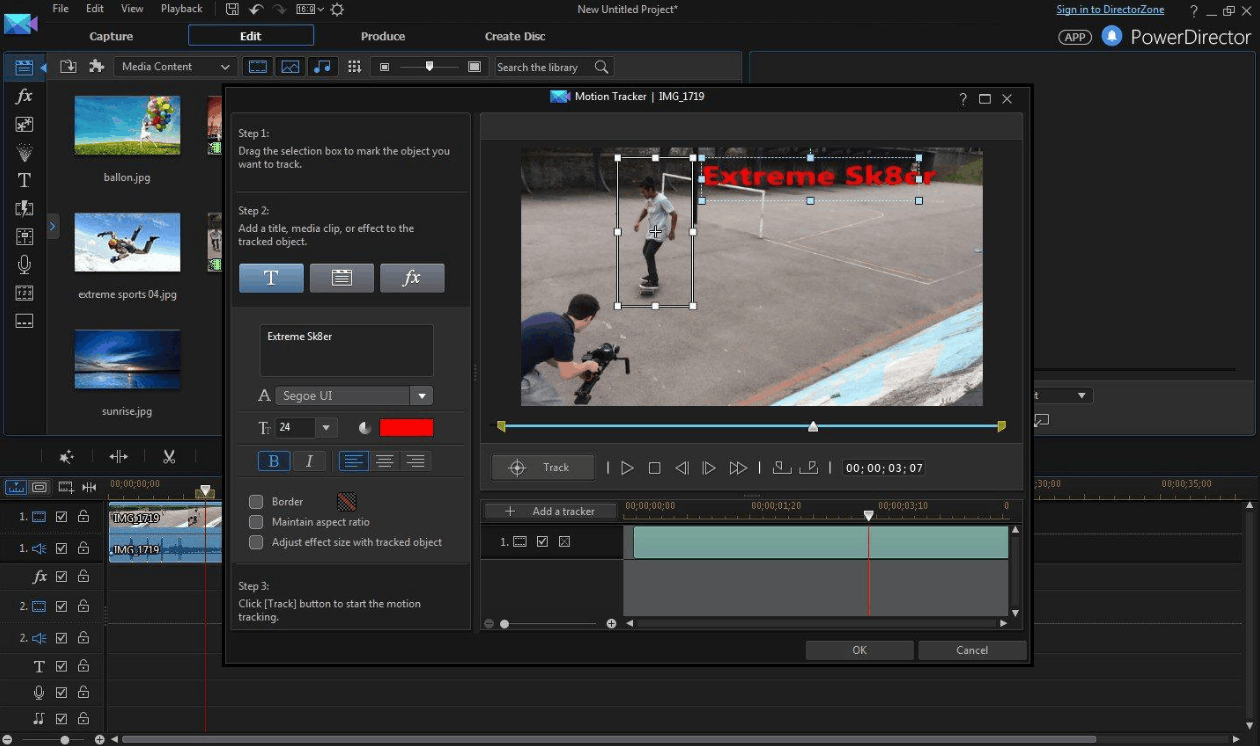
In addition, PowerDirector provides keyframe controls, a green screen removal tool, masks to isolate subjects, video stabilization, and color correction and matching. The software supports 4K video editing and multi-camera editing. A library of animated titles, animated overlays, and audio editing help you finish your product without switching to another application. AI-powered video quality enhancement features and vertical video workflows for social media are also emphasized by CyberLink.
PowerDirector suits projects that combine ordinary video editing with titles, transitions, motion tracking, and occasional compositing of effects.
1.2 Strengths and limitations of PowerDirector
In terms of strengths, PowerDirector is much easier to learn than in-depth compositing applications. You can edit video and add effects in the same software, the motion tracking tool works well, and the software supports common social media formats.
In terms of limitations, its advanced compositing capabilities are not as deep as After Effects. Some premium features are only available in the paid version. An interface with a large feature set can also sometimes feel confusing to newcomers. In addition, the software is better suited to ordinary video editing and is not ideal for complex 3D effects.
2. Blender, a powerful open-source 3D toolkit
Note that here Blender is 3D graphics software, not a household appliance. It is one of the most powerful free options for replacing After Effects, although its approach is different. Rather than focusing mainly on 2D motion graphics, Blender is a complete 3D creative toolkit, including modeling, animation, simulation, rendering, compositing, motion tracking, and even video editing. The software is completely free, open-source, and runs on Windows, macOS, and Linux.
2.1 Notable features of Blender
Blender's built-in compositor can handle both images and video, while its motion tracking tool can track the movement of a camera or an object in footage. The software also has a video editor that helps arrange footage, add transitions, and work with audio.
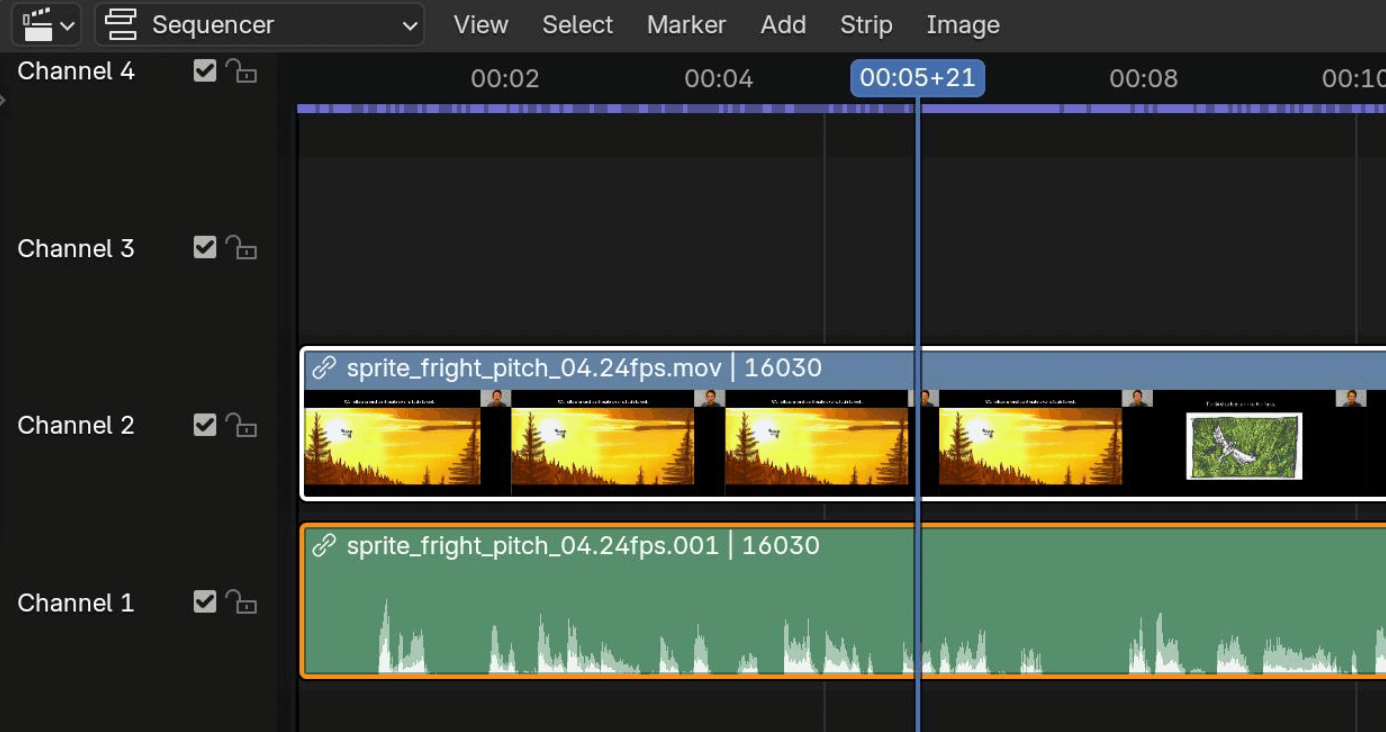
In 3D, Blender provides modeling, character animation, particle and physics simulation, and high-quality rendering tools. Masking, rotoscoping, and color and image processing are fully supported. Advanced users can also customize and automate their workflow with Python.
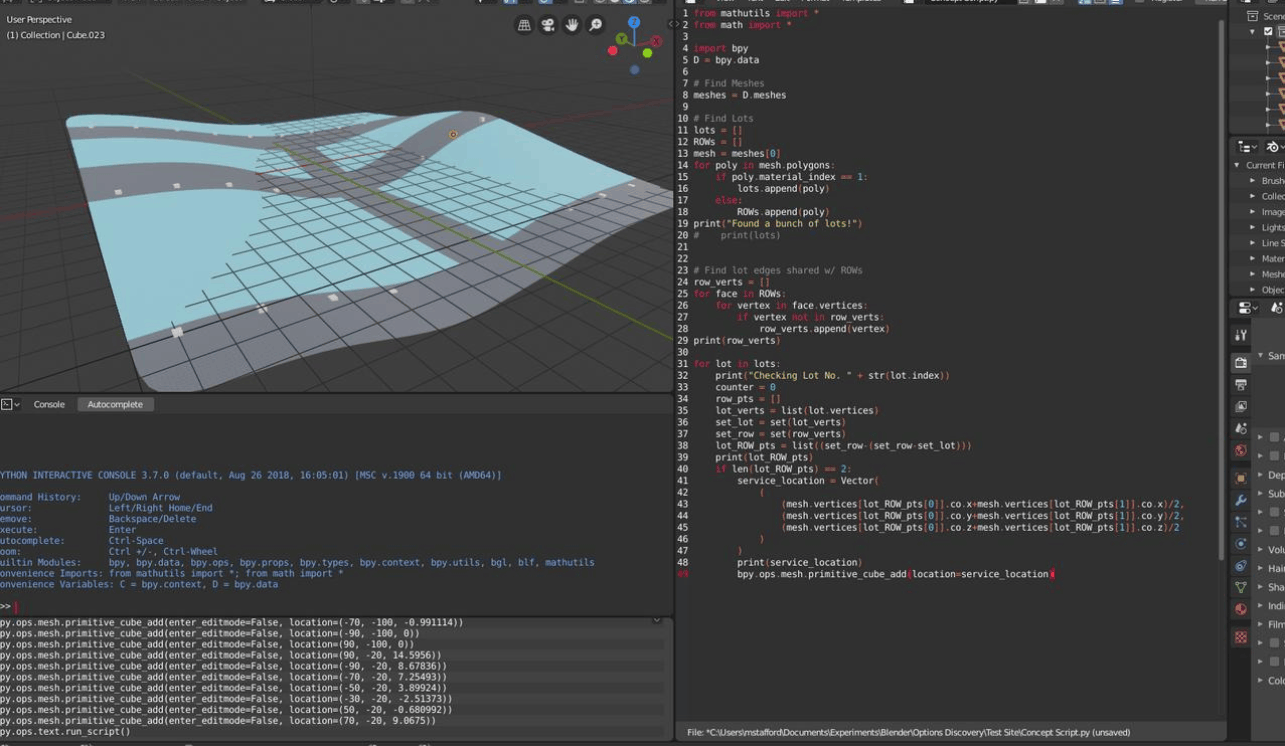
Blender is especially appealing if you want an After Effects alternative that also opens up the possibility of modeling, 3D animation, simulation, and rendering.
2.2 Strengths and limitations of Blender
The biggest strengths are zero cost and a very large user community. Excellent 3D capabilities, a powerful compositor and motion tracking, plus cross-platform support make Blender suitable for complex effects projects.
In return, Blender has a steep learning curve, and its interface can overwhelm newcomers. The software is not designed primarily for 2D motion graphics, and some workflows need more setup than in dedicated editors. For simple jobs such as titles or transitions, Blender may be overkill.
3. Apple Motion, a lightweight choice for Mac users
Apple Motion is a dedicated motion graphics application designed to create animated titles, transitions, visual effects, and both 2D and 3D graphics. Unlike many subscription-based software, Motion is sold as a one-time purchase on the Mac App Store, with a current US list price of 49.99 USD. The software runs only on macOS.
3.1 Notable features of Apple Motion
Motion lets you create 2D and 3D titles, animated text, and real-time effects, so you see results immediately as you edit without waiting long for rendering. The software supports keyframe animation, particle systems, masks, rotoscoping, and motion tracking, including tracking features powered by machine learning. Motion also supports 360-degree content and third-party FxPlug plugins.
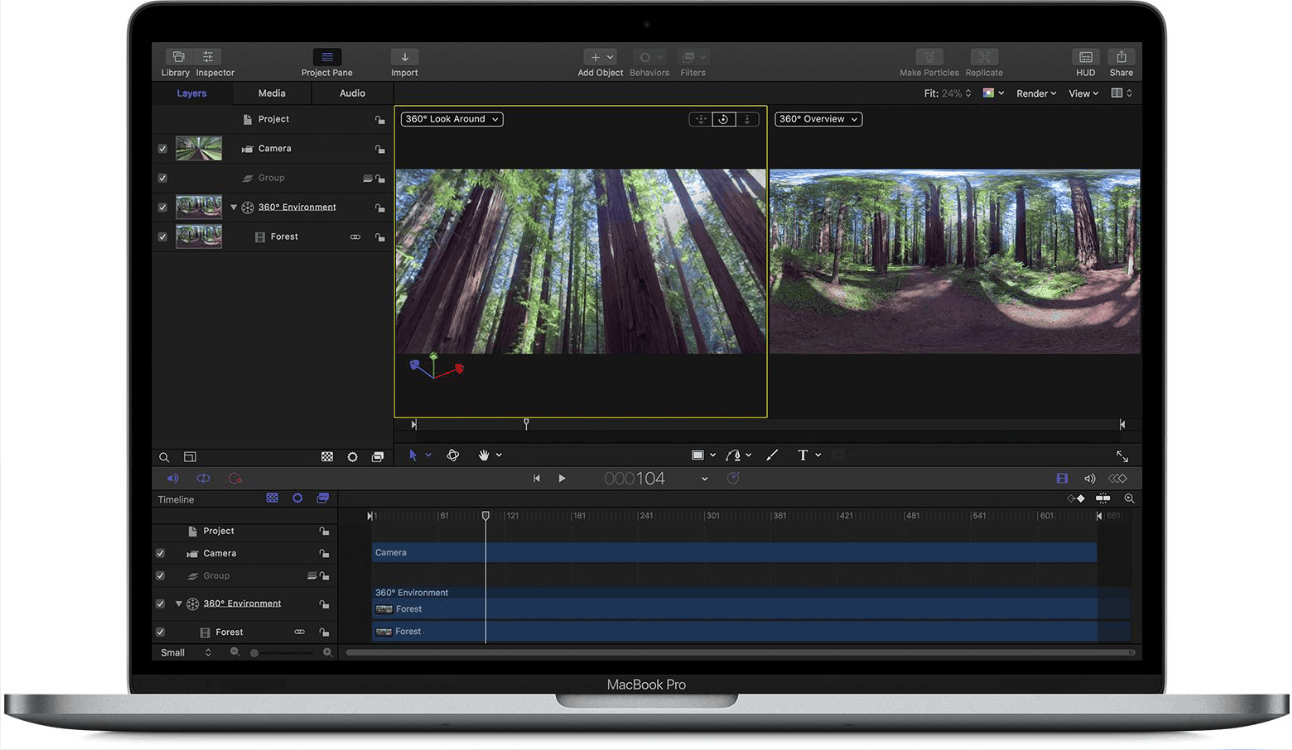
The biggest plus is its integration with Final Cut Pro. Titles, effects, transitions, and generators you design in Motion can appear in Final Cut Pro as customizable templates, making for a seamless workflow. For Mac users who mainly need motion graphics and are already familiar with Final Cut Pro, this is one of the simplest and most sensible choices.
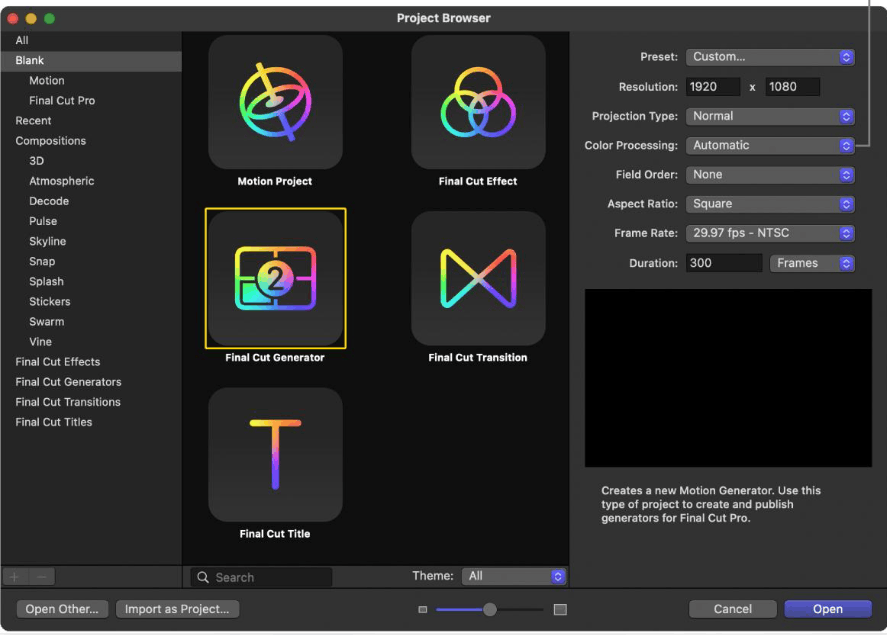
3.2 Strengths and limitations of Apple Motion
Motion has a low one-time price, deep integration with Final Cut Pro, a smooth real-time workflow, and a fairly complete set of 2D and 3D tools, along with modern motion tracking and masking tools.
The first limitation is that the software is Mac-only. Motion is not a general-purpose video editor, is less suited to some advanced 3D workflows, and its plugin and resource ecosystem is also smaller than Adobe's. The software works best when you are already within the Apple ecosystem.
4. Cinema 4D, a professional solution for 3D motion graphics
Maxon's Cinema 4D is professional 3D software, especially strong in motion graphics. The software works on Windows and macOS under a subscription model. If your project revolves around 3D objects, procedural animation, simulation, and high-quality rendering, this is a name worth considering more than an ordinary video editor.
4.1 Notable features of Cinema 4D
Cinema 4D provides tools for modeling, animation, procedural motion design, simulation, rendering, and motion tracking. The MoGraph system is a highlight, allowing you to create complex animations without manually keyframing each object. For example, you can control hundreds of shapes at once with a few parameters.

Current subscription plans all come with the Redshift GPU renderer, which shortens the time needed to create high-quality images. The software also supports animated characters, particles, cloth, rigid bodies, fluids, and many other kinds of simulation, along with surface material creation. Recent versions have further expanded simulation, particle, MoGraph, and UV workflow tools.
A practical advantage is that Cinema 4D can work together with After Effects through Maxon's workflow tools. So even artists who don't want to give up Adobe software entirely can still benefit.
4.2 Strengths and limitations of Cinema 4D
The software has an excellent set of motion graphics tools, powerful 3D modeling and animation, flexible procedural workflows, integrated GPU rendering, and impressive simulation capabilities.
However, Cinema 4D runs on a subscription model, is more specialized than an ordinary video editor, and takes time to get used to. For simple 2D effects, it may be overkill. System specs also need to be higher as scenes become more complex.
5. DaVinci Resolve with Fusion, an all-in-one post-production platform
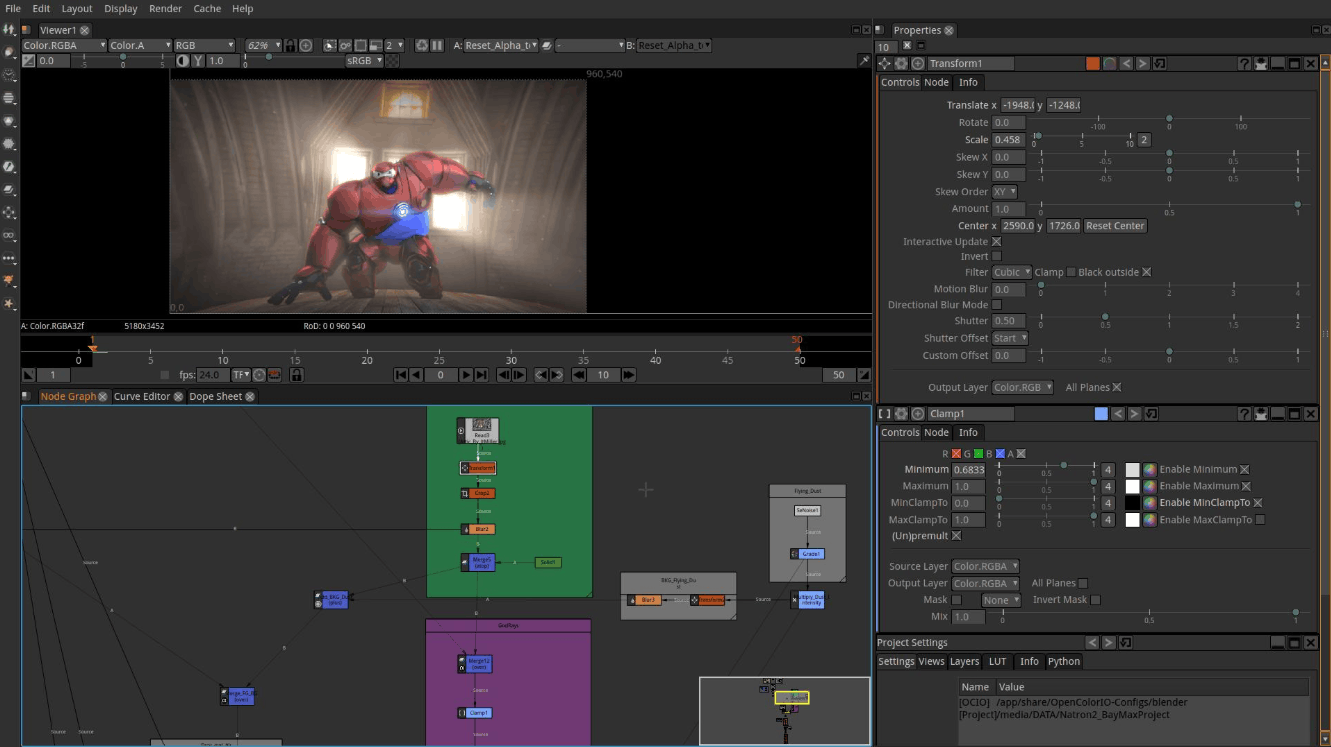
Fusion is a visual effects and motion graphics environment integrated right inside Blackmagic Design's DaVinci Resolve. Unlike After Effects' familiar layer-based interface, Fusion operates on a node-based workflow, in which each node handles one task and is connected together into a processing graph. DaVinci Resolve has a free version, while the Studio edition is the paid version, and the software runs on Windows, macOS, and Linux.
5.1 Notable features of DaVinci Resolve with Fusion
Fusion supports 2D and 3D compositing, motion graphics, particle effects, keying for background removal, rotoscoping, curve-based animation, and 3D camera tracking. Nodes let you control each processing step, making multi-layered effects easy to manage and easy to re-edit later.
The biggest value of using Fusion in DaVinci Resolve is the ability to switch back and forth between editing, visual effects, color grading, and audio post-production without having to maintain several separate applications. Resolve's color grading capabilities are highly regarded by professionals, so you can finish the entire product in the same environment.
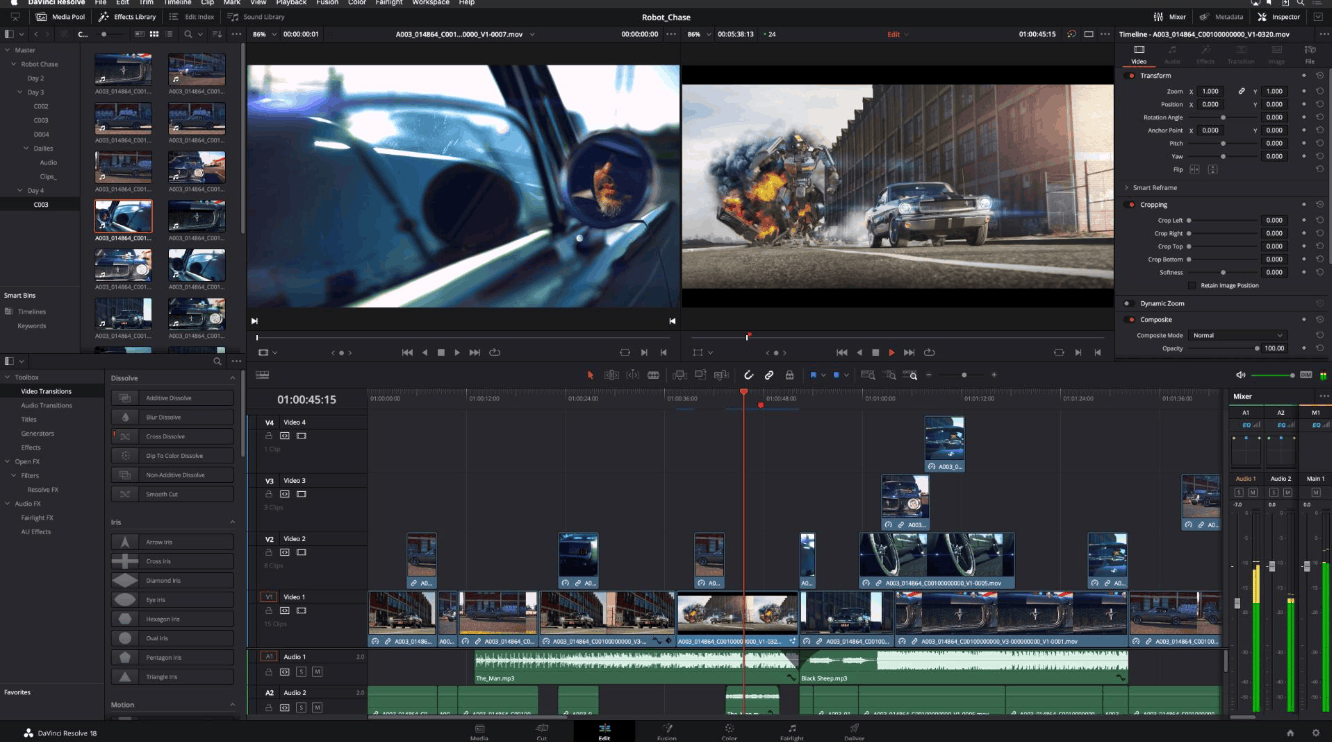
If you want a single application that both edits video and creates effects, DaVinci Resolve with Fusion is one of the strongest options for replacing a workflow built around After Effects.
5.2 Strengths and limitations of DaVinci Resolve with Fusion
The software has a free version, combines editing, effects, color, and audio, has powerful compositing capabilities, supports Linux, and is very well suited to a complete post-production workflow.
On the limitation side, people used to After Effects will need time to adapt to node-based thinking. The application is large and has a great many features, and advanced effects require a considerable learning process. Hardware requirements rise with heavy projects, and Fusion can be a bit complicated if you only need to make a few simple animations.
6. Natron, a completely free node-based compositing tool
Natron is a free, open-source compositing application inspired by node-based effects workflows in the professional post-production industry. The software focuses on compositing rather than general video editing, and runs on Windows, macOS, and Linux.
6.1 Notable features of Natron
Natron operates on a node graph and provides tools for tasks such as keying for background removal, 2D motion tracking, rotoscoping, geometric transformation, and image processing. The software supports color processing, image and video compositing, and is compatible with the OpenFX plugin standard, so you can extend its capabilities with many third-party effect packs.
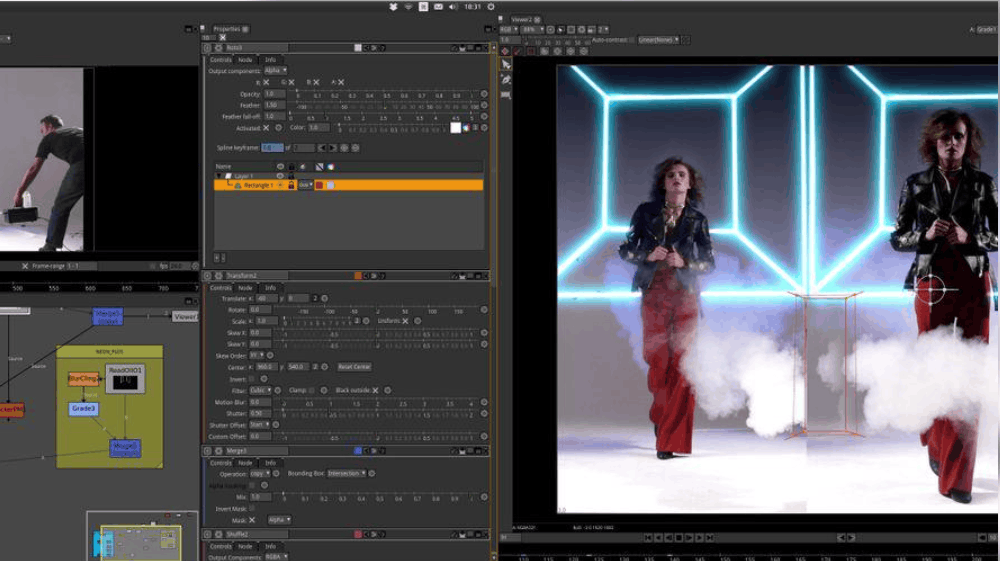
Natron still has releases and development activity, although its ecosystem and feature set are significantly smaller than commercial applications such as After Effects or Fusion. It is a worthwhile option if your main requirement is compositing rather than editing an entire video project, or if you want to get familiar with node-based thinking at no cost.
6.2 Strengths and limitations of Natron
Natron is completely free and open-source, has a node-based compositing workflow, runs cross-platform, is suited to visual effects, and supports OpenFX.
The limitations are a fairly small ecosystem, the software is not a full video editor, and its development pace is not as lively as the big commercial solutions. It has fewer built-in tools than After Effects or Fusion, and users may need additional technical knowledge to use it effectively.
7. How to choose the right alternative for you
Before installing any tool, determine which part of the After Effects workflow you actually need. If your work is mainly cutting and joining clips, adding titles, transitions, background music, and color correction along with a few simple effects, an in-depth compositing application may not be necessary, and PowerDirector handles most of these tasks well. When you need to composite many layers, isolate subjects, track motion, remove green screens, and build complex effects, consider Fusion, Blender, or Natron. For projects that need 3D models, simulation, procedural animation, or physically based rendering, Blender and Cinema 4D are stronger options.
Mac users working around Final Cut Pro should consider Apple Motion, while Linux users can choose Blender, DaVinci Resolve, or Natron since After Effects does not support that operating system.
8. Conclusion
No software perfectly replicates every After Effects workflow, so the most effective approach is to start from your own work rather than chase the number of features. PowerDirector is practical for video editing with effects and motion tracking. Blender is the strongest free choice for 3D, visual effects, and compositing. Apple Motion appeals to Mac and Final Cut Pro users, and Cinema 4D is aimed at professional motion graphics and 3D. DaVinci Resolve with Fusion is an all-in-one post-production solution, while Natron remains a free compositing tool worth trying. Clearly define your needs, budget, operating system, and skill level, then try a few applications to find the tool that will accompany you in the long run.





















VIP Products








Best Selling Products
Autodesk All App Account Copyright
120 USD
Plugin Retouch4me
69 USD
Windows 10 & 11 Pro Key
36 USD
Freepik Premium Account
59 USD
MidJourney Account
29 USD
Adobe Photoshop Copyright - Full App
120 USD
Upgrade genuine Capture One account
120 USD
Capcut Pro 1 Year
39 USD
Upgrade Duolingo Super
29 USD
Genuine Cheap Canva Pro
39 USD
Adobe Premiere Pro Account
99 USD
Copyright Adobe Lightroom Account
59 USD
Genuine Adobe Illustrator account
99 USD
Upgrade Genuine Office 365
49 USD
ChatGPT Plus Account (GPT-4)
16 USD