Best Selling Products

Genuine Adobe Illustrator account
99 USD

Capcut Pro 1 Year
39 USD

Upgrade Duolingo Super
29 USD

Genuine Cheap Canva Pro
39 USD

Upgrade Genuine Office 365
49 USD

MidJourney Account
29 USD

Autodesk All App Account Copyright
120 USD

Windows 10 & 11 Pro Key
36 USD

Adobe Photoshop Copyright - Full App
120 USD

Adobe Premiere Pro Account
99 USD

ChatGPT Plus Account (GPT-4)
16 USD

Upgrade genuine Capture One account
120 USD

Freepik Premium Account
59 USD

Plugin Retouch4me
69 USD

Copyright Adobe Lightroom Account
59 USD
7 apps to help you take more effective astrophotography photos with your phone.
Nội dung
- 1. PhotoPills: A comprehensive planning toolkit for night photographers.
- 2. The Photographer's Ephemeris: Map-Based Planning Options for iPhone Users
- 3. Ephemeris: Sun and Moon Seeker: A free planning solution for Android
- 4. Sky Guide: Your sky-identifying companion, works even without a signal.
- 5. Celestron SkyPortal: An astronomical encyclopedia for observation enthusiasts.
- 6. NightCap Camera: A dedicated camera app for night scenes on iPhone.
- 7. Stellarium Mobile: Free star map with accurate astronomical data
- 8. Conclusion: Choose the right app suite for your device and shooting style.
Photographing the night sky has never been more accessible. Your phone can tell you what time the Milky Way will rise, the direction of the Moon, whether clouds will obscure the sky tonight, and even directly capture star trails or galactic scenes. Of course, to get photos detailed enough for large prints, you still need a camera, tripod, and a bright lens. But the apps below will make all the preparation much more precise and effortless.
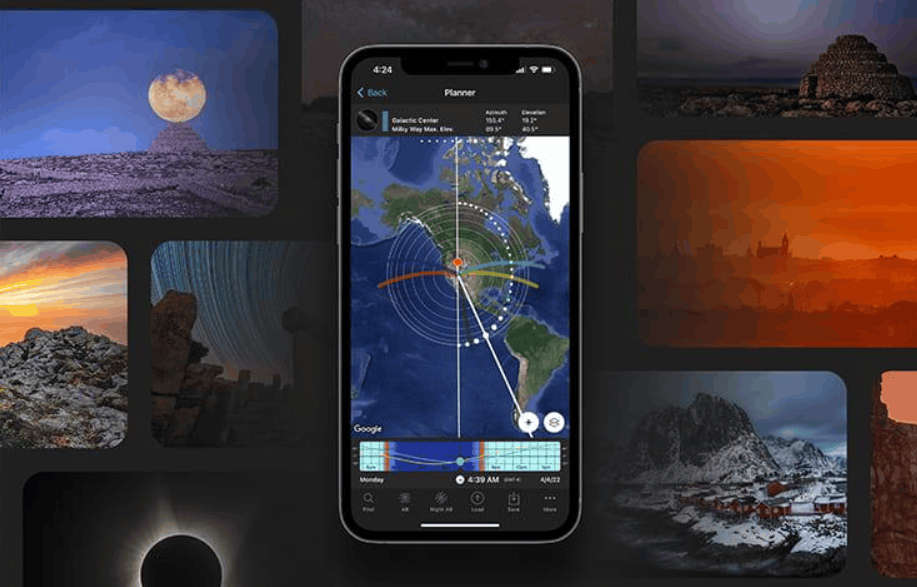
1. PhotoPills: A comprehensive planning toolkit for night photographers.
PhotoPills, launched in 2013, has long been an indispensable app for many landscape photographers around the world. While not specifically designed for astronomy, its night photography features are among the most advanced and practical available today. The app is available on both iOS and Android, with a one-time purchase price of around $10.99, and no monthly subscription required.
PhotoPills' greatest strength lies in its planning capabilities. The 2D map lets you preview the positions of the Sun, Moon, and Milky Way at any location, at any time. The 3D augmented reality mode lets you see the Milky Way's core, the North Star, and the celestial equator right on your screen, positioned correctly relative to the real-world context. The lunar calendar shows the shape, rising time, and direction of the moon each night, useful when you want to capture the full moon behind a mountain or tower.
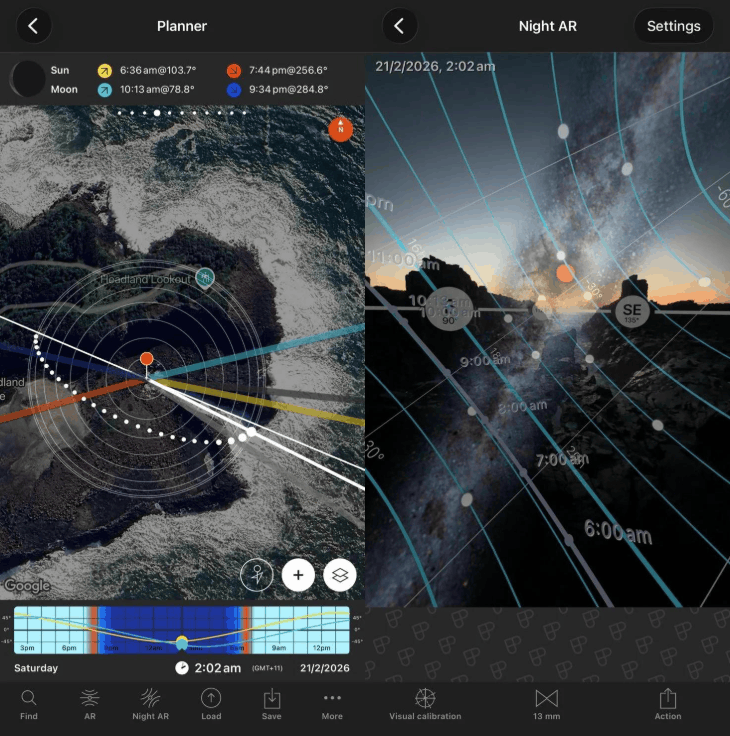
The shooting parameter calculator is also worth mentioning. The exposure time calculator for star trails and long-exposure photos takes your sensor and focal length into account, making it more accurate than the traditional 500 rule which is based on general assumptions. Additionally, the app supports tracking solar and lunar eclipses, calculating frame rates and intervals between shots for time-lapse photography, and provides information on golden hours, blue hours, and sunset phases.
The price of completeness is complexity. You should spend a few nights getting familiar with it before you can operate it quickly, and the Academy section with its many tutorial videos will be of great help. If you only need to know the name of the star above your head, a free astrology map would be more suitable.
2. The Photographer's Ephemeris: Map-Based Planning Options for iPhone Users
The Photographer's Ephemeris, often abbreviated as TPE, is a direct competitor to PhotoPills on the iOS platform. The app's philosophy revolves around mapping: all information about light and celestial objects is placed directly onto the real terrain, allowing you to accurately visualize the scene before leaving home. The app also charges a one-time fee, at a price similar to PhotoPills.
Astronomically, TPE provides the position and timing of the Sun, Moon, and other celestial bodies on any given day. You can look up the azimuth and altitude of the Milky Way's core hourly, and view major events such as lunar phases, summer solstice, winter solstice, and spring and autumn equinoxes. The app also includes eclipse maps and simulators, updated for the 2027 and 2028 eclipses, and reminds you of upcoming lunar and solar eclipses. All three twilight phases—civilian, nautical, and astronomical—are clearly displayed, helping you know when the sky is truly dark enough.
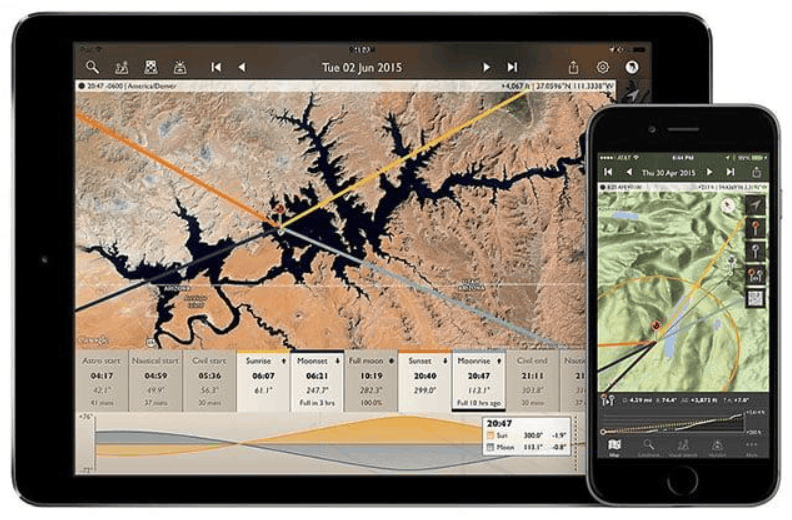
Two other standout features are the augmented reality 3D Milky Way map and the light pollution overlay. This overlay is particularly valuable when you need to find a very dark shooting spot, because even with artificial light filters, a deserted location always yields better results. The line-of-sight analysis tool, distance calculator, and elevation angle calculator are also very useful for those who like to shoot landscapes with a clear foreground. In addition to the mobile app, TPE also has a web version for computers so you can plan on a large screen.
The most obvious limitation is that TPE doesn't have an Android version, and sunrise and sunset color forecasts require a separate Skyfire subscription. It's also not a camera app, so you still need a suitable camera.
3. Ephemeris: Sun and Moon Seeker: A free planning solution for Android
Android users don't have TPE, but that doesn't mean they're short of options. Ephemeris: Sun and Moon Seeker, developed by Vito Technology, is a worthwhile planning tool, free to download and upgradeable with in-app purchases when you need more features.
This app tracks the orbits of the Sun and Moon, provides the altitude and azimuth of the Milky Way, and the brightness and phase of the Moon. The great thing is you can view this information for any time, past or future, making it possible to plan a photography trip next month or even next year. The 3D compass has two modes, basic and advanced, helping you locate celestial objects from your precise position according to your desired level of detail.
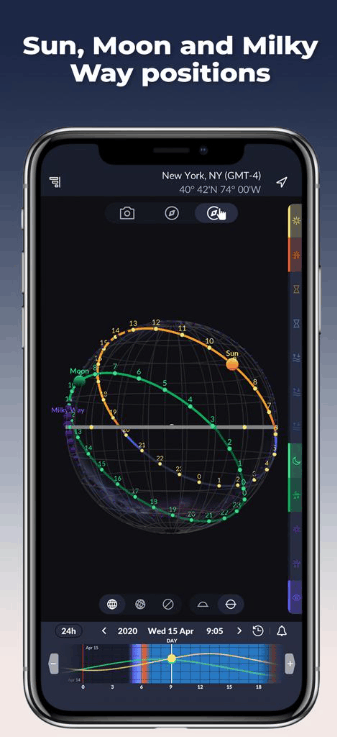
The most notable feature is the augmented reality live view. It displays the night sky with celestial objects positioned correctly relative to your chosen vantage point, even for a future time. This allows you to visualize the composition beforehand without waiting until nighttime to shoot. The app also sends notifications about sunset, golden hour, and blue hour times, along with accurate sunrise and sunset times for almost any location.
It's important to note that this is a planning tool, not a star map. It will tell you when the Milky Way's nucleus rises, but it won't name the bright stars next to it. While not as sophisticated as TPE or PhotoPills, it's a very reasonable and free starting point for beginners.
4. Sky Guide: Your sky-identifying companion, works even without a signal.
Sky Guide was developed by Fifth Star Labs and is only available for iPhone and iPad. It's not a photography app in the strict sense, but for astrophotographers, it's a very convenient companion when standing in the dark of night wondering what they're seeing.
It's incredibly easy to use: open the app, point your phone at the sky, and the app will instantly recognize everything it sees, from stars, planets, and constellations to satellites and man-made objects like the International Space Station. The augmented reality mode overlays the shapes of constellations onto the real sky, connecting key bright spots, helping you understand why each constellation is named that way and feel the structure of the sky more intuitively.
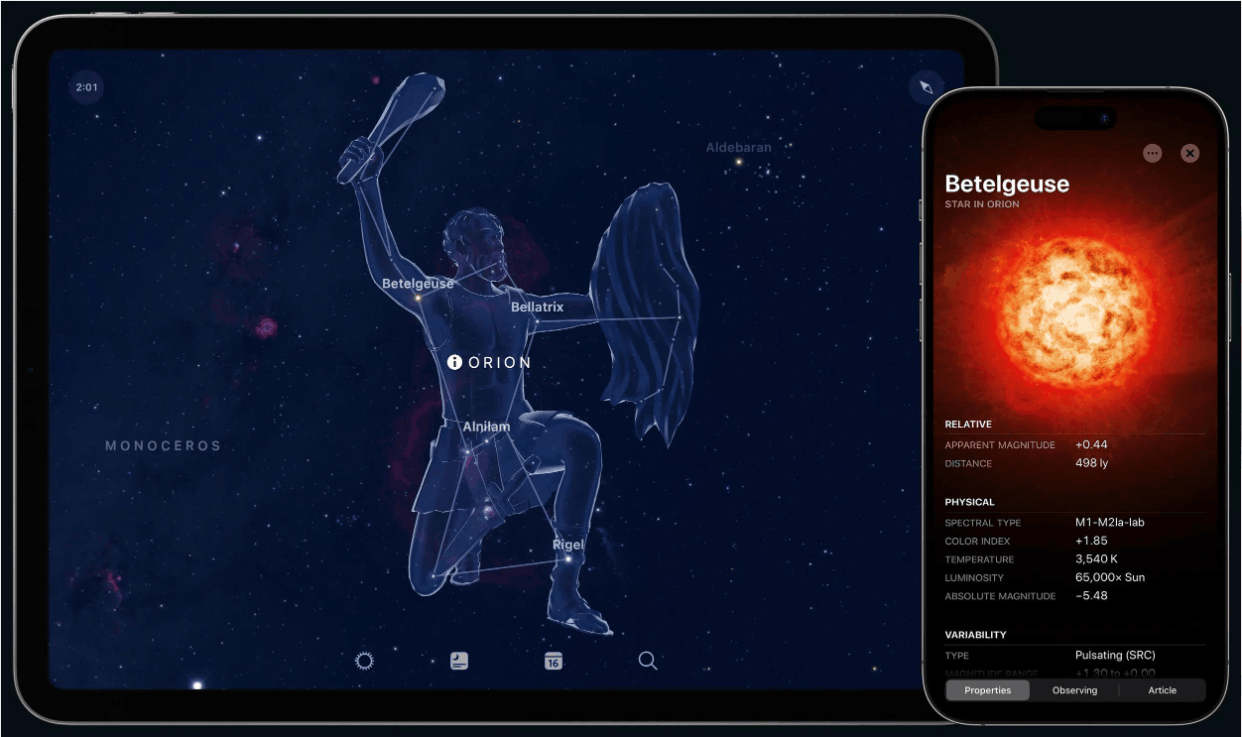
The biggest advantage of Sky Guide is its ability to function completely without WiFi, cellular signal, or GPS. This is highly practical, as the best astronomical photography locations are often in remote areas where cell phone signals are virtually nonexistent. The app also notifies you about astronomical events in your area, such as meteor showers, lunar eclipses, and solar eclipses, ensuring you don't miss any worthwhile nights for photography.
The app is free to download, but advanced satellite tracking features and image packages are sold as in-app purchases. A point to consider is that Sky Guide only shows you the sky right now, not helps you plan a shoot for next Thursday. Think of it as a supplement to a planning app, rather than a replacement.
5. Celestron SkyPortal: An astronomical encyclopedia for observation enthusiasts.
Celestron is one of the world's leading telescope brands, and SkyPortal is their official app, containing a wealth of information about the universe. The app is free and available on iOS and Android, with some advanced content sold through in-app purchases.
In terms of recognition capabilities, SkyPortal covers over 120,000 stars and more than 200 star clusters, nebulae, and galaxies, and also recognizes asteroids and satellites. The compass mode displays the sky above you in real time: simply point the camera at the sky, and the app will return relevant information for each object.
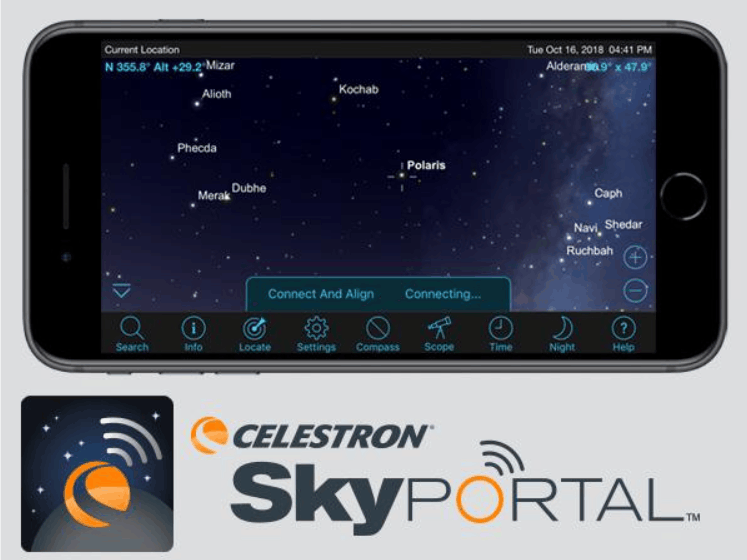
One clever feature is that the compass still works during the day, so you can arrive at your intended shooting location in the afternoon, point your phone at it, and see where the Milky Way will be that night. The sky simulator allows you to move forward or backward by up to 100 years, making it easy to check any day. Once on location, the red-light night mode helps protect your eyes' ability to adjust to darkness. The app also includes a library of astronomical images and over four hours of audio commentary guiding you through the stars and planets, perfect for learning more during those nights waiting for exposures.
If you own a Celestron telescope with WiFi, you can pair it with the app to make searching for celestial objects easier. Conversely, if you don't use the company's equipment, SkyPortal will be more of an astronomical encyclopedia than a photography tool.
6. NightCap Camera: A dedicated camera app for night scenes on iPhone.
In this list, NightCap Camera is the only app that actually takes care of photography. Developed by Realtime Dreams, it's a specialized camera app for night photography, available only for iPhone and with a one-time fee.
NightCap boasts five astronomical modes, each with its own camera settings. The Stars mode is for the Milky Way. Star Trails draws circles around the aurora borealis. Meteors automatically captures passing meteors. ISS is for capturing the International Space Station as it flies by. Aurora, added in version 10, is a time-lapse mode for the aurora borealis in both hemispheres. If you prefer more control, you can manually adjust exposure, ISO, focus, and white balance with swipe gestures. Because phone lenses have fixed apertures, shutter speed and ISO are the two parameters that truly affect the results.
The app boasts numerous features that improve night photography quality, which is often difficult with phones: ISO can be pushed up to four times higher than many other apps, a noise reduction mode for cleaner images, and a brightness boost feature to brighten overly dark frames. 16x zoom supports capturing distant objects, including the surface of the Moon. A notable feature in version 10 is the ability to align and stack the entire frame as you shoot, allowing for handheld long exposures, something previously almost impossible. While it can't replace a tripod for a half-hour star trail sequence, this feature is still sufficient to produce a usable Milky Way frame as long as you hold the camera steady. Long exposure and time-lapse modes also produce 4K video that can be directly uploaded to social media.
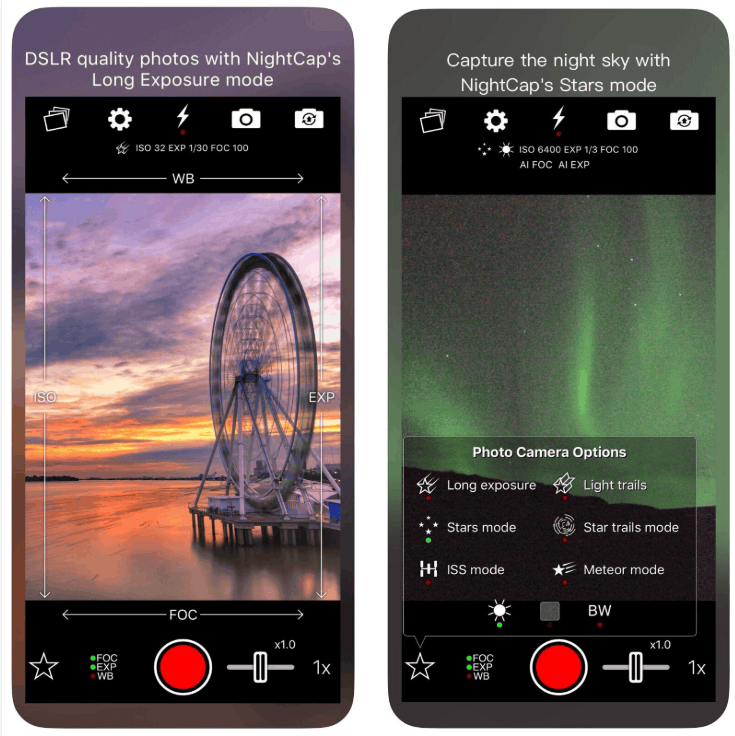
The biggest limitation remains the platform: Android users will have to rely on their phone's built-in night mode.
7. Stellarium Mobile: Free star map with accurate astronomical data
Stellarium is a familiar name in the astronomy community, and the mobile version developed by Noctua Software is a reliable guide on both iPhone and Android. The app is free to download, with some advanced content available through in-app purchases.
Stellarium's core function is identification. You point your phone at the sky, and the app tells you exactly which star, constellation, planet, or comet you're looking at, as well as man-made objects like satellites and the ISS. If something intrigues you, you can zoom in for a closer look, with real astronomical images and 3D models to help you better understand what's visible above. The 3D sky rendering feature also allows you to view the sky from other parts of the Earth, a fun feature for those who enjoy exploration.
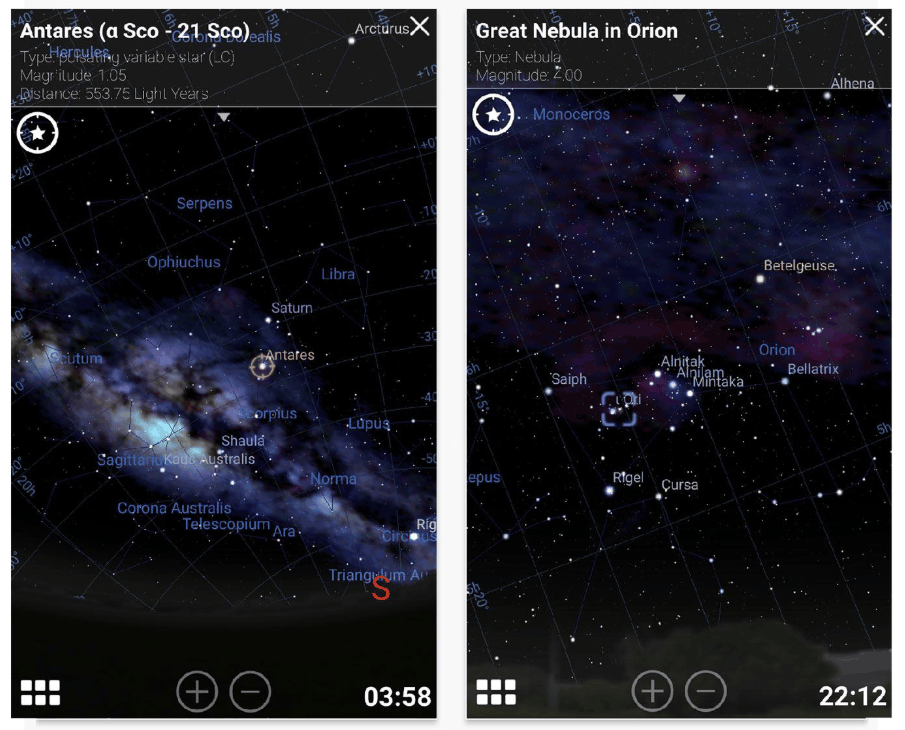
The red light in night mode is a small but crucial detail for night photographers. When switching your gaze between your phone screen and the darkness outdoors, your eyes don't have to readjust, thus maintaining better vision throughout the shoot.
It's also worth noting the Stellarium Plus version, which adds a much deeper catalog of celestial objects and smoother performance. On iPhone, this is a free in-app purchase. On Google Play, it's a separate, paid app, so be sure to check before installing. Finally, Stellarium is a star map, not a planner or camera. It won't tell you when the Milky Way will cross the horizon or what exposure settings to use, so use it in conjunction with PhotoPills or Ephemeris, rather than as a replacement.
8. Conclusion: Choose the right app suite for your device and shooting style.
No single app can meet all your needs, and that's why you should think about building a compact toolkit. A lightweight and effective combination would be to use a planning app to know where and when to be, a star map to name what you find, and a sky weather forecast app to decide whether or not to go.
For iPhone users, PhotoPills or The Photographer's Ephemeris for planning, plus Stellarium Mobile or Sky Guide, and NightCap Camera if you don't bring a camera, makes a very powerful trio. For Android users, PhotoPills combined with Stellarium Mobile is a solid foundation, while Ephemeris: Sun and Moon Seeker is a cost-effective planning option. And if you own a Celestron telescope, SkyPortal will offer significantly more value than those who don't.
Whichever method you choose, start by opening your calendar app, checking the next new moon, then select a very dark location and go find your own Milky Way.





















VIP Products








Best Selling Products
Genuine Adobe Illustrator account
99 USD
Capcut Pro 1 Year
39 USD
Upgrade Duolingo Super
29 USD
Genuine Cheap Canva Pro
39 USD
Upgrade Genuine Office 365
49 USD
MidJourney Account
29 USD
Autodesk All App Account Copyright
120 USD
Windows 10 & 11 Pro Key
36 USD
Adobe Photoshop Copyright - Full App
120 USD
Adobe Premiere Pro Account
99 USD
ChatGPT Plus Account (GPT-4)
16 USD
Upgrade genuine Capture One account
120 USD
Freepik Premium Account
59 USD
Plugin Retouch4me
69 USD
Copyright Adobe Lightroom Account
59 USD
Articles on the same topic