Best Selling Products

Autodesk All App Account Copyright
120 USD

Adobe Premiere Pro Account
99 USD

Upgrade Genuine Office 365
49 USD

Upgrade Duolingo Super
29 USD

Plugin Retouch4me
69 USD

Copyright Adobe Lightroom Account
59 USD

Genuine Cheap Canva Pro
39 USD

Capcut Pro 1 Year
39 USD

Windows 10 & 11 Pro Key
36 USD

Upgrade genuine Capture One account
120 USD

MidJourney Account
29 USD

Adobe Photoshop Copyright - Full App
120 USD

ChatGPT Plus Account (GPT-4)
16 USD

Genuine Adobe Illustrator account
99 USD

Freepik Premium Account
59 USD
7 steps to running ads on ChatGPT for Vietnamese businesses.
Nội dung
- 1. What are ChatGPT Ads?
- 2. What does the ChatGPT ad template include?
- 3. How do ChatGPT Ads work?
- 4. Who can see ads on ChatGPT?
- 5. How much does it cost to run ads on ChatGPT?
- 6. A 7-step guide to running ads on ChatGPT
- 6.1. Step 1: Register for an Ads Manager account
- 6.2. Step 2: Set up payment method
- 6.3. Step 3: Create a campaign and define objectives
- 6.4. Step 4: Create ad groups and write context hints
- 6.5. Step 5: Create ad template and attach landing page
- 6.6. Step 6: Set up measurement using Pixel and UTM
- 6.7. Step 7: Activate and optimize the campaign
- 7. Tips for running effective ChatGPT Ads
- 8. Conclusion
ChatGPT is opening up a new marketing avenue, helping businesses reach customers right as they search for information and interact with AI. Instead of just appearing on Google or social media, brands have more opportunities to introduce products and services in contexts that match user needs. The emergence of ChatGPT Ads also raises many questions for businesses: How does the advertising work? Who can see the ads? How are costs calculated and what do you need to prepare to get started? In this article, Sadesign will help you understand the overview of ChatGPT Ads and guide you through 7 steps to deploy a campaign, from account registration and budget setting to measuring and optimizing effectiveness.

1. What are ChatGPT Ads?
ChatGPT Ads are an advertising format developed by OpenAI that allows businesses to showcase their products and services within the ChatGPT interface. Ads can appear below responses when the content is deemed relevant to the user's interaction context. Unlike traditional search advertising, ChatGPT Ads aim to connect brands with needs expressed through conversation. For example, when a user searches for design software or marketing solutions, relevant ads may appear if they meet the delivery criteria.
Some notable features of ChatGPT Ads include:
-
Contextual display: Ad content is considered based on its relevance to the user's interests.
-
Identification label: Advertisements are distinguished from ChatGPT responses by a sponsored content label.
-
Landing page links: Businesses can direct users to their website, product page, or service registration page.
-
Do not control AI responses: Advertisers do not purchase the right to change the content of ChatGPT's responses.
-
Effectiveness needs to be measured: Impressions are just the first step. Businesses need to track clicks, conversions, and costs to evaluate results.
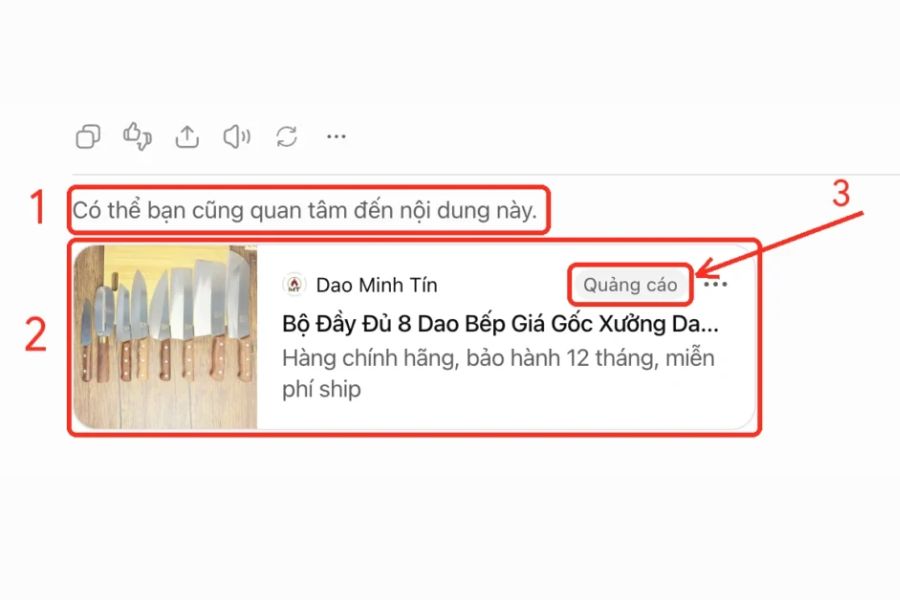
2. What does the ChatGPT ad template include?
Ads on ChatGPT are typically presented as a separate content card located below the response. This card provides brand identification, the main message, and a link for users to learn more. Due to the relatively small display space, businesses need to convey clear benefits rather than using lengthy content.
The basic components may include:
-
Advertiser name: Helps users identify the business.
-
Brand logo: Helps increase memorability and recognition.
-
Title: Highlights the main product, service, or benefit.
-
Description: Briefly explain the value that the business brings.
-
Image: Product illustration if supported by the ad format.
-
Landing page link: Directs users to a related website or service page.
-
Advertising labels: Help distinguish sponsored content from AI responses.
3. How do ChatGPT Ads work?
ChatGPT Ads shares some similarities with Google Ads, such as campaign structure, ad groups, ad templates, and delivery mechanisms. However, the most notable difference lies in how ads are connected to the context of the conversation, rather than relying solely on keyword matching. Businesses provide information about their products, related topics, and the target audience they want to reach. The system uses relevant signals to support ad delivery. However, specifying a topic does not guarantee that the ad will appear in every relevant conversation.
The business principles that need to be understood include:
-
Ads aren't just based on keywords: they're considered in context and relevance.
-
Do not insert ads into answers: Sponsored content is displayed separately.
-
No control over AI responses: Advertisers cannot buy the right to direct ChatGPT's responses.
-
No default access to conversations: Advertisers cannot be provided with private chat content simply because an ad appears.
-
Effectiveness depends on many factors: Budget, content, relevance, and landing page quality can all affect the results.
4. Who can see ads on ChatGPT?
The audience for ads depends on the account plan, supported markets, and OpenAI's distribution conditions. According to available information, ads are displayed to users of the Free, Go, and unregistered plans; Plus, Pro, Business, Enterprise, and Edu plans are not shown ads using this model. However, being in a group of users who can see ads does not guarantee they will see the company's ads. The system also considers context, distribution conditions, and content relevance.
-
Clearly identify your target customer group and their needs.
-
Check if Vietnam is on the list of supported markets.
-
Learn about the registration, payment, and ad distribution methods.
-
Assessing customer reach through AI usage behavior.
-
Monitor actual data before expanding the budget.

5. How much does it cost to run ads on ChatGPT?
The cost of ChatGPT Ads should not be considered a fixed price for all businesses. The actual budget depends on campaign goals, pricing mechanisms, distribution conditions, and the level of competition at the time of implementation. Some key metrics to consider include:
-
CPM: Cost per 1,000 impressions, suitable for evaluating the effectiveness of brand reach.
-
CPC: Average cost per click on an advertisement.
-
CTR: The click-through rate (CTR) is the ratio of clicks to total impressions, which helps assess the attractiveness of content.
-
CPA: The average cost to achieve a conversion action such as signing up or making a purchase.
-
ROAS: The ratio of revenue earned to advertising expenses.
6. A 7-step guide to running ads on ChatGPT
6.1. Step 1: Register for an Ads Manager account
First, check the eligibility requirements for the advertising program and access OpenAI's official registration channel if your account in the same market is already supported. Ads Manager is where you manage campaigns, set budgets, and track results.
You should prepare your business name, management email, contact information, and required verification documents. Also, carefully review the advertising policy, industry terms and conditions, and assign account management permissions to the responsible personnel.

6.2. Step 2: Set up payment method
After registration, businesses need to add a payment method accepted by the platform. Please check the payment information, international transaction capabilities, and account limits before implementation.
Some things need to be done:
-
Please confirm that the payment information is correct.
-
Check which cards or payment methods are supported.
-
Identify the person responsible for cost control.
-
Learn about regulations regarding invoices, taxes, and related documents.
-
Set a budget limit if the system offers this option.
6.3. Step 3: Create a campaign and define objectives
In Ads Manager, businesses set up campaigns using a structure of Campaigns, Ad Groups, and Ads. At the campaign level, choose goals that align with your desired business outcomes. If you want to increase awareness, prioritize impressions. If you want to drive traffic to your website, choose a click-through-when-supported goal. For businesses focused on orders or leads, a conversion goal is more appropriate if a corresponding feature is available.
Before starting, you need to define the campaign name, budget, duration, target market, and KPIs for evaluation. Clearly defined criteria make it easier to control costs and compare results later.
6.4. Step 4: Create ad groups and write context hints
Context Hints are contextual suggestions where businesses describe the topic, need, or situation that the product is relevant to. These are not exact match keywords and do not guarantee that the ad will appear in a specific conversation.
For better results, segment your ads by product line or customer needs, then describe the problems your service can solve. For example, a software design provider might mention social media image design, brand identity building, or marketing content creation. Prioritize topics closely related to your product, avoiding overly broad or irrelevant suggestions. This organizational approach also makes it easier for businesses to track which ad groups are performing better.

6.5. Step 5: Create ad template and attach landing page
The ad needs to convey the main benefit in a short time. The headline should be clear, the description should focus on the customer's needs, and the call to action should guide users to the next step. Businesses need to prepare the brand name, headline, description, images (if available), and a landing page link. The content must be consistent with the landing page; avoid situations where the ad introduces a service but users are directed to a homepage lacking relevant information.
Before submitting for review, check the URL, spelling, contact information, and accuracy of the advertising claims. The landing page should load quickly, be easy to use on mobile devices, and help customers quickly find the information they need.
6.6. Step 6: Set up measurement using Pixel and UTM
Measurement helps businesses know if their advertising is generating real value. If your platform and website support it, you can install a Pixel or conversion tracking tool following the official instructions. Additionally, UTMs help differentiate traffic sources and individual campaigns within website analytics tools. Before running campaigns, clearly define the conversions you need to measure, such as form submissions, consultation registrations, or order completions.
Some things that need to be done include:
-
Set up appropriate conversion events.
-
Attach UTMs according to a unified structure.
-
Test data recording capabilities.
-
Compare the number of visits with the actual results.
-
Comply with privacy and personal data requirements.
6.7. Step 7: Activate and optimize the campaign
After completing the setup, submit your ads for review and monitor their delivery status. Once the campaign is running, businesses need to evaluate results against their chosen goals rather than just focusing on impressions. Key metrics to track include:
-
Reach Campaign: Impressions and CPM.
-
Clicks Campaign: Clicks, CTR, and CPC.
-
Conversions Campaign: Number of conversions, conversion rate, and CPA.
-
Revenue campaign: Revenue recorded and ROAS if data allows.
If results aren't meeting expectations, review your ad content, contextual suggestion group, and landing page quality. Experiment with each change to identify the factors impacting performance and avoid increasing your budget too early when data is limited.

7. Tips for running effective ChatGPT Ads
ChatGPT Ads is an advertising channel with a different approach, so businesses need to experiment strategically instead of simply copying campaign prototypes from other platforms.
-
Start with a specific goal: Focus on brand awareness, website traffic, or conversions.
-
Choose products with clear value: Prioritize services that address real needs.
-
Write natural-sounding advertisements: Use easy-to-understand language and avoid exaggerating benefits.
-
Optimize your landing page: Make it easier for users to find information and take action.
-
Budget control: Determine cost limits before implementation.
-
Data-driven evaluation: Monitor results before deciding to expand.
-
Policy update: Check market conditions and new platform features.
8. Conclusion
ChatGPT Ads opens up opportunities to reach customers in contexts relevant to their information search needs. To effectively utilize this, businesses need to understand the advertising mechanism, prepare appropriate content, determine a budget, and set up measurement from the outset. With the 7 steps above, you can build a more systematic implementation process from account registration to campaign optimization. Sadesign recommends that businesses start with clear goals, a suitable budget, and real data to assess the potential of this new advertising channel before investing long-term.





















VIP Products








Best Selling Products
Autodesk All App Account Copyright
120 USD
Adobe Premiere Pro Account
99 USD
Upgrade Genuine Office 365
49 USD
Upgrade Duolingo Super
29 USD
Plugin Retouch4me
69 USD
Copyright Adobe Lightroom Account
59 USD
Genuine Cheap Canva Pro
39 USD
Capcut Pro 1 Year
39 USD
Windows 10 & 11 Pro Key
36 USD
Upgrade genuine Capture One account
120 USD
MidJourney Account
29 USD
Adobe Photoshop Copyright - Full App
120 USD
ChatGPT Plus Account (GPT-4)
16 USD
Genuine Adobe Illustrator account
99 USD
Freepik Premium Account
59 USD