Best Selling Products

Plugin Retouch4me
69 USD

MidJourney Account
29 USD

Genuine Adobe Illustrator account
99 USD

Copyright Adobe Lightroom Account
59 USD

Genuine Cheap Canva Pro
39 USD

Freepik Premium Account
59 USD

ChatGPT Plus Account (GPT-4)
16 USD

Windows 10 & 11 Pro Key
36 USD

Upgrade Duolingo Super
29 USD

Upgrade Genuine Office 365
49 USD

Adobe Premiere Pro Account
99 USD

Capcut Pro 1 Year
39 USD

Adobe Photoshop Copyright - Full App
120 USD

Autodesk All App Account Copyright
120 USD

Upgrade genuine Capture One account
120 USD
8 Technological "Assistants" That Help Teachers Save Time and Enhance Their Lessons
Nội dung
- 1. Transform Studying into an Interactive Experience
- 2. Clearly Outline a Semester-Long Study Plan and Track Each Student's Progress with SheetPlanner
- 3. Create Academic Documents Without the Headache of Formatting with MonsterWriter
- 4. Record your lectures smoothly and professionally with FocuSee.
- 5. Create Subtitles for Any Lecture in an Instant with VidCap
- 7. Transform Recorded Lectures into Lookable Notes with WhisperTranscribe
- 8. Annotate directly on the screen during lectures with Presentify.
- 9. Conclusion
A teacher''s work never ends when the bell rings for the end of class. After each lesson, there''s still the lesson plan for the next day, review materials for students, emails to parents, gradebooks to update, and countless other administrative tasks silently consuming their already limited time. Fortunately, the current Mac ecosystem offers many tools specifically designed to share that burden, allowing teachers to dedicate more time to what''s most important: teaching.
1. Transform Studying into an Interactive Experience
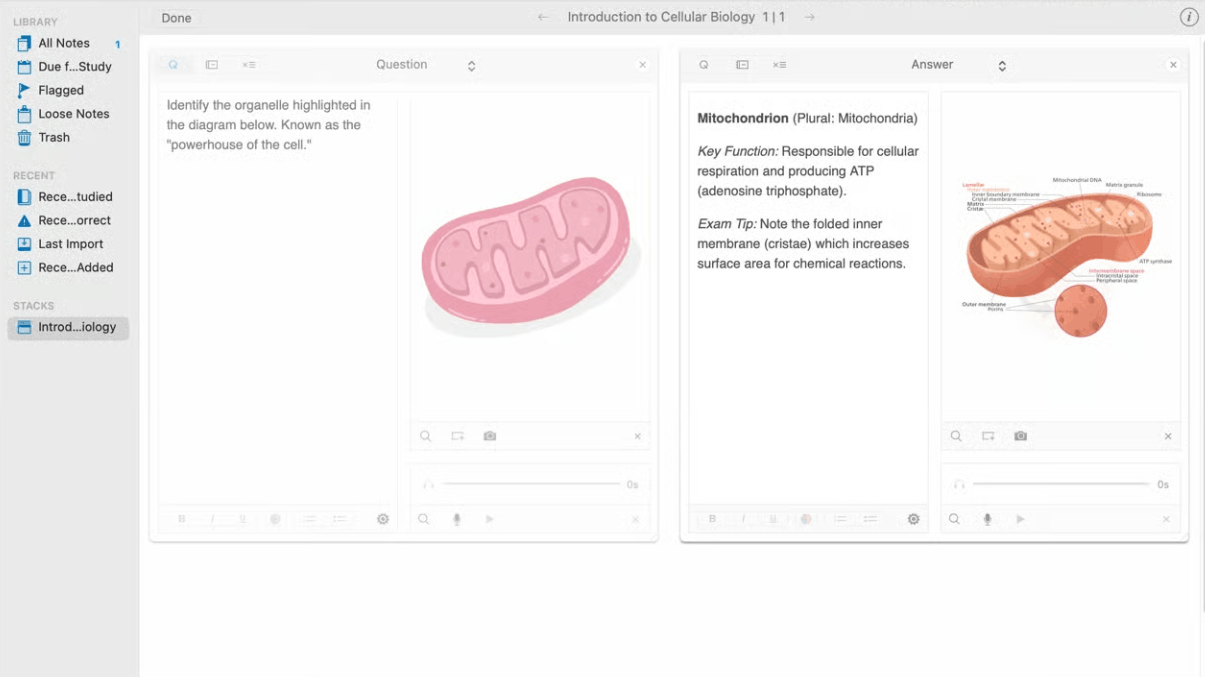
Instead of repeatedly creating formula sheets or vocabulary lists for each class, teachers can use Studies to build an entire set of flashcards for any topic, from historical events and chemical formulas to technical terms. What makes this tool stand out is its ability to embed various types of content into a single flashcard. For lessons requiring visual elements, teachers can insert illustrations or short videos. And when students need to pronounce a foreign term or sentence accurately, a sample audio recording makes practice much more intuitive than simply writing it down.
As a result, teachers don't have to recreate review materials from scratch for each class, while students get a set of interactive flashcards that they can return to at any time, especially useful before important tests or exams.
2. Clearly Outline a Semester-Long Study Plan and Track Each Student's Progress with SheetPlanner
Balancing curriculum content with school events is always a headache for many teachers at the beginning of each semester. SheetPlanner solves this problem by allowing the entire semester or school year to be presented as a visual timeline, where the school schedule, extracurricular activities, and school events are all displayed on a single plane.
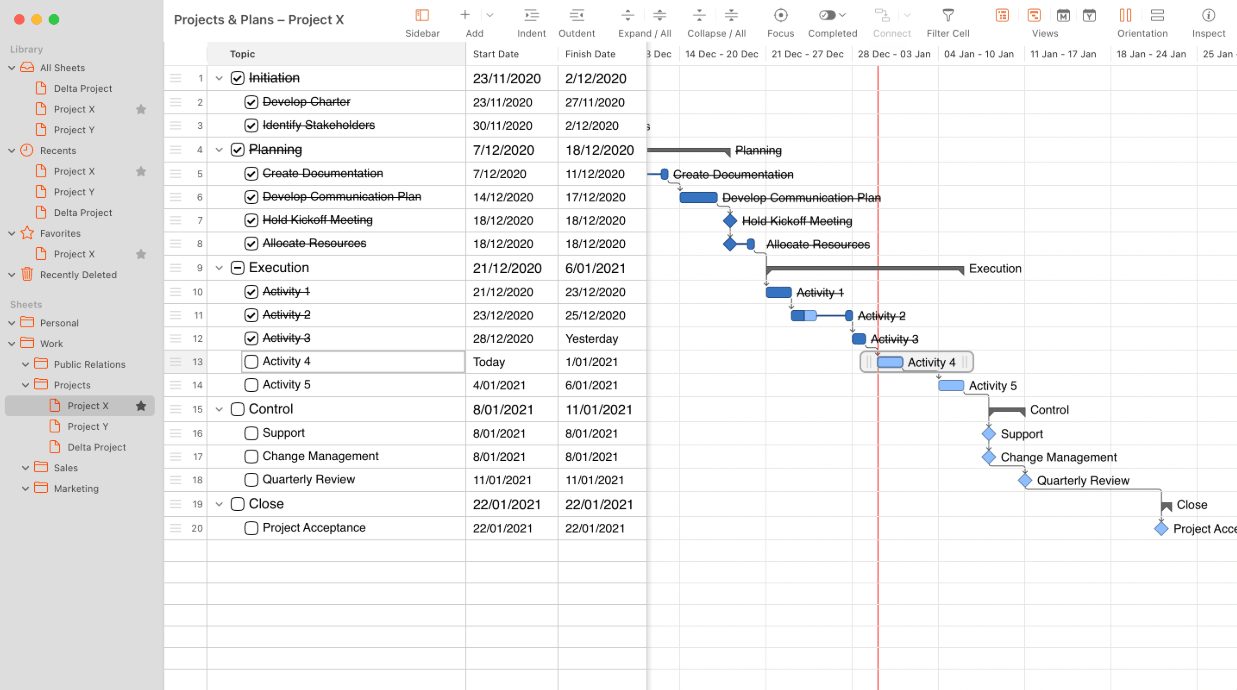
Beyond just overall planning, this tool allows for the creation of individual rows for each student, assignment, or lesson topic, along with columns showing scores, assignment completion status, or learning objectives. For more dynamic progress tracking, teachers can simply switch from spreadsheet view to timeline or Kanban board view, making it easier and more intuitive to see the overall picture of the class compared to manually checking each row in a traditional spreadsheet.
3. Create Academic Documents Without the Headache of Formatting with MonsterWriter
Anyone who has ever written a research paper, a literature review, or any academic document understands that formatting can sometimes be more time-consuming than writing the content itself. MonsterWriter is designed to solve this very problem, handling all formatting neatly within the application.
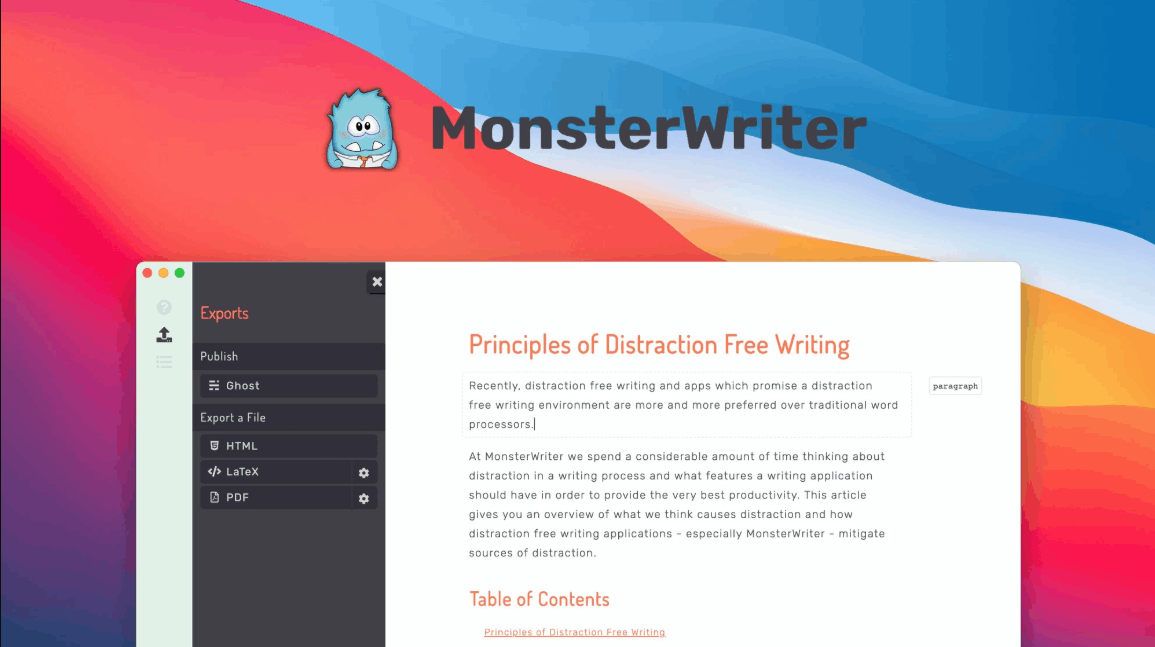
Teachers can manage citations and bibliographies directly within the editor without needing to install any additional tools. Furthermore, inserting headings, tables, footnotes, images, code snippets, hyperlinks, and cross-references within the text is seamless and doesn't interrupt the writing process. Once the document is complete, it can be exported in LaTeX, HTML, or PDF format depending on submission or storage requirements.
Recording a lecture video no longer requires a camera, tripod, or even an entire editing team. The tools below will accompany teachers through every stage, from recording to the final product ready to share with students.
4. Record your lectures smoothly and professionally with FocuSee.
FocuSee is one of the best choices when creating video lectures, thanks to its ability to almost completely eliminate the time-consuming post-production process. Its automatic zoom in both two and three dimensions, along with the ability to highlight mouse clicks, helps students easily follow each action on the screen without visual clutter.
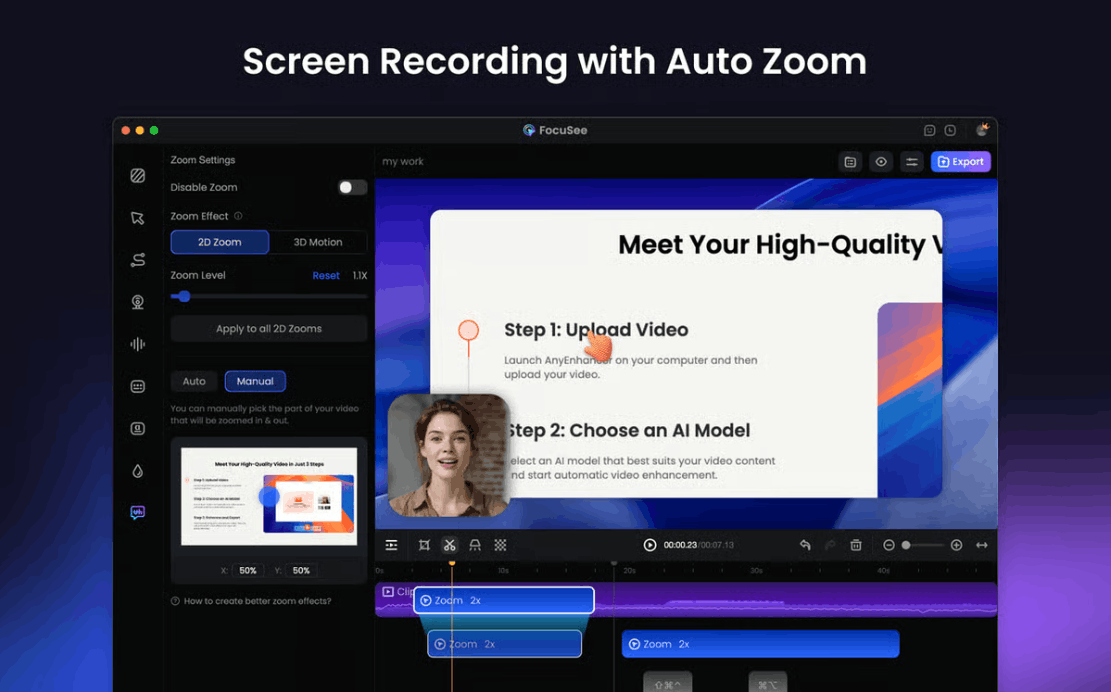
A major advantage of this tool lies in its deep customization capabilities, allowing teachers to precisely decide how the screen moves and how mouse actions are displayed. In addition, the built-in teleprompter feature makes delivering a prepared script smoother and more natural. Teachers can record the entire screen, a specific window, or a custom selection, and then let the tool automatically handle the post-production. One of the most highly appreciated features is its ability to automatically cut out unnecessary pauses and filler words during speech, and to automatically generate and insert subtitles using AI technology running directly on the computer without an internet connection.
5. Create Subtitles for Any Lecture in an Instant with VidCap
Once the complete video lecture is ready, VidCap will handle adding subtitles so students can easily follow the content even in quiet environments like libraries. Simply upload the video, and the tool will automatically recognize speech, generate subtitles, and insert them directly into the video, along with effects to highlight each word at the right moment it's spoken.
Another notable strength is that VidCap supports over 60 different languages, making it particularly useful for international, bilingual, or foreign language classes. Additionally, it integrates many advanced AI-powered features such as virtual green screen creation, background blurring, and gaze adjustment to create a more natural eye contact experience for viewers, along with noise and echo cancellation for clearer, more professional-sounding video audio.
6. Transform Lessons into Natural, Lively Audio Narration with Vexel
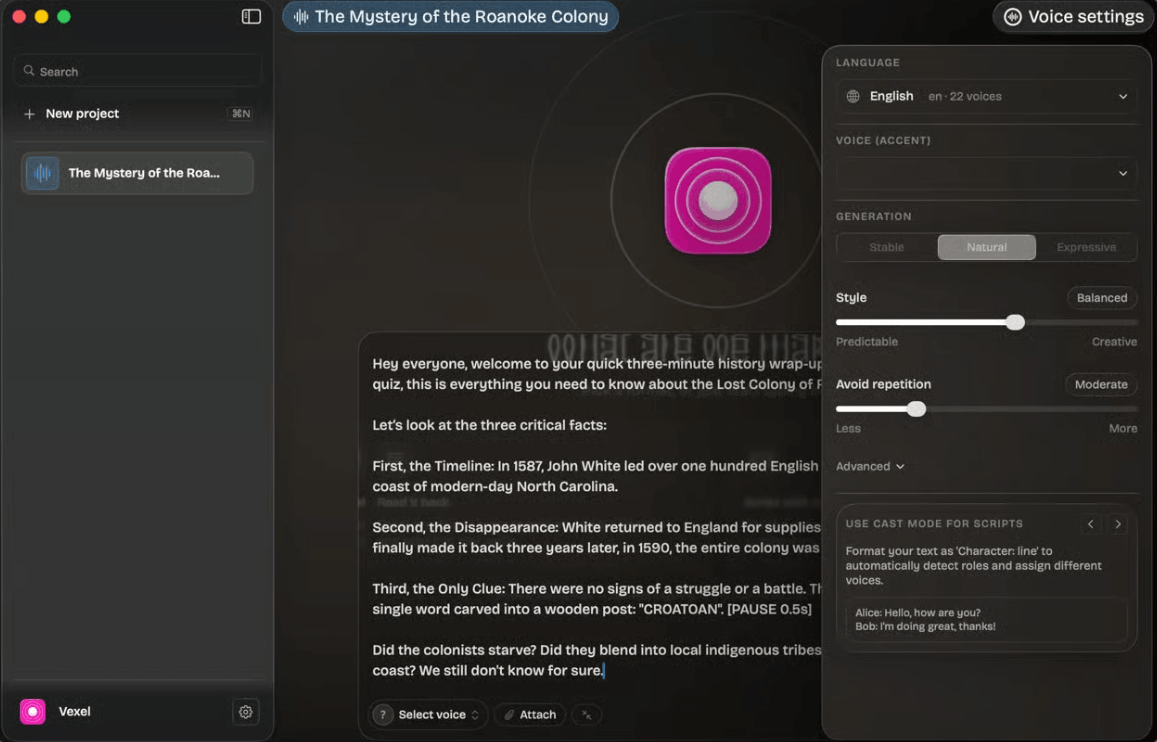
Before or after posting the text, teachers can choose from over 30 different languages. English alone offers twenty-two voices to choose from, while Spanish and Chinese each have eighteen voices, enough to find the voice that best suits each lesson and each group of students.
7. Transform Recorded Lectures into Lookable Notes with WhisperTranscribe
After recording a lecture, WhisperTranscribe makes the video even more useful by creating a timestamped transcript with keyword search. This is a very convenient way to share lessons, as students don't need to listen to or rewatch the entire video just to review a specific concept. With the transcript, they can use it directly as study notes or quickly jump to the exact section they need.
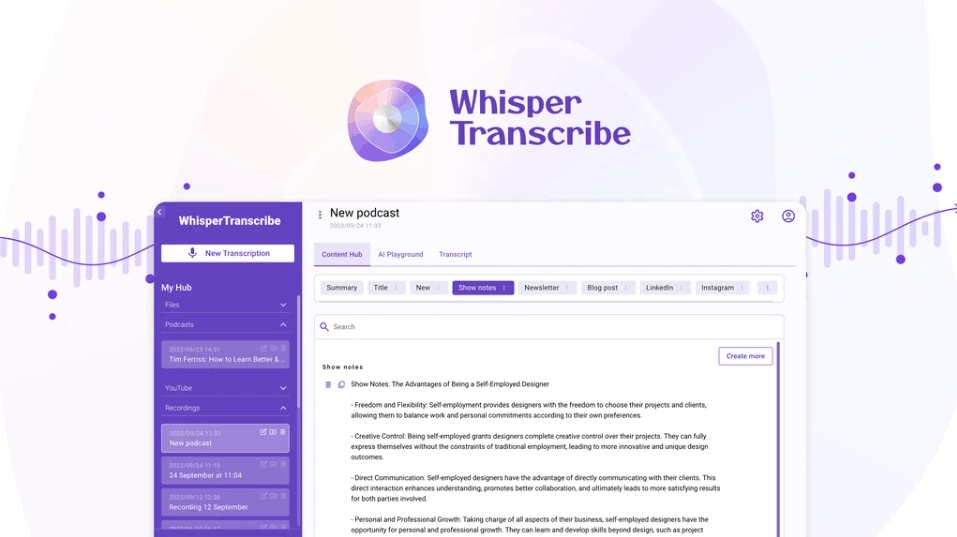
Beyond just delivering lectures, WhisperTranscribe proves useful in many other administrative tasks for teachers. Recorded professional meetings can be transcribed into text for later reference. Furthermore, the tool can automatically summarize key points discussed, extract important quotes, and suggest relevant discussion questions.
8. Annotate directly on the screen during lectures with Presentify.
Presentify helps teachers accurately illustrate what they are saying directly on the screen. When explaining a concept or a set of data, teachers can enable Presentify's annotation mode to draw diagrams or circle key points directly on the presentation screen. And when they want to guide the class to focus on a specific detail, the cursor highlighting feature and spotlight tool ensure that everyone's attention is directed to the relevant point.
Presentify also includes a built-in whiteboard that can be opened with a keyboard shortcut while you're taking notes. This feature takes teachers from pre-written notes to a completely blank whiteboard to sketch out ideas from scratch, working seamlessly with familiar screen sharing or online meeting tools already in use by schools.
9. Conclusion
Every teacher has a task that they find most tiring, whether it's lesson planning, schedule management, or simply keeping things organized. The most effective way to reduce that pressure is to let the right tools take over some of the repetitive tasks, so that teachers have more time and energy to dedicate to their students. The ten applications mentioned above are just the beginning, but they cover almost the entire teaching process, from lesson preparation and recording lectures to delivering knowledge in a more engaging and professional manner in the classroom.





















VIP Products








Best Selling Products
Plugin Retouch4me
69 USD
MidJourney Account
29 USD
Genuine Adobe Illustrator account
99 USD
Copyright Adobe Lightroom Account
59 USD
Genuine Cheap Canva Pro
39 USD
Freepik Premium Account
59 USD
ChatGPT Plus Account (GPT-4)
16 USD
Windows 10 & 11 Pro Key
36 USD
Upgrade Duolingo Super
29 USD
Upgrade Genuine Office 365
49 USD
Adobe Premiere Pro Account
99 USD
Capcut Pro 1 Year
39 USD
Adobe Photoshop Copyright - Full App
120 USD
Autodesk All App Account Copyright
120 USD
Upgrade genuine Capture One account
120 USD