Best Selling Products

Upgrade Genuine Office 365
49 USD

Upgrade genuine Capture One account
120 USD

Adobe Premiere Pro Account
99 USD

Windows 10 & 11 Pro Key
36 USD

Capcut Pro 1 Year
39 USD

MidJourney Account
29 USD

Upgrade Duolingo Super
29 USD

Plugin Retouch4me
69 USD

ChatGPT Plus Account (GPT-4)
16 USD

Adobe Photoshop Copyright - Full App
120 USD

Freepik Premium Account
59 USD

Genuine Cheap Canva Pro
39 USD

Genuine Adobe Illustrator account
99 USD

Autodesk All App Account Copyright
120 USD

Copyright Adobe Lightroom Account
59 USD
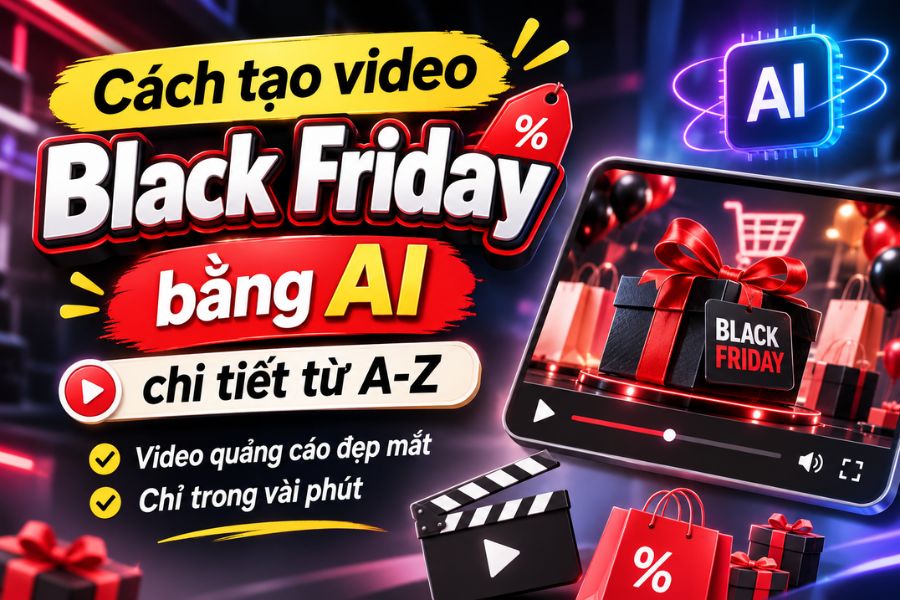
A detailed, step-by-step guide to creating stunning Black Friday videos using AI in just minutes.
Nội dung
- 1. What are Black Friday videos created with AI?
- 2. What preparations are needed before creating Black Friday videos using AI?
- 3. How to create Black Friday videos using AI with Google Flow
- 4. How to create Black Friday videos using AI with Canva
- 6. Things to note when creating Black Friday videos using AI
- 7. Conclusion
Instead of spending a lot of time filming, designing images, and editing each frame, you can now create Black Friday advertising videos using AI with just a few simple steps. Modern artificial intelligence tools can transform ideas, product images, or text commands into dynamic videos, complete with motion effects and a professional visual style. Importantly, you don''t need any video editing experience to create advertising content that suits your store or brand. In this article, let''s explore the useful applications of AI and learn how to create beautiful, engaging Black Friday videos, even if you''re a beginner.
1. What are Black Friday videos created with AI?
AI-powered Black Friday videos utilize artificial intelligence to create promotional videos for Black Friday shopping and sales events. Instead of filming and editing from scratch, users can provide images, text, or descriptive commands, and the AI will automatically build appropriate scenes, effects, and animations.
The highlight of this method is its ability to save time while still creating visually appealing content. You can use video to introduce products, announce discounts, promote your store, or create short clips to post on social media.
Some notable advantages of using AI to create Black Friday videos include:
-
Save time: Automate many video production processes, reducing the need for manual filming and editing.
-
Creative visuals: Create vibrant shopping scenes, lighting effects, and motion animations based on your own ideas.
-
Easily customizable: Colors, styles, content, and images can be changed to match your brand identity.
-
Compatible with multiple platforms: Create videos with aspect ratios suitable for TikTok, Facebook, Instagram Reels, and YouTube Shorts.
-
Cost-effective: No need to invest heavily in filming and editing equipment or hire a professional production team.
2. What preparations are needed before creating Black Friday videos using AI?
To create engaging videos that align with your advertising goals, you should prepare your ideas and necessary materials before using AI tools. Clearly defining your style, product, and message will make the video creation process smoother and minimize the chances of producing images that don't meet your expectations.
Some of the things that need to be prepared include:
-
Video concept: Determine the advertising theme, such as Black Friday sales, showcasing discounted products, shopping deals, or special promotions.
-
Prompt description: Write specific commands about the desired context, colors, effects, camera movement, and video style.
-
Product images: Prepare clear images if you want the AI to include the actual product in the advertising video.
-
Promotion information: Clearly define the discount amount, the validity period, the products included in the promotion, and the message that should be included.
-
Aspect ratio: Choose a 9:16 ratio for TikTok, Reels, Shorts, or a 16:9 ratio for horizontal video ads.
-
AI tools: Prepare your account and choose a suitable application such as Google Flow, Canva, or CapCut.
3. How to create Black Friday videos using AI with Google Flow
For Black Friday, you can leverage Google Flow to create product showcases, shopping experiences, or cinematic advertising scenes. Specifically, depicting the color palette of black, red, and gold, along with lighting effects, will help create a more prominent and engaging promotional atmosphere in your video.
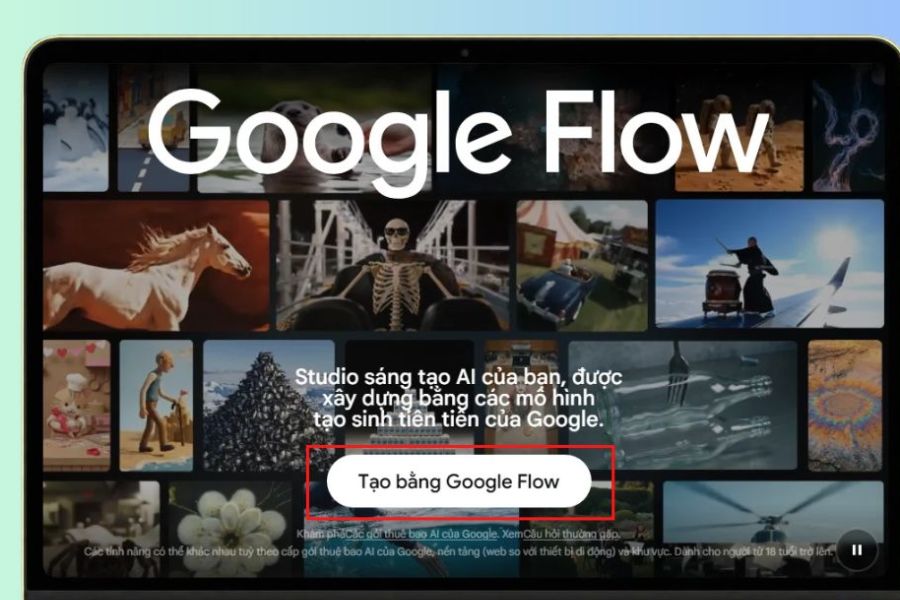
Step 1: Access Google Flow
Open your browser on your computer and go to https://flow.google.com/ . Next, log in with your Google account to use the tool. On the main interface, you can learn about the video creation features and prepare to start your Black Friday advertising project.
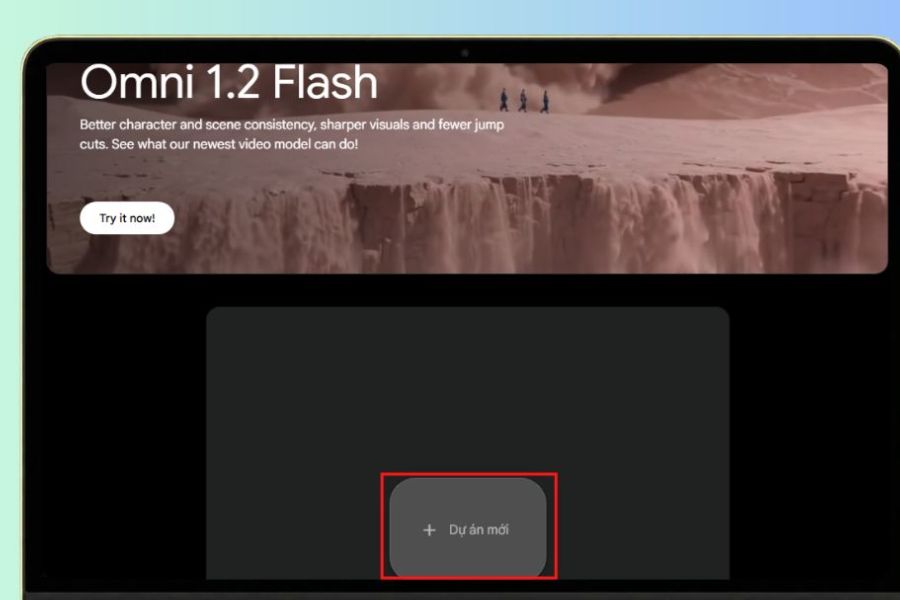
Step 2: Create a new project
After successfully accessing the site, select " New Project" to create a workspace. The video creation interface will appear with options to help import content and reference images. If you want to promote a specific product, you should prepare product images so that the AI has more data for guidance.
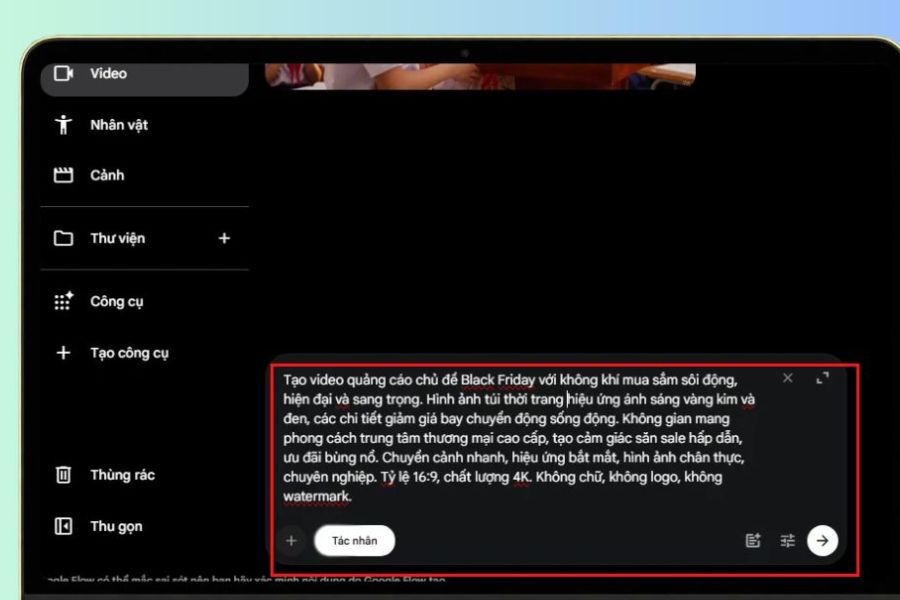
Step 3: Enter the video creation prompt.
In the content input field, write a detailed description of the Black Friday video you want to create. Focus on the context, colors, lighting effects, motion, and advertising style so that the AI understands your requirements. You can refer to the prompt below:
Prompt: Create a Black Friday themed advertising video with a vibrant, modern, and luxurious shopping atmosphere. Images of fashion bags, gift boxes, and shopping products appear in a high-end shopping mall setting. Use black, red, and gold tones, combined with shimmering lighting effects, moving light strips, and fast transitions. Create an exciting sense of sale hunting and explosive deals. The images should be realistic, sharp, and professional-looking, with a 16:9 aspect ratio and 4K quality. No text, logo, or watermark.
Step 4: Create a video using AI
After completing the command, review the content and select the appropriate video creation mode. Next, press the create button for Google Flow to begin processing the request. While waiting, the AI will analyze the prompt and build the animation based on the description. If the result is not as desired, you can adjust the command, add details about the context, or change the image style to create a different version.
Step 5: Download the video to your device.
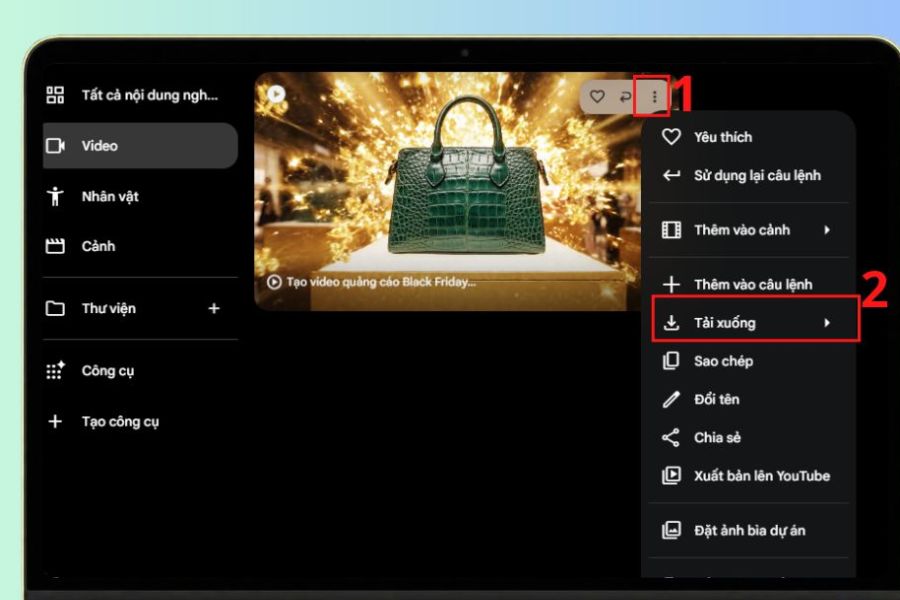
Once the video is complete, play it back to check the image quality, motion, and layout. If you're satisfied with the result, click the three-dot icon in the corner of the video and select Download to save it to your computer. You can then use the video to post on social media platforms or continue editing before using it in your advertising campaign.
4. How to create Black Friday videos using AI with Canva
Canva is a familiar online design application that offers many advertising video templates and AI tools to support content creation. With Canva, you can start with pre-made Black Friday video templates, then customize images, colors, promotional content, and motion effects to match your brand style.
The advantage of Canva is that users don't need advanced video editing skills to create visually appealing promotional videos. You can also combine product images, discount icons, sound, and text effects to highlight your promotions. This is a suitable choice for online stores, individual sellers, or businesses that want to quickly deploy marketing content.
Step 1: Access Canva
Open your browser and go to https://www.canva.com/ , then log in to your personal account. On the main interface, enter the keyword "Black Friday Video" into the search bar to explore available design templates. You should choose a template with a clear layout, striking colors, and one that is suitable for the product you want to advertise.
Step 2: Choose a suitable video template.
After searching, Canva will display many video templates with different styles. Choose a design with a black, red, or gold color scheme to create a distinctive shopping season feel. Click on your favorite template to open the editing interface, then check the layout and available elements before making any changes to the content.
Step 3: Customize ad content
Next, replace the sample image with actual product images from your store. You can add information such as the product name, discount level, promotion period, and promotional message. Additionally, use concise phrases like "Black Friday Sale," "Super Deal," or "Amazing Sale" to make the video stand out.
Step 4: Add motion and sound effects.
In the editing toolbar, select animation effects to add movement to images, text, and decorative details. You can also add upbeat background music to enhance the shopping atmosphere of the video. However, prioritize smooth transition effects and avoid using too much motion that makes it difficult for viewers to focus on the product.
Step 5: Export the completed video
After completing the edits, play the entire video to check the content and length. If everything is satisfactory, select Share , then press Download and choose the MP4 Video format. Finally, set the appropriate video output quality and save it to your device for use in your Black Friday campaign.

6. Things to note when creating Black Friday videos using AI
Although AI makes video production faster and more convenient, you still need to carefully check the final product before using it. An effective advertising video not only needs beautiful visuals but also needs to convey the right information, highlight the product, and attract customer attention.
To make your Black Friday video look professional and achieve better communication results, you should keep the following points in mind:
-
Write a clear prompt: Specifically describe the context, colors, movement, and style of the advertisement so that the AI can create a video that closely matches your initial vision.
-
Prioritize signature colors: Combine black, red, and gold to create a striking, luxurious feel that suits the Black Friday atmosphere.
-
Ensure accurate information: Check the discount amount, product name, promotion period, and applicable terms and conditions before posting.
-
Avoid overusing effects: Use transitions, lighting, and motion in moderation so the video doesn't become visually overwhelming.
-
Choose the appropriate aspect ratio: Use vertical video for TikTok, Reels, and Shorts, while horizontal video is suitable for YouTube or websites.
-
Product image verification: Ensure that AI does not distort the color, style, or features of the actual product.
-
Please be mindful of audio copyright: Choose background music that you have the right to use for advertising purposes.
-
Review the final product: Play a test video before posting to check the image quality, sound, content, and any errors that may have occurred during the AI creation process.
7. Conclusion
Creating Black Friday videos using AI is a useful solution that helps individuals and businesses save time and effort while still creating eye-catching advertising content. Depending on your needs, you can use Google Flow to create videos from commands, Canva to design advertising videos, or CapCut to edit and finalize the product. Hopefully, with the above instructions, you can easily create Black Friday videos with your own style, clearly conveying the promotional message and attracting customer attention. Prepare your ideas well, choose the right tools, and start creating impressive advertising videos for this exciting shopping season!





















VIP Products








Best Selling Products
Upgrade Genuine Office 365
49 USD
Upgrade genuine Capture One account
120 USD
Adobe Premiere Pro Account
99 USD
Windows 10 & 11 Pro Key
36 USD
Capcut Pro 1 Year
39 USD
MidJourney Account
29 USD
Upgrade Duolingo Super
29 USD
Plugin Retouch4me
69 USD
ChatGPT Plus Account (GPT-4)
16 USD
Adobe Photoshop Copyright - Full App
120 USD
Freepik Premium Account
59 USD
Genuine Cheap Canva Pro
39 USD
Genuine Adobe Illustrator account
99 USD
Autodesk All App Account Copyright
120 USD
Copyright Adobe Lightroom Account
59 USD