Best Selling Products

Autodesk All App Account Copyright
120 USD

Plugin Retouch4me
69 USD

Upgrade genuine Capture One account
120 USD

Upgrade Duolingo Super
29 USD

Adobe Premiere Pro Account
99 USD

MidJourney Account
29 USD

Freepik Premium Account
59 USD

Genuine Adobe Illustrator account
99 USD

Upgrade Genuine Office 365
49 USD

ChatGPT Plus Account (GPT-4)
16 USD

Genuine Cheap Canva Pro
39 USD

Capcut Pro 1 Year
39 USD

Adobe Photoshop Copyright - Full App
120 USD

Windows 10 & 11 Pro Key
36 USD

Copyright Adobe Lightroom Account
59 USD
A guide to creating beautiful, meaningful, and emotional videos celebrating Teachers'' Day on November 20th using Google Flow.
Nội dung
- 1. What is an AI-generated video celebrating Vietnamese Teachers' Day on November 20th?
- 2. How to create a video celebrating Teachers' Day on November 20th using Google Flow
- 3. Prompt suggests creating a video celebrating Vietnamese Teachers' Day on November 20th using Google Flow.
- 4. Notes when creating a video celebrating Vietnamese Teachers' Day on November 20th using Google Flow
- 5. Some creative and meaningful video ideas for November 20th using Google Flow.
- 6. Conclusion
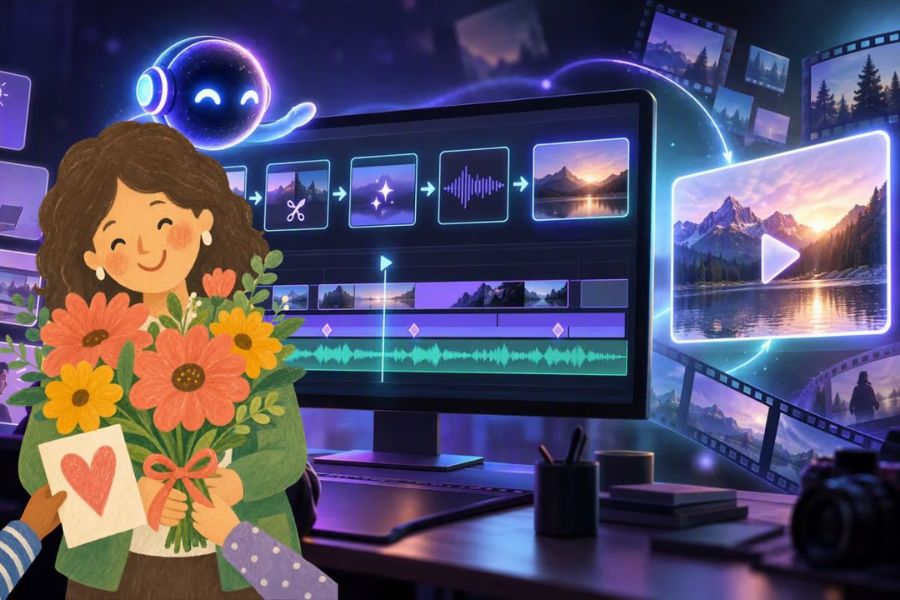
Vietnamese Teachers'' Day on November 20th is a special occasion for everyone to express their sincere gratitude to the teachers who have dedicated themselves to guiding them on their educational journey. Instead of just sending familiar greeting cards or wishes, you can create a thank-you video with beautiful visuals, a meaningful story, and soothing music. Especially with the help of Google Flow, creating a video celebrating November 20th is easier than ever. Simply prepare your ideas and enter the appropriate commands, and you can transform your loving messages into a lively film without needing professional video editing skills. Let''s explore with Sadesign!

1. What is an AI-generated video celebrating Vietnamese Teachers' Day on November 20th?
AI-powered videos celebrating Vietnamese Teachers' Day on November 20th are a form of content creation that uses artificial intelligence to build films conveying messages of gratitude to teachers. Instead of manually filming each scene, searching for illustrative images, or performing complex editing tasks, users can describe their ideas using text commands, allowing AI to assist in creating images and videos as desired. The content can revolve around familiar moments such as teachers standing at the podium, students attentively listening, a sun-drenched schoolyard, or students presenting bouquets of fresh flowers.
The appeal of this format lies in its ability to transform simple ideas into visually engaging and emotionally rich stories. You can choose cinematic style, 3D animation, artistic drawings, or realistic imagery depending on your target audience. A short video with heartfelt wishes, relatable imagery, and a gentle melody is enough to create a memorable spiritual gift for those unsung heroes.
2. How to create a video celebrating Teachers' Day on November 20th using Google Flow
To ensure your video has cohesive content and visually appealing imagery, you should first define the theme, visual style, and message you want to convey. For example, a video chronicling a student's journey of growth under the guidance of their teachers would be well-suited to a cinematic style, warm lighting, and soothing background music. Below is a step-by-step guide on how to create a video using Google Flow.
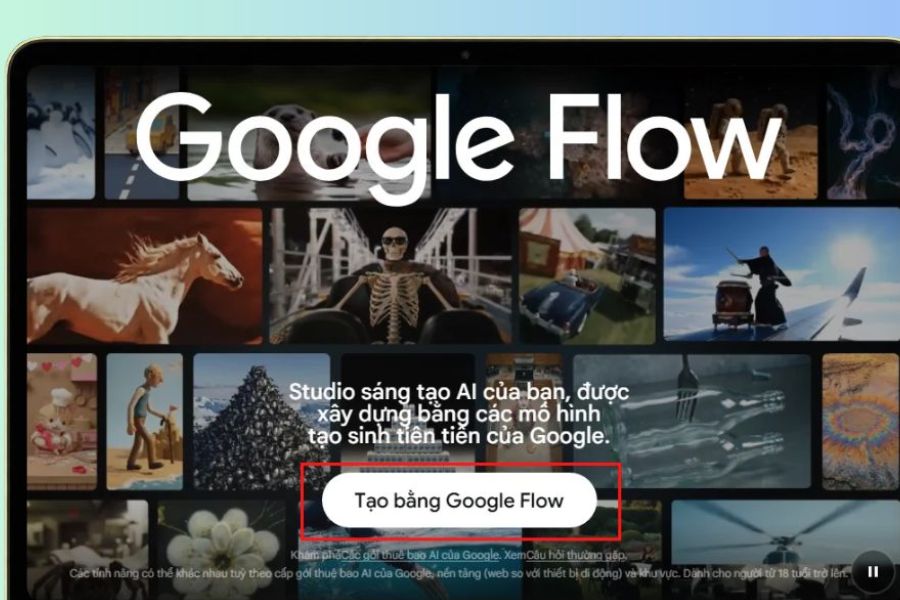
Step 1: Access Google Flow
First, open your browser on your computer and go to https://flow.google.com/ . On the homepage, log in with your Google account to use the tool. After successfully logging in, find and select "Create with Google Flow" to begin the video creation process.
This is the first step to getting started with the Google Flow workspace. Before proceeding, check your account's access and usage limits to avoid interruptions during video creation. The interface and features displayed may vary depending on your region and account permissions.
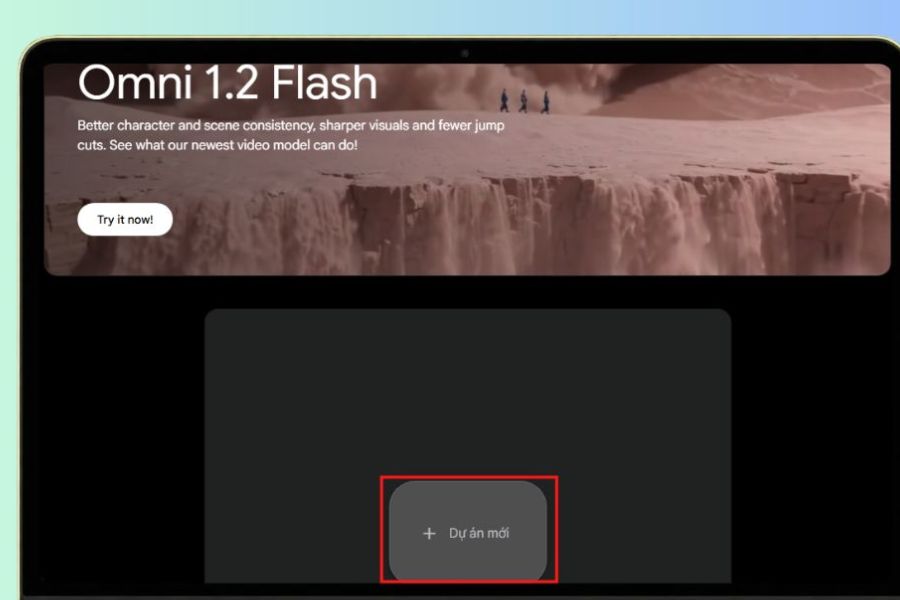
Step 2: Create a new video project
After successfully accessing the site, you will be taken to the Google Flow workspace. Here, select " New Project" to create a video creation project. This will open a space for you to enter commands, choose how to create content, and monitor the results generated by the AI.
You should name your project related to the November 20th theme for easier management, especially when you want to create multiple versions of the video. For example, you could name it "Teacher Appreciation Video for November 20th" or "The Ferryman's Journey." Clearly dividing the project also makes editing and selecting the best video segments easier.
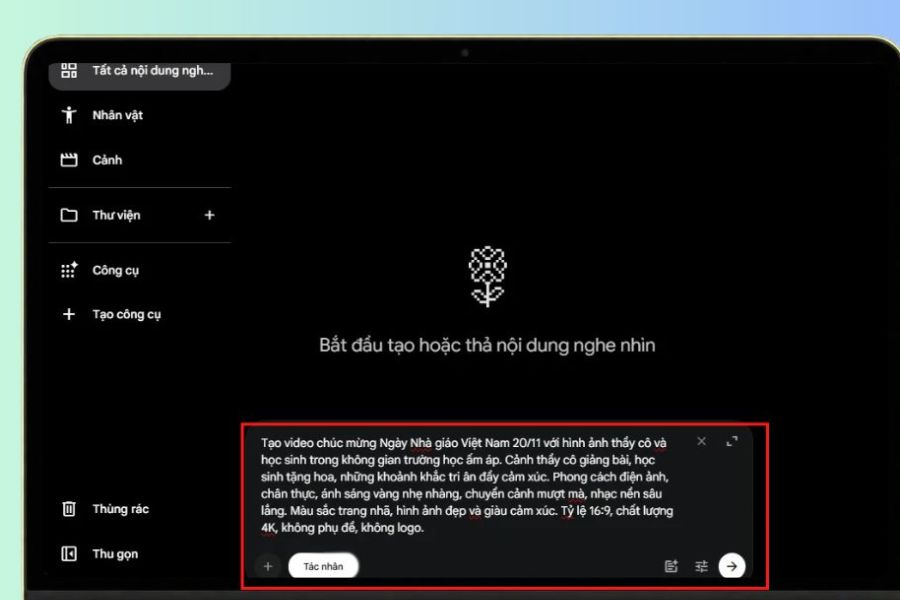
Step 3: Enter the prompt to create the November 20th video.
This is a crucial step that determines the content and style of the video. In the Prompt input field, describe your desired concept in detail, including characters, setting, action, colors, lighting, and visual style. The more specific your instructions, the better the AI can create a result that closely matches your vision.
If you're unsure where to start, you can refer to the command below and adjust it to your own ideas:
| Video Creation Prompt for November 20th | Create a short video celebrating Vietnamese Teachers' Day on November 20th, with the theme of expressing gratitude to dedicated teachers. Begin with a scene of a Vietnamese schoolyard in the morning, with soft golden sunlight filtering through green trees. Next, show a teacher attentively lecturing at the podium, students listening attentively and taking notes. The scene then transitions to a moment of students presenting flowers to their teacher, their smiles happy and their eyes filled with emotion. The video concludes with a warm classroom scene conveying a message of gratitude to teachers on November 20th. The style should be realistic, with refined imagery, warm colors, natural movement, soft lighting, smooth transitions, and genuine emotion. Use a 16:9 aspect ratio, high image quality, and no logos or text on the images.
After completing the command, press the arrow button to submit the request and wait for Google Flow to process it. The time it takes to create the video may vary depending on the complexity of the content and system status. If the result is not as expected, you can adjust the prompt, add descriptions of characters, background, or motion to create a more suitable version.
Step 4: Review and finalize the video
Once Google Flow successfully creates the video, open the result to review the entire content. Pay attention to the character's movement, the connection between scenes, the colors, and how well it fits the November 20th theme. If the image doesn't look natural or contains unwanted details, you can go back to the command to adjust and recreate it.
For thank-you videos, emotion is a crucial element. Therefore, you should prioritize scenes that show the close relationship between teachers and students, such as moments of lecturing, guiding students, or receiving congratulatory flowers. After obtaining suitable video clips, you can use editing tools to combine scenes, add greetings and background music to create a complete product.
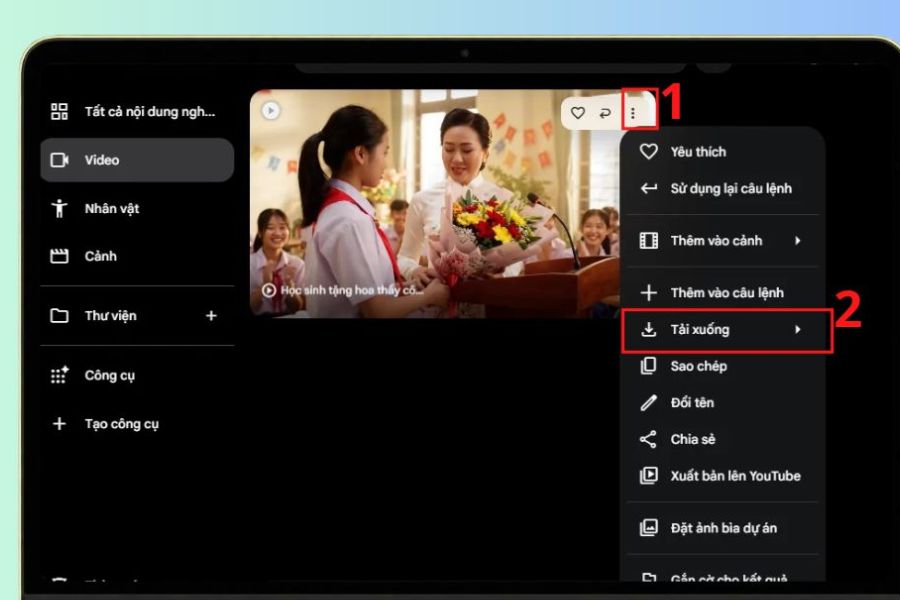
Step 5: Download the video to your device.
Once you're satisfied with the result, you can save the video to your computer. In the project interface, find the three vertical dots icon in the upper right corner of the video, then select Download if this option is provided. Wait for the download to complete and check the video file in the storage folder on your device.
After downloading, you can share the video on Facebook, TikTok, Zalo, or show it at a Vietnamese Teachers' Day celebration at school. If you want to make the video more formal, consider adding an introduction to the topic and a concluding message expressing gratitude to your teachers. These small details will make your gift more polished and meaningful.
3. Prompt suggests creating a video celebrating Vietnamese Teachers' Day on November 20th using Google Flow.
To avoid making your video monotonous, you can try different ideas instead of just using one general command. Each theme will bring its own unique style, suitable for different audiences and purposes. Below are some prompts you can refer to when creating a thank-you video using Google Flow.
Prompt 1: Cinematic video tribute to teachers
Create a video celebrating Vietnamese Teachers' Day on November 20th with emotionally rich cinematic footage. The video features a dedicated teacher lecturing in a classroom, students attentively listening, and sunlight gently streaming through the window. This is followed by a scene of a grown-up student returning to their old school to present their teacher with a bouquet of fresh flowers. The style is authentic, with warm colors, natural lighting, smooth movement, and profound emotion.
Prompt 2: 3D Animated Video for November 20th
Create a cute 3D animated video to celebrate Vietnamese Teachers' Day on November 20th. The setting is a colorful Vietnamese classroom, with the teacher standing at the podium with a friendly smile, and the students happily decorating the blackboard and preparing bouquets of flowers for her. The characters have adorable expressions, natural movements, bright colors, clear imagery, and a cheerful and warm atmosphere.
Prompt 3: Formal video greetings for November 20th
Create a video celebrating Vietnamese Teachers' Day on November 20th, featuring a bouquet of fresh flowers on the teacher's desk, a blackboard with messages of gratitude, and a sunlit classroom. The scenes transition smoothly to teachers and students together, capturing beautiful moments. The elegant and formal style, soft colors, gentle yellow lighting, and touching background music make it suitable for presentation at a celebratory event.
You can change the details in the prompt to suit the story you want to tell. If creating a video specifically for your homeroom teacher, add images related to the classroom and group activities. If making a video as a gift for former teachers, the content can focus on school memories, the schoolyard, and memorable moments.
4. Notes when creating a video celebrating Vietnamese Teachers' Day on November 20th using Google Flow
Google Flow simplifies the video creation process; however, to achieve a beautiful final product that conveys the right message, you still need to pay attention to a few factors. Thorough content preparation from the start will help minimize unwanted errors and save time recreating the video.
-
Write a specific prompt: Clearly describe the characters, setting, actions, and visual style. Avoid using overly short or vague commands such as "create a beautiful video for November 20th."
-
Review AI-generated images: AI can sometimes create inaccurate details such as hands, faces, clothing, or handwriting. You should review each scene before using it.
-
Pay attention to consistency between scenes: If the video has multiple segments, try to maintain consistency in characters, costumes, settings, and colors so that the story doesn't feel disjointed.
-
Choose an appropriate length: Appreciation videos should focus on meaningful moments, avoiding excessive length that might distract viewers. A length of 1 to 3 minutes is usually suitable for videos shared on social media or shown in classrooms.
-
Use appropriate music: Gentle, soothing melodies can enhance the emotional impact of the video. If uploading publicly, choose audio with proper usage rights to minimize copyright issues.
-
Check the quality before sharing: After downloading the video, open it on your device to check the image, sound, frame rate, and details in the video.
-
Understand your account limitations: Google Flow may apply different creation limits, feature restrictions, and access restrictions depending on your plan, region, and time. You should check your account information before starting a project.
5. Some creative and meaningful video ideas for November 20th using Google Flow.
Besides traditional thank-you videos, you can try exploring more creative themes to make your gift to your teachers more special. Instead of just putting together images of flowers and greetings, build a story with a beginning, middle, and end. This approach helps viewers empathize more easily and makes the message of gratitude more naturally conveyed. Some ideas worth trying include:
-
The journey of growing up at school: This video recreates the image of students from their first hesitant days in class to their confident journey out of school gates as adults. Throughout the story, the teachers are there to support and guide them.
-
A memorable day in the life of a teacher: This video depicts the familiar tasks of teachers such as preparing lessons, teaching classes, grading papers, and diligently guiding students. The video will help viewers better appreciate the dedication behind each lesson.
-
School memories: Focus on the schoolyard, the trees, the classroom, the blackboard, and the fun moments of your school days. This is a suitable idea for creating a video to send to your homeroom teacher or former teachers.
-
A thank-you message from the students: Create a video centered around short, heartfelt messages of gratitude to the teachers for their patient guidance, inspiration, and for helping us grow every day.
6. Conclusion
Creating a video celebrating Vietnamese Teachers' Day on November 20th using Google Flow is a creative way to express your feelings and gratitude to your respected teachers. With just a few simple steps and the right commands, you can create lively and emotional videos without needing advanced video editing skills. Hopefully, this guide will help you easily create a beautiful thank-you video, turning your words of gratitude into a meaningful gift for your teachers on this special day.





















VIP Products








Best Selling Products
Autodesk All App Account Copyright
120 USD
Plugin Retouch4me
69 USD
Upgrade genuine Capture One account
120 USD
Upgrade Duolingo Super
29 USD
Adobe Premiere Pro Account
99 USD
MidJourney Account
29 USD
Freepik Premium Account
59 USD
Genuine Adobe Illustrator account
99 USD
Upgrade Genuine Office 365
49 USD
ChatGPT Plus Account (GPT-4)
16 USD
Genuine Cheap Canva Pro
39 USD
Capcut Pro 1 Year
39 USD
Adobe Photoshop Copyright - Full App
120 USD
Windows 10 & 11 Pro Key
36 USD
Copyright Adobe Lightroom Account
59 USD