Best Selling Products

Adobe Photoshop Copyright - Full App
120 USD

Windows 10 & 11 Pro Key
36 USD

Genuine Adobe Illustrator account
99 USD

Upgrade Duolingo Super
29 USD

Upgrade Genuine Office 365
49 USD

Autodesk All App Account Copyright
120 USD

Plugin Retouch4me
69 USD

Genuine Cheap Canva Pro
39 USD

ChatGPT Plus Account (GPT-4)
16 USD

Capcut Pro 1 Year
39 USD

Copyright Adobe Lightroom Account
59 USD

MidJourney Account
29 USD

Upgrade genuine Capture One account
120 USD

Freepik Premium Account
59 USD

Adobe Premiere Pro Account
99 USD
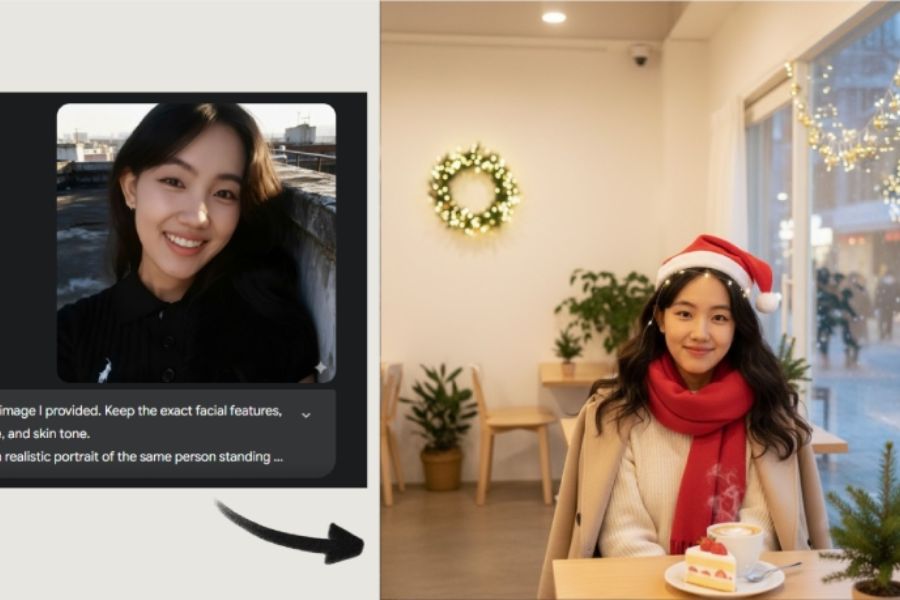
A guide to creating beautiful, unique, and impressive Christmas-themed Facebook profile pictures using AI.
Nội dung
- 1. How to create a Christmas-themed Facebook profile picture using AI
- Step 1: Open Gemini and enter the image description.
- Step 2: Upload a portrait photo for reference.
- Step 3: Enter the image description prompt.
- Step 4: Run the AI command and wait for the results.
- Step 5: View and download the images to your computer.
- 2. Compilation of prompts for creating beautiful AI-generated Christmas profile pictures for Facebook.
- 2.1. Prompt to create a Christmas profile picture in the muse style.
- 2.2. Prompt to create a profile picture with a cute Christmas outfit.
- 2.3. Prompt to create a luxurious Christmas profile picture
- 2.4. Prompt creates a profile picture amidst a snowy landscape.
- 2.5. Prompt to create a 3D cartoon-style Christmas avatar.
- 3. Tips to create a more beautiful and natural-looking Christmas Facebook profile picture using AI.
- 4. Things to note when using AI images as Facebook profile pictures.
- 5. Conclusion
Christmas is approaching, and it''s the perfect time to refresh your profile with a Christmas-themed profile picture. Instead of using familiar frames, you can create your own Christmas-themed portrait using AI with many creative ideas such as romantic snowfall, sparkling Christmas trees, Christmas outfits, or European winter scenes. With just a portrait photo and a few descriptive commands, you can transform a familiar image into a completely new version. In this article, let''s explore with Sadesign how to create a simple and easy-to-follow Christmas Facebook profile picture using Gemini AI, along with beautiful prompt templates for you to choose from.

1. How to create a Christmas-themed Facebook profile picture using AI
With the help of Gemini, creating a Christmas-themed profile picture is easier than ever. You don't need professional photo editing skills or complex software installation. Just prepare a portrait photo, import the appropriate prompt, and follow the steps below to have your own unique Christmas image.
Step 1: Open Gemini and enter the image description.
First, open your browser on your phone or computer and go to the Google Gemini website . Log in with your Google account to use the AI image creation features. After entering the main interface, you will see a chat box where you can submit your request. This is where you provide reference images and describe the idea you want to create. Before creating your profile picture, decide on your preferred style, such as a muse in the snow, a girl by a Christmas tree, or an elegant Christmas-style portrait, to make the image creation process smoother.

Step 2: Upload a portrait photo for reference.
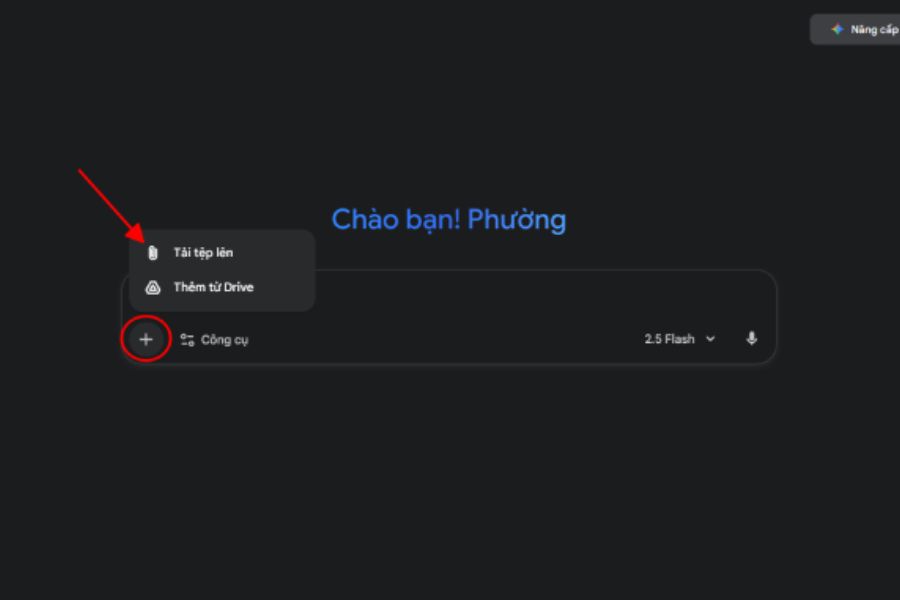
Next, tap the plus (+) icon to the left of the input box, select "Upload file," and then find the portrait photo you want to use in your device's library. After successful upload, the image will appear as a thumbnail in the chat window. This is a reference image that helps Gemini identify facial features and create a new Christmas-themed version. For a more natural and realistic result, prioritize photos with clear faces, good lighting, and a frontal or slightly angled shot. Avoid blurry photos, those obscuring the face, or those with too much distracting detail.
Step 3: Enter the image description prompt.
After uploading your image, you should enter a prompt so Gemini understands your intended design. An effective command should specifically describe the image style, clothing, background, lighting, colors, and the character's emotions. In particular, if you want to use the image as a Facebook avatar, you should instruct the AI to preserve the recognizable facial features and center the character so that the cropped image still looks good. You can refer to some suggested prompts in the following section to create images in various styles without having to think of commands from scratch.
Step 4: Run the AI command and wait for the results.
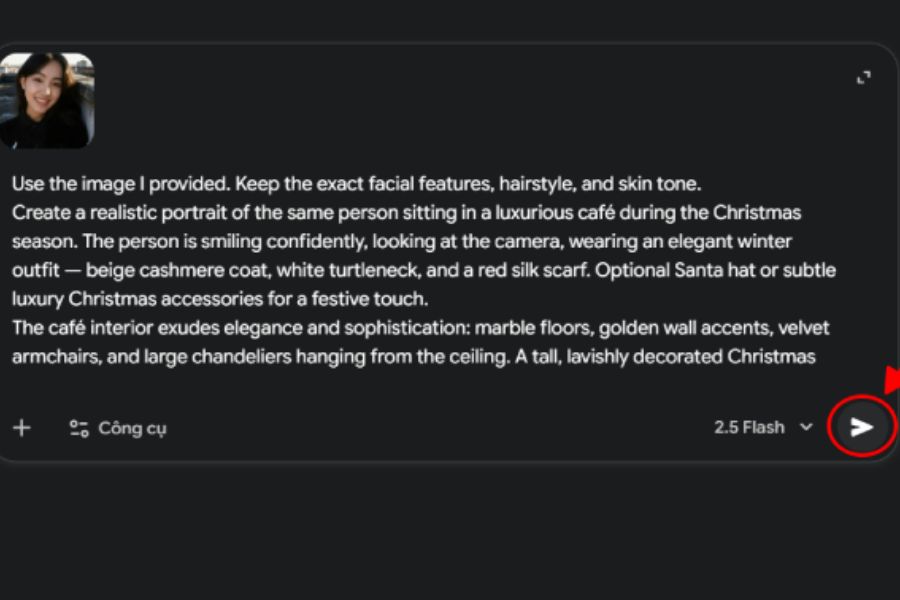
Once you've completed the prompt, press the Submit arrow button to have Gemini begin analyzing the reference image and processing your request. The AI will combine features from the original image with the described details to create a new portrait with a Christmas atmosphere. Processing time may vary depending on the complexity of the request and system status. When the image appears, carefully check the face, clothing, colors, and decorative details. If the result is not as desired, you can continue to enter editing requests such as changing the color of the shirt, adding snow, adjusting the lighting, or highlighting the Christmas tree in the background.
Step 5: View and download the images to your computer.
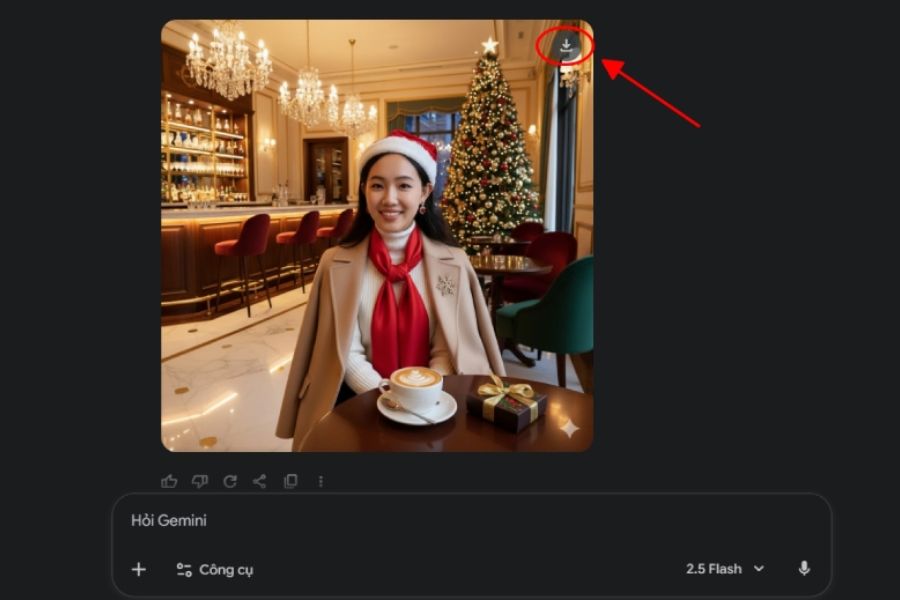
After Gemini finishes creating the image, tap on it to view a larger version and check the quality before saving. Then, find the Download icon in the upper right corner of the image to download it to your device. If using a phone, you can find the image in your gallery or downloads folder; on a computer, the image is usually saved in the Downloads folder. Before setting it as your Facebook profile picture, double-check the layout to ensure your face isn't cropped out when displayed as a circle. You can also use the image you just created to post stories, as a cover photo, or to share Christmas greetings with friends.
2. Compilation of prompts for creating beautiful AI-generated Christmas profile pictures for Facebook.
One of the key factors determining image quality is the prompt. With the same initial portrait photo, you can create many different versions simply by changing the background, clothing, and artistic style. Below are some sample commands you can copy and use directly in Gemini.
2.1. Prompt to create a Christmas profile picture in the muse style.
If you love a gentle, pure beauty, the winter muse style will be a suitable choice. The images often use white, cream, and cool blue tones, combined with white snow and yellow lights to create a romantic feeling.
Reference prompt:
"Create a Christmas portrait based on the uploaded reference image. Keep the subject's face, features, and identifying characteristics intact. The subject should be wearing an elegant white dress, standing in a snow-covered forest, surrounded by gently falling snowflakes, with a Christmas tree decorated with twinkling yellow lights in the background. The lighting should be soft, the atmosphere dreamy, the portrait style professional, the colors harmonious, the image realistic, the composition frontal, and the aspect ratio 1:1."
2.2. Prompt to create a profile picture with a cute Christmas outfit.
Red and white Christmas outfits always bring a cheerful and eye-catching feel. You can choose a style with a Santa hat, a Christmas-themed sweater, or a red dress paired with cute accessories to create a youthful avatar.
Reference prompt:
"Based on the reference portrait, create a lovely Christmas profile picture. Keep the face and identifying features of the person. The person should wear a red and white Christmas-themed sweater, a Santa hat, and a natural smile. The setting should be a warm room with a Christmas tree, colorful gift boxes, and twinkling decorative lights. The style should be professional portrait photography, with bright colors, sharp and natural images, and a 1:1 square aspect ratio."
2.3. Prompt to create a luxurious Christmas profile picture
If you want your profile to look more striking and mature, you can try a luxurious Christmas style. Burgundy red, gold, and black tones are often used to create a sophisticated and captivating feel.
Reference prompt:
"Create a luxurious Christmas portrait from a reference photo. The face remains unchanged, preserving the subject's identifying features. The subject wears an elegant burgundy dress, with light makeup, posing naturally in front of a Christmas tree decorated with gold ornaments and warm lighting. High-end studio setting, cinematic lighting, subtle colors, natural skin tone, high detail, composition focused on the face, 1:1 aspect ratio."
2.4. Prompt creates a profile picture amidst a snowy landscape.
The snowy scenery evokes a quintessential Christmas feeling, perfect for those who love a romantic winter style. You can combine a wool coat, scarf, and beret to create a photo that is both warm and fashionable.
Reference prompt:
"Transform the reference portrait into a Christmas photo taken in a European winter street. Keep the subject's face and identifying features intact. The subject is wearing a cream-colored wool coat, a red wool scarf, and a beret, standing in a snow-covered street. Behind them are shops decorated for Christmas, Christmas trees, and bright yellow lights. The snow is falling lightly, the expression is natural, the photography style is authentic, the lighting is beautiful, the portrait is centered, and the aspect ratio is 1:1."
2.5. Prompt to create a 3D cartoon-style Christmas avatar.
Besides realistic portrait photos, 3D cartoon style is also an interesting idea to refresh your Facebook avatar. The character is recreated with sparkling eyes, soft features, and bright colors, creating a lovely and unique feel.
Reference prompt:
"Transform the reference image into a cute 3D animated character with a Christmas theme. Retain prominent facial features so the character still resembles the original image. The character wears a red sweater, a white and red Santa hat, and stands next to a Christmas tree decorated with ornaments and gift boxes. The eyes are sparkling, the smile is bright, the 3D image texture is soft, the colors are vibrant, the lighting is shimmering, the composition is balanced, and the aspect ratio is 1:1."
3. Tips to create a more beautiful and natural-looking Christmas Facebook profile picture using AI.
To create a beautiful profile picture, choosing the right prompt isn't enough. You need to pay attention to the quality of the input image and how you describe your requirements so that Gemini can create an image that matches your wishes. The following tips will help you significantly improve the results:
-
Choose a good quality portrait photo: Prioritize photos that clearly show the face, are not blurry or shaky, have balanced lighting, and do not have too many objects obscuring the face.
-
Clearly describe the requirement to preserve the face: Add phrases such as "preserve facial features," "do not change identifying characteristics," and "maintain natural expressions."
-
Choosing the main colors: Red, white, green, and yellow are familiar colors that help the image clearly convey the Christmas atmosphere.
-
Prioritize a square layout: 1:1 aspect ratio photos are usually suitable for Facebook avatars. You should request that the subject be in the center and avoid placing important details close to the edges of the image.
-
Refine every detail: If you're not satisfied, ask Gemini to change individual elements like clothing, background, or lighting instead of rewriting the entire prompt.
-
Check your images before posting: Zoom in on the photos to see if the details on the face, hands, accessories, and background look natural.
4. Things to note when using AI images as Facebook profile pictures.
AI-generated images can offer many unique styles, but you should still carefully check them before using them on your personal page. Some images may show inaccurate details such as slightly altered faces, distorted accessories, or unnatural lighting. Therefore, don't upload them immediately after the AI is finished; take some time to review the overall result.
In addition, you should note the following issues:
-
Only upload personal images or images that you are authorized to use.
-
You should not share photos containing private information, personal documents, or sensitive data.
-
Check the usage rights and related terms if using AI images for commercial purposes.
-
AI images should not be used to impersonate other people or to mislead about their identities.
-
It's a good idea to save the original image so you can edit it or create additional versions if needed.
5. Conclusion
With just a few simple steps on Gemini, you can create your own AI-powered Christmas Facebook profile picture in various unique styles, from gentle muse and adorable Christmas girl to elegant portraits and 3D animations. Hopefully, the instructions and prompts shared in this article will help you easily create a beautiful, personalized photo to welcome the holiday season. Don't forget to try different styles and choose your favorite to refresh your profile this Christmas!





















VIP Products








Best Selling Products
Adobe Photoshop Copyright - Full App
120 USD
Windows 10 & 11 Pro Key
36 USD
Genuine Adobe Illustrator account
99 USD
Upgrade Duolingo Super
29 USD
Upgrade Genuine Office 365
49 USD
Autodesk All App Account Copyright
120 USD
Plugin Retouch4me
69 USD
Genuine Cheap Canva Pro
39 USD
ChatGPT Plus Account (GPT-4)
16 USD
Capcut Pro 1 Year
39 USD
Copyright Adobe Lightroom Account
59 USD
MidJourney Account
29 USD
Upgrade genuine Capture One account
120 USD
Freepik Premium Account
59 USD
Adobe Premiere Pro Account
99 USD