Best Selling Products

Genuine Adobe Illustrator account
99 USD

Genuine Cheap Canva Pro
39 USD

MidJourney Account
29 USD

Adobe Photoshop Copyright - Full App
120 USD

Copyright Adobe Lightroom Account
59 USD

Autodesk All App Account Copyright
120 USD

Capcut Pro 1 Year
39 USD

Adobe Premiere Pro Account
99 USD

Upgrade Duolingo Super
29 USD

ChatGPT Plus Account (GPT-4)
16 USD

Plugin Retouch4me
69 USD

Upgrade Genuine Office 365
49 USD

Freepik Premium Account
59 USD

Upgrade genuine Capture One account
120 USD

Windows 10 & 11 Pro Key
36 USD
A simple guide on how to create a Duolingo profile for beginners in 2026.
Nội dung
- 1. Why should I create a profile on Duolingo?
- 2. How to create a Duolingo profile on your phone
- 3. How to create a Duolingo profile on a computer
- 4. How to set up your profile after registration for more effective learning.
- 5. Common errors when creating a Duolingo profile and how to fix them.
- 6. Tips for maintaining your studies after creating a Duolingo profile
- 7. Conclusion
Duolingo is one of the most popular language learning apps, known for its intuitive learning style, short study sessions, and interactive activities. Instead of spending hours in front of textbooks, you can take advantage of a few minutes each day to practice vocabulary, listening, speaking, and reinforce your knowledge right on your phone or computer. However, to track your learning progress and fully utilize its personalized features, creating a Duolingo profile is crucial. With a personal account, your learning progress, XP, achievements, and Streak days can be synchronized, allowing you to continue learning conveniently even when switching to a different device. If you''re new to Duolingo, let Sadesign guide you through the detailed and easy-to-follow steps to create a Duolingo profile below.
1. Why should I create a profile on Duolingo?
You can certainly explore Duolingo and start some lessons before completing your registration. However, if you want to learn long-term, creating a personal profile is almost a must-do step. An account keeps your learning process linked to your personal information, thus preventing you from losing progress when logging in on different devices. A complete profile also helps you better utilize the achievement tracking system and community activities. Each completed lesson can contribute to your practice, motivating you to maintain a regular language learning habit.
Some notable benefits of creating a Duolingo profile include:
-
Your learning progress is recorded: XP points, achievements, badges, and streak days are linked to your account, making it convenient to continue learning later.
-
Synchronize across multiple devices: You can start learning on your phone and then log in to your account on your computer to continue your studies without having to start over.
-
Personalized experience: The system can tailor the learning process and skill level to provide more suitable practice content.
-
Goal tracking: Profiles make it easy to monitor your daily study habits and maintain your streak.
-
Connect with the community: Users with profiles can utilize social features such as making friends, tracking achievements, and participating in competitions on Duolingo.
Therefore, if you're committed to learning a foreign language long-term, you should create an account right from the start. It only takes a few minutes to register, but in return, your entire learning journey will be managed more conveniently.
2. How to create a Duolingo profile on your phone
Smartphones are a popular choice for learning Duolingo due to their convenience. You can open the app at any time of day and quickly complete a lesson in a few minutes. Creating a profile on Android and iPhone is generally quite simple, mainly involving choosing a language, setting goals, and entering account information. Before you begin, you should prepare a working email address. This email may be necessary for logging in, recovering your account, or handling profile-related issues later. The names or button locations on the app may vary by version, but the basic process usually includes the following steps.
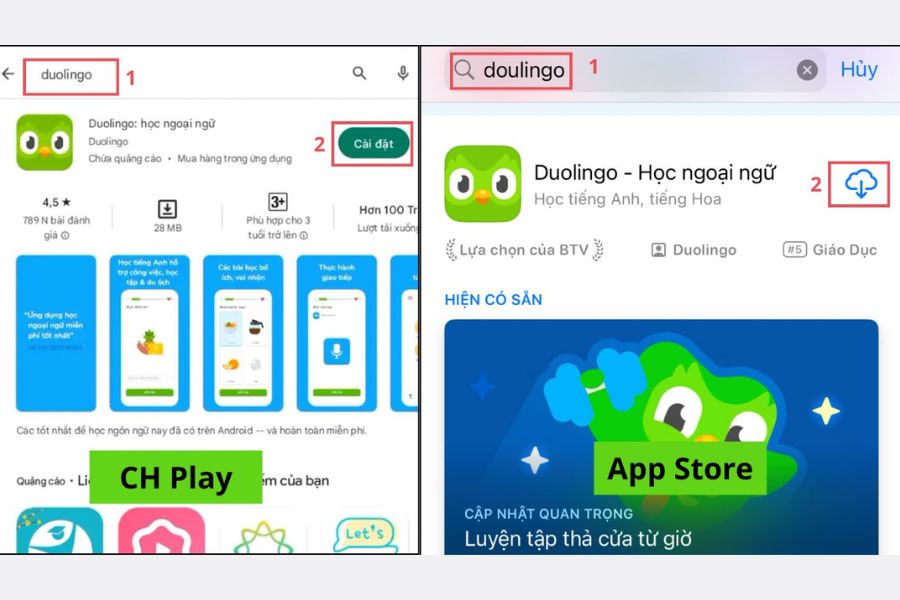
Step 1: Download the Duolingo app
On an Android phone, open the Google Play Store. If using an iPhone or iPad, go to the App Store. Enter " Duolingo" in the search bar, select the official app, and then install it.
After installation is complete, open the app to begin setup. You should use the latest version of Duolingo for a compatible interface and features with your device.
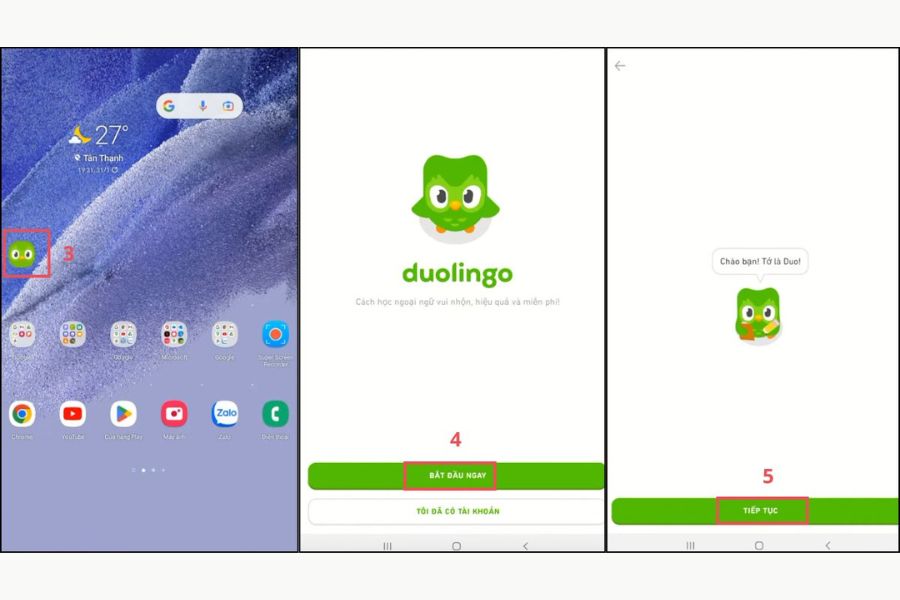
Step 2: Begin setup
On the first screen, select Start or Begin Now , then follow the on-screen instructions. Duolingo will then ask a series of questions to determine your learning needs.
Step 3: Choose your language and target audience.
Next, select the language you want to learn, such as English. The app may then ask about your goals or the amount of time you want to study each day.
If you're just starting out, you don't necessarily need to choose a very high level. A realistic goal is easier to maintain, especially on busy days. After making your choice, proceed to start the lesson or move on to creating your profile.
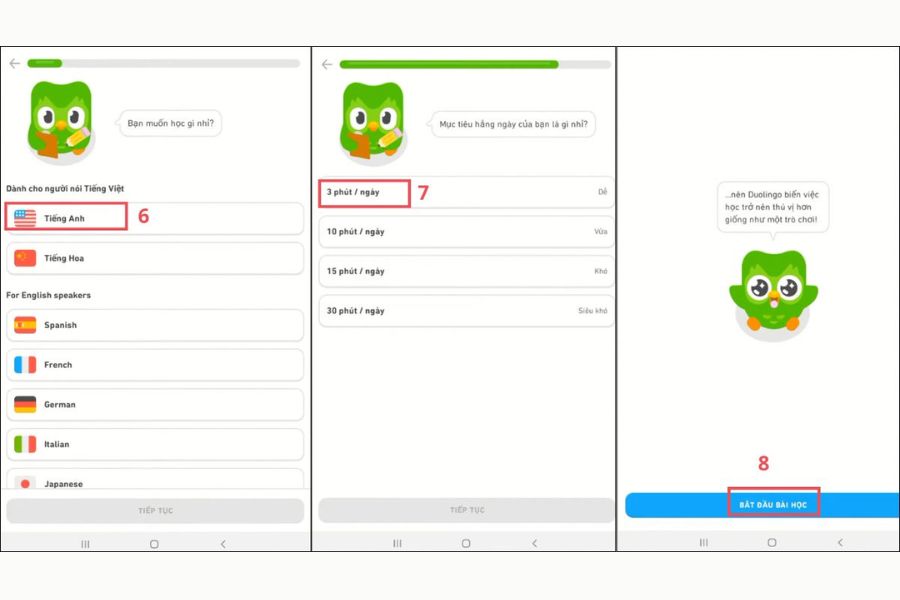
Step 4: Create a profile
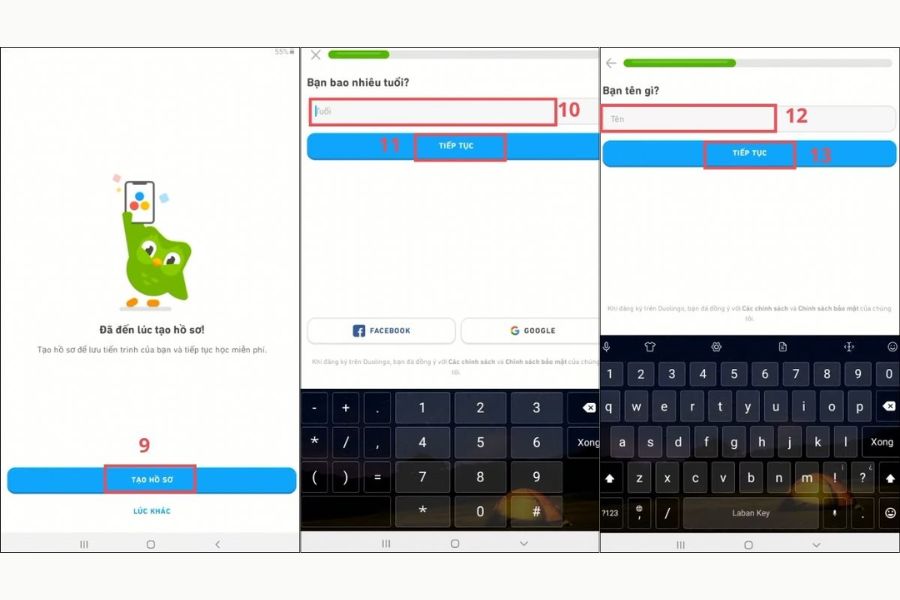
When the system prompts you to create a profile, select " Create Profile" . Next, enter the required information such as age, name, or display name. Then, enter your email address and create a password for your account. Double-check the information and then select "Create Profile" or the corresponding confirmation button to complete the process.
Thus, in just a few steps, you'll have your own Duolingo profile. From this point on, your learning progress can be linked to your account for convenient tracking and synchronization.
3. How to create a Duolingo profile on a computer
If you frequently study foreign languages at home or prefer working on a large screen, you can use Duolingo directly through your computer's browser. This method is especially convenient for those who frequently use a keyboard and want to switch flexibly between studying, working, and researching. Simply open your familiar browser, access the official Duolingo website, and begin the registration process. The steps may vary slightly depending on the time and website interface, but the basic sequence is quite easy to follow.
Step 1: Access Duolingo
Open your browser on your computer and go to duolingo.com . On the homepage, find and select the Start button to begin the course setup process.
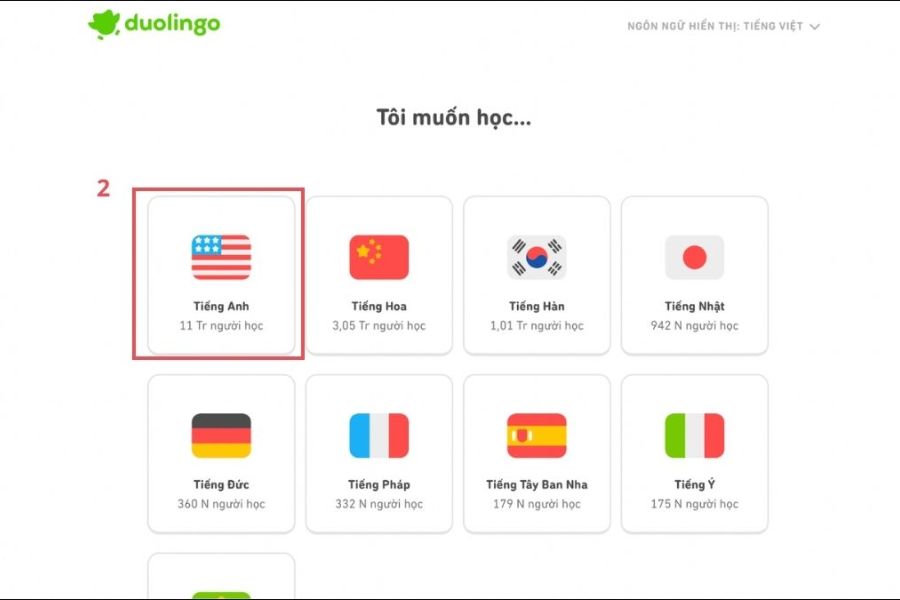
Step 2: Choose the language you want to learn.
Duolingo will ask you to choose the language you want to learn. Choose the right language and follow the instructions. If you've never learned this language before, you can start at the beginner level.
Step 3: Answer the initial question
The system may ask about your learning goals, reasons for learning, or the amount of time you want to dedicate to practice. In some cases, an entrance test may be included to determine your current level.
If you already have some foundational knowledge, the test can help you avoid having to relearn too much familiar content. Conversely, if it's completely new to you, you can start from the basics to build a more solid foundation.
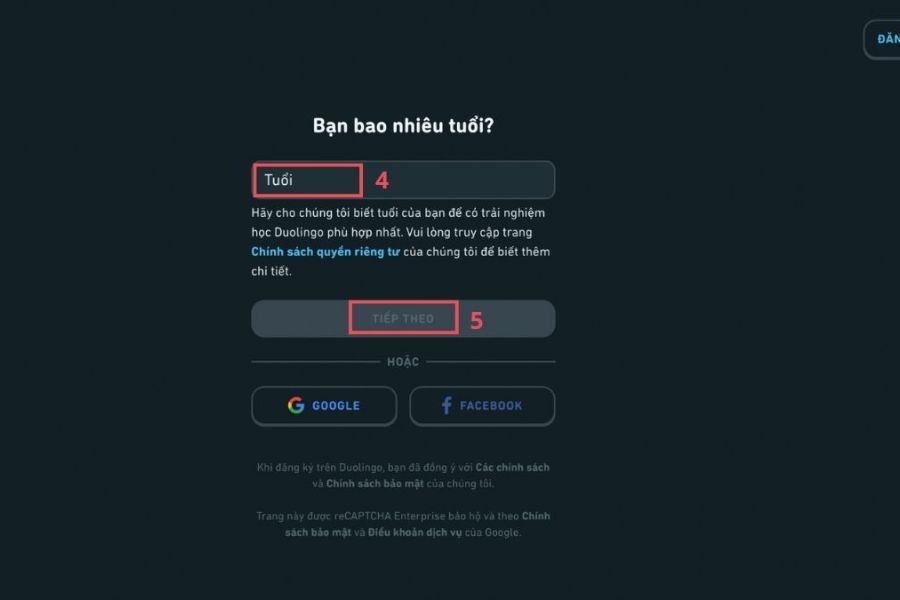
Step 4: Select Create Profile
After completing the necessary questions, select Create Profile or an equivalent option. Continue by entering your age, display name, and other requested information.
Step 5: Complete account information
Enter your email and create a password. After verifying the information, select " Create Account" to complete the process. After successful registration, you can log in to this account on other devices to continue learning. This is also why using a stable email address from the start will make account management more convenient.
4. How to set up your profile after registration for more effective learning.
Creating a new account is just the beginning. To make Duolingo a real language learning habit, you should spend some extra time setting up your profile. A suitable goal and reasonable reminders can make learning easier instead of stressful. After logging in, go to the Profile area and find the Settings section . Here, you can check and adjust some personal options to suit your needs.
Some settings to pay attention to include:
-
Daily study goals: Choose a timeframe that fits your schedule. Beginners should prioritize goals that can be consistently maintained rather than setting excessively long timeframes that they might quickly give up on.
-
Study reminder notifications: Turn on notifications if you frequently forget your study schedule. You can choose a time when you are least busy, such as the morning or evening.
-
Display name and personal information: Double-check your profile information to ensure your account displays correctly as desired.
-
Tracking Streaks: A continuous learning streak is one of the most interesting motivational factors. Think of it as a reminder to maintain the habit rather than turning it into pressure.
-
Use XP wisely: XP helps you track your learning progress and participate in leaderboards. However, don't focus too much on earning XP and neglect the quality of your lessons.
The most important thing is to create a manageable study schedule. Just a few minutes of practice each day, but consistently, is more likely to become a habit than cramming for one session and then taking several days off.
5. Common errors when creating a Duolingo profile and how to fix them.
Although the registration process is quite simple, new users sometimes encounter errors while creating an account. Most problems stem from email, network connection, or login information. If you encounter an error, don't worry too much; just check each cause to find a solution.
Some common cases and solutions include:
-
Email already in use: If the system indicates the email already exists, it's likely that this address was previously registered with Duolingo. Instead of creating a new account, try using the recovery or forgotten password option to retrieve your old account.
-
Didn't receive the email: Double-check the email address you entered, then open your Spam, Promotions, or Junk folder. You can also wait a while longer and request a resend if that option is available.
-
Unable to connect: Check your Wi-Fi or mobile data. If the network is unstable, try switching to a different connection and then reopening the app.
-
The app is unstable: Check if Duolingo has been updated to the latest version. Restarting the app or device may also help resolve temporary errors.
-
Forgot your password? Use the account recovery feature via email instead of registering a new profile.
If you've tried the above methods but still can't create an account, you should check Duolingo's official support page for instructions tailored to the specific problem you're experiencing.
6. Tips for maintaining your studies after creating a Duolingo profile
Creating an account only takes a few minutes, but maintaining your learning is the most important part. Duolingo is designed to break down lessons into smaller segments, so you don't necessarily need to dedicate a long amount of time each day. Instead, choose a fixed time slot and make it a habit. A simple way to do this is to set small goals from the start. For example, instead of forcing yourself to study for dozens of minutes every day, you can begin with a short period but try to maintain consistency. Once you get used to it, you can increase the duration or number of lessons as you can.
To make the learning process more enjoyable, you can apply some tips:
-
Maintain a Streak: Choose a fixed time of day to complete your lessons and avoid forgetting your schedule.
-
Set realistic goals: The more aligned the goals are with your daily schedule, the higher the likelihood of maintaining them.
-
Reviewing old knowledge: Don't just rush through new lessons. Going back to vocabulary and content you've already learned helps reinforce your understanding.
-
Combine multiple skills: Alternate between listening, reading, speaking, and vocabulary practice instead of focusing on just one type of exercise.
-
Track your progress: XP, Streak, and achievements can be motivating factors to help you see your progress.
-
Study in short bursts: You can squeeze in study time while waiting for the bus, during your lunch break, or before bed instead of scheduling a long study session.
What makes Duolingo effective isn't about studying a lot in one day, but about maintaining consistency over the long term. A well-established profile helps you record your progress, track your achievements, and easily continue when switching to a different device.
7. Conclusion
Creating a profile on Duolingo isn't complicated, whether you're using a phone or a computer. With just a few steps – choosing your language, setting goals, and entering your account information – beginners can begin their language learning journey. After registering, you should also check your daily goals, notifications, and privacy settings for a more suitable experience. Most importantly, make Duolingo a small daily habit instead of viewing learning as a daunting task. With consistent practice, each short lesson will gradually build up into a longer journey, helping you accumulate knowledge and gain motivation to conquer your favorite language.





















VIP Products








Best Selling Products
Genuine Adobe Illustrator account
99 USD
Genuine Cheap Canva Pro
39 USD
MidJourney Account
29 USD
Adobe Photoshop Copyright - Full App
120 USD
Copyright Adobe Lightroom Account
59 USD
Autodesk All App Account Copyright
120 USD
Capcut Pro 1 Year
39 USD
Adobe Premiere Pro Account
99 USD
Upgrade Duolingo Super
29 USD
ChatGPT Plus Account (GPT-4)
16 USD
Plugin Retouch4me
69 USD
Upgrade Genuine Office 365
49 USD
Freepik Premium Account
59 USD
Upgrade genuine Capture One account
120 USD
Windows 10 & 11 Pro Key
36 USD