Best Selling Products

Genuine Adobe Illustrator account
99 USD

Windows 10 & 11 Pro Key
36 USD

MidJourney Account
29 USD

Genuine Cheap Canva Pro
39 USD

Upgrade genuine Capture One account
120 USD

Plugin Retouch4me
69 USD

Autodesk All App Account Copyright
120 USD

Adobe Premiere Pro Account
99 USD

Freepik Premium Account
59 USD

Adobe Photoshop Copyright - Full App
120 USD

Upgrade Genuine Office 365
49 USD

Copyright Adobe Lightroom Account
59 USD

Capcut Pro 1 Year
39 USD

Upgrade Duolingo Super
29 USD

ChatGPT Plus Account (GPT-4)
16 USD
Gemini Pro vs. ChatGPT Plus Comparison: Which AI is Right for Learning and Work?
Nội dung
- 1. What are the differences between Gemini Pro and ChatGPT Plus?
- 2. Advantages and disadvantages of ChatGPT Plus
- 3. Advantages and disadvantages of Gemini Pro
- 4. ChatGPT Plus and Gemini Pro: Which tool is better for studying?
- 5. Which types of work are ChatGPT Plus and Gemini Pro suitable for?
- 6. Upgrade to ChatGPT Plus with a reputable and affordable service at Sadesign.
- 7. Conclusion
AI is increasingly becoming a familiar assistant in learning, work, and content creation. From writing articles and searching for information to analyzing documents, programming, and data processing, users can significantly shorten the time it takes to complete tasks with just a few commands. Among the popular AI tools available today, Gemini Pro and ChatGPT Plus are attracting attention due to their ability to handle a variety of tasks. However, the two tools have different strengths in conversational skills, document processing, ecosystems, and integration into workflows. Therefore, comparing Gemini Pro and ChatGPT Plus will help you gather more information before choosing the right tool. Let''s explore them with Sadesign!
1. What are the differences between Gemini Pro and ChatGPT Plus?
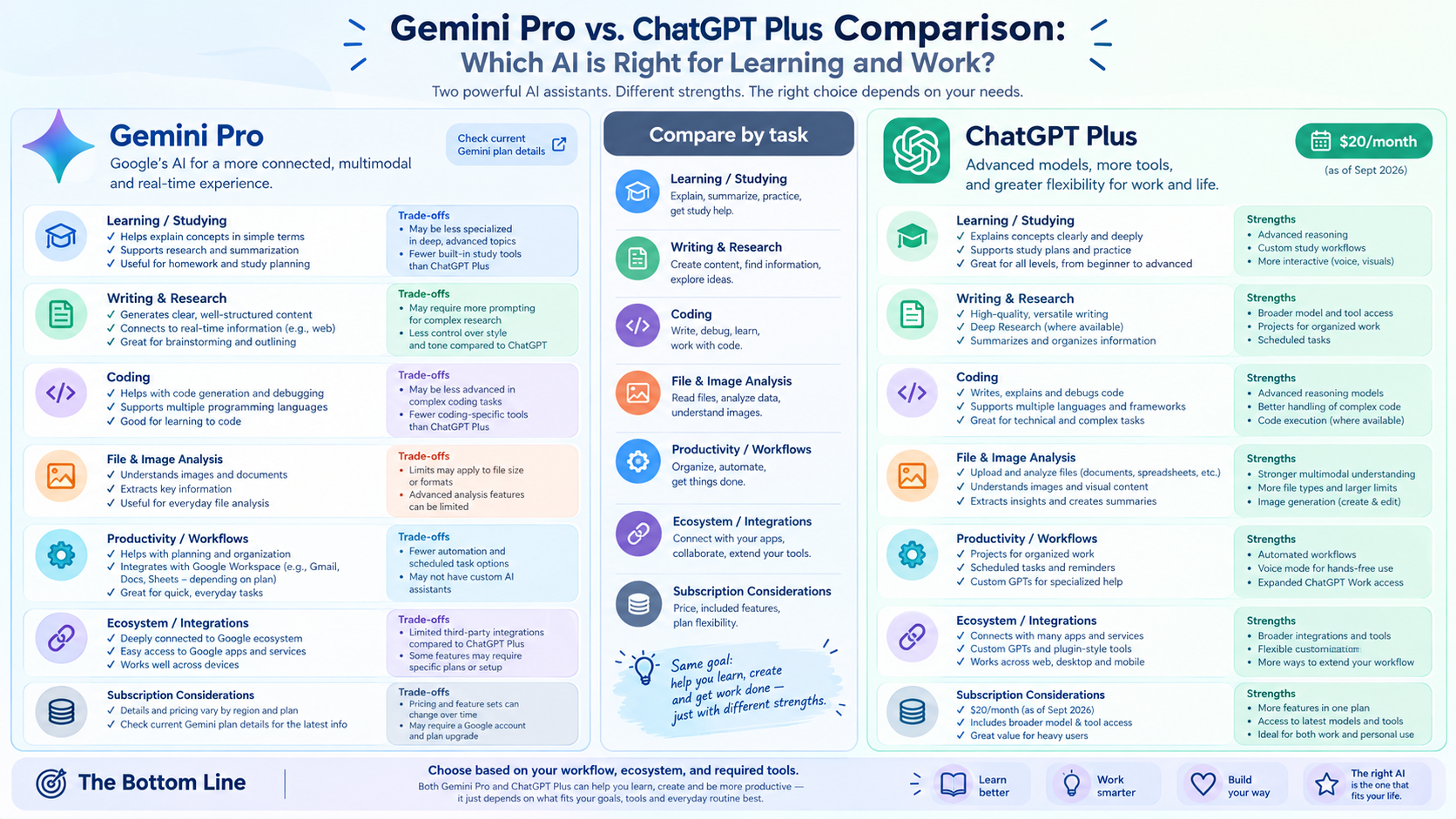
Both ChatGPT Plus and Gemini Pro aim to assist users in handling tasks using AI, but the user experience differs significantly. ChatGPT Plus is suitable for those who frequently interact with AI, write content, analyze data, program, or process documents. Gemini Pro, on the other hand, benefits from integration with the Google ecosystem, particularly Gmail, Google Docs, Google Sheets, and Google Drive. Therefore, instead of focusing solely on the model name or price, users should consider how each tool best suits their specific needs.
-
Contextual understanding: ChatGPT Plus excels at maintaining conversational flow and handling multi-step requests. Users can continuously request edits, additions, or changes to content without having to re-enter the entire original request.
-
Document handling capabilities: Both tools can assist with working with documents, but Gemini has an advantage for those who already store data on Google Drive and frequently use Google services.
-
Writing and content creation: ChatGPT Plus can accommodate various writing styles, from SEO articles and advertising content to emails and video scripts. Gemini also supports writing, summarizing, and developing content, especially convenient when working directly with Google Docs.
-
Programming: ChatGPT Plus supports writing, interpreting, testing, and debugging code. Gemini also has programming support capabilities, making it suitable for those who want to integrate AI with the Google ecosystem.
-
Data analysis: ChatGPT Plus can support processing various file types and analyzing data. Gemini is also effective when the data is in Google Sheets or Drive.
-
Ecosystems: ChatGPT focuses on OpenAI's AI tool system, while Gemini is tied to the Google ecosystem.
-
Target users: ChatGPT Plus is suitable for those who want a versatile AI assistant. Gemini Pro is suitable for those who already use Google as their primary work environment.
-
Cost: Prices and benefits of each package may vary depending on the time, region, and provider's policy, so please check the information before subscribing.
2. Advantages and disadvantages of ChatGPT Plus
ChatGPT Plus is designed for users who need to use AI more frequently than the free version. The highlight of this package is its diverse range of features, allowing users to perform many tasks simultaneously. From an initial idea, you can have the AI develop it into an outline, a complete article, an analysis, or a detailed plan, and then continue to edit it as desired. This is also why ChatGPT Plus is widely used in office work, content creation, learning, and programming. However, upgrading to a paid package should still be considered based on usage frequency and actual needs.
Advantages of ChatGPT Plus:
-
Supports a wide range of tasks: Can serve from content writing, learning, research, programming to document and data analysis.
-
Excellent conversational capabilities: Users can exchange information in multiple rounds to complete a request instead of having to create new commands for each part.
-
Content creation support: The tone, expression, length, and structure can be customized to suit different purposes.
-
File analysis: Can assist users in working with uploaded documents and data.
-
More AI features: ChatGPT Plus offers additional tools and enhanced capabilities compared to the free version, depending on the model and time of purchase.
-
Suitable for professional work: Can assist with planning, research, report writing, data analysis, or programming.
-
Convenient user experience: Users can perform multiple tasks within a single chat without constantly switching between tools.
Disadvantages of ChatGPT Plus:
-
Monthly fees are required: This is a factor to consider for those who only use AI occasionally.
-
There are still usage limitations: The Plus package does not mean unlimited use of all models and features.
-
Information may be inaccurate: AI sometimes provides incorrect or outdated answers, so users should double-check important information.
-
Some features are subject to change: Models, limits, and features offered may change according to OpenAI's policies.
3. Advantages and disadvantages of Gemini Pro
Gemini Pro stands out thanks to its ability to connect with the Google ecosystem. For those already familiar with Gmail, Google Docs, Google Sheets, and Google Drive, Gemini can become a convenient assistant in their workflow. Instead of using AI as a standalone tool, users can leverage Gemini's capabilities within their familiar environment. Google is also continuously expanding Gemini's capabilities for research, learning, content creation, and information processing. However, like other AI tools, Gemini still has limitations in terms of features and capabilities depending on the account or region.
Advantages of Gemini Pro:
-
Integration with the Google ecosystem: This is one of Gemini's most notable advantages, especially for those who use Gmail, Docs, Sheets, and Drive daily.
-
Document processing support: Gemini can assist in summarizing, analyzing, and extracting information from various types of content.
-
Research support: Tools that can help in understanding a topic, synthesizing information, and building content for learning or work.
-
Multimodal: Gemini is capable of working with various data types such as text, images, and other supported content types.
-
Office support: Integration with Google services makes it more convenient for users to handle emails, documents, and spreadsheets.
-
Ideal for Google users: If most of your personal or work data is already stored on Drive, using Gemini can create a more seamless workflow.
Disadvantages of Gemini Pro:
-
Package-dependent features: Some models or advanced features may require a paid package or be region-dependent.
-
Usage limits: Users may still encounter limits depending on the model and features being used.
-
Information needs to be verified: Gemini can also generate inaccurate information, so AI answers should not be used as the sole source of confirmation.
-
Privacy Note: When connecting AI to emails, documents, or data on Drive, users should check access permissions and avoid putting sensitive information in unnecessary places.

4. ChatGPT Plus and Gemini Pro: Which tool is better for studying?
In education, AI can assist with many tasks, from explaining concepts and summarizing lessons to creating review questions. However, its effectiveness depends heavily on how users ask questions. Instead of asking the AI to do the entire assignment for you, you can use the tool to explain parts you don't understand, provide examples, or review the solution.
-
ChatGPT Plus is suitable when: You want to have multiple rounds of communication to understand a problem, require explanations in various ways, or build a learning roadmap.
-
Gemini Pro is suitable if: You frequently use Google Docs, Drive, or other Google tools to store study materials.
-
Language learning: Both can assist with conversation, sentence correction, grammar explanations, and exercise creation.
-
Learning to program: Learners can use both to explain code, find errors, and build practice examples.
-
Exam preparation: AI can generate questions, flashcards, practice tests, and explain the answers.
-
Research shows that Gemini has an advantage for those familiar with working within the Google ecosystem, while ChatGPT is better suited to step-by-step communication and analysis processes.
-
Document summarization: Both can support summarization, but users should review the key content to avoid missing information.
The most important point when using AI for learning is not to rely entirely on the generated answers. Think of AI as a helper, explaining and prompting. For specialized knowledge, data, formulas, or information used in research, cross-referencing with authoritative sources is still essential.
5. Which types of work are ChatGPT Plus and Gemini Pro suitable for?
In a work environment, the choice of AI tools often depends on the system you're using. Someone who spends most of their time working on Google Workspace will have different needs than someone who frequently writes content, analyzes files, or works directly with AI. Therefore, there isn't a single tool that fits every workflow.
-
Content writing: ChatGPT Plus provides excellent support for brainstorming, outlining, writing articles, and editing as requested.
-
SEO: ChatGPT can be used to research content structure, develop topics, build outlines, and optimize wording.
-
Email: Both can support writing, shortening, and adjusting the tone of emails.
-
Google Workspace: Gemini has an advantage when work is tightly coupled with Gmail, Docs, Sheets, and Drive.
-
Programming: Both ChatGPT Plus and Gemini Pro can support writing, interpreting, and editing code.
-
Data analysis: ChatGPT Plus is suitable for those who frequently upload files for analysis, while Gemini is convenient for data managed within the Google ecosystem.
-
Planning: Both can assist in creating work plans, schedules, or checklists.
-
Marketing: ChatGPT Plus can support the development of multiple versions of content for advertising, social media, websites, and emails.
-
Office work: Gemini can be convenient if the entire process is already organized on Google Workspace.
A simple tip is to try both in your daily tasks. Instead of just reading the specifications, you can give each tool the same requirements and then compare how well the results fit your workflow. This is often the easiest way to identify the strengths of each platform.
6. Upgrade to ChatGPT Plus with a reputable and affordable service at Sadesign.
If you're already familiar with ChatGPT and want to upgrade to the Plus package to use more features for studying, working, or creating content, choosing where to upgrade is also an important factor. Sadesign offers ChatGPT upgrade services at a reasonable price, with dedicated support during use and a focus on a convenient user experience. Sadesign is a company with transparent information and quick support when issues arise, making the usage process more convenient, especially for those who frequently use ChatGPT for work.
7. Conclusion
Comparing Gemini Pro and ChatGPT Plus reveals that both tools offer many useful capabilities but are built around different ecosystems and use cases. ChatGPT Plus is suitable for a wide range of tasks such as content writing, conversation, programming, and document and data analysis. Meanwhile, Gemini Pro has a notable advantage for frequent users of Gmail, Google Docs, Google Sheets, and Google Drive. If your work primarily takes place within the Google ecosystem, Gemini can offer convenience due to its inter-service connectivity. If you need an AI assistant for communication, idea development, content writing, analysis, and processing various types of requests within a single space, ChatGPT Plus might be a good fit for that workflow.





















VIP Products








Best Selling Products
Genuine Adobe Illustrator account
99 USD
Windows 10 & 11 Pro Key
36 USD
MidJourney Account
29 USD
Genuine Cheap Canva Pro
39 USD
Upgrade genuine Capture One account
120 USD
Plugin Retouch4me
69 USD
Autodesk All App Account Copyright
120 USD
Adobe Premiere Pro Account
99 USD
Freepik Premium Account
59 USD
Adobe Photoshop Copyright - Full App
120 USD
Upgrade Genuine Office 365
49 USD
Copyright Adobe Lightroom Account
59 USD
Capcut Pro 1 Year
39 USD
Upgrade Duolingo Super
29 USD
ChatGPT Plus Account (GPT-4)
16 USD