Best Selling Products

Genuine Cheap Canva Pro
39 USD

Upgrade Duolingo Super
29 USD

Capcut Pro 1 Year
39 USD

Upgrade Genuine Office 365
49 USD

Autodesk All App Account Copyright
120 USD

Freepik Premium Account
59 USD

Adobe Photoshop Copyright - Full App
120 USD

Genuine Adobe Illustrator account
99 USD

Copyright Adobe Lightroom Account
59 USD

Plugin Retouch4me
69 USD

Windows 10 & 11 Pro Key
36 USD

Upgrade genuine Capture One account
120 USD

Adobe Premiere Pro Account
99 USD

MidJourney Account
29 USD

ChatGPT Plus Account (GPT-4)
16 USD
Design your own Lunar New Year 2027 red envelopes at home using Canva – it''s incredibly simple!
Nội dung
- 1. Why should you design your own Lunar New Year 2027 red envelopes using Canva?
- 2. Essential elements for a beautiful Tet 2027 red envelope.
- 3. How to design Lunar New Year 2027 red envelopes using Canva
- 3.1. Find red envelope templates on Canva
- 3.2. Choose a template with a suitable layout.
- 3.3. Open the template and begin editing.
- 3.4. Adjust the greetings and content on the red envelope.
- 3.5. Add Tet 2027 motifs
- 3.6. Creating a Goat mascot using AI on Canva
- 3.7. Inserting and aligning the mascot
- 3.8. Adjusting colors and fonts
- 3.9. Review the layout before printing.
- 3.10. Download the red envelope design to your computer.
- 4. Suggestions for designing unique Lunar New Year red envelopes in 2027 using Canva
- 5. Some notes on designing and printing Lunar New Year red envelopes for 2027
- 6. Conclusion
Red envelopes have long been an indispensable part of the Lunar New Year celebrations. Beyond simply giving money as a gift, they convey wishes for good fortune, prosperity, and positive feelings to family and friends. Instead of buying ready-made designs from stores, you can easily design your own 2027 Lunar New Year red envelopes using Canva at home. With Canva, you don''t need Photoshop skills or professional design experience. With just a ready-made template, a few drag-and-drop actions, and a touch of creativity, you can create a red envelope with your own unique style. Especially since 2027 is the Year of the Goat (Ding Mui), images of chibi goats, stylized goats, or the goat mascot combined with apricot blossoms, peach blossoms, and golden clouds will be interesting highlights for this year''s design. Let''s explore with Sadesign!

1. Why should you design your own Lunar New Year 2027 red envelopes using Canva?
Designing your own red envelopes isn't just about creating a visually appealing product. It's also a way to express your personality, wishes, and personal messages through your New Year's gift. Canva makes this process much simpler thanks to its vast library of templates, images, fonts, and intuitive editing tools.
A custom-designed red envelope is especially suitable if you want to prepare Tet gifts for family, friends, or customers. By changing just a few details, the same design style can be transformed into many different versions.
-
Personalization is easy: Add the recipient's name, greeting, or a personal message.
-
Choose your own style: You can design it in a traditional, modern, cute, or minimalist style.
-
No specialized skills required: Canva primarily uses drag-and-drop functionality, making it easy for beginners to learn.
-
Suitable for businesses: Logos, brand colors, and brand messages can be added.
-
Easy to edit: When you want to change the greeting, colors, or illustrations, you can simply edit them directly on the template.
-
Time saving: A complete design can be duplicated into multiple versions for use.

2. Essential elements for a beautiful Tet 2027 red envelope.
A beautiful red envelope doesn't necessarily need to be covered in lots of patterns. More importantly, the elements should be arranged harmoniously, the colors should evoke the festive spirit of Tet (Vietnamese New Year), and the greetings should be striking enough to create a positive first impression. For Tet red envelopes in 2027, you can use the image of a goat as the focal point and combine it with other familiar symbols of the spring festival.
When designing, you should pay attention to the following factors:
-
Colors: Red, yellow, orange, pink, or other warm tones often evoke feelings of joy and good fortune.
-
Mascot for 2027: Can be a chibi goat, a cartoon goat, a stylized goat, or a goat combined with traditional motifs.
-
Tet motifs: Apricot blossoms, peach blossoms, couplets, lanterns, fireworks, gold coins, and clouds are easy choices to coordinate.
-
Greetings: You can use phrases like "Happy New Year," "Peace and Prosperity," "May all your wishes come true," or "May your home be filled with blessings and good fortune."
-
Font: Prioritize clear fonts with moderate thickness that complement the overall style.
-
White space: Don't try to cram too much detail in. A reasonable amount of white space makes the red envelope look more elegant and visually appealing.
-
Focus: Choose one main detail, such as the goat mascot or the greeting, instead of letting all the elements stand out.
3. How to design Lunar New Year 2027 red envelopes using Canva
Canva offers a wide variety of design templates to help you get started quickly. If you don't have an idea yet, the simplest way is to choose a template that closely matches your desired style and then change each element. You can follow the steps below to create your 2027 Lunar New Year red envelope design at home.
3.1. Find red envelope templates on Canva
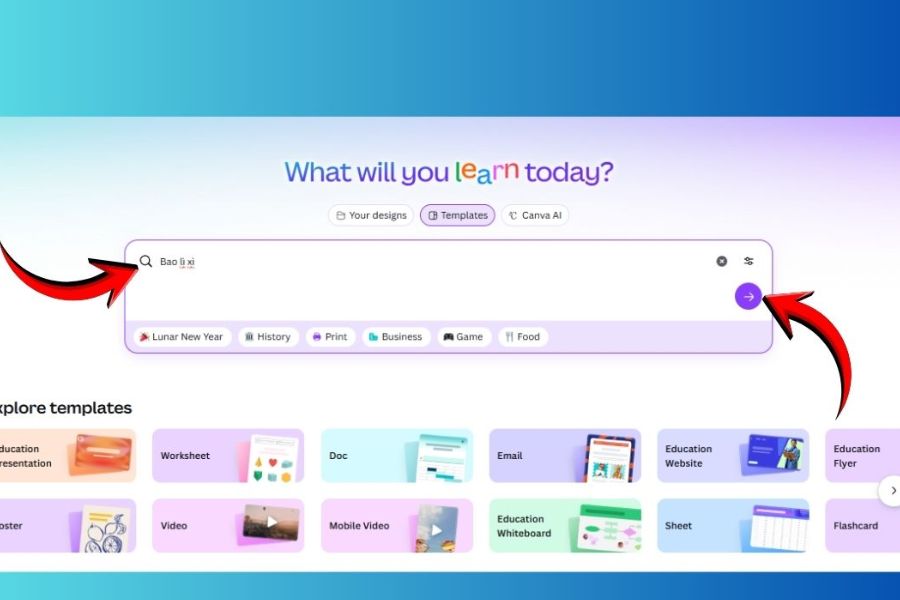
First, access Canva and log in to your account. On the main interface, select Templates and then enter keywords such as "Red envelope" , "Tet lucky money" , "Lunar New Year envelope" , or "Red envelope" into the search box.
Canva will display many templates with different styles. You don't necessarily need to find the exact template for 2027 right away. Prioritize templates with a nice layout, easy to edit, and enough space to add the Goat mascot along with New Year's greetings.
3.2. Choose a template with a suitable layout.
After you have a list of templates, take some time to review them overall before making a choice. A template that looks great on screen may not be suitable for printing if it has too many small details or text that is too close to the edges.
If you want to create personalized Lunar New Year 2027 red envelopes, you should prioritize designs with a relatively spacious layout. This allows you to easily change images, colors, and add the Goat mascot without making the design look cluttered.
Several criteria can be used to select a sample:
-
There is a prominent section dedicated to greetings.
-
The pattern isn't too dense.
-
The background color is easy to change.
-
There is room to add a mascot for 2027.
-
Text and images are clearly separated.
-
Matches the intended size of the red envelopes to be printed.
3.3. Open the template and begin editing.
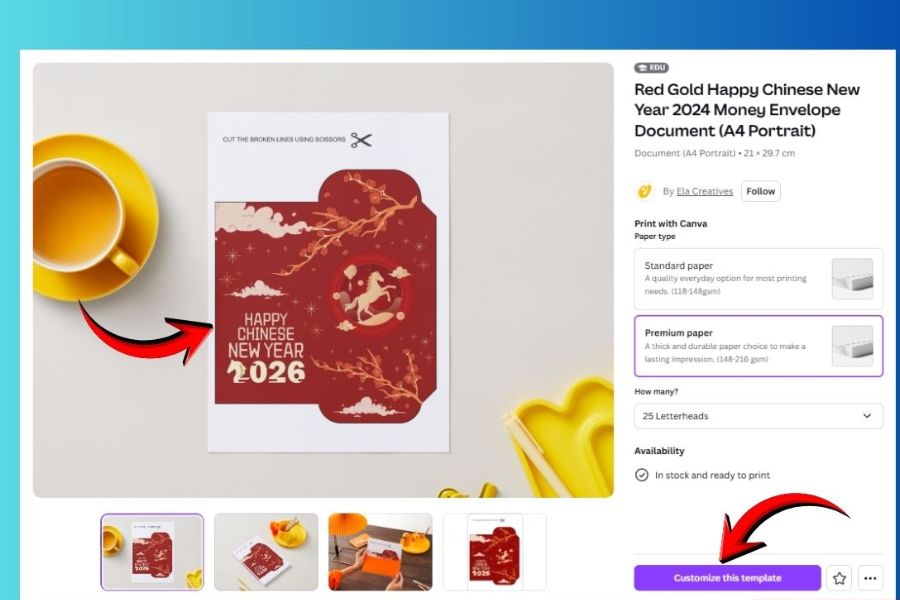
Once you find a template you like, click on it to preview it. Then select Customize this template to open the editing interface.
At this point, Canva will take you to the main design area. Each element on the red envelope, such as text, images, icons, or background, can be selected individually. You simply click on the element you want to change and edit it as desired.
If this is your first time using Canva, don't worry, as most operations are quite intuitive. Just get familiar with selecting, dragging, dropping, zooming in and out of elements, and you can start designing.
3.4. Adjust the greetings and content on the red envelope.
Next, change the text in the template. You can choose familiar greetings or create your own personalized message for the recipient.
For red envelopes intended for children, short, cheerful messages are more appropriate. Meanwhile, red envelopes for parents, grandparents, or customers can use more formal greetings.
Here are some suggestions:
-
"Happy New Year 2027"
-
"May the Year of the Goat 2027 bring you all the best."
-
"Peace, Health, and Prosperity"
-
"May your home be filled with blessings and prosperity"
-
"May you be blessed with wealth and prosperity"
-
"Happy Family, Peaceful New Year"
You can also add the recipient's name to make the red envelope more special, for example, "To Minh , " "Wishing grandparents a peaceful New Year," or a short message written by you.
3.5. Add Tet 2027 motifs
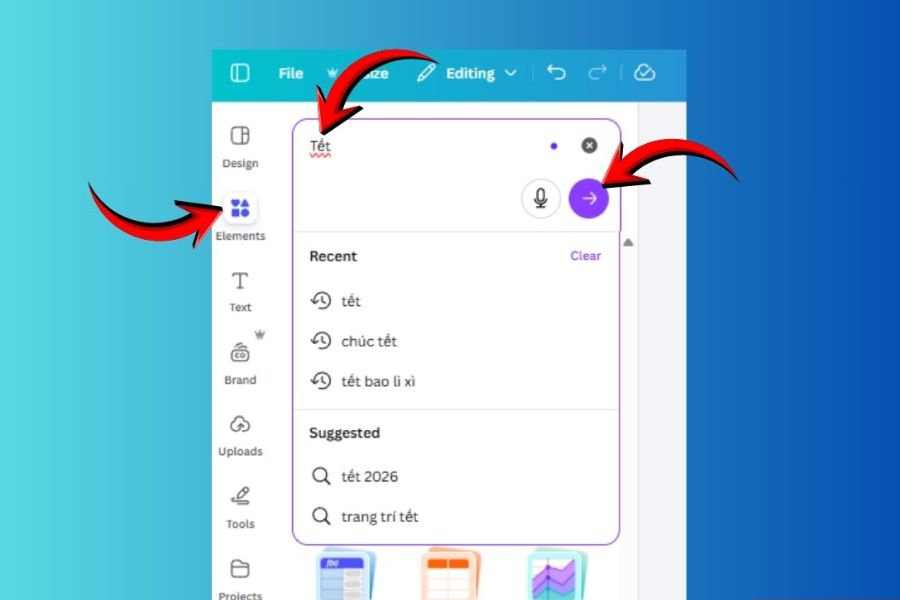
This step helps the red envelope design begin to have its own unique touch. In the toolbar on the left, select Elements and then search for keywords related to Tet (Vietnamese Lunar New Year).
For the 2027 design, in addition to familiar motifs like apricot blossoms, peach blossoms, or lanterns, you can also find images related to the Goat to add a special touch to the year's mascot.
Here are some keywords you could try:
-
"Chibi Goat"
-
“Cute goat”
-
“Goat cartoon”
-
“Year of the Goat”
-
“Lunar New Year”
-
"Tet"
-
"come on"
-
"Peach blossom"
-
"Lantern"
-
“Lucky”
-
“Gold coin”
Once you find a suitable image, simply click on it to add it to your design and then drag and drop it to your desired location.
3.6. Creating a Goat mascot using AI on Canva
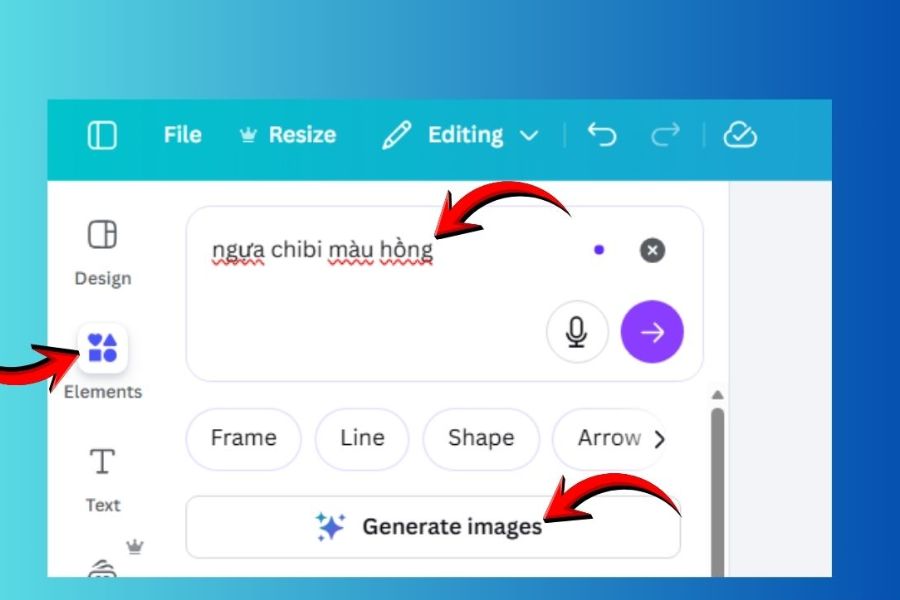
If the Elements library doesn't have a goat image in the style you want, Canva AI could be a great option. Instead of using pre-made illustrations, you can describe your desired image to create a unique mascot.
For example, you could try descriptions like:
-
"Cute chibi goat wearing a red ao dai, in the style of Vietnamese Tet."
-
"A cute white cartoon goat holding a gold bar."
-
“Cute goat celebrating Lunar New Year, red and gold”
-
"Chibi goat wearing a New Year's hat, adorable illustration style"
After Canva generates the image, you can choose the most suitable version and incorporate it into your design. This is also a fun way to create a lucky money envelope with a mascot that is different from the ready-made designs available on the market.
3.7. Inserting and aligning the mascot
Once you have the goat figurine, place it in a suitable location. You can place it in the center to make the goat the main character, or move it to a corner to leave more space for the greeting.
Don't be afraid to try different arrangements. You could enlarge the mascot, shrink the surrounding details, or move some elements to the background to create a sense of depth.
A simple rule is to have only one main focal point . If the mascot is already very prominent, the remaining details should be kept to a minimum so that the overall design doesn't feel overwhelming.
3.8. Adjusting colors and fonts
After adding enough images, double-check the colors. Lunar New Year red envelopes are usually best suited to bright colors, but that doesn't mean every detail has to be red or yellow.
You can pair red with gold for a traditional feel, combine red with pink for a youthful look, or use green, cream, and yellow for a more modern style.
The font should also be chosen consistently. A prominent greeting can use a decorative font, while the supplementary information should use a simple font to ensure readability.
3.9. Review the layout before printing.
This is a step many people often skip, but it's very important. Once you've finished, zoom out the design on your screen so you can see the entire red envelope from a distance.
You should check:
-
Is the greeting easy to read?
-
Is the Goat mascot obscured by other motifs?
-
Are the components misaligned or overlapping?
-
Does the text color provide sufficient contrast with the background?
-
Are there any details that are too close to the edge?
-
Is there too much imagery or color overall?
If you plan to print a large quantity of red envelopes, it's best to print a test copy first. This helps you identify any issues with size, color, or image placement before printing in bulk.
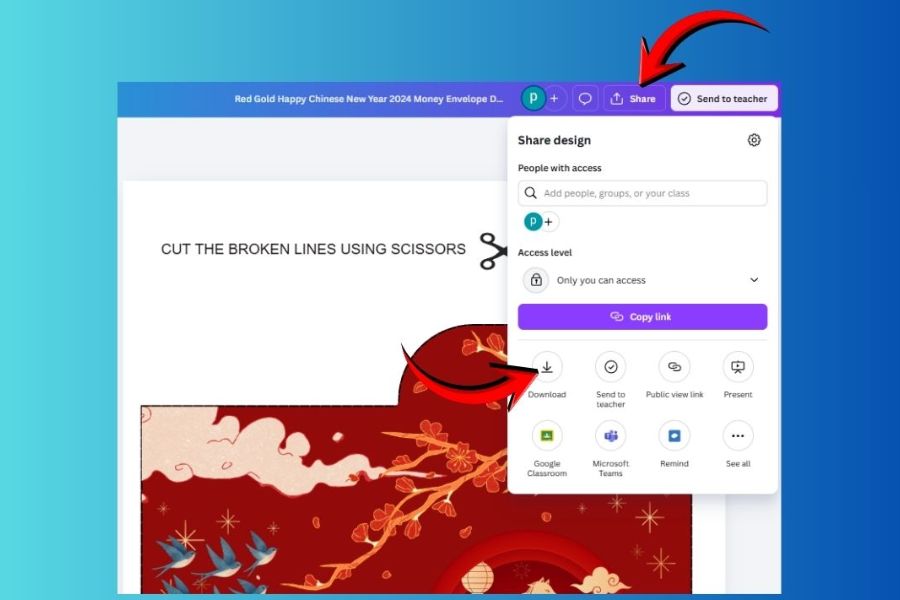
3.10. Download the red envelope design to your computer.
Once you're satisfied with the design, click Share in the upper right corner of the Canva interface and then select Download . Depending on your needs, you can choose the appropriate format.
If designing for print, prioritize high-quality formats and carefully check the dimensions before sending it to the printing company. If you only want to save the sample for reference or share online, you can choose a common image format.
Before downloading, double-check the file name and design version to avoid confusion, especially if you're creating multiple different red envelope designs.
4. Suggestions for designing unique Lunar New Year red envelopes in 2027 using Canva
The 2027 Lunar New Year, with the Goat as its mascot, offers plenty of creative ideas. Instead of just using a red background and a familiar greeting, try combining the mascot with different styles. Simply by changing the colors, fonts, and arrangement, the same Canva template can be transformed into many completely different versions.
Here are some ideas you can consider:
-
Traditional style: Red background, gold lettering, plum blossoms, and a stylized goat image.
-
Chibi style: Adorable goats wearing long robes, headscarves, or holding red envelopes.
-
Minimalist style: A plain cream or red background, using only a Goat mascot along with a short greeting.
-
Auspicious style: Combine the Goat with gold bars, coins, plum blossoms, and cloud motifs.
-
Modern style: Uses large typography, stylized goat imagery, and a color palette of red, orange, and pink.
-
Children's style: Colorful cartoon goat mascot, combined with fireworks, banh chung (Vietnamese rice cake), and lanterns.
5. Some notes on designing and printing Lunar New Year red envelopes for 2027
Designing on Canva is quite easy, but to ensure the final printed product looks as good as it does on the screen, you still need to pay attention to a few things. Colors on the screen may differ from the colors after printing, while very small details may sometimes not show up clearly on paper.
Before sending the file to print, please check:
-
Size: Ensure the design matches the actual size of the red envelope.
-
Edge spacing: Avoid placing important text or design elements too close to the cut line.
-
Resolution: Select the download setting that best suits your printing needs.
-
Color: A proof print should be checked if using special or brand colors.
-
Font: Prioritize clear fonts and avoid overly thin fonts.
-
Images: Avoid using low-quality images or images that appear blurry when enlarged.
-
Copyright: If using for commercial purposes, please check the usage rights of selected elements, images, and resources on Canva.
6. Conclusion
You don't need complex design software to create a beautiful 2027 Lunar New Year red envelope design at home with Canva. From choosing a template, changing the greeting, adding apricot blossoms and lanterns, to incorporating the Year of the Goat mascot into the design, everything can be done with simple drag-and-drop operations. The most interesting thing about designing it yourself is that you're not limited by pre-made templates. A red envelope can reflect your family's unique style, a personalized greeting for the recipient, or even become a branded gift for clients and partners. If you want a more beautiful design, remember the important principle: less is more . Choose a striking Goat mascot, a meaningful greeting, and a harmonious color palette, and you'll have the foundation for a beautiful and unique 2027 Lunar New Year red envelope design.





















VIP Products








Best Selling Products
Genuine Cheap Canva Pro
39 USD
Upgrade Duolingo Super
29 USD
Capcut Pro 1 Year
39 USD
Upgrade Genuine Office 365
49 USD
Autodesk All App Account Copyright
120 USD
Freepik Premium Account
59 USD
Adobe Photoshop Copyright - Full App
120 USD
Genuine Adobe Illustrator account
99 USD
Copyright Adobe Lightroom Account
59 USD
Plugin Retouch4me
69 USD
Windows 10 & 11 Pro Key
36 USD
Upgrade genuine Capture One account
120 USD
Adobe Premiere Pro Account
99 USD
MidJourney Account
29 USD
ChatGPT Plus Account (GPT-4)
16 USD